


In the world of enterprise architecture and operational excellence, few acronyms spark as much debate as BPMN (Business Process Model and Notation). Some teams treat it as the silver bullet for digital transformation. Others dismiss it as overly bureaucratic documentation that gathers dust in a shared drive. The reality lies somewhere between these extremes, buried under layers of marketing fluff and implementation fatigue.
This guide cuts through the noise. We are not here to sell you a methodology or a tool. We are here to examine the notation itself, strip away the hype, and look at where Business Process Model and Notation actually delivers value in a live environment. Whether you are a business analyst, a process owner, or a technical architect, understanding the practical utility of BPMN is critical for sustainable improvement. 📊
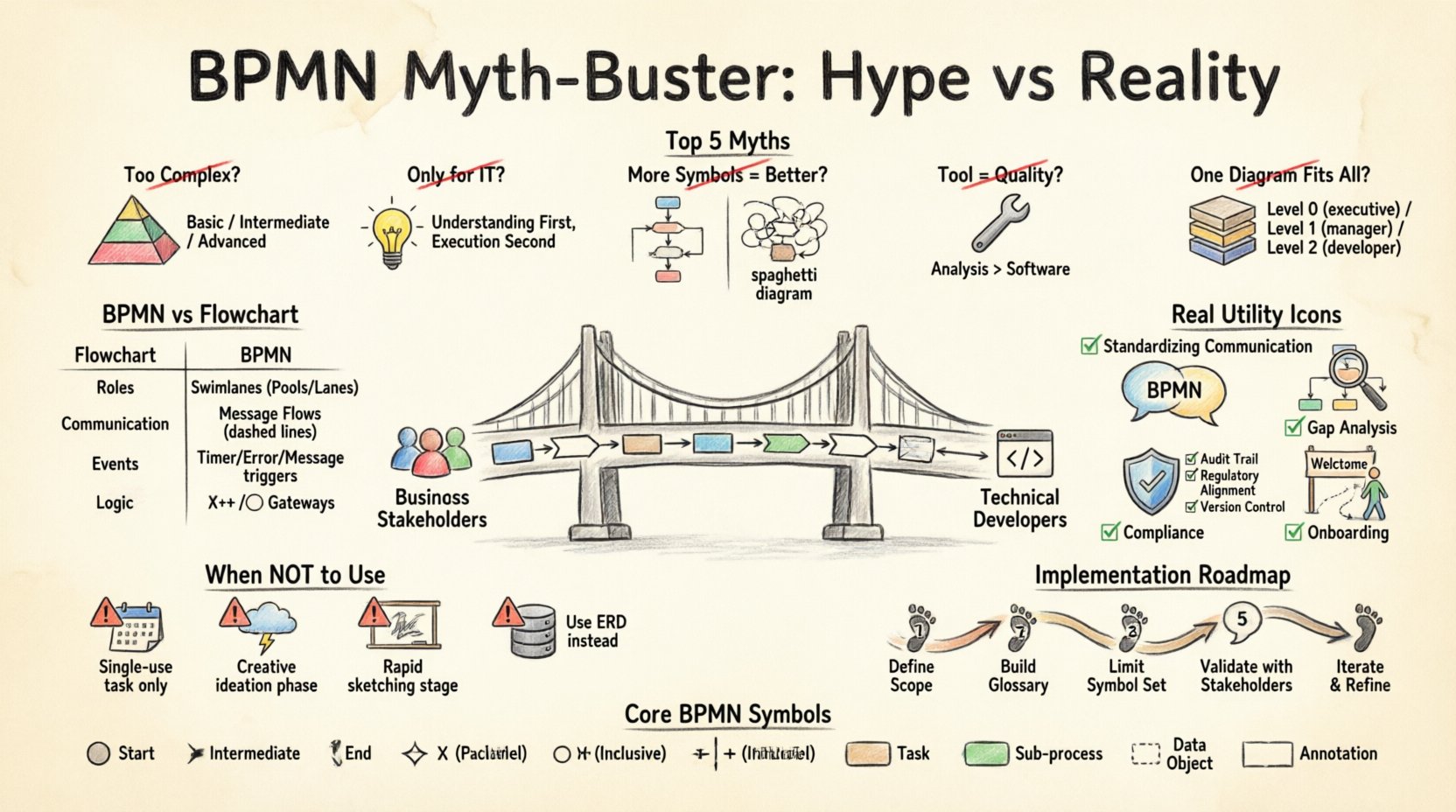
🧐 What Is BPMN, Really?
Before debunking myths, we must agree on the definition. BPMN is a standard for modeling business processes. It provides a visual language that bridges the gap between business stakeholders and technical developers. It is not a programming language, nor is it a database schema. It is a communication standard.
Think of it as the English of process management. Just as English has grammar rules, BPMN has strict syntax rules defined by the Object Management Group (OMG). When used correctly, it ensures that a process diagram created by a manager in London looks identical to the one built by a developer in Tokyo.
However, the standard is often treated as a checklist of symbols rather than a tool for clarity. This leads to the confusion we address next.
🚫 The Top 5 Myths About BPMN
There is a significant amount of noise surrounding this notation. Let’s address the most common misconceptions that prevent teams from adopting it effectively.
1️⃣ Myth: It Is Too Complex for Business Users
The Hype: “Business people can’t understand BPMN. It is too technical.” The Reality: BPMN has levels of abstraction. You do not need to use every symbol in the standard to model a process.
- Basic Level: Start Event → Task → End Event. Any stakeholder can read this.
- Intermediate Level: Includes Gateways (Decision points) and Sub-processes.
- Advanced Level: Includes Message Flows, Pools, and Complex Data Objects.
Forcing a business analyst to model a simple approval flow using complex data objects is a failure of the analyst, not the notation. When you restrict the scope to what is needed, the complexity vanishes. 🎯
2️⃣ Myth: It Is Only for IT and Automation
The Hype: “We use BPMN to generate executable code for our workflow engine.” The Reality: While executable BPMN is possible, the notation was designed for understanding first, and execution second.
Many organizations waste time trying to make every diagram executable. This creates “spaghetti models” that are technically runnable but impossible to maintain. Often, a diagram is sufficient for documenting policy, compliance, or handover requirements without needing to trigger software logic immediately.
3️⃣ Myth: More Symbols Mean a Better Diagram
The Hype: “I need to show every exception path to be thorough.” The Reality: A diagram with too many symbols is a diagram no one reads.
Clarity trumps completeness. If a specific exception path is rare, document it in the notes, not on the flow line. A clean process map highlights the Happy Path (the ideal flow) and key decision points. Overloading the visual with edge cases obscures the core value.
4️⃣ Myth: The Tool Determines the Quality
The Hype: “We bought a $50,000 platform, so our processes are now optimized.” The Reality: A tool enforces syntax, but it does not enforce logic.
You can create a perfect-looking BPMN diagram in any software that still describes a broken process. The value comes from the analysis performed before the modeling begins, not the rendering engine used to draw it. 🛠️
5️⃣ Myth: One Diagram Fits All
The Hype: “We will create one master process model for the entire organization.” The Reality: Context matters. A high-level overview for the board of directors differs vastly from a detailed specification for a developer.
It is better to maintain a hierarchy of diagrams (Level 0, Level 1, Level 2) than to try to cram every detail into a single sheet of paper. Different audiences require different granularities.
📊 BPMN vs. Other Visual Standards
Why choose BPMN over a standard flowchart or a Gantt chart? The answer lies in semantic precision. A flowchart uses generic boxes. BPMN uses specific shapes that carry meaning.
| Feature | Standard Flowchart | BPMN |
|---|---|---|
| Roles/Responsibilities | Text labels only | Swimlanes (Pools/Lanes) enforce ownership |
| Communication | Arrows imply flow | Message Flows distinguish internal vs. external interaction |
| Events | Start/End circles | Specific Triggers (Timer, Error, Message, Signal) |
| Logic | Generic Diamond | Gateway Types (Exclusive, Parallel, Inclusive) |
Notice the distinction in the table. BPMN adds layers of information that standard diagrams lack. This is why it is preferred for process transparency.
🛠️ Where BPMN Delivers Real Utility
If we strip away the marketing, where does this notation actually solve problems? Here are the concrete use cases where Business Process Model and Notation proves its worth.
✅ 1. Standardizing Communication
When a business stakeholder says “approval,” and an IT stakeholder thinks “database trigger,” misunderstandings occur. BPMN standardizes the term. An Exclusive Gateway means exactly one path is taken. A Parallel Gateway means all paths run simultaneously. This reduces ambiguity in requirements gathering.
✅ 2. Gap Analysis
By modeling the As-Is process, you can visually identify bottlenecks. Where do tasks pile up? Where do approvals stall? The visual nature of BPMN makes it easier to spot inefficiencies than reading a spreadsheet of tasks.
✅ 3. Compliance and Audit Trails
For regulated industries (finance, healthcare, manufacturing), documentation is mandatory. BPMN provides a structured way to document controls. If an audit requires proof of a specific approval step, the diagram shows exactly where that decision point sits in the workflow.
✅ 4. Onboarding New Hires
When a new employee joins a department, a process map is a faster way to understand their role than a 50-page employee handbook. It shows them where their work starts and ends relative to others.
⚠️ When NOT to Use BPMN
Authority means knowing when not to use a tool. BPMN is not a universal solution. Using it where it doesn’t fit creates waste.
- One-off Tasks: If a process happens once a year, a diagram might be overkill. A checklist suffices.
- Highly Creative Work: Processes involving brainstorming or R&D often have non-linear, unpredictable flows. BPMN assumes a degree of structure that may not exist.
- Quick Sketches: During a whiteboard session, use a simple sketch. Save the formal BPMN for when the scope is frozen.
- Static Data Models: BPMN models behavior, not data structure. Use Entity-Relationship diagrams for data schemas.
🔍 Implementation Strategy: The Quiet Path
Implementing BPMN without the hype requires a disciplined approach. Here is a practical roadmap for adoption.
Step 1: Define the Scope
Do not start with the whole company. Pick one high-value, high-volume process. A process that touches multiple departments is usually a good candidate.
Step 2: Establish a Glossary
Before drawing, define the vocabulary. What does “Submit” mean? Does it trigger an email or a database entry? Ensure everyone agrees on the terminology used in the diagram.
Step 3: Limit the Symbols
Create a Notation Profile. If your organization does not need Message Flows, do not use them. Limit the set of allowed symbols to reduce cognitive load. A restricted set is easier to learn than the full standard.
Step 4: Validate with Stakeholders
Draw the model. Walk through it with the people who actually do the work. If they say, “We don’t do it that way,” stop and correct the model. The model belongs to the process, not the analyst.
Step 5: Iterate and Maintain
Processes change. If the diagram is not updated when the process changes, it becomes a liability. Assign ownership. Who is responsible for updating the map when the rule changes?
📐 Technical Details: Symbols That Matter
To understand the utility, you must understand the mechanics. Here are the core elements that define BPMN’s power.
Events (Circles)
Events signify something that happens. They have a specific start, middle, or end state.
- Start Event: Where the process begins (e.g., Form Submitted).
- Intermediate Event: Occurs during the flow (e.g., Waiting for Email).
- End Event: Where the process finishes (e.g., Invoice Paid).
Gateways (Diamonds)
Gateways control the flow path. They do not do work; they make decisions.
- Exclusive Gateway (X): Choose one path (If Yes, go here; If No, go there).
- Parallel Gateway (Plus): Split into multiple paths that run at the same time.
- Inclusive Gateway (Circle): Choose one or more paths based on conditions.
Activities (Rounded Rectangles)
These represent work being done. They can be subdivided into sub-processes to hide complexity.
- Task: A single unit of work.
- Sub-process: A group of tasks that can be expanded into a separate diagram.
- Call Activity: A reference to a process defined elsewhere.
Artifacts
These are optional elements that add context without changing flow.
- Data Object: Shows information used or created.
- Annotation: Notes or comments.
- Group: A visual grouping for documentation purposes.
🌐 The Future of Process Modeling
BPMN is evolving. Version 2.0 introduced the ability to tie diagrams directly to execution engines more tightly. However, the core principle remains: visual clarity for human understanding.
As automation and AI tools become more common, the role of the process model shifts. It is no longer just documentation; it is often the specification for the machine. This makes accuracy even more critical. A typo in a gateway condition can route a transaction to the wrong department automatically.
🔑 Key Takeaways
To wrap this up, here is the essential information you need to retain regarding Business Process Model and Notation.
- Standardization: BPMN provides a universal language for processes across departments.
- Simplicity: You do not need to use the entire symbol set to be effective.
- Utility: It excels at communication, gap analysis, and compliance, not just automation.
- Maintenance: A diagram that is not updated is useless. Assign ownership.
- Context: Use it where structure exists. Avoid it for highly creative or one-off tasks.
The goal is not to create a perfect diagram. The goal is to create a shared understanding that allows an organization to operate more efficiently. When you separate the hype from the utility, BPMN becomes a powerful asset rather than a bureaucratic burden. 🚀
Start small. Focus on the value. Let the notation serve the process, not the other way around.
This post is also available in Deutsch, Español, فارسی, Français, English, Bahasa Indonesia, 日本語, Polski, Portuguese, Ру́сский, Việt Nam, 简体中文 and 繁體中文.