Enterprise architecture is a complex discipline that requires clear communication between business stakeholders and technical teams. Without a standardized language, misunderstandings proliferate, leading to misaligned projects and wasted resources. ArchiMate provides this standard. It is a modeling language designed to describe, analyze, and visualize business strategies, infrastructure, and applications in a unified way. For those new to the field, understanding the core concepts and structure is vital before diving into specific implementation details.
This guide outlines the foundational principles and a practical checklist for establishing a robust architecture framework. It focuses on the methodology and structure rather than specific tools, ensuring you build a solid understanding of the underlying logic. By following this approach, you can create models that are clear, maintainable, and valuable to your organization.
🤔 What is ArchiMate? 🏛️
ArchiMate is an open and independent enterprise architecture modeling language. It was developed to support the description and visualization of enterprise architecture from a business perspective. Unlike code or configuration files, ArchiMate focuses on the abstract representation of elements and their relationships. This abstraction allows architects to discuss high-level strategy without getting bogged down in technical syntax.
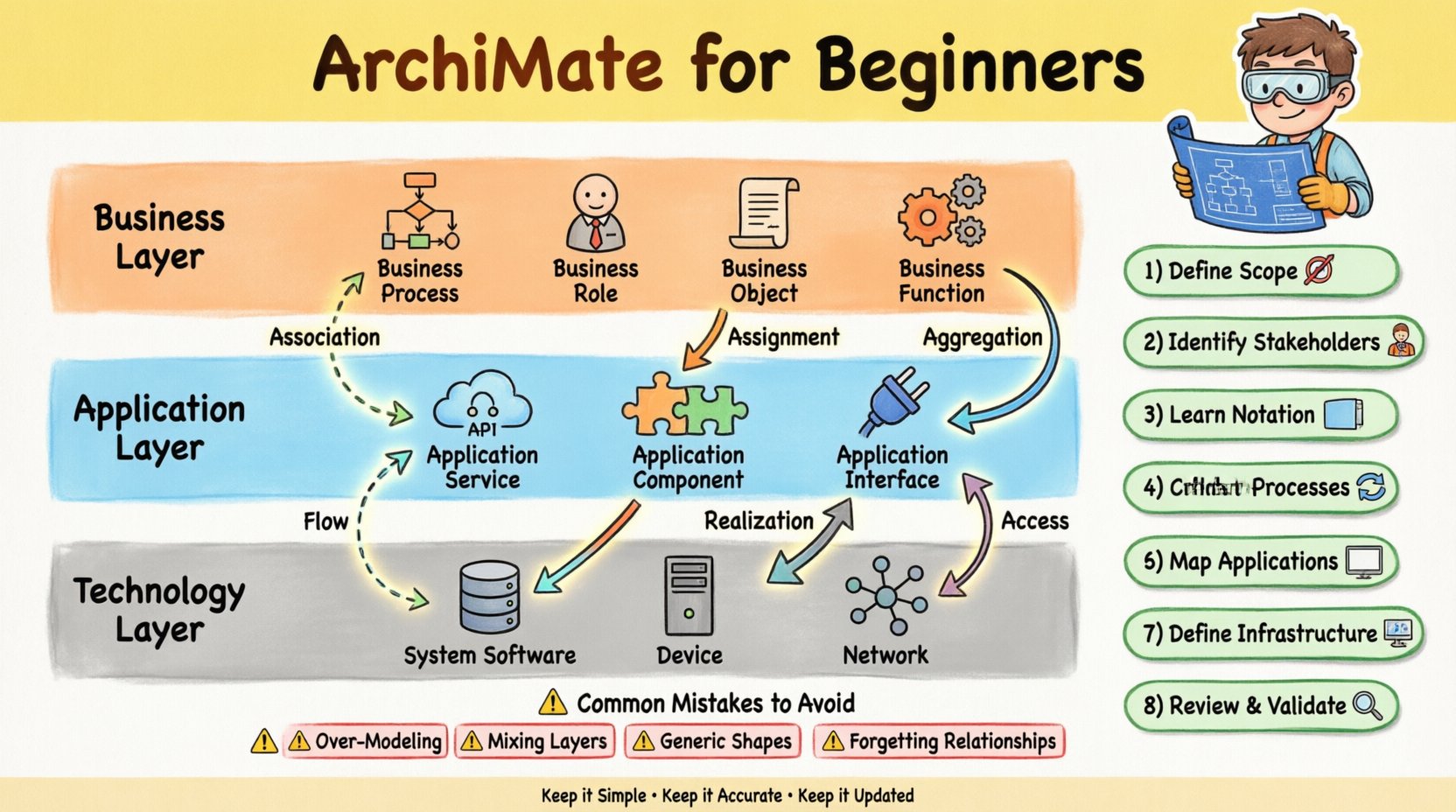
The language is structured around three core layers. These layers represent different domains of the enterprise:
- Business Layer: Focuses on business strategy, governance, and organization.
- Application Layer: Concerns the software applications and services that support the business.
- Technology Layer: Deals with the physical infrastructure, hardware, and network components.
Understanding these distinctions is the first step. A common error beginners make is mixing concepts from different layers without clear justification. For instance, mapping a business process directly to a physical server without an intermediate application layer obscures the actual flow of value. Keeping these layers distinct helps in isolating changes. If the technology changes, the business process might remain the same. If the business strategy changes, the applications might need to be reconfigured.
🏛️ The Three Core Layers Explained 📊
To effectively model an enterprise, you must understand the specific elements within each layer. Each layer has its own set of building blocks that define what can be modeled. Below is a structured overview of these layers and their primary components.
| Layer | Primary Focus | Example Elements |
|---|---|---|
| Business | Organization and Activities | Business Process, Business Role, Business Object, Business Function |
| Application | Software Services | Application Service, Application Component, Application Interface |
| Technology | Infrastructure | System Software, Device, Network, Infrastructure Function |
🔹 The Business Layer
This layer is often the starting point for any architectural initiative. It defines the value chain of the organization. Key elements include:
- Business Process: A collection of related and structured activities. For example, “Order Processing” or “Customer Onboarding”.
- Business Role: An actor or group of actors that performs a business function. Examples include “Sales Manager” or “HR Specialist”.
- Business Object: A representation of information used in a business context. Think of “Invoice” or “Product Catalog”.
- Business Function: A set of capabilities that the business possesses. This is broader than a process. Examples are “Marketing” or “Finance”.
When modeling this layer, ensure that you capture the interaction between roles and processes. Who does what, and what information is produced or consumed?
🔹 The Application Layer
Once the business requirements are clear, the application layer maps the software solutions that support them. This layer bridges the gap between human activity and technical infrastructure.
- Application Service: A function that is provided by an application component to another component. It represents what the application does, not how it does it.
- Application Component: A modular part of a software system. For example, the “Authentication Module” or “Billing Engine”.
- Application Interface: The point where an application interacts with an external actor or system.
A critical aspect here is the concept of provisioning and usage. One component provides a service, and another uses it. This relationship is fundamental for understanding dependencies.
🔹 The Technology Layer
The final layer deals with the physical execution environment. This is where the software actually runs.
- System Software: Operating systems, databases, and middleware.
- Device: Physical hardware like servers, routers, or workstations.
- Network: The communication infrastructure connecting devices.
While this layer is technical, it is important to model it in relation to the layers above. A technology element should not be modeled in isolation. It must be linked to the application component that runs on it.
🔗 Understanding Relationships and Connections 🧩
Elements alone do not form a model. Relationships define how elements interact. ArchiMate defines specific types of relationships to ensure clarity. Using the wrong relationship can lead to misinterpretation of the architecture.
1. Association
An association is a generic relationship between two elements. It indicates that there is a connection, but not necessarily a specific flow of data or control. It is often used to link a Business Role to a Business Process to show who is responsible.
2. Assignment
This relationship shows that a Business Role is assigned to perform a Business Process. It is a common pattern to indicate responsibility. For example, the “Accountant” role is assigned to the “Financial Reporting” process.
3. Aggregation
Aggregation represents a whole-part relationship. A Business Process might be composed of several sub-processes. This helps in breaking down complex activities into manageable chunks.
4. Realization
Realization is perhaps the most critical relationship for cross-layer modeling. It indicates that an element in a lower layer provides the capability for an element in a higher layer. For example, an Application Service realizes a Business Service. This links the “what” (Business) to the “how” (Application).
5. Flow
Flow describes the movement of information or material between processes. In the business layer, this might be a document passing between departments. In the technology layer, this is network traffic. Distinguishing between Flow and Association is key; Flow implies sequence and direction.
6. Access
Access indicates that one element uses the services of another. This is common in the application layer where one component accesses a database managed by another component.
✅ Your Step-by-Step Implementation Checklist 📝
Starting a modeling initiative can be overwhelming. A structured approach reduces risk and ensures that the output is useful. Use this checklist to guide your initial setup and development.
Step 1: Define the Scope and Purpose 🎯
Before creating a single shape, determine why you are modeling. Is it to document the current state? Is it to design a future state? Is it to plan a migration? The scope dictates the level of detail. A high-level strategy model should not contain the same detail as an implementation blueprint. Define the boundaries of the architecture. Which departments are included? Which systems are in scope?
Step 2: Identify Stakeholders and Needs 👥
Who will read your models? Executives need high-level views. Developers need detailed component views. Define the audience for each view. This prevents information overload. If you provide a detailed technical diagram to a C-level executive, they may lose interest. If you provide a high-level summary to an engineer, they may lack necessary context.
Step 3: Learn the Notation and Rules 📐
Commit to the standard syntax. ArchiMate has specific shapes and colors for different element types. Do not invent new shapes. Consistency is crucial for maintainability. If you use a circle for a process in one diagram and a rectangle in another, confusion will ensue. Ensure all team members adhere to the same notation rules.
Step 4: Establish the Layer Structure 🏗️
Set up the canvas or workspace to reflect the three core layers. Even if you are only modeling the business layer, having the structure ready helps you see where connections will go later. This prevents the temptation to mix layers prematurely.
Step 5: Create the Core Business Processes 🔄
Start with the Business Layer. Identify the primary value chains. Map out the major processes. Do not get stuck on the details immediately. Focus on the high-level flow. Who initiates the process? Who completes it? What are the major steps?
Step 6: Map Supporting Applications 🖥️
Once the business processes are defined, identify the applications that support them. For each process, list the software tools used. Map the Application Services to the Business Processes using the Realization relationship. This creates the critical link between business needs and technical capabilities.
Step 7: Define the Technology Infrastructure 🖨️
Finally, map the applications to the technology layer. Which servers host the software? Which networks connect them? This step is often the most granular. Ensure that the technology supports the applications it hosts. If an application requires high availability, the technology layer must reflect redundant devices.
Step 8: Review and Validate 🔍
Conduct a review session with key stakeholders. Walk them through the models. Ask if the processes match reality. Ask if the applications are correctly identified. Validate the relationships. Ensure that the arrows point in the correct direction. A model that is not validated is just a drawing.
🚫 Common Mistakes to Avoid ⚠️
Even experienced architects make errors. Being aware of common pitfalls can save you significant time later. Here are the most frequent issues encountered during the modeling process.
- Over-Modeling: Trying to capture every single detail in the first draft. This leads to models that are too complex to maintain. Start high-level and refine as needed.
- Mixing Layers: Placing a business process next to a server without an application layer in between. This breaks the logical flow and makes dependencies unclear.
- Ignoring Context: Creating models that stand alone without a defined context. Every model should have a title, version, and description of the scope.
- Using Generic Shapes: Using a generic box for everything. Specific shapes convey specific meaning. Use the correct shapes for Processes, Roles, and Components.
- Neglecting the Data: Focusing only on processes and ignoring Business Objects. Data is the fuel of the business. Mapping how data flows between processes is often just as important as the processes themselves.
- Forgetting Relationships: Creating islands of elements. An element without a relationship is isolated and provides little insight into the system.
📈 Integrating Architecture with Strategy 🧭
Architecture is not just about drawing diagrams; it is about supporting business strategy. The gap between strategy and execution is often where projects fail. ArchiMate provides a mechanism to bridge this gap.
When modeling, always ask how a specific element supports a strategic goal. For example, if the strategy is “Improve Customer Experience,” does the current application layer support this? If not, the model should highlight the gap. This is known as a gap analysis.
Use the model to drive decision-making. If a new regulation requires a change in data handling, trace the impact through the layers. Which business processes are affected? Which applications store the data? Which technologies need to be updated? This traceability is the true value of a well-maintained model.
🔄 Maintaining Your Models Over Time 🛠️
Architecture is dynamic. The business changes, technology evolves, and requirements shift. A model that is not maintained becomes obsolete quickly. In fact, an outdated model is worse than no model at all, as it leads to false confidence.
To maintain models effectively:
- Version Control: Treat models like code. Use versioning to track changes over time. This allows you to revert if necessary and understand the evolution of the system.
- Regular Reviews: Schedule periodic reviews. A quarterly review is often sufficient for high-level strategy, while monthly reviews might be needed for implementation details.
- Change Management: Integrate the model into your change management process. When a change request is approved, update the model. Do not update the model only when it is convenient.
- Central Repository: Store models in a central location where all stakeholders can access them. Avoid keeping models on local desktops where they can be lost or forgotten.
- Documentation: Include metadata. Who created it? When was it last updated? What is the status? This information helps users trust the content.
📚 Summary of Best Practices 🏆
To summarize the journey of starting with ArchiMate, remember these core principles. Clarity is paramount. Use the standard notation to ensure everyone understands the diagrams. Keep the layers distinct to maintain logical separation. Focus on relationships to show how the parts fit together. Start with the business value, not the technology.
Building a model is a collaborative effort. It requires input from business leaders, IT staff, and end-users. The resulting diagram is a shared artifact that aligns the organization. It serves as a single source of truth for the enterprise structure.
By following the checklist and avoiding common pitfalls, you can establish a framework that adds real value. The goal is not perfection in the first attempt, but a living representation of the enterprise that evolves with it. This disciplined approach ensures that your architecture remains relevant and useful for decision-making in the long term.
Remember, the best model is the one that is actually used. Keep it simple, keep it accurate, and keep it updated. With these practices in place, you will be well-equipped to navigate the complexities of enterprise architecture and drive meaningful transformation within your organization.
This post is also available in 简体中文.