


A comprehensive resource for software architects, product managers, and systems engineers seeking to master formal specification and modern visual modeling practices.
Introduction to Object Constraint Language (OCL)
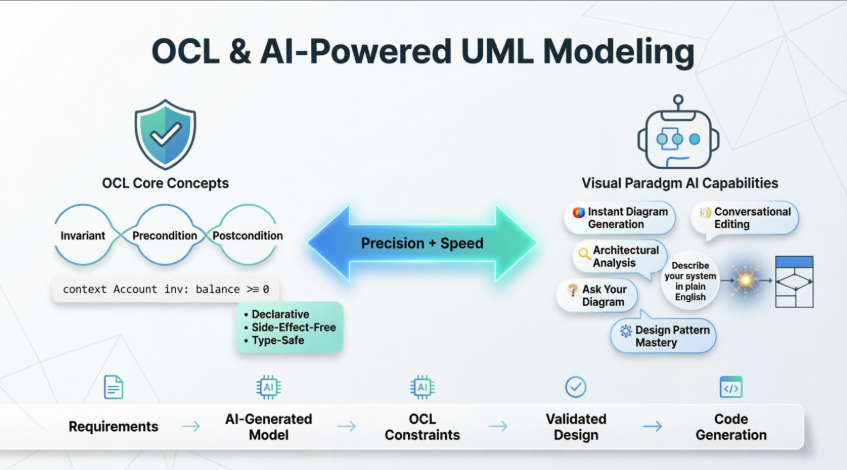
The Object Constraint Language (OCL) is a formal, side-effect-free declarative language standardized by the Object Management Group (OMG) for use within the Unified Modeling Language (UML) framework. OCL enables modelers to specify precise constraints, queries, and behavioral rules that cannot be adequately expressed through graphical notation alone.
Why OCL Matters
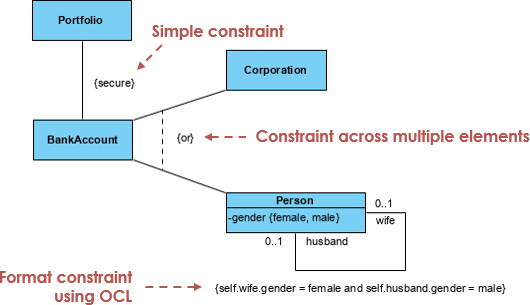
While UML diagrams provide powerful visual abstractions for system structure and behavior, they inherently lack the precision required for:
-
Mathematical verification of model correctness
-
Automated code generation with guaranteed semantic fidelity
-
Round-trip engineering between models and implementation
-
Formal validation of business rules and domain constraints
OCL bridges this gap by providing a rigorously defined syntax and semantics for expressing logical conditions that must hold true within a model.
Core Concepts and Syntax
Fundamental Principles
| Principle | Description |
|---|---|
| Declarative | OCL describes what must be true, not how to compute it |
| Side-effect-free | Expressions do not modify system state; they only query or constrain |
| Type-safe | Strong typing prevents invalid navigation and operations |
| Collection-oriented | Rich support for sets, bags, sequences, and ordered collections |
Basic Expression Types
-- Invariant: Account balance must never be negative
context Account
inv nonNegativeBalance: self.balance >= 0

-- Precondition: Withdrawal amount must not exceed balance
context Account::withdraw(amount: Real)
pre sufficientFunds: amount <= self.balance

-- Postcondition: Balance decreases by withdrawn amount
post balanceUpdated: self.balance = self.balance@pre - amount

-- Query: Select employees with managerial titles
company.employees->select(title = "Manager")
Navigation and Collection Operations
OCL provides powerful operators for traversing model relationships:
-- Navigation through associations
customer.orders->size()

-- Collection operations
orders->select(amount > 100)->collect(product)

-- Iteration with constraints
employees->forAll(e | e.salary > minimumWage)
Primary Roles of OCL in UML Modeling
1. Specifying Constraints
OCL is the industry standard for defining Boolean expressions that validate model integrity:
Invariants
Conditions that must always hold true for instances of a class:
context BankAccount
inv validAccountNumber:
  self.accountNumber.matches('[0-9]{10}') and
  self.accountNumber <> ''
Preconditions
Requirements that must be satisfied before an operation executes:
context ShoppingCart::checkout(payment: Payment)
pre cartNotEmpty: self.items->size() > 0
pre paymentValid: payment.isValid()
Postconditions
Guarantees about system state after operation completion:
context Order::cancel()
post orderCancelled: self.status = OrderStatus::CANCELLED
post inventoryRestored:
  self.lineItems->forAll(li |
    li.product.stock = li.product.stock@pre + li.quantity)
2. Providing Precision and Rigor
When models serve as:
-
Formal specifications for safety-critical systems
-
Contracts between development teams
-
Inputs for automated code generation
OCL eliminates ambiguity inherent in natural language documentation, enabling mathematical reasoning about correctness and consistency.
3. Defining Behavioral Rules
OCL expressions power dynamic model elements:
| Element | OCL Application |
|---|---|
| State Machine Guards | Boolean conditions controlling transition firing |
| Activity Diagram Decisions | Branching logic based on object state |
| Interaction Constraints | Message ordering and parameter validation |
| Use Case Extensions | Conditions triggering alternative flows |
4. Model Navigation and Querying
OCL functions as a query language for extracting insights from models:
-- Find all premium customers with overdue orders
Customer.allInstances()->select(
  status = 'PREMIUM' and
  orders->exists(o | o.dueDate < Date::today() and o.status = 'OPEN')
)

-- Calculate average order value per region
Region.allInstances()->collect(r |
  r.customers.orders->average(amount)
)
5. Defining the UML Metamodel
Critically, the UML specification itself uses OCL to define well-formedness rules for its own metamodel. This self-referential application ensures:
-
Consistent interpretation of modeling constructs
-
Validation of diagram semantics
-
Interoperability between modeling tools
OCL vs. Programming Languages: Key Distinctions
| Aspect | OCL | Programming Language |
|---|---|---|
| Purpose | Specification & validation | Implementation & execution |
| Paradigm | Declarative | Imperative/Object-oriented |
| Side Effects | Prohibited | Common and expected |
| Execution | Evaluated by tools/validators | Compiled/interpreted at runtime |
| Output | Boolean truth value or query result | Computed data, state changes |
| Audience | Modelers, architects, validators | Developers, runtime systems |
⚠️ Important: OCL is not executable code. It describes constraints that implementations must satisfy, but does not prescribe how to satisfy them.
Visual Paradigm: Professional UML Modeling Platform
Visual Paradigm provides a comprehensive, professional-grade modeling environment that fully supports the UML 2.x standard, now augmented by an AI-powered ecosystem for automated diagram generation and architectural analysis.
Platform Overview
Visual Paradigm serves as a unified platform for:
-
Visual Modeling: Complete UML, SysML, BPMN, and ArchiMate support
-
Code Engineering: Bidirectional round-trip engineering for multiple languages
-
Agile Management: User stories, backlogs, and sprint planning integration
-
Enterprise Architecture: TOGAF, Zachman, and DoDAF framework support
-
AI Assistance: Generative AI for diagram creation and analysis
UML Modeling Tool Support
The platform supports all 14 standard UML diagrams, bridging the gap between requirements and implementation.
Standard Diagrams Supported
✅ Class Diagrams
✅ Use Case Diagrams
✅ Sequence Diagrams
✅ Activity Diagrams
✅ State Machine Diagrams
✅ Component Diagrams
✅ Deployment Diagrams
✅ Package Diagrams
✅ Object Diagrams
✅ Composite Structure Diagrams
✅ Timing Diagrams
✅ Interaction Overview Diagrams
✅ Communication Diagrams
✅ Profile Diagrams
Advanced Engineering Capabilities
Code Engineering
-
Bidirectional Round-Trip Engineering: Generate source code (Java, C++, PHP, Python, C#, etc.) from diagrams or reverse-engineer existing code back into UML models
-
Real-time Synchronization: Changes in code automatically update diagrams and vice versa
-
Multi-language Support: Seamless integration across technology stacks
Database Design
-
ERD Synchronization: Automatically synchronize Class diagrams with Entity Relationship Diagrams
-
ORM Mapping: Generate Hibernate, JPA, and other ORM mapping configurations
-
Database Script Generation: Produce DDL scripts for multiple database engines
IDE Integration
Operate directly within popular development environments:
-
Eclipse
-
IntelliJ IDEA
-
NetBeans
-
Visual Studio
-
Android Studio
Traceability & Linking
-
Model Transitor: Link model elements across different diagram types for end-to-end traceability
-
Sub-diagrams: Create hierarchical model elaboration with parent-child relationships
-
Requirement Tracing: Connect business requirements to design elements and test cases
Team Collaboration
-
Concurrent Editing: Multiple team members can work on the same model simultaneously
-
Version Control Integration: Automatic conflict resolution and change history tracking
-
PostMania: Cloud-based commenting and review tool for stakeholder feedback
AI-Powered Modeling Capabilities
The integrated AI engine acts as a “creative co-pilot,” transforming text-based requirements into actionable designs.
Instant Diagram Generation
Use natural language prompts to instantly create professional diagrams:
Prompt: "Create a class diagram for an e-commerce system with Customer,
Product, Order, and Payment classes, showing associations and multiplicities"

Result: Fully-formed UML Class Diagram with:
- Classes with attributes and operations
- Associations with multiplicities
- Inheritance relationships where appropriate
- Proper UML notation and styling
Supported diagram types for AI generation:
-
Class Diagrams
-
Sequence Diagrams
-
State Machine Diagrams
-
Use Case Diagrams
-
Component Diagrams
-
Deployment Diagrams
-
Activity Diagrams
Conversational Editing
Modify existing models through natural language commands:
| Command | Action |
|---|---|
"Add a PaymentGateway class" |
Creates new class with default structure |
"Refactor Student into a superclass" |
Applies inheritance refactoring pattern |
"Add validation to the email attribute" |
Inserts OCL constraints or notes |
"Show the sequence for user login" |
Generates or updates Sequence Diagram |
Architectural Analysis & Critique
The AI performs automated quality assessments:
🔍 Design Flaw Detection
-
Tight coupling between modules
-
Circular dependencies
-
Violations of SOLID principles
-
Missing error handling paths
📊 Analysis Reports
-
Complexity metrics
-
Cohesion/coupling scores
-
Maintainability indices
-
Security vulnerability suggestions
“Ask Your Diagram” Feature
Query your visual models as an interactive knowledge base:
Question: "What are the main use cases for the Admin role?"
Answer: [Generated summary based on Use Case Diagram elements]

Question: "Generate a technical specification document for this component"
Answer: [Formatted markdown/PDF with component interfaces, dependencies, and constraints]
Design Pattern Mastery
Instruct the AI to automatically apply established architectural patterns:
Prompt: "Apply the Observer pattern to notify Inventory when Order status changes"

Result:
- Observer and Subject interfaces added
- Order class implements Subject
- Inventory class implements Observer
- Notification mechanism defined in sequence diagram
- Relevant OCL constraints for state consistency
Supported patterns include:
-
Creational: Singleton, Factory, Builder, Prototype
-
Structural: Adapter, Decorator, Facade, Proxy
-
Behavioral: Observer, Strategy, Command, State
-
Architectural: MVC, Layered, Microservices, C4 Model
Practical Implementation Guide
Getting Started with OCL in Visual Paradigm
-
Enable OCL Support
-
Open your UML project in Visual Paradigm
-
Navigate to Project > Properties > OCL
-
Enable OCL constraint validation
-
-
Add Constraints to Model Elements
-
Right-click any class, attribute, or operation
-
Select Add > OCL Constraint
-
Choose constraint type: Invariant, Precondition, or Postcondition
-
Enter your OCL expression in the editor with syntax highlighting
-
-
Validate Your Model
-
Run Tools > Validate Model with OCL
-
Review any constraint violations in the Problems view
-
Refine expressions or model structure as needed
-
-
Generate Documentation
-
Use Project > Publish > Documentation
-
Include OCL constraints in generated HTML/PDF reports
-
Share precise specifications with development teams
-
AI-Assisted Workflow Example
Scenario: Designing a library management system
Step 1: Initial Prompt
"Create a use case diagram for a library system with members,
librarians, book borrowing, and reservation features"

Step 2: Refinement Commands
"Add an 'Overdue Notice' use case triggered when return date passes"
"Show the sequence for the 'Reserve Book' scenario"
"Add OCL constraint: member cannot borrow more than 5 books"

Step 3: Analysis Request
"Check for circular dependencies in the class diagram"
"Generate a project proposal document from this model"

Step 4: Export & Collaborate
"Export to Visual Paradigm Desktop for team review"
"Share via PostMania for stakeholder feedback"
OCL Expression Best Practices
✅ Do:
-
Keep expressions concise and focused on a single concern
-
Use meaningful context declarations
-
Leverage collection operations for clarity
-
Document complex expressions with comments
❌ Avoid:
-
Overly complex nested expressions (break into multiple constraints)
-
Navigation through optional associations without null checks
-
Assuming execution order (OCL is declarative)
-
Mixing specification concerns with implementation details
Best Practices and Recommendations
For Modelers Using OCL
-
Start Simple: Begin with basic invariants before adding complex pre/postconditions
-
Iterate with Stakeholders: Review constraints with domain experts to ensure business rule accuracy
-
Test Constraints: Use sample data to validate OCL expressions before deployment
-
Document Intent: Add comments explaining the business rationale behind complex constraints
-
Version Control: Track OCL expressions alongside model changes for auditability
For Teams Adopting AI-Powered Modeling
-
Treat AI as Co-Pilot: Review and refine AI-generated content; don’t accept blindly
-
Establish Prompt Guidelines: Create team standards for effective natural language instructions
-
Validate Generated Models: Apply traditional modeling reviews to AI-assisted outputs
-
Combine Strengths: Use AI for rapid prototyping, human expertise for architectural decisions
-
Secure Your Data: Understand data handling policies when using cloud-based AI features
Integration Strategy
| Phase | Activities | Tools/Features |
|---|---|---|
| Discovery | Requirements gathering, domain modeling | AI diagram generation, textual analysis |
| Design | Detailed architecture, constraint specification | OCL editor, pattern application, validation |
| Implementation | Code generation, round-trip engineering | IDE integration, ORM mapping, script generation |
| Validation | Model checking, constraint verification | OCL validator, AI architectural critique |
| Documentation | Stakeholder communication, knowledge transfer | “Ask Your Diagram”, report generation, PostMania |
Reference
- Visual Paradigm Homepage: Comprehensive platform for visual modeling, code engineering, agile management, and enterprise architecture, now enhanced with generative AI capabilities for automated diagram creation and analysis.
- UML Tool Features: Detailed overview of Visual Paradigm’s award-winning UML software, supporting all 14 standard UML diagrams with AI-powered generation, code engineering, and team collaboration features.
- UML Tool Solution Page: Business-focused presentation of UML modeling capabilities, emphasizing the bridge between requirements and implementation through intelligent visual modeling.
- UML Modeling User Guide: Official documentation covering UML diagram creation, model management, constraint specification, and advanced modeling techniques within Visual Paradigm.
- UML Tool – Chinese Solution Page: Localized resource detailing UML modeling solutions for Chinese-speaking enterprises, including case studies and implementation guidance.
- Visual Paradigm Editions: Comparison of Community, Standard, Professional, and Enterprise editions, outlining feature availability, licensing options, and upgrade paths for different team sizes and project needs.
- UML Tool – Additional Solution Resource: Supplementary material on UML best practices, integration strategies, and industry-specific modeling patterns.
- AI Chatbot Platform: Entry point to Visual Paradigm’s AI-powered conversational interface for natural language diagram generation, model editing, and architectural analysis.
- Guide to AI-Powered UML Diagram Generation: Tutorial resource explaining how to craft effective prompts, refine AI outputs, and integrate generative modeling into professional workflows.
- AI Chatbot Features: Overview of conversational AI capabilities including instant diagram generation, command-based editing, “Ask Your Diagram” querying, and automated documentation.
- AI Diagram Generation Features: Dedicated page showcasing text-to-diagram functionality, supported diagram types, and use cases for accelerating visual modeling tasks.
- Visual Paradigm AI Demo Video: Video demonstration of AI-powered modeling features in action, including prompt examples, refinement workflows, and export options.
- AI Guide: UML Class Diagram Modeling: Comprehensive guide to using AI for class diagram creation, covering entity identification, relationship mapping, constraint specification, and pattern application.
- AI-Assisted Class Diagram Generator Tool: Direct access to the specialized AI tool for generating UML class diagrams from textual descriptions, with customization and export options.
- AI Component Diagram Generation: Resource focused on using AI to create UML Component Diagrams, including interface definition, dependency management, and deployment mapping.
💡 Pro Tip: Combine OCL’s formal precision with Visual Paradigm’s AI assistance for maximum impact. Use AI to rapidly prototype model structures, then apply OCL constraints to rigorously specify business rules. This hybrid approach accelerates design while maintaining the semantic rigor required for complex systems.
This post is also available in Deutsch, Español, فارسی, Français, English, Bahasa Indonesia, 日本語, Polski, Portuguese, Ру́сский, Việt Nam, 简体中文 and 繁體中文.
Related posts:
 Comprehensive Guide: From Problem Statement to Class Diagram, ERD, and Database Modeling with Visual Paradigm
 Visual Paradigm’s AI‑Powered ERD Generator
 How Visual Paradigm’s AI Diagram Generation Turns Your Ideas into Professional UML & BPMN Diagrams in Seconds
 Why Teams Are Switching to Visual Paradigm: Powerful Modeling Meets Cutting-Edge AI