


Composite Structure Diagram is one of the new artifacts added to UML 2.0. A composite structure diagram is a UML structural diagram that contains classes, interfaces, packages, and their relationships, and that provides a logical view of all, or part of a software system. It shows the internal structure (including parts and connectors) of a structured classifier or collaboration.
A composite structure diagram performs a similar role to a class diagram, but allows you to go into further detail in describing the internal structure of multiple classes and showing the interactions between them. You can graphically represent inner classes and parts and show associations both between and within classes.
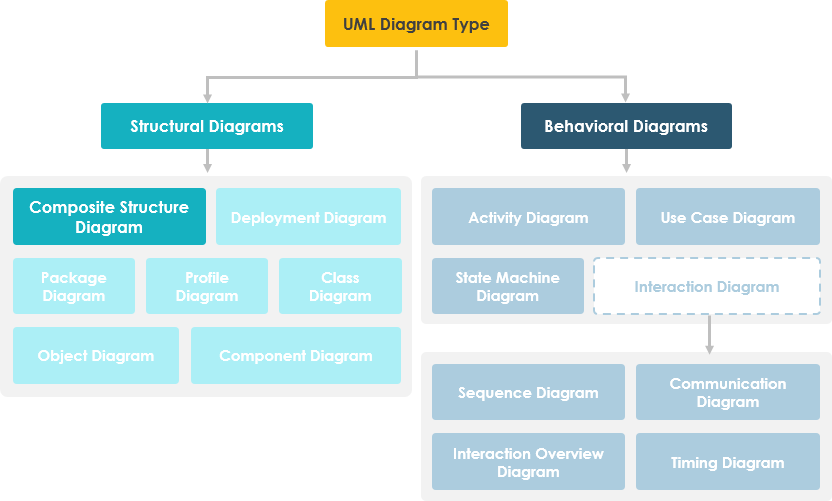
🎯 Purpose of Composite Structure Diagram
Composite Structure Diagrams serve several critical purposes in system modeling:
- Peek Inside Objects: Allow users to examine exactly what components compose an object
- Detail Internal Actions: Document the internal actions of a class, including relationships of nested classes
- Composition Modeling: Show objects defined as a composition of other classified objects
📊 Composite Structure Diagram at a Glance
Key characteristics to understand:
- Composite Structure Diagrams show the internal parts of a class
- Parts follow the naming convention:
partName:partType[multiplicity] - Aggregated classes are parts of a class, but parts are not necessarily classes—a part is any element used to make up the containing class
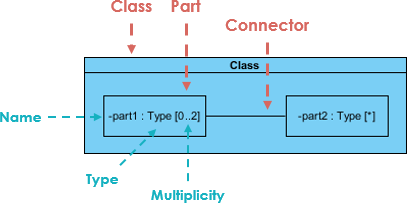
🔗 Deriving Composite Structure Diagram from Class Diagram
Case Study: Online Store System
Suppose we are modeling a system for an online store. The client has told us that customers may join a membership program which will provide them with special offers and discounted shipping, so we have extended the customer object to provide a member and standard option.
Let’s model the online store using a class diagram:
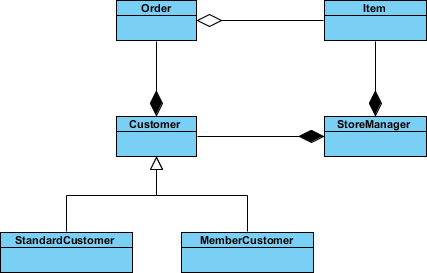
Key Relationships:
- A class for Item which may be aggregated by the Order class
- Order is composed by the Customer class
- Customer itself is composed by the StoreManager class
We have a lot of objects that end up within other objects. Everything looks like it ends up inside StoreManager, so we can create a composite structure diagram to really see what it’s made of.
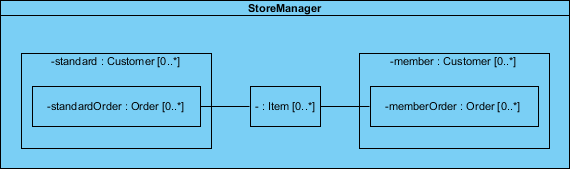
In the example above, we can see:
- StoreManager from its own perspective, instead of the system as a whole
- StoreManager directly contains two types of objects (Customer and Item) as indicated by the two composition arrows on the class diagram
- The composite structure diagram shows more explicitly the inclusion of the subtypes of Customer
- Notice that the type of both of these parts is Customer, as the store sees both as Customer objects
- We also see a connector which shows the relation between Item and Order
- Order is not directly contained within the StoreManager class but we can show relations to parts nested within the objects it aggregates
⚖️ Class Diagram vs. Composite Structure Diagram
Question: Are two diagrams below expressing the same meaning?
Answer: In a class diagram the reference between Description and Pricing is ambiguous—strictly speaking, they are not exactly the same.
- The class diagram does show that Description will have a reference to a Pricing object
- But it does not specify whether the reference between the two objects is contained inside the Item explicitly
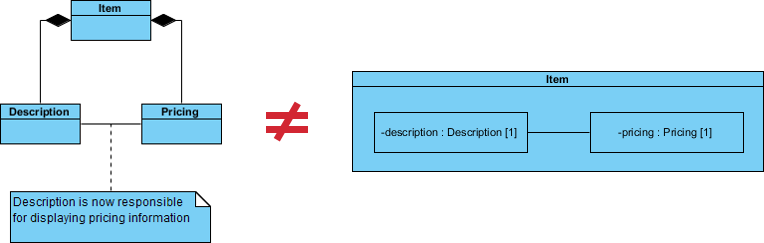
If we use a Composite Structure Diagram, the meaning of the containment of the association relationship is unambiguous:
- The reference between the Description and Pricing objects is contained to objects that are composed by Item
- The specific implementations of an object’s activity can be clearly modeled
🔗 References to External Parts
We have seen examples of how Composite Structure diagrams are great at describing aggregation, but your models will also need to contain references to objects outside of the class you are modeling.
But what about referencing an external object with Composite Structure Diagram like the example below?
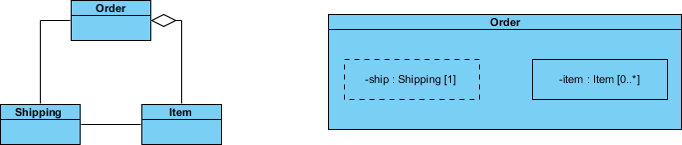
Key Points:
- References to external objects are shown as a part with a dashed rectangle
- Even though the referenced object is outside of the class, the reference itself is within the modeled class and is an important step in showing its implementation
🧱 Basic Concepts of Composite Structure Diagram
The key composite structure entities identified in the UML 2.0 specification are: structured classifiers, parts, ports, connectors, and collaborations.
Collaboration
A collaboration describes a structure of collaborating parts (roles). A collaboration is attached to an operation or a classifier through a Collaboration Use. You use a collaboration when you want to define only the roles and connections that are required to accomplish a specific goal of the collaboration.
For example, the goal of a collaboration can be to define the roles or the components of a classifier. By isolating the primary roles, a collaboration simplifies the structure and clarifies behavior in a model.
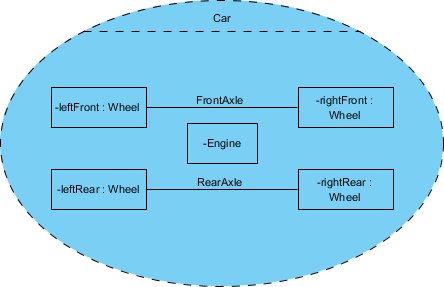
Example:
In this example the Wheels and the Engine are the Parts of the Collaboration and the FrontAxle and the RearAxle are the Connectors. The Car is the Composite Structure that shows the parts and the connections between the parts.
Parts
A part is a diagram element that represents a set of one or more instances that a containing structured classifier owns. A part describes the role of an instance in a classifier. You can create parts in the structure compartment of a classifier, and in several UML diagrams such as composite structure, class, object, component, deployment, and package diagrams.
Port
A port defines the interaction point between a classifier instance and its environment or between the behavior of the classifier and its internal parts.
Interface
Composite Structure diagram supports the ball-and-socket notation for the provided and required interfaces. Interfaces can be shown or hidden in the diagram as needed.
Connector
A line that represents a relationship in a model. When you model the internal structure of a classifier, you can use a connector to indicate a link between two or more instances of a part or a port. The connector defines the relationship between the objects or instances that are bound to roles in the same structured classifier and it identifies the communication between those roles. The product automatically specifies the kind of connector to create.
💻 Composite Structure Diagram Example – Computer System
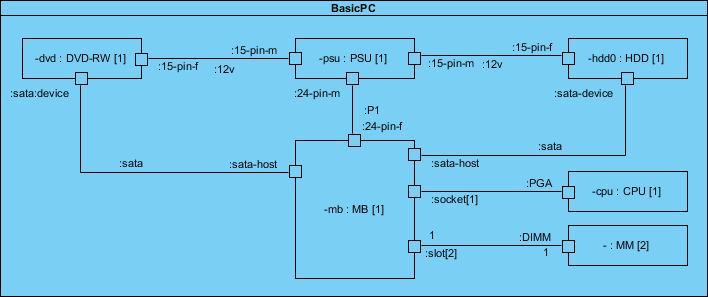
Let’s develop the composite structure diagram for a computer system which includes the following components:
- Power Supply Unit (PSU)
- Hard Disk Drive (HDD)
- Mainboard (MB)
- Optical Drive (DVD-RW)
- Memory Module (MM)
We will assume for the moment that the mainboard is of the type that has a sound card and display adapter built in:
🚀 Draw Composite Structure Diagram Now
You’ve learned what a Composite Structure Diagram is and how to draw one. It’s time to draw a Composite Structure Diagram of your own.
Visual Paradigm Community Edition is a UML software that supports all UML diagram types. It is an international award-winning UML modeler, and yet it is easy-to-use, intuitive & completely free.
🤖 New: Generate AI Composite Structure Diagrams in Visual Paradigm Desktop
March 25, 2026 | EDITION REQUIRED: Desktop Professional
We are excited to announce a powerful update to Visual Paradigm Desktop. Our latest release introduces the ability to generate professional Composite Structure Diagrams using advanced AI technology. This new feature streamlines the modeling of internal structures, ports, and collaborations, making us a leading AI UML tool for modern software architects.
Whether you are documenting complex system hierarchies or detailing the runtime interactions of a microservice, our AI UML generator allows you to transform a simple text description into a structured visual model in seconds.
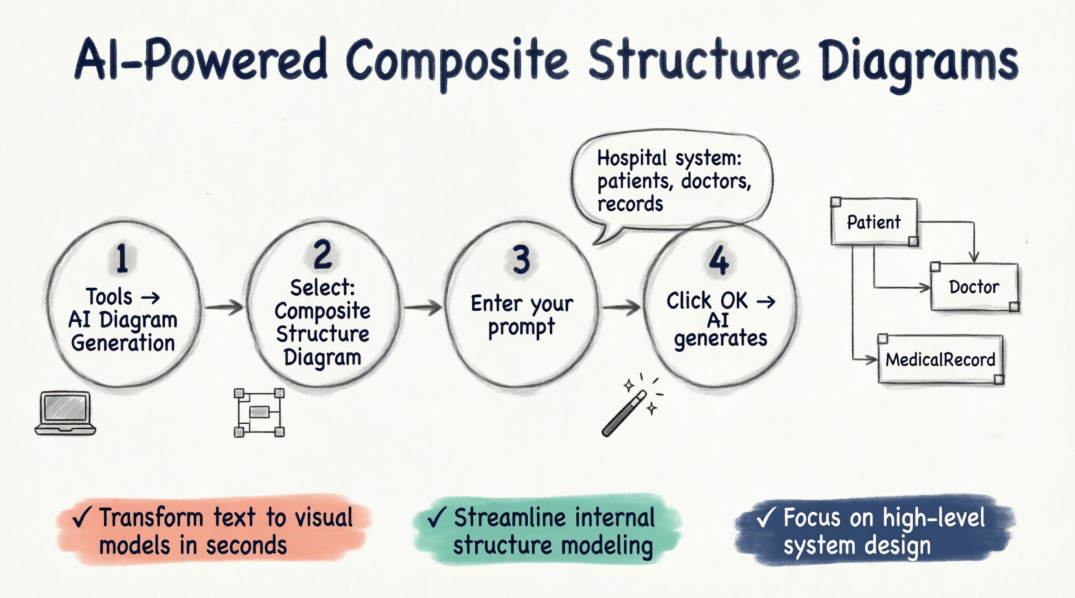
How to Use the AI Composite Structure Diagram Generator
Creating your next diagram is a seamless process within the desktop environment. Follow these four simple steps to get started:
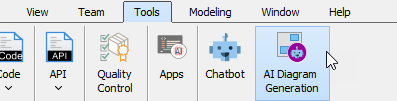
- Navigate to the top menu and select Tools > AI Diagram Generation. This will open the AI Diagram Generation dialog box.
- In the diagram type selection, choose Composite Structure Diagram.
- Enter your specific topic or requirements. For example:
“Generate a Composite Structure Diagram for a hospital management system illustrating relationships between patients, doctors, and medical records.”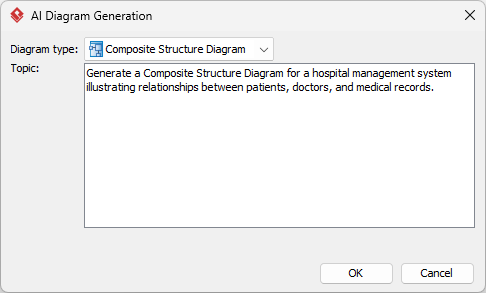
- Click OK.
Once the AI processes your request, it will generate the resulting diagram directly on your canvas. From there, you can continue modeling, revise the components, or fine-tune the layout using our comprehensive suite of UML tools.
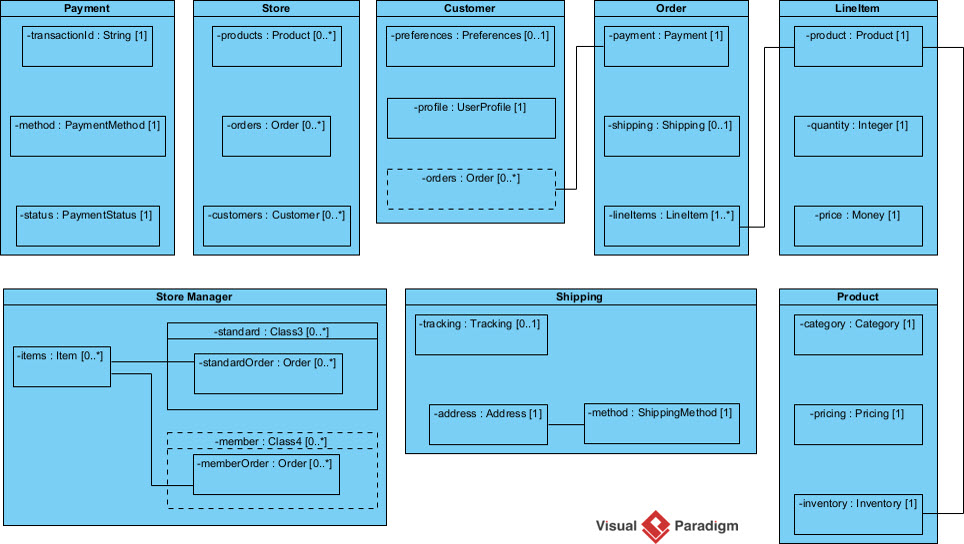
This update reinforces our commitment to being the most versatile AI diagram generator on the market. By integrating AI into the UML workflow, we help teams reduce manual effort and focus on high-level system design. You can explore more about how this works on our AI diagram generation landing page.
🌐 Option 2: Using Visual Paradigm Online (OpenDocs)
You can also use this feature in the Online “OpenDocs” workspace:
- Open Editor: Inside an OpenDocs Space, click the Insert button in the top bar and select the Diagrams tab.
- Choose Diagram: Select Composite Structure Diagram to open the editor.
- Use AI: Click Create with AI at the top right of the editor.
- Describe & Render: Enter your system description in the input box and click Generate.
✨ Refinement and Customization with AI
Once the initial diagram is created, you can refine it conversationally using the AI Chatbot:
- Modify Elements: Ask the bot to “Rename Guest contact info to Contact” or “Add a new part for Payment Gateway”
- Establish Links: Instruct it to “Create a connector between Booking Details and Room”
- Traceability: The AI can cross-reference your existing Class Diagrams to ensure the internal parts and ports remain consistent with your broader model
🎯 Ready to accelerate your modeling workflow?
Experience the most advanced AI UML generator available today.
Download Visual Paradigm Desktop
We look forward to seeing the complex systems you build with our new AI-driven capabilities. Stay tuned for more updates as we continue to expand our AI toolkit.
Visual Paradigm’s AI can generate UML Composite Structure Diagrams directly from natural language descriptions, allowing you to visualize the internal structure of classes, components, or systems without manual drawing.
- 📚 References
- AI Composite Structure Diagram Generator for OpenDocs: Learn how to generate Composite Structure Diagrams using AI in Visual Paradigm’s Online OpenDocs workspace with step-by-step instructions.
- AI Composite Structure Diagram Generator for Desktop: Official release notes detailing the new AI-powered Composite Structure Diagram generation feature for Visual Paradigm Desktop Professional edition.
- AI UML Generator for Beginners Guide: A comprehensive beginner-friendly guide to using AI-powered UML diagram generation tools across Visual Paradigm platforms.
- AI Composite Structure Diagram Generator – Desktop Release: Detailed documentation on leveraging AI to transform text descriptions into structured Composite Structure Diagrams within the desktop environment.
- Visual Paradigm AI Diagram Generation Tutorial (Video): Video tutorial demonstrating the workflow for generating UML diagrams, including Composite Structure Diagrams, using Visual Paradigm’s AI tools.
- Enhance Design Thinking: New AI Diagram Generation: Announcement covering the broader AI diagram generation capabilities introduced across Visual Paradigm’s product suite.
- Miro AI Diagram Tools Overview: Comparative resource discussing how AI automation accelerates initial diagram creation and provides a clear visual foundation for system design.
- UML Class Diagram Tutorial with AI Chatbot: Tutorial explaining how Visual Paradigm’s AI Chatbot can draft and refine UML diagrams through conversational interaction.
- Visual Paradigm AI Features Demo (Video): Video demonstration showcasing AI-powered features for UML modeling, including diagram generation and refinement capabilities.
- Visual Paradigm AI Chatbot Features: Official feature page detailing the capabilities of Visual Paradigm’s AI Chatbot for interactive diagram creation and modification.
- Advanced AI UML Modeling Techniques (Video): Advanced tutorial video covering sophisticated techniques for using AI to model complex UML structures and relationships.
- AI-Powered Structural Visualization Demo (Video): Supplementary video resource demonstrating AI-assisted creation of structural UML diagrams including Composite Structure and Object Diagrams.
- AI-Powered Internal Structure Modeling Guide: In-depth documentation on using AI to model internal structures, ports, and collaborations in Composite Structure Diagrams.
- AI-Powered Object Diagram Guide: Companion guide explaining how AI tools can assist in creating Object Diagrams and related structural visualizations for system modeling.
This post is also available in Deutsch, Español, فارسی, Français, English, Bahasa Indonesia, 日本語, Polski, Portuguese, Ру́сский, Việt Nam, 简体中文 and 繁體中文.
Related posts:
 Comprehensive Guide: From Problem Statement to Class Diagram, ERD, and Database Modeling with Visual Paradigm
 Visual Paradigm’s AI‑Powered ERD Generator
 How Visual Paradigm’s AI Diagram Generation Turns Your Ideas into Professional UML & BPMN Diagrams in Seconds
 Why Teams Are Switching to Visual Paradigm: Powerful Modeling Meets Cutting-Edge AI