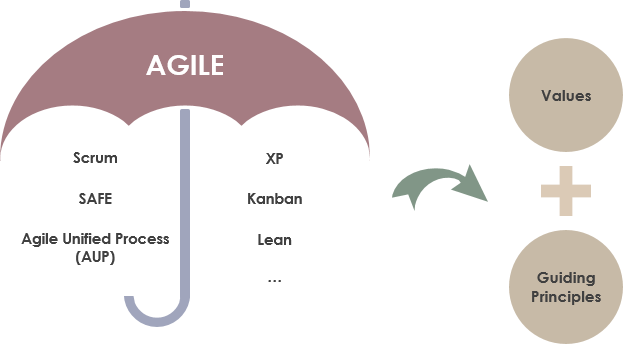
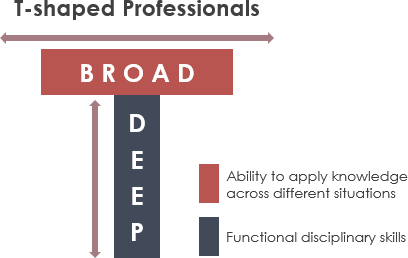
Combine Structured Modeling with AI-Driven Speed for Maximum Impact
⚠️ Important Note: AI can make mistakes. Always double-check AI-generated content, diagrams, and code against your project requirements and team standards.
📋 Introduction
Using Visual Paradigm (VP) for agile development in a small team allows you to combine structured modeling with rapid, AI-driven development. The best approach for a small team is to use Visual Paradigm Online (or Desktop with Teamwork Server) for collaboration, integrated with AI features to speed up requirement gathering and design [[1]].
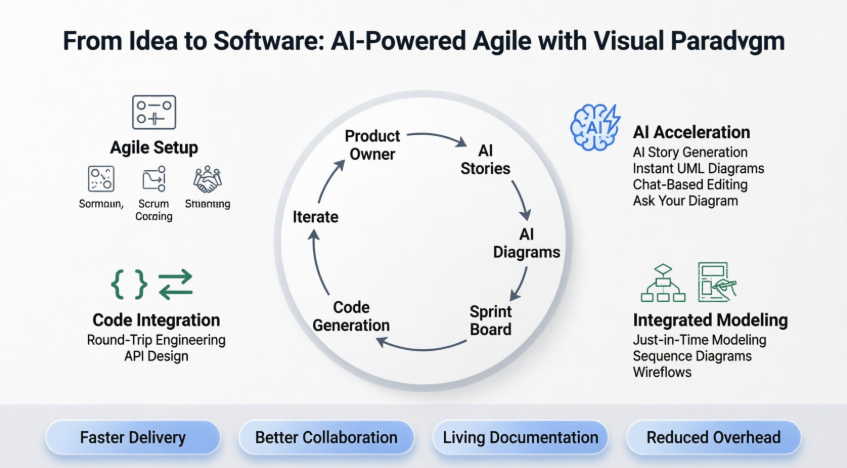
This guide provides a complete, step-by-step workflow for small agile teams to leverage Visual Paradigm’s powerful features—from initial vision to working, documented software—without the overhead of heavy, manual documentation [[7]].
🎯 1. Set Up Your Agile Environment (Scrum/Kanban)
🧭 Use the Scrum Process Canvas
Instead of setting up disparate tools, use the Scrum Process Canvas feature in VP. It provides a one-page view for the entire Scrum lifecycle, including backlog management, sprint planning, and retrospectives [[7]].
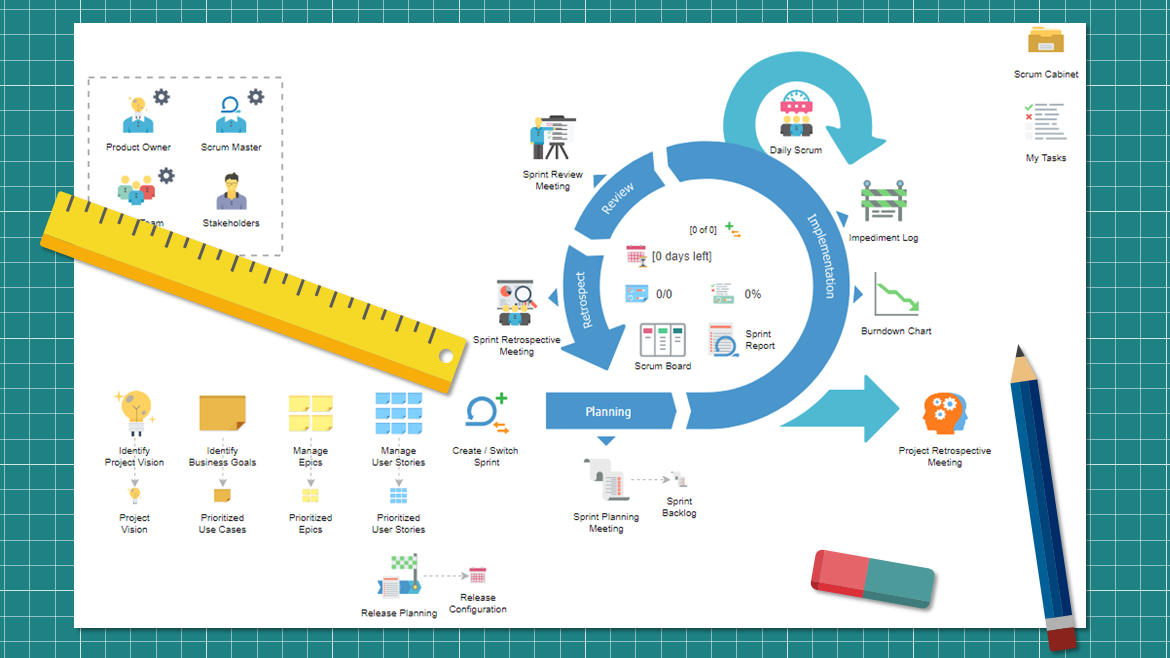
Key Benefits:
-
Unified Workspace: Manage vision, backlog, sprints, and reviews in a single, interactive dashboard
-
Guided Workflow: Step-by-step prompts for each Scrum ceremony reduce onboarding time
-
Auto-Documentation: Generate sprint reports, retrospectives, and release notes automatically
-
Real-Time Visibility: Stakeholders can view progress via web browser without installing software [[11]]
🗺️ User Story Mapping
Utilize the User Story Map tool to visualize user journeys. It helps identify gaps in product design and enables the team to break down features into user stories and tasks effectively [[34]].
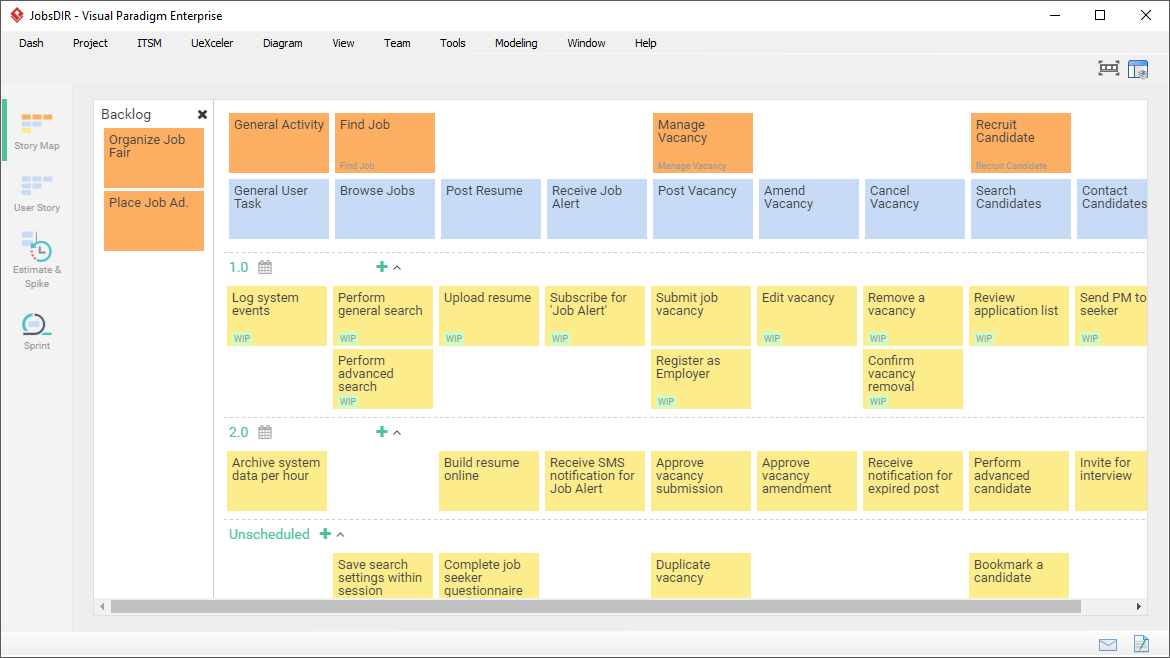
Best Practices:
-
Start with high-level user activities, then decompose into epics and stories
-
Use drag-and-drop to prioritize and reorder stories visually
-
Link stories to acceptance criteria and test cases for traceability
-
Export story maps to share with stakeholders or import into development tools [[40]]
👥 Enable Parallel Development
Configure the VP Teamwork Server to enable real-time collaboration, allowing team members to work on diagrams concurrently [[9]].
Collaboration Features:
-
Cloud-based repository with automatic versioning and merge conflict resolution
-
Diagram-level locking to prevent unintended overwrites
-
Inline commenting and discussion threads directly on model elements
-
Role-based permissions for controlled access to sensitive designs [[4]]
⚡ 2. Leverage AI Features for Speed
✍️ AI-Assisted User Story Creation (Agilien)
Use the AI story tool to generate 3C-compliant (Card, Conversation, Confirmation) stories. You can generate an entire backlog in seconds from a simple idea [[45]].
Example Workflow:
Prompt: "Create user stories for an e-commerce checkout flow"
→ AI generates:
  • As a customer, I want to save my shipping address so I can checkout faster
  • As a customer, I want to apply promo codes so I can get discounts
  • As a system, I want to validate payment details so transactions are secure
→ Each story includes acceptance criteria and priority suggestions
🎨 Instant Diagram Generation
Use “Create with AI” for UML diagrams. Type a description (e.g., “Create a class diagram for a library system”), and the AI generates the initial diagram, identifying classes, attributes, and relationships [[10]].
Supported Diagram Types:
-
Class, Sequence, Use Case, Activity, State Machine diagrams
-
C4 architecture models, ER diagrams, deployment diagrams
-
Business models: SWOT, PESTLE, Value Stream Mapping [[23]]
💬 AI Chat-Based Editing
Use the AI chatbot to modify diagrams conversationally. Commands like “Add payment gateway” or “Connect Order to Inventory” are executed instantly, saving time on manual dragging [[13]].
Powerful Commands:
-
“Refactor the User class to include authentication methods”
-
“Add error handling to the payment sequence diagram”
-
“Show only public methods in this class diagram”
-
“Export this as a PNG for the sprint review”
🔍 Ask Your Diagram
Query your diagram using the AI to act as a knowledge base, aiding in documentation and onboarding [[14]].
Sample Queries:
-
“What are the main actors in this use case diagram?”
-
“Explain the relationship between Order and Inventory”
-
“Generate a summary of this sequence diagram for non-technical stakeholders”
-
“What design patterns are represented here?”
🔄 3. Integrated UML and Agile Modeling
⏱️ Just-in-Time Modeling
Use Use Case diagrams to define functional requirements, but generate them only when needed for a sprint, rather than upfront [[5]].
Agile Modeling Principles:
-
Model only what’s necessary for the current sprint
-
Keep diagrams lightweight and focused on communication
-
Evolve models incrementally as understanding deepens
-
Use diagrams as living documentation, not static artifacts
🎬 Dynamic Behavior Modeling
Use AI to generate Sequence Diagrams from descriptions of user scenarios to understand interaction flows [[10]].
Example:
Input: "Show the flow when a user resets their password"
→ AI generates sequence diagram with:
  • User → UI: Request password reset
  • UI → Auth Service: Validate email
  • Auth Service → Email Service: Send reset link
  • Email Service → User: Deliver email
  • User → UI: Submit new password
  • UI → Auth Service: Update credentials
🖼️ Wireflow Generation
Use the wireframe tool to create UI sketches and link them into a “wireflow” to show screen interactions to stakeholders [[56]].
Wireflow Benefits:
-
Visualize user navigation paths between screens
-
Identify missing states or error flows early
-
Share interactive prototypes with clients for feedback
-
Link wireframes to user stories for end-to-end traceability
💻 4. Code & Technical Integration
🔁 Round-Trip Engineering
If your small team writes code, use VP to reverse-engineer database schemas (ERD) or Java/C# code into class diagrams. Updates to the diagram can automatically update the code [[41]].
Workflow:
-
Import existing codebase → Auto-generate class diagrams
-
Refactor diagram visually → Propagate changes to source code
-
Maintain synchronization between model and implementation
-
Generate skeleton code for new features from diagrams [[54]]
🔌 API Design
Use the Visual REST API Designer to generate Swagger/OpenAPI specifications directly from your UML models [[66]].
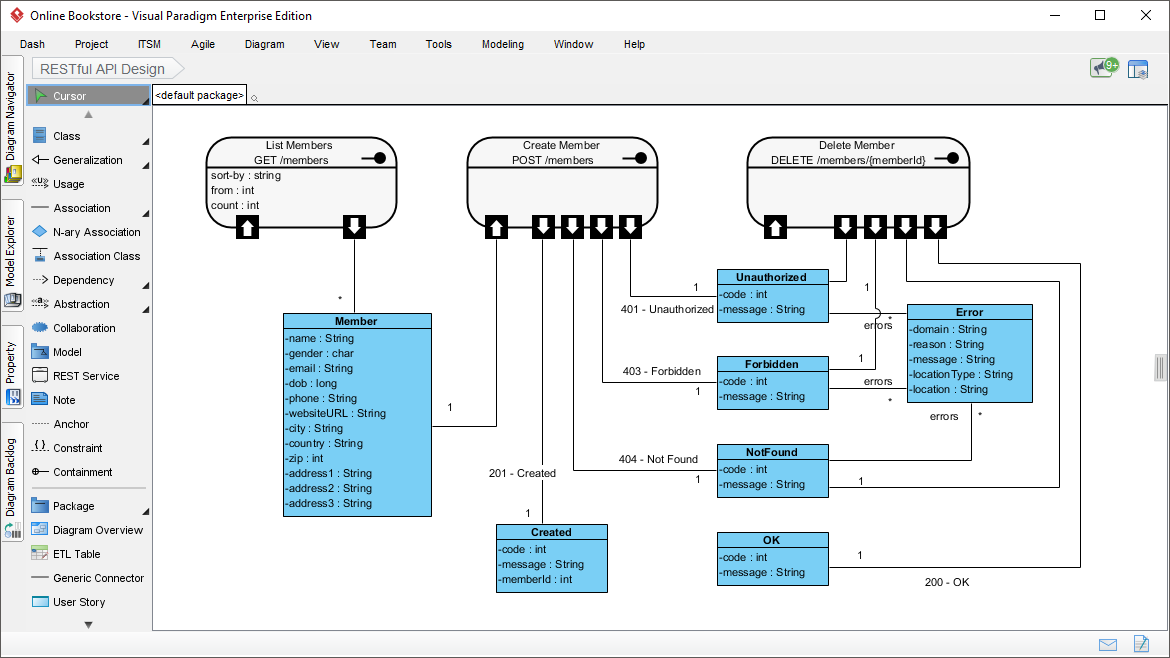
API Design Process:
-
Model API resources as UML classes with operations
-
Define request/response schemas using attributes
-
Annotate endpoints with HTTP methods and status codes
-
Export to OpenAPI 3.0 YAML/JSON for documentation and testing [[67]]
📊 Summary: Workflow for Small Teams

graph LR
    A[Product Owner creates<br>User Story Map in VP Online] --> B[Use AI to write<br>detailed 3C stories]
    B --> C[Team uses AI-Generate<br>Diagram for initial design]
    C --> D[Refine diagrams using<br>AI chat-based editing]
    D --> E[Move stories to Sprint Backlog<br>Track on Scrum Board]
    E --> F[Use Code Engineering to<br>generate skeleton code]
    F --> G[Iterate, Review,<br>Retrospect, Repeat]
Step-by-Step Execution:
-
Product Owner creates a User Story Map in VP Online to visualize the product roadmap [[34]]
-
Product Owner uses AI to write detailed 3C-compliant user stories with acceptance criteria [[45]]
-
Development Team uses “AI-Generate Diagram” to create initial class/sequence diagrams for selected stories [[10]]
-
Team refines diagrams using AI chat-based editing for rapid iteration [[13]]
-
Scrum Master moves stories to Sprint Backlog and tracks progress on the integrated Scrum Board [[7]]
-
Developers use Code Engineering to generate skeleton code and maintain round-trip synchronization [[54]]
-
Entire Team reviews deliverables, documents lessons learned via auto-generated reports, and plans the next sprint [[11]]
🎁 Key Takeaways for Small Teams
✅ Start Small: Begin with User Story Mapping and AI story generation before adopting full UML modeling
✅ Leverage AI Wisely: Use AI for first drafts and repetitive tasks, but always validate outputs
✅ Keep Models Lean: Model just enough to support communication and implementation—not for documentation’s sake
✅ Collaborate Early: Use VP Online’s real-time features to involve stakeholders in design reviews
✅ Automate Documentation: Let Doc. Composer generate reports so your team focuses on building value
By using the Scrum Process Canvas combined with AI-Assisted Diagrams, your small team can move from ideas to working, documented software without the overhead of heavy, manual documentation [[7]].
- 📚 Reference List
- What is Agile Software Development?: Foundational overview of Agile principles, values, and the Scrum framework as implemented in Visual Paradigm. [[1]]
- What is a Gap Analysis? Your Guide to AI-Powered Strategic Planning: Explains how AI-powered gap analysis helps teams identify requirements gaps and plan strategic improvements. [[2]]
- AI State Machine Diagram Generator: Order Lifecycle: Tutorial demonstrating AI generation of state machine diagrams for modeling order processing workflows. [[3]]
- Agile Overview – Adobe Workfront: General Agile methodology reference covering Scrum, Kanban, and hybrid approaches (contextual comparison). [[4]]
- Comprehensive Tutorial: Adopting UML for Agile Projects with Visual Paradigm: Practical guide on integrating lightweight UML modeling into Agile sprints using VP’s toolset. [[5]]
- Complete Guide to Agile Scrum Tools in Visual Paradigm Standard Edition: Detailed walkthrough of Scrum-specific features including backlog management, sprint boards, and reporting. [[6]]
- Comprehensive Guide to Visual Paradigm’s Scrum Process Canvas: In-depth exploration of the one-page Scrum dashboard for end-to-end sprint management and automation. [[7]]
- Best Free and Commercial Agile Tools: Comparative overview of Agile tooling options, highlighting VP’s integrated approach for small teams. [[8]]
- Team Collaboration Toolset: Documentation of VP’s cloud-based collaboration features including versioning, permissions, and real-time editing. [[9]]
- Guide to AI-Powered UML Diagram Generation: Tutorial on using natural language prompts to generate UML diagrams instantly via VP’s AI engine. [[10]]
- Visual Paradigm AI Chatbot Demo: Video demonstration of conversational diagram editing and AI-assisted modeling workflows. [[11]]
- Agile Tool Solution Overview: Product page summarizing VP’s integrated Agile toolset for story mapping, sprint planning, and delivery tracking. [[12]]
- Guide to AI-Powered UML Diagram Generation (Alternate): Additional examples of chat-based diagram refinement and “Ask Your Diagram” knowledge queries. [[13]]
- Agile Tool Solution – AI Features: Expanded coverage of AI capabilities including story generation, diagram synthesis, and automated documentation. [[14]]
- Visual Paradigm Tutorials Library: Curated collection of step-by-step tutorials covering modeling techniques, Agile practices, and AI features. [[15]]
- Explore All Visual Paradigm Features: Comprehensive feature catalog including UML, BPMN, wireframing, code engineering, and team collaboration tools. [[16]]
- Visual Paradigm Workflow Demo: Video walkthrough of end-to-end Agile workflow from story mapping to code generation. [[17]]
- AI Tools Benefit Product Owners: Industry article on how AI-assisted tools enhance Product Owner effectiveness in backlog refinement and stakeholder communication. [[18]]
-
ℹ️ Note on Images: The original input content did not contain embedded images. For visual examples of Visual Paradigm features (Scrum Process Canvas, AI diagram generation, User Story Map, etc.), please visit the official Visual Paradigm website or YouTube channel linked in the references above.
This post is also available in Deutsch, Español, فارسی, Français, English, Bahasa Indonesia, 日本語, Polski, Portuguese, Ру́сский, Việt Nam, 简体中文 and 繁體中文.