

In today’s fast-paced development environment, the gap between creating visual models and documenting them can slow down teams significantly. Visual Paradigm’s Pipeline feature bridges this divide, creating a seamless workflow between diagram creation and knowledge management. Let’s explore what the Pipeline is, when and why to use it, and how it transforms your documentation process.
What is the Pipeline?
The Pipeline is a secure, centralized repository for “artifacts”—the valuable assets you create across the Visual Paradigm ecosystem. Whether you’re working on enterprise architecture, agile development, or system design, the Pipeline serves as the essential hub to store, manage, and transfer these artifacts between different Visual Paradigm tools.
Think of it as the connective tissue between Visual Paradigm Desktop (where you create and refine diagrams) and OpenDocs (where you build comprehensive documentation). The Pipeline allows outputs from one tool—like an AI-generated UML diagram—to become inputs for another, such as a technical manual or system specification document.
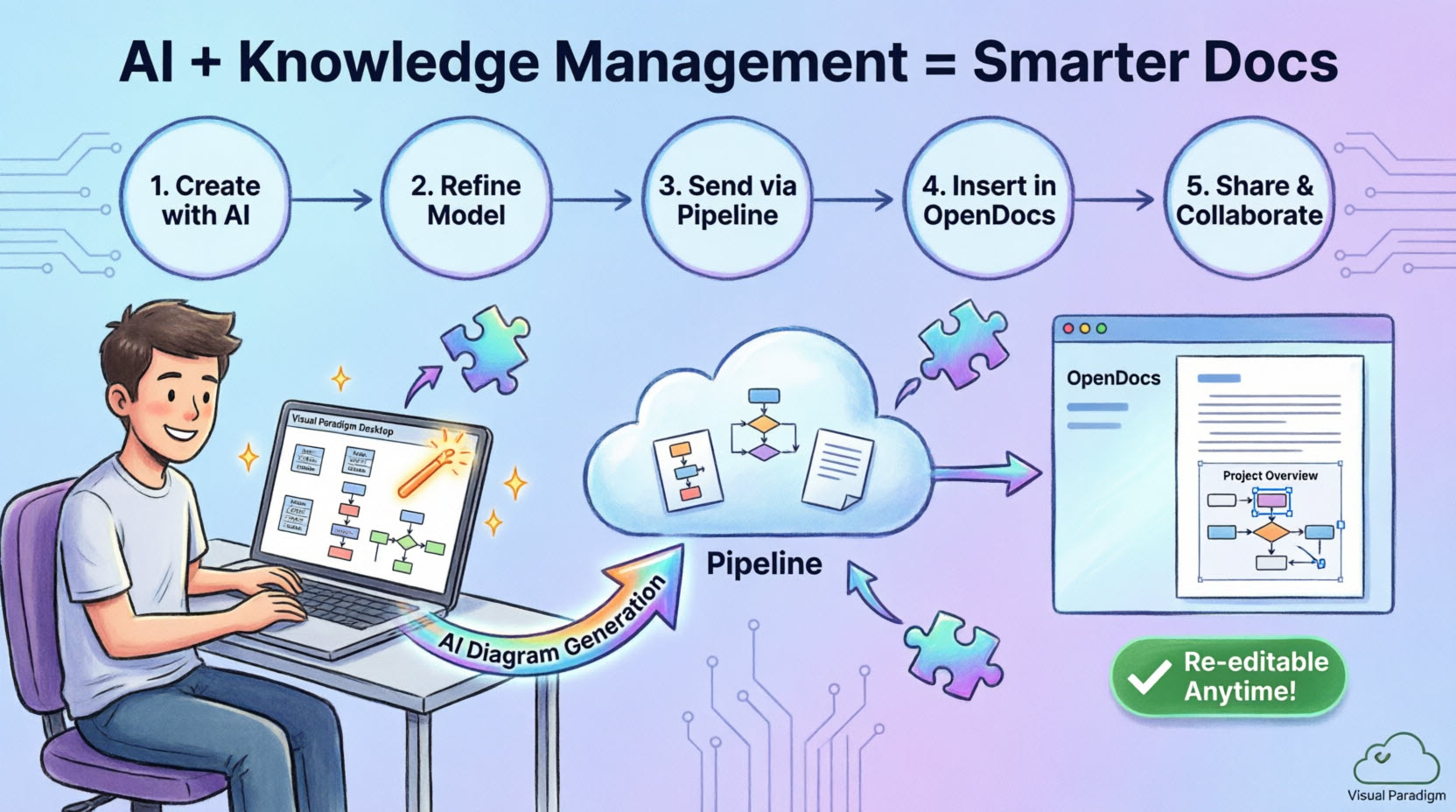
When Should You Use the Pipeline?
The Pipeline is designed for scenarios where you need to:
- Transfer diagrams from Desktop to documentation: After creating or refining diagrams in Visual Paradigm Desktop Professional Edition, use the Pipeline to move them into your OpenDocs knowledge base
- Maintain version control: When your models evolve and you need to keep documentation synchronized with the latest diagram revisions
- Collaborate across teams: When multiple stakeholders need access to both the visual models and their contextual documentation
- Leverage AI-generated diagrams: After using Visual Paradigm Desktop’s AI diagram generation feature to quickly visualize concepts, send them directly to OpenDocs for elaboration
- Create living documentation: When your documentation needs to evolve alongside your models throughout the project lifecycle
Why the Pipeline is Essential for Modern Knowledge Management
1. Eliminates Manual Export/Import Workflows
Traditional documentation processes require exporting diagrams as images, uploading them to document platforms, and manually replacing them when changes occur. The Pipeline automates this entirely, removing friction and reducing the risk of outdated diagrams in your documentation.
2. Preserves Editability
Unlike static image exports, diagrams sent through the Pipeline maintain their connection to the source model. This means you can re-edit diagrams directly from OpenDocs without losing fidelity or starting from scratch.
3. Enables Version Control
The Pipeline tracks revisions automatically. Every time you send an updated diagram, it creates a new revision in the repository, allowing you to maintain a complete history and swap between versions as needed.
4. Bridges the Concept-to-Docs Gap
By integrating AI-assisted modeling with professional knowledge management, the Pipeline enables teams to move from initial ideas to comprehensive, shared knowledge bases in minutes rather than hours.
5. Centralizes Asset Management
Instead of scattered files across multiple platforms, the Pipeline provides a single source of truth for all your modeling artifacts, making it easier to manage, locate, and reuse diagrams across projects.
How to Use the Pipeline: A Step-by-Step Guide
Exporting Diagrams from Visual Paradigm Desktop to OpenDocs
Step 1: Prepare Your Diagram
Open the diagram you wish to send in Visual Paradigm Desktop. This could be a diagram you created manually or one generated using the AI diagram generation tool.
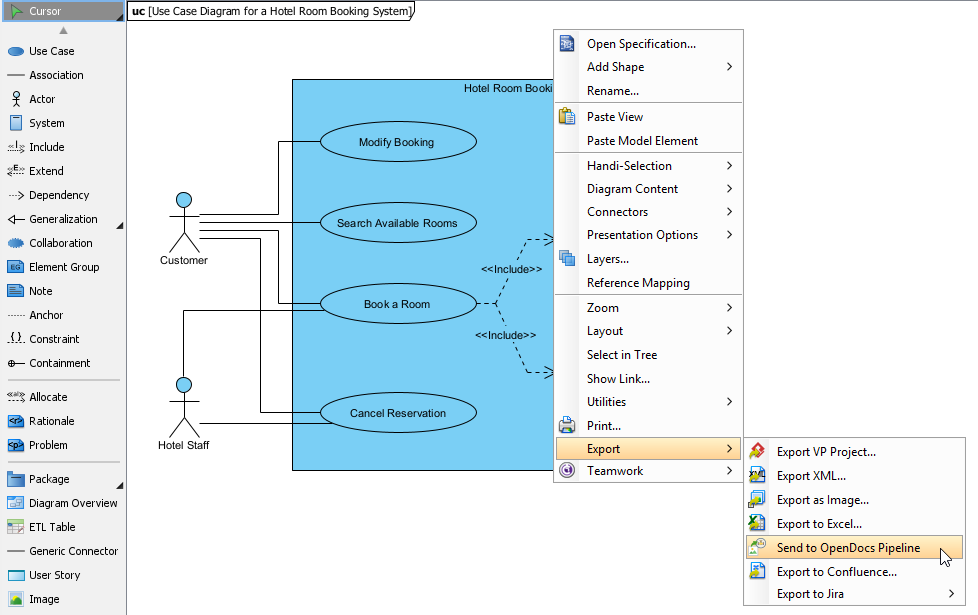
Step 2: Send to Pipeline
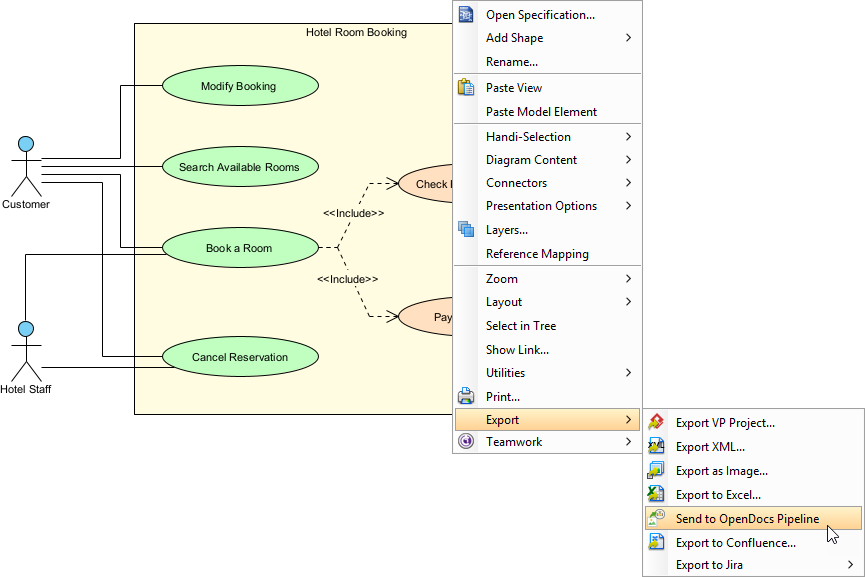
Right-click on the diagram and select Export > Send to OpenDocs Pipeline.
Step 3: Save Your Project
When prompted, save your project by clicking OK. This ensures your diagram is properly versioned in the Pipeline.
Step 4: Add Context (Optional)
Enter a comment to help identify the version or purpose of the artifact. This comment will be visible in the Pipeline pane within OpenDocs, making it easier for team members to understand the diagram’s context.
Step 5: Confirm Export
Confirm the export to send your diagram to the cloud-based Pipeline repository.
Inserting Pipeline Artifacts into OpenDocs
Once your diagram is in the Pipeline, integrating it into your documentation is straightforward:
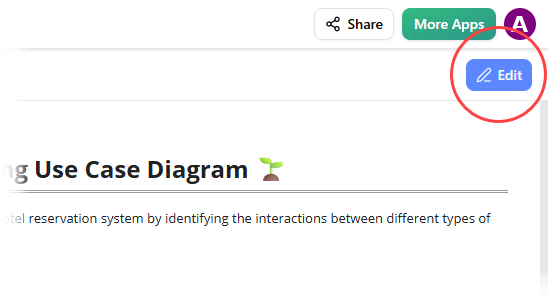
Step 1: Enter Edit Mode
Open any document page in OpenDocs and click Edit.
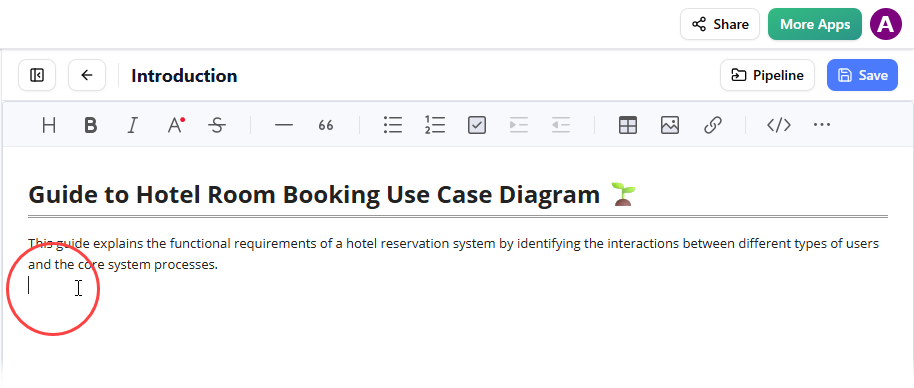
Step 2: Position Your Cursor
Click on the page where you want to insert the diagram.
Step 3: Access the Insert Menu
On the toolbar, click Insert.
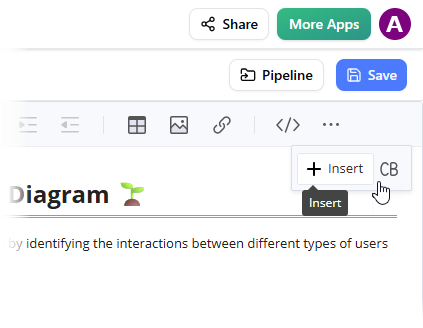
Step 4: Select from Pipeline
In the Insert window, select Pipeline from the left-hand sidebar. Your sent diagrams will appear here, ready for insertion.
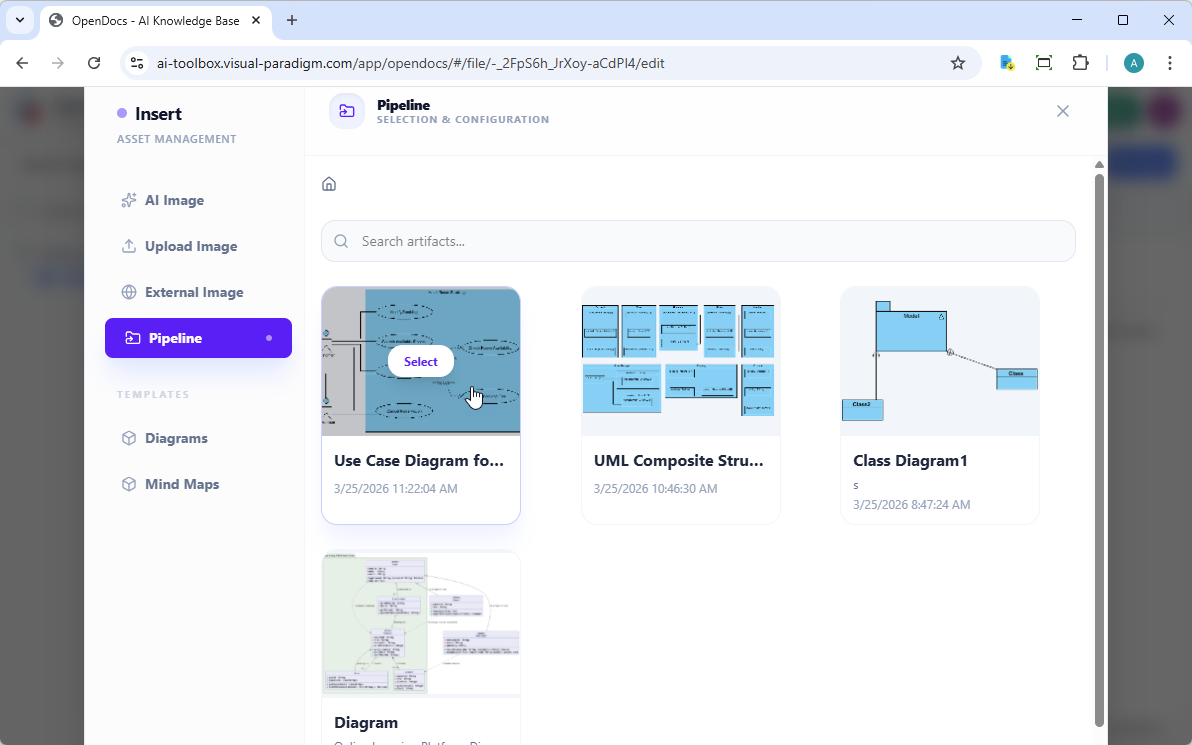
Step 5: Insert the Diagram
Click on the diagram to insert the image directly at your cursor position.
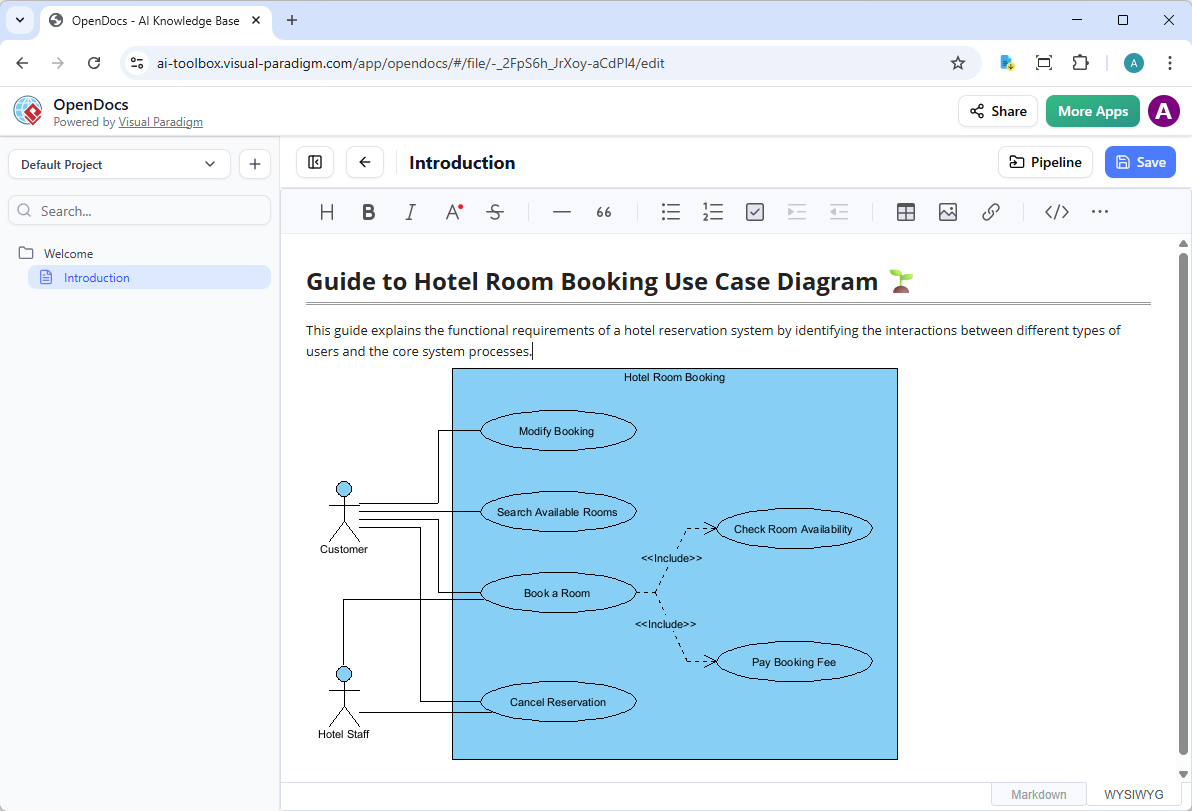
Keeping Documentation in Sync: Updating Artifacts
One of the Pipeline’s most powerful features is its ability to keep your documentation synchronized with evolving models.
Step 1: Open the Source Diagram
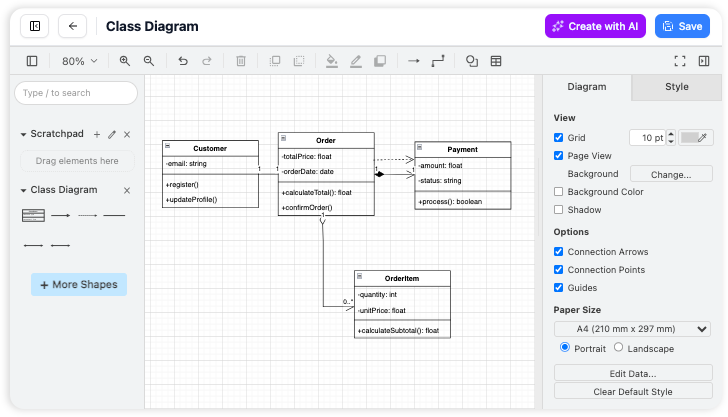
In OpenDocs, click the Edit icon at the top right of the diagram image to open the Edit Diagram window.
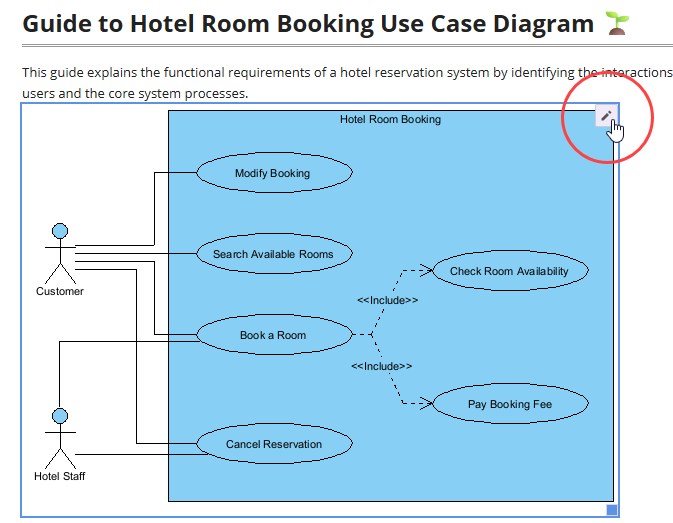
Copy the diagram link provided. In Visual Paradigm Desktop, go to Project > Open, paste the link, and the software will open the source model for you.
Step 2: Edit and Re-send
Modify your diagram in Visual Paradigm Desktop. Once finished, right-click the diagram and select Export > Send to OpenDocs Pipeline again. This creates a new revision of the artifact automatically.
Step 3: Swap to the Latest Revision
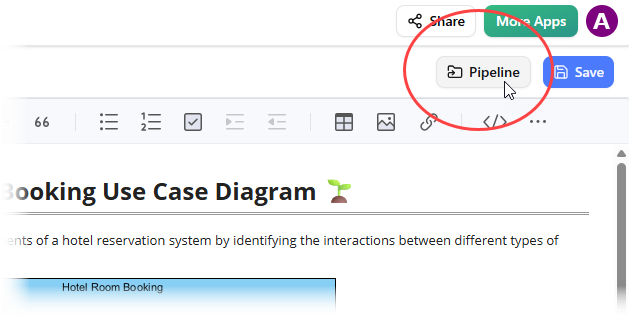
Back in the OpenDocs editor, click Pipeline at the top right.
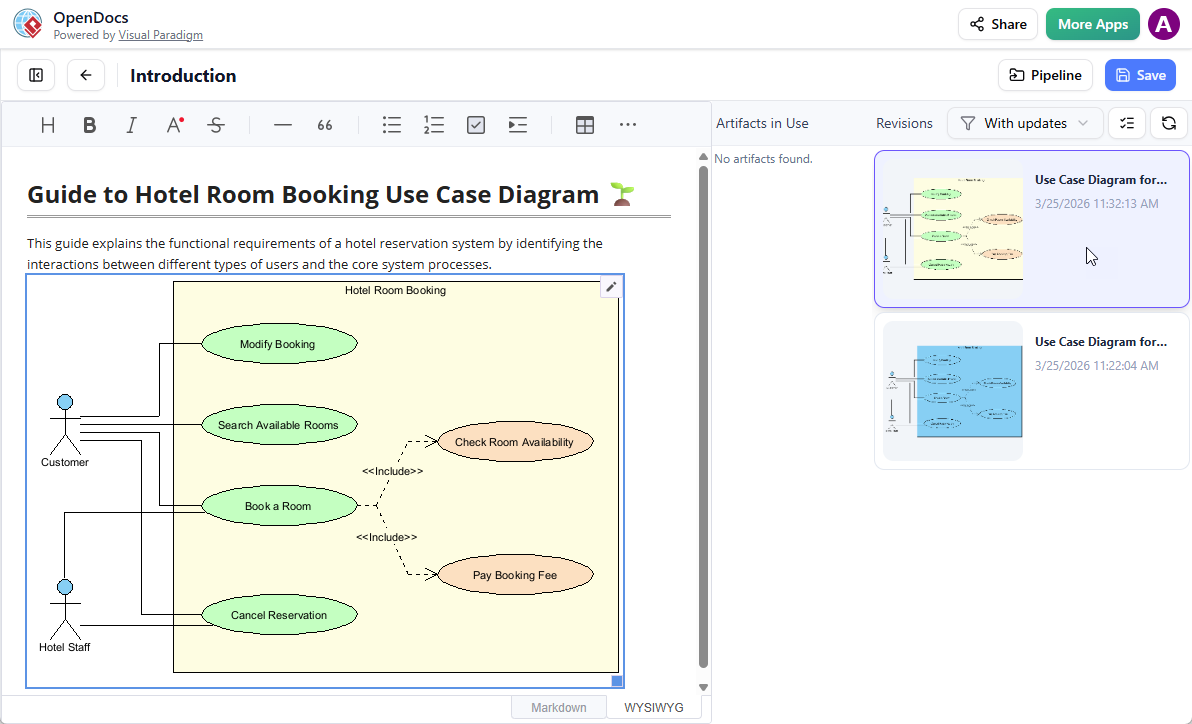
You will see the artifacts currently used on that page. Select the diagram to see a list of revisions. Simply click on the latest revision to instantly swap the old diagram for the updated version.
Why the Pipeline Makes OpenDocs More Practical for Knowledge Management
1. Creates a True Single Source of Truth
The Pipeline eliminates the problem of scattered diagram versions across different platforms. By centralizing all artifacts in one repository that both Desktop and OpenDocs can access, teams always work with the most current version. This is critical for knowledge management, where outdated information can lead to costly mistakes.
2. Enables Collaborative Knowledge Building
Different team members excel at different tasks—some are skilled modelers, others are technical writers. The Pipeline allows each person to work in their preferred environment while contributing to a unified knowledge base. Modelers can focus on Visual Paradigm Desktop, while documentation specialists can work in OpenDocs, with the Pipeline seamlessly connecting their work.
3. Supports Agile Documentation Practices
In agile environments, requirements and designs evolve rapidly. The Pipeline’s revision tracking and easy update mechanism mean documentation can keep pace with development. Teams no longer face the choice between “documentation that’s current” and “documentation that exists”—they can have both.
4. Reduces Cognitive Load
By automating the transfer of diagrams between tools, the Pipeline frees team members from mundane file management tasks. This allows them to focus on what matters: creating accurate models and writing clear documentation. The optional commenting feature also provides context without requiring separate communication channels.
5. Facilitates Knowledge Transfer
When onboarding new team members or transitioning projects, the Pipeline provides a complete, versioned history of how models evolved alongside their documentation. This historical context is invaluable for understanding design decisions and system evolution.
6. Integrates AI-Assisted Workflows
The Pipeline fully supports Visual Paradigm’s AI diagram generation capabilities. Teams can rapidly prototype ideas using AI, refine them manually, and immediately incorporate them into living documentation—all without leaving the Visual Paradigm ecosystem. This accelerates the entire knowledge creation process.
7. Ensures Professional Quality
Available in Visual Paradigm Professional Edition and above, the Pipeline integration ensures that only professional-grade tools are used for enterprise knowledge management. This maintains quality standards while providing the flexibility modern teams need.
Conclusion
The Pipeline feature transforms OpenDocs from a simple documentation platform into a comprehensive knowledge management system that grows with your models. By eliminating the barriers between diagram creation and documentation, it enables teams to build living knowledge bases that remain accurate, accessible, and valuable throughout the project lifecycle.
Whether you’re documenting enterprise architecture, agile development processes, or complex system designs, the Pipeline ensures your visual models and textual documentation evolve together—creating a true single source of truth for your entire organization.
Ready to streamline your knowledge management workflow?
- OpenDocs – AI-Powered Visual Knowledge Engine: OpenDocs is an AI-powered visual knowledge platform that enables users to create, manage, and share diagrams and documentation using natural language. It integrates with Visual Paradigm’s suite of tools to streamline knowledge creation and collaboration across teams.
- Comprehensive Guide to OpenDocs (February–March 2026 Update): The AI-Powered Visual Knowledge Engine: This in-depth guide explores the latest advancements in OpenDocs, including AI-driven diagram generation, real-time collaboration features, and enhanced knowledge management workflows. It highlights how OpenDocs is transforming enterprise documentation and technical communication.
- Visual Paradigm OpenDocs: The Complete Guide to AI-Powered Knowledge Management and Diagram Generation: A detailed overview of OpenDocs’ capabilities, this article explains how AI automates the creation of complex diagrams such as ERDs, flowcharts, and deployment diagrams, while maintaining accuracy and professional standards.
- OpenDocs: The AI-Powered Knowledge Platform – Release Notes: This release announcement details the launch of OpenDocs as a full-featured AI knowledge platform, emphasizing its ability to convert text descriptions into structured diagrams and documentation with minimal user input.
- AI Flowchart Generator – OpenDocs Update: Discover how OpenDocs now supports AI-generated flowcharts from plain text. This update enhances productivity by automatically translating business logic or process descriptions into visually intuitive flowcharts.
- AI Entity Relationship Diagram (ERD) Generator – OpenDocs: OpenDocs now includes an AI-powered ERD generator that creates accurate database schema diagrams from natural language input, ideal for developers and data architects.
- WYSIWYG Editor Update – AI Knowledge Management Tool: This update introduces a refined WYSIWYG editor within OpenDocs, allowing users to edit content and diagrams in real time with enhanced formatting, collaboration, and AI-assisted content structuring.
- AI Diagram to OpenDocs Pipeline: Learn how the new AI diagram-to-OpenDocs pipeline enables seamless import and conversion of diagrams from external sources into structured OpenDocs knowledge repositories, preserving metadata and layout.
- Sync AI Diagram to OpenDocs Pipeline Guide: A step-by-step guide on synchronizing AI-generated diagrams with OpenDocs in real time, ensuring consistency and up-to-date documentation across projects and teams.
- Integrated Diagram Editor – Create a Wide Variety of Diagrams: OpenDocs features an integrated diagram editor that supports a broad range of diagram types, from UML and BPMN to network and organizational charts, enabling users to create professional-looking diagrams without external tools.
- Chat with OpenDocs AI: Access the AI assistant within OpenDocs to generate diagrams, clarify documentation, and receive real-time suggestions for improving knowledge artifacts using conversational AI.
- AI Deployment Diagram Generator – OpenDocs: OpenDocs now includes an AI-powered deployment diagram generator that automatically creates infrastructure diagrams based on textual descriptions of system architecture.
- AI Component Diagram Generator – OpenDocs Update: This update enhances OpenDocs with an AI-driven component diagram generator, enabling developers to quickly visualize software architecture and module relationships from simple text inputs.
- AI EPC Diagram Generator – OpenDocs (Event-Driven Process Chain): OpenDocs now supports AI-generated EPC (Event-Driven Process Chain) diagrams, helping business analysts model complex processes with event-triggered logic and organizational roles.
- New in OpenDocs: AI-Powered Data Flow Diagram (DFD) Support: OpenDocs now supports AI-generated Data Flow Diagrams (DFDs), allowing users to create detailed system data flow visualizations from plain language descriptions, ideal for system analysis and design.
- AI PERT Chart Generator – OpenDocs (Visual Paradigm): This release introduces an AI-powered PERT chart generator, helping project managers visualize task dependencies, timelines, and critical paths with minimal manual input.
- AI Breakdown Structure Chart Maker – OpenDocs: OpenDocs now includes an AI-driven tool for generating Work Breakdown Structure (WBS) charts, enabling project teams to organize tasks hierarchically and efficiently plan complex projects.
- Is OpenDocs Available as a Desktop App?: OpenDocs is accessible via a modern web browser and does not require any installation—making it instantly available on any device with internet access, ideal for remote and collaborative teams.
- Visual Paradigm – Shop & Licensing: Explore licensing options, bundles, and pricing plans for Visual Paradigm and OpenDocs, including enterprise, academic, and individual subscriptions.
- AI-Powered Diagram Generation – Visual Paradigm AI: Visit the dedicated AI portal for Visual Paradigm to explore advanced AI features, including diagram generation, natural language to diagram conversion, and intelligent documentation tools integrated across the Visual Paradigm ecosystem.
Note: Pipeline integration requires Visual Paradigm Professional Edition or above.
This post is also available in 日本語.
Related posts:
 OpenDocs by Visual Paradigm: Revolutionizing Knowledge Management with AI and Visual Thinking
 Comprehensive Guide: Fishbone Diagrams (Ishikawa) in OpenDocs
 Comprehensive Guide to OpenDocs (February–March 2026 Update): The AI-Powered Visual Knowledge Engine
Mastering the Visual Paradigm AI Ecosystem: A Comprehensive Guide
Comprehensive Guide to OpenDocs (February–March 2026 Update): The AI-Powered Visual Knowledge Engine
Mastering the Visual Paradigm AI Ecosystem: A Comprehensive Guide