


In object-oriented modeling, understanding the real-world instances that bring your system to life is crucial. While class diagrams define the blueprint, object diagrams show the actual state of a system at a given moment — how specific objects relate, what data they hold, and how they interact.
Traditionally, building these diagrams from scratch can be time-consuming, especially when working with complex systems or evolving datasets. AI can now automate much of this process, helping you instantly visualize object instances from existing models, code, or text descriptions.
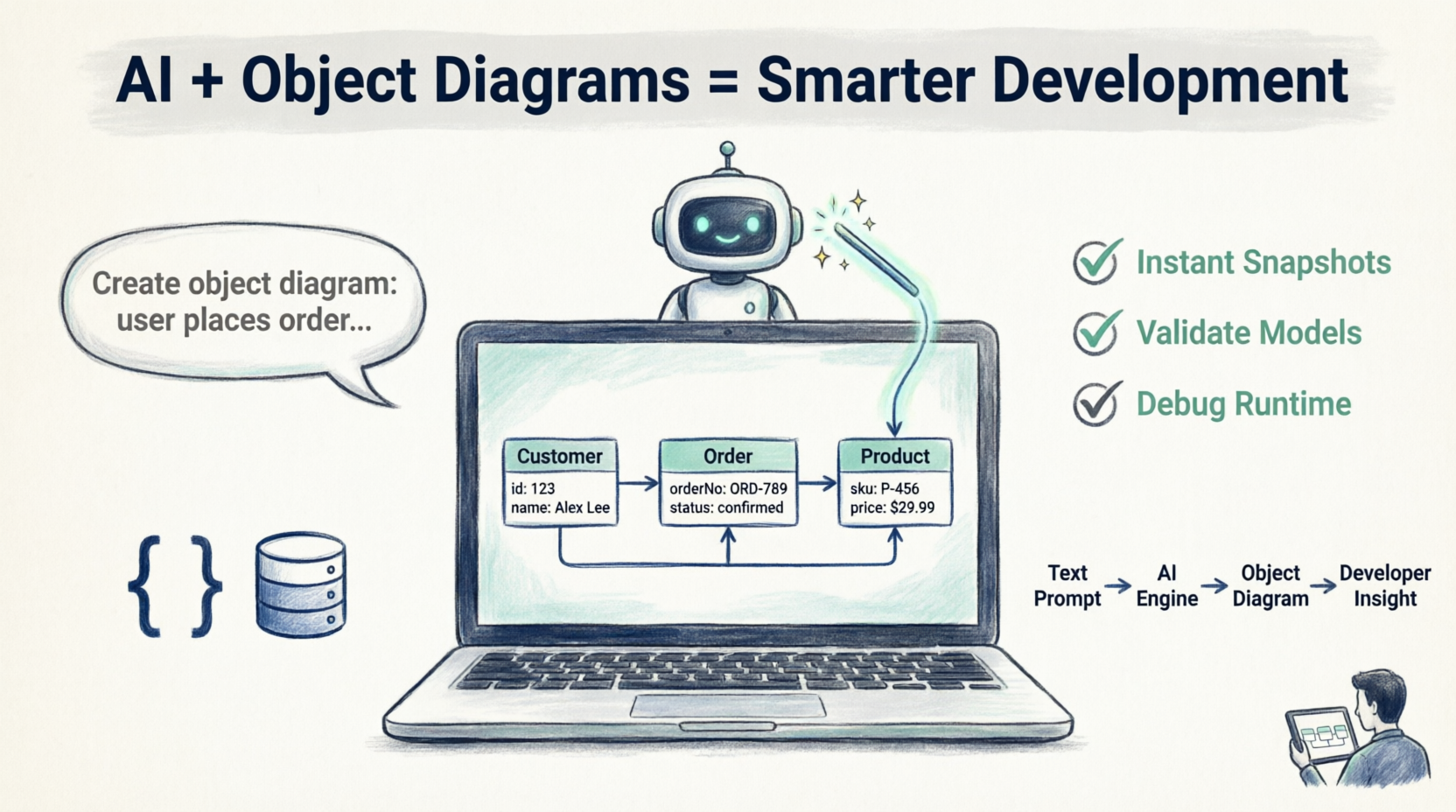
This guide explains what an Object Diagram is, why it matters, and how AI can accelerate and enhance your modeling workflow — tailored specifically for IT developers.
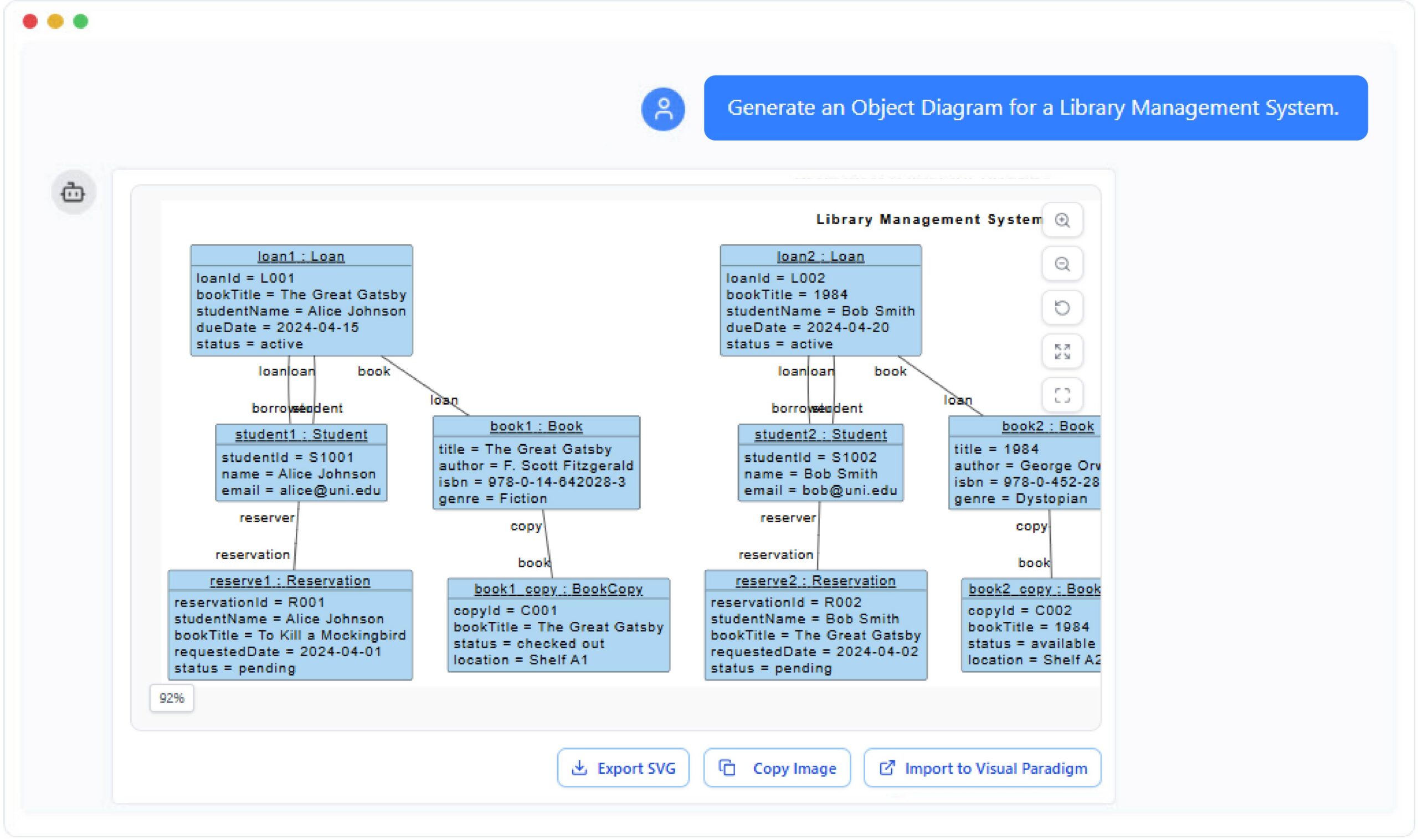
What Is an Object Diagram?
An Object Diagram is a static structure diagram in UML that shows a snapshot of a system at a specific point in time. It represents instances of classes (objects) and the links (relationships) between them.
While a Class Diagram shows the abstract design — such as classes, attributes, and operations — an Object Diagram captures a concrete moment of the system, showing real data values and active object relationships.
Key Elements for Developers
| Element | Description | Example |
|---|---|---|
| Objects | Specific instances of classes, with attribute values assigned | userSession_42 : Session |
| Links | Instance-level relationships between objects | userSession_42 → cart_88 |
| Attribute Values | Actual data stored within each object | status = "pending", total = 149.99 |
| Object Names | Formatted as objectName : ClassName |
order_2024_001 : Order |
💡 Developer Tip: Object diagrams are invaluable for debugging runtime behavior, validating ORM mappings, and documenting API payloads in context.
Why Use AI for Object Diagrams?
AI transforms how developers visualize and analyze system instances. Instead of manually defining each object, attribute, and link, you can describe your system in natural language — and let AI generate the diagram for you.
Key Benefits for IT Teams
✅ Generate Instant Snapshots
Describe your scenario (e.g., “A user authenticates, creates a cart, and adds three products”) and let AI create a complete object diagram with instances, links, and attribute values.
✅ Visualize Real Data States
AI can parse data from your system’s current state (database records, JSON payloads, or in-memory objects) and visualize it as an object diagram — bridging the gap between code and model.
✅ Ensure Consistency with Class Diagrams
By referencing your class diagram, AI ensures every generated object diagram respects class definitions, inheritance, and relationships — preventing modeling errors or inconsistent instances.
✅ Accelerate Onboarding & Documentation
New team members can quickly generate examples to understand domain models, test edge-case states, or document execution flows without digging through legacy code.
✅ Support Test Case Design
Use AI-generated object diagrams to visualize preconditions, postconditions, and state transitions for unit and integration tests.
Common Use Cases for IT Developers
AI-generated object diagrams serve multiple practical purposes across software design, analysis, and communication.
🔍 System Snapshot for Debugging
Capture a system’s state at a given time. Visualize how objects interact during a transaction or event (e.g., “user_101 placed order_555 with three products and a pending payment”). Ideal for post-mortem analysis or reproducing bugs.
🔗 Validating ORM & Repository Mappings
Verify that class-level relationships defined in your domain model correctly translate into real-world object instances. Detect missing associations, circular dependencies, or lazy-loading issues early.
🎓 Teaching & Knowledge Transfer
Simplify onboarding by generating diagrams from simple text prompts — “show two services communicating via a message queue” — to illustrate architectural patterns and dependency injection.
🗄️ Visualizing Database Records as Objects
Convert database rows or NoSQL documents into object diagrams to understand entity relationships intuitively without writing complex JOIN queries or parsing raw JSON.
🧪 Scenario Modeling for Requirements & Testing
Generate diagrams that simulate real use cases (e.g., “an e-commerce checkout flow with inventory reservation, payment processing, and notification dispatch”) to help stakeholders visualize interactions and refine acceptance criteria.
🔄 Refactoring Support
Before refactoring a complex module, generate an object diagram of its current runtime state. Use it as a baseline to validate behavior after changes.
How to Use AI for Object Diagrams: Practical Prompts for Developers
Think of your AI as a modeling collaborator. You describe your scenario, and it converts your words into structured visual representations.
1. From Text Description
"Create an object diagram showing a User object with email '[email protected]',
linked to a ShoppingCart containing two Product objects:
'Wireless Mouse' ($29.99) and 'Mechanical Keyboard' ($119.99).
Include timestamps and status attributes."
2. From Class Diagram or Code
"Based on my Order, Customer, and Product classes, generate an object diagram
showing two customers, each with multiple orders containing products.
Include foreign key relationships and cascade rules."
3. For Debugging Runtime Issues
"Visualize the object state after executing the checkout() function where:
- cart contains three products
- payment service returned 'timeout'
- inventory was reserved but not confirmed"
4. For API Documentation
"Generate an object diagram representing the JSON response of GET /api/orders/123,
showing nested OrderItem objects, linked Product references, and computed totals."
5. For Microservices Architecture
"Show object instances across services: UserService, OrderService, and NotificationService,
with message payloads and correlation IDs linking them during an order placement flow."
💡 Pro Tip: Include cardinality, nullability, and lifecycle state (e.g.,
isNew,isDirty) in your prompts to generate more accurate, developer-ready diagrams.
Tips & Tricks for IT Developers
🎯 Prompt Engineering for Better Results
-
Be specific about attribute names and data types:
userId: UUID,createdAt: ISO8601 -
Specify relationship directionality:
Customer "1" --> "0..*" Order -
Include business rules: “Only show objects where status != ‘archived'”
🔁 Iterative Refinement
-
Start with a high-level prompt
-
Review the generated diagram
-
Refine with follow-ups: “Add the PaymentMethod object linked to the Order”
-
Export and integrate into your documentation pipeline
🧩 Integration with Development Workflow
-
IDE Plugins: Use AI diagram tools that integrate with VS Code, IntelliJ, or Eclipse
-
CI/CD Hooks: Generate object diagrams from test fixtures as part of your build pipeline
-
Swagger/OpenAPI: Map API schemas to object diagrams for living documentation
🛡️ Validation & Quality Checks
-
Cross-check AI-generated diagrams against your class diagram or entity schema
-
Use diagrams to validate serialization/deserialization logic
-
Verify that generated object states comply with domain invariants
📦 Export & Collaboration
-
Export diagrams as PNG, SVG, or PlantUML for version control
-
Embed diagrams in Confluence, Notion, or GitHub READMEs
-
Share interactive links with stakeholders for real-time feedback
Best Practices for AI-Powered Object Diagramming
| Practice | Why It Matters |
|---|---|
| Start with a clear class model | AI needs structural context to generate valid object instances |
| Use consistent naming conventions | Ensures generated diagrams align with your codebase |
| Validate generated diagrams | Always review AI output for business logic accuracy |
| Document assumptions in prompts | Helps AI handle edge cases and domain-specific rules |
| Version your diagrams | Track evolution of system state alongside code changes |
| Combine with sequence diagrams | Object diagrams show what; sequence diagrams show when and how |
Conclusion
Object Diagrams provide a clear, snapshot-level understanding of how your system behaves at a given time. They turn abstract designs into tangible realities, showing the flow of data and the relationships that bring your models to life.
By pairing Object Diagrams with AI-powered generation, you move from manual drawing to intelligent visualization — gaining speed, accuracy, and deeper insight into your system’s true structure.
For IT developers, this means:
-
Faster debugging and root-cause analysis
-
Clearer communication with cross-functional teams
-
More effective onboarding and knowledge sharing
-
Stronger alignment between code, models, and requirements
AI makes it effortless to create, explore, and refine these diagrams, helping you not only document your system but understand it as it truly exists.
Start small: pick one complex flow in your application, describe it to your AI modeling assistant, and generate your first AI-powered object diagram today.
References
AI-Powered Object Diagrams: A Guide to AI-Powered Structural Visualization: This guide explores how artificial intelligence enhances structural visualization through object diagrams within the Visual Paradigm environment.
AI-Powered UML Diagramming Using Visual Paradigm: This article examines how generative AI streamlines the creation of various UML diagrams, including object diagrams, to support smarter system design.
Mastering UML Diagram Generation with Visual Paradigm AI: A comprehensive resource explaining how to create precise UML models by leveraging AI-driven automation for faster project delivery.
Visual Paradigm AI Diagram Generator: A Comprehensive Guide: This article details how to use AI-powered diagram generation to convert textual ideas into structured visual designs.
Visual Paradigm AI Chatbot: Turn Your Ideas into Diagrams Instantly: This resource highlights a chatbot that allows users to generate diagrams using natural language, making visual modeling more accessible to teams.
How AI Chatbot Can Help You Learn UML Faster: This blog post discusses how students and professionals can practice UML interactively and receive instant feedback through AI assistants.
Mastering UML Object Diagrams: A Comprehensive Guide with Visual Paradigm: A technical guide providing an overview of creating and understanding object diagrams, depicting class instances and their relationships.
How to Turn Requirements into Diagrams with an AI Chatbot: This article focuses on bridging the gap between textual requirements and visual models like object diagrams using conversational AI.
Mastering Automated Modeling: A Guide to New AI Diagram Types: A guide on leveraging new AI-powered diagramming features to automate complex modeling tasks and maintain standards compliance.
Visual Paradigm’s AI-Powered Ecosystem: Smarter Visual Modeling: An overview of how integrated AI platforms support the entire modeling lifecycle, from conversational ideation to enterprise-grade delivery.
This post is also available in Deutsch, Español, فارسی, Français, English, Bahasa Indonesia, 日本語, Polski, Portuguese, Ру́сский, Việt Nam, 简体中文 and 繁體中文.
Related posts:
 Comprehensive Guide: From Problem Statement to Class Diagram, ERD, and Database Modeling with Visual Paradigm
 Visual Paradigm’s AI‑Powered ERD Generator
 How Visual Paradigm’s AI Diagram Generation Turns Your Ideas into Professional UML & BPMN Diagrams in Seconds
 Why Teams Are Switching to Visual Paradigm: Powerful Modeling Meets Cutting-Edge AI