


Operating their businesses without well documented processes is just like a pilot who is flying blind without properly functioning instruments and navigation.”
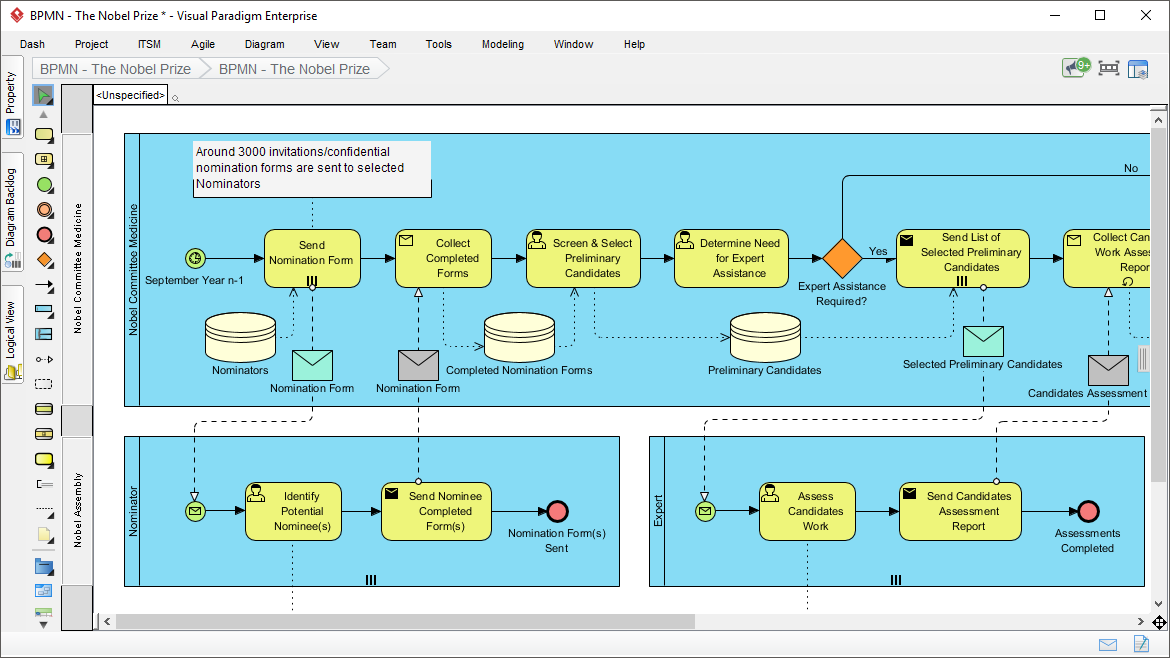
🎯 Introduction to BPMN
Business Process Model and Notation (BPMN) is a standardized graphical notation for specifying business processes in a Business Process Diagram (BPD) [[14]]. The primary goal of BPMN is to provide a notation readily understandable by all business users—from business analysts creating initial drafts, to technical developers implementing the technology, to business people managing and monitoring processes [[10]].
Why BPMN Matters
Well-documented and streamlined processes are essential for smooth team functioning focused toward shared goals. Visual Paradigm streamlines the entire business process modeling process for Business Analysts, supporting:
-
✅ Align Operations with Business Strategy
-
✅ Improve Process Communication
-
✅ Increase Control and Consistency
-
✅ Improve Operational Efficiencies
-
✅ Gain Competitive Advantage
BPMN can be applied at three distinct levels [[10]]:
| Level | Description | Target Audience |
|---|---|---|
| Descriptive | High-level modeling comfortable for flowchart users | Business Analysts |
| Analytic | Contains concepts covered in BPMN training | Process Architects |
| Executable | Elements required for executable process models | Technical Developers |
🔷 BPMN Core Elements: The Four Categories
BPMN organizes graphical elements into four basic categories to make diagrams easy to recognize and understand [[10]]:
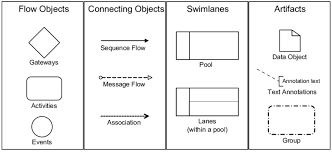
1️⃣ Flow Objects (The Heart of BPMN)
Flow Objects are the three core graphical elements that form the foundation of any BPMN diagram [[7]].
🟢 Events: “Something That Happens”
An Event is represented by a circle and represents something that happens during a business process [[10]]. Events affect process flow and usually have a cause (trigger) or impact (result).
| Event Type | Visual | Description | Common Markers |
|---|---|---|---|
| Start Event | ○ (thin border) | Triggers the beginning of a process [[35]] | None, Message, Timer, Signal, Conditional |
| Intermediate Event | ◎ (double border) | Occurs between start and end [[9]] | Timer, Message, Error, Escalation, Link |
| End Event | ● (thick border) | Marks the completion of a process [[35]] | None, Message, Error, Terminate, Signal |
💡 Pro Tip: Events can be catching (waiting for a trigger) or throwing (sending a result) [[38]].
🔵 Activities: “Work That Is Performed”
An Activity is represented by a rounded-corner rectangle and is a generic term for work performed by the organization [[10]].
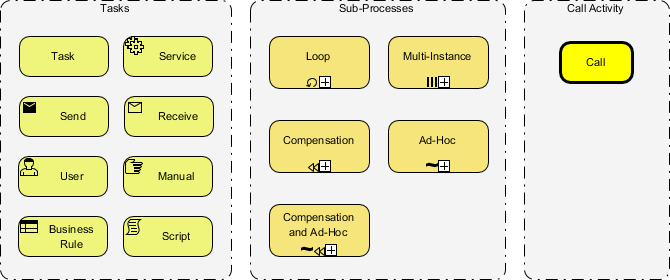
Activity Types [[54]]:
| Task Type | Icon | Use Case |
|---|---|---|
| User Task | 👤 | Requires human interaction |
| Service Task | ⚙️ | Automated service invocation |
| Script Task | 📜 | Executes script code |
| Business Rule Task | 📋 | Evaluates business rules |
| Manual Task | ✋ | Performed without system support |
| Send/Receive Task | ✉️ | Sends or receives messages |
| Sub-Process | ➕ | Collapsed process with internal details |
A Sub-Process is distinguished by a small plus sign (+) in the bottom center of the shape [[10]].
🔶 Gateways: “Decision & Control Points”
A Gateway is represented by a diamond shape and controls the divergence and convergence of Sequence Flow [[10]].
| Gateway Type | Symbol | Behavior | Use When |
|---|---|---|---|
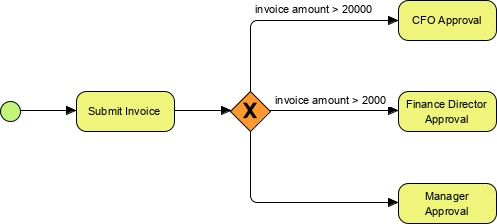
| Exclusive (XOR) | ⨁ | Follow only one path | Mutually exclusive decisions [[45]] |
| Inclusive (OR) | ⭕ | Follow one or more paths | Multiple conditions may be true [[47]] |
| Parallel (AND) | ➕ | Follow all paths simultaneously | Tasks can run in parallel [[45]] |
| Event-Based | ⚡ | Wait for first occurring event | Race conditions between events [[43]] |
| Complex | ✳️ | Custom logic via expression | Advanced branching scenarios |
Example: Exclusive Gateway Decision
2️⃣ Connecting Objects: “How Elements Relate”
Connecting Objects link Flow Objects to create the skeletal structure of a business process [[10]].
| Connector | Visual | Purpose | Rules |
|---|---|---|---|
| Sequence Flow | ──► (solid) | Shows order of activities [[6]] | Connects Flow Objects within same Pool |
| Message Flow | – -► (dashed) | Shows communication between Participants [[6]] | Connects across Pools; never within same Pool |
| Association | · · · (dotted) | Links Artifacts/Data to Flow Objects | No directionality; for documentation |
⚠️ Key Rule: Message Flows cannot connect two elements within the same Pool—they represent cross-organizational communication [[10]].
3️⃣ Swimlanes: “Organizing Responsibility”
Swimlanes organize activities into visual categories to illustrate functional capabilities or responsibilities [[10]].
🏊 Pool
-
Represents a Participant in a Process (e.g., Customer, System, Department)
-
Acts as a graphical container partitioning activities from other Pools
-
Essential for B2B process modeling
🛣️ Lane
-
A sub-partition within a Pool extending its full length
-
Used to categorize activities by role, department, or system
-
Supports hierarchical lane structures

4️⃣ Artifacts: “Adding Context & Documentation”
Artifacts provide additional information without affecting Sequence Flow [[10]].
| Artifact | Visual | Purpose |
|---|---|---|
| Data Object | 📄 | Shows data required/produced by activities |
| Data Store | 🗄️ | Represents persistent data storage |
| Group | ┌───┐ (dashed) | Visually clusters elements for documentation |
| Annotation | 📝 | Adds explanatory text to diagram elements |
🔄 Advanced BPMN Concepts
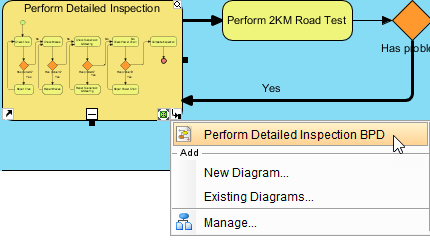
Process Drill-Down & Sub-Processes
Complex processes can be decomposed using Sub-Processes. Click the “+” marker to drill down into detailed steps, or collapse to maintain high-level views [[21]].
Working Procedures & Documentation
Attach detailed working procedures, policies, or references directly to process elements for comprehensive documentation [[21]].

Process Simulation & Animation
-
Animation: Visually illustrate different path choices in BPMN to validate logic
-
Simulation: Evaluate process cost, duration, and identify bottlenecks before implementation [[21]]
Gap Analysis: As-Is vs. To-Be
Auto-transform diagrams to compare current state (As-Is) with future state (To-Be) processes, highlighting improvements and changes [[21]].
Agile Integration
Seamlessly transform business processes to user stories or use cases, subsequently feeding Agile process backlogs [[21]].
🛠️ Key Features of Professional BPMN Tools
When selecting a BPMN modeling tool like Visual Paradigm, look for these capabilities [[21]]:
✅ Core Modeling
-
Powerful and intuitive connection rules validation
-
Flexible pools and lanes editing for easy updates
-
Process drill-down and collapse functionality
-
Map processes with other standards (UML, User Stories, Sub-diagrams)
✅ Advanced Analytics
-
Auto transform for As-Is/To-Be gap analysis
-
Transform BPMN diagrams to RACI or CRUD Charts
-
Process animation to illustrate path choices
-
Process simulation to evaluate cost or identify bottlenecks
✅ Collaboration & Delivery
-
Manage co-editing with teammates and track changes
-
Generate professional reports automatically
-
Design custom reports with powerful report designers
-
Comment, annotate, and collaborate over the cloud
✅ Enterprise Ready
-
Cross-Platform: Windows, Unix, Mac OS
-
Trusted by over 320,000 users in Fortune 500 companies, universities, and government units
-
Seamless transfer between teams without application silos
📚 Reference List
- BPMN Notation Overview – Visual Paradigm: Comprehensive guide to BPMN symbols with clear explanations and diagram examples for creating professional Business Process Diagrams.
- Business Process Modeling Tool – Visual Paradigm: Details advanced process modeling features including gap analysis, RACI transformation, process animation, simulation, and Agile integration capabilities.
- BPMN 2.0 Symbols – A complete guide with examples – Camunda: Authoritative reference for BPMN 2.0 symbols covering events, tasks, subprocesses, messages, and executable process patterns.
- Business Process Model & Notation™ (BPMN™) – OMG: Official specification from the Object Management Group defining the graphical notation standard for business processes.
- All BPMN 2.0 Level 1 Elements – InveSkills: Practical guide to the descriptive modeling notation pallet consisting of events, activities, and gateways for beginner to intermediate modelers.
🎓 Best Practices for BPMN Modeling
-
Start Simple: Begin with Level 1 (Descriptive) elements before adding complexity [[5]]
-
Consistent Naming: Use clear, action-oriented labels for Activities (verb-noun format)
-
Limit Gateways: Avoid nested gateways; consider refactoring complex logic into Sub-Processes
-
Document Decisions: Use Annotations to explain non-obvious business rules
-
Validate Flows: Ensure every Start Event has a path to an End Event (no dead ends)
-
Separate Concerns: Use Pools/Lanes to clarify organizational boundaries and responsibilities
-
Test with Animation: Use process animation to validate logic before stakeholder review
“A Business Process Model is a network of graphical objects—activities (work) and flow controls that define their order of performance.” [[10]]
Ready to streamline your business processes? Visual Paradigm offers a free 30-day trial with no credit card required to start modeling professional BPMN diagrams today. 🚀
This post is also available in Deutsch, Español, فارسی, Français, English, Bahasa Indonesia, 日本語, Polski, Portuguese, Ру́сский, Việt Nam, 简体中文 and 繁體中文.
Related posts:
 How Project Managers Can Use Business Process Model and Notation to Reduce Scope Creep
 Avoiding the “Spaghetti Diagram”: How to Keep Business Process Model and Notation Readable at Scale
 Business Process Model and Notation in Agile Teams: Integrating Models into Sprint Planning and Retrospectives
 Business Process Model and Notation: A Guide to Handling Exception Flows Without Breaking Logic