


Transform Ideas into Strategic Blueprints in Minutes — No Blank Page Anxiety, No Guesswork
“The future of business strategy isn’t a 50-page plan — it’s a single, intelligent canvas.”
— Visual Paradigm, 2026
Whether you’re a founder launching a startup, a product manager shaping a new feature, an intrapreneur driving innovation inside a corporation, or a non-profit leader scaling social impact — Visual Paradigm’s AI-Powered Business Model Canvas (BMC) Tool turns a vague idea into a complete, actionable, and investor-ready strategy in under 20 minutes.
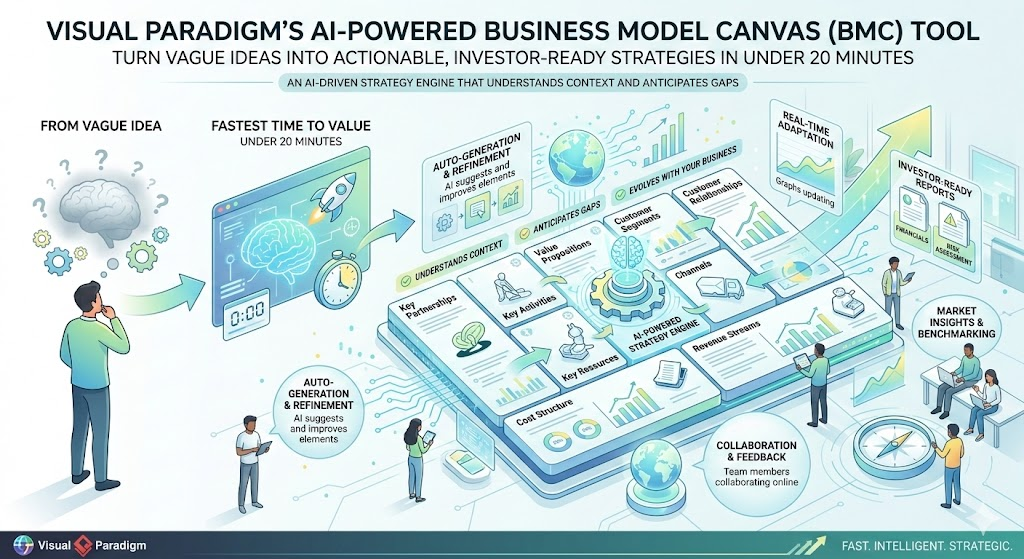
This isn’t just another template. It’s an AI-driven strategy engine that understands context, anticipates gaps, and evolves with your business — all in real time.
🔑 1. Key Concepts: The Business Model Canvas (BMC) — Reimagined with AI
The Business Model Canvas, pioneered by Alexander Osterwalder, is the world’s most popular strategic framework. It replaces the bloated business plan with 9 interconnected building blocks that force clarity, alignment, and validation.
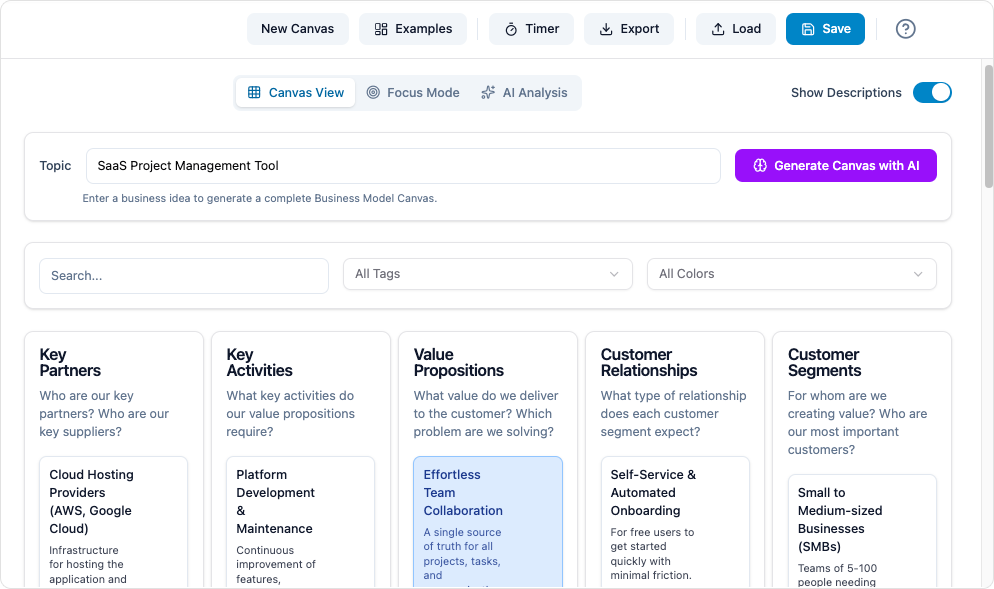
But in 2026, Visual Paradigm’s AI layer transforms the BMC from a static diagram into a living, thinking strategy partner.
✅ The 9 Building Blocks (Left-to-Right Flow)
| Block | What It Means | AI’s Role |
|---|---|---|
| 1. Customer Segments | Who are you solving problems for? (e.g., urban commuters, small businesses, NGOs) | Identifies segments based on your prompt and market context |
| 2. Value Propositions | What unique value do you deliver? (Pain relievers, gain creators, innovation) | Suggests multiple high-impact propositions tailored to target users |
| 3. Channels | How do you reach and deliver to customers? (Web, app, retail, social media) | Recommends optimal channels based on segment behavior and industry norms |
| 4. Customer Relationships | How do you nurture trust and loyalty? (Self-service, co-creation, personal assistance) | Recommends relationship types based on customer profile and product complexity |
| 5. Revenue Streams | How does money flow in? (Subscription, one-time sale, licensing, ads) | Matches revenue models to value delivery and market stage |
| 6. Key Resources | What assets are essential? (IP, talent, capital, infrastructure) | Flags critical resources based on industry and business model |
| 7. Key Activities | What must you do exceptionally well? (R&D, operations, platform maintenance) | Aligns activities with value creation and resource availability |
| 8. Key Partnerships | Who do you need to succeed? (Suppliers, tech partners, co-creators) | Suggests strategic alliances based on industry and stage |
| 9. Cost Structure | What are the biggest costs? (Fixed vs. variable, scale economics) | Predicts cost drivers and flags potential inefficiencies |
💡 Pro Insight:
Right Side (Customer-Facing): Front stage — what customers see and pay for.
Left Side (Operational): Back stage — the invisible engine that powers delivery.
AI ensures both sides are in balance — no more misaligned resources or unsustainable revenue models.
🛠️ 2. Core Features: Why This Isn’t Just a Canvas Anymore
Visual Paradigm’s AI-Powered BMC is not a static diagram. It’s a dynamic strategy ecosystem.
| Feature | Why It Matters |
|---|---|
| ✨ Instant AI Canvas Generation | Type: “AI-powered tutoring platform for high schoolers in India” → AI generates a full, structured BMC in under 30 seconds. |
| 🎯 Guided Builder with Smart Prompts | Step-by-step walkthrough with tooltips, examples, and AI suggestions — no more guessing. |
| 📊 One-Click AI Analysis Suite | Automatically generates: • SWOT Analysis • Cohesion & Risk Score • 10-Slide Pitch Deck Outline |
| 👥 Real-Time Collaboration | Multiple users edit simultaneously. Leave @mentions, track changes, and comment live. |
| 🔗 Seamless Diagram Integration | Link any block to: • Customer Journey Map • Empathy Map • Lean Canvas • BPMN Process Diagram • UML Class Diagram |
| 📤 Professional Export Options | Export as: PowerPoint, PDF, HTML, Markdown, or even a shareable web link. |
| 📁 Pre-Built Templates & Industry Context | SaaS, Marketplace, Hardware, Non-Profit, EdTech, HealthTech, B2B, B2C — AI adapts accordingly. |
| 🔄 Living Document | Duplicate, version, and track changes. Ideal for quarterly reviews and pivot planning. |
✅ Bonus: The AI remembers your past projects and learns your style — the more you use it, the smarter it gets.
🧭 3. Step-by-Step: Build Your First AI-Powered BMC in 2026 (Under 20 Minutes)
Follow this proven workflow used by startups, enterprises, and NGOs worldwide.
Step 1: Start Fresh
-
Log in to Visual Paradigm Online → Open Canvas Tool → Select “Business Model Canvas”.
Step 2: Feed the AI Your Idea
📌 Pro Tip: Use a clear, specific prompt:
"AI-powered mental wellness app for remote workers in North America. Focus on personalized therapy bots and community support. Stage: MVP."
-
Click “Generate with AI” → Watch as all 9 blocks populate instantly.
Step 3: Set the Context (Optional but Recommended)
-
Add: Company name, industry, strategic focus (e.g., “user retention,” “monetization”), and stage (idea, MVP, scaling).
🎯 This primes the AI to tailor suggestions to your reality.
Step 4: Refine with AI Assistance
-
Walk through each block using tooltips and “Suggest more” buttons.
-
Drag-and-drop sticky notes. Merge ideas. Add your own insights.
-
Use AI rewrites to refine phrasing (e.g., “More compelling value proposition?”).
Step 5: Run AI Analysis
Click “Analyze” → Instantly get:
-
🔍 SWOT Analysis (Strengths, Weaknesses, Opportunities, Threats)
-
⚠️ Cohesion & Risk Score (e.g., “82/100 — Risk: Medium. Revenue model doesn’t fully align with Key Activities.”)
-
📊 Pitch Deck Outline (10 slides, mapped directly to BMC blocks)
🎯 Use this for investor pitches, board reviews, or team alignment.
Step 6: Collaborate & Iterate
-
Invite teammates → assign blocks → comment with
@name. -
Test “What-if” scenarios:
→ “What if we add a B2B segment?”
→ “What if we switch to a freemium model?”
→ AI auto-updates affected blocks.
Step 7: Export & Share
-
Export as PowerPoint: For investor presentations.
-
Export as Markdown: Paste into Notion, Confluence, Obsidian, or GitHub Pages.
-
Export as PDF: For sharing with partners or printing.
✅ Total time for a polished, investor-ready BMC: 10–20 minutes
💡 4. Pro Tips & Tricks (Insider Secrets from 2026 Users)
| Tip | Why It Works |
|---|---|
| ✅ Tip 1: Never Start Blank Again | Always begin with AI generation — even a vague idea becomes a coherent starting point. |
| ✅ Tip 2: Use the “Ripple Effect” Hack | Change one block (e.g., shift from subscription to one-time purchase), and AI highlights impacted areas. Perfect for rapid scenario testing. |
| ✅ Tip 3: Adapt for Non-Profits & Social Enterprises | Replace “Customer Segments” → “Beneficiaries”, “Revenue Streams” → “Funding Sources” (grants, donations, earned income). AI understands context. |
| ✅ Tip 4: Master the Cohesion Score | Aim for 85+. Below 70? You’ve got a misalignment. Focus on fixing: • Value Proposition ↔ Key Resources • Revenue ↔ Key Activities |
| ✅ Tip 5: Turn BMC into Investor Gold | Export the Pitch Deck Outline → it’s already structured for slides: Slide 1: Problem → Slide 2: Solution → … → Slide 10: Financials |
| ✅ Tip 6: Link to Deeper Analysis | Right-click any block → “Create linked diagram” → instantly generate: • Empathy Map • Lean UX Canvas • Customer Journey Map |
| ✅ Tip 7: Update Quarterly (or After Big Events) | Make it a living document. Duplicate before major changes to preserve history. |
| ✅ Tip 8: Use Prompt Engineering for Better AI Output | Use this template: |
“[Industry] [product/service] for [target customer] in [region]. Focus on [unique differentiator]. Stage: [idea / MVP / scaling]. Generate full Business Model Canvas.” |
| ✅ Tip 9: Run Team Workshops with AI as Facilitator | Generate the draft → project it → assign 1–2 blocks per team member → discuss in real time. Alignment in 45 minutes. |
| ✅ Tip 10: Export to Markdown for Knowledge Bases | Paste into Notion, Obsidian, or Confluence for beautiful, searchable internal documentation. |
💬 Insider Insight: Teams using this workflow report 60% faster strategy alignment and 40% fewer misaligned product decisions.
🏆 5. Why Visual Paradigm Beats Every Other BMC Tool (2026)
| Feature | Visual Paradigm | Generic Tools (e.g., Miro, Canva) |
|---|---|---|
| AI-Powered Generation | ✅ Yes — full context-aware drafting | ❌ Only templates or prompts |
| AI Analysis (SWOT, Risk Score) | ✅ Yes — real-time insights | ❌ Manual or none |
| Multi-Canvas Integration | ✅ Link to Empathy Maps, Journey Maps, Lean Canvas | ❌ Limited or no integration |
| Real-Time Collaboration | ✅ Full version control & commenting | ⚠️ Basic collaboration |
| Professional Export | ✅ PowerPoint, PDF, Markdown, HTML | ⚠️ Basic export (PNG/PDF) |
| Living Document & History | ✅ Yes — version tracking | ❌ No |
| Industry-Specific Context | ✅ Yes — AI adapts to SaaS, non-profit, hardware | ❌ One-size-fits-all |
✅ Bottom Line: Visual Paradigm isn’t just a canvas tool — it’s your AI-powered strategy co-pilot.
📌 Final Thought: The Future Is Already Here
“The best way to predict the future is to create it.” — Peter Drucker
Stop writing 50-page business plans that no one reads.
Stop staring at blank pages.
Stop guessing what your customers really want.
With Visual Paradigm’s AI-Powered Business Model Canvas, you get:
-
✅ A strategic blueprint in minutes
-
✅ AI-powered insights that reveal hidden risks
-
✅ Investor-ready outputs with one click
-
✅ A collaborative, living document that evolves with your business
🚀 Ready to Build Your First AI-Powered BMC?
👉 Go to Visual Paradigm’s Canvas Tool
👉 Type your idea (e.g., “AI-powered pet health tracker for dog owners in Germany”)
👉 Click “Generate with AI”
👉 Watch your strategy come to life — in seconds.
✨ Transform your idea into impact — one intelligent canvas at a time.
Let your strategy be smart, fast, and alive.
Start building your future — today. 🚀
- Complete Guide to the Business Model Canvas (BMC) – Visual Paradigm: This thorough guide explains the nine building blocks of the framework and provides real-world examples for business innovation.
- Business Model Canvas Guide with Examples – Visual Paradigm: A practical resource featuring step-by-step instructions and expert tips for effective business planning.
- What Is the Business Model Canvas? Why Use Visual Paradigms & AI Tools: This article details the core components of the canvas and how AI-powered tools enhance strategic planning.
- AI-Powered Business Model Canvas Builder – Instant Strategy Design: This automated tool leverages machine intelligence to generate canvases and provide strategic insights instantly.
- Comprehensive Tutorial: Visual Paradigm Model Canvas Tool: A step-by-step technical guide for mastering the tool for effective modeling and innovation planning.
- Business Model Canvas Software – Visual Paradigm Online: A cloud-based platform designed for visualizing strategy with real-time collaboration features.
- Business Model Canvas Tool – Visual Paradigm: A structured framework that enables teams to design, analyze, and iterate on business models visually.
- Business Model Canvas Templates – Visual Paradigm Online: A library of professionally designed templates created to accelerate strategy development for startups and enterprises.
- Visual Paradigm Canvas – Collaborative Strategy Tool: A modern web-based platform for creating and sharing canvases and lean startup frameworks in real time.
- Mastering the Business Model Canvas with AI: Step-by-Step Guide: This guide demonstrates how to use AI capabilities to optimize and customize canvases efficiently.
This post is also available in Deutsch, Español, فارسی, Français, English, Bahasa Indonesia, 日本語, Polski, Portuguese, Ру́сский, Việt Nam, 简体中文 and 繁體中文.