


In a world where cloud infrastructure complexity continues to grow, Visual Paradigm has launched a groundbreaking tool that redefines how cloud architectures are designed: AI Cloud Architecture Studio. Launched in February 2026, this intelligent, web-based application leverages advanced artificial intelligence to transform natural language descriptions into professional, production-ready cloud architecture diagrams—eliminating the tedious manual work of traditional diagramming tools.
Whether you’re a cloud architect, developer, or business stakeholder, this AI-powered platform makes designing, documenting, and sharing cloud solutions faster, smarter, and more collaborative than ever before.
🌐 What Is AI Cloud Architecture Studio?
AI Cloud Architecture Studio is a next-generation, AI-driven web application designed to serve as your intelligent cloud diagram generator. By simply describing your application or infrastructure needs in plain English, the tool automatically analyzes, generates, and refines a fully detailed, professionally structured cloud architecture diagram—complete with official icons, best-practice layouts, and strategic alignment.
🎯 Target Users
-
Cloud architects
-
DevOps engineers and infrastructure developers
-
Solution architects and technical leads
-
Product managers and business analysts
-
Teams building MVPs, enterprise systems, or edge-optimized applications
With its intuitive interface and powerful AI capabilities, it brings cloud design to the masses, making complex infrastructure planning accessible—even for non-technical stakeholders.
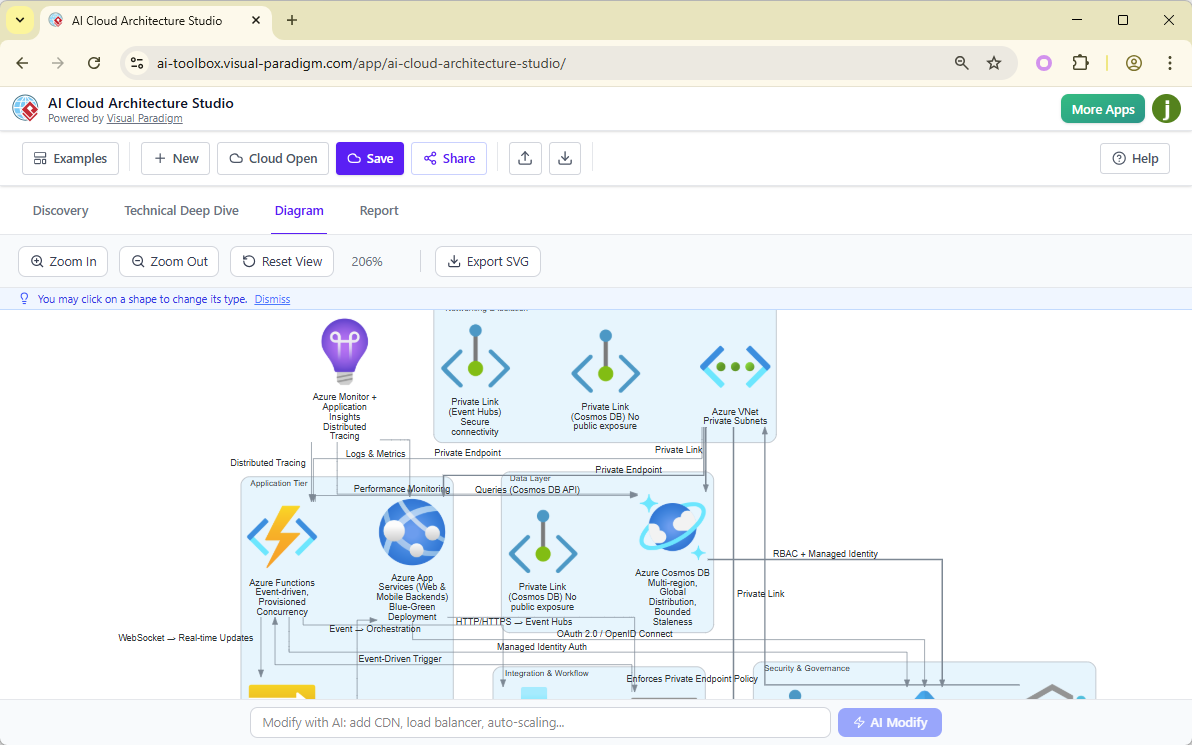
✨ Key Features & Benefits
1. AI-Powered Discovery & Generation
-
Describe your project in natural language:
“I need a scalable food delivery app with real-time tracking, secure payments, and driver dispatch.” -
The AI instantly interprets your intent and drafts a comprehensive architecture.
-
No coding. No learning curves. Just describe—and let AI do the rest.
2. Multi-Cloud & Platform Support
Generate diagrams for any major cloud provider or platform:
-
✅ AWS
-
✅ Microsoft Azure
-
✅ Google Cloud Platform (GCP)
-
✅ Alibaba Cloud
-
✅ Oracle Cloud
-
✅ IBM Cloud
-
✅ Kubernetes (K8s)
-
✅ DigitalOcean
-
✅ OpenStack
-
✅ Elastic Cloud
-
✅ Generic (neutral) cloud setup
👉 Easily switch between providers to compare architectures side-by-side—perfect for decision-making and governance.
3. Architectural Strategy Selection
Choose a design philosophy that aligns with your goals:
-
🟢 Low Cost / MVP – Ideal for rapid prototyping and proof-of-concept.
-
🟡 High Availability – Designed for fault-tolerant, production-grade systems.
-
🔵 Enterprise Grade – Comprehensive, secure, scalable, and compliant.
-
🟣 Edge Optimized – Tailored for low-latency, distributed applications (e.g., IoT, real-time apps).
These strategies guide the AI in selecting appropriate components, configurations, and deployment patterns.
4. Interactive Diagram Editor
Once generated, your diagram is fully editable:
-
Zoom, pan, and explore every component in detail.
-
Click any shape to swap it with alternatives (e.g., change RDS to DynamoDB, or replace EC2 with Fargate).
-
Use natural language prompts to make changes:
“Add auto-scaling to the backend servers”
“Move the database to a read replica for better performance”
This level of interactivity turns static diagrams into dynamic design canvases.
5. Export & Documentation
-
Export your diagrams as high-resolution, resolution-independent SVG files—perfect for presentations, documentation, or integration into design systems.
-
Support for PNG, PDF, and other formats coming soon.
6. Project Management & Collaboration
-
Save projects to your Visual Paradigm account.
-
Load previous designs for reuse or iteration.
-
Share projects via link—ideal for team reviews, stakeholder feedback, or board approvals.
-
Built-in collaboration tools ensure alignment across departments.
7. AI-Driven Analysis & Reporting
The AI doesn’t stop at diagram generation. It also provides intelligent insights and recommendations:
-
Asks clarifying questions during setup (e.g., “Will this system handle 10,000 concurrent users?”)
-
Offers AI-suggested answers when you’re unsure.
-
Generates detailed architecture reports (Markdown or PDF) in the Report tab, covering:
-
Security considerations
-
Scalability and performance
-
Cost estimation (approx.)
-
Compliance & best practices
-
Risk assessment and mitigation
-
These reports are invaluable for audits, investor pitches, or internal governance.
💼 Editions & Access Requirements
| Feature | Desktop Version | VP Online / Web Version |
|---|---|---|
| Required Edition | Visual Paradigm Professional | Combo edition or higher |
| Platform | Windows, macOS | Browser-based (no install) |
| License | Full access with license key | Cloud-based, subscription-based |
| AI Features | Full AI generation & editing | Full AI + collaboration |
🔗 Official Links:
Launch the App
(Note: Some advanced features may require a paid license or subscription.)
🛠️ Step-by-Step Guide: How to Use AI Cloud Architecture Studio
Let’s walk through a real-world example: designing a real-time food delivery application using Azure.
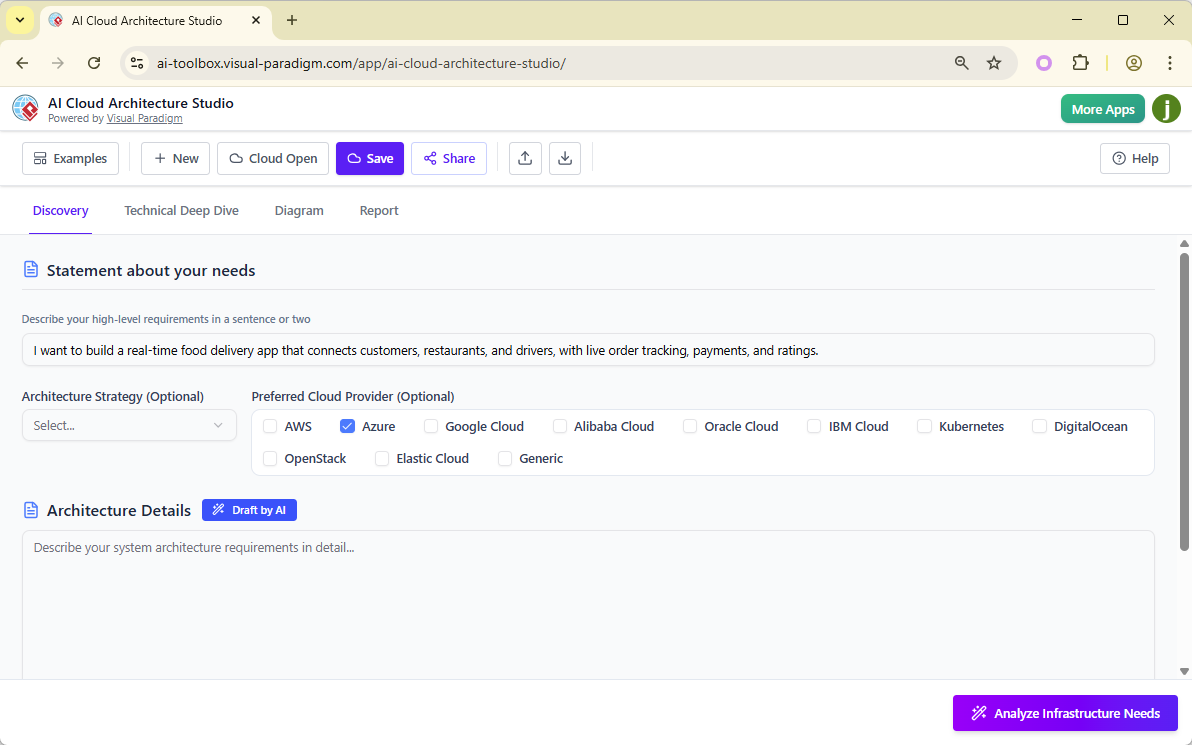
Step 1: Access the Tool
-
Log in to your Visual Paradigm account.
-
Navigate to the AI Cloud Architecture Studio via the AI Toolbox or directly at the launch URL.
Step 2: Define Your Solution (Discovery Tab)
Enter a clear, natural language description:
“I want to build a real-time food delivery app that connects customers, restaurants, and drivers, with live order tracking, secure payments, and user ratings.”
Optional additions:
-
Select Architecture Strategy: High Availability
-
Choose Cloud Provider: Azure
Click Draft by AI to let the system refine your idea into a structured architecture outline.
Step 3: Clarify Infrastructure Needs
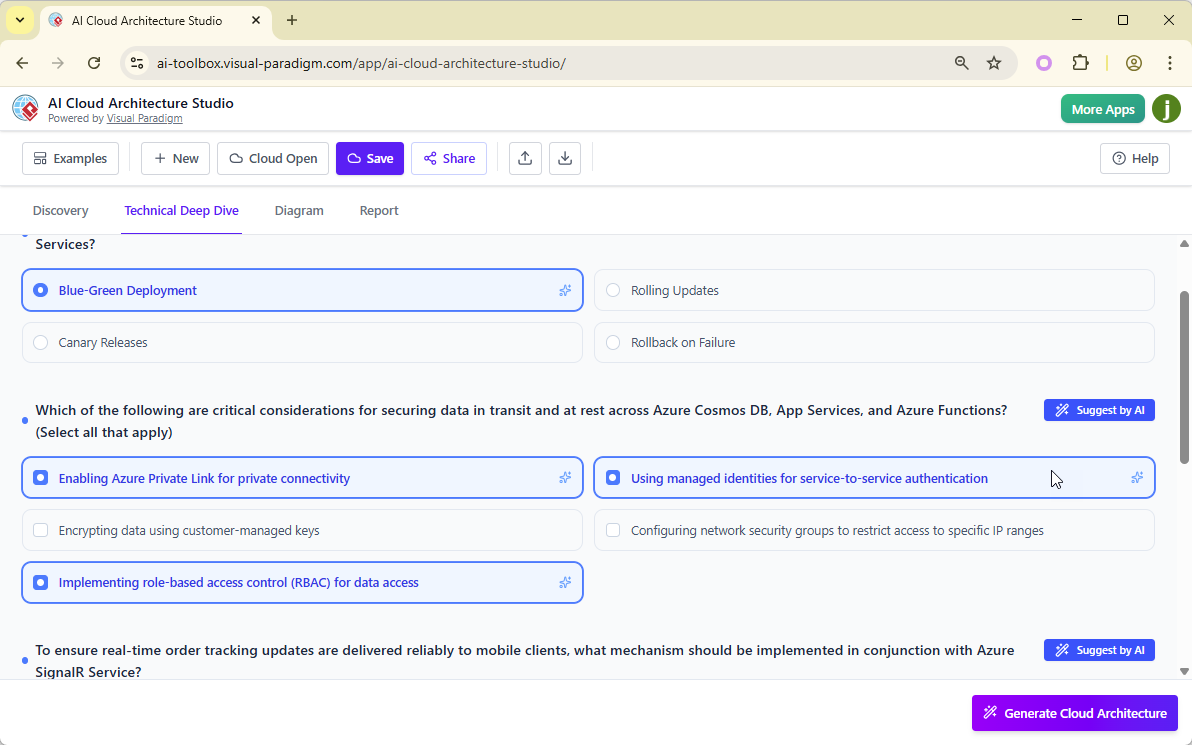
Click Analyze Infrastructure Needs.
The AI will prompt you with intelligent questions such as:
-
What database type do you prefer? (e.g., Cosmos DB, PostgreSQL)
-
Should the backend scale automatically?
-
Are there strict security or compliance requirements?
If unsure, click Suggest by AI—the tool recommends the optimal choice based on your strategy and use case.
Step 4: Generate the Diagram
Click Generate Cloud Architecture.
Wait a few seconds as the AI processes your inputs and assembles a polished, industry-standard diagram using official Azure icons and best practices.
Your final diagram appears in the Diagram tab—ready for review and editing.
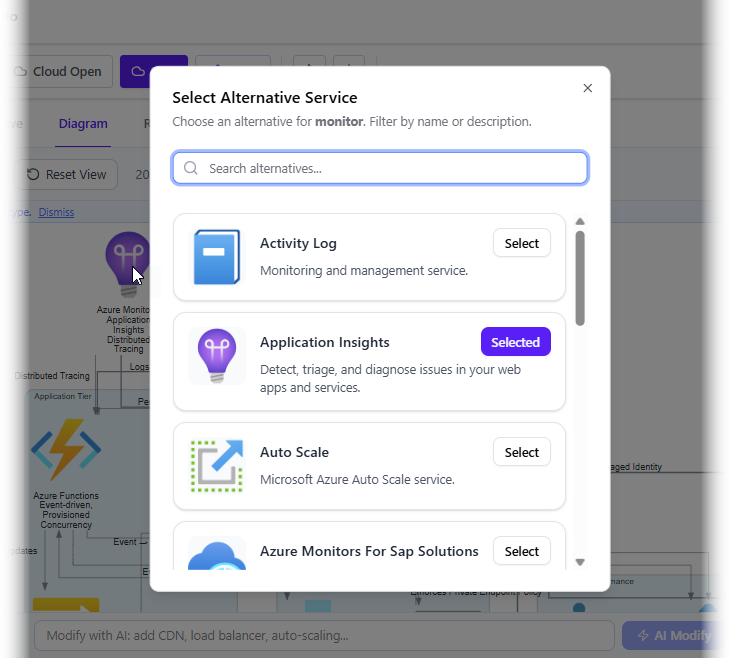
Step 5: Edit & Refine
-
Zoom in to examine components.
-
Click any component (e.g., “Web App”) → see a list of alternatives → choose a different service.
-
Use natural language to make bulk changes:
“Add a CDN for static assets”
“Set up auto-scaling for the API tier”
Step 6: Export & Share
-
Click Export SVG to download a crisp, scalable vector file.
-
Use the Share button to generate a secure link for team members or stakeholders.
-
Save your project to return later.
Step 7: Generate a Professional Report
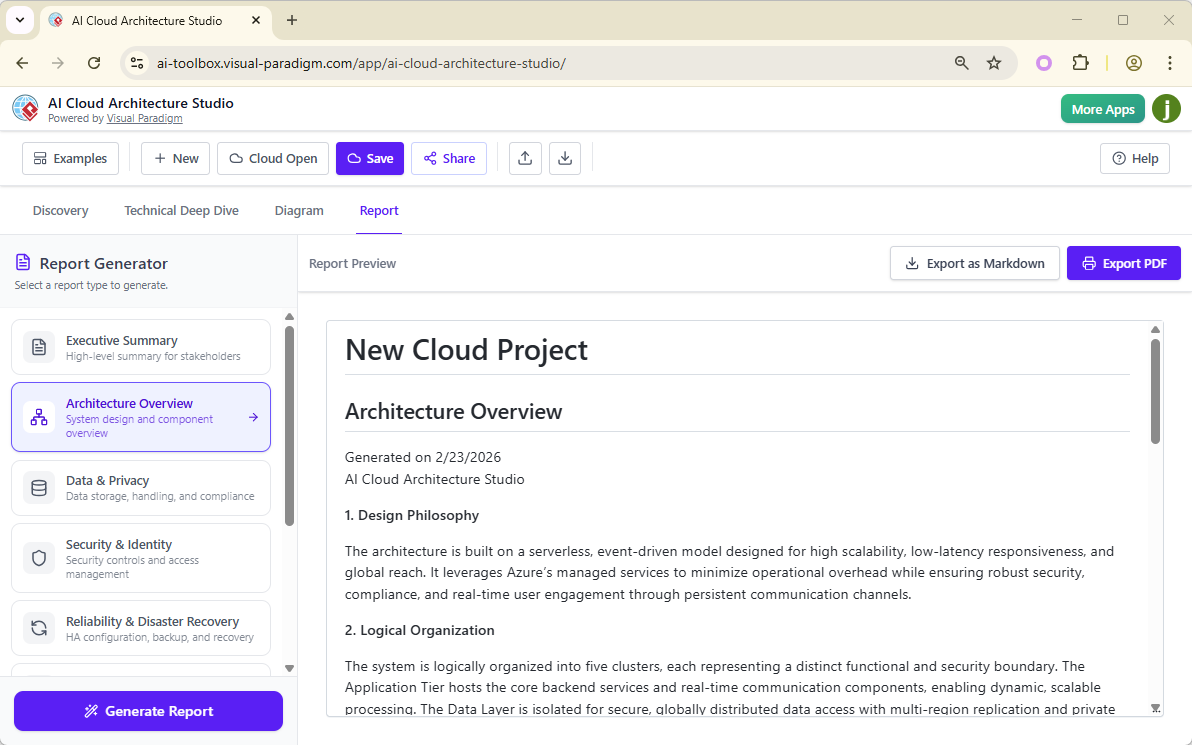
Switch to the Report tab:
-
Choose a report template (e.g., Architecture Overview, Security & Compliance, Cost & Scalability).
-
Click Generate Report → AI compiles a detailed, well-structured document.
-
Export as Markdown (ideal for GitHub or documentation sites) or PDF (perfect for presentations or board reviews).
💡 Tips for Best Results
-
Be Specific in Your Input
Instead of: “I want a cloud app”
Try: “A scalable food delivery app with real-time tracking, payment processing via Stripe, and driver dispatch using geolocation.” -
Use the Right Strategy
-
Start with Low Cost / MVP for early validation.
-
Upgrade to Enterprise Grade when moving to production.
-
-
Compare Providers
Generate the same idea for AWS, Azure, and GCP—then compare cost, scalability, and integration patterns. -
Iterate with Confidence
If the output isn’t perfect, refine your description or use natural language edits. The tool is designed for rapid iteration. -
Collaborate Early
Share your project with developers, product managers, or security teams early in the design phase to gather feedback and avoid rework.
🏁 Why Choose AI Cloud Architecture Studio?
| Feature | Traditional Tools | AI Cloud Architecture Studio |
|---|---|---|
| Input | Manual drag-and-drop | Natural language description |
| Speed | Hours to design | Minutes to generate |
| Accuracy | Prone to human error | AI-guided, best-practice aligned |
| Collaboration | Limited | Real-time sharing & feedback |
| Documentation | Manual | Auto-generated reports |
| Multi-Cloud Support | Often partial | Full support across 10+ platforms |
It’s not just a diagramming tool—it’s an AI-powered infrastructure designer.
🔮 Final Thoughts: The Future of Cloud Design is Here
Visual Paradigm’s AI Cloud Architecture Studio isn’t just a novelty—it’s a transformative leap forward in cloud infrastructure design. By combining natural language understanding, multi-cloud expertise, interactive editing, and intelligent reporting, it empowers teams to move from idea to visualized architecture in minutes.
Whether you’re prototyping an MVP, planning a global enterprise deployment, or explaining a complex system to stakeholders, this tool streamlines the entire process—saving time, reducing errors, and fostering better collaboration.
🚀 Get Started Today
Don’t wait to design your next cloud system.
👉 Discover the AI Cloud Architecture Studio
👉 Launch the App Now
Start building smarter, faster, and with confidence.
The future of cloud architecture is not just automated—it’s intelligent.
Stay Tuned: Visual Paradigm continues to expand its AI ecosystem with upcoming tools for AI-powered code generation, security scanning, and CI/CD pipeline design. Follow their blog and social channels for updates.
This post is also available in Deutsch, Español, فارسی, Français, English, Bahasa Indonesia, 日本語, Polski, Portuguese, Ру́сский, Việt Nam, 简体中文 and 繁體中文.