


In many organizations, the true heartbeat of operations lies buried within dense paragraphs of Word documents, PDF reports, and email chains. These legacy textual processes often suffer from ambiguity, version drift, and a lack of visual clarity. While text is excellent for legal specifications, it frequently fails to communicate the flow of work to stakeholders across different departments. This is where Business Process Model and Notation (BPMN) becomes indispensable. It provides a universal standard for mapping workflows visually, ensuring that every stakeholder, from the floor manager to the executive suite, sees the same reality.
This guide walks through the disciplined process of extracting meaning from text and encoding it into clean, executable BPMN diagrams. We will focus on the methodology of translation, ensuring accuracy, consistency, and maintainability without relying on specific vendor tools.
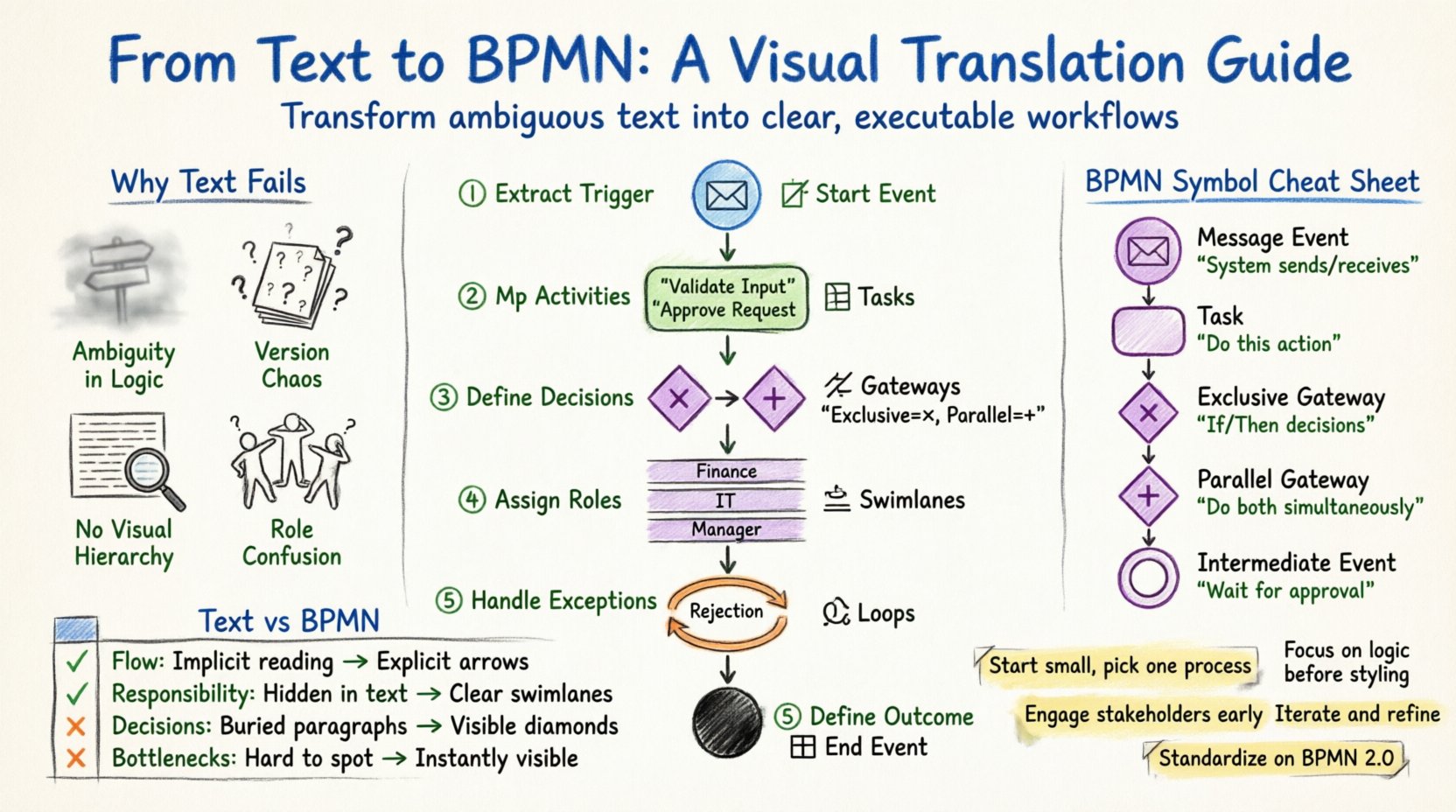
🧐 Why Textual Processes Fail to Scale
Before diving into the conversion, it is necessary to understand the friction points inherent in legacy documentation. Text-based workflows are often static snapshots rather than dynamic representations of reality. When a process is described in a document, several issues typically arise:
- Ambiguity in Logic: Words like “sometimes,” “usually,” or “check” are subjective. A BPMN Gateway requires a definitive Yes/No decision.
- Version Control Chaos: PDFs are rarely versioned. Two departments might hold different versions of the same policy, leading to compliance gaps.
- Lack of Visual Hierarchy: It is difficult to spot bottlenecks or loops in a wall of text. Visual flows reveal where work piles up instantly.
- Role Confusion: Text often hides who is responsible for a specific action. BPMN uses Lanes to explicitly assign responsibility.
Translating this content into BPMN forces a level of rigor that text alone cannot enforce. It demands that you define every step, every decision, and every handoff precisely.
🛠️ Preparing the Source Material
The quality of the final diagram depends entirely on the quality of the input. Do not attempt to translate a document that has not been reviewed for accuracy. Follow these preparation steps:
- Consolidate Sources: Gather all relevant documentation. Combine emails, policy manuals, and interview notes into a single “As-Is” repository.
- Identify the Scope: Define the start and end points of the process. A process should begin with a trigger (e.g., “Customer places order”) and end with an outcome (e.g., “Invoice delivered”).
- Extract Roles: List every person or system involved. These will become your Swimlanes.
- Annotate Exceptions: Highlight where things go wrong. Text often hides errors; diagrams must show where the flow breaks or loops back.
📐 Core BPMN Elements for Translation
To translate effectively, you must speak the language of BPMN. You do not need to know every symbol, but you must master the core four categories. Here is a breakdown of how textual cues map to standard symbols.
| Textual Cue | BPMN Symbol Type | Function |
|---|---|---|
| “The system sends…” or “We receive…” | Message Event | Start or End communication with an external entity. |
| “Do this task” | Task | Work performed by a human or system. |
| “If… then…” | Exclusive Gateway | A decision point with mutually exclusive outcomes. |
| “And also do this…” | Parallel Gateway | Splitting flow into multiple paths simultaneously. |
| “Wait for approval” | Intermediate Event | A pause or wait state within the flow. |
Understanding these mappings is the foundation of the translation. A sentence like “If the budget is over $10k, the manager must sign off” is not just a rule; it is a Gateway connected to a Task.
🚀 Step-by-Step Translation Workflow
Now, let us move from theory to practice. This workflow outlines the logical progression from raw text to a structured diagram.
Step 1: Extract the Trigger Event
Every process starts somewhere. In text, this is often buried in the first paragraph. Look for phrases like “Upon receipt of,” “When,” or “After.” In BPMN, this becomes the Start Event.
- Input: “When a purchase order is received…”
- Translation: Place a Circle with an envelope or clock icon to denote the event type.
- Tip: Ensure the start event has no incoming flows. It is the entry point.
Step 2: Map Sequential Activities
Read the document sentence by sentence. Identify the verbs. Each verb typically represents a Task.
- Input: “The clerk enters the data into the system.”
- Translation: Create a rounded rectangle labeled “Enter Data” in the appropriate Lane.
- Tip: Keep task names concise. Avoid “The clerk does”; just write “Enter Data”.
Step 3: Define Decision Logic (Gateways)
This is the most critical step. Text often uses conditional language. You must determine if the paths are exclusive (only one happens) or parallel (both happen).
- Input: “If the item is in stock, ship it. Otherwise, order from vendor.”
- Translation: Insert a Diamond Gateway. Connect two outgoing Sequence Flows.
- Labeling: Label the outgoing lines “Yes (In Stock)” and “No (Out of Stock)”.
- Tip: Ensure every Gateway has at least two outgoing paths and one incoming path (unless it is a start point).
Step 4: Assign Swimlanes for Roles
Text often mentions actors. “The manager approves,” “The system checks.” Assign these to distinct horizontal or vertical bands.
- Input: “The Finance Team verifies the invoice.”
- Translation: Move the “Verify Invoice” task into the “Finance” Lane.
- Tip: Avoid crossing lanes with arrows unless necessary. If a flow moves from one lane to another, use an Interface Connector or simply cross the boundary clearly.
Step 5: Handle Loops and Exceptions
Legacy text rarely mentions what happens if a rejection occurs. BPMN requires this. If a manager rejects an invoice, the flow must return to the originator.
- Input: “If rejected, send back to requester.”
- Translation: Draw a Sequence Flow from the Gateway back to the previous Task.
- Tip: Label the return flow “Rejection” to make the loop clear.
Step 6: Define the End Event
Where does the process stop? Text often ends with “Done” or “Finalize.” Map this to a thick black circle.
- Input: “Process complete.”
- Translation: Place the End Event. Ensure it is reachable from all paths.
- Tip: A process should not have “dangling” paths where work disappears into the void.
⚠️ Common Pitfalls in Text-to-Model Translation
Even with a solid process, errors creep in. Watch out for these common mistakes that degrade the model’s utility.
- Over-complication: Do not map every single click or mouse movement. Stick to the business logic level. If a user has to click “Save” three times to finish a task, model it as one task.
- Missing Exceptions: If the text says “Notify the user,” but doesn’t say what happens if the notification fails, you must add a path for that failure.
- Inconsistent Naming: Do not use “Approve” in one lane and “Sign Off” in another. Use a standard glossary for all Task names.
- Swimlane Swapping: Ensure tasks stay in the correct Lane. If a task involves multiple roles, place it in the Lane of the primary actor, or create a sub-process.
🔍 Validating the Translated Model
Once the diagram is drawn, it is not finished. It must be validated against the source text and subject matter experts.
The Walkthrough Protocol
Conduct a formal walkthrough with the process owners. Follow the diagram path by path.
- Trace the Happy Path: Does the flow work perfectly if everything goes right?
- Trace the Exception Path: Does the flow handle errors correctly?
- Trace the Edge Cases: What happens if a user skips a step?
Consistency Checks
Review the diagram for visual and logical consistency.
- No Dangling Arrows: Every line must connect to a shape.
- No Deadlocks: Ensure no path leads to a spot where the flow stops without an End Event.
- Clear Labels: Every Gateway must have a condition label.
- Uniform Shapes: Tasks should look the same across the entire diagram.
📂 Governance and Maintenance
A model is a living artifact. As business rules change, the text changes, and the diagram must change with it. Establishing governance ensures the model remains useful over time.
- Versioning: Treat the diagram like code. Keep a history of changes. Note the date and the author of the update.
- Review Cadence: Schedule quarterly reviews. Ask stakeholders: “Has this process actually changed since we drew this?”
- Documentation Linkage: Link the BPMN diagram back to the legacy text. If a rule changes in the text, the diagram must be updated first.
- Training: Ensure new hires understand how to read the diagram. It is a communication tool, not just a map.
📊 Comparing Textual vs. BPMN Structures
To further illustrate the value of this translation, consider how information density shifts between formats.
| Feature | Textual Document | BPMN Diagram |
|---|---|---|
| Flow Logic | Implicit, requires reading comprehension | Explicit, visual arrows show direction |
| Responsibility | Often implied in paragraphs | Explicit via Swimlanes |
| Decision Points | Hidden within paragraphs | Visible Diamonds with conditions |
| Bottlenecks | Hard to detect | Visible where paths converge |
| Execution Readiness | Cannot be executed directly | Can be interpreted by engines |
🛠️ Advanced Techniques for Complex Processes
Some processes are too large for a single diagram. In these cases, you need to apply abstraction techniques.
Sub-processes
If a single Task contains too much detail, encapsulate it. Create a Collapsed Sub-process.
- Example: Instead of showing “Check ID, Check Credit, Check Address,” create a task called “Verify Identity”.
- Benefit: Reduces visual clutter on the main map.
- Detail: Keep the detailed steps in a separate page or file linked to the main diagram.
Events and Messages
Processes often span systems. Use Intermediate Message Events to show when data is passed between different BPMN pools.
- Example: System A sends data to System B.
- Visual: Use a dashed line with an envelope icon.
- Benefit: Clarifies system boundaries and integration points.
📉 The Cost of Inaction
Ignoring the translation of legacy text into BPMN carries a hidden cost. Organizations continue to rely on tribal knowledge. When key personnel leave, the process knowledge leaves with them. Textual documents are rarely updated, leading to “zombie processes” that no one follows but everyone claims to own.
By standardizing on BPMN, you create a single source of truth. This reduces training time for new employees and allows for easier auditing. When a compliance officer asks for a workflow, you can point to the diagram rather than a stack of papers.
🎯 Key Takeaways for Implementation
- Start Small: Do not attempt to model the entire enterprise at once. Pick one high-value process.
- Focus on Logic: Ignore visual styling until the logic is correct.
- Engage Stakeholders: A diagram is useless if the people who do the work do not recognize it.
- Iterate: The first version will be wrong. That is expected. Refine it based on feedback.
- Standardize Symbols: Stick to the BPMN 2.0 standard to ensure compatibility.
🔄 Moving Forward
The journey from legacy text to clean BPMN is not just a technical task; it is a discipline of clarity. It requires you to strip away the noise of natural language and reveal the skeleton of the business logic. By following the steps outlined here—extraction, mapping, validation, and governance—you ensure that your process models remain accurate, useful, and actionable.
Remember, the goal is not to create art, but to create a map that works. As you refine your skills in this translation, you will find that the diagrams themselves become the primary medium for communication, replacing the ambiguity of text with the precision of flow.
This post is also available in Deutsch, Español, فارسی, Français, English, Bahasa Indonesia, 日本語, Polski, Portuguese, Ру́сский, Việt Nam, 简体中文 and 繁體中文.