


In today’s fast-paced business environment, organizations constantly seek ways to optimize their operations, reduce costs, and improve efficiency. Business Process Model and Notation (BPMN) has emerged as the industry standard for visualizing, analyzing, and improving business processes. Whether you’re a business analyst documenting current workflows, a manager planning process improvements, or a developer implementing process automation, BPMN provides a common language that bridges the gap between business and technical teams.
This comprehensive guide explores the fundamental concepts of BPMN, provides practical examples, and demonstrates how Visual Paradigm’s powerful BPMN tools can help you create professional business process diagrams that drive organizational success.
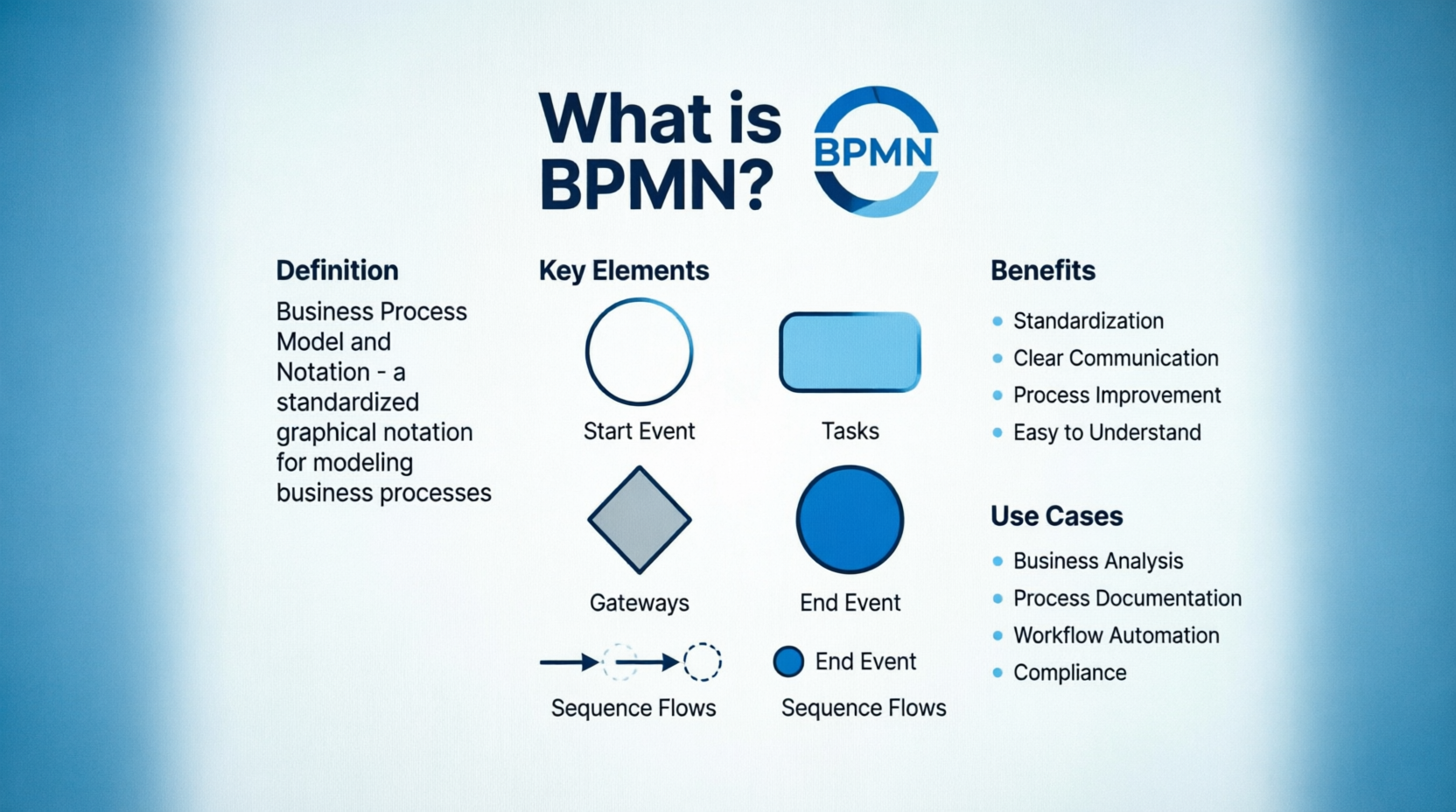
What is BPMN?
Business Process Model and Notation (BPMN) is a well-known modeling standard used in business process modeling. It’s often created to aid business process analysis, business process improvement, or reengineering. BPMN visualizes business processes from the beginning to the end, showing the sequence of process activities and the information flow between the participants.
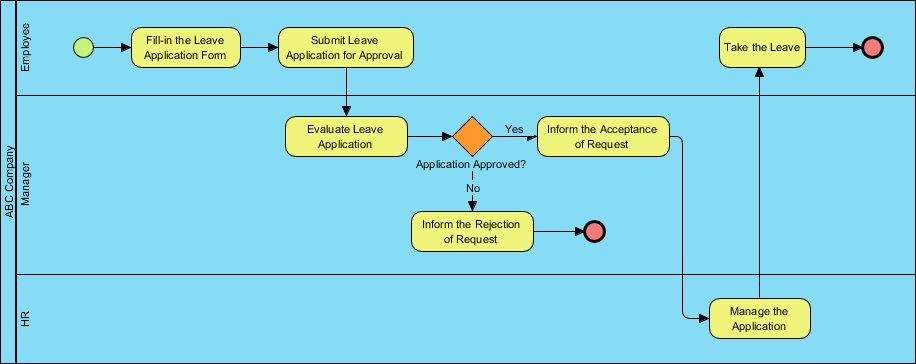
Purpose of BPMN Diagram
BPMN symbols are so simple that they can be understood by everyone, including business analysts who create and improve business processes, technical developers who implement the process changes, business managers who are monitoring changes, and even non-technical people like stakeholders who want to understand how the future process will look like. BPMN is an effective communication tool as it provides a common and simple visual language for specifying business processes, which eliminates miscommunication between the different parties.
Understanding BPMN Diagrams
In BPMN, the processes are described using diagrams with a series of graphic elements. Such a visual presentation makes it easy for users to understand the logic of a process. BPMN has been primarily developed to design and read both simple and complex diagrams of business processes. For that, the BPMN standard classifies the graphic elements by categories: as a result, the elements are easily recognized by the users who work with business process diagrams.
BPMN Symbols
There are five basic categories of BPMN elements. Each of them represents a unique aspect of the business process.
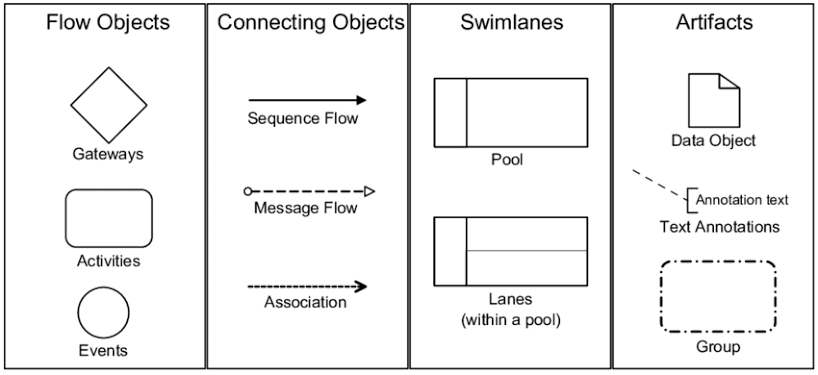
Swimlane
Swimlanes are graphical containers that represent participants of a process. There are two types of swimlanes — pools, and lanes.
Flow Elements
Flow elements are elements that connect to form business workflows. Flow elements are the primary elements that define the behavior of a process. There are three kinds of flow elements: Events, Activities, and Gateways.
Connecting Objects
Flow objects are not isolated, but rather connected to form a flow. The connectors that connect the flow objects are called connecting objects. There are four kinds of connecting objects: Sequence flows, message flows, associations and data associations.
Data
Data is mainly information needed or produced when executing a business process. There are four kinds of data: Data objects, data inputs, data outputs and data stores.
How to Draw BPMN in Visual Paradigm
Manual Creation Method
- Select Diagram > New from the main menu.
- In the New Diagram window, select Business Process Diagram and click Next.
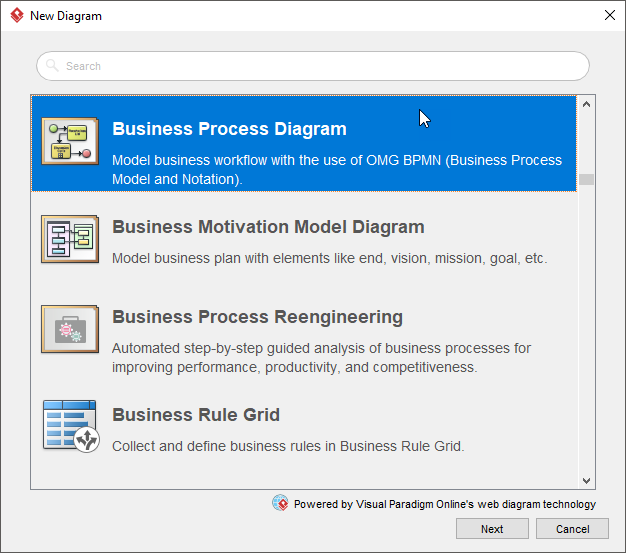
- Select an existing BPMN diagram template, or select Blank to create from scratch. Click Next.
- Enter the diagram name and click OK.
- Drag and drop shapes from the diagram toolbar.
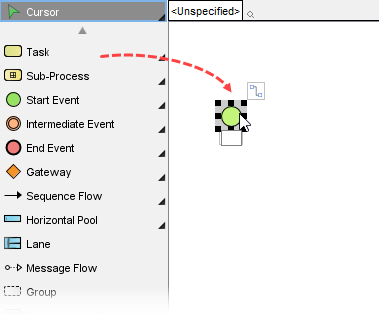
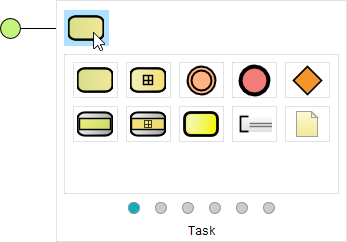
- Use the Resource Catalog to complete the diagram. Move your mouse pointer over a shape. Press on the resource icon and drag it out, and then select the shape to create. A connector will be automatically created for you.
- When you finished, you can export the diagram as an image (JPG, PNG, PDF, SVG, etc) and share it with your friends or co-workers (Project > Export > Active Diagram as Image…).
AI Text-to-Diagram Generation
If you are using Visual Paradigm Desktop Professional Edition or higher, you can use natural language processing to generate a complete diagram:
- Navigate to Tools > AI Diagram Generation.
- Select Business Process Diagram.
- Check the Include Pools and Lanes option to automatically assign organizational boundaries based on your narrative.
- Type or paste your textual business workflow into the prompt box and hit generate to construct an editable diagram.
Advanced Tools and Features
Working Procedures Documentation
Use the Doc. Composer tool under Tools to convert your workflow elements into formal SOP PDF manuals. This feature is invaluable for organizations that need to maintain documentation standards while ensuring that process documentation remains synchronized with process models.
BPMN Simulation
Right-click the diagram background and select Utilities > Show Statistic to run business process simulations. This powerful feature assists you in calculating process costs and operational times, enabling data-driven decision-making for process optimization.
Case Study: Implementing BPMN for Healthcare Claims Processing
Background
MediClaim Solutions, a mid-sized healthcare claims processing company, faced significant challenges in their claims handling workflow. The organization was experiencing processing delays, frequent errors, and communication breakdowns between departments. Claims were taking an average of 45 days to process, compared to the industry benchmark of 30 days. Customer satisfaction scores had dropped by 15% over the previous year.
Challenge
The primary challenges included:
- Lack of visibility into the end-to-end claims processing workflow
- Multiple handoffs between departments without clear accountability
- No standardized process documentation
- Difficulty identifying bottlenecks and inefficiencies
- Poor communication between business analysts, developers, and stakeholders
Solution Implementation
Phase 1: Process Discovery and Modeling
The business analysis team at MediClaim Solutions began by documenting the “As-Is” claims processing workflow using Visual Paradigm’s BPMN tools:
- Initial Setup: The team created a new Business Process Diagram using the manual creation method, selecting Diagram > New and choosing Business Process Diagram as the diagram type.
- Participant Identification: Using swimlanes, they identified three key participants:
- Claims Intake Department (Pool)
- Medical Review Unit (Pool)
- Payment Processing Department (Pool)
- Within each pool, specific lanes were created for individual roles and teams
- Process Flow Mapping: The team used the Resource Catalog feature to quickly build the process flow:
They began with a Start Event and used the resource icon to drag and create connected elements:
- Task: Receive Claim Submission
- Gateway: Validate Claim Completeness
- Task: Assign Claim Number
- Task: Medical Review Assessment
- Gateway: Coverage Verification
- Task: Payment Calculation
- Task: Payment Authorization
- End Event: Claim Closed
- Incorporating Data Elements: Data objects were added to represent claim documents, medical records, and payment information flowing through the process.
Phase 2: Simulation and Analysis
The team leveraged Visual Paradigm’s simulation capabilities to analyze the existing workflow:
- Right-clicked on the diagram background and selected Utilities > Show Statistic
- Inputted time and cost parameters for each task
- Ran the simulation to identify bottlenecks and inefficiencies
The simulation revealed:
- The Medical Review Assessment task was taking 15 days on average (50% longer than estimated)
- Claim validation was causing 20% of claims to be returned for additional information
- Payment authorization required multiple approvals, adding 5 days to the process
Phase 3: Process Redesign
Based on the simulation results, the team designed a “To-Be” process model incorporating improvements:
- Medical Review Optimization: Divided the Medical Review Assessment into parallel sub-processes for different claim types
- Validation Automation: Implemented automated validation checks using data associations to reduce manual verification time
- Simplified Authorization: Replaced multi-level approval with risk-based authorization using exclusive gateways
- Documentation: Used the Doc. Composer tool to generate comprehensive SOP documentation for the new process
Phase 4: AI-Powered Enhancement
The team leveraged Visual Paradigm’s AI Diagram Generation to create an alternative optimized workflow:
- Navigated to Tools > AI Diagram Generation
- Selected Business Process Diagram
- Enabled Include Pools and Lanes
- Input their business narrative: “A healthcare claims process starting with claim submission, followed by validation and medical review, with parallel processing for different claim types, then payment calculation and authorization, concluding with claim closure”
- Generated an AI-optimized diagram that suggested additional improvements the team hadn’t considered
Phase 5: Implementation and Monitoring
The redesigned process was implemented with the following results:
- Claims processing time reduced from 45 to 28 days (37% improvement)
- Error rate decreased by 42%
- Customer satisfaction improved by 22%
- Operational costs reduced by 18%
- Documentation clarity enabled 40% faster onboarding of new claims processors
Visual Representation of the Solution
The optimized BPMN diagram provided clear visibility into the complete claims processing workflow, enabling effective communication between business stakeholders, process owners, and technical implementers.
Key Takeaways
- Standardization Matters: Using BPMN provided a common language that eliminated miscommunication between business and technical teams
- Simulation Drives Insight: Before committing to process changes, simulation allowed the team to test and validate improvements
- AI Enhances Human Expertise: Visual Paradigm’s AI capabilities complemented the team’s expertise by suggesting optimization opportunities
- Documentation is Critical: The ability to generate SOP documents directly from BPMN models ensured process integrity across implementation
Best Practices, Guidelines, and Tips for BPMN Modeling
1. Start with the Big Picture
Begin by identifying the primary participants (pools) and their interactions. Use message flows to show communication between pools. Don’t get bogged down in details initially; focus on the end-to-end process flow.
2. Use Clear and Consistent Naming
- Name all elements with clear, action-oriented descriptions
- Use verb-object format for tasks (e.g., “Process Invoice,” “Review Application”)
- Maintain consistent naming conventions across your organization
3. Leverage the Resource Catalog for Efficiency
When building your diagram in Visual Paradigm, use the resource catalog feature to rapidly create connected elements:
- Hover over any shape
- Click the resource icon
- Drag and select the next element type
- A connector is automatically created
This approach significantly speeds up diagram creation and reduces errors.
4. Keep Diagrams Focused
- Limit each diagram to a single process scope
- Use sub-processes for complex activities that have their own detailed flows
- Avoid crossing sequence flow lines whenever possible
5. Validate with Stakeholders
- Share draft diagrams early and often
- Use BPMN’s intuitive symbols to facilitate discussions with non-technical stakeholders
- Document feedback and iteration history
6. Leverage Simulation Capabilities
- Use Visual Paradigm’s simulation tools to validate process performance
- Test “what-if” scenarios before implementing changes
- Identify bottlenecks and optimization opportunities
7. Maintain Documentation Synchronization
- Use the Doc. Composer tool to generate SOP documents
- Ensure that documentation always reflects the current process model
- Create PDF manuals automatically when processes change
8. Consider AI-Powered Generation
- For complex processes, use Visual Paradigm’s AI Diagram Generation
- Provide clear, structured narratives for best results
- Fine-tune generated diagrams using manual editing capabilities
9. Apply Consistent Notations
- Understand the five BPMN element categories thoroughly
- Use the right element for the right purpose:
- Events (start, intermediate, end) trigger or conclude processes
- Activities (tasks, sub-processes) represent work performed
- Gateways control branching and merging of flow
- Data Objects represent information artifacts
- Swimlanes show organizational responsibility
10. Export and Share Effectively
- Use Visual Paradigm’s export capabilities for different audiences:
- PNG/JPG: Quick sharing with stakeholders
- PDF: Formal documentation
- SVG: High-quality integration into reports
- BPMN 2.0 XML: Exchange with other BPMN-compliant tools
Conclusion
Business Process Model and Notation has established itself as the premier standard for process visualization, analysis, and improvement. Its visual nature makes it accessible to all stakeholders, while its formal structure provides the precision required for technical implementation and automation.
Visual Paradigm offers a comprehensive BPMN solution that addresses the needs of modern organizations. Whether you’re a business analyst documenting current processes, a manager planning improvements, or a developer implementing automated workflows, Visual Paradigm provides the tools you need to succeed:
- Intuitive Manual Creation: Drag-and-drop interface with intelligent resource catalog
- AI-Powered Generation: Natural language processing for rapid diagram creation
- Advanced Simulation: Validate and optimize processes before implementation
- Documentation Integration: Seamless creation of SOP manuals
- Collaboration Features: Share and export diagrams in multiple formats
By following the guidelines and best practices outlined in this article and leveraging the capabilities of Visual Paradigm, organizations can transform their process modeling efforts from simple documentation to powerful tools for operational excellence.
The case study of MediClaim Solutions demonstrates the transformative potential of BPMN when properly implemented. By standardizing their process modeling approach, leveraging simulation for insight, and utilizing AI capabilities for optimization, they achieved significant improvements in efficiency, quality, and customer satisfaction.
Start your BPMN journey today with Visual Paradigm’s BPMN software and experience the difference that professional process modeling can make for your organization.
Reference
- BPMN Diagram and Tools – Visual Paradigm: Overview of Visual Paradigm’s BPMN diagramming capabilities, including features for business process modeling, analysis, and optimization.
- From Narrative to Diagram: How Visual Paradigm’s AI BPMN Generator Transforms Process Modeling Workflows: Guide on using AI-powered natural language processing to generate BPMN diagrams from textual process descriptions.
- Business Process Modeling Tutorial: Comprehensive tutorial covering business process modeling concepts, best practices, and hands-on exercises.
- Drawing Business Process Diagram – Visual Paradigm User Guide: Detailed user guide documentation for creating business process diagrams in Visual Paradigm.
- How to Create BPMN Diagram: Step-by-step tutorial on creating BPMN diagrams, covering basic concepts and practical techniques.
- How to Create BPMN Diagram – YouTube Video: Video tutorial demonstrating the BPMN diagram creation process in Visual Paradigm.
- Pool and Lane – Visual Paradigm User Guide: Documentation on using pools and lanes to represent process participants and organizational boundaries in BPMN.
- How to Draw BPMN Diagram: Practical guide on drawing BPMN diagrams using Visual Paradigm’s tools and features.
- How to Draw BPMN Business Process Diagram: Circle community documentation with tips and techniques for effective BPMN diagram creation.
- As-Is to Be Business Process: Tutorial on documenting and improving business processes through As-Is and To-Be modeling approaches.
- BPMN Tutorial with Example: Comprehensive BPMN tutorial with practical examples and real-world scenarios.
- Process Simulation Example: Guide on using simulation capabilities to analyze and optimize business processes.
- Business Process Modeling Guide: Complete guide to business process modeling, covering BPMN fundamentals, advanced concepts, and implementation strategies.
This post is also available in Deutsch, Español, فارسی, Français, English, Bahasa Indonesia, 日本語, Polski, Portuguese, Ру́сский, Việt Nam, 简体中文 and 繁體中文.
Related posts:
 Business Process Model and Notation Deep Drive: Advanced Patterns for High-Volume Transaction Systems
 Business Process Model and Notation: Turning Ambiguous Requirements into Actionable Process Maps
 Avoiding the “Spaghetti Diagram”: How to Keep Business Process Model and Notation Readable at Scale
 Business Process Model and Notation in Agile Teams: Integrating Models into Sprint Planning and Retrospectives