
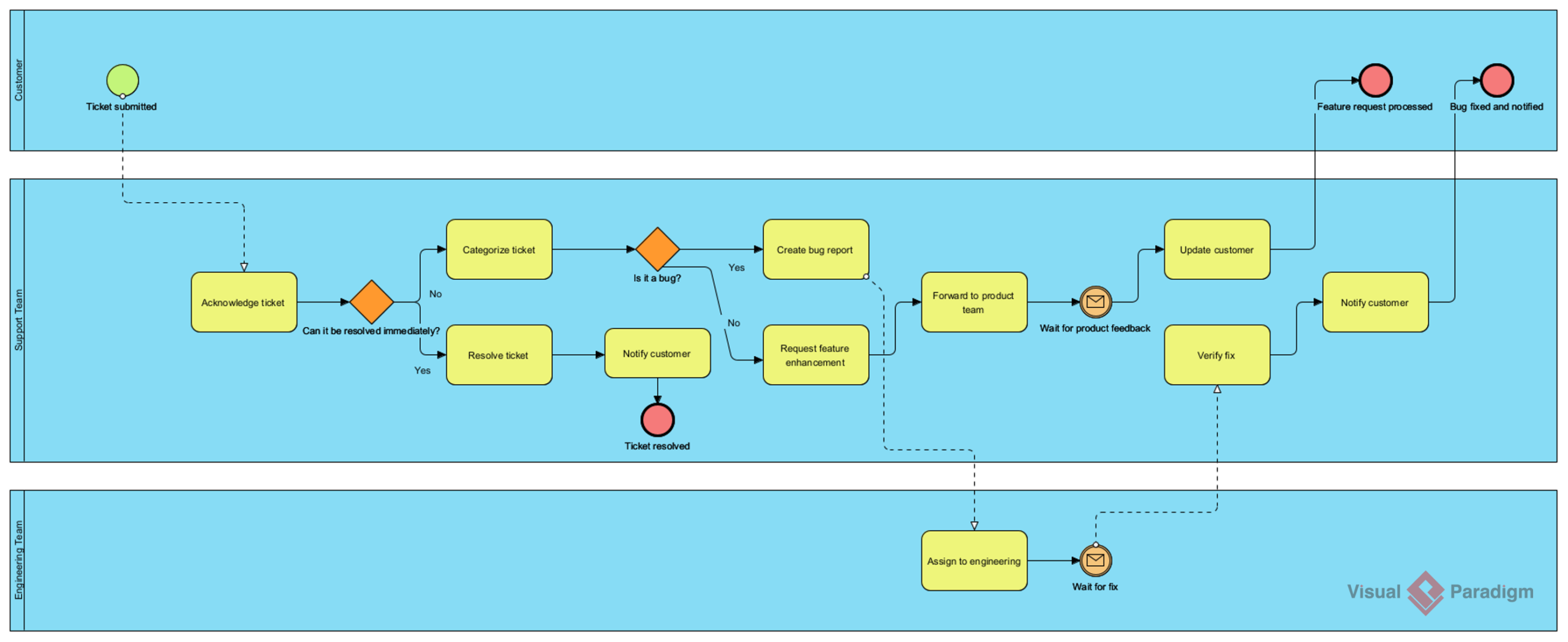
In the realm of Software as a Service (SaaS), efficiency is currency. A critical component of operational excellence is the Customer Support Ticket Resolution process. When a user encounters an issue or requests a feature, a seamless transition of information between the Customer, Support Team, and Engineering Team is vital. This tutorial delves into the mechanics of modeling this complex workflow using Visual Paradigm, focusing on how to structure a robust Business Process Model and Notation (BPMN) diagram.
Understanding the Architecture: Swimlanes and Roles
The foundation of this diagram lies in its use of Swimlanes. In BPMN, swimlanes are used to visually separate the responsibilities of different participants within a process. In our scenario, we have three distinct lanes, which define who performs which action:
- Customer Lane: This lane represents the external user initiating the interaction. It contains the Start Event (Ticket submitted) and the final End Events (Feature request processed or Bug fixed).
- Support Team Lane: This is the central hub of the process. It contains the initial triage, categorization, and decision-making logic.
- Engineering Team Lane: This lane handles the technical implementation, specifically for bug fixes and feature enhancements.
By strictly adhering to these lanes in Visual Paradigm, you ensure that the process map clearly delineates ownership. The Message Flow (dashed lines with open arrowheads) is used to connect events across these lanes, indicating communication between different participants rather than a direct sequence of tasks.
Step 1: The Initial Interaction
The process begins in the Customer lane. When a user encounters an issue, they trigger a Start Event. In the diagram, this is a simple green circle labeled “Ticket submitted.” This event sends a message to the Support Team.
Visual Paradigm allows you to link these via a dashed arrow, establishing the trigger for the Support Team’s work. The Support Team receives this input and immediately moves to the Acknowledge ticket task. This is a standard User Task, represented by a rounded rectangle, indicating an activity performed by a human actor.
Decision Logic and Gateways
Real-world processes are rarely linear. They require branching logic based on specific conditions. This is where Gateways come into play. In the diagram, we utilize two distinct decision points:
- Can it be resolved immediately? (Exclusive Gateway): Represented by a diamond shape, this gateway asks a binary question.
- If the answer is Yes, the flow moves to Resolve ticket, followed by notifying the customer, and finally terminating with a End Event (Ticket resolved).
- If the answer is No, the process branches into a more complex categorization phase.
- Is it a bug? (Exclusive Gateway): Once the ticket is categorized, the Support Team must determine the nature of the issue.
- If Yes, a Create bug report task is initiated.
- If No, the ticket is treated as a Request feature enhancement.
Using Visual Paradigm’s Gateway properties, you can define the conditions (e.g., “Bug = True”) that route the flow to the correct path.
Asynchronous Communication with Intermediate Events
One of the most powerful features of BPMN is handling asynchronous waits. In our diagram, after the Support Team “Forwards to product team,” they cannot immediately notify the customer. They must wait for the Engineering Team to complete their work.
This is modeled using an Intermediate Catching Event. You will see a circle with an envelope icon labeled “Wait for product feedback.” This signifies a message wait state. The process flow pauses here until a message is received from the Engineering lane.
This same pattern applies to the Engineering Team’s workflow. After “Assign to engineering,” they also encounter a “Wait for fix” event. Once the fix is deployed, the flow moves to “Verify fix,” which is a critical step to ensure the solution actually addresses the problem.
Conclusion
This tutorial has walked you through the essential components of a SaaS ticket resolution process using Visual Paradigm. By mastering Swimlanes for role clarity, Gateways for decision logic, and Intermediate Events for asynchronous communication, you can build process maps that are not only visually intuitive but also logically robust.