In the complex ecosystem of modern e-commerce, ambiguity is the enemy. For a mid-size retailer like “Mercado,” where 40% of customer complaints stem from confusion regarding the order fulfillment process, the gap between operational reality and customer expectation is a critical vulnerability. This tutorial explores how to bridge that gap using rigorous system modeling. We will dissect the architecture of the Mercado Order Fulfillment System, examining how to translate narrative requirements into a precise, executable logic map using VPasCode and Mermaid.
1. The Challenge: Translating Narrative to Logic
The core challenge presented in the Mercado case study is not merely technical; it is semantic. The operations team possesses a narrative understanding of the process, but it lacks a unified “source of truth.” Engineers require a strict specification to refactor code, while support agents need a readable guide to explain exceptions.
A narrative description like “If payment fails → retry up to 3 times, then cancel or hold order” is prone to interpretation. Does “cancel or hold” mean a choice is made? Or is it a system rule? By converting this text into a formal flowchart, we eliminate ambiguity. Every decision point is explicitly defined, and every exception path is mapped to a specific outcome.
2. Visual Paradigm Syntax: The Anatomy of a Flowchart
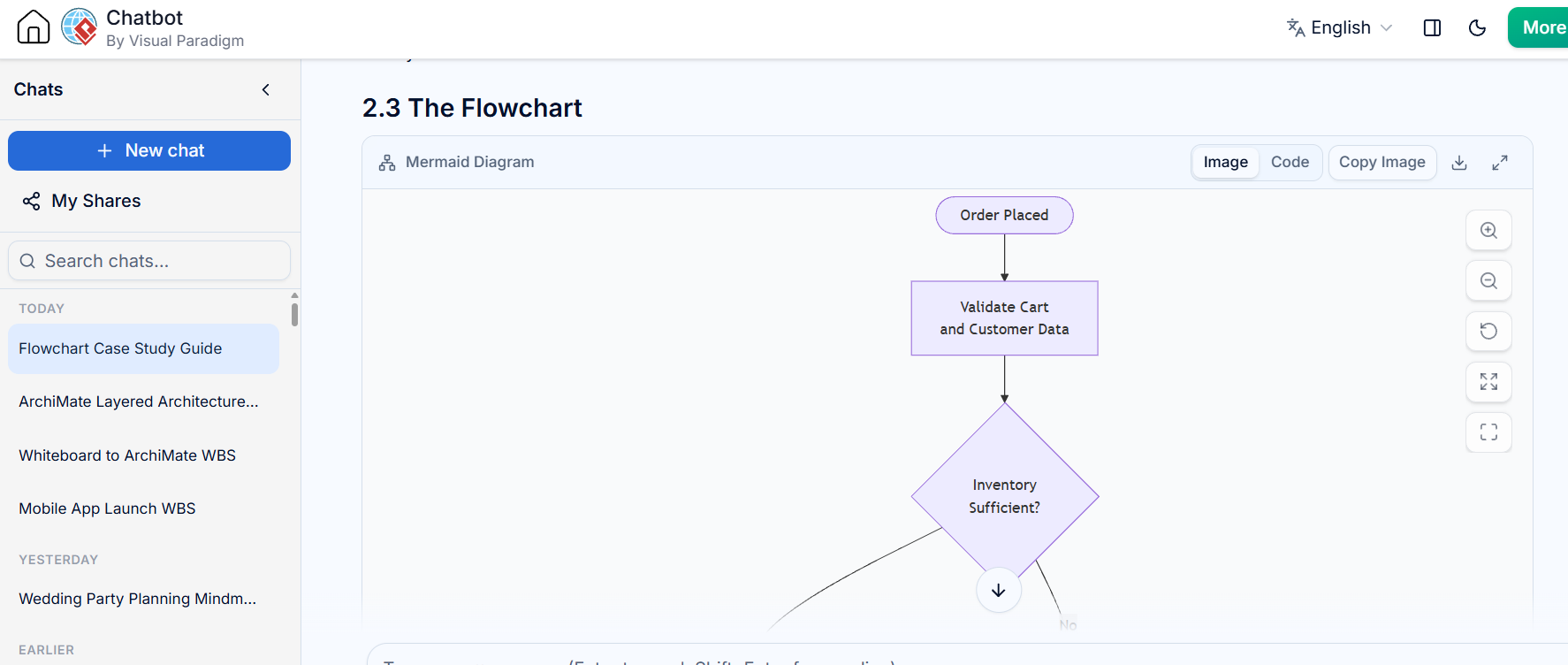
When modeling system behavior, we rely on standard symbols to communicate intent. In the Mercado diagram, we utilize three primary shapes, each serving a distinct architectural purpose:
- Ovals (Terminators): These represent the entry and exit points of the system. In the diagram,
Order Placedmarks the trigger event, whileEnd: Order FailedandEnd: Order Shippedmark the final states of the process. - Rectangles (Process/Action): These denote specific activities or tasks performed by the system. Examples include
Validate Cart,Authorize Payment, andHand to Carrier. - Diamonds (Decisions): These are the critical branching points in the logic. They represent a condition that must be evaluated (e.g.,
Inventory Sufficient?). A fundamental rule in flowcharting is that every diamond must have exactly two labeled outgoing paths (typically “Yes/No” or “True/False”) to ensure the logic is deterministic.
3. Analyzing the Logic Paths
The Mercado flowchart is a masterclass in handling Exception Paths. A robust system design anticipates failure. The diagram does not just show the “Happy Path” (where everything goes right); it explicitly models the friction points where the process might break.
3.1 The Inventory Gate
The first major decision point occurs immediately after validation. The system checks Inventory Sufficient?. If the answer is “No,” the system does not crash; it diverts to a Backorder logic branch. This demonstrates a graceful degradation strategy, offering the customer a choice (Accept or Cancel) rather than a hard error.
3.2 The Retry Loop
Perhaps the most critical algorithmic component is the payment handling logic. The diagram illustrates a Loop structure. The flow moves from PayAttempt to a decision Payment Authorized?. If “No,” it checks Retry Attempts < 3?. If true, the arrow loops back to PayAttempt. This visual representation ensures developers understand that the system must maintain state (counting retries) rather than simply failing immediately.
3.3 The Quality Control Cycle
The fulfillment phase includes a Quality Check decision. If QC fails, the process loops back to Repack / Replace Item. This is a “Do-While” loop in disguise: continue picking and packing until the quality check passes. Modeling this as a loop rather than a linear sequence is vital for tracking inventory and time metrics accurately.
4. Implementation: VPasCode and Mermaid
Visual Paradigm’s VPasCode tool allows us to generate these diagrams via natural language or code, making the modeling process accessible. Below is the Mermaid syntax used to generate the Mercado flowchart. This code is “Diagram as Code,” meaning the diagram is version-controllable and reproducible.
flowchart TB
    Start([Order Placed]) --> Validate[Validate Cart
and Customer Data]
    Validate --> InvCheck{Inventory
Sufficient?}

    InvCheck -- No --> Backorder[Offer Backorder
or Substitute]
    Backorder --> CustChoice{Accepts
Backorder?}
    CustChoice -- No --> CancelOrder[Cancel Order
Refund Deposit]
    CancelOrder --> NotifyCancel[Notify Customer
Order Cancelled]
    CustChoice -- Yes --> PayAttempt

    InvCheck -- Yes --> PayAttempt[Authorize Payment]

    PayAttempt --> PayResult{Payment
Authorized?}
    PayResult -- No --> RetryCount{Retry Attempts
< 3?}
    RetryCount -- Yes --> PayAttempt
    RetryCount -- No --> HoldOrder[Place Order on Hold]
    HoldOrder --> NotifyFail[Notify Customer
Payment Failed]
    NotifyFail --> EndFail([End: Order Failed])

    PayResult -- Yes --> Reserve[Reserve Inventory
and Create Shipment]
    Reserve --> AssignWH[Assign to Warehouse
and Generate Pick List]
    AssignWH --> PickPack[Pick and Pack Order]
    PickPack --> QC{Quality Check
Passed?}

    QC -- No --> Repack[Repack / Replace Item]
    Repack --> PickPack

    QC -- Yes --> Handover[Hand to Carrier
Generate Tracking No.]
    Handover --> EmailConfirm[Email Confirmation
with Tracking]
    EmailConfirm --> EndOk([End: Order Shipped])
5. The Value of a Single Source of Truth
The ultimate goal of this exercise was to create a “single authoritative flowchart.” By using a standardized tool like VPasCode, the engineering team gains a strict specification for refactoring the order service, ensuring the code matches the diagram. Simultaneously, the customer support team can reference this same diagram to explain order statuses, reducing the 4,000 monthly complaints.
When documentation and architecture are aligned, onboarding new hires shifts from weeks to days. They don’t just read a manual; they visualize the system’s heartbeat.