In the world of business analysis and software engineering, communication gaps often lead to project failure. Business Process Model and Notation (BPMN) bridges this divide. It is an international standard (ISO/IEC 19510) designed to be a “visual language” that is readable by business stakeholders yet detailed enough for technical implementation.
This tutorial explores the anatomy of BPMN, how it answers critical process questions, and how tools like Visual Paradigm facilitate the creation of these diagrams.
1. The Anatomy of a BPMN Diagram
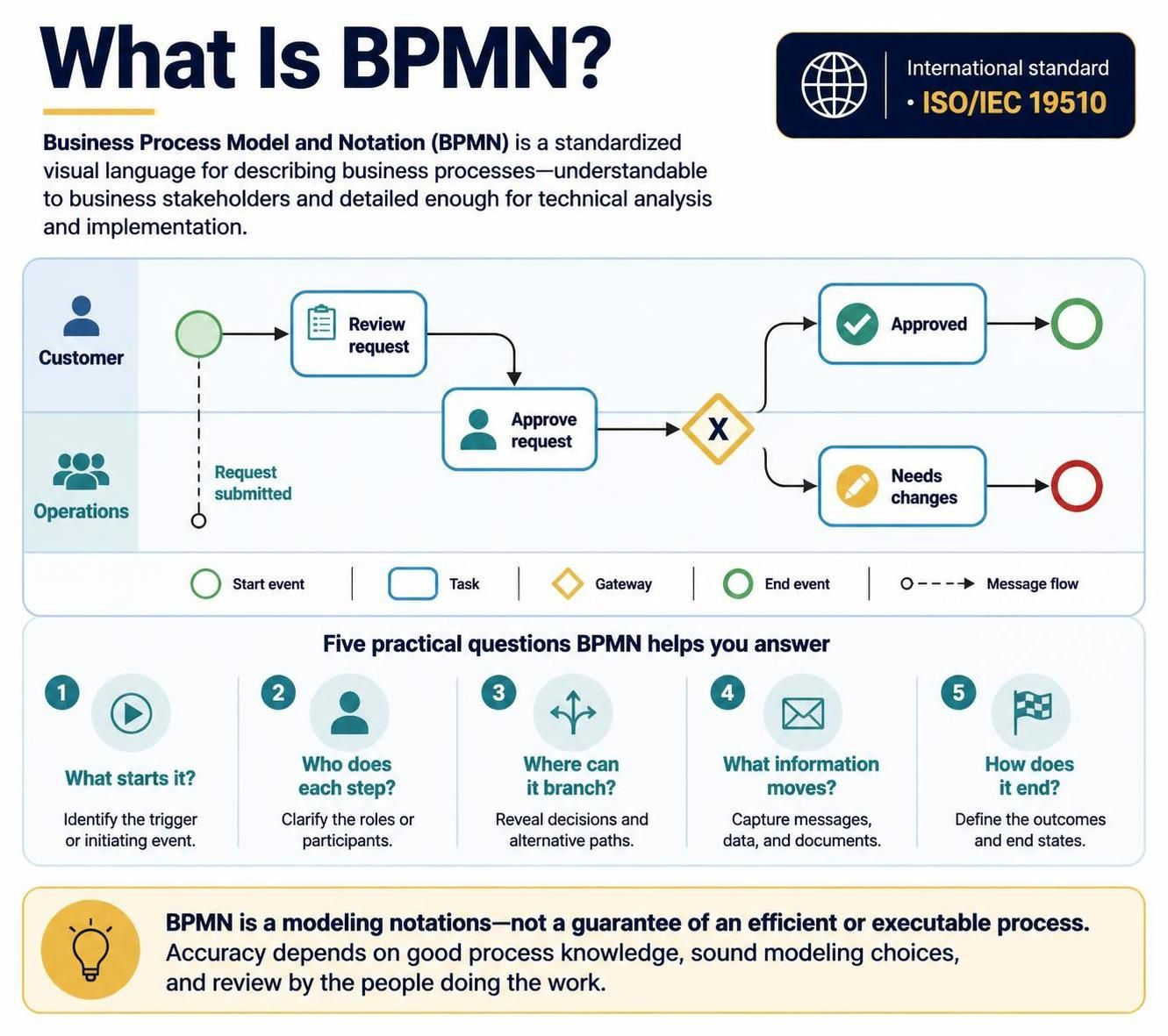
Looking at the standard example of a “Request Approval” process, we can deconstruct the diagram into its fundamental components. BPMN relies on four primary elements: Events, Activities, Gateways, and Connectors.
Start and End Events
Every process requires a trigger and a conclusion. In the diagram, the Start Event is represented by a thin green circle. It signifies the initiation of the workflow, often triggered by a message (e.g., “Request submitted”). Conversely, End Events (thick colored circles) indicate the termination of the process. Notice how the green circle indicates a successful “Approved” outcome, while the red circle indicates a failure or “Needs changes” state.
Tasks and Roles (Swimlanes)
The rectangular rounded boxes represent Tasks (or Activities). These are the actual work items being performed. To manage complexity, BPMN uses Swimlanes (the horizontal rows in the diagram). These lanes assign responsibility to specific participants:
- Customer: The external entity initiating the request.
- Operations: The internal group responsible for reviewing and approving.
This visual separation answers the question: “Who performs each step?”
Gateways: The Logic of the Process
Business processes are rarely linear; they require decision points. The yellow diamond in the diagram represents a Gateway (specifically an Exclusive Gateway, denoted by the “X”). This symbol dictates that the process flow can only take one path. It acts as a filter: if the request is approved, it goes one way; if it needs changes, it goes the other.
Message Flows
Unlike standard sequence flows which connect tasks within the same process, the dashed line represents a Message Flow. This indicates communication between participants (e.g., from the Customer to the Operations team). This answers the question: “What information or messages move between participants?”
2. The 5 Practical Questions BPMN Answers
When building a model, you are essentially answering five specific questions. A robust BPMN diagram must provide clear answers to all of them:
- What starts it? (The Trigger). Identify the initiating event that sparks the workflow.
- Who does each step? (The Roles). Clarify the participants involved in every task.
- Where can it branch? (The Logic). Reveal decisions and alternative paths using Gateways.
- What information moves? (The Data). Capture the messages and documents exchanged between participants.
- How does it end? (The Outcomes). Define the distinct end states of the process.
3. Modeling Concepts: Notation vs. Execution
A common misconception in process modeling is that a diagram is a guarantee of efficiency. It is crucial to remember that BPMN is a modeling notation, not a guarantee of an efficient or executable process.
Visual Paradigm and AI-assisted tools can help you generate the syntax and structure of the diagram, but the “sound modeling choices” must come from human expertise. A clear diagram depends on accurate process knowledge and review by the people who actually do the work.
When you transition from a conceptual diagram to a formal model in Visual Paradigm, the tool can often validate the syntax against the ISO/IEC 19510 standard, ensuring that your logic is sound before it is ever executed.
4. Conclusion
By mastering these visual elements, you can transform complex business logic into a standardized language. Whether you are documenting a simple approval chain or a complex enterprise integration, BPMN provides the clarity needed to ensure everyone—from the CEO to the developer—is looking at the same picture.