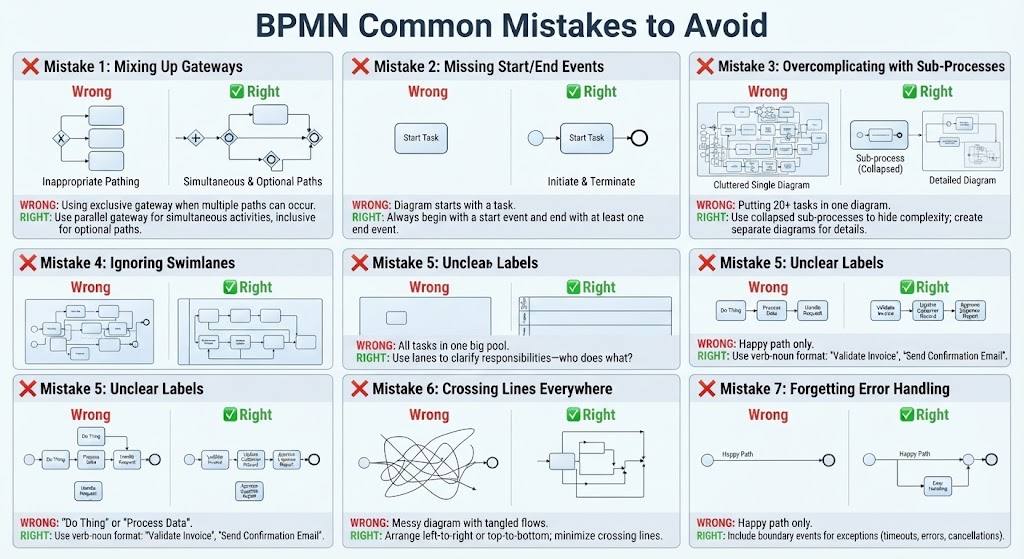
Business Process Model and Notation (BPMN) is the industry standard for visualizing business processes, but despite its widespread adoption, even experienced modelers often introduce structural flaws that make diagrams difficult to read, execute, or maintain. This tutorial breaks down the seven most common pitfalls found in business process diagrams and provides actionable strategies to ensure your models are robust, clear, and semantically correct.
1. Correct Gateway Logic: Exclusive vs. Inclusive vs. Parallel
The most frequent logical error in BPMN is the misuse of gateways. Gateways control the divergence and convergence of sequence flows, determining how the process splits and merges. Confusing their types can fundamentally alter the process logic.
The Wrong Way: Misinterpreting Divergence
A common mistake is using an Exclusive Gateway (XOR) when multiple paths could simultaneously occur. An Exclusive Gateway dictates that only one of the outgoing paths can be taken based on a specific condition.
The Right Way: Matching Gateway to Reality
To model a process correctly, you must select the gateway that matches the business logic:
- Parallel Gateway (+): Use this when multiple activities must occur simultaneously. The incoming flow splits into two or more concurrent flows that do not wait for one another.
- Inclusive Gateway (OR): Use this for optional paths where one, several, or even all outgoing paths might be taken. This is distinct from Exclusive, as it allows for multiple active branches.
2. The Lifecycle Rule: Start and End Events
A process diagram represents a complete lifecycle. It must have a defined beginning and a defined conclusion. A diagram that starts with a task or ends without a closure is technically incomplete.
The Wrong Way: Missing Boundaries
Starting a diagram directly with a task (e.g., “Process Data”) implies the work just appeared out of nowhere. This lacks context regarding the trigger or the state of the data before processing begins.
The Right Way: Explicit Termination
Always begin your diagram with a Start Event (typically a circle with a thick border) to indicate the trigger. Similarly, ensure your process ends with at least one End Event (a thick black circle) to signify successful completion or termination. This establishes a clear scope for the workflow.
3. Managing Complexity: The Power of Sub-Processes
As processes grow, they can become unwieldy. A single diagram containing 20+ tasks often leads to cognitive overload for the reader, making it hard to grasp the high-level flow.
The Wrong Way: The “Spaghetti” Diagram
Attempting to cram every detail, exception, and sub-task into one massive diagram results in a cluttered mess. This violates the principle of modularity and makes maintenance a nightmare.
The Right Way: Abstraction and Detail
Utilize Collapsed Sub-Processes to hide complexity. A collapsed sub-process acts as a container that represents a detailed set of steps without displaying them immediately. You can create a separate, detailed diagram for the specific sub-process while keeping the main diagram clean and readable.
4. Clarifying Responsibility with Swimlanes
Business processes are rarely the responsibility of a single entity. They involve interactions between departments, systems, or individuals. Ignoring this structure creates a “black box” where no one knows who is accountable.
The Wrong Way: The Big Pool
Placing all tasks in one big pool (or no pool at all) obscures the flow of responsibility. It becomes impossible to distinguish between a task performed by the “Sales Department” and one performed by “Accounting.”
The Right Way: Swimlanes
Use Swimlanes (Lanes or Pools) to clarify responsibilities. By organizing tasks into vertical or horizontal lanes, you explicitly define who does what. This visual separation makes handoffs between different actors immediately obvious.
5. The Art of Naming: Verb-Noun Format
Labels on tasks are the primary way humans interact with the diagram. Vague or ambiguous labels lead to misinterpretation of the process requirements.
The Wrong Way: Generic or Noun-Only Labels
Labels like “Do Thing,” “Process Data,” or “Approval” are insufficient. They fail to describe the action taking place or the object being acted upon, leading to confusion during implementation.
The Right Way: Action-Oriented Labels
Adopt a strict Verb-Noun format for all task labels. This ensures clarity and consistency. For example:
- Validate Invoice (instead of “Invoice”)
- Send Confirmation Email (instead of “Email”)
- Calculate Tax (instead of “Tax”)
6. Visual Hygiene: Minimizing Crossing Lines
A diagram is a visual tool. If the lines (sequence flows) are tangled and crossed excessively, the cognitive load required to trace the path increases significantly.
The Wrong Way: The Tangled Web
A messy diagram with crossing lines everywhere makes it difficult to trace the logic flow, especially for complex scenarios. It looks unprofessional and is prone to misinterpretation.
The Right Way: Structured Layout
Arrange your diagram logically, typically left-to-right or top-to-bottom. Plan the layout before drawing to minimize crossing lines. If crossing is unavoidable, use orthogonal connectors (lines with 90-degree angles) to maintain clarity.
7. Resilience: Handling Exceptions and Errors
Real-world processes rarely follow a “Happy Path” perfectly. Systems fail, data is missing, and users cancel actions. A diagram that only shows the ideal scenario is incomplete.
The Wrong Way: The Happy Path Only
Modeling only the successful execution of a process leaves the development team guessing on how to handle errors, timeouts, or cancellations.
The Right Way: Boundary Events
Always include Error Handling mechanisms. Use Boundary Events attached to tasks to catch exceptions. These events allow you to model what happens when a specific error occurs (e.g., a timeout, a validation failure, or a manual cancellation) without cluttering the main flow.