In the world of Business Process Model and Notation (BPMN), managing the complexity of modern business operations often requires more than just a linear sequence of events. Real-world scenarios frequently involve multiple teams or systems working simultaneously to achieve a single outcome. This tutorial explores the Parallel Gateway, a critical component for modeling concurrency, using the “Order Fulfillment” scenario as our primary case study.
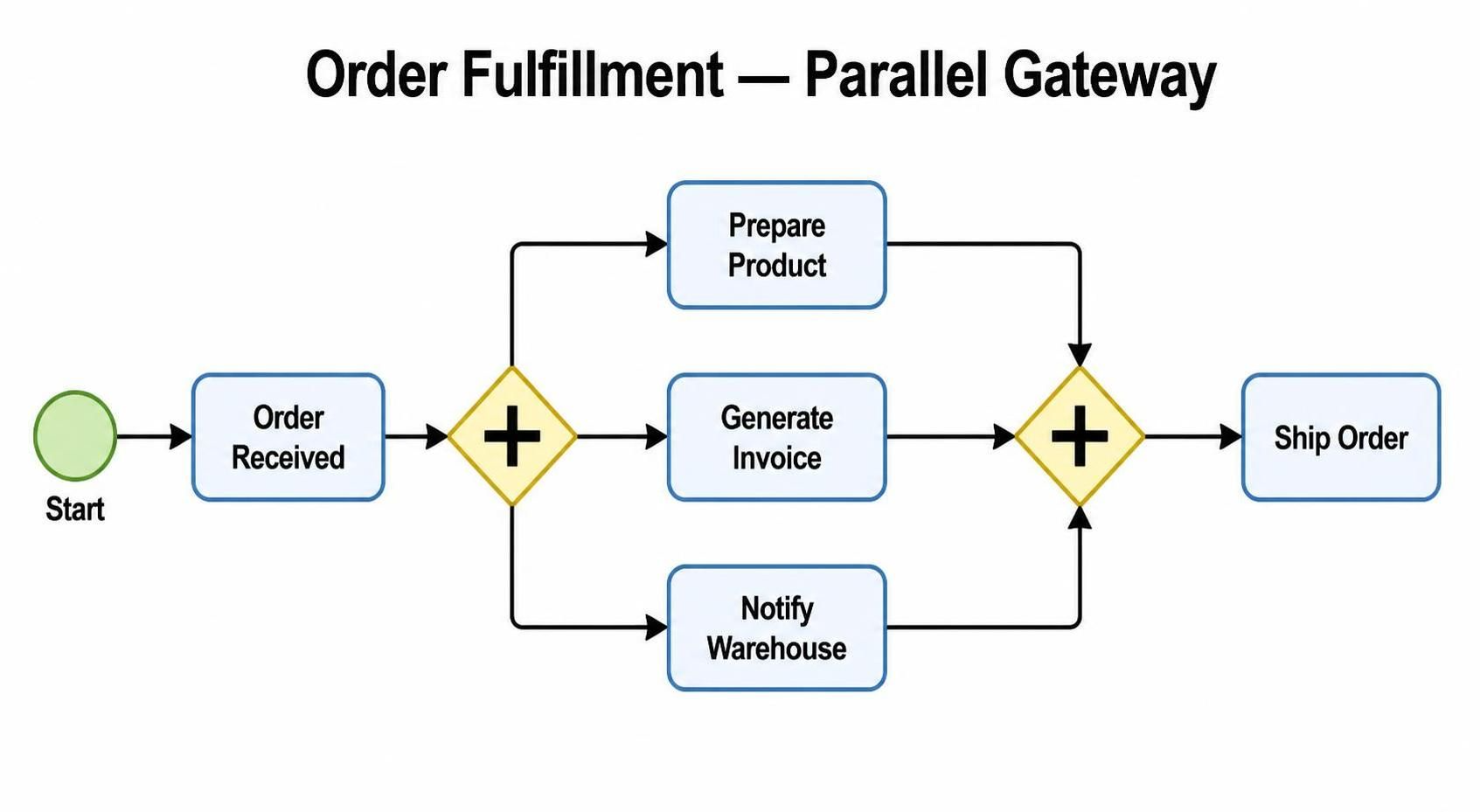
The diagram provided illustrates a robust order processing workflow. It begins with an order being received and immediately branches into three independent tasks: preparing the product, generating the invoice, and notifying the warehouse. These tasks must all finish before the final step—shipping the order—can occur. This is the textbook definition of a Parallel Gateway implementation.
What is a Parallel Gateway?
A Parallel Gateway, often referred to as an AND-split or AND-join, is a control flow element that manages the synchronization of process threads. Unlike an Exclusive Gateway (XOR), which directs flow to only one path based on a condition, a Parallel Gateway directs the flow to all outgoing paths simultaneously.
In our visual model, this is represented by a yellow diamond containing a bold + symbol. This symbol is universally recognized in BPMN standards as the indicator for parallelism. It tells the process engine: “Do not wait. Send this task to every connected downstream activity right now.”
Diving into the Workflow Architecture
Let’s break down the architecture of the “Order Fulfillment” process step-by-step to understand how the Parallel Gateway facilitates efficiency.
1. The Parallel Split (Diverging)
After the [Order Received] task is completed, the process flow reaches the first Parallel Gateway (the diverging fork). At this specific moment, the single instance of the process splits into three concurrent threads:
- Thread A: The warehouse team is triggered to [Prepare Product].
- Thread B: The finance team is triggered to [Generate Invoice].
- Thread C: The logistics team is triggered to [Notify Warehouse].
Key Concept: The “+” symbol at this split indicates that no conditions are checked. Even if “Generating an Invoice” takes 2 hours and “Notifying the Warehouse” takes 2 minutes, both start at the exact same second. This is true parallelism.
2. Independent Execution
During the execution phase, these three tasks run independently. The system does not care about the status of one task when processing another. This is vital for performance; it prevents the entire process from stalling while waiting for a single, slow task to complete. The process engine essentially creates three active instances of the workflow for this single order.
3. The Parallel Join (Converging)
Once the independent tasks are complete, the flow reaches the second Parallel Gateway (the converging join). This is the synchronization point. The behavior here is strict:
- The gateway waits for the first incoming flow (e.g., “Prepare Product”).
- It holds the process in a suspended state.
- It waits for the second incoming flow (e.g., “Generate Invoice”).
- It waits for the third incoming flow (e.g., “Notify Warehouse”).
Only when all three threads have arrived at the gateway does the process release the lock and proceed to the final [Ship Order] task. If any single task is delayed, the entire process waits.
When to Use Parallel Gateways
Understanding when to deploy a Parallel Gateway is just as important as knowing how to draw it. You should utilize this pattern in the following scenarios:
- Concurrent Activities: When distinct parts of a business need to happen at the same time to save time.
- Independent Tasks: When the completion of one task does not depend on the output of another (e.g., the warehouse doesn’t need the invoice to pack the box).
- Resource Optimization: When you have multiple resources (teams, systems) available to work on the same instance simultaneously.
Contrast with Exclusive Gateways
It is crucial not to confuse Parallel Gateways with Exclusive (XOR) Gateways. An Exclusive Gateway asks, “Which path should I take?” and selects one. A Parallel Gateway asks, “What paths are available?” and takes all of them.
Conclusion
The Order Fulfillment diagram serves as a perfect example of how BPMN models real-world complexity. By using Parallel Gateways, we ensure that the order processing is efficient, allowing the warehouse, finance, and logistics teams to work in unison. This synchronization ensures that the final “Ship Order” action only happens when the product is ready, the paperwork is done, and the carrier is notified—all in a coordinated, parallel fashion.