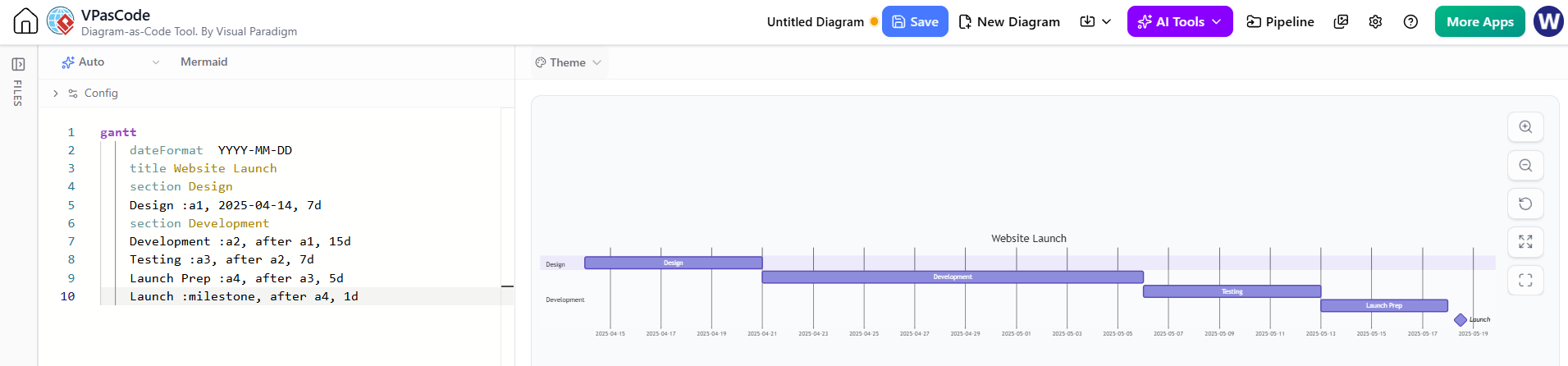
In the realm of project management and planning, visualizing timelines is crucial. Traditional tools often require dragging and dropping blocks, which can be cumbersome when making rapid adjustments. VPasCode, the diagram-as-code tool by Visual Paradigm, revolutionizes this experience by allowing you to define complex project schedules using simple text. By leveraging the Mermaid syntax, developers and project managers can create precise Gantt charts that are version-controllable and AI-friendly.
This tutorial explores how to utilize the Mermaid Gantt chart functionality within the VPasCode interface to manage a website launch project, demonstrating the power of “code-first” modeling.
Understanding the Mermaid Gantt Syntax
The Mermaid library offers a descriptive syntax specifically designed for project timelines. Unlike static images, this code defines the structure, dates, and dependencies of your project directly. The syntax allows for:
- Date Formatting: Explicitly defining the date format used in your timeline.
- Sectioning: Grouping tasks into logical phases (e.g., Design, Development).
- Dependencies: Defining task flow using relative time (e.g., “7d” for 7 days) and sequential logic (e.g., “after a1”).
When you enter code into the VPasCode editor, it renders the corresponding visual diagram in real-time, providing a seamless “What You See Is What You Get” experience.
Step-by-Step: Creating a Website Launch Timeline
Let’s walk through the construction of the project plan shown in the VPasCode interface. We will build a timeline for a “Website Launch” project, breaking it down into specific phases and dependencies.
1. Setup and Configuration
First, we must establish the context for the chart. We define the chart type as gantt, set the date format to YYYY-MM-DD for clarity, and assign a descriptive title.
gantt
dateFormat  YYYY-MM-DD
title Website Launch
2. Defining Sections and Tasks
Next, we organize the project into sections. In Mermaid, section creates a visual grouping on the chart. Inside each section, we define tasks. The syntax generally follows the pattern: TaskName :id, startDate, duration.
The Design Phase
We start with the “Design” section. Here, we assign a unique ID (a1) to the task “Design” to allow other tasks to reference it later. We set the start date to April 14, 2025, and the duration to 7 days.
section Design
Design :a1, 2025-04-14, 7d
3. Establishing Dependencies
The true power of a Gantt chart lies in its dependencies. In the “Development” section, we do not specify a calendar date. Instead, we use the keyword after followed by the ID of the previous task (a1). This ensures that if the “Design” phase is delayed, the “Development” phase automatically shifts to start later.
section Development
Development :a2, after a1, 15d
4. Sequential Workflow and Milestones
We continue this pattern for “Testing” and “Launch Prep”, chaining them together. Finally, we introduce a Milestone for the “Launch”. A milestone represents a significant event in the project, often taking zero or negligible duration, marked by a diamond shape in the visual output.
Testing :a3, after a2, 7d
Launch Prep :a4, after a3, 5d
Launch :milestone, after a4, 1d
The VPasCode Advantage
Using the VPasCode tool to edit this Mermaid diagram offers several distinct benefits over traditional drag-and-drop interfaces:
- AI Friendly: Because the diagram is text, AI chatbots can easily read, analyze, and even modify the project schedule. You can ask an AI, “What happens if Design takes 10 days?”, and it can instantly update the code.
- Version Control: You can commit your Gantt chart to Git just like source code, tracking changes to project timelines over time.
- Visual Paradigm Integration: As part of the Visual Paradigm ecosystem, this tool bridges the gap between high-level architecture and detailed project execution.
Conclusion
By combining the precision of code with the visual clarity of a Gantt chart, VPasCode empowers teams to manage complex projects with agility. Whether you are planning a software launch or a marketing campaign, mastering the Mermaid syntax in VPasCode ensures your project plan is always up-to-date and easy to communicate.