


Enterprise architecture serves as the backbone for organizational strategy. It connects business goals with the technical infrastructure that supports them. For domain architects, adopting the ArchiMate modeling language is a significant milestone. This framework provides a common vocabulary for describing, analyzing, and visualizing architecture.
Starting a new ArchiMate project can feel daunting. There are many layers, views, and relationships to consider. This guide breaks down the process into manageable phases. It focuses on the core principles of modeling without relying on specific software capabilities.
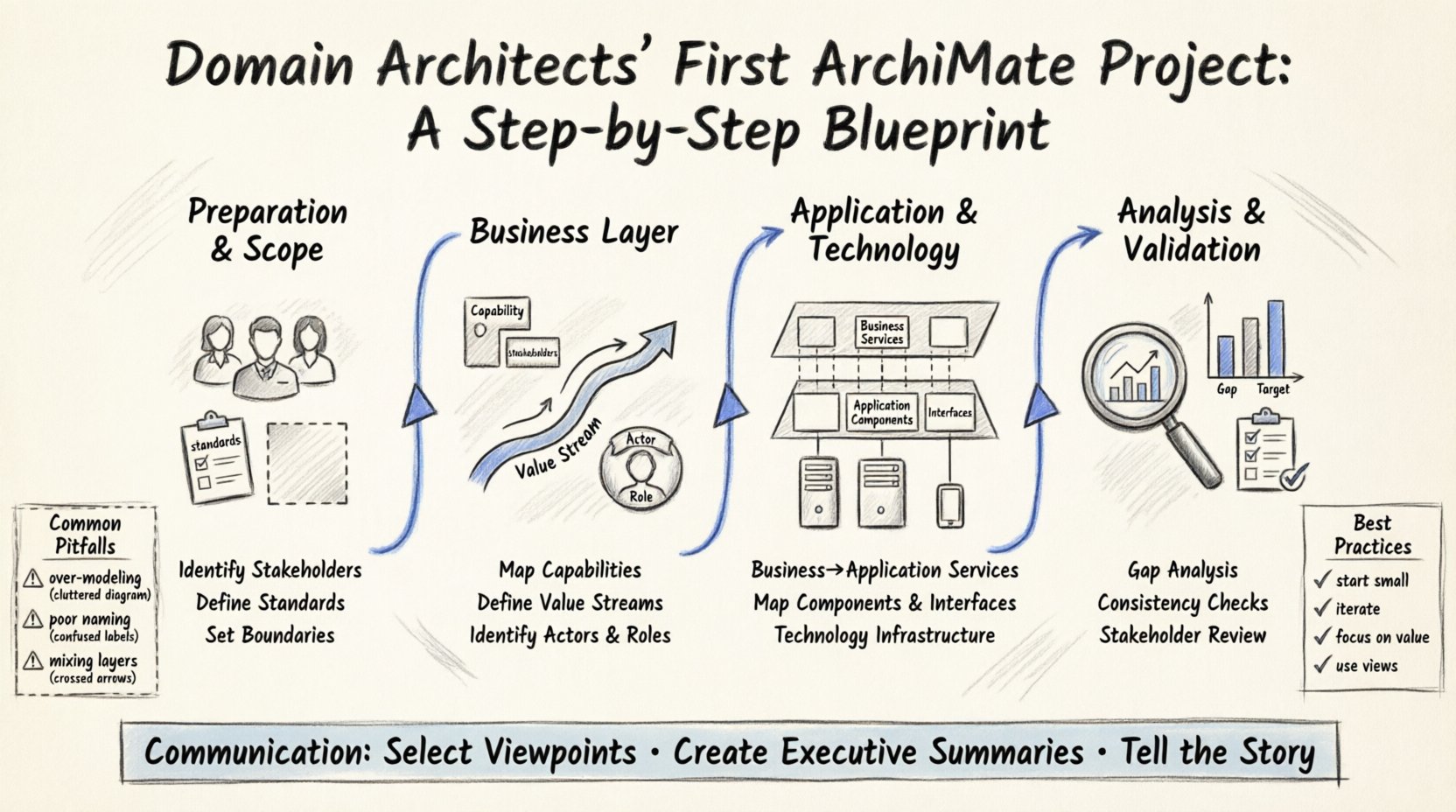
Understanding the Scope of Domain Architecture 📋
Before beginning any modeling effort, it is essential to understand what domain architecture entails. This discipline focuses on specific areas of the enterprise, such as data, business, or technology. The goal is to define the structure and relationships within that domain.
When initiating an ArchiMate project, you must define the boundaries clearly. Without clear boundaries, the model can become unmanageable. Consider the following factors:
- Business Context: What business value does this domain deliver?
- Stakeholders: Who needs to see this information?
- Granularity: How detailed should the model be?
- Timeframe: Is this a snapshot of the current state or a target vision?
Defining these elements early prevents scope creep. It ensures that the project remains focused on delivering actionable insights rather than just documentation.
Phase 1: Preparation and Scope Definition 🚀
The foundation of any successful project lies in preparation. This phase involves gathering requirements and setting the stage for modeling.
Identify Key Stakeholders
Communication is critical in enterprise architecture. You need to know who will use the models and for what purpose. Typical stakeholders include:
- Business Leaders: They care about capabilities and value streams.
- IT Managers: They focus on applications and infrastructure.
- Developers: They need clarity on interfaces and data flows.
- Compliance Officers: They require visibility into risk and control points.
Engage with these groups to understand their information needs. This ensures the models produced will be useful rather than ignored.
Define Modeling Standards
Consistency is key when multiple architects work on the same ecosystem. Establish standards for naming conventions, colors, and symbol usage.
- Naming: Use clear, descriptive names for all elements.
- Layers: Adhere to the standard ArchiMate layers (Business, Application, Technology).
- Relationships: Use standard relationship types (access, flow, serve).
Documenting these standards helps maintain quality over time. It also makes the model easier to read for anyone reviewing it later.
Phase 2: Building the Business Layer 🧠
The Business Layer is the starting point for most architectures. It describes the organization’s capabilities and how it delivers value. This layer is often the most important for domain architects because it defines the “what” before the “how”.
Map Business Capabilities
Capabilities represent what the organization can do. They are relatively stable compared to processes or roles. Mapping these provides a high-level view of the domain.
- Identify Core Capabilities: What is essential for the business to operate?
- Identify Support Capabilities: What functions enable the core capabilities?
- Identify Enabling Capabilities: What external factors support the business?
Group these capabilities logically. Avoid creating too many levels of hierarchy. A flat structure is often easier to navigate.
Define Value Streams
Value streams describe the sequence of activities that create value for a customer or stakeholder. They connect capabilities to outcomes.
When modeling a value stream:
- Start Point: Identify the trigger that starts the stream.
- End Point: Define the value delivered to the recipient.
- Steps: Break down the stream into distinct activities.
This approach highlights how different parts of the organization interact to achieve a goal. It is particularly useful for identifying gaps or redundancies.
Identify Actors and Roles
Who performs the work? Actors represent the people or systems involved. Roles define the responsibilities within the business context.
- Business Actor: External entities like customers or partners.
- Business Role: Internal positions or job functions.
Map these to the capabilities and processes they support. This clarifies accountability and ownership.
Phase 3: Connecting to Application and Technology ⚙️
Once the business layer is established, you must show how it is supported. This involves the Application and Technology layers. These layers describe the systems and infrastructure required to execute the business functions.
Model Business Services and Application Services
Services act as the bridge between business and application layers. A business service is a capability exposed to a business actor. An application service is a function performed by software.
- Trace Business to Application: Show which applications support which business capabilities.
- Identify Gaps: Are there business capabilities without application support?
- Identify Overlaps: Are multiple applications supporting the same capability inefficiently?
Map Application Components and Interfaces
Applications are composed of components. These components interact through interfaces.
- Application Component: A piece of software with a specific function.
- Interface: The point of interaction between components.
Defining interfaces clearly helps in understanding data flow and integration points. It is crucial for planning system modernization.
Technology Infrastructure
The Technology Layer represents the hardware and network infrastructure. It hosts the application components.
- Node: A computational resource like a server or cloud instance.
- Device: End-user hardware like laptops or mobile devices.
- Network: Communication infrastructure like LAN or WAN.
Map application components to the nodes that host them. This provides visibility into deployment and resource requirements.
Phase 4: Analysis and Validation 🔍
Building the model is only half the work. You must analyze it to ensure it is accurate and useful. Validation ensures that the architecture aligns with reality and strategy.
Gap Analysis
Compare the current state model with the target state model. This reveals what needs to change.
- Functional Gaps: Missing capabilities or services.
- Technical Gaps: Outdated infrastructure or missing interfaces.
- Process Gaps: Inefficient workflows or missing handoffs.
Document these gaps clearly. They form the basis for the roadmap and investment decisions.
Consistency Checks
Ensure the model follows logical rules. For example, a technology node cannot serve a business process directly. There must be an application layer in between.
- Layering Rules: Verify that relationships respect the layer hierarchy.
- Naming Conventions: Check for consistency across the entire model.
- Completeness: Ensure all required elements are present.
Stakeholder Review
Present the model to the stakeholders identified in Phase 1. Gather feedback on accuracy and clarity.
- Walkthroughs: Guide stakeholders through the key views.
- Q&A Sessions: Address specific concerns about the architecture.
- Updates: Incorporate feedback into the model.
This collaborative approach builds trust and ensures the model is adopted.
Common Pitfalls in ArchiMate Modeling ⚠️
Even experienced architects can make mistakes. Being aware of common errors helps avoid them.
| Pitfall | Impact | Mitigation |
|---|---|---|
| Over-Modeling | Too much detail makes the model unreadable. | Focus on high-level views first. Drill down only when needed. |
| Ignoring Context | Models do not reflect the actual environment. | Validate with stakeholders regularly. |
| Poor Naming | Confusion about what elements represent. | Enforce naming standards strictly. |
| Mixing Layers | Logical errors in relationships. | Review layer constraints before saving relationships. |
| Static View Only | Misses dynamic behavior and flows. | Create flow diagrams for critical processes. |
Best Practices for Success ✅
Following established practices increases the value of your work. Here are recommendations for maintaining a healthy architecture project.
- Start Small: Begin with a pilot scope. Prove the value before expanding.
- Iterate: Models evolve. Plan for regular updates.
- Focus on Value: Ensure every model element serves a purpose.
- Use Views: Create different views for different audiences.
- Document Assumptions: Record why certain decisions were made.
Communication and Reporting 📢
The final step is communicating the results. A model that sits in a repository is useless. It must be presented effectively.
Select the Right Viewpoints
Different stakeholders need different views. Use the standard ArchiMate viewpoints to select the right perspective.
- Business Process View: For operational managers.
- Application Composition View: For IT architects.
- Deployment View: For infrastructure teams.
Create Executive Summaries
Leadership often needs high-level summaries. Create dashboards or one-page overviews.
- Key Metrics: Highlight cost, risk, and performance.
- Visuals: Use diagrams to tell the story.
- Recommendations: Clearly state the next steps.
Conclusion
Completing your first ArchiMate project is a significant achievement. It demonstrates the ability to translate complex business needs into structured models. By following this blueprint, you ensure a solid foundation for future work.
Remember that architecture is a journey, not a destination. The models you create today will change as the organization evolves. Maintain a flexible mindset and continue to refine your approach. With discipline and focus, your domain architecture will become a vital asset for the enterprise.
This post is also available in Deutsch, Español, فارسی, Français, English, Bahasa Indonesia, 日本語, Polski, Portuguese, Ру́сский, Việt Nam, 简体中文 and 繁體中文.