


Enterprise architecture is often viewed as a complex discipline reserved for large corporations with massive budgets. However, the core principles behind structuring an organization’s capabilities are universal. At the heart of this discipline lies the ArchiMate modeling language. It serves as a standardized way to visualize, analyze, and describe the relationships between business strategies, organizational structures, information flow, and technology infrastructure. 🌐
Creating your first model can feel daunting. There is a lot of terminology to learn, and the temptation to overcomplicate the structure is high. This guide cuts through the noise. We will focus on the fundamentals of constructing a usable ArchiMate model without relying on specific proprietary tools or hype. The goal is to build a clear, communicative representation of your organization’s current state and future goals. 🎯
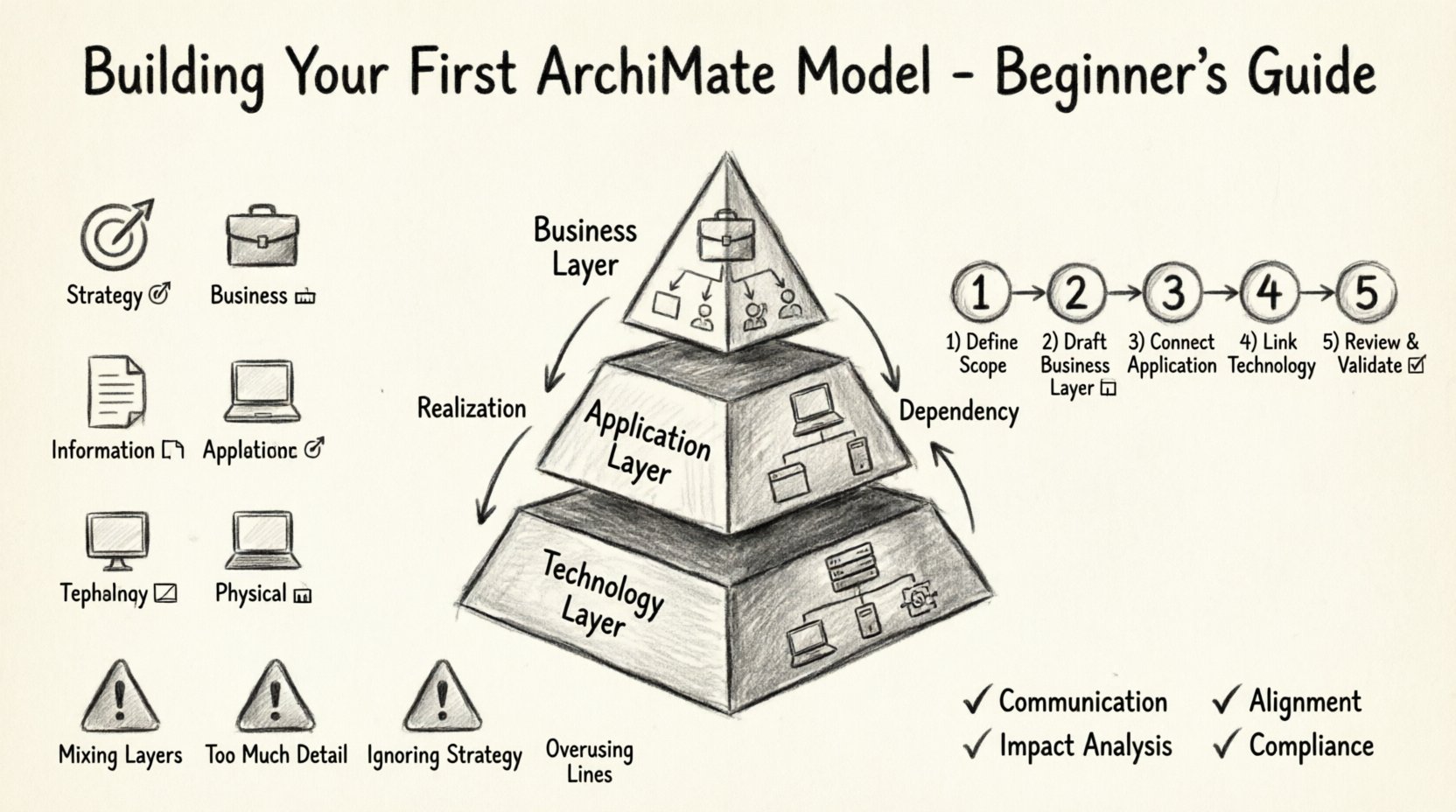
🧩 Understanding the Core Concept
Before drawing a single line, you must understand what ArchiMate actually models. It is not just a diagramming tool; it is a language designed to bridge the gap between business stakeholders and IT teams. The model acts as a common ground where a business manager can understand how a software change impacts their operations, and an architect can see how a new business strategy requires technological support. 🤝
The framework organizes information into specific layers and domains. This separation ensures clarity. Instead of mixing business processes with server configurations, you categorize them. This structural discipline is what makes the model readable and maintainable over time.
📊 The ArchiMate Layers
The architecture is divided into three primary layers. Each layer represents a different level of abstraction. Moving from the top layer down, you move from strategy to implementation.
- Business Layer: Focuses on the visible organization. This includes business processes, roles, actors, and services. It answers the question: “What does the organization do?” 💼
- Application Layer: Represents the software and services that support the business. This includes application components, data objects, and user interfaces. It answers: “What software supports the business?” 💻
- Technology Layer: The physical infrastructure. This covers hardware, networks, and system software. It answers: “What hardware runs the software?” 🖥️
While these layers are distinct, they are deeply interconnected. A change in the Business Layer often necessitates a change in the Application Layer, which in turn may require upgrades in the Technology Layer. Understanding these dependencies is crucial for effective change management. 🔄
📐 The Six Domains of Architecture
In addition to layers, ArchiMate defines six domains. These domains provide a way to classify the elements within the layers. They help ensure that you cover all necessary aspects of the enterprise without leaving gaps.
| Domain | Description | Example Element |
|---|---|---|
| Strategy | Intentions, goals, and principles that guide the enterprise. | Business Goal: Reduce Costs |
| Business | Organizational capabilities and processes. | Process: Process Customer Order |
| Information | Knowledge and data structures. | Artifact: Customer Invoice |
| Application | Software and services. | Application: Order Management System |
| Technology | Hardware and system software. | Device: Database Server |
| Physical | Real-world objects and locations. | Location: New York Office |
For a beginner, it is recommended to start with the first four domains (Strategy, Business, Information, Application) before expanding into Technology and Physical domains. This prevents the model from becoming too dense too quickly. 🚀
🔗 Relationship Types: The Glue of the Model
Elements alone are static. The value of the model comes from the relationships that connect them. These relationships define how elements influence one another. There are several key relationship types you must master to build a coherent diagram. 🧱
- Association: A generic link between two elements. It implies a connection without a specific direction of control or flow. Used often for context. 🔗
- Dependency: One element relies on another. If the supporting element changes, the dependent element is affected. Common between Business and Application layers. ⚠️
- Realization: One element implements another. For example, a Process realizes a Service. This shows implementation logic. 🛠️
- Flow: Indicates the movement of data or information between elements. Essential for showing how information moves through the system. 📥📤
- Triggering: One event triggers another. This is often used to show cause-and-effect in business processes. ⏱️
🚀 Step-by-Step: Building Your First Model
Now that the theory is clear, let’s move to the practical application. Follow this structured approach to build your initial model. Do not rush. Precision is more important than speed at this stage. ⏳
Step 1: Define Scope and Goals 🎯
Before opening your modeling tool, write down the purpose of the model. Are you documenting a specific process? Are you planning a migration? Are you explaining a merger? A clear scope prevents “scope creep,” where the model grows uncontrollably.
- Identify the specific business problem you are solving.
- Identify the stakeholders who will review the model.
- Decide the level of detail required (high-level vs. detailed).
If you try to model the entire enterprise in one go, you will likely fail. Start with a single business capability or a specific project area. 🏁
Step 2: Draft the Business Layer 🏢
Begin at the top. The Business Layer provides the context for everything else. Draw the business processes, roles, and actors involved in your scope.
- Identify Actors: Who performs the work? (e.g., Sales Clerk, Manager, Customer).
- Map Processes: What activities do they perform? (e.g., “Receive Order”, “Verify Payment”).
- Define Services: What value is delivered to the customer? (e.g., “Process Transaction Service”).
- Connect them: Use realization relationships to show how processes deliver services.
At this stage, ignore the software. Focus purely on the operational logic. If you cannot explain the business process without mentioning a specific app, you may be mixing layers too early. Keep it abstract. 🧐
Step 3: Connect the Application Layer 💾
Once the business logic is stable, introduce the software that supports it. This layer answers how the business process is technically enabled.
- Place Application Components below the corresponding Business Processes.
- Use Dependency or Realization relationships to link them.
- Identify where data is stored. Add Data Objects if necessary.
Ask yourself: “Which application supports this specific business process?” If a process is manual, note that. If it is automated, link it to the relevant software component. Avoid drawing every single app in the company; only include those relevant to your scope. 🛡️
Step 4: Link the Technology Layer ⚙️
This is the infrastructure layer. It sits at the bottom of your diagram. Here you define the hardware and network components that host the applications.
- Map Application Components to Device or System Software nodes.
- Use Deployment relationships to show where software runs.
- Consider network connections if communication between components is critical.
Do not get bogged down in IP addresses or specific server models unless they are critical to the architecture decision. Keep it high-level. A “Web Server” is often enough detail for the initial model. 🌐
Step 5: Review and Validate ✅
After connecting the layers, step back and review the model. Does it tell a coherent story? Can a stakeholder trace a business goal down to a physical device?
- Check Consistency: Ensure relationship types are used correctly (e.g., don’t use “Flow” where “Dependency” is needed).
- Check Completeness: Are there orphaned elements with no connections?
- Check Readability: Is the layout logical? Use grouping to keep related elements together.
🛑 Common Pitfalls to Avoid
Beginners often make the same mistakes when starting out. Being aware of these traps will save you hours of rework. 🚫
Pitfall 1: Mixing Layers
The most common error is drawing a line directly from a Business Process to a Database Server. This skips the Application Layer. Every connection should respect the layer boundaries unless explicitly modeling a logical dependency. Always route through the intermediate layer. 📉
Pitfall 2: Too Much Detail
Trying to document every single field in a database or every button on a screen defeats the purpose of enterprise architecture. The model is for decision-making, not user manual documentation. Simplify. If a detail does not impact the architecture decision, leave it out. 🧹
Pitfall 3: Ignoring the Strategy
Many models start with processes and ignore the strategic drivers. Without linking processes to business goals or principles, the model loses its strategic value. Always trace back to the “Why” at the top of the diagram. 🎖️
Pitfall 4: Overusing Lines
Every line represents a dependency. Too many lines create a “spaghetti diagram” that is impossible to read. If you have more than 10 lines entering a single element, consider grouping or abstraction. Less is often more. 🕸️
🛠️ Tools and Environment Setup
You will need a modeling environment to create and save your diagrams. While many commercial tools exist, the fundamental process remains the same regardless of the software you choose. 🔧
- Selection Criteria: Look for a tool that supports the ArchiMate standard. It should allow you to define layers, elements, and relationships clearly.
- Template Usage: Start with a blank template. Do not rely on pre-made complex examples. Building from scratch forces you to understand the structure.
- Export Capabilities: Ensure the tool allows you to export to PDF or image formats for sharing with stakeholders.
Remember, the tool is just a vessel. The value lies in the clarity of the thinking, not the features of the software. Focus on the content, not the interface. 🖊️
🔄 Maintaining the Model
An architecture model is not a one-time project. It is a living document that must evolve with the organization. If the model is not updated, it becomes a liability that misleads stakeholders. 📅
Version Control
Always save versions of your model. When a significant change occurs, create a new version number. This allows you to compare the “Before” and “After” states of the architecture. It provides an audit trail for decisions made. 📂
Change Management
Establish a routine for reviewing the model. Quarterly reviews are often sufficient for stable environments. During these reviews, ask:
- Has any new software been introduced?
- Has any business process changed?
- Are there any deprecated elements that should be removed?
Involving stakeholders in this review process ensures the model reflects reality. If the business team does not recognize their process in the model, the model is wrong. 🗣️
📈 Benefits of a Well-Structured Model
Why invest this effort? A well-constructed ArchiMate model offers tangible benefits to the organization. 🌟
- Communication: It provides a single source of truth. Everyone looks at the same diagram and understands the connections.
- Impact Analysis: When a server fails or a process changes, the model helps you identify exactly which other parts of the organization are affected.
- Alignment: It ensures IT investments are directly tied to business goals. You can see which applications support which strategies.
- Compliance: It helps in documenting controls and data flows for regulatory requirements.
🏁 Final Thoughts on Architecture Modeling
Building your first ArchiMate model is a journey from confusion to clarity. It requires patience and discipline. You will make mistakes, and you will have to redraw lines. This is part of the learning process. The goal is not perfection on the first draft, but a solid foundation that can grow. 🌱
Focus on the logic of the connections rather than the aesthetics of the drawing. A messy diagram with correct logic is more valuable than a beautiful diagram with incorrect relationships. Keep your scope narrow, your definitions clear, and your layers distinct. With time, this practice will become second nature. You will find that you start seeing your organization through a structured lens, identifying gaps and opportunities that were previously invisible. 👁️
Start small today. Pick one process. Map the business, the app, and the tech. See how they fit together. That single diagram is the beginning of a mature architecture practice. Good luck with your modeling journey. 🚀
This post is also available in Deutsch, Español, فارسی, Français, English, Bahasa Indonesia, 日本語, Polski, Portuguese, Ру́сский, Việt Nam, 简体中文 and 繁體中文.