


In modern organizations, the divide between business objectives and technical execution often leads to inefficiency, delayed delivery, and misaligned investments. Business Process Model and Notation (BPMN) serves as the critical bridge in this dynamic. It provides a standardized graphical representation of business processes, allowing stakeholders from different domains to collaborate effectively. This guide explores how to leverage BPMN to ensure IT architecture supports strategic business goals without unnecessary friction.
🌉 Understanding the Alignment Challenge
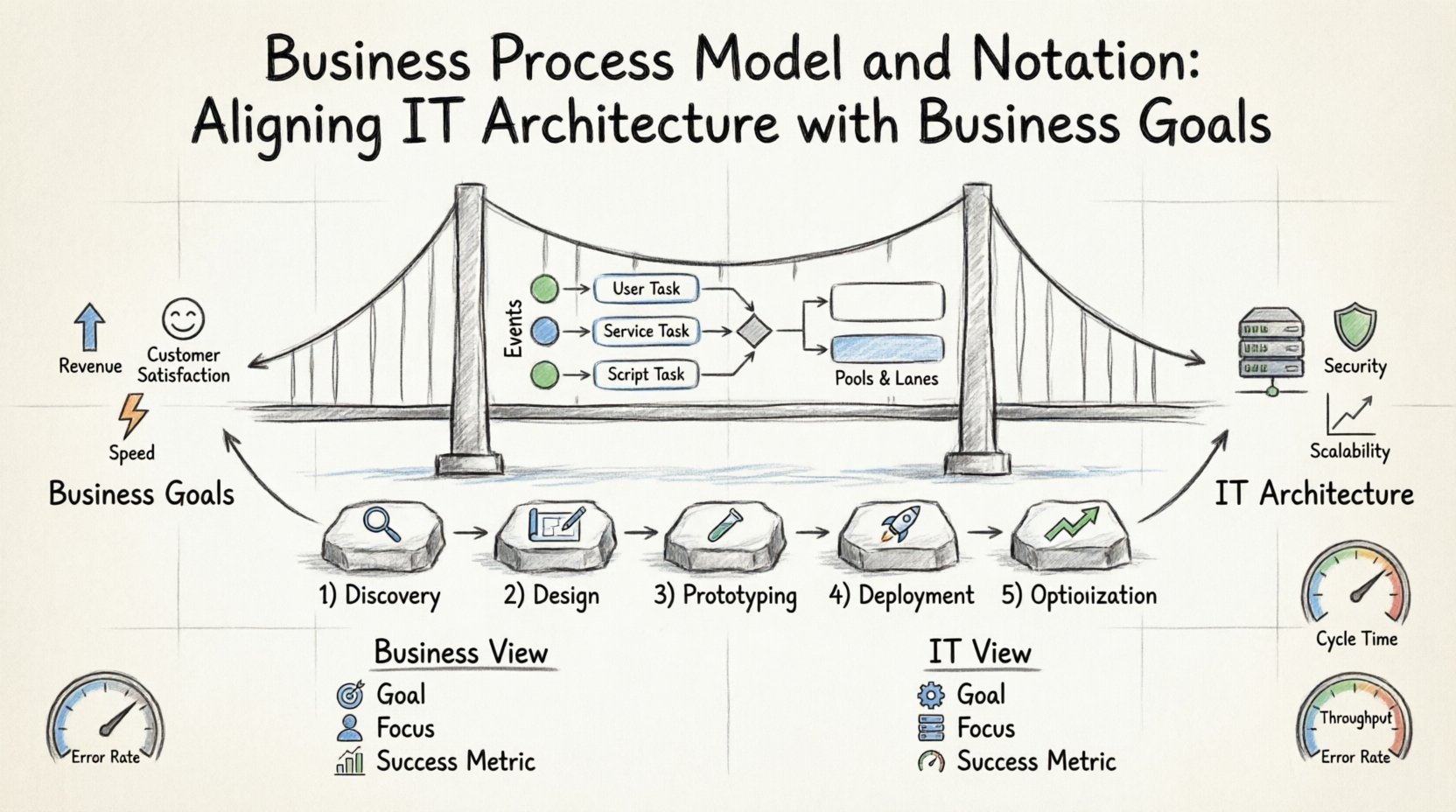
Organizations frequently operate with siloed information. Business leaders define goals in terms of revenue, customer satisfaction, and speed to market. IT leaders define success in terms of uptime, scalability, and security. Without a common language, these perspectives drift apart. BPMN offers a visual syntax that is readable by both technical architects and business analysts.
- Business Perspective: Focuses on value delivery, process efficiency, and compliance requirements.
- IT Perspective: Focuses on system integration, data flow, and infrastructure reliability.
- The Gap: Misunderstanding of requirements leads to over-engineered solutions or under-delivered functionality.
By adopting a process-centric approach, teams can visualize the end-to-end flow of information and activities. This visibility is essential for identifying bottlenecks, redundancies, and opportunities for automation. The goal is not just to document what happens, but to define how technology enables the desired outcome.
📐 Core Elements of BPMN for IT Alignment
To align IT architecture effectively, one must understand the building blocks of the notation. These elements translate abstract business logic into concrete technical requirements.
1. Events 🟢
Events represent something that happens during a process. They act as triggers or results.
- Start Events: Indicate where the process begins. In IT terms, this might be an API trigger, a database insertion, or a user action.
- Intermediate Events: Occur during the flow. Examples include message reception or timer delays.
- End Events: Signify the completion of the process. This correlates to transaction commits, notifications sent, or records archived.
2. Activities and Tasks 🔵
These are the actionable steps within the process. They define work that needs to be performed.
- User Tasks: Work performed by a human. Requires UI design and role-based access control.
- Service Tasks: Work performed by a system or application. This maps directly to microservices, legacy APIs, or database queries.
- Script Tasks: Logic handled by custom code or scripts. Defines where custom development is needed.
3. Gateways ⬛
Gateways control the divergence and convergence of paths. They determine decision logic.
- Exclusive Gateways: One path is taken based on a condition (e.g., if credit score > 700). This translates to conditional logic in code.
- Inclusive Gateways: Multiple paths can be taken simultaneously (e.g., send email and SMS). This implies parallel processing.
- Parallel Gateways: All paths are executed concurrently. Critical for performance optimization.
4. Pools and Lanes 🟦
These elements organize the process and assign responsibility.
- Pools: Represent the boundary of the process. A single pool indicates a single organization.
- Lanes: Subdivide a pool to assign tasks to specific roles, departments, or systems. In IT architecture, lanes often represent different system components or teams.
🤝 Strategies for Strategic Alignment
Achieving alignment requires more than just drawing diagrams. It demands a structured approach to governance, design, and maintenance. The following strategies ensure that BPMN models remain relevant and actionable.
1. Establish a Common Vocabulary 📚
Before modeling begins, all stakeholders must agree on terminology. Ambiguity in names leads to ambiguity in code. Create a glossary that defines terms like “Order,” “Customer,” and “Invoice” across both business and IT contexts. This ensures that a process model maps directly to database schemas and API contracts.
2. Map Processes to Service Boundaries 🏗️
When designing IT architecture, especially with microservices, process boundaries are crucial. Use BPMN to define the scope of each service.
- Identify long-running processes that span multiple services.
- Define clear handoff points between different service lanes.
- Ensure that data consistency is maintained across service boundaries.
3. Integrate Compliance and Security Early 🔒
Security and compliance requirements should not be an afterthought. Include specific events and tasks in the BPMN model that represent:
- Authentication checks.
- Data encryption steps.
- Regulatory reporting obligations.
- Access review cycles.
By modeling these explicitly, IT architects can build these controls into the infrastructure rather than patching them later.
4. Version Control for Process Models 📝
Just as code is versioned, process models must be. Changes in business rules should trigger version updates in the BPMN files. This allows for:
- Rollback to previous states if a new process fails.
- Clear audit trails of who changed what and when.
- Comparison of process evolution over time.
📊 Comparing Business vs. IT Perspectives
Understanding the nuances of how different teams view the same process is vital for alignment. The table below outlines the differences.
| Aspect | Business View | IT Architecture View |
|---|---|---|
| Goal | Value delivery, efficiency | Performance, reliability, security |
| Focus | End-to-end customer journey | Data flow, system integration |
| Success Metric | Time to complete, cost reduction | Latency, error rate, availability |
| Change Driver | Market demand, regulation | Technology debt, infrastructure limits |
| BPMN Role | Defines the “What” | Defines the “How” |
🚀 Implementation Roadmap
Implementing a BPMN-driven alignment strategy requires a phased approach. Rushing this process can lead to resistance and poor adoption.
Phase 1: Discovery and Analysis 🔍
Begin by interviewing key stakeholders. Document the “As-Is” processes without judgment. Use BPMN to capture the current state. Identify pain points, manual handoffs, and system gaps. This phase is about understanding reality, not ideal scenarios.
Phase 2: Design and Modeling 🎨
Create the “To-Be” models. These should reflect the optimized future state. Involve IT architects in this stage to validate feasibility. Ensure that the proposed process can be supported by existing or planned infrastructure. Define the technical requirements for each task.
Phase 3: Prototyping and Validation 🧪
Before full deployment, test the process logic. Use simulation tools to run the models. Check for deadlocks, resource contention, and logical errors. Validate with business users to ensure the flow matches their expectations.
Phase 4: Deployment and Execution 🚀
Translate the validated models into executable workflows. This involves configuring the workflow engine or developing the necessary custom code. Ensure monitoring tools are in place to track execution in real-time.
Phase 5: Monitoring and Optimization 📈
Processes are not static. They must evolve. Collect performance data from the execution environment. Compare actual outcomes against the BPMN design. Identify deviations and initiate change requests to update the models.
⚠️ Common Pitfalls and Solutions
Even with a solid strategy, challenges arise. Being aware of common pitfalls helps teams navigate them successfully.
- Pitfall: Over-Modeling
Solution: Do not model every edge case. Focus on the happy path and major exception flows. Use simplified diagrams for high-level communication and detailed diagrams for technical implementation. - Pitfall: Lack of Stakeholder Buy-In
Solution: Involve business users early. Show them how the model improves their daily work. Avoid creating models that exist only for compliance. - Pitfall: Model Drift
Solution: Enforce a governance policy. If the code changes, the model must change. Make model updates a mandatory part of the deployment checklist. - Pitfall: Ignoring Non-Functional Requirements
Solution: Include SLAs and performance constraints in the process definition. Define response time expectations for each task.
🔗 Integrating with IT Architecture Patterns
BPMN models often need to map to specific architectural patterns. Understanding these mappings ensures technical feasibility.
Microservices Architecture
In a microservices environment, each service should ideally own a specific part of a business process. Use BPMN lanes to assign process segments to specific services. Ensure that the service boundaries align with the process boundaries to minimize inter-service communication overhead.
Legacy System Integration
Many organizations rely on legacy systems. BPMN can help wrap these systems with modern interfaces. Model the interaction with the legacy system as a distinct task or gateway. This clarifies the data transformation and error handling required.
Event-Driven Architecture
Modern systems often rely on events. BPMN supports message events that correspond to event streams. Map process triggers to event sources. Ensure that the process engine can subscribe to the necessary event buses.
📏 Measuring Success and KPIs
How do you know if the alignment is working? You need measurable indicators. Define Key Performance Indicators (KPIs) that span both business and IT domains.
- Process Cycle Time: How long does the process take from start to finish? (Business)
- System Throughput: How many transactions can the system handle per second? (IT)
- Error Rate: How often does the process fail or require manual intervention? (Both)
- Resource Utilization: Are human and system resources being used efficiently? (Both)
- Compliance Adherence: Are regulatory requirements met at every step? (Business/IT)
Regularly review these metrics. If the cycle time increases, investigate whether it is due to process complexity or system latency. If the error rate rises, check for logic flaws in the model or instability in the infrastructure.
🔮 Future Directions: Automation and AI
The landscape of process management is evolving. Automation and artificial intelligence are changing how BPMN is used.
Robotic Process Automation (RPA)
BPMN models can identify tasks suitable for automation. Tasks that are repetitive, rule-based, and digital are prime candidates. Use the process model to select which tasks should be automated first.
Predictive Analytics
Advanced process mining tools can analyze event logs to compare actual execution with the BPMN model. They can predict bottlenecks before they occur. This moves the discipline from reactive fixing to proactive optimization.
Generative AI
New tools allow for the generation of process models from natural language descriptions. While this speeds up initial drafting, human review remains essential to ensure accuracy and alignment with technical constraints.
🛠️ Governance and Maintenance
Maintaining the alignment requires ongoing governance. Establish a Process Center of Excellence (CoE) or a similar body responsible for overseeing the modeling standards.
- Modeling Standards: Define rules for naming conventions, symbol usage, and diagram layout.
- Review Cadence: Schedule regular reviews of critical processes.
- Training: Ensure both business analysts and developers are trained in BPMN.
- Tooling: Select a modeling tool that supports versioning, collaboration, and export capabilities.
Without governance, models become outdated quickly. The gap between the document and the reality widens. Regular maintenance keeps the models as valuable assets rather than archival documents.
🌟 Final Thoughts on Process Alignment
Aligning IT architecture with business goals is not a one-time project. It is a continuous journey of communication, adaptation, and improvement. BPMN provides the visual language necessary to facilitate this conversation. By treating process models as living artifacts that evolve with the organization, teams can ensure that technology remains a strategic enabler rather than a bottleneck.
The investment in clear process modeling pays dividends in reduced rework, faster delivery, and higher stakeholder satisfaction. As organizations face increasing pressure to innovate, the ability to translate business intent into technical reality becomes a competitive advantage. Focus on clarity, maintain rigor, and keep the dialogue open between all parties involved.
This post is also available in Deutsch, Español, فارسی, Français, English, Bahasa Indonesia, 日本語, Polski, Portuguese, Ру́сский, Việt Nam, 简体中文 and 繁體中文.