


Enterprise architecture is a complex discipline. It involves aligning business strategy with information technology, managing change, and ensuring that digital initiatives deliver value. To navigate this complexity, organizations need a common language. This is where ArchiMate comes in. It is a modeling language designed specifically for enterprise architecture. It provides a standardized way to describe, analyze, and visualize the relationships between business processes, applications, and technology infrastructure.
Understanding ArchiMate is not about learning a specific software tool. It is about understanding the structure of an organization. This guide breaks down the core components, layers, and relationships that make up the framework. By the end of this reading, you will have a clear picture of how to use this language to improve clarity and communication within your enterprise.
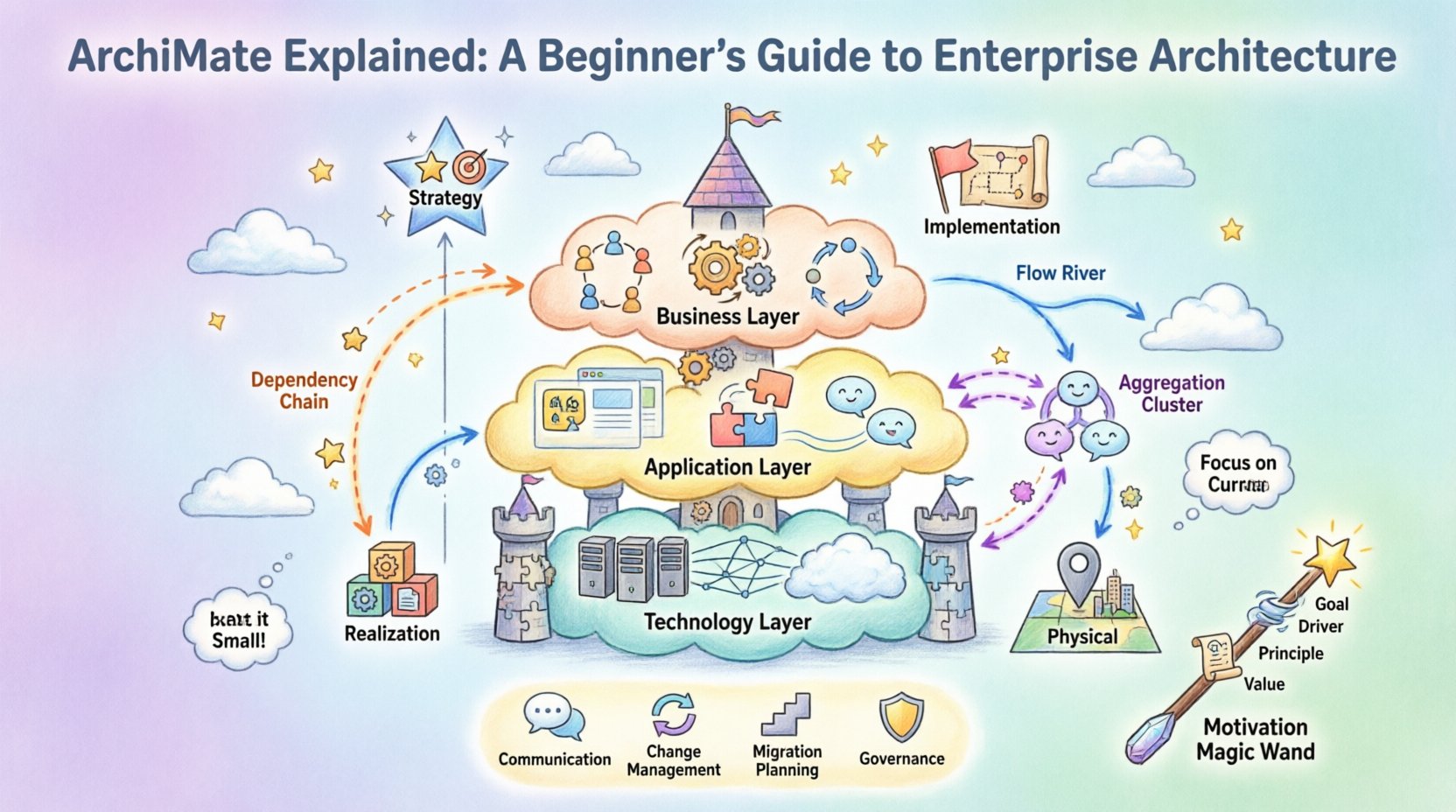
🧩 What Is ArchiMate? 🧩
ArchiMate is an open and independent enterprise architecture modeling language. It is maintained by The Open Group, a non-profit consortium that develops standards. Unlike other frameworks that focus primarily on methodology, ArchiMate focuses on the what rather than the how.
It serves as a visual language. Think of it like a blueprint for a building, but for an entire organization. It allows architects to create models that show how different parts of the business connect. This is crucial for stakeholders who need to understand the impact of change.
Key Characteristics
- Vendor Neutral: It does not belong to any single software company. Anyone can use it.
- Layered Structure: It separates concerns into distinct layers to manage complexity.
- Domain Specific: It covers business, application, and technology domains.
- Relationship Focused: It defines how elements interact, not just what they are.
🏛️ The Core Structure: Layers and Domains
The power of ArchiMate lies in its metamodel. The metamodel is the set of concepts and rules used to build models. It is organized into layers and domains. This structure prevents confusion by keeping related concepts together.
1. The Three Layers
ArchiMate divides the enterprise into three main layers. These layers represent different aspects of the organization.
| Layer | Focus | Key Concepts |
|---|---|---|
| Business Layer | What the organization does | Processes, Actors, Functions |
| Application Layer | Software support | Applications, Application Services |
| Technology Layer | Hardware and Infrastructure | Devices, Networks, System Software |
Business Layer
This layer describes the business side of the enterprise. It includes the actors who perform work, the business processes they follow, and the business functions that provide capabilities. It is the highest level of abstraction.
- Business Actor: A person or organization that performs a role.
- Business Process: A set of business activities that achieve a specific goal.
- Business Function: A collection of business capabilities.
Application Layer
This layer represents the software applications that support the business. It shows how applications provide services to the business layer and interact with each other.
- Application Component: A modular part of an application.
- Application Service: A function exposed by an application.
Technology Layer
This layer describes the physical and logical infrastructure that hosts the applications. It includes servers, networks, and storage.
- Device: Physical hardware like servers or routers.
- Network: Communication infrastructure.
- System Software: Operating systems and database management systems.
2. The Four Domains
Beyond layers, ArchiMate uses domains to organize concepts based on their nature. The domains help architects see the architecture from different perspectives.
- Strategy Domain: Deals with high-level goals, principles, and drivers. It sets the direction.
- Implementation & Migration Domain: Deals with projects, portfolios, and programs that drive change.
- Realization Domain: Deals with the actual creation of the new architecture, such as components and artifacts.
- Physical Domain: Deals with the physical implementation, including locations and devices.
🔗 Understanding Relationships
Concepts alone do not tell the whole story. Relationships define how elements interact. Understanding these connections is vital for impact analysis. For example, if a server fails, which applications stop working, and which business processes are affected?
Common Relationships
- Association: A general connection between two elements. Used when no specific relationship exists.
- Dependency: One element relies on another. If the dependency is removed, the dependent element cannot function.
- Aggregation: A whole-part relationship. The parts can exist independently of the whole.
- Composition: A strong whole-part relationship. The parts cannot exist without the whole.
- Specialization: A subtype relationship. One element is a specific version of another.
- Realization: One element implements or realizes another. For example, a component realizes a service.
- Access: One element uses or accesses another.
- Flow: Information or material moves from one element to another.
These relationships are directional. Arrows indicate the flow or dependency. This directionality is critical for tracing issues through the architecture.
🎯 The Motivation Extension
Why does an organization make changes? To answer this, ArchiMate includes a Motivation Extension. This extension adds concepts that explain the reasons behind architectural decisions.
Motivation Concepts
- Goal: An outcome that an organization strives to achieve.
- Driver: An internal or external factor that influences the goal.
- Principle: A guideline that informs the design and implementation.
- Assessment: An evaluation of a situation or status.
- Requirement: A condition that must be met.
- Constraint: A restriction on the design or implementation.
- Value: The benefit gained from achieving a goal.
By linking motivation concepts to architectural elements, architects can justify decisions. They can show how a specific technology supports a business goal. This creates a clear line of sight from the boardroom to the server room.
📊 Visualizing the Architecture
One of the main benefits of using this language is visualization. Models are diagrams that represent the architecture. They help stakeholders understand complex systems without reading technical documentation.
Diagram Types
- Structure Diagrams: Show the static relationships between elements.
- Behavior Diagrams: Show the dynamic flow of processes or data.
- Realization Diagrams: Show how concepts are implemented by other concepts.
- Dependency Diagrams: Show the dependencies between elements.
When creating diagrams, it is important to follow best practices. Avoid clutter. Use consistent notation. Ensure that the diagram serves a specific purpose. A diagram that tries to show everything often shows nothing clearly.
🚀 Practical Applications
How is this framework used in real-world scenarios? It supports various activities across the enterprise lifecycle.
1. Alignment and Communication
IT and business units often speak different languages. Business leaders talk about revenue and customers. IT leaders talk about servers and code. This language bridges that gap. It allows both groups to discuss the architecture using the same terms. This reduces misunderstandings and ensures alignment.
2. Change Management
Organizations constantly change. New regulations, market shifts, or technology updates require adaptation. With a model, architects can simulate changes. They can see which parts of the system will be affected before making a move. This reduces risk and improves planning.
3. Migration Planning
Moving from a current state to a future state is a common challenge. Models help define the current state and the target state. They also help identify the gaps that need to be filled. This supports the creation of detailed migration roadmaps.
4. Governance
Governance ensures that IT investments match business strategy. Models provide the evidence needed for governance boards. They show compliance with standards and principles. This supports better decision-making at the highest levels.
🤝 Integration with Other Frameworks
ArchiMate is often used alongside other frameworks. It is not a replacement for process methodologies. It complements them.
TOGAF Integration
The Open Group Architecture Framework (TOGAF) is a widely used methodology for enterprise architecture. TOGAF provides the process, while ArchiMate provides the language. TOGAF tells you how to run the architecture development cycle. ArchiMate helps you document the output of that cycle.
Other Frameworks
Other frameworks like Zachman or BPMN can also be integrated. ArchiMate focuses on the architecture view, while BPMN focuses on detailed process flows. Using them together provides a comprehensive view of the enterprise.
✅ Best Practices for Success
To get the most out of this language, follow these recommendations.
- Start Small: Do not attempt to model the entire enterprise at once. Start with a specific domain or project.
- Focus on Value: Ensure every model serves a purpose. Avoid creating models for the sake of having models.
- Keep it Current: Architecture is not static. Models must be updated as the organization changes.
- Use Standard Notation: Stick to the official symbols and definitions. This ensures consistency across the organization.
- Train Your Team: Ensure that everyone involved understands the concepts. Misinterpretation leads to errors.
⚠️ Common Pitfalls to Avoid
Even with the best intentions, mistakes happen. Being aware of common errors can help you avoid them.
- Over-Modeling: Creating too much detail too soon. This leads to maintenance nightmares.
- Ignoring Context: Focusing only on the technology and ignoring the business.
- Static Models: Treating the model as a one-time document rather than a living asset.
- Complex Relationships: Using too many relationship types in a single diagram. This confuses the reader.
📈 The Future of Enterprise Architecture
The landscape of enterprise architecture is evolving. Cloud computing, microservices, and DevOps are changing how systems are built. ArchiMate adapts to these changes.
Cloud and Virtualization
Modern infrastructure is often virtualized. The technology layer in ArchiMate has been updated to include cloud services and virtual machines. This allows architects to model cloud-native environments accurately.
Agile and DevOps
Agile methodologies emphasize speed and iteration. Architecture models need to be lightweight enough to support this pace. The focus is shifting from detailed documentation to value-driven modeling.
🎓 Getting Started
Ready to begin your journey? Here is a path to follow.
- Read the Official Specification: The foundation documents are available online. They are the source of truth.
- Take a Course: Formal training provides structured learning and certification opportunities.
- Practice Modeling: Use a tool to create simple models. Apply the concepts to real scenarios.
- Join the Community: Engage with other architects. Share experiences and challenges.
Learning this language takes time. It requires patience and practice. However, the skills you gain are valuable assets. They enable you to communicate complex ideas clearly and drive strategic change effectively.
🔑 Summary
ArchiMate is a robust language for describing enterprise architecture. It provides a structured way to visualize the business, application, and technology layers. By understanding the relationships and motivation extensions, architects can align IT with business goals. It supports change management, governance, and strategic planning. While it requires effort to learn, the benefits of clarity and alignment make it a worthwhile investment for any organization serious about its digital transformation.
This post is also available in Deutsch, Español, فارسی, Français, English, Bahasa Indonesia, 日本語, Polski, Portuguese, Ру́сский, Việt Nam, 简体中文 and 繁體中文.