


🔷 Agile vs Scrum: Key Differences
| Aspect | Agile | Scrum |
|---|---|---|
| Type | Framework / Mindset | Framework / Process |
| Scope | A philosophy or approach to project management and software development | A specific Agile framework |
| Focus | Iterative, customer-centric, adaptive delivery | Roles, events, artifacts, and rules |
| Flexibility | High (can be applied in many ways) | Structured (defined roles, events, artifacts) |
| Example | Agile values: individuals, collaboration, responding to change | Scrum uses Sprints, Product Backlog, Daily Stand-ups, etc. |
✅ Simple analogy:
Agile is like a philosophy of driving (being flexible, adapting to traffic). Scrum is a specific car model (with defined parts like steering wheel, pedals, dashboard) that helps you drive agilely.
🛠️ Key Concepts of Agile
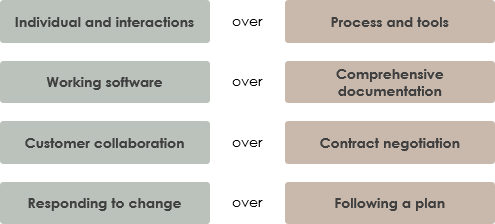
Agile is guided by the Agile Manifesto (2001), which values:
-
Individuals and interactions over processes and tools
-
Working software over comprehensive documentation
-
Customer collaboration over contract negotiation
-
Responding to change over following a plan
💡 Agile Principles (12 principles) – Focus on delivering value early and often, welcoming change, frequent delivery, collaboration, and sustainable pace.
🏁 Key Concepts of Scrum
Scrum is a lightweight framework that implements Agile principles through:
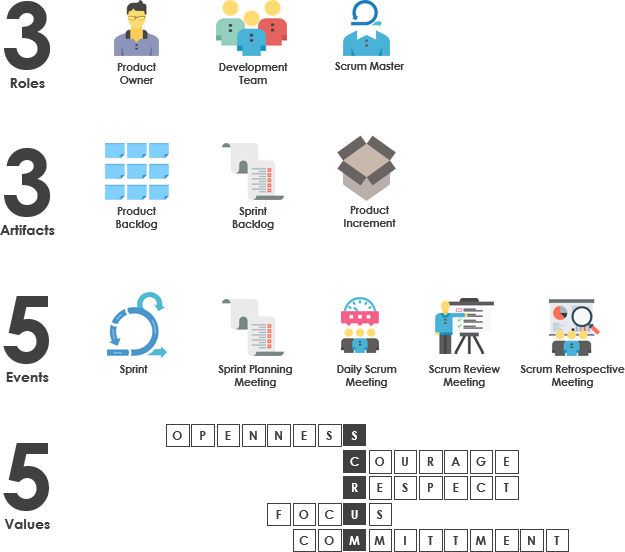
1. Roles (3 Key Roles)
-
Product Owner: Owns the Product Backlog, maximizes value.
-
Scrum Master: Ensures Scrum is understood and practiced; removes impediments.
-
Development Team: Cross-functional team that delivers potentially shippable product increments.
🚩 Tip: The Scrum Master is not a project manager. They’re a servant-leader who coaches the team.
2. Artifacts (3 Main Artifacts)
-
Product Backlog: Prioritized list of features, bugs, improvements.
-
Sprint Backlog: Work planned for the current Sprint.
-
Increment: Potentially shippable product at the end of each Sprint.
✅ Tip: Keep the Product Backlog visible, transparent, and updated. Use INVEST criteria for good backlog items.
3. Events (Ceremonies) (5 Key Events)
| Event | Duration | Purpose |
|---|---|---|
| Sprint | 1–4 weeks | Time-boxed iteration to deliver value |
| Sprint Planning | Max 8 hours (for 1-month sprint) | Plan what to build in the Sprint |
| Daily Scrum | 15 minutes | Sync team on progress, plan next steps |
| Sprint Review | Max 4 hours | Demo the increment to stakeholders |
| Sprint Retrospective | Max 3 hours | Reflect on the Sprint and improve |
🎯 Tip: Daily Scrum is not a status report — it’s a planning sync:
What did I do yesterday?
What will I do today?
Any blockers?
🎯 Tips & Tricks for Agile & Scrum Success
✅ Agile Tips
-
Start small: Begin with one team and scale gradually.
-
Focus on value: Prioritize features that deliver real business value.
-
Embrace change: Welcome changing requirements, even late in development.
-
Collect feedback early: Get stakeholder feedback after every Sprint.
-
Measure progress with working software, not just tasks completed.
✅ Scrum Tips
-
Keep Sprints consistent: Avoid changing Sprint length mid-way.
-
Refine the backlog regularly: Dedicate time (e.g., 1–2 hours/week) to groom the backlog.
-
Empower the team: Let the Development Team self-organize.
-
Protect the Sprint: No changes to the Sprint Backlog unless the Product Owner agrees and the team agrees.
-
Retrospectives matter: Act on insights — make one improvement per Sprint.
🚨 Common Pitfalls to Avoid
| Mistake | Fix |
|---|---|
| Treating Scrum as a checklist | Focus on the spirit of Scrum, not just ceremonies |
| Sprint planning too long or vague | Keep it time-boxed and focused on the Sprint Goal |
| Daily Scrum becomes a status update | Ask: “What helps us deliver the Sprint Goal?” |
| Product Owner not involved | They must be available to clarify requirements |
| No Sprint Review or Retrospective | These are critical for continuous improvement |
📌 Summary: Agile vs Scrum
| Feature | Agile | Scrum |
|---|---|---|
| Philosophy | Mindset (values & principles) | A framework to implement Agile |
| Flexibility | High (can use Kanban, XP, etc.) | Structured with defined roles/events |
| Best for | Teams wanting to be adaptive and customer-focused | Teams needing structure and clear roles |
| Example | Agile teams using Scrum, Kanban, or hybrid | A team using Sprints, Backlog Grooming, Daily Stand-ups |
✅ Final Takeaway
Agile is the “why” — Scrum is the “how.”
Use Scrum to implement Agile effectively.
Focus on collaboration, feedback, transparency, and continuous improvement.
📌 Bonus: Use the “Scrum Triangle” to remember core elements:
-
Transparency
-
Inspection
-
Adaptation
These are the pillars of Scrum and Agile.
Let me know if you’d like a Scrum cheat sheet, template for Sprint Backlog, or Agile maturity assessment checklist! 🚀
-
What Is Scrum? A Complete Guide to Agile Project Management: This in-depth overview explains the core principles, roles, and processes that define the Scrum framework in agile software development.
-
Agile Methodology Tutorial: Principles and Practices Explained: A comprehensive tutorial detailing fundamental Agile principles, various frameworks, and their real-world applications in software development.
-
Sprint Guide in the Agile Handbook: This resource provides a thorough overview of sprints, explaining their purpose, structure, and essential role in iterative software development.
-
How to Start a Sprint Using the Scrum Process Canvas: This article offers step-by-step guidance on initiating a sprint using the Scrum Process Canvas, with an emphasis on planning and team alignment.
-
Sprint Planning in Agile: Step-by-Step Guide: A detailed and actionable guide to effective sprint planning, covering backlog prioritization, task breakdown, and alignment within Agile environments.
-
The Scrum Sprint Cycle in 8 Clear Steps: This article provides a detailed breakdown of the Scrum sprint cycle, illustrating how teams deliver value through iterative, time-boxed increments.
-
Unleash the Power of Agile and Scrum with Visual Paradigm: A comprehensive guide demonstrating how specialized tools can enhance Agile and Scrum practices to improve project planning, collaboration, and delivery.
-
What Is a User Story? A Complete Guide to Agile Requirements: This guide explains the concept of user stories and their critical role in capturing user needs within the product backlog for Scrum teams.
-
Scrum Process Canvas – Agile Project Management Framework: This resource highlights a structured canvas designed for managing Agile projects, supporting activities like sprint planning, backlog refinement, and team alignment.
-
Scrum vs Waterfall vs Agile vs Lean vs Kanban: This article provides a comparative analysis of the most commonly used methodologies, including Scrum, Kanban, and traditional Waterfall models.
This post is also available in Deutsch, Español, فارسی, Français, English, Bahasa Indonesia, 日本語, Polski, Portuguese, Ру́сский, Việt Nam, 简体中文 and 繁體中文.