


Transform chaos into clarity. From vision to delivery—visualize, prioritize, and deliver with confidence.
🔍 Introduction: Why Story Mapping?
In agile environments, teams often face the challenge of backlog chaos—a flat, unstructured list of tasks and stories that lack context, priority, and user-centric focus. This leads to misaligned efforts, scope creep, and delayed value delivery.
Enter Story Mapping—a powerful agile technique that brings structure, clarity, and collaboration to product development by visualizing the user journey as a narrative.
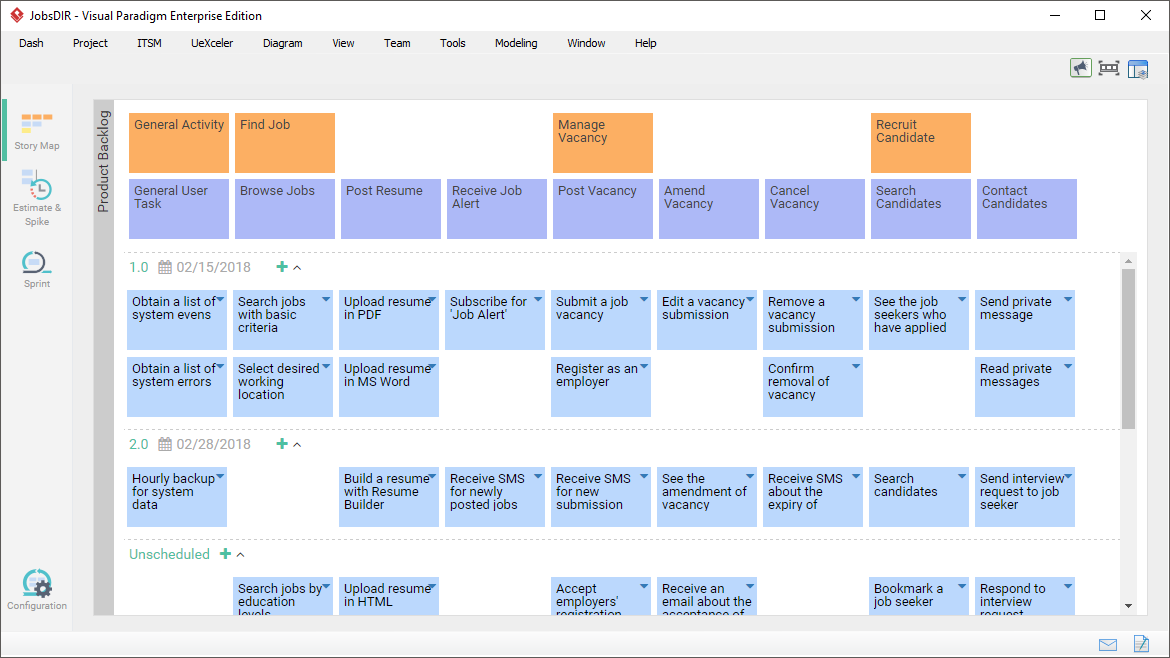
✅ Story mapping turns abstract backlogs into a clear, prioritized roadmap of user value.
With Visual Paradigm, story mapping isn’t just a one-off workshop exercise—it becomes a living, integrated part of your Scrum workflow, seamlessly connected to planning, execution, and delivery.
🧭 What Is User Story Mapping?
User Story Mapping is a visual technique for organizing user stories along two dimensions:
| Axis | Purpose |
|---|---|
| Horizontal (X-axis) | The user journey – the sequence of activities or goals a user completes (e.g., “Browse → Select → Checkout → Pay”). This forms the backbone of your product. |
| Vertical (Y-axis) | Prioritization & release planning – breaking down each activity into epics, user stories, and tasks, ordered by importance, complexity, or release timeline. |
This creates a “top-down” narrative map that answers:
-
What does the user want to achieve?
-
In what order?
-
What’s essential now vs. later?
-
Where are the gaps?
🎯 Goal: Deliver value incrementally, align stakeholders, and maintain focus on user needs.
🛠️ How Visual Paradigm Empowers Agile Teams with Story Mapping
Visual Paradigm offers a fully integrated, enterprise-grade platform for agile teams to practice story mapping effectively—turning vision into execution with minimal friction.
Let’s explore how it works across four core capabilities.
✅ 1. Dedicated User Story Mapping Interface
Visual Paradigm provides a purpose-built user story map canvas that supports hierarchical structuring (3–4 levels), making it easy to build a clear, actionable product roadmap.
📊 Structure of the Story Map (Hierarchical Levels)
| Level | Description | Example |
|---|---|---|
| 1. User Activities (Backbone) | High-level user goals or steps in the journey. | “Browse Products”, “Add to Cart”, “Checkout”, “Receive Order” |
| 2. User Tasks | Specific actions within each activity. | “Search for items”, “Filter by price”, “View product details” |
| 3. Epics (Optional) | Large features or themes. | “Implement Search Functionality” |
| 4. User Stories | Small, testable units of value. | “As a shopper, I want to filter products by price so I can find affordable options” |
💡 Key Features:
-
Drag-and-drop reordering for dynamic prioritization.
-
Inline editing of stories (title, description, acceptance criteria).
-
Support for wireframes, attachments, notes, and estimates.
-
Visual alignment with release slices (Now/Next/Later).
🎯 Benefit: Turn a flat backlog into a strategic, user-centered roadmap that guides every sprint.
✅ 2. Seamless Integration with Scrum Process Canvas
The Scrum Process Canvas is Visual Paradigm’s one-page agile dashboard that unifies all Scrum artifacts—vision, product backlog, sprint planning, burndown charts, retrospectives, and more.
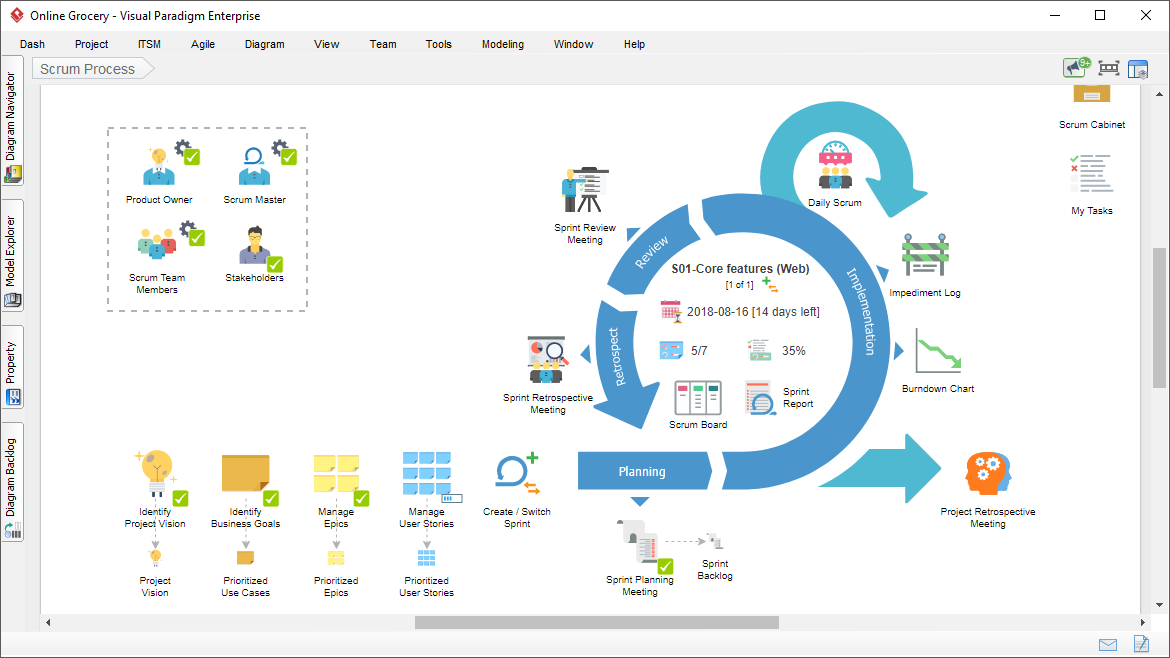
🔗 How Story Mapping Fits In:
-
The User Story Map is embedded directly into the Scrum Process Canvas.
-
You can drag stories from the map into sprint backlogs with a single click.
-
Real-time updates sync across:
-
Sprint planning
-
Daily standups
-
Burndown charts
-
Impediment tracking
-
Retrospective notes
-
🔄 No more tool switching. Everything stays in context.
🛠️ Practical Workflow:
-
Start with user journey (horizontal axis).
-
Break down into tasks and stories (vertical axis).
-
Prioritize using “Now/Next/Later” lanes.
-
Drag selected stories into the current sprint on the Scrum Canvas.
-
Track progress via burndown chart and impediment log.
✅ Result: A continuous flow from vision → backlog → sprint → delivery.
✅ 3. Collaboration & Productivity Boosters
Visual Paradigm is built for team collaboration, whether co-located or distributed.
🎯 Key Features:
| Feature | Benefit |
|---|---|
| Drag-and-Drop Reordering | Easily reorder stories, slice releases, adjust priorities in real time. |
| Inline Editing | Edit titles, acceptance criteria, notes, and attachments without leaving the map. |
| Affinity Estimation (Planning Poker) | Estimate story points collaboratively using visual grouping. |
| AI-Powered Story Generation (New in v2024+) | Generate user stories from requirements, use cases, or even natural language input. |
| Cloud (VP Online) & Desktop Versions | Work from anywhere—perfect for remote teams. |
| Export & Documentation | Export story maps as PDF, PNG, or HTML for stakeholder sharing. |
| Version Control & Audit Trail | Track changes and maintain traceability across sprints. |
🤝 Ideal for: Product Owners, Scrum Masters, Developers, QA, UX Designers, and Stakeholders.
✅ 4. Bridging Visualization to Real Execution
One of the biggest pitfalls of story mapping is turning it into a “pretty picture” that sits unused after the workshop.
Visual Paradigm eliminates this gap by making story mapping actionable and traceable.
🔄 How It Works:
-
Story map → Sprint backlog: Drag stories directly into sprint planning.
-
Stories → Tasks: Expand user stories into actionable tasks.
-
Tasks → Assignments: Assign to team members with due dates.
-
Progress → Burndown Chart: Automatically updates based on completed tasks.
-
Dependencies → Visual Alerts: Spot cross-sprint dependencies early.
🎯 Outcome: The story map isn’t just a planning tool—it’s the source of truth for the entire sprint.
🧩 Best Practices for Effective Story Mapping in Visual Paradigm
| Tip | Why It Works |
|---|---|
| Start with the user journey – define the backbone first. | Ensures focus on user value, not technical features. |
| Keep the map visible during sprints – display it in your sprint room or shared workspace. | Maintains alignment and context for the team. |
| Use “Now/Next/Later” lanes to slice releases. | Enables iterative delivery and clear roadmap communication. |
| Involve cross-functional teams in mapping (PO, Devs, QA, UX). | Brings diverse perspectives and reduces blind spots. |
| Review and update the map every sprint – it’s a living artifact. | Keeps the product evolving with feedback and market changes. |
🚀 Why Visual Paradigm Stands Out
| Feature | Why It Matters |
|---|---|
| All-in-one agile platform | No need to juggle multiple tools (Jira, Confluence, Trello, etc.). |
| Seamless integration with BPMN, Use Cases, Wireframes | Reuse existing models to jumpstart story mapping. |
| AI-powered story generation | Accelerates backlog creation from requirements. |
| Real-time collaboration | Ideal for distributed teams working across time zones. |
| Scalable for enterprises | Supports large-scale agile (SAFe, LeSS, Nexus) with customizable templates. |
📌 Getting Started: Try Visual Paradigm Today
Ready to move from chaos to clarity?
🔹 Step 1: Download or Access
-
Desktop App: Download Visual Paradigm
-
Cloud (VP Online): Start Free Trial at VP Online
🔹 Step 2: Create a New Project
-
Choose Agile > User Story Mapping.
-
Or start with Scrum Process Canvas (recommended for full integration).
🔹 Step 3: Build Your Story Map
-
Define user activities (horizontal axis).
-
Break down into tasks.
-
Add epics and user stories.
-
Prioritize with drag-and-drop.
-
Use “Now/Next/Later” lanes for release planning.
🔹 Step 4: Connect to Scrum Canvas
-
Open the Scrum Process Canvas.
-
Drag stories from the map into the Sprint Backlog.
-
Start tracking sprints, burndowns, and impediments.
🏁 Conclusion: From Chaos to Clarity, One Map at a Time
Story mapping is more than a planning technique—it’s a mindset shift toward user-centric delivery.
With Visual Paradigm, story mapping becomes:
-
✅ Visual and intuitive
-
✅ Integrated with Scrum
-
✅ Collaborative and dynamic
-
✅ Actionable and traceable
It transforms abstract ideas into a clear, prioritized path to value, helping teams deliver faster, with less confusion, and greater stakeholder alignment.
🌟 Final Thought:
“Don’t just plan your work—map the user’s journey. Let every story tell a part of the bigger story.”
📚 Resources & Further Reading
- A Comprehensive Guide to User Story Mapping: This guide explains how to create and use user story maps to visualize product development, align teams, and prioritize features effectively. It provides a visual framework for teams to understand the entire user journey while planning their releases.
- What Is User Story Mapping? A Beginner’s Guide: An introductory resource providing an overview of the purpose and benefits of user story mapping in agile software development. It highlights how the technique supports product discovery and helps teams move beyond flat backlog lists.
- Scrum Process Canvas – Agile Project Management Framework: This resource highlights a structured canvas designed for managing Agile projects using the Scrum methodology. It facilitates essential activities such as sprint planning, backlog refinement, and maintaining team alignment within a single interface.
- How to Manage User Stories with Story Maps in Scrum: This practical guide focuses on using story maps to organize, prioritize, and manage user stories within a Scrum framework. It assists Product Owners in maintaining a clear and actionable product backlog.
- Scrum Process Canvas – Project Initiation Guide: A step-by-step guide to using the Scrum Process Canvas for effective project initiation. It helps teams define project goals, roles, and deliverables in a collaborative Agile environment.
- Visual Paradigm: User Story Mapping Tool Tour: This tour explores the specialized user story mapping features available in the Visual Paradigm platform. It demonstrates how agile teams can visualize workflows and plan product releases in a single integrated environment.
- How to Start a Sprint Using the Scrum Process Canvas: This article provides guidance on initiating a sprint using the canvas, with an emphasis on planning and goal setting. It ensures that the team is aligned on the sprint backlog before work begins.
- Sprint Management with Scrum Process Canvas: An in-depth resource on managing the full sprint lifecycle using the Scrum Process Canvas. It covers critical activities including sprint tracking, review sessions, and continuous improvement through retrospectives.
- Managing Product Backlog with User Story Maps: This guide explains how to optimize the priority and structure of a product backlog using mapping techniques. It helps teams clearly plan iterations and ensure they are delivering the highest value features.
- Agile User Story Mapping Tool for Productivity: This article discusses how specialized agile tools maximize the productivity and efficiency of Scrum projects. It emphasizes the importance of effective backlog management and release planning through visual mapping.
📌 Pro Tip:
👉 Try the free trial of Visual Paradigm today and experience how a single tool can unify your agile journey—from story mapping to sprint delivery.
🔄 Stay Agile. Stay Visual. Stay in Control.
Visual Paradigm – Your Agile Partner in Clarity
This post is also available in Deutsch, Español, فارسی, Français, English, Bahasa Indonesia, 日本語, Polski, Portuguese, Ру́сский, Việt Nam and 繁體中文.