
Introduction
Visual Paradigm Desktop is a comprehensive, cross-platform visual modeling and enterprise architecture application that bridges the gap between deep desktop modeling capabilities and a synchronized online ecosystem. Designed for architects, developers, product managers, and business analysts, it provides an all-in-one platform for designing, documenting, and managing complex systems—from software architecture to business strategy.
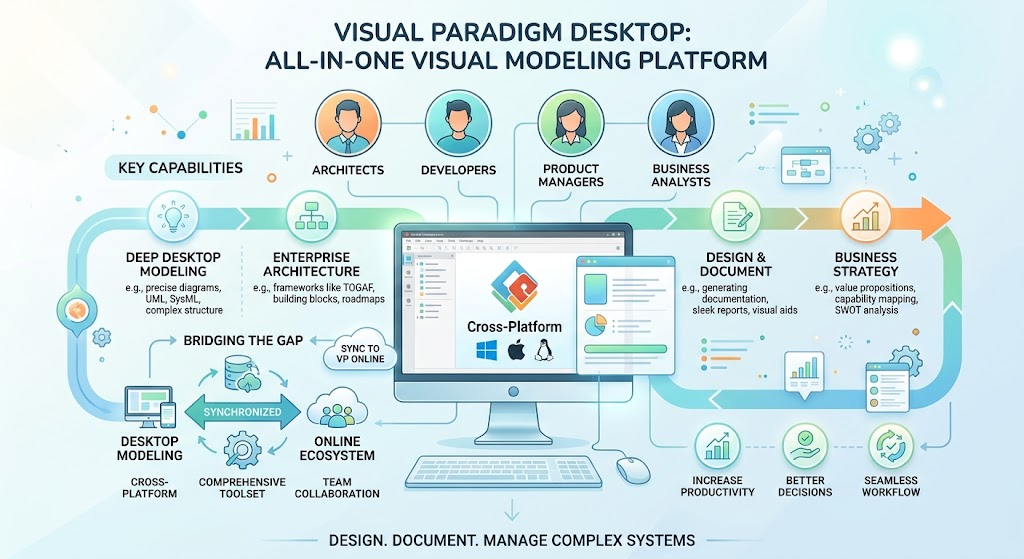
This guide explores the core capabilities, practical applications, and strategic advantages of using Visual Paradigm Desktop in modern enterprise environments.
Key Concepts
1. Unified Modeling Platform
Concept: Visual Paradigm consolidates multiple modeling standards and methodologies into a single integrated environment, eliminating the need for disparate tools.
Supported Standards:
-
UML (Unified Modeling Language): Class diagrams, sequence diagrams, use case diagrams, activity diagrams
-
SysML (Systems Modeling Language): For systems engineering and complex system design
-
BPMN (Business Process Model and Notation): Business process workflow modeling
-
ArchiMate: Enterprise architecture framework aligned with TOGAF
-
C4 Model: Context, Container, Component, and Code-level software architecture
-
DFD (Data Flow Diagrams): System data flow visualization
-
ERD (Entity Relationship Diagrams): Database schema design
-
Flowcharts & Mind Maps: General-purpose diagramming
Example Use Case:
A fintech startup uses Visual Paradigm to create:
-
BPMN diagrams for loan approval workflows
-
UML sequence diagrams for payment processing APIs
-
ERD for database schema design
-
C4 model for microservices architecture documentation
All diagrams remain synchronized within the same project repository.
2. Enterprise Architecture & Strategic Planning
Concept: Visual Paradigm supports formal enterprise architecture frameworks and strategic analysis tools, enabling organizations to align IT infrastructure with business objectives.
Key Frameworks Supported:
-
TOGAF ADM (The Open Group Architecture Framework – Architecture Development Method): Complete lifecycle support from vision to governance
-
DoDAF/NAF/MODAF: Defense and government architecture frameworks
-
Strategic Analysis Tools: SWOT analysis, PESTLE analysis, balanced scorecards
Example Use Case:
A healthcare organization undergoing digital transformation uses Visual Paradigm to:
-
Map current-state architecture using ArchiMate views
-
Define target-state architecture aligned with TOGAF phases
-
Conduct SWOT analysis for cloud migration strategy
-
Create roadmaps showing transition architectures across multiple years
3. Code & Database Engineering
Concept: Bidirectional engineering capabilities allow seamless translation between visual models and actual code/database structures, reducing manual effort and ensuring consistency.
Capabilities:
-
Code Generation: Generate skeleton code in Java, C#, Python, C++, PHP, Ruby, JavaScript, and more
-
Reverse Engineering: Import existing codebases to generate UML class diagrams
-
Database Engineering: Design ERDs and automatically generate DDL scripts for MySQL, PostgreSQL, Oracle, SQL Server
-
API Design: Create REST APIs with Swagger/OpenAPI specification generation
-
ORM Support: Hibernate mapping integration
Example Use Case:
A development team building a new e-commerce platform:
-
Designs the domain model using UML class diagrams
-
Generates Java entity classes with JPA annotations
-
Creates ERD for the database schema
-
Exports DDL scripts for PostgreSQL deployment
-
Designs REST API endpoints and exports OpenAPI specifications for frontend teams
Changes to the model automatically propagate to generated artifacts, maintaining synchronization.
4. Project & Agile Management
Concept: Visual Paradigm extends beyond technical modeling to include comprehensive project management capabilities, supporting both traditional PMBOK methodologies and agile frameworks.
Project Management Features:
-
PMBOK Lifecycle Maps: Traditional waterfall project planning
-
WBS (Work Breakdown Structure): Hierarchical task decomposition
-
PERT Charts: Critical path analysis and dependency mapping
-
Gantt Charts: Timeline-based project scheduling
-
Agile Toolsets: Scrum boards, Kanban boards, LeSS (Large-Scale Scrum), Nexus scaling frameworks
Example Use Case:
A product team launching a mobile app uses Visual Paradigm to:
-
Create user story maps and prioritize features
-
Set up sprint planning with Kanban boards
-
Track dependencies using PERT charts
-
Generate Gantt charts for stakeholder reporting
-
Manage release planning across multiple Scrum teams using Nexus framework
5. AI-Powered Productivity Tools
Concept: Visual Paradigm integrates generative AI capabilities to accelerate diagram creation, automate documentation, and enhance collaboration.
AI Features:
-
Text-to-Diagram: Natural language prompts generate diagrams automatically
-
AI Diagramming Chatbot: Interactive assistance for modeling questions and best practices
-
VPasCode Workspaces: AI-assisted code generation and refactoring
-
NotesKeep: Automated AI note-taking during meetings and workshops
Example Use Case:
During an architecture review meeting:
-
A stakeholder describes a new feature: “Users should be able to upload documents, which get scanned for viruses, then stored in S3, with metadata saved in DynamoDB”
-
Using text-to-diagram, the architect types this description and Visual Paradigm generates a component diagram showing the flow
-
NotesKeep captures meeting discussions and automatically creates action items
-
The AI chatbot suggests security considerations and compliance requirements based on the diagram
Editions & Licensing
Available Editions
| Edition | Target Audience | Key Features |
|---|---|---|
| Community Edition | Students, non-commercial users | Basic UML, limited diagrams, free for non-commercial use |
| Modeler | Individual modelers | Core diagramming, basic code engineering |
| Standard | Small teams | Full diagramming suite, database engineering, basic project management |
| Professional | Professional practitioners | Advanced EA frameworks, full code engineering, agile toolsets |
| Enterprise | Large organizations | All features, team collaboration, cloud repositories, advanced AI tools |
Pricing & Access
-
Enterprise Subscription: Starting at ~$89/month (with 6–12 month billing terms)
-
Free Trial: 30-day trial available for paid editions
-
Academic Licenses: Special pricing for educational institutions
-
Desktop + Online Synergy: Desktop license includes access to Visual Paradigm Online features, cloud repositories, and team versioning
Getting Started: Practical Workflow
Step 1: Installation & Setup
-
Download from Visual Paradigm Download Page
-
Choose your edition (start with Community Edition for evaluation)
-
Install on Windows, macOS, or Linux
-
Activate license or start free trial
Step 2: Create Your First Project
-
Launch Visual Paradigm Desktop
-
Select “New Project”
-
Choose project template (e.g., “Software Development,” “Enterprise Architecture,” “Agile Project”)
-
Configure project settings and repository location
Step 3: Build Your Models
For Software Architecture:
-
Start with C4 Context diagram to define system boundaries
-
Drill down to Container and Component diagrams
-
Generate class diagrams from requirements
-
Use reverse engineering to import existing code
For Business Processes:
-
Create BPMN diagrams for key workflows
-
Link processes to organizational roles
-
Export process documentation for stakeholders
For Enterprise Architecture:
-
Use ArchiMate to map business, application, and technology layers
-
Align with TOGAF ADM phases
-
Create capability maps and value streams
Step 4: Leverage AI Assistance
-
Use text-to-diagram for rapid prototyping
-
Ask the AI chatbot for modeling best practices
-
Enable NotesKeep during workshops to capture decisions
-
Use AI suggestions for diagram improvements
Step 5: Collaborate & Share
-
Sync with Visual Paradigm Online for cloud storage
-
Enable team versioning for concurrent editing
-
Export diagrams as PDF, PNG, or interactive HTML
-
Generate comprehensive documentation packages
Best Practices
1. Maintain Model Consistency
-
Use repository features to ensure all team members work from the same source
-
Regularly validate diagrams against modeling standards
-
Leverage bidirectional engineering to keep code and models synchronized
2. Adopt Incremental Modeling
-
Start with high-level context diagrams before diving into details
-
Use C4 model’s layered approach for progressive disclosure
-
Avoid over-modeling; focus on diagrams that provide value
3. Integrate with Development Workflow
-
Store models in version control alongside code
-
Generate code skeletons early in development
-
Update models as code evolves through reverse engineering
4. Leverage AI Responsibly
-
Use AI-generated diagrams as starting points, not final artifacts
-
Validate AI suggestions against domain knowledge
-
Combine AI efficiency with human expertise for quality outcomes
5. Enable Stakeholder Engagement
-
Export diagrams in formats accessible to non-technical stakeholders
-
Use interactive HTML exports for navigable documentation
-
Create executive summaries from detailed models
Real-World Application Scenarios
Scenario 1: Legacy System Modernization
Challenge: A bank needs to modernize its 20-year-old core banking system.
Visual Paradigm Approach:
-
Reverse engineer existing COBOL and Java code to generate UML diagrams
-
Create current-state architecture view using ArchiMate
-
Design target-state microservices architecture using C4 model
-
Map migration strategy using TOGAF phases
-
Generate API specifications for new services
-
Track modernization project using Gantt charts and Kanban boards
Scenario 2: Agile Product Development
Challenge: A SaaS company wants to accelerate feature delivery while maintaining architectural integrity.
Visual Paradigm Approach:
-
Capture user stories and create story maps
-
Design feature architecture using component diagrams
-
Set up Scrum boards for sprint planning
-
Use text-to-diagram for rapid brainstorming sessions
-
Generate OpenAPI specs for backend services
-
Maintain living documentation that evolves with each sprint
Scenario 3: Regulatory Compliance Documentation
Challenge: A healthcare provider needs to document systems for HIPAA compliance audit.
Visual Paradigm Approach:
-
Create comprehensive data flow diagrams showing PHI handling
-
Document security controls using UML deployment diagrams
-
Map organizational roles and responsibilities
-
Generate audit-ready documentation packages
-
Maintain traceability from requirements to implementation
-
Use versioning to track changes for audit trails
Integration Ecosystem
Visual Paradigm Desktop integrates with:
-
Version Control: Git, SVN for model versioning
-
IDEs: Eclipse, IntelliJ IDEA, Visual Studio for code synchronization
-
Cloud Platforms: AWS, Azure, GCP for deployment diagrams
-
Collaboration Tools: Slack, Microsoft Teams via VP Online
-
Documentation: Confluence, SharePoint for publishing
Conclusion
Visual Paradigm Desktop represents a mature, comprehensive solution for organizations seeking to unify their modeling, architecture, and project management activities. Its strength lies in:
-
Breadth: Supporting diverse modeling standards from UML to ArchiMate
-
Depth: Providing bidirectional engineering between models and code
-
Integration: Combining desktop power with cloud collaboration
-
Innovation: Leveraging AI to accelerate modeling tasks
-
Flexibility: Serving individual practitioners to large enterprises
Whether you’re a software architect designing microservices, a business analyst mapping processes, or an enterprise architect planning digital transformation, Visual Paradigm Desktop provides the tools to create clear, consistent, and actionable models that bridge the gap between vision and implementation.
Resources
-
Download: Visual Paradigm Download Page
-
Features Overview: Visual Paradigm Features
-
Pricing & Editions: Shop Page
-
Community Edition: Free Download
-
Product Updates: Latest Updates
Start your journey with Visual Paradigm Desktop today—download the Community Edition for non-commercial exploration or begin a 30-day trial of the Professional or Enterprise editions.