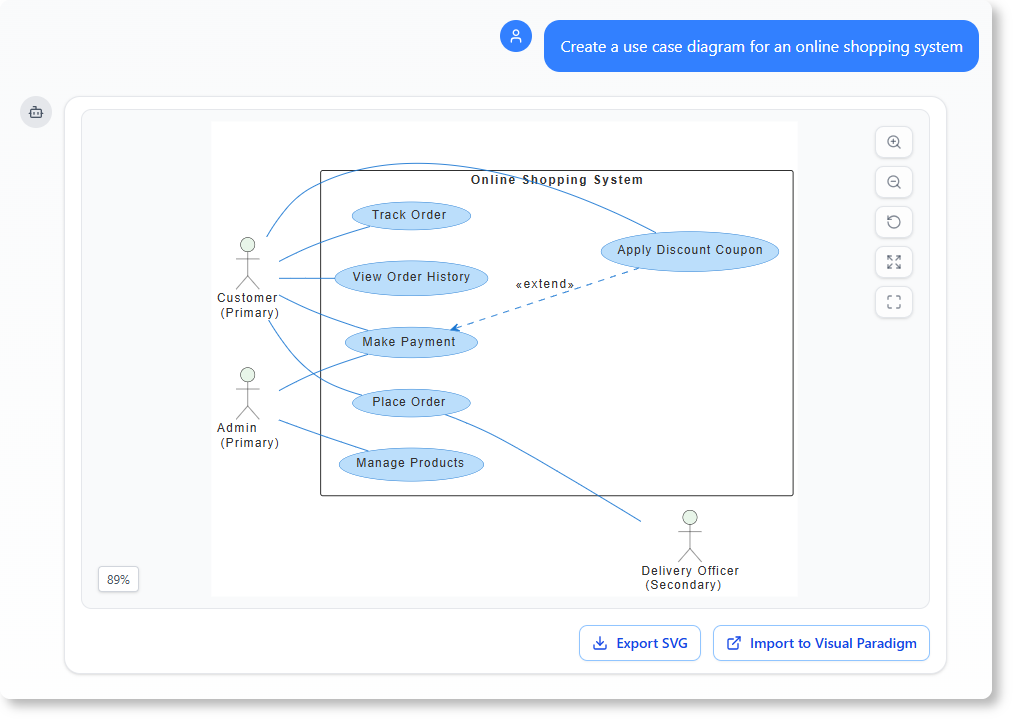
In the world of software engineering and system analysis, understanding how users interact with a system is critical. The Use Case Diagram serves as the primary tool for capturing these functional requirements. It provides a visual representation of the actors (users) and the specific actions (use cases) they can perform within a system boundary.
Visual Paradigm’s AI Chatbot transforms the creation of these diagrams from a manual, time-consuming drawing exercise into an instant, natural language interaction. This tutorial explores the technical concepts behind the diagram shown in your request—specifically the Online Shopping System—and breaks down how the AI interprets modeling logic to generate a structurally accurate diagram.
1. The System Boundary and Scope
Every use case diagram is defined by a system boundary, typically represented by a rectangle. This box delineates what is inside the system (the functionality) and what is outside (the external world).
- Inside the Box: Contains the “Use Cases” (the blue ovals), which represent specific goals or functions, such as Place Order or Manage Products.
- Outside the Box: Contains the “Actors” (the stick figures), representing external entities that interact with the system.
2. Identifying Actors
Actors are the roles played by users or external systems. In the generated diagram, we see three distinct roles:
The Customer (Primary Actor)
The primary actor is the main user driving the system. In an online shopping context, the Customer initiates the most critical workflows, such as placing orders and making payments. The diagram shows the Customer connected to multiple use cases, indicating a broad scope of interaction.
The Admin (Primary Actor)
Administrators are internal users responsible for system maintenance. The Admin is shown interacting specifically with the Manage Products use case. This demonstrates a clear separation of duties: while the customer buys, the admin ensures the inventory exists.
The Delivery Officer (Secondary Actor)
Secondary actors provide input to the system but do not initiate the core workflow. The Delivery Officer is depicted outside the system boundary. Their role is typically triggered by the completion of a use case (e.g., once an order is placed, the delivery officer receives the package for shipping).
3. Modeling Relationships: Association and Extension
The power of a use case diagram lies in the lines connecting actors to use cases. These lines represent specific types of relationships.
Association (Solid Lines)
These are the standard connections indicating that an actor can interact with a use case. In the diagram, the solid lines connect the Customer to Track Order, View Order History, and Place Order. This signifies that these are direct, intentional actions.
Extension (Dashed Lines with «extend»)
One of the most sophisticated features in the diagram is the dashed line connecting Apply Discount Coupon to Make Payment. This is an Extension relationship.
- Concept: An extension relationship indicates that the extending use case (Apply Discount Coupon) is optional. It only happens if a specific condition is met (e.g., the customer has a coupon).
- Logic: The base flow is Make Payment. The system extends this flow only when the customer chooses to apply a coupon. This is a vital concept for modeling complex business logic without cluttering the diagram.
4. How the AI Chatbot Interprets Your Request
When you type a prompt like Create a use case diagram for an online shopping system, the AI Chatbot performs a semantic analysis to determine the necessary components.
The AI doesn’t just draw random shapes; it applies UML (Unified Modeling Language) logic:
- Entity Recognition: It identifies the domain (“Online Shopping”) and infers standard roles (Customer, Admin, Delivery).
- Functional Extraction: It infers standard actions associated with that domain (Buy, Pay, Manage Inventory).
- Relationship Mapping: It analyzes the flow of events. It understands that paying is the “parent” process and applying a coupon is a conditional “child” process, leading it to draw the «extend» relationship automatically.
5. From Concept to Refinement
One of the key benefits of using the AI Chatbot is the ability to refine the model through natural language. If the initial diagram misses a critical feature, you don’t need to redraw it manually.
You can simply type commands like:
"Add a 'Return Item' use case for the Admin"or
"Connect the Delivery Officer to the 'Track Order' use case"The AI Chatbot will instantly update the diagram, ensuring that the visual representation always matches your current understanding of the system requirements. This iterative process allows you to move rapidly from a high-level concept to a detailed, technically accurate architectural blueprint.