
Introduction
Visual Paradigm Desktop stands as one of the most comprehensive modeling tools available today, serving everyone from students learning UML basics to enterprise architects implementing complex frameworks like TOGAF and ArchiMate. However, with five distinct editions available, choosing the right version can feel overwhelming—especially for new users and beginners who may not yet understand which features they truly need.
This guide provides a detailed product review and evaluation specifically tailored for newcomers to Visual Paradigm. We’ll break down each edition’s capabilities, highlight key concepts with practical examples, and help you make an informed decision that balances functionality with budget. Whether you’re a student, developer, business analyst, or enterprise architect, understanding these differences will save you time, money, and frustration.
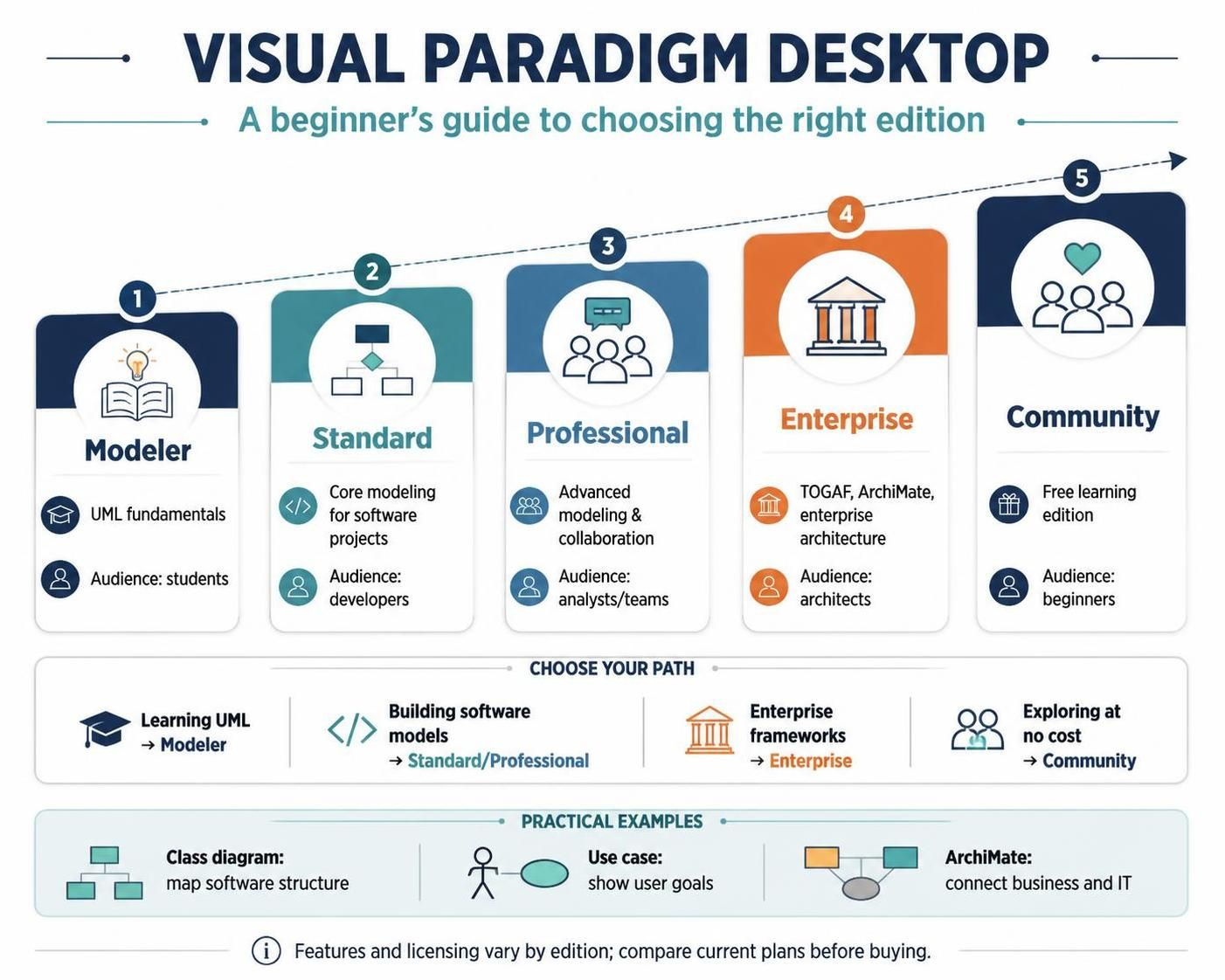
Understanding Visual Paradigm: Key Concepts for Beginners
Before diving into edition comparisons, let’s clarify some fundamental concepts that will help you evaluate which edition suits your needs.
What is Model-Driven Development?
Model-Driven Development (MDD) is an approach where visual models serve as the primary artifacts in software development. Instead of jumping straight into code, you create diagrams that represent system structure, behavior, and processes. Visual Paradigm supports this by allowing you to:
-
Generate code from models: Create Java, C#, Python, and other code directly from UML diagrams
-
Reverse-engineer code into models: Import existing codebases and visualize their structure
-
Maintain synchronization: Keep models and code aligned as projects evolve
Example: A developer creates a class diagram showing user authentication components. Visual Paradigm generates skeleton Java classes with proper relationships, saving hours of manual coding.
Key Modeling Languages Supported
-
UML (Unified Modeling Language): The industry standard for software modeling, including class diagrams, sequence diagrams, use case diagrams, and more
-
SysML (Systems Modeling Language): Extends UML for systems engineering, useful for hardware-software integration
-
ERD (Entity-Relationship Diagrams): Essential for database design and schema visualization
-
BPMN (Business Process Model and Notation): Standard for documenting business workflows and processes
-
DFD (Data Flow Diagrams): Shows how data moves through a system
Enterprise Architecture Frameworks
For larger organizations, Visual Paradigm supports major EA frameworks:
-
TOGAF (The Open Group Architecture Framework): Comprehensive framework for enterprise architecture
-
ArchiMate: Standard language for enterprise architecture modeling
-
DoDAF/NAF/MODAF: Defense and military architecture frameworks
Beginner Tip: If you’re just starting out, you likely won’t need these enterprise frameworks. Focus on mastering UML and BPMN first.
Detailed Edition Breakdown
1. Community Edition – The Free Starting Point
Best For: Students, hobbyists, and anyone wanting to test Visual Paradigm before committing financially.
Key Features:
-
Access to core UML, SysML, and ERD tools
-
Completely free for personal and educational use
-
Ideal for learning modeling fundamentals
Limitations to Consider:
-
Watermarked exports: All exported diagrams include a visible watermark, making them unsuitable for professional presentations
-
No code or database engineering capabilities
-
No BPMN or DFD support
-
No team collaboration features
-
No enterprise architecture frameworks
Real-World Example:
Sarah, a computer science student, uses the Community Edition to complete her semester project on library management systems. She creates class diagrams and sequence diagrams to document her design. While she can’t export clean images for her final presentation without watermarks, she can screenshot diagrams directly from the tool for her report.
Verdict for Beginners:
✅ Start here if: You’re learning, have no budget, or want to evaluate Visual Paradigm’s interface before purchasing.
❌ Skip if: You need professional-quality exports or plan to use the tool for commercial work.
2. Modeler Edition – Pure Diagramming Power
Best For: Business analysts, system designers, and users focused exclusively on creating visual documentation.
Key Features:
-
Core UML and SysML support
-
ERD support for database design
-
Online editing capabilities
-
IDE integration with popular development environments
What’s Missing:
-
No advanced code or database engineering (generation/reverse-engineering)
-
No BPMN or DFD support
-
No team collaboration features
-
No Scrum or Agile project management tools
Real-World Example:
Marcus, a freelance system designer, creates architecture diagrams for clients. He doesn’t write code himself but needs to communicate system structures clearly. The Modeler Edition gives him all the diagramming tools he needs at an affordable price point, without paying for code generation features he’ll never use.
Verdict for Beginners:
✅ Choose this if: You only need to create diagrams and don’t require code generation or business process modeling.
❌ Skip if: You’re a developer who wants to generate code from models or need BPMN for process documentation.
3. Standard Edition – The Developer’s Sweet Spot
Best For: Developers and small teams needing core engineering capabilities without extensive Agile tooling.
Key Features:
-
Complete UML modeling support
-
Code and database engineering (generate and reverse-engineer)
-
BPMN and DFD support
-
Basic team collaboration tools
-
Scrum canvases and Agile project management guides
What’s Missing:
-
No enterprise architecture frameworks (TOGAF, DoDAF, ArchiMate)
-
Some advanced collaboration features found in higher editions
Real-World Example:
A startup development team of five engineers uses the Standard Edition to model their microservices architecture. They create component diagrams, generate skeleton code for new services, and document API interactions with sequence diagrams. The BPMN support helps them map out user registration workflows, while basic collaboration features allow team members to share models.
Verdict for Beginners:
✅ Choose this if: You’re a developer who wants code generation, need BPMN for process modeling, and work in a small team.
❌ Skip if: You need enterprise architecture frameworks or advanced team collaboration features.
4. Professional Edition – The Agile Team’s Choice
Best For: Software engineers, business analysts, and Agile development teams requiring robust collaboration.
Key Features:
-
Full UML, SysML, and ERD support
-
Complete code and database engineering
-
BPMN and DFD support
-
Enhanced team collaboration features
-
Scrum canvases and Agile project management guides
-
UI wireframing capabilities
What’s Missing:
-
No full enterprise architecture frameworks (TOGAF, DoDAF, ArchiMate)
Real-World Example:
An Agile team at a mid-sized tech company uses the Professional Edition to support their Scrum practices. They create user story maps, design UI wireframes for new features, model backend services with component diagrams, and generate code scaffolding. The enhanced collaboration features allow multiple team members to work on models simultaneously, while Scrum canvases help them plan sprints effectively.
Verdict for Beginners:
✅ Choose this if: You’re part of an Agile team, need UI wireframing, want robust collaboration, but don’t require enterprise architecture frameworks.
❌ Skip if: You work alone, don’t practice Agile methodologies, or need TOGAF/ArchiMate support.
5. Enterprise Edition – The Complete Solution
Best For: Large enterprise architects, systems engineers, and project leads managing complex organizational frameworks.
Key Features:
-
Full Enterprise Architecture Support: TOGAF, DoDAF, NAF, MODAF, and ArchiMate
-
Advanced Collaboration Tools: Team collaboration, UI wireframing
-
Agile & Project Management: Scrum process canvases, project management guides
-
AI-Powered Business Tools: AI-assisted business analysis and decision-making
-
Complete Engineering Suite: Full code and database engineering
-
Comprehensive Modeling: UML, SysML, ERDs, BPMN, DFD, and more
Real-World Example:
A Fortune 500 financial services company implements TOGAF across its IT organization. Enterprise architects use the Enterprise Edition to create capability maps, value stream models, and technology landscape diagrams using ArchiMate notation. The AI-powered tools help analyze business impact of proposed changes, while comprehensive collaboration features enable dozens of architects to work on interconnected models. The edition’s ability to link business strategy to technical implementation proves invaluable for large-scale transformation initiatives.
Verdict for Beginners:
✅ Choose this if: Your organization requires enterprise architecture frameworks, you manage large teams, or budget allows for maximum feature coverage.
❌ Skip if: You’re an individual contributor, don’t need EA frameworks, or have budget constraints.
Quick Comparison Table
| Feature / Capability | Enterprise | Professional | Standard | Modeler | Community |
|---|---|---|---|---|---|
| Core UML, SysML, ERD | ✅ Yes | ✅ Yes | ✅ Yes | ✅ Yes | ✅ Yes (Watermarked) |
| BPMN & DFD | ✅ Yes | ✅ Yes | ✅ Yes | ✅ Yes | ❌ No |
| Code & Database Engineering | ✅ Yes | ✅ Yes | ✅ Yes | ❌ No | ❌ No |
| Team Collaboration & Wireframing | ✅ Yes | ✅ Yes | ✅ Yes | ❌ No | ❌ No |
| Scrum Canvas & PM Guides | ✅ Yes | ✅ Yes | ✅ Yes | ❌ No | ❌ No |
| AI-Powered Business Tools | ✅ Yes | ✅ Yes | ❌ No | ❌ No | ❌ No |
| TOGAF, DoDAF & ArchiMate | ✅ Yes | ❌ No | ❌ No | ❌ No | ❌ No |
| Price | Premium | Mid-High | Mid | Low-Mid | Free |
How to Choose: A Decision Framework for Beginners
Step 1: Assess Your Primary Use Case
Ask yourself:
-
Am I learning? → Start with Community Edition
-
Am I creating diagrams only? → Consider Modeler Edition
-
Am I developing software? → Look at Standard or Professional
-
Am I part of an Agile team? → Professional Edition is ideal
-
Am I implementing enterprise architecture? → Enterprise Edition is necessary
Step 2: Identify Must-Have Features
Create a checklist of features you absolutely need:
-
Code generation? → Standard or above
-
BPMN for process modeling? → Standard or above
-
Team collaboration? → Standard or above
-
UI wireframing? → Professional or above
-
TOGAF/ArchiMate? → Enterprise only
-
AI-powered tools? → Professional or above
Step 3: Consider Your Team Size
-
Solo user: Community, Modeler, or Standard depending on needs
-
Small team (2-10 people): Standard or Professional
-
Large team (10+ people): Professional or Enterprise
Step 4: Evaluate Your Budget
Remember that Visual Paradigm often offers:
-
Educational discounts for students and educators
-
Volume licensing for teams
-
Upgrade paths from lower to higher editions
-
Trial periods for paid editions
Practical Examples by User Profile
Student Learning UML
Recommended: Community Edition
Why: Free access to core UML tools lets you learn without financial commitment. Watermarks don’t matter for academic submissions when you can embed diagrams directly in documents.
Freelance Business Analyst
Recommended: Modeler or Standard Edition
Why: If you only create process diagrams and system designs, Modeler suffices. If clients also need BPMN workflows documented, upgrade to Standard.
Startup Developer
Recommended: Standard Edition
Why: Code generation saves time, BPMN helps document user flows, and basic collaboration works for small teams. Avoid paying for enterprise features you won’t use.
Mid-Size Company Agile Team
Recommended: Professional Edition
Why: Scrum canvases, UI wireframing, enhanced collaboration, and AI tools support Agile practices. Enterprise frameworks aren’t needed unless doing formal EA.
Enterprise Architect at Large Corporation
Recommended: Enterprise Edition
Why: TOGAF and ArchiMate support is non-negotiable for formal enterprise architecture work. Advanced collaboration and AI tools justify the premium price.
Tips for Getting Started with Visual Paradigm
-
Start with Community Edition: Even if you plan to purchase, begin with the free version to explore the interface and confirm Visual Paradigm meets your workflow preferences.
-
Learn One Diagram Type at a Time: Don’t try to master all UML diagram types simultaneously. Start with class diagrams or use case diagrams, then expand to sequence diagrams, activity diagrams, etc.
-
Use Templates: Visual Paradigm includes numerous templates for common scenarios. These accelerate learning and ensure you follow best practices.
-
Leverage Online Resources: The Visual Paradigm website offers tutorials, webinars, and documentation. Take advantage of these before seeking external training.
-
Practice Reverse Engineering: Import an existing codebase to see how Visual Paradigm visualizes it. This helps you understand the relationship between code and models.
-
Join the Community: Participate in forums and user groups to learn tips from experienced users and stay updated on best practices.
-
Review the Full Comparison: Visit the Visual Paradigm Edition Comparison Page for the most current and detailed feature breakdown.
Common Beginner Mistakes to Avoid
Mistake 1: Overbuying Features
Don’t purchase the Enterprise Edition because “it has everything.” If you don’t need TOGAF or ArchiMate, you’re wasting money. Start lower and upgrade as needs grow.
Mistake 2: Underestimating Collaboration Needs
If you’re working with a team, even a small one, consider whether collaboration features will save time. Sharing models via email isn’t efficient compared to built-in collaboration tools.
Mistake 3: Ignoring the Learning Curve
Visual Paradigm is powerful but complex. Allocate time for learning. Don’t expect to be productive on day one. Use the Community Edition’s free access to build familiarity.
Mistake 4: Not Using Code Generation
If you choose Standard or above, actually use the code generation features. Many beginners create beautiful models but manually write all code, missing half the value proposition.
Mistake 5: Forgetting About Export Quality
If you need professional presentations, remember that Community Edition exports are watermarked. Plan accordingly if you’re presenting to clients or stakeholders.
Conclusion
Visual Paradigm Desktop offers a thoughtfully structured edition lineup that scales from free learning tools to comprehensive enterprise architecture platforms. For beginners and new users, the key is honest self-assessment: understand your current needs, anticipate near-term growth, and choose the edition that provides necessary features without overpaying for capabilities you won’t use.
Quick Recommendations:
-
Students and learners: Start with Community Edition—it’s free and fully functional for learning
-
Individual professionals: Modeler or Standard Edition based on whether you need code generation
-
Development teams: Standard for small teams, Professional for Agile teams
-
Enterprise architects: Enterprise Edition is essential for framework compliance
Remember that Visual Paradigm offers upgrade paths, so you can start conservatively and expand as your needs evolve. The most important step is getting started—download the Community Edition today, create your first diagram, and experience the power of model-driven development firsthand.
For the most up-to-date pricing and feature details, always refer to the official Visual Paradigm website. Happy modeling!