


Introduction
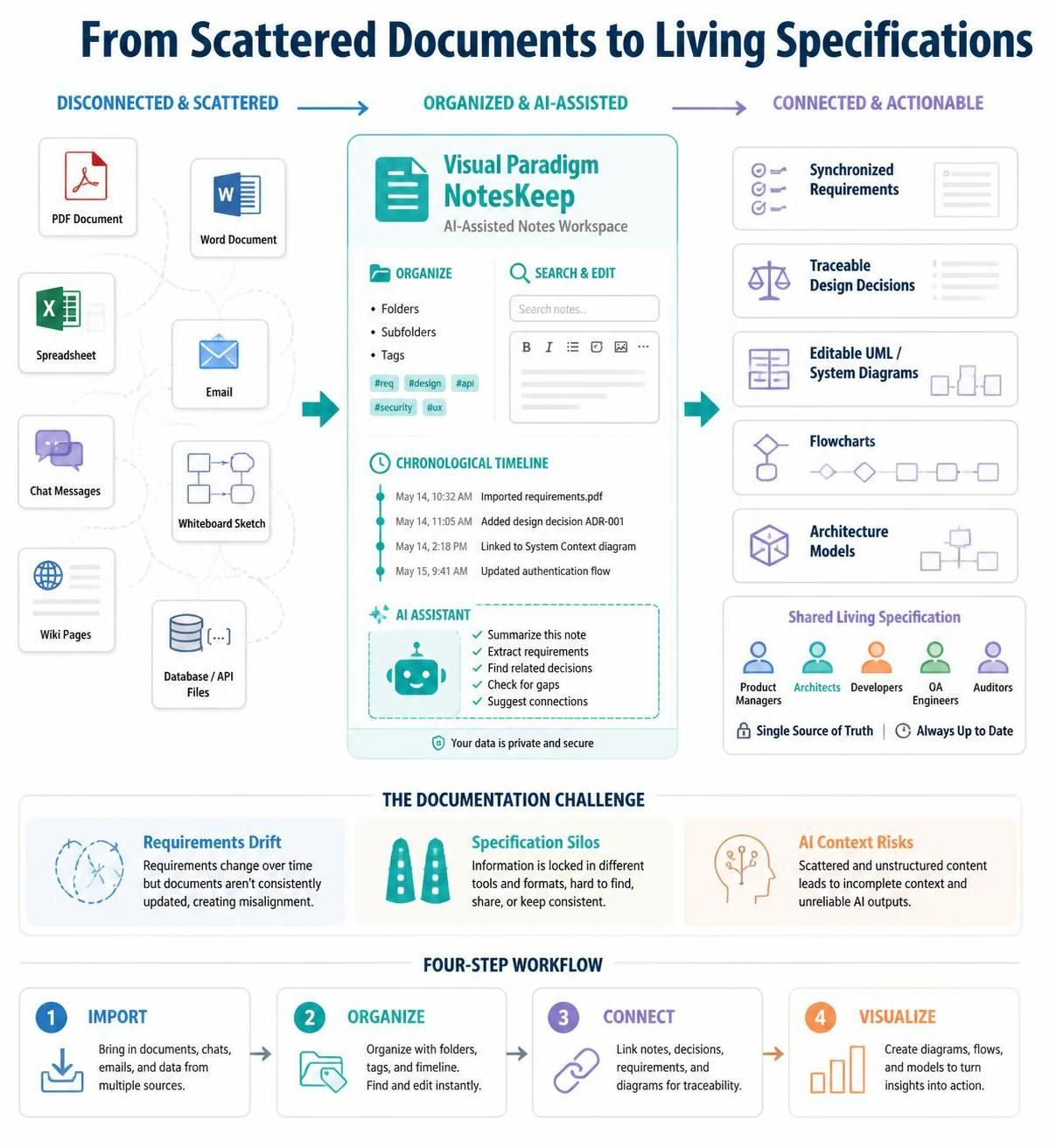
Engineering teams rarely lack information. More often, they struggle with information that is fragmented across PDFs, Word documents, spreadsheets, emails, chat messages, whiteboards, and disconnected wikis.
When requirements change, teams must manually determine which document is current, which design decision superseded an earlier one, and whether implementation work still matches the approved specification. This creates delays, duplicate effort, compliance gaps, and avoidable misunderstandings.
Visual Paradigm NotesKeep addresses this problem by turning scattered project information into organized, editable, and chronologically connected documentation. It combines AI-assisted note extraction with requirements management, system modeling, and diagramming workflows. Instead of treating documentation as a static archive, NotesKeep helps teams maintain a living specification that evolves alongside the project.
This guide explains the core ideas behind NotesKeep, the documentation problems it addresses, and practical ways different teams can use it.
The Documentation Challenge
Modern software and systems engineering projects generate information in many formats:
-
Requirements documents
-
Technical specifications
-
Architecture diagrams
-
API definitions
-
Database scripts
-
Meeting notes
-
Product briefs
-
Test plans
-
Whiteboard sketches
-
Emails and chat discussions
-
Change requests and design decisions
These sources often become disconnected from one another. A product manager may update a requirement in a document, while an architect modifies a diagram and a developer receives the change through a chat message. Unless the information is consolidated and tracked chronologically, different team members may work from conflicting versions.
Three recurring problems are especially damaging.
Requirements Drift
Requirements change continuously. A static specification may accurately describe the system when it was written but become outdated after several design discussions or customer requests.
For example:
-
A product brief requires users to approve transactions manually.
-
A later stakeholder meeting changes the requirement to automatic approval below a defined threshold.
-
The updated decision is recorded in meeting notes but not added to the main specification.
-
Developers continue implementing the original workflow.
This is requirements drift: the implemented system gradually diverges from the current business intent.
Specification Silos
Important information may be spread across multiple formats and locations. A requirements document might exist in Word, interface details in a spreadsheet, database definitions in SQL, and architecture decisions in a whiteboard image.
When these sources are not connected, teams spend time:
-
Searching for the latest version
-
Copying information manually
-
Recreating diagrams
-
Comparing inconsistent documents
-
Explaining context repeatedly to new team members
AI Context and Accuracy Risks
General-purpose AI tools may produce answers based on broad patterns rather than a project’s approved documentation. This can lead to suggestions that are technically plausible but inconsistent with the actual system.
An AI assistant that is restricted to selected project notes or tags can provide more focused assistance. Rather than answering from unrelated information, it can work within a defined project context.
What NotesKeep Does
NotesKeep is designed to connect notes, source documents, requirements, and visual models in one documentation workflow. Its central purpose is to turn raw project material into structured knowledge that teams can update and reuse.
The workflow generally involves four stages:
-
Import information from supported files, websites, or images.
-
Convert content into editable notes that can be organized and tagged.
-
Connect notes to requirements and design decisions over time.
-
Use the structured information to generate or update visual models and specifications.
This approach creates a bridge between unstructured information and formal systems engineering.
Key Concepts
1. Living Specifications
A living specification is documentation that changes with the project instead of becoming obsolete after its initial publication.
It should preserve:
-
The current requirement
-
Earlier versions or decisions
-
The reason for each major change
-
The people or teams involved
-
Related diagrams and implementation details
-
Open questions and unresolved conflicts
For example, a payment system specification could record that:
-
Version 1 required manual review for all high-value transactions.
-
Version 2 introduced automatic approval for trusted customers.
-
Version 3 added additional fraud checks after a compliance review.
This chronological context helps teams understand not only what the system should do, but also why it works that way.
2. Chronological Notes
Chronological notes provide a timeline of project understanding. They can capture decisions, changes, discussions, and clarifications as they happen.
A useful chronological note might include:
-
Date of the decision
-
Participants
-
Affected requirement
-
Previous behavior
-
New behavior
-
Reason for the change
-
Related artifacts
-
Follow-up tasks
This makes it easier to resolve conflicts between older documents and newer decisions.
3. Bounded AI Context
Bounded AI means restricting an AI assistant to selected notes, projects, or tags.
For example, a team could create tags such as:
-
billing-platform -
mobile-app -
security-requirements -
customer-onboarding -
release-2026-q3
An AI chatbot working with the billing-platform tag would focus on the notes and documents associated with that project rather than unrelated organizational material.
This can help teams:
-
Locate relevant requirements
-
Summarize a project area
-
Identify inconsistencies
-
Draft acceptance criteria
-
Explain architecture decisions
-
Generate diagrams from approved information
4. Multi-Format Information Extraction
Project knowledge is rarely created in one format. NotesKeep is intended to convert several common formats into editable notes, including:
-
Microsoft Word documents
-
PDF files
-
HTML pages
-
Rich Text Format files
-
Markdown
-
Plain text
-
Excel spreadsheets
-
CSV files
-
PowerPoint presentations
-
PNG, JPG, and SVG images
The supplied product information indicates that PDF imports can contain up to 10 pages. Image imports can be particularly useful for capturing whiteboard sketches, workshop diagrams, and photographed design notes.
5. Visual Systems Engineering
Text alone is not always sufficient for understanding a system. Visual models help teams represent structure, behavior, dependencies, and data relationships.
NotesKeep can support workflows involving:
-
UML diagrams
-
Entity-relationship diagrams
-
Flowcharts
-
System architecture diagrams
-
Database models
-
Story maps
-
Server topology diagrams
It can also work with diagramming formats such as Mermaid, PlantUML, and DBML, allowing teams to move from conversational descriptions to editable technical models.
6. Audit Trails and Architectural Decisions
Architecture Decision Records, commonly called ADRs, document important technical choices.
An ADR typically records:
-
The decision
-
The context
-
Alternatives considered
-
The selected approach
-
The consequences
-
The date and status
For example:
The team selected event-driven integration instead of direct synchronous calls because several downstream systems may be unavailable during peak traffic. The trade-off is increased operational complexity and the need for event monitoring.
Maintaining ADRs alongside project notes makes it easier to understand why a system was designed in a particular way.
A Practical NotesKeep Workflow
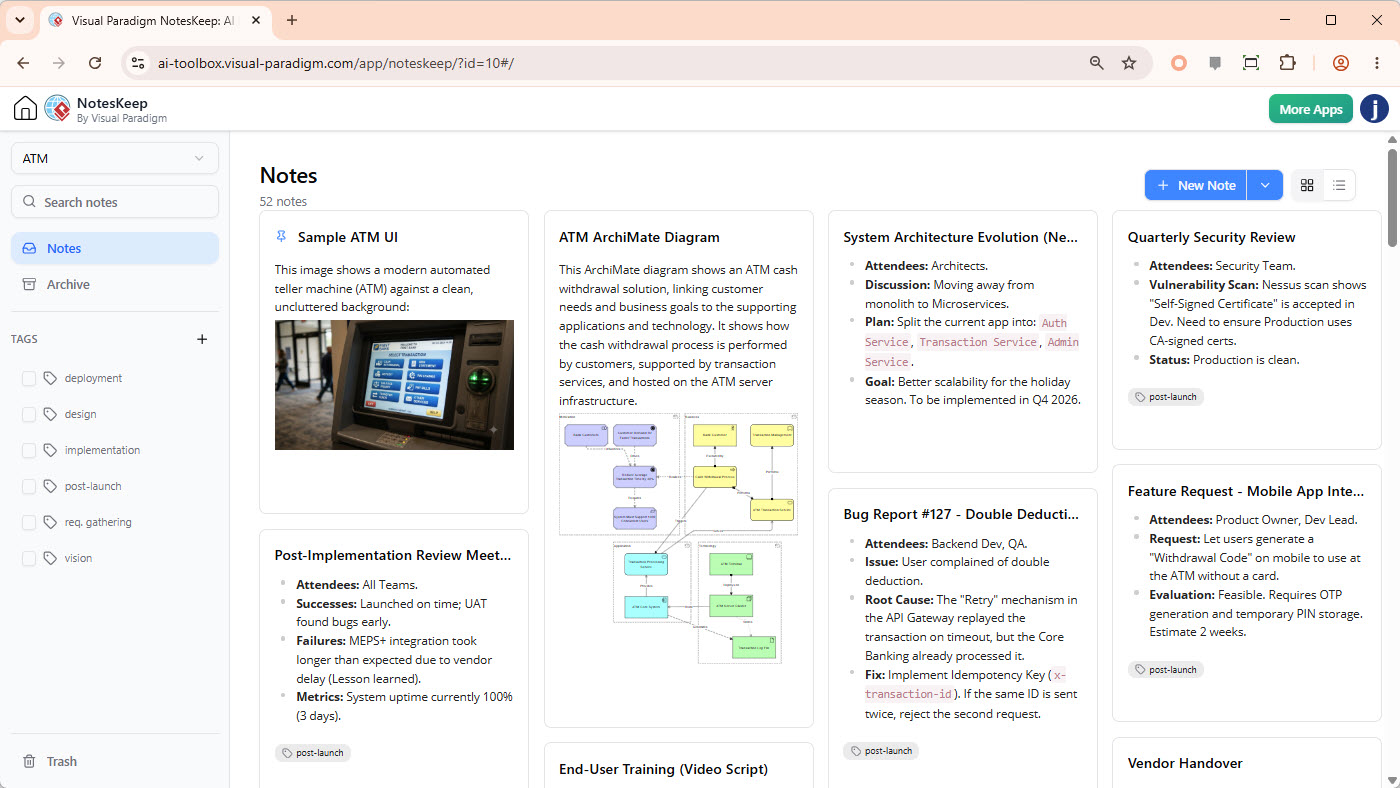
Step 1: Gather Existing Project Material
Begin by collecting the documents that represent the current state of the project:
-
Product requirements
-
Technical specifications
-
Existing diagrams
-
Meeting notes
-
Spreadsheets
-
API documentation
-
Database definitions
-
Test plans
-
Compliance documents
-
Whiteboard images
Do not limit the collection to polished documents. Informal notes often contain the explanation behind later changes.
Step 2: Import and Convert the Content
Import the relevant files into NotesKeep and convert them into editable notes. This creates a common workspace for information that previously existed in different formats.
For example:
-
A Word requirements document becomes an editable project note.
-
An Excel feature matrix becomes structured reference material.
-
A photographed whiteboard becomes a source for extracting design elements.
-
A PDF compliance checklist becomes searchable project documentation.
Step 3: Organize Notes with Projects and Tags
Create a logical organization system before adding large amounts of content.
A project might be divided into tags such as:
-
business-requirements -
technical-architecture -
database -
api -
security -
testing -
decisions -
release-planning
Tags should describe the subject, product area, or purpose of a note. Consistent tagging makes it easier to limit AI queries to the correct context.
Step 4: Record Changes Chronologically
When a requirement changes, record the change as a new note or update linked to the relevant project area.
A useful change entry could look like this:
Change: Customer identity verification

Previous requirement:
All new customers must complete manual identity verification.

Updated requirement:
Low-risk customers may complete automated verification. High-risk customers continue to require manual review.

Reason:
Reduce onboarding delays while preserving enhanced review for higher-risk cases.

Affected areas:
- Customer onboarding workflow
- Risk scoring service
- Compliance reporting
- QA test scenarios
This format helps developers, testers, auditors, and product managers understand the impact of the change.
Step 5: Ask AI Questions Within a Defined Context
Instead of asking broad questions about the entire organization, direct the AI assistant to the relevant project or note tags.
Examples include:
-
“Summarize the current onboarding requirements.”
-
“Which requirements changed during the latest release cycle?”
-
“Identify conflicts between the API notes and the database model.”
-
“List all security requirements related to customer authentication.”
-
“Generate acceptance criteria for the updated payment workflow.”
-
“Explain the reason for choosing asynchronous integration.”
The quality of the answer depends heavily on the clarity and completeness of the source material.
Step 6: Generate or Update Visual Models
Once the requirements are organized, use them to create visual representations.
For example, a description such as:
A customer submits an application. The onboarding service validates the data, sends it to the risk engine, and either approves the customer automatically or routes the application to a compliance officer.
Could be represented as a flowchart with:
-
Application submission
-
Data validation
-
Risk assessment
-
Automated approval
-
Manual compliance review
-
Customer notification
The resulting model can then be reviewed and edited by architects and stakeholders.
Step 7: Link Models Back to Requirements
A diagram is most valuable when its elements can be traced back to requirements and decisions.
For example:
-
A “Risk Assessment” process links to the fraud-detection requirement.
-
A “Compliance Review” step links to an ADR.
-
A database entity links to data-retention rules.
-
An API interaction links to an integration specification.
This creates traceability between business goals, system behavior, and technical implementation.
Examples by Team Role
Product Managers
Product managers can use NotesKeep to transform high-level ideas into detailed specifications.
A product brief might state:
Customers should be able to pause a subscription and resume it later without losing their account history.
This can be expanded into:
-
Functional requirements
-
User stories
-
Acceptance criteria
-
Edge cases
-
Gherkin scenarios
-
Related billing rules
-
Customer notification requirements
Example acceptance criteria:
Given an active subscription
When the customer selects “Pause subscription”
Then the subscription status changes to “Paused”
And the customer retains access to historical invoices
And the system displays the scheduled resume date
Software Architects
Architects can use project notes to compare system components and generate visual models.
Suppose the project includes:
-
A mobile application
-
An API gateway
-
An account service
-
A payment service
-
A notification service
-
A reporting database
NotesKeep can help organize the relationships and express them through architecture diagrams or formats such as Mermaid, PlantUML, and DBML.
A simplified Mermaid flowchart might look like this:
flowchart LR
    MobileApp --> APIGateway
    APIGateway --> AccountService
    APIGateway --> PaymentService
    PaymentService --> ReportingDatabase
    PaymentService --> NotificationService
The diagram should still be reviewed by an architect. AI-generated models are useful starting points, but technical ownership remains with the engineering team.
Developers
Developers can use chronological notes to understand the current implementation intent and the history behind it.
For example, before changing an API, a developer could ask:
-
Which clients depend on this endpoint?
-
Was the response format changed previously?
-
Are there unresolved compatibility concerns?
-
Which acceptance tests cover this behavior?
-
What architectural decisions affect this service?
This reduces the need to search through separate repositories and meeting archives.
QA Teams
QA teams can convert requirements into test scenarios and identify gaps between documented behavior and expected behavior.
For a password-reset feature, relevant scenarios might include:
-
A valid reset request
-
An expired reset link
-
An already-used reset token
-
A nonexistent email address
-
Rate limiting after repeated requests
-
Password complexity validation
-
Notification delivery failure
A QA team can also compare requirements with diagrams and implementation notes to find behaviors that have not been tested.
Compliance Auditors
Auditors benefit from chronological documentation and traceability.
They may need to determine:
-
When a control was introduced
-
Which requirement motivated it
-
Who approved the change
-
Which systems are affected
-
Whether testing evidence exists
-
Whether the current design matches the approved policy
A centralized repository of notes, decisions, and related diagrams can make this review more systematic.
Systems Integrators
Integration teams often work with legacy systems, database exports, API specifications, and incomplete documentation.
NotesKeep can help organize:
-
Database DDL files
-
Legacy module descriptions
-
Interface contracts
-
Data mappings
-
Transformation rules
-
Dependency diagrams
-
Migration decisions
For example, an integration project could document how a legacy customer identifier maps to a new platform identifier and what happens when historical records do not contain the required field.
Industry Applications
Regulated Industries
Financial technology, medical technology, and aerospace projects often require strong traceability.
A practical documentation chain may connect:
-
A regulatory requirement
-
An internal business rule
-
A system requirement
-
A design decision
-
An implementation component
-
A test case
-
Approval or audit evidence
This structure helps teams demonstrate how obligations are translated into operational controls.
Agile Digital Agencies
Agencies must often convert workshop discussions into client-approved deliverables quickly.
A possible workflow is:
-
Import workshop notes and sketches.
-
Organize them by client project and feature.
-
Extract requirements and unresolved questions.
-
Generate user stories and acceptance criteria.
-
Create preliminary UML or flow diagrams.
-
Present the visual models for client sign-off.
-
Record approved changes chronologically.
This can reduce the time between discovery workshops and formal project documentation.
Systems Integration Projects
Integration projects frequently involve incomplete or inconsistent information. NotesKeep can serve as a central workspace for connecting legacy documentation with new architecture plans.
Teams can use it to map:
-
Existing database tables
-
New service boundaries
-
API endpoints
-
Data transformations
-
Authentication methods
-
Error-handling rules
-
Migration dependencies
Licensing and Access Overview
The supplied access information describes the following general structure:
| Platform | Minimum tier | Core NotesKeep access | AI chatbot features |
|---|---|---|---|
| Visual Paradigm Online | Combo Edition | Included | Deluxe Edition or higher required |
| Visual Paradigm Online | Deluxe Edition | Included | Full access, including OCR, synthesis, UML, and specification assistance |
| Visual Paradigm Desktop Client | Professional Edition with active subscription or software maintenance | Included through unified web portal integration | Full access while active maintenance is available |
Organizations should match the edition to the capabilities they need. Teams that only require centralized notes may have different needs from teams that want OCR, AI-assisted synthesis, UML generation, and specification automation.
Best Practices for Maintaining Living Specifications
Use Clear Naming Conventions
Name notes consistently so team members can understand them quickly.
Examples:
-
REQ-Customer-Onboarding-v2 -
ADR-014-Event-Driven-Integration -
API-Payment-Authorization -
TEST-Subscription-Pause -
CHANGE-2026-09-Identity-Verification
Separate Facts from Open Questions
Mark unresolved information clearly. Mixing confirmed requirements with assumptions can cause teams to implement behavior that has not been approved.
Useful labels include:
-
Confirmed
-
Proposed
-
Under review
-
Deprecated
-
Blocked
-
Needs stakeholder approval
Preserve Superseded Decisions
Do not delete every old note when a requirement changes. Retain the earlier decision and mark it as superseded. Historical context can explain existing code, database structures, or customer behavior.
Link Requirements to Deliverables
Where possible, connect requirements to:
-
Diagrams
-
User stories
-
Code modules
-
Test cases
-
Release notes
-
ADRs
-
Compliance controls
Traceability makes impact analysis easier when a requirement changes.
Review AI-Generated Results
AI can accelerate extraction, summarization, and diagram creation, but project owners should review the results. Pay particular attention to:
-
Missing exceptions
-
Incorrect relationships
-
Ambiguous requirements
-
Unsupported assumptions
-
Conflicting source documents
-
Security and compliance implications
AI should help teams organize and analyze project knowledge, not replace technical or business approval.
A Complete Example
Consider a healthcare scheduling platform with the following source material:
-
A PDF describing appointment rules
-
An Excel sheet containing provider availability
-
A photographed whiteboard showing the booking workflow
-
A Word document describing patient notifications
-
Meeting notes documenting a new cancellation policy
A team could use NotesKeep to:
-
Import each source into editable notes.
-
Tag the material with
scheduling,notifications, andcancellation-policy. -
Extract the booking workflow from the whiteboard image.
-
Record the cancellation policy as the newest chronological decision.
-
Ask the AI assistant to summarize the current rules.
-
Generate a flowchart for appointment booking.
-
Create acceptance criteria for cancellation fees.
-
Link the requirements to QA scenarios.
-
Identify conflicts between the original PDF and the latest meeting notes.
-
Preserve the original policy as superseded documentation.
The result is more than a collection of files. It becomes an interconnected project knowledge base that explains the system’s current behavior and its evolution.
Conclusion
NotesKeep addresses a common engineering problem: valuable knowledge exists, but it is scattered across documents, diagrams, spreadsheets, images, and conversations.
By converting these sources into editable notes, organizing them with projects and tags, preserving chronological decisions, and connecting them to visual system models, teams can create specifications that remain useful as the project changes.
Its most important idea is the shift from static documentation to living project knowledge. Requirements can be traced through their history, AI assistance can be focused on approved project context, and technical teams can move more easily from unstructured information to requirements, diagrams, acceptance criteria, and implementation guidance.
Used thoughtfully, NotesKeep can help product managers, architects, developers, QA teams, auditors, and systems integrators maintain a shared understanding of what the system should do, why it works that way, and how each change affects the broader design.
This post is also available in Deutsch, Español, فارسی, Français, English, Bahasa Indonesia, 日本語, Polski, Portuguese, Ру́сский, Việt Nam, 简体中文 and 繁體中文.