


Adornments are the extra symbols and text labels added to relationships and their ends. They turn a bare line into a precise specification. This guide covers the adornments found in your notes.
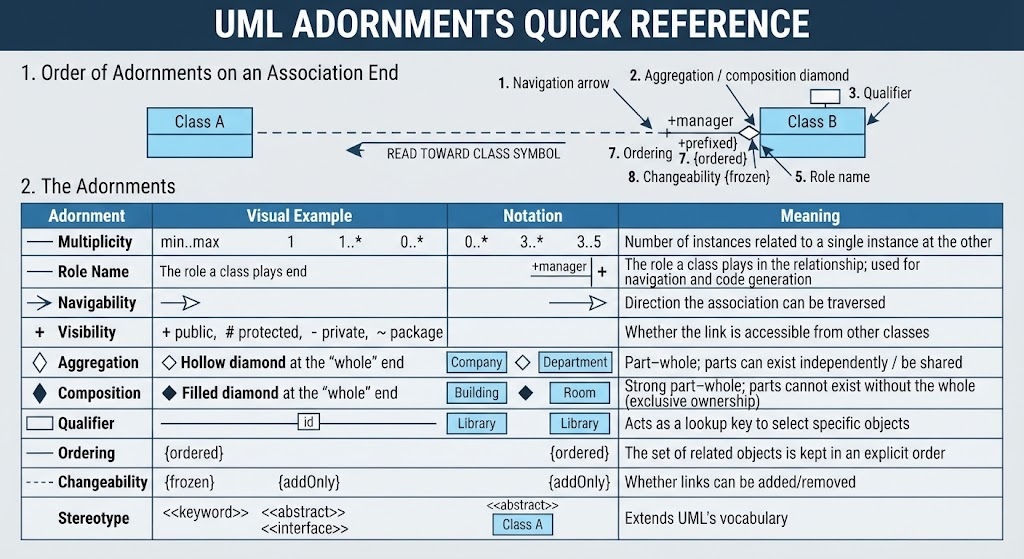
1. Order of Adornments on an Association End
When several adornments appear on one end, they follow a fixed order — read from the far end of the path toward the class symbol:
- Navigation arrow
- Aggregation / composition diamond
- Qualifier (small rectangle)
- Multiplicity (near the path end)
- Role name (near the path end)
- Visibility (prefixed to the role name)
- Ordering (e.g.,
{ordered}) - Changeability (e.g.,
{frozen},{addOnly})
2. The Adornments
| Adornment | Notation | Meaning |
|---|---|---|
| Multiplicity | min..max — 1, 0..1, 1..*, 0..*, 3..5 |
Number of instances related to a single instance at the other end |
| Role Name | Text label near the path end | The role a class plays in the relationship; used for navigation and code generation |
| Navigability | Arrowhead on the path end | Direction the association can be traversed |
| Visibility | + public · # protected · - private · ~ package |
Whether the link is accessible from other classes |
| Aggregation | Hollow diamond at the “whole” end | Part–whole; parts can exist independently / be shared |
| Composition | Filled diamond at the “whole” end | Strong part–whole; parts cannot exist without the whole (exclusive ownership) |
| Qualifier | Small rectangle on the line near the source class | Acts as a lookup key to select specific objects |
| Ordering | {ordered} |
The set of related objects is kept in an explicit order |
| Changeability | {frozen} · {addOnly} |
Whether links can be added/removed |
| Stereotype | <<keyword>> |
Extends UML’s vocabulary (e.g., <<abstract>>, <<interface>>) |
3. Key Details
Navigability
- Unidirectional — arrow points to the accessible class.
- Bidirectional — no arrowheads (the default); access both ways.
Role Name
- Underlined → class scope; otherwise → instance scope.
- Must be unique among the source class’s direct and inherited pseudoattributes.
Multiplicity
1exactly one ·0..1zero or one ·*=0..*many ·1..*one or more.
Ordering
- Values:
unordered(default),ordered, orsorted.
Changeability
{frozen}— links cannot change ·{addOnly}— links can only be added ·changeable(default) — add and remove freely.
Qualifier
- Example: a
Ticketassociation qualified byperformanceandseatuniquely identifies a ticket for a specific show.
Association Name
- Text label placed along the middle of the line, clear of the role names.
- A small filled triangle near the name shows the reading direction of the class list.
4. Notation Patterns
Class A ──1..*  employee──> Class B      navigable, multiplicity, role
Class A ──◇ 1  parts──────── Class B      aggregation (hollow diamond)
Class A ──◆ 1  frames──────── Class B      composition (filled diamond)
Class A ──[qualifier]──────── Class B      qualified association
How to use this guide: Start with the bare line — is it a dependency, association, generalization, or realization? Then layer adornments on the ends (navigation, diamond, qualifier, multiplicity, role name, visibility, ordering, changeability) in that left-to-right order. The diamond and the arrowhead are the two that most often get confused: the diamond goes on the “whole” end (aggregation/composition), while the arrowhead shows navigability — they are independent properties and can appear together.
Tooling: Visual Paradigm UML
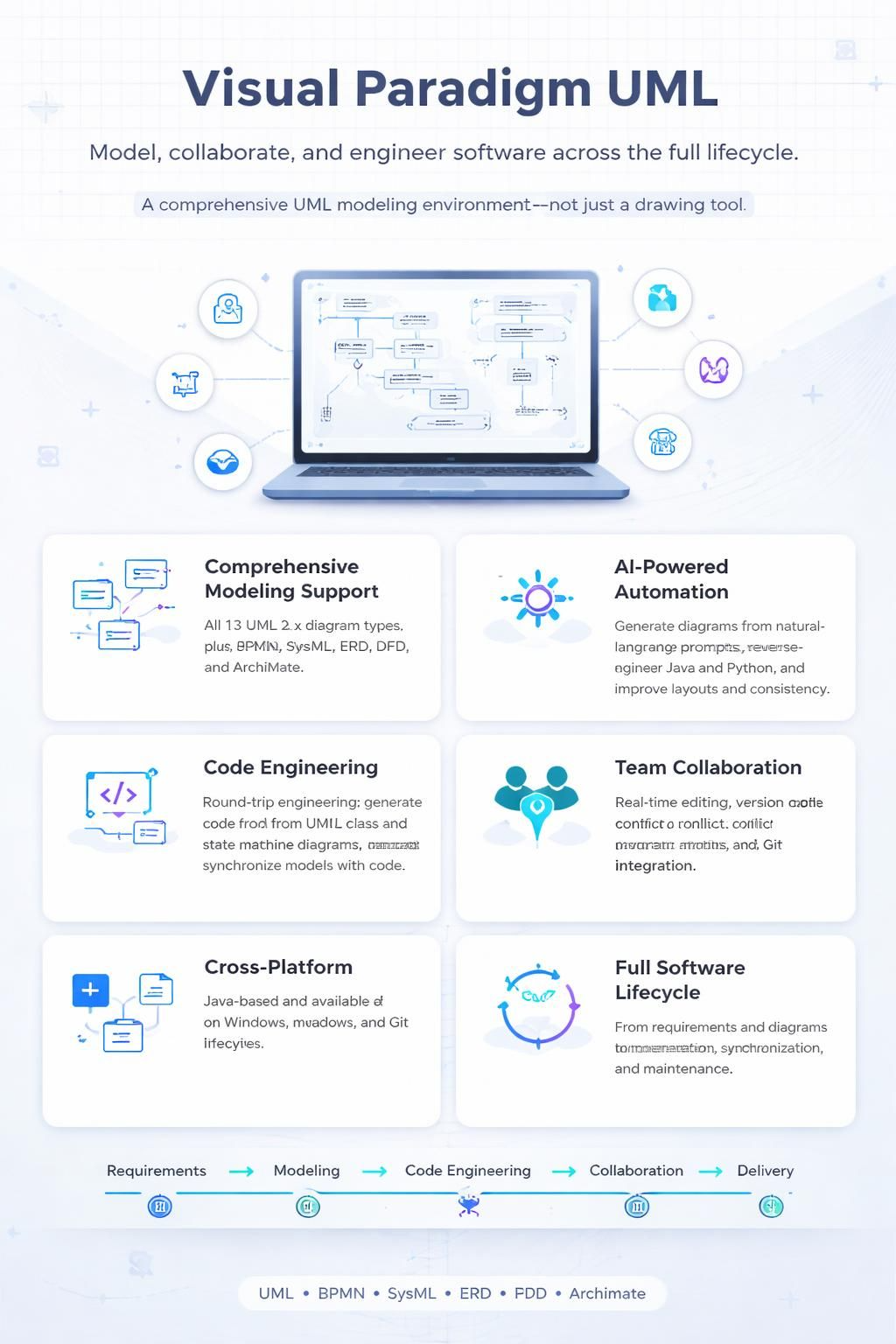
Visual Paradigm is a comprehensive UML modeling tool that supports the full software development lifecycle, from creating diagrams to reverse-engineering code. It stands out for its support of the latest UML 2.6 standard and its user-friendly, drag-and-drop interface.
🛠️ Core Features and Capabilities
Visual Paradigm is more than just a drawing tool; it’s a full-fledged modeling environment designed for team collaboration and complex projects. Here are its key strengths:
-
Comprehensive Modeling Support: It supports all 13 UML 2.x diagram types, including class, use case, and sequence diagrams. Beyond UML, it also covers BPMN, SysML, ERD, DFD, and ArchiMate, making it a versatile tool for various modeling needs.
-
AI-Powered Automation: The tool integrates AI to accelerate modeling. You can use natural language prompts to generate diagrams, reverse-engineer code from languages like Java and Python into UML models, and get AI-powered suggestions for layouts and design consistency.
-
Code Engineering: It facilitates round-trip engineering, allowing you to generate code from UML class and state machine diagrams, and synchronize models with your codebase.
-
Team Collaboration: Visual Paradigm supports real-time collaborative editing, version control, and conflict resolution, enabling entire teams to work on models simultaneously. It also integrates with Git for versioning.
-
Cross-Platform Availability: Built on Java, it runs on Windows, macOS, and Linux, ensuring a consistent experience across different operating systems.
📊 Choosing the Right Edition
Visual Paradigm offers several editions to cater to different users, from individuals to large enterprises. The table below outlines the key differences to help you select the right one.
| Feature | Modeler | Standard | Professional | Enterprise |
|---|---|---|---|---|
| UML, SysML, ERD, DFD Diagrams | ✔ | ✔ | ✔ | ✔ |
| BPMN, Mind Mapping | ✔ | ✔ | ✔ | ✔ |
| Source Code & Database Engineering | ✔ | ✔ | ✔ | ✔ |
| UX Design (Wireframe, Storyboard) | ✔ | ✔ | ✔ | ✔ |
| Agile & Project Management Tools | ✔ | ✔ | ✔ | |
| Team Collaboration | ✔ | ✔ | ✔ | |
| ArchiMate, TOGAF, DoDAF Support | ✔ |
📝 Practical Modeling Workflow
A typical workflow in Visual Paradigm involves using the tool to create precise models that communicate system design. For example, when modeling a library system, you would:
-
Define Core Classes: Start by creating a class diagram to model your domain. Identify key entities like
Book,Member, andLoan. -
Add Attributes and Operations: For each class, specify attributes (e.g.,
title: StringforBook) and operations (e.g.,borrowBook()forMember). -
Establish Relationships: Connect classes with associations and define multiplicities (e.g., a
Membercan have manyLoans(1..*)). -
Model Interactions: Use a sequence diagram to visualize how objects interact over time for a specific use case, such as a “Book Checkout” process.
-
Refine and Validate: Review your diagrams for clarity and correctness. Visual Paradigm’s AI can help generate an initial draft from a text description, which you can then refine manually.
💡 Key Considerations from User Feedback
According to reviews on Gartner Peer Insights, users appreciate Visual Paradigm’s comprehensive feature set, its ability to generate database scripts and code, and its project management capabilities. Some users have noted that the tool can be complex for new users and that the pricing is relatively high compared to some alternatives. However, its standard-compliant modeling and wide range of features make it a valuable tool for professionals and academics alike.
In summary, Visual Paradigm is a powerful, all-in-one modeling platform. Its strength lies in its deep support for industry standards, AI-assisted design, and robust collaboration features, making it suitable for both individual modelers and large, agile enterprises.
If you have a specific project in mind, I can provide more detailed guidance on which diagrams to use or how to approach a particular modeling challenge.
This post is also available in Deutsch, Español, فارسی, Français, English, Bahasa Indonesia, 日本語, Polski, Portuguese, Ру́сский, Việt Nam, 简体中文 and 繁體中文.