


Introduction
In today’s fast-paced digital landscape, organizations face increasing pressure to align business strategy with technical execution. Business Process Model and Notation (BPMN) has emerged as the universal language for visualizing, analyzing, and optimizing workflows across departments. However, the true value of BPMN is realized only when it seamlessly integrates with Agile development practices, enabling teams to transform high-level process designs into actionable user stories and technical specifications.
This case study explores how Visual Paradigm’s comprehensive BPMN modeling platform empowers organizations to bridge the gap between business process design and Agile software delivery. By examining its core capabilities, integration features, and practical implementation guidance, we demonstrate how teams can leverage this toolset to accelerate digital transformation, improve cross-functional collaboration, and ensure that every line of code traces back to a validated business need.
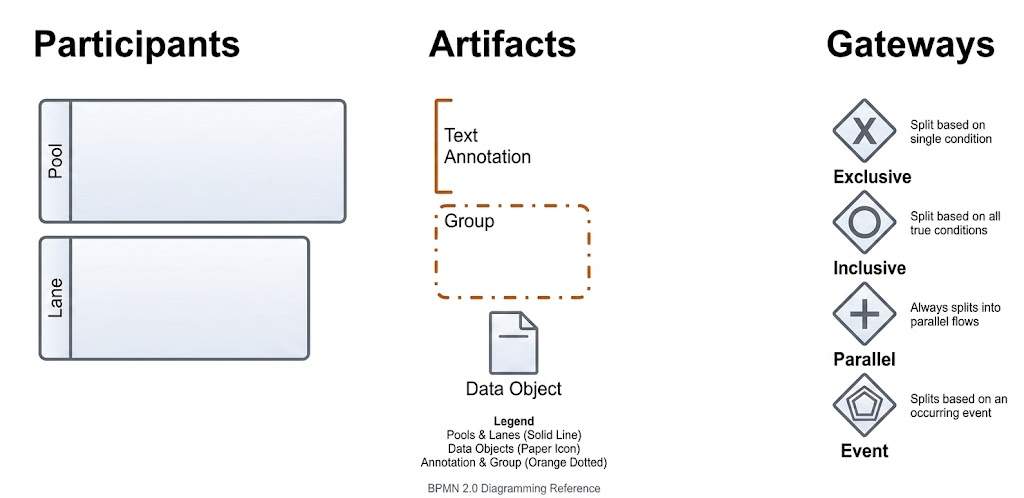
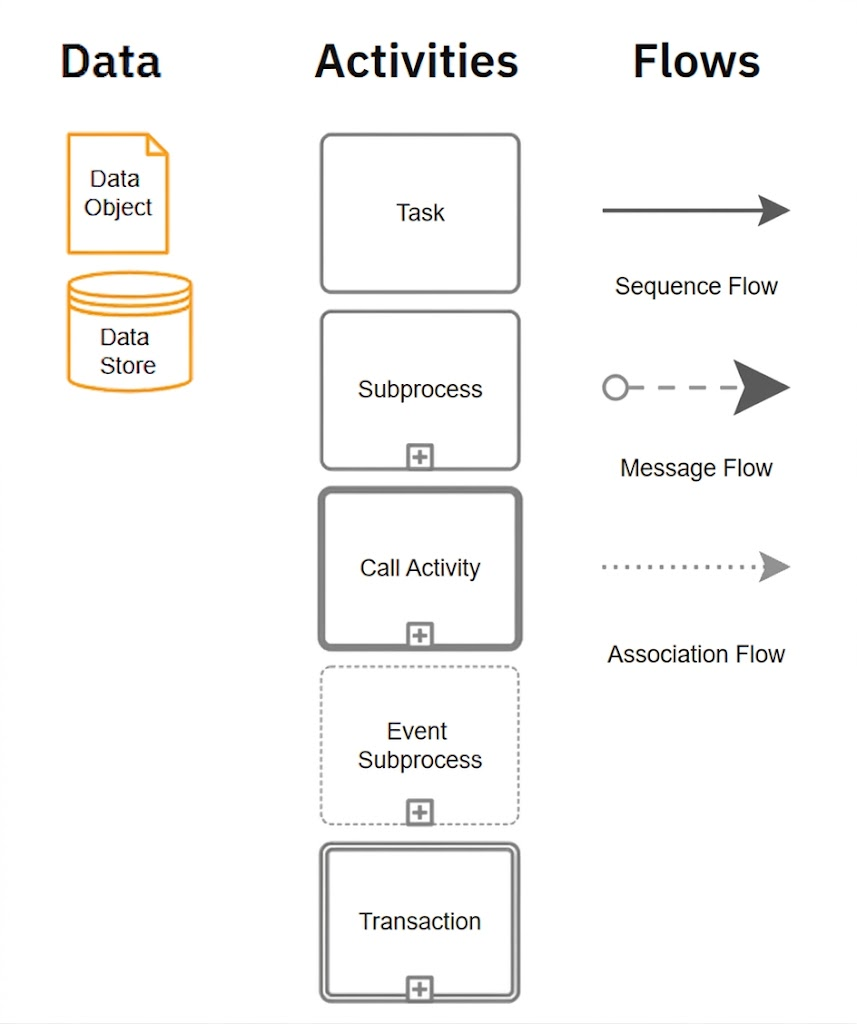
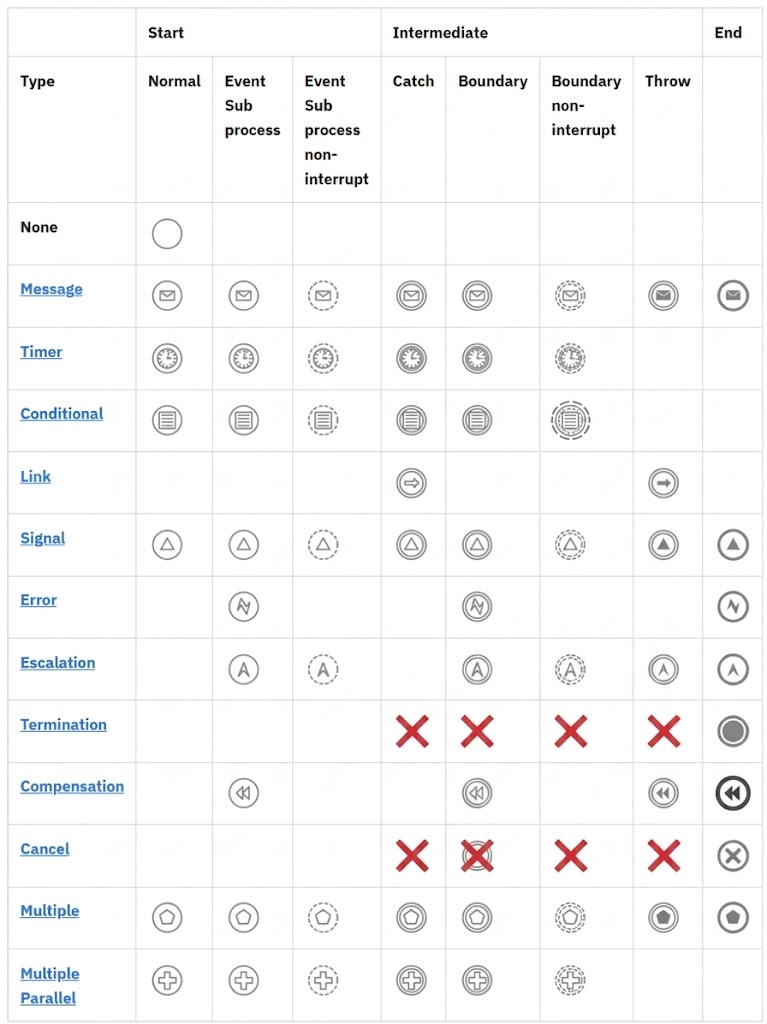
BPMN Symbol Overview
Events
Heads up!
For understanding the principle behavior of events in BPMN, check out Events: Basic Concepts.
Visual Paradigm: Core BPMN 2.0 Capabilities
Visual Paradigm provides full support for BPMN 2.0 (Business Process Model and Notation), enabling teams to map business workflows and directly link them to technical Agile UML artifacts. The platform supports both business-level mapping and automated technical alignment through three foundational pillars:
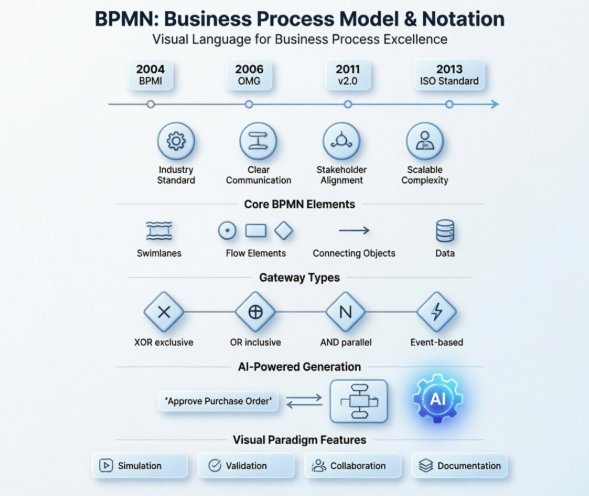
Complete Notation Set
The platform includes all standard BPMN 2.0 elements required for enterprise-grade process modeling:
-
Pools and lanes for organizational boundaries
-
Tasks, sub-processes, and call activities for workflow decomposition
-
Data objects and data stores for information flow tracking
-
Gateways (exclusive, parallel, inclusive, event-based) for decision logic
-
Comprehensive event types including timer, message, error, signal, and conditional triggers
As-Is vs. To-Be Analysis
A built-in workflow simulator allows business analysts and process owners to execute modeled processes in a risk-free environment. Teams can:
-
Identify bottlenecks and resource constraints before implementation
-
Test alternative process flows and measure performance impacts
-
Optimize resource allocation and handoff points
-
Validate compliance requirements through simulated execution paths
Process Animation
Static diagrams come to life through step-by-step process animation, making complex workflows accessible to non-technical stakeholders. This visual validation approach:
-
Builds consensus across business and IT teams
-
Reduces misinterpretation of process logic
-
Accelerates sign-off cycles for process changes
-
Supports training and onboarding for new team members
Linking BPMN to Agile UML: The Semantic Backplane
In an Agile setup, business processes (BPMN) must align with technical implementations (UML). Visual Paradigm bridges this gap using the Semantic Backplane—a intelligent connectivity layer that maintains traceability between business requirements and technical artifacts.
BPMN Tasks to User Stories
Developers and product owners can right-click any BPMN Task element and select “Transit to User Story.” This action automatically:
-
Creates a properly formatted story in the sprint backlog
-
Preserves context and acceptance criteria from the process model
-
Maintains bidirectional links for impact analysis
-
Ensures that every software feature maps directly back to a real business need
BPMN Tasks to Activity/Sequence Diagrams
For complex tasks requiring detailed technical design, teams can nest UML Sequence or Activity diagrams inside BPMN elements. This hierarchical approach:
-
Keeps the high-level process view clean and business-focused
-
Allows architects to define exact software interactions at the task level
-
Maintains synchronization between process changes and technical specifications
-
Supports incremental refinement from concept to code
Data Objects to Class Diagrams
Data consistency is critical across business and technical layers. By dragging a BPMN Data Object onto a UML Class Diagram, the platform automatically:
-
Converts the data object into a structural class element
-
Preserves attributes, relationships, and constraints
-
Enables data model evolution alongside process changes
-
Reduces redundancy and synchronization errors
Quick-Start Guide for BPMN Modeling
Getting started with Visual Paradigm’s BPMN tooling is designed for rapid adoption:
-
Go to the top toolbar and click Diagram > New.
-
Search for Business Process Diagram and click Create.
-
Drag a Pool from the lateral palette to represent your organization, and use Lanes to designate specific departments, roles, or microservices.
-
Use the Resource Catalog icon (the small green arrow pop-up on selected shapes) to quickly click-and-drag next-step elements. This builds your flow 3x faster than dragging shapes manually from the sidebar.
Pro Tip: Leverage keyboard shortcuts and template libraries to accelerate diagram creation. For teams evaluating the platform, consider whether VP Online (cloud-based collaboration) or the Desktop Client (advanced offline capabilities) better fits your workflow. Both options support process simulation setup and documentation export.
Enterprise-Grade Features and Team Collaboration
Visual Paradigm’s BPMN tooling extends beyond diagramming to support full lifecycle process management:
-
Rich Notation & Reusability: Access all 60+ BPMN event types and reuse tasks seamlessly across different diagrams while maintaining central data repositories.
-
Animation & Simulation: Transform static diagrams into interactive workflows to visualize process logic and simulate real-time operations under varying load conditions.
-
Process Drill-Down: Collapse or expand sub-processes to hide complex details for executive views, or drill down into specific operational layers for technical teams.
-
Enterprise Integration: Seamlessly cross-reference BPMN workflows with other standards like UML, CMMN, ERD models, and decision tables for holistic enterprise architecture.
-
Team Collaboration: Utilize built-in repository management to track versions, generate compliance reports, and share updates across distributed teams with role-based access controls.
These capabilities position Visual Paradigm not just as a modeling tool, but as a strategic platform for digital transformation initiatives requiring alignment between business strategy, process excellence, and Agile delivery.
Conclusion
The convergence of business process management and Agile software development represents a critical evolution in how organizations deliver value. Visual Paradigm’s BPMN modeling platform exemplifies this convergence by providing a unified environment where business analysts, process owners, and development teams can collaborate on a single source of truth.
By combining comprehensive BPMN 2.0 support with intelligent integration to Agile artifacts, the platform enables organizations to:
-
Reduce time from process design to implementation
-
Improve traceability between business requirements and technical delivery
-
Enhance stakeholder engagement through visual simulation and animation
-
Scale process excellence practices across enterprise teams
As digital transformation accelerates, tools that bridge business and technical domains will become increasingly vital. Visual Paradigm demonstrates how thoughtful platform design can turn process modeling from a documentation exercise into a catalyst for agile, value-driven delivery. Teams adopting this approach position themselves to respond faster to market changes, deliver higher-quality solutions, and maintain strategic alignment across all levels of the organization.
References
- BPMN Diagram and Tools – Visual Paradigm: Comprehensive overview of Visual Paradigm’s BPMN diagramming capabilities, notation support, and enterprise features for business process modeling.
- Comprehensive Guide to BPMN and Using Visual Paradigm’s BPMN Tool: In-depth tutorial covering BPMN fundamentals and practical implementation strategies using Visual Paradigm’s modeling environment.
- BPMN Made Easy – Visual Paradigm: Beginner-friendly resource introducing BPMN concepts and demonstrating how Visual Paradigm simplifies business process modeling for teams of all skill levels.
- BPMN Tools – Visual Paradigm: Detailed exploration of Visual Paradigm’s BPMN toolset, including simulation, collaboration, and integration capabilities for enterprise process management.
- Project Management Learning Guide – Visual Paradigm: Educational resource covering project management methodologies, Agile practices, and how BPMN modeling supports effective project delivery.
- Visual Paradigm User Guide: BPMN Introduction: Official documentation providing step-by-step instructions for creating, editing, and managing BPMN diagrams in Visual Paradigm.
This post is also available in Deutsch, Español, فارسی, Français, English, Bahasa Indonesia, 日本語, Polski, Portuguese, Ру́сский, Việt Nam, 简体中文 and 繁體中文.
Related posts:
 Business Process Model and Notation: Strategies for Aligning IT Architecture with Business Goals
 Mastering Business Process Visualization: A Practitioner’s Review of BPMN and Process Mapping with Visual Paradigm
 Mastering Business Process Modeling: A Hands-On Review of BPMN and Visual Paradigm’s AI-Powered Tools
 Mastering AI-Powered Mind Mapping with Visual Paradigm