


Enterprise architecture serves as the blueprint for organizational change. Without a clear standard for representation, communication between business leaders, IT professionals, and stakeholders becomes fragmented. ArchiMate provides a standardized framework for this representation. It allows teams to visualize, analyze, and design complex enterprise architectures with precision. This guide explores the foundational steps and best practices for engaging with this modeling language effectively.
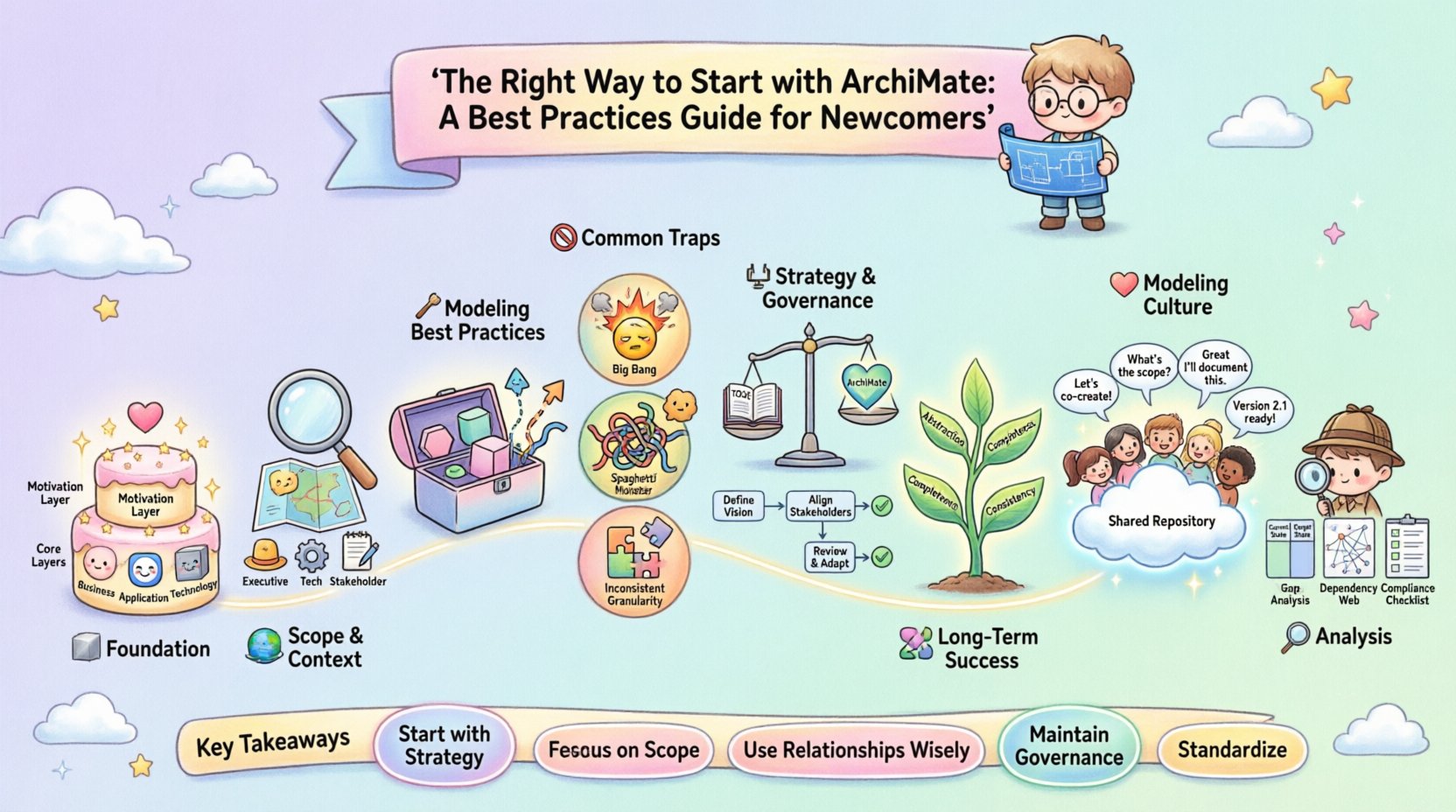
1. Understanding the ArchiMate Foundation 🧱
Before creating any diagrams, one must grasp the underlying structure. ArchiMate is not merely a drawing tool; it is a conceptual framework. It defines specific concepts and relationships that map to real-world elements within an organization. A successful start relies on understanding the layers and domains that structure the information.
The Motivation Layer
Often overlooked by beginners, the Motivation Layer is critical for context. It answers the “why” behind the architecture. This layer includes concepts such as:
- Stakeholder: Who is affected by or interested in the architecture?
- Goal: What does the organization aim to achieve?
- Principle: What rules guide the design?
- Requirement: What constraints or needs must be met?
- Assessment: How are the goals and requirements evaluated?
Integrating this layer ensures that every technical or business decision ties back to a strategic objective. It prevents the creation of artifacts that look good visually but lack strategic justification.
The Three Core Layers
The architecture is typically divided into three horizontal layers. Each layer represents a different level of abstraction.
- Business Layer: Represents the human and organizational elements. This includes processes, roles, and business services.
- Application Layer: Represents the software and IT systems that support the business. This includes application components, functions, and interfaces.
- Technology Layer: Represents the physical and logical infrastructure. This includes nodes, devices, and networks.
Vertical cross-cutting concerns also exist, such as the Physical Layer (Infrastructure) and the Implementation & Migration Layer. Understanding the distinction between static and dynamic elements is equally important. Static elements describe the structure (e.g., a business role), while dynamic elements describe the behavior (e.g., a business process).
2. Defining Your Scope and Context 🌍
Attempting to model an entire organization in a single view is a common mistake. The scope must be defined early to maintain clarity. A model should answer specific questions for a specific audience.
- Identify the Audience: Is this for a technical team, a business executive, or a compliance auditor?
- Determine the Depth: Does the model need to show high-level services or detailed database tables?
- Set Boundaries: Which systems or departments are included? Which are excluded?
Without clear boundaries, the model becomes a “spaghetti diagram.” This confusion hinders decision-making. It is better to create multiple focused views than one overloaded diagram. A view is a representation of the architecture for a specific stakeholder group, using a specific viewpoint.
Table: ArchiMate Layers and Domains
| Layer | Focus | Key Concepts |
|---|---|---|
| Business | Organization & Operations | Business Process, Role, Function, Service |
| Application | Software Capabilities | Application Component, Function, Interface |
| Technology | Infrastructure & Hardware | Node, Device, System Software, Network |
3. Modeling Best Practices 🛠️
Once the foundation and scope are set, the actual modeling begins. Consistency and adherence to notation rules ensure that the model remains readable and maintainable over time.
Adhering to Notation Rules
Every shape and line has a specific meaning. Deviating from these rules creates ambiguity.
- Shapes: Business objects are hexagons. Application components are cylinders. Technology nodes are cubes. Stick to these standard shapes.
- Connections: Solid lines usually indicate structural relationships (like aggregation). Dashed lines often indicate dependencies or flows. Arrows indicate direction.
- Color Coding: Use color consistently to differentiate layers or to highlight specific statuses (e.g., deprecated vs. active).
Managing Relationships
The power of ArchiMate lies in the relationships between elements. There are several types of relationships, and choosing the right one is vital for accuracy.
- Flow: Indicates that one element is used by another (e.g., a process uses a service).
- Assignment: Indicates that one element is responsible for another (e.g., a role performs a process).
- Realization: Indicates that one element implements another (e.g., an application realizes a business service).
- Access: Indicates that one element has access to another (e.g., an application accesses a data object).
- Aggregation: Indicates a part-of relationship (e.g., a process is part of a business function).
- Specialization: Indicates a type-of relationship (e.g., a specific role is a type of general role).
- Influence: Indicates a causal relationship (e.g., a goal influences a requirement).
Overusing relationships can clutter the diagram. Only include connections that add value to the understanding of the architecture. If a relationship does not explain a dependency or a capability, consider removing it.
Using Views and Viewpoints
A viewpoint defines the conventions for creating a view. It specifies which concepts and relationships are allowed and how they should be displayed. A view is the actual diagram produced using a viewpoint.
- Strategic Viewpoint: Focuses on goals, drivers, and high-level capabilities.
- Operational Viewpoint: Focuses on processes, resources, and flows.
- Technical Viewpoint: Focuses on infrastructure, data, and system components.
By separating these views, you prevent information overload. A business executive does not need to see the underlying network topology, just as an engineer does not need to see the high-level corporate strategy.
4. Avoiding Common Modeling Traps 🚫
Even experienced practitioners can fall into patterns that reduce the value of the architecture. Awareness of these pitfalls helps maintain quality.
The “Big Bang” Approach
Trying to model everything at once leads to fatigue and inconsistency. It is better to build incrementally. Start with the business layer, then map applications, and finally map the technology. This bottom-up or top-down approach ensures logical consistency.
Ignoring the Motivation Layer
Many models focus solely on the structure (Business, Application, Technology) and ignore the “Why.” Without goals and requirements, the model is just a picture. It becomes difficult to justify changes or investments later. Always link structural elements to the Motivation Layer.
Inconsistent Granularity
Do not mix high-level concepts with low-level details in the same view. For example, do not show a specific database field next to a high-level corporate strategy goal. Keep the level of detail appropriate for the intended audience. If a process needs to be broken down, create a separate diagram for that process.
Unclear Naming Conventions
Names should be consistent and descriptive. Avoid abbreviations unless they are universally understood within the organization. A naming convention document should be created and shared with all contributors. This includes prefixes for layers or suffixes for status.
5. Integrating with Strategy and Governance ⚖️
Architecture is not a static artifact. It is a living discipline that must evolve with the organization. Integrating ArchiMate with governance processes ensures the model remains relevant.
Alignment with TOGAF
ArchiMate is often used alongside the TOGAF framework. While they are distinct, they complement each other. TOGAF provides the process for developing architecture, while ArchiMate provides the language for describing it. When developing an architecture project:
- Use TOGAF to define the phases and work packages.
- Use ArchiMate to document the output of those phases.
- Ensure the Architecture Vision aligns with the ArchiMate Motivation Layer.
Change Management
When a change occurs in the organization, the architecture model must be updated. This process requires governance. A change request should trigger a review of the relevant diagrams. If a business process changes, the application and technology layers supporting it must be reviewed for impact.
- Impact Analysis: Use the relationships in the model to trace dependencies.
- Version Control: Maintain versions of the model to track evolution.
- Approval Workflows: Define who must approve changes to the core architecture.
Data Management
Data is a critical resource that often spans layers. Business objects in the Business Layer should map to data objects in the Application Layer, which may map to physical storage in the Technology Layer. Ensuring this lineage is clear helps in data governance and compliance.
6. Principles for Long-Term Success 📈
To sustain the value of the architecture, certain principles should guide the ongoing work.
Abstraction
Do not model every detail. Abstract away unnecessary complexity. Focus on the elements that matter for the specific decision at hand. If a specific server model is not relevant to the strategic discussion, do not include it in the high-level view.
Completeness
While abstraction is key, the model must be complete within its scope. If a business service is shown, the applications that realize it should be visible. If a business process is shown, the roles that perform it should be visible. Gaps in the model lead to gaps in understanding.
Consistency
Consistency across the entire repository is non-negotiable. Terminology, notation, and structure must be uniform. This allows for automated analysis and reporting. Inconsistent models require manual reconciliation, which consumes time and introduces error.
7. Developing a Modeling Culture 👥
The success of ArchiMate depends on the people using it. A culture of architecture requires training and support.
- Training: Ensure all architects understand the standard notation. Certification can help validate this knowledge.
- Templates: Provide pre-built templates for common views to speed up creation.
- Repositories: Store models in a central repository to avoid version conflicts.
- Feedback Loops: Regularly review the models with stakeholders to ensure they remain accurate.
When stakeholders see the value in the models, they will use them. If the models are seen as bureaucratic overhead, they will be ignored. The goal is to make the architecture a tool for decision-making, not a reporting exercise.
8. Analyzing the Architecture 🔍
Once the model is built, it can be used for analysis. This is where the value is realized.
- Gap Analysis: Compare the current state with the target state to identify missing capabilities.
- Cost-Benefit Analysis: Assess the cost of technology changes against the business value gained.
- Dependency Analysis: Identify single points of failure or critical dependencies.
- Compliance Analysis: Verify that the architecture meets regulatory or internal policy requirements.
Automation tools can assist in this analysis, checking for violations of defined principles or missing links. However, the human element of interpreting the results remains essential.
Summary of Key Takeaways 📝
- Start with Strategy: Always link architectural elements to business goals and requirements.
- Respect Layers: Keep Business, Application, and Technology layers distinct but connected.
- Focus on Scope: Create multiple views for different audiences rather than one massive diagram.
- Use Relationships Wisely: Ensure every connection adds meaning to the model.
- Maintain Governance: Treat the model as a living asset that requires management and updates.
- Standardize: Enforce naming conventions and notation rules across the team.
By following these practices, newcomers can build robust architectures that facilitate communication and drive organizational success. The journey requires patience and discipline, but the clarity gained is invaluable for navigating complex change initiatives.
This post is also available in Deutsch, Español, فارسی, Français, English, Bahasa Indonesia, 日本語, Polski, Portuguese, Ру́сский, Việt Nam, 简体中文 and 繁體中文.