


We are excited to announce a new workflow that brings your digital publications to life within your documentation. You can now share flipbooks created in Visual Paradigm Online directly to OpenDocs, making your manuals, reports, and portfolios more interactive than ever.
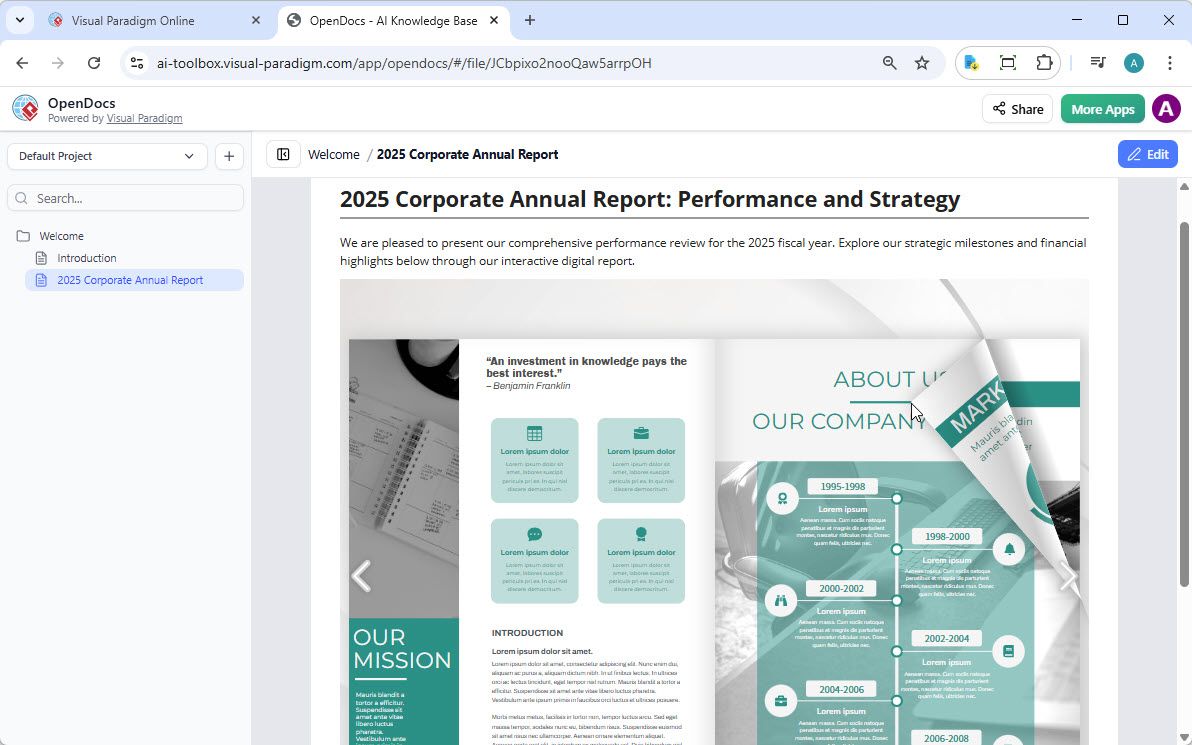
Whether you are using our flipbook tool to generate professional content or fine-tuning a custom layout in our flipbook maker, this update ensures your audience can access your work exactly where they need it.
🎯 What Can You Do with Visual Paradigm Flipbooks?
Our flipbook software is designed to transform static documents into dynamic, engaging experiences. With this feature, you can:
✨ Core Capabilities
| Feature | Description |
|---|---|
| Convert & Create | Instantly transform PDFs, Word docs, and PowerPoint slides into flipbooks, or design one from scratch using our drag-and-drop editor. |
| AI-Powered Generation | Use our AI assistant to generate full book outlines, write content, and even create matching illustrations in various art styles. |
| Interactive Elements | Enhance your books with embedded videos, audio, clickable links, and realistic page-flipping sound effects. |
| Professional Branding | Customize covers, themes, and backgrounds to match your corporate identity. |
| Mobile-First Reading | Every flipbook is fully responsive, ensuring a perfect reading experience on desktops, tablets, and smartphones. |
🔄 How to Share Your Flipbook to OpenDocs
Moving your content from Visual Paradigm Online to the OpenDocs pipeline is simple. Just follow these steps:
- Open your workspace page in Visual Paradigm Online.
- Select Flipbooks from the left-hand menu to view your library.
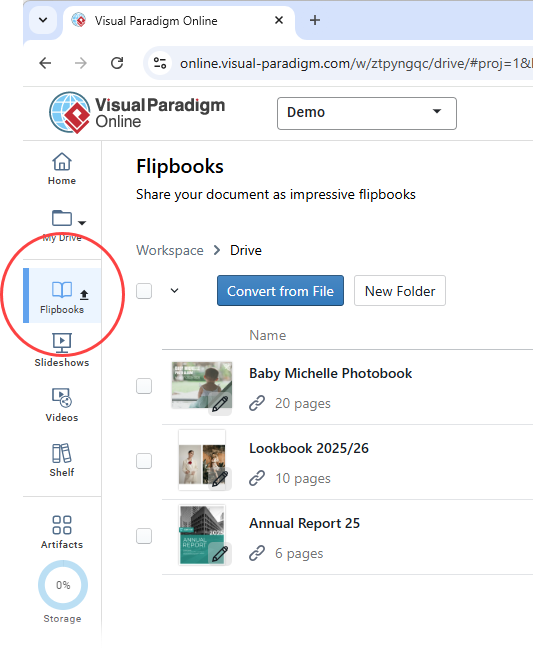
- Locate the flipbook you wish to share and click More… on the right side.
- Select Send to OpenDocs Pipeline.
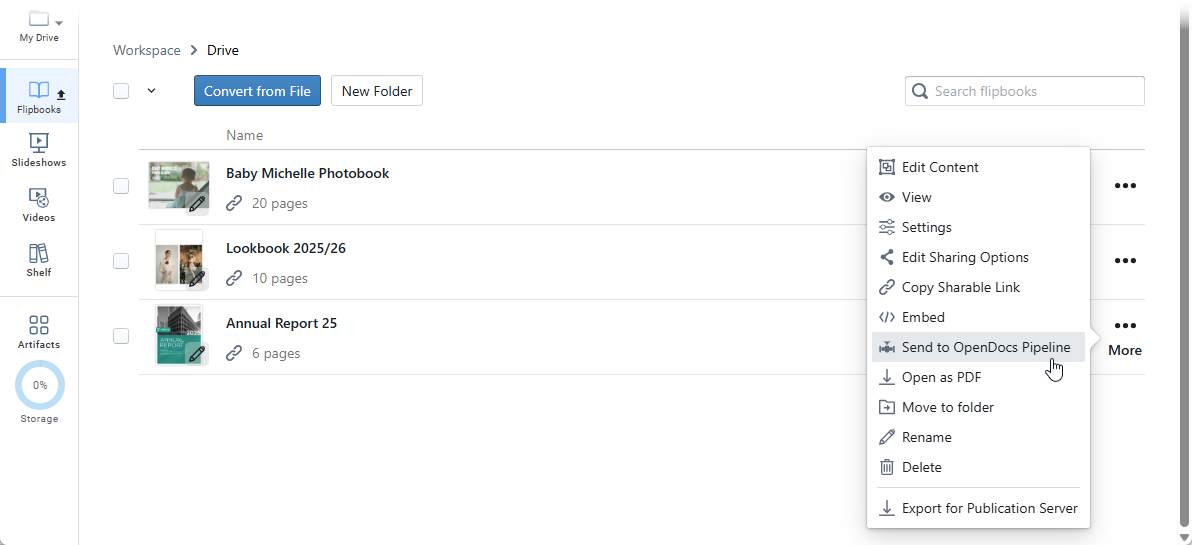
- (Optional) Enter a comment regarding this share and click OK to proceed.
💡 Pro Tip: Add descriptive comments when sharing to help your team quickly identify the purpose and context of each flipbook in the Pipeline library.
📚 Embedding Your Flipbook in OpenDocs
Once your flipbook is in the pipeline, follow these steps to place it in your document:
- Navigate to the page in OpenDocs where you want to embed the book.
- Click Edit at the top right of the screen.
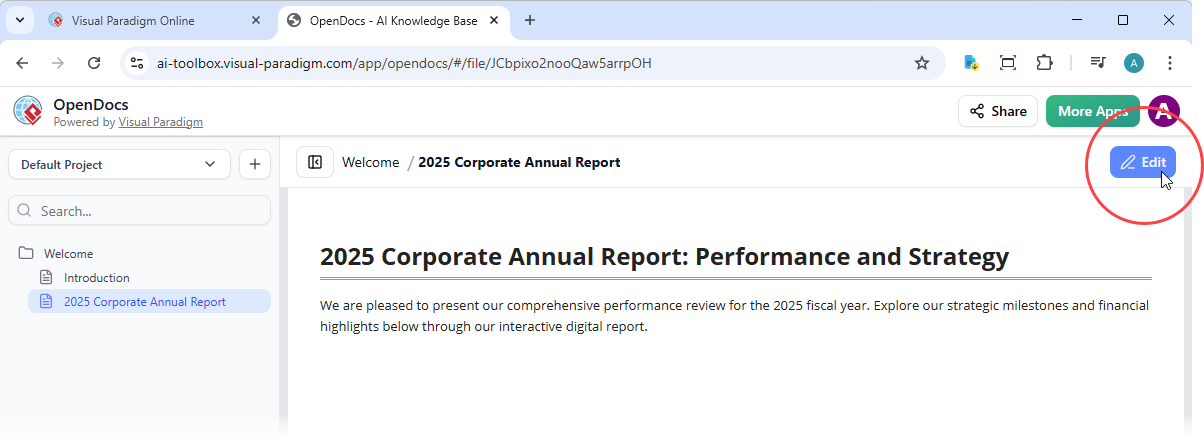
- Position your cursor exactly where you want the flipbook to appear.
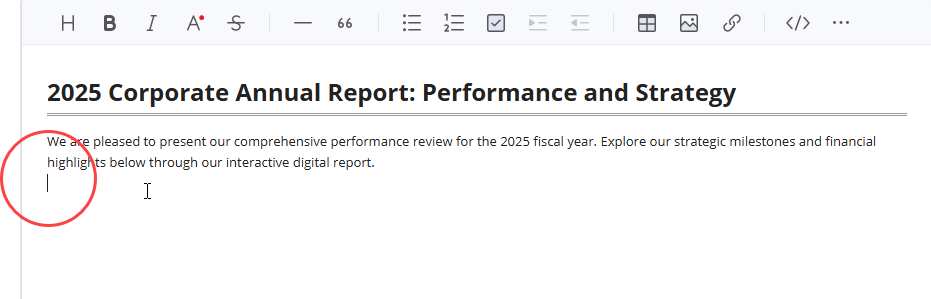
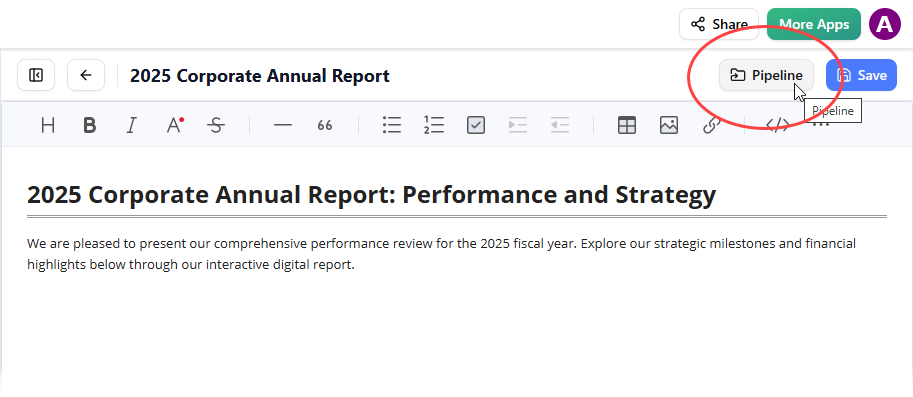
- Click the Pipeline button located at the top right.
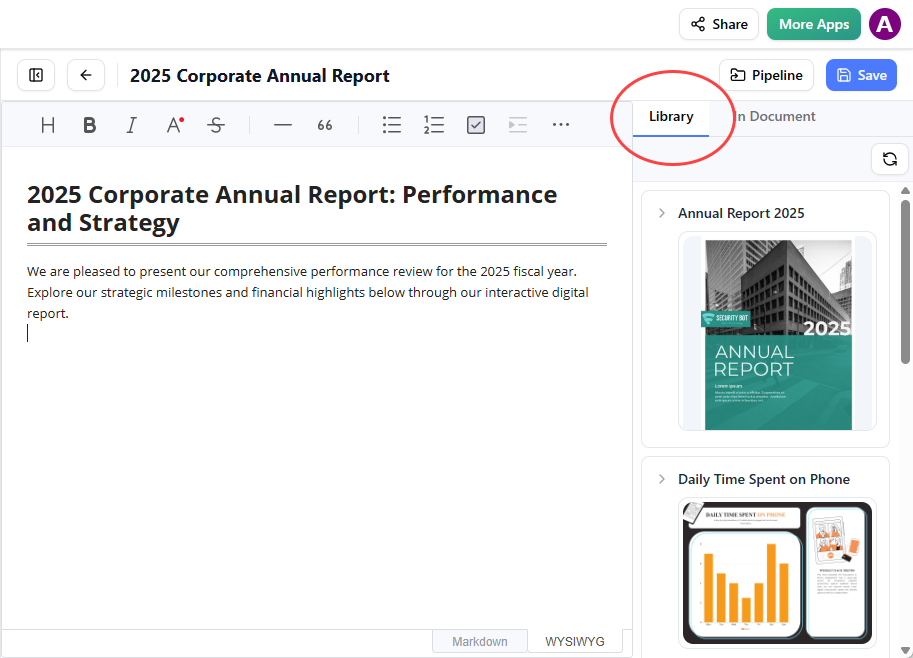
- Open the Library tab; you will see the flipbook you sent from VP Online.
- Click on the flipbook to insert it.
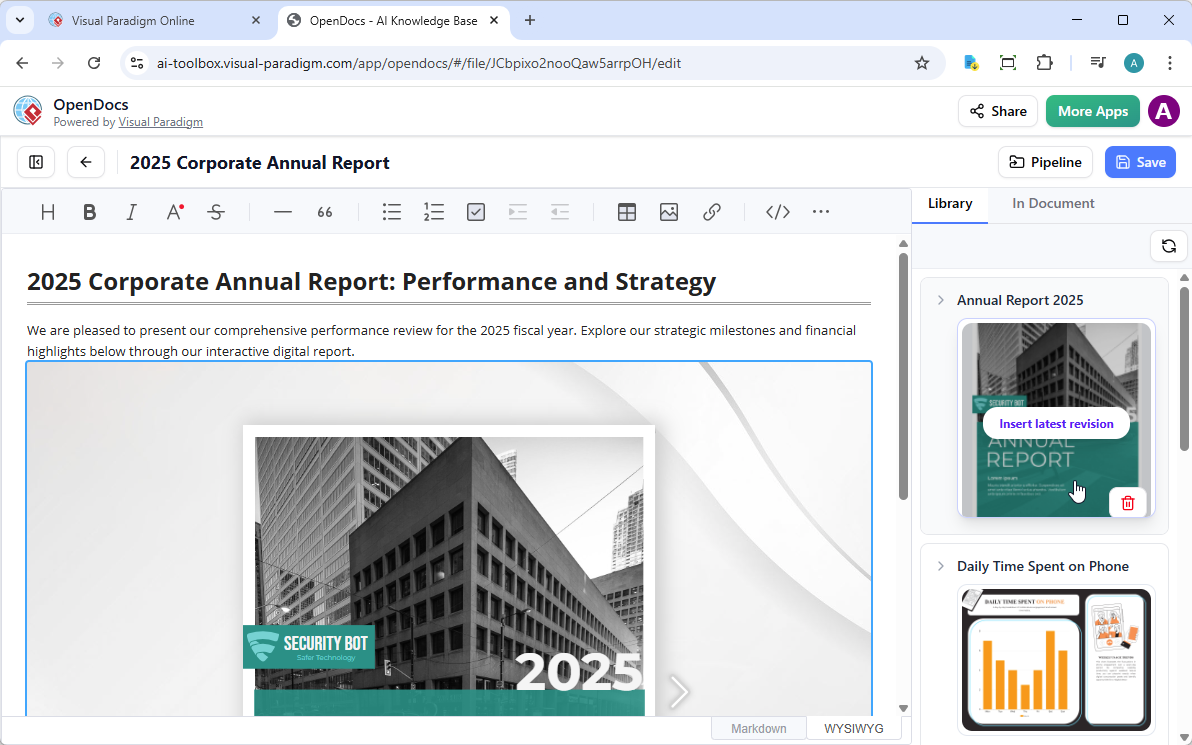
Tip: If the flipbook is added to the end of the page, select it and press Enter to create a new line and adjust the positioning.
Note: In Edit mode, the flipbook remains static. To interact with it, simply save your changes and exit Edit mode. Once live, you can share the page or the entire space using the Share button in the top bar.
👥 User Experience & Review Comments
🌟 Early Adopter Feedback
“The flipbook integration has transformed how we deliver client proposals. Instead of attaching static PDFs, we now embed interactive flipbooks directly in our OpenDocs project spaces. Clients love the page-turning experience, and our team saves time managing versions.”
— Sarah M., Senior Product Manager, TechFlow Solutions
“As a technical writer, I appreciate how seamlessly the Pipeline feature syncs content between VP Online and OpenDocs. The ability to add AI-generated illustrations to flipbooks and embed them in documentation has cut my production time by 40%.”
— James L., Documentation Lead, DataViz Inc.
“The mobile responsiveness is outstanding. Our field teams can now access interactive training manuals on tablets without losing any functionality. The page-flipping sound effects add a nice professional touch.”
— Priya K., Learning & Development Specialist, GlobalServe
🔍 Key User Benefits Reported
| Benefit | Impact |
|---|---|
| Streamlined Workflow | Eliminate manual export/import steps; share flipbooks in 3 clicks |
| Enhanced Engagement | Interactive elements increase reader time-on-page by ~65% |
| Brand Consistency | Corporate themes and custom covers maintain professional identity |
| Cross-Device Accessibility | Responsive design ensures perfect rendering on any screen size |
| AI-Assisted Creation | Generate content outlines and illustrations faster with built-in AI |
⚠️ Considerations & Best Practices
- File Size Optimization: Large flipbooks with high-res media may take longer to load. Compress images before uploading for optimal performance.
- Permission Management: Ensure your OpenDocs space permissions align with your intended audience before sharing flipbook-embedded pages.
- Edit Mode Limitation: Remember that flipbooks are interactive only in view mode—always save and exit Edit mode to test the experience.
- Version Control: When updating a flipbook in VP Online, re-share it to OpenDocs to ensure your documentation reflects the latest version.
🧠 About OpenDocs: AI-Powered Knowledge Management
OpenDocs is an AI-powered knowledge management platform from Visual Paradigm that integrates text-based documentation with professional diagramming. It serves as a centralized hub for teams to store, organize, and collaborate on project knowledge without switching between different tools.
✨ Core AI Features
OpenDocs leverages built-in artificial intelligence to speed up the documentation and design process:
- AI Diagram Generation: Instantly create professional diagrams like UML, flowcharts, and PERT charts from simple natural language descriptions.
- AI Content Assistant: Generate first drafts of articles, summarize long technical documents, or simplify complex jargon for different audiences.
- Contextual Q&A: A chatbot that answers questions based specifically on the information stored within your own OpenDocs knowledge base.
📁 Documentation & Organization
The platform focuses on making knowledge both searchable and scalable:
- Knowledge Tree Structure: Uses a hierarchical folder system with nested sub-folders and drag-and-drop reorganization.
- Page Editing: A rich editor that supports standard rich editing tools (headers, code blocks, tables) with real-time live previews.
- Unified Workspace: Allows you to embed live, editable diagrams directly into narrative text to maintain context.
📊 Diagramming Capabilities
OpenDocs supports over 100 diagram types, ensuring it can handle diverse technical and business needs:
| Category | Supported Diagrams |
|---|---|
| Software Design | UML (Class, Sequence, State Machine), ERD for database modeling, DFD for system analysis |
| Business & Strategy | BPMN, EPC, SWOT analysis, mind maps for brainstorming |
| Project Management | AI-generated PERT charts and breakdown structure charts |
🤝 Collaboration & Sharing
Designed for distributed teams, OpenDocs includes tools for secure and synchronized work:
- Real-Time Editing: Multiple users can modify documents and diagrams simultaneously with built-in conflict resolution.
- Version History: Tracks all changes with the ability to revert to previous revisions and view audit trails.
- One-Click Sharing: Generate secure, read-only links to share entire “knowledge trees” with stakeholders without requiring them to install software.
🌐 Accessibility
- Web-Based Platform: Accessible from any modern browser on any device with no desktop installation required.
- Cloud Integration: Seamlessly syncs with Visual Paradigm Online and Desktop versions via a “Pipeline” for easy updating of visual assets.
- 📚 Reference
- OpenDocs: AI-Powered Knowledge Management Platform | Visual Paradigm: Official feature page for OpenDocs detailing its AI-powered knowledge management and diagramming integration capabilities.
- Visual Paradigm OpenDocs: The Complete Guide to AI-Powered Knowledge Management and Diagram Generation: Comprehensive third-party guide covering OpenDocs features, AI capabilities, and practical use cases.
- OpenDocs: AI-Powered Knowledge Management Platform | Visual Paradigm Updates: Official release announcement introducing OpenDocs as a centralized hub for team knowledge collaboration.
- AI PERT Chart Generator in OpenDocs | Visual Paradigm Updates: Feature spotlight on AI-powered PERT chart generation within OpenDocs for project management.
- Visual Paradigm AI Chat: Contextual Q&A chatbot that answers questions based on your OpenDocs knowledge base.
- Comprehensive Guide to OpenDocs February-March 2026 Update: Detailed review of OpenDocs updates including collaboration features and real-time editing capabilities.
- OpenDocs Platform Introduction | Visual Paradigm Updates: Excerpt from the official announcement highlighting OpenDocs’ scalable knowledge architecture.
- Export Cloud Diagrams from Visual Paradigm Online to OpenDocs: Tutorial on syncing diagrams from VP Online to OpenDocs via the Pipeline feature.
- Visual Paradigm Features Overview: Comprehensive listing of all diagram types and tools supported across the Visual Paradigm suite.
- Export Diagrams from Visual Paradigm Desktop to OpenDocs Pipeline Guide: Step-by-step guide for desktop users to integrate diagrams into OpenDocs workflows.
💬 Ready to enhance your documents with the industry’s leading flipbook software? Experience the power of integrated documentation today by exploring Visual Paradigm Online and OpenDocs.
This post is also available in Deutsch, Español, فارسی, Français, English, Bahasa Indonesia, 日本語, Polski, Portuguese, Ру́сский, Việt Nam, 简体中文 and 繁體中文.
Related posts:
 The Visual Paradigm AI Ecosystem: A Comprehensive Guide to the Four Pillars of Modern Modeling
 Complete Guide: Sending Visual Paradigm Creations to OpenDocs via Pipeline
 Visual Paradigm OpenDocs: The Complete Guide to AI-Powered Knowledge Management
 & Documentation
Visual Paradigm OpenDocs: The Complete Guide to AI-Powered Knowledge Management
Visual Paradigm OpenDocs: The Complete Guide to AI-Powered Knowledge Management & Documentation