


A business goal is a target that an organization aims to achieve by performing correctly the related business process.
“A business process consists of a set of activities that are performed in coordination in an organizational and technical environment. These activities jointly realize a business goal.”
Understanding how to model, analyze, and implement these processes is critical for organizational success. This is where BPMN (Business Process Model and Notation) comes into play.
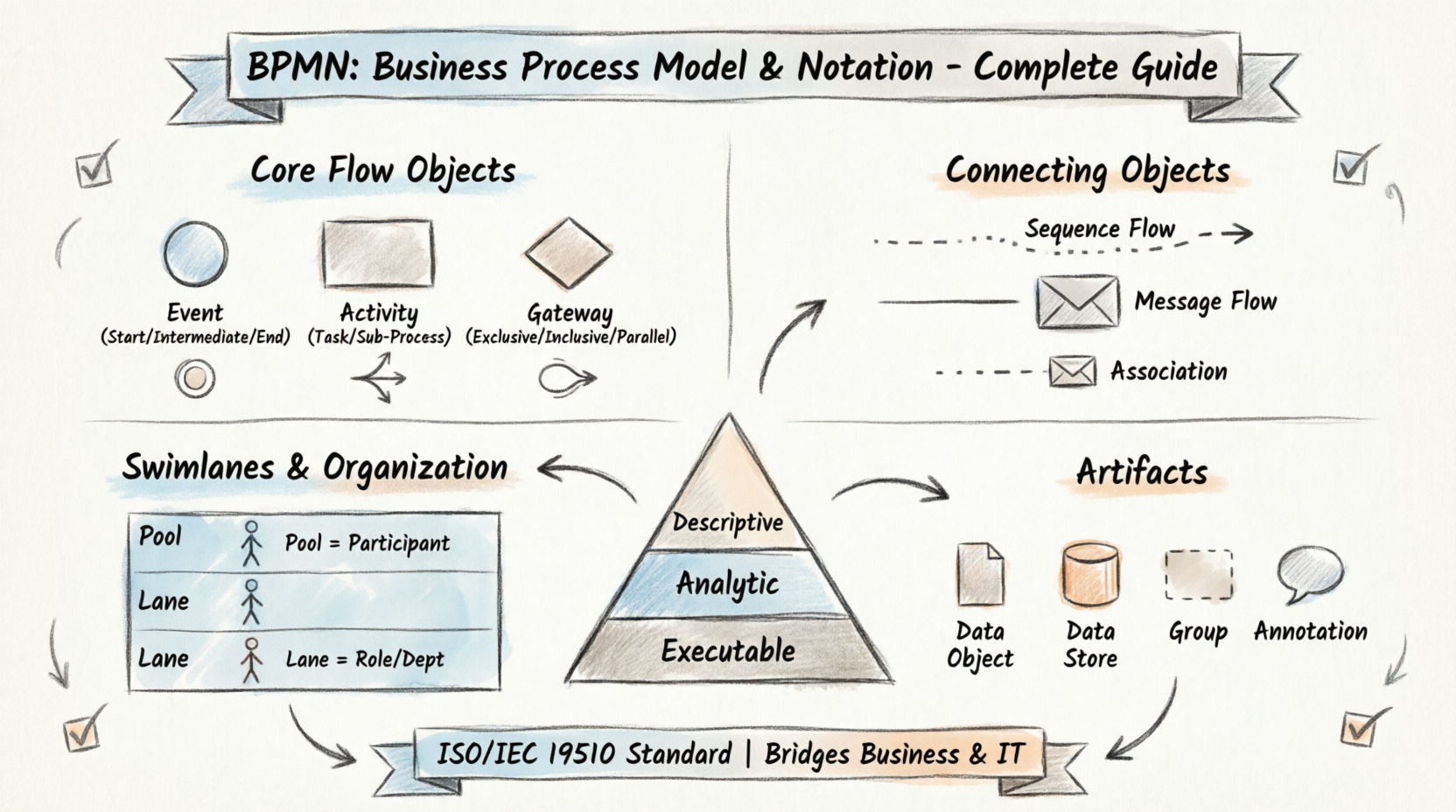
Purpose of BPMN
The primary goal of the BPMN effort was to provide a notation that is readily understandable by all business users:
-
Business Analysts who create initial drafts of processes
-
Technical Developers responsible for implementing the technology that performs those processes
-
Business Managers who manage and monitor those processes
Key Characteristics of BPMN
-
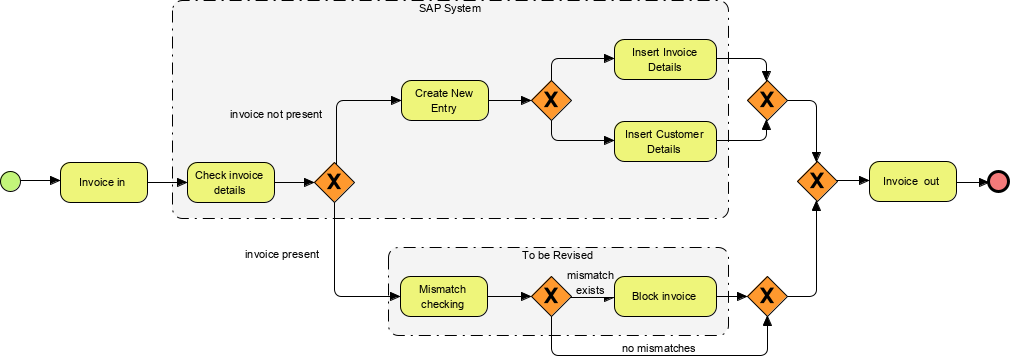
BPMN defines a Business Process Diagram (BPD) made up of a set of graphical elements. It is based on a flowcharting technique tailored for creating graphical models of business process operations.
-
A Business Process Model is a network of graphical objects—activities (i.e., work) and the flow controls that define their order of performance.
-
Familiar Visual Language: Elements enable the easy development of simple diagrams that look familiar to most business analysts (e.g., flowchart diagrams).
-
Intuitive Design: Elements were chosen to be distinguishable from each other and to utilize shapes familiar to most modelers.
Three Levels of BPMN Application
BPMN can also be supported by an internal model that enables the generation of executable BPEL4WS, creating a standardized bridge between business process design and process implementation. BPMN can be applied at three different levels:
-
Descriptive Process Models – Suitable for high-level modeling; comfortable for analysts familiar with flowcharts.
-
Analytic Process Models – Contains concepts most commonly used and covered in BPMN training.
-
Common Executable Process Models – Focuses on elements required for executable process models.
Evolution of BPMN
-
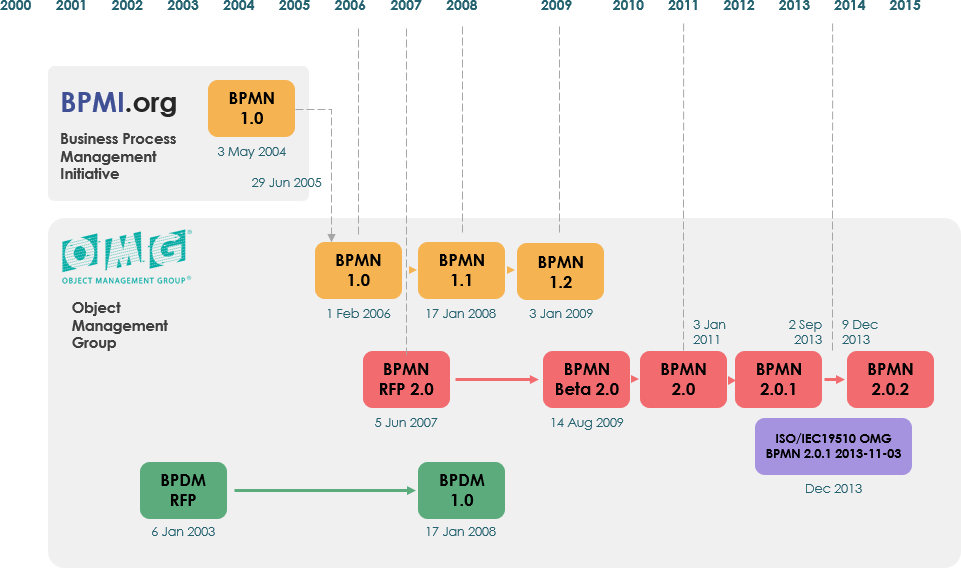
Origins: BPMN was originally developed by the Business Process Management Initiative (BPMI).
-
BPMN 1.0: Released to the public in May 2004, representing more than two years of effort by the BPMI Notation Working Group.
-
OMG Adoption: A BPMN Specification document was released by OMG in February 2006.
-
Version 2.0: Developed in 2010, with the specification released in December 2013.
-
ISO Standardization: The latest version (2.0.2) has been formally published by ISO as the 2013 edition standard: ISO/IEC 19510.
BPMN Core Elements
A Business Process Diagram (BPD) is made up of a set of graphical elements designed for easy development of simple, familiar diagrams. The approach balances simplicity with the ability to handle complexity:
-
Organize graphical aspects into specific categories for easy recognition
-
Provide a small set of notation categories for quick understanding
-
Allow additional variation within basic categories to support complexity without changing the basic look-and-feel
The Four Basic Categories of Elements
-
Flow Objects
-
Connecting Objects
-
Swimlanes
-
Artifacts
1. Flow Objects
A BPD has a small set of three core Flow Objects so modelers do not have to learn a large number of different shapes.
Event
Represented by a circle, an Event is something that “happens” during the course of a business process. Events affect the flow of the process and usually have a cause (trigger) or an impact (result). Events are circles with open centers to allow internal markers to differentiate triggers or results.
Three Types of Events:
| Type | Description |
|---|---|
| Start Event | Indicates where a process begins |
| Intermediate Event | Occurs between start and end; can trigger or react to something |
| End Event | Indicates where a process completes |
Activity
Represented by a rounded-corner rectangle, an Activity is a generic term for work that the company performs. An Activity can be atomic or nonatomic (compound).
Types of Activities:
| Type | Description |
|---|---|
| Task | A single unit of work that cannot be broken down further |
| Sub-Process | A compound activity containing other activities; distinguished by a small plus sign (+) in the bottom center |
Gateway
Represented by a diamond shape, a Gateway is used to control the divergence and convergence of Sequence Flow. It determines traditional decisions, as well as the forking, merging, and joining of paths. Internal markers indicate the type of behavior control.
| Gateway Type | Behavior | Visual Example |
|---|---|---|
| Exclusive Gateway | Follow only one path (XOR logic) | 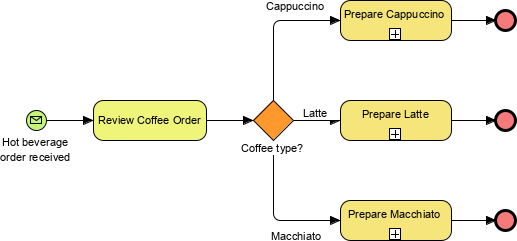 |
| Inclusive Gateway | Follow one or more paths (OR logic) | 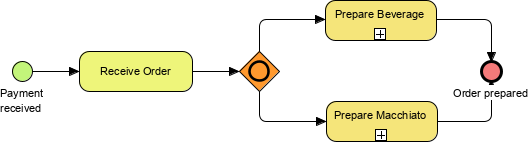 |
| Parallel Gateway | Follow all paths simultaneously (AND logic) | 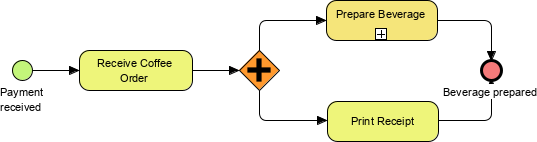 |
Flow Object Summary Visuals
Events Overview:

Activities Overview:

Gateways Overview:

2. BPMN Connecting Objects
Flow objects are connected together in a diagram to create the basic skeletal structure of a business process. There are three Connecting Objects:
Sequence Flow
-
Represented by a solid line with a solid arrowhead
-
Shows the order (sequence) that activities will be performed in a Process
-
Note: The term “control flow” is generally not used in BPMN
Message Flow
-
Symbolizes information flow across organizational boundaries
-
Can be attached to pools, activities, or message events
-
May be decorated with an envelope depicting the content of the message
Association
-
Used to connect Artifacts (like annotations or data objects) to flow objects
-
Represented by a dotted line
-
Does not affect the sequence of activities; used for documentation purposes
Connecting Objects Visual Reference:

3. BPMN Swimlanes
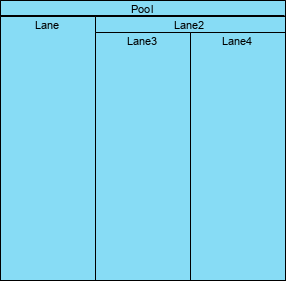
Swimlanes organize activities into separate visual categories to illustrate different functional capabilities or responsibilities. BPMN supports swimlanes with two main constructs:
Pool
-
Represents a Participant in a Process (e.g., an organization, system, or role)
-
Acts as a graphical container for partitioning a set of activities from other Pools
-
Commonly used in B2B situations to show interactions between different entities
Lane
-
A sub-partition within a Pool that extends the entire length of the Pool (vertically or horizontally)
-
Used to organize and categorize activities by department, role, or system
Pool and Lane Visual Reference:
4. BPMN Artifacts
BPMN was designed to allow flexibility in extending the basic notation and adding context appropriate to specific modeling situations (e.g., insurance or banking verticals). Any number of Artifacts can be added as appropriate. The specification pre-defines three types:
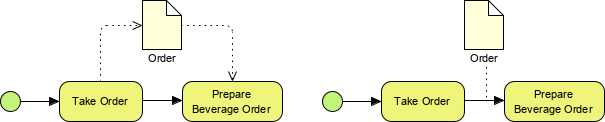
Data Object
-
A mechanism to show how data is required or produced by activities
-
Connected to activities through Associations
-
Helps visualize data dependencies within a process
Data Store
-
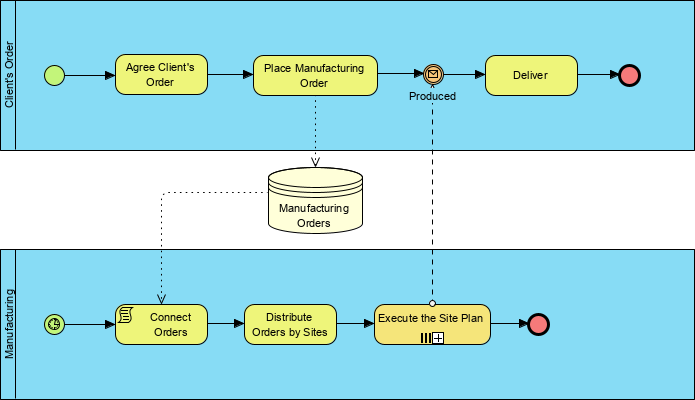
Represents a location where the process can read or write data that persists beyond the scope of the process
-
Useful for modeling databases, file systems, or other persistent storage
Group
-
Represented by a rounded-corner rectangle drawn with a dashed line
-
Used for documentation or analysis purposes
-
Does not affect the Sequence Flow; purely organizational
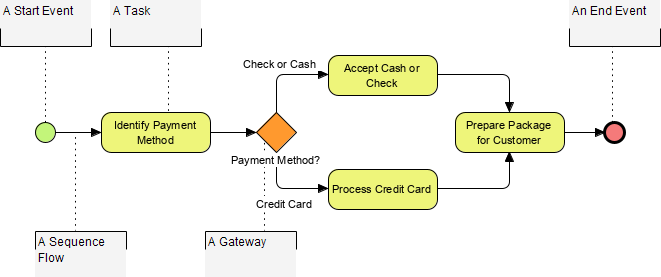
Annotation
-
A mechanism for modelers to provide additional text information for readers of a BPMN Diagram
-
Connected via Associations to relevant elements
-
Enhances clarity and documentation without altering process logic
BPMN Notation: Simple or Complex?
BPMN was designed with a dual philosophy: simplicity for basic modeling, extensibility for complex scenarios.
Within the basic categories of elements, additional variation and information can be added to support the requirements for complexity without dramatically changing the basic look-and-feel of the diagram.
Event Complexity Matrix
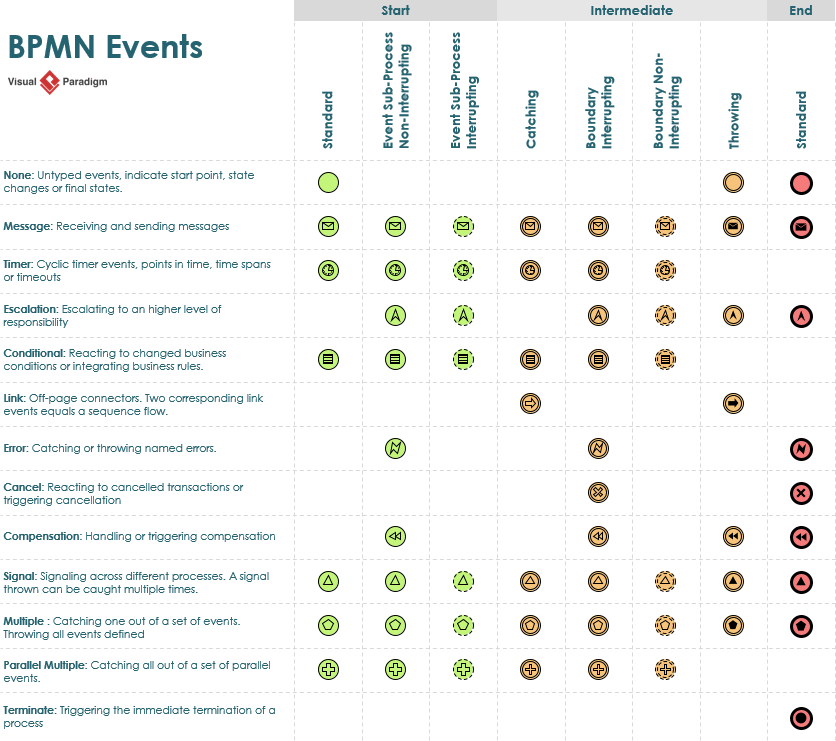
BPMN events support complexity through combinations of:
-
Trigger/Result Type (Message, Timer, Error, Signal, etc.)
-
Event Timing (Start, Intermediate, End)
-
Event Behavior (Catching vs. Throwing)
This allows modelers to represent sophisticated process behaviors while maintaining visual consistency.
Complete Event Combination Reference:
Best Practices for BPMN Modeling
-
Start Simple: Begin with Descriptive Process Models using basic flow objects and sequence flows.
-
Use Swimlanes Strategically: Assign pools to external participants and lanes to internal roles/departments.
-
Label Clearly: Always name activities, events, and gateways to improve readability.
-
Limit Gateway Complexity: Avoid nesting too many gateways; consider sub-processes for complex logic.
-
Document with Artifacts: Use annotations and data objects to clarify data dependencies and business rules.
-
Validate Executability: If targeting executable models, ensure all elements map to BPEL4WS constructs.
Conclusion
BPMN provides a powerful, standardized notation for modeling business processes that bridges the gap between business stakeholders and technical implementers. By mastering its core elements—Flow Objects, Connecting Objects, Swimlanes, and Artifacts—organizations can:
✅ Improve process visibility and communication
✅ Enable accurate process analysis and optimization
✅ Facilitate seamless transition from design to execution
✅ Support compliance with international standards (ISO/IEC 19510)
Whether you are drafting a high-level process overview or designing an executable workflow, BPMN offers the flexibility and precision needed to turn business goals into operational reality.
References
- BPMN Notation Overview – Visual Paradigm Guide: This comprehensive resource provides a detailed list of BPMN notation elements, including events, activities, gateways, and symbols used in process modeling.
- What is BPMN? – Visual Paradigm Guide: An introductory guide explaining the purpose, structure, and benefits of using BPMN for business process design and communication.
- How to Draw a BPMN Diagram – Visual Paradigm Tutorial: A step-by-step tutorial designed to help users create professional diagrams using intuitive tools and modeling best practices.
- Understanding Pools and Lanes in BPMN – Visual Paradigm User Guide: A technical guide explaining how to represent different departments, organizations, or roles within a process through structural elements.
- Comprehensive Guide to BPMN with Visual Paradigm: This article offers an in-depth exploration of BPMN 2.0 standards and their practical application in modern enterprise environments.
- How to Perform Gap Analysis with BPMN? – Visual Paradigm: This guide demonstrates how to use BPMN to visually identify discrepancies between current and future business states.
- As-Is to To-Be Business Process Modeling Tutorial: A tutorial focused on analyzing current workflows and designing improved “to-be” processes to drive operational efficiency.
- How to Create a BPMN Conversation Diagram in Visual Paradigm: This resource explains how to model interactions and communication flows between various business partners.
- How to Animate Business Processes with Visual Paradigm: A tutorial on creating dynamic, animated business process diagrams to enhance engagement and stakeholder understanding.
- Integrating BPMN and UML for Enhanced Modeling: This article discusses the benefits of combining BPMN and UML to achieve better alignment between business processes and system design.
This post is also available in Deutsch, Español, فارسی, Français, English, Bahasa Indonesia, 日本語, Polski, Portuguese, Ру́сский, Việt Nam, 简体中文 and 繁體中文.
Related posts:
 How Project Managers Can Use Business Process Model and Notation to Reduce Scope Creep
 Avoiding the “Spaghetti Diagram”: How to Keep Business Process Model and Notation Readable at Scale
 Business Process Model and Notation in Agile Teams: Integrating Models into Sprint Planning and Retrospectives
 Business Process Model and Notation: A Guide to Handling Exception Flows Without Breaking Logic