


Streamline Business Processes with BPMN Diagrams
Standardize your business processes with detailed yet easy-to-understand diagrams for all levels of your organization.
What is BPMN?
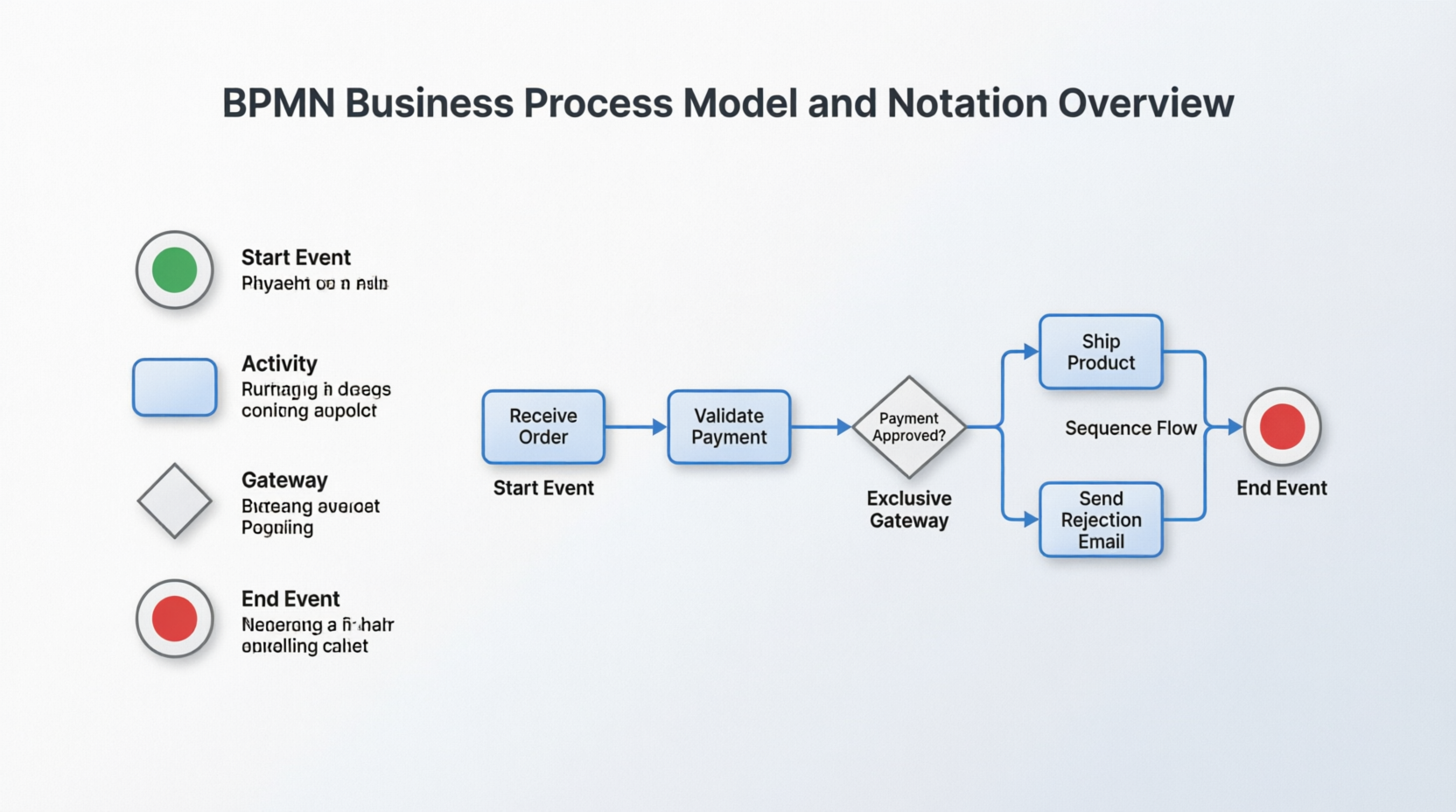
The Challenge BPMN Solves
- Standard modeling techniques
- Standardized symbols
- Universal visual language
Core Purpose
- Better communication and collaboration
- Increased efficiency
- Identification of areas for improvement
- Clear process documentation
Key Benefits of BPMN
All organizations can benefit from improved business processes supported by BPMN. With business process modeling software, you can create simple or complex diagrams—whatever your process requires. The flowcharts you make can easily be recognized and understood by stakeholders, whether they have a technical background or not.
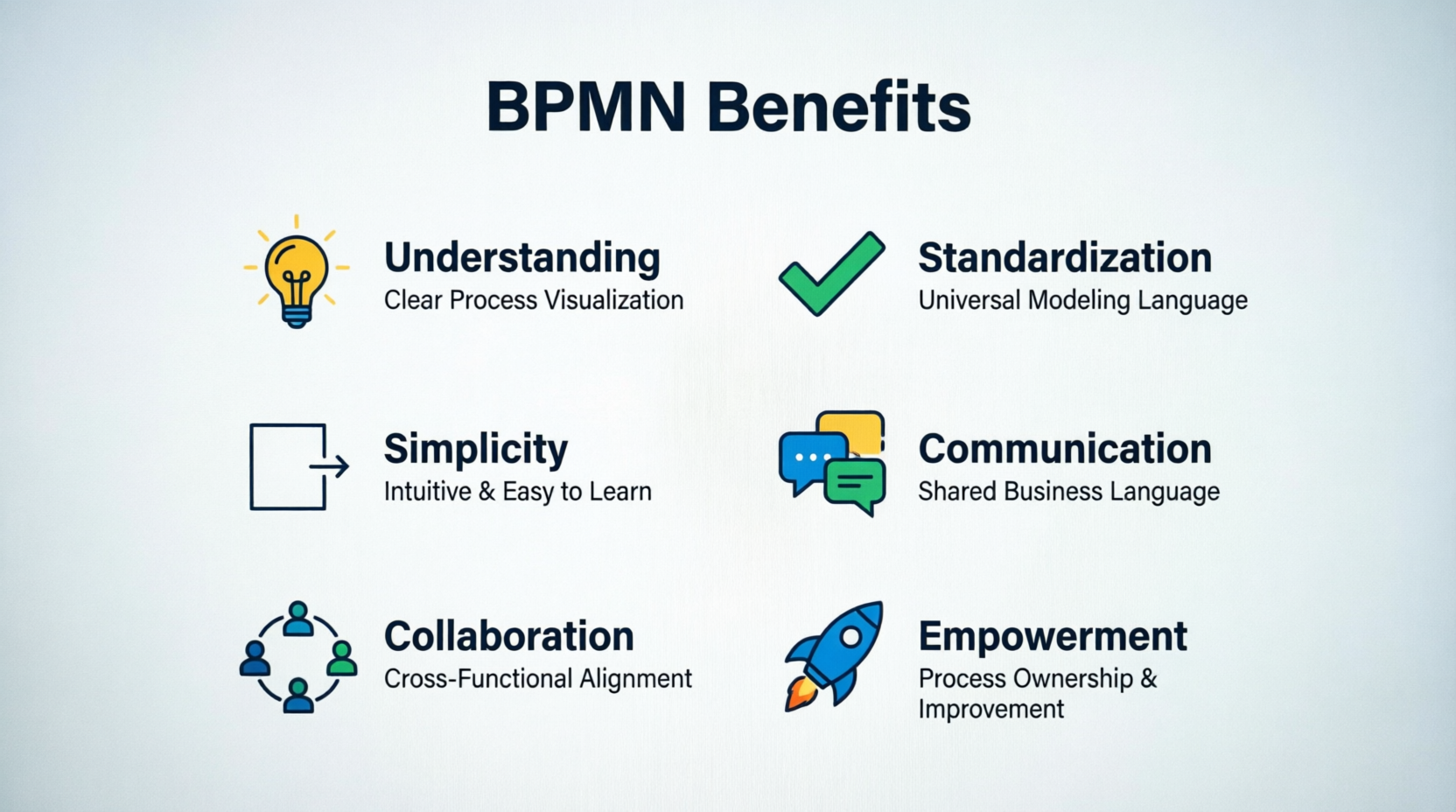
The Six Core Benefits:
As you create BPMN diagrams that all teams can decipher, intricate and complex workflows become easier to understand. It allows businesses to clearly define their business procedures.
Having one solution in place allows information to be quickly shared—and understood by everyone. BPMN works as a standard notation for all levels of your stakeholders.
Diagrams are a visual learning tool, making them easier to understand than narrative text. It’s also an industry standard, so there’s little room for error.
BPMN helps bridge the communication gap between various teams, departments, and organizations by designing flowcharts that all department levels can understand.
BPMN brings all relevant stakeholders into the process, making it an effective collaboration tool. Multiple departments can review your flowchart and almost immediately identify the business process, outcomes for your team, and next steps without much detail.
As BPMN promotes effective and efficient communication across all departments, employees are empowered to create flowcharts representing their business processes and other activities. When teammates can quickly interpret your chart, they can make knowledgeable business decisions faster.
How BPMN Works
Historical Background
- Originally developed by: Business Process Management Initiative (BPMI)
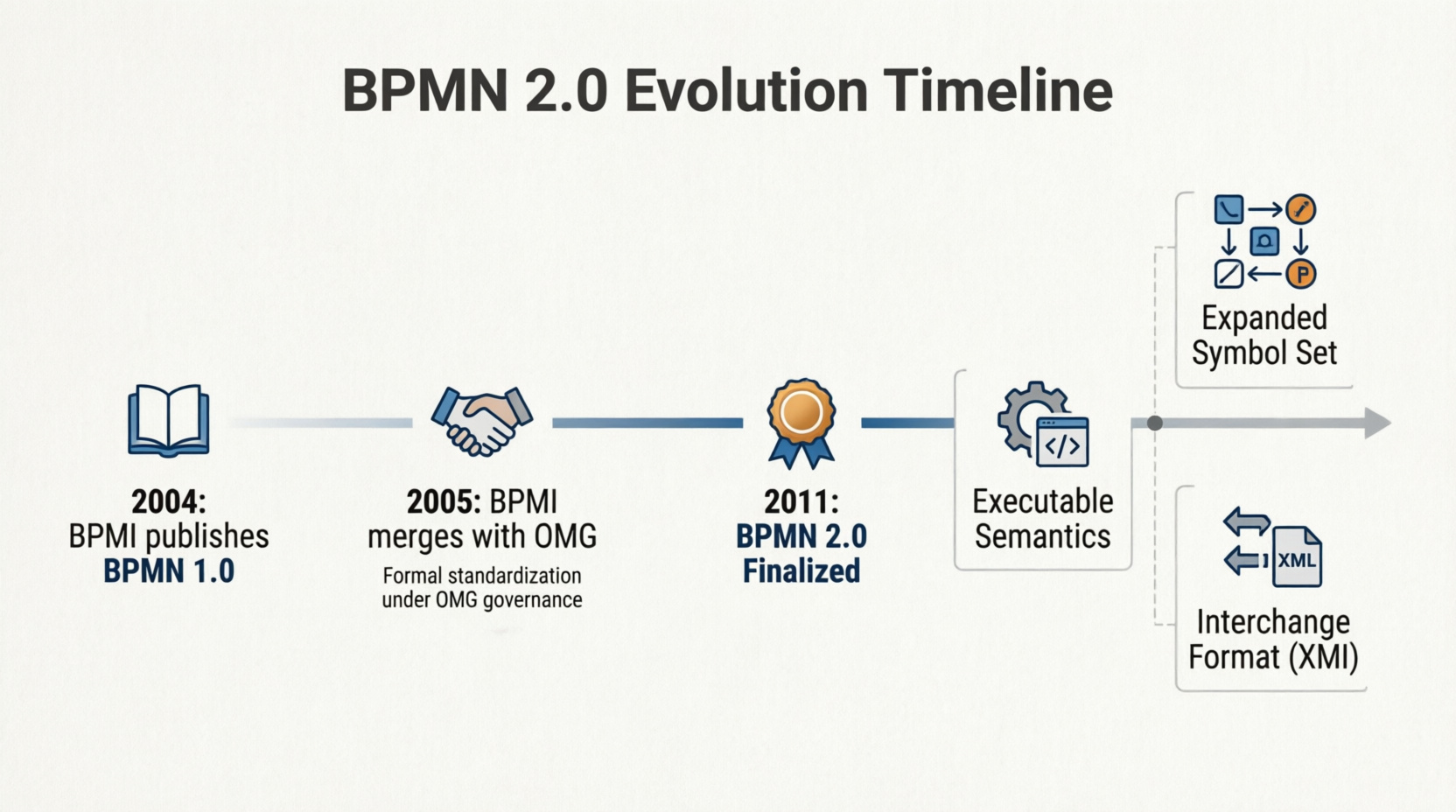
- Currently maintained by: Object Management Group (OMG) since their merger in 2005
- Version 2.0: The name was changed from “Business Process Modeling Notation” to “Business Process Model and Notation”
The BPMN Approach
- Organizing graphical aspects into specific categories
- Using a small set of notation categories to help readers recognize symbols
- Capturing pertinent data and presenting it graphically, accurately, and consistently
- Allowing additional information and context to be added without changing the look and feel of the diagram
BPMN Design Elements
BPMN is a collection of symbols and rules used to connect those symbols in a business process model. The BPMN language is based on flowcharts and graphical notations divided into five core element categories:
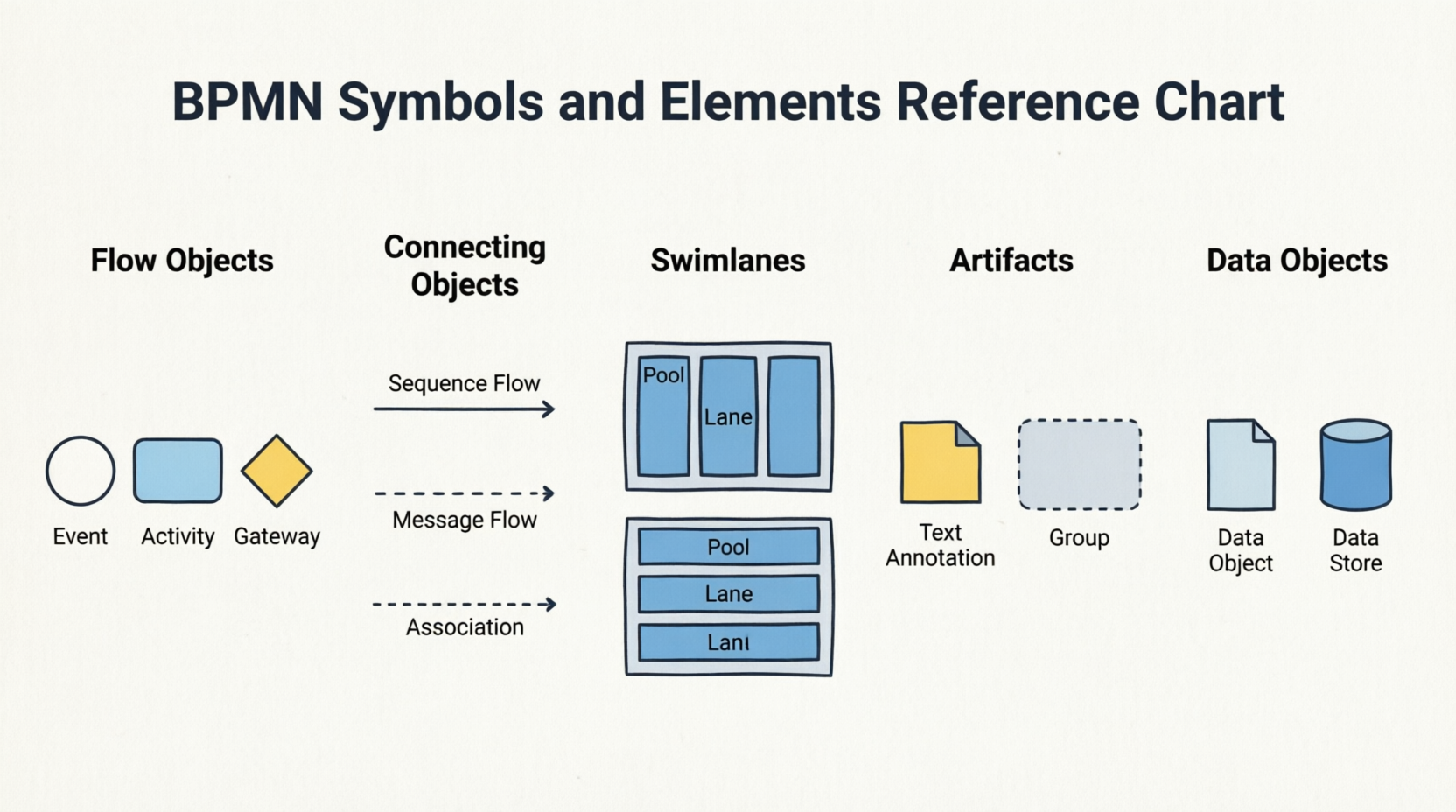
1. Flow Objects
Represent an occurrence and are broken into three types:
- Start Event: Signals the first step of the process
- Intermediate Event: Describes any event that occurs between the first and the last
- End Event: Signals the final stage of your business process
Represent a task performed by a person or system. There are four BPMN activity types:
- Task: A single unit of work
- Sub-process: A compound activity that can be broken down further
- Call Activity: References a global process or task
- Transaction: A set of activities that must all succeed or fail together
Signal if an activity needs to go through a different process flow. Different gateway types include:
- Exclusive Gateway: Only one path can be taken
- Inclusive Gateway: One or more paths can be taken
- Parallel Gateway: All paths are taken simultaneously
- Complex Gateway: Complex decision logic
2. Connecting Objects
Display the order of business activities with a solid line and arrow.
Messages that “flow” across different departments or organizations, represented by a dashed line with a circle and an arrow.
Dotted lines connecting artifacts or text to an event, activity, or gateway.
Dotted lines with an arrow that represent data with flow objects. Data associations show the inputs and outputs of activities.
3. Swimlanes
Represent significant participants, whether within the company or externally, working in the process.
Show the activities and flow for a participant, dictating their responsibilities within the process. Many lanes can make up a single pool, as a pool is determined by which actions must be completed by that group in the process.
4. Artifacts
Copy providing context to a part of the diagram.
The logical grouping of activities without changing the flow of the diagram.
5. Data Objects
Showing what data is necessary for an activity.
External data input for the entire process.
The results of that data throughout the entire process.
A place to read or write data, lasting throughout the process.
Creating Your First BPMN Diagram
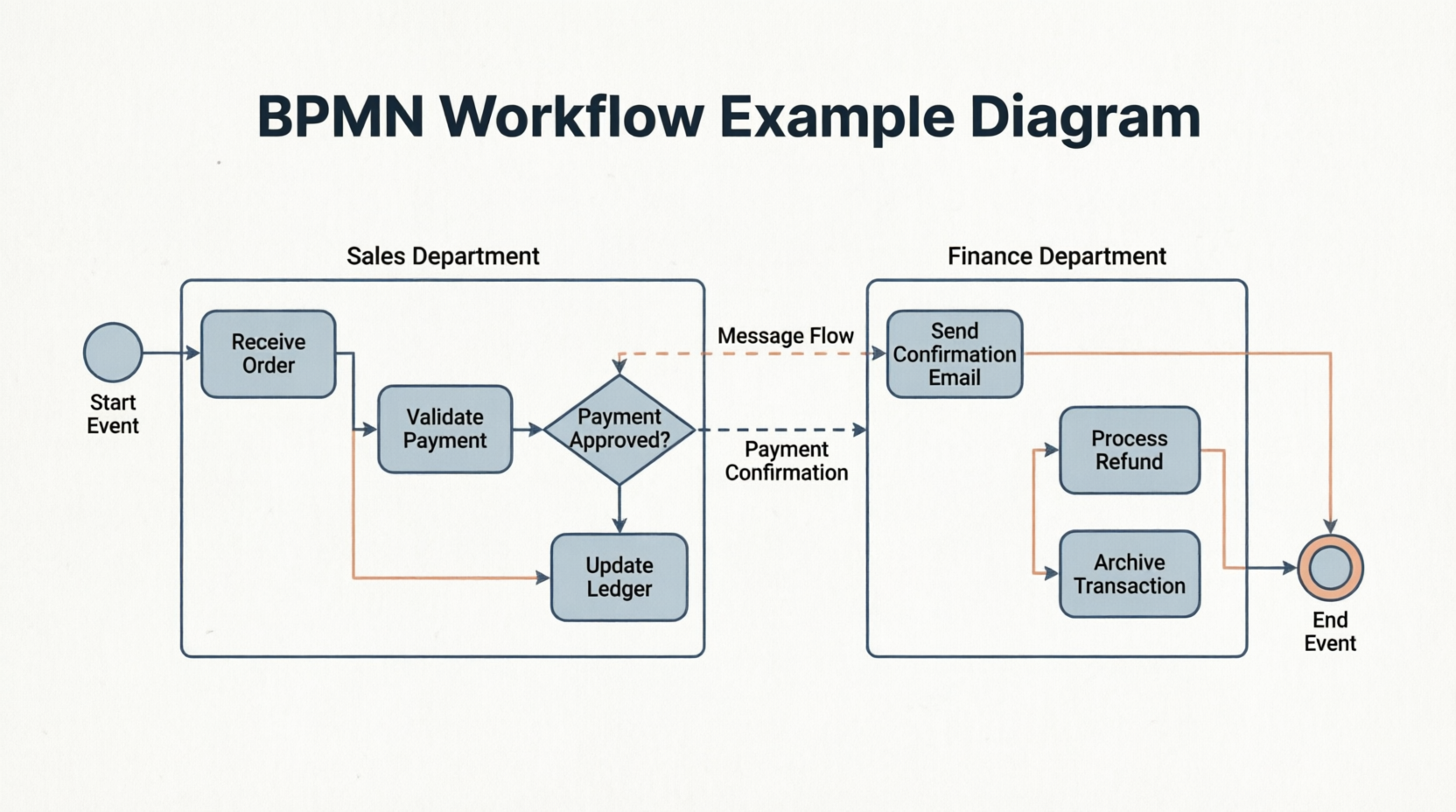
Step-by-Step Process
Familiarize yourself with the design elements used throughout all BPMN diagrams:
- Events (circles)
- Activities (rounded rectangles)
- Gateways (diamonds)
- Connecting objects (various line types)
- Swimlanes (pools and lanes)
- Identify the start and end points
- Determine all participants (pools and lanes)
- List all activities and decisions
- Place start event
- Add activities in sequence
- Insert gateways for decision points
- Connect with sequence flows
- Add end events
- Include data objects where needed
- Add text annotations for clarity
- Use groups to organize related activities
- Specify message flows between pools
- Ensure all paths lead to an end event
- Verify that decision gateways have clear conditions
- Check that all stakeholders are represented in swimlanes
- Confirm the diagram is understandable to both technical and non-technical users
Best Practices
✓ Use standard symbols – Stick to BPMN notation
✓ Label clearly – Every element should have a descriptive name
✓ Organize with swimlanes – Show who does what
✓ Test readability – Can someone unfamiliar with the process understand it?
BPMN 2.0 Evolution
The latest iteration, BPMN 2.0, builds off the previous versions, providing a more extensive set of icons, symbols, and notations, allowing for more detail when necessary.
Key Enhancements in BPMN 2.0
More detailed icons and symbols for complex process modeling
Processes can be directly executed by BPMN engines
Standard format for sharing BPMN diagrams between different tools
Better support for modeling interactions between multiple organizations
Why Upgrade to BPMN 2.0?
- Greater precision in process modeling
- Better integration with execution engines
- Improved interoperability between different BPM tools
- More comprehensive documentation capabilities
- Future-proof standardization under OMG governance
Getting Started with BPMN
Who Should Use BPMN?
- Business Analysts – Document and analyze processes
- Process Owners – Define and optimize workflows
- IT Teams – Bridge business and technical requirements
- Management – Gain visibility into operations
- Compliance Teams – Ensure regulatory adherence
- All Employees – Understand their role in processes
Tools You’ll Need
- BPMN-compliant diagramming software
- Understanding of your business processes
- Stakeholder input and validation
- Commitment to standardization
Quick Start Checklist
☐ Gather stakeholder input
☐ Define process boundaries (start/end)
☐ Identify all participants and their roles
☐ Map activities in sequence
☐ Add decision points and gateways
☐ Include data objects and stores
☐ Review with stakeholders
☐ Validate accuracy
☐ Publish and share
☐ Update as processes evolve
Conclusion
- Clearer communication across all levels
- Better collaboration between departments
- Faster decision-making through visual clarity
- Continuous improvement through standardized documentation
- Scalable processes that grow with your organization
Reference
As-Is to To-Be Business Process Tutorial: Comprehensive tutorial on developing As-Is and To-Be BPMN diagrams using Visual Paradigm, including step-by-step instructions for capturing current processes, redesigning for future states, and comparing changes.
Visual Paradigm Enterprise Edition: Information about Visual Paradigm’s Enterprise edition, which supports advanced BPMN modeling, collaboration, and enterprise-scale process management capabilities.
Visual Paradigm Professional Edition: Details on Visual Paradigm’s Professional edition, offering robust BPMN diagramming tools suitable for business analysts and process improvement teams.
Visual Paradigm Standard Edition: Overview of Visual Paradigm’s Standard edition, providing essential BPMN modeling features for individual practitioners and small teams.
Visual Paradigm Homepage: Official website for Visual Paradigm, featuring BPMN diagramming tools, tutorials, and resources for business process modeling and management.
BPMN Diagram and Tools Feature Page: Detailed information about Visual Paradigm’s BPMN diagramming capabilities, including supported notation elements, collaboration features, and export options.
BPMN Basics Tutorial: Foundational tutorial covering BPMN notation basics, ideal for beginners learning to create business process diagrams.
Introduction to BPMN – Swimlanes (Video): Video tutorial demonstrating how to use swimlanes in BPMN diagrams to organize activities by role, department, or system.
Online-Shopping.vpp Sample File: Downloadable Visual Paradigm project file containing the example online shopping process used in this tutorial.
BPMN Notation Overview – Visual Paradigm: Full BPMN notation guide with clear explanations of symbols, elements, and diagram examples for creating standards-compliant business process models [[1]].
BPMN 2.0 Symbol Reference – Camunda: Comprehensive reference for BPMN 2.0 symbols with practical examples covering events, tasks, gateways, and advanced modeling patterns [[4]].
BPMN Diagram Symbols Explained – Lucidchart: Beginner-friendly guide categorizing BPMN symbols into flow objects, connecting objects, swimlanes, and artifacts with visual examples [[2]].
This post is also available in Deutsch, Español, فارسی, Français, English, Bahasa Indonesia, 日本語, Polski, Portuguese, Ру́сский, Việt Nam, 简体中文 and 繁體中文.
Related posts:
 How Project Managers Can Use Business Process Model and Notation to Reduce Scope Creep
 Avoiding the “Spaghetti Diagram”: How to Keep Business Process Model and Notation Readable at Scale
 Business Process Model and Notation in Agile Teams: Integrating Models into Sprint Planning and Retrospectives
 Business Process Model and Notation: A Guide to Handling Exception Flows Without Breaking Logic