
A Comprehensive Tutorial for Product Owners, Scrum Masters, and Agile Teams
Introduction: The User Story Paradox
You’ve embraced Agile. You’ve adopted Scrum. You’ve written dozens of user stories—only to find them failing during sprint reviews, missing deadlines, or being rejected by stakeholders.
The problem isn’t the framework. It’s how you’re writing and managing your user stories.
User stories are meant to be simple, clear, and actionable. But when they’re poorly written, they become ambiguous, untestable, and a source of frustration. In this comprehensive tutorial, we’ll uncover the top 5 reasons user stories fail, and then walk you through a proven 5-step framework to fix them—once and for all.
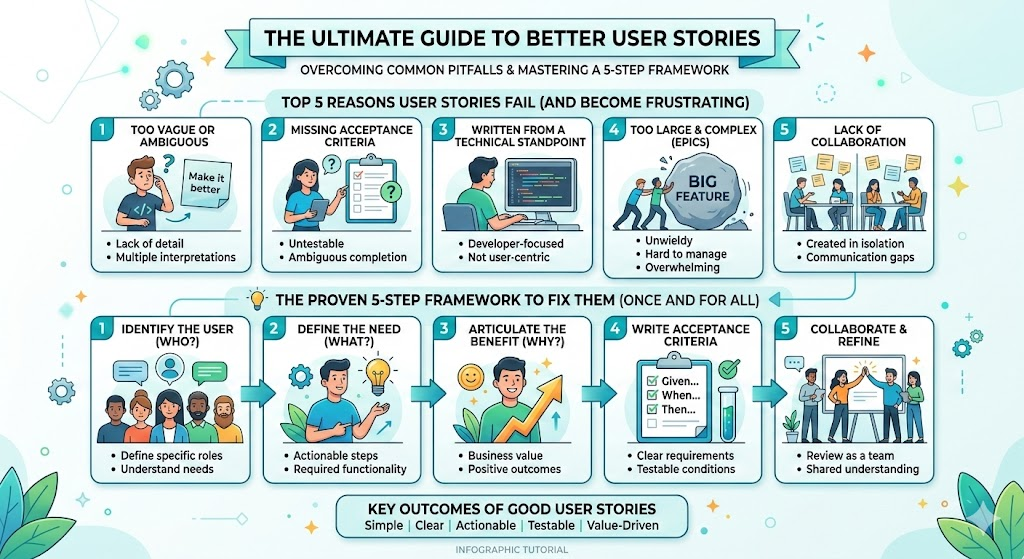
Part 1: Why Your User Stories Keep Failing
Let’s diagnose the root causes of user story failure. These are not just “bad practices”—they’re common traps that derail Agile delivery.
❌ 1. Too Vague: “As a user, I want to see data”
-
No context, no acceptance criteria, no definition of “data.”
-
Result: Ambiguity leads to misinterpretation, rework, and missed expectations.
❌ 2. Missing Acceptance Criteria (AC)
-
The story says what to do, but not how it should work.
-
Result: Developers guess. QA tests fail. Stakeholders complain.
❌ 3. Too Big or Complex (Monolithic Stories)
-
“As a customer, I want to manage my entire account, including billing, settings, and support tickets.”
-
Result: Overwhelms the team, can’t fit in a sprint, leads to scope creep.
❌ 4. Not User-Centric (Developer-Centric Language)
-
“As a developer, I want to refactor the database layer.”
-
Result: Focuses on implementation, not value. Fails to answer “Why?”
❌ 5. No Definition of Done (DoD)
-
The story is “done” in the sprint, but the feature doesn’t work in production.
-
Result: Bugs, deployment failures, and stakeholder dissatisfaction.
Part 2: The 5-Step Fix Framework
Let’s fix these failures with a proven, repeatable system used by top-performing Agile teams at companies like Spotify, Atlassian, and Google.
✅ The 5-Step User Story Fix Framework:
Start with the “Why” – Define the User & Value
Break Down Big Stories – Use INVEST Principles
Add Acceptance Criteria – Make It Testable
Define the Definition of Done (DoD) – Ensure Quality
Validate with Stakeholders – Close the Loop
Let’s dive in.
✅ Step 1: Start with the “Why” – Define the User & Value
Ask: Who is the user? What problem are they trying to solve? What value does this deliver?
🎯 Best Practice: Use the “3C” Rule (Card, Conversation, Confirmation)
-
Card: Write the story in the format:
As a [user], I want [goal] so that [benefit].
-
Conversation: Discuss the story in refinement. Capture details through dialogue.
-
Confirmation: Define acceptance criteria (we’ll do this in Step 3).
🔧 Example: Before vs. After
❌ Bad:
As a user, I want to see my data.
✅ Good:
As a customer, I want to see my recent order history so I can track my purchases and return items if needed.
✅ Why it works:
Clear user (customer)
Clear goal (see recent order history)
Clear benefit (track purchases, return items)
💡 Pro Tip: Always answer: “What changes for the user after this feature is complete?”
✅ Step 2: Break Down Big Stories – Use INVEST Principles
INVEST = Independent, Negotiable, Valuable, Estimable, Small, Testable
🔍 Apply INVEST to Break Down Large Stories
Let’s take this epic:
As a customer, I want to manage my entire account.
This is too big. Break it down using INVEST:
| INVEST Principle | How to Apply |
|---|---|
| Independent | Break into standalone features (e.g., update profile, manage billing, view order history). |
| Negotiable | Keep the story open for discussion—avoid locking in technical details. |
| Valuable | Each story must deliver measurable value to the user. |
| Estimable | Can the team estimate effort? If not, split further. |
| Small | Should fit in a sprint. If not, split again. |
| Testable | Can we verify it works? (Yes—via acceptance criteria) |
✅ Splitting Example:
-
Original: As a user, I want to manage my account.
-
Split into:
-
As a user, I want to update my profile picture and contact info so I can keep my account current.
-
As a user, I want to view my billing history so I can track payments.
-
As a user, I want to update my payment method so I can avoid service interruption.
-
✅ Each is now small, testable, and valuable.
🛠 Tool Tip: Use story mapping or user journey visualization to break down epics.
✅ Step 3: Add Acceptance Criteria – Make It Testable
Acceptance Criteria (AC) are the “tests” that define when a story is complete.
📌 Best Practice: Use the Given-When-Then format
Given [context]
When [action]
Then [expected outcome]
✅ Example: Update Profile Picture
Given I am logged in as a customer
When I click “Edit Profile” and upload a new photo
Then the system saves the image and displays it on my profile page within 3 seconds
Additional AC:
The file must be under 5MB.
Only JPG, PNG, or GIF formats are allowed.
If upload fails, a clear error message appears.
✅ This makes the story testable, unambiguous, and verifiable.
💡 Pro Tip: Write AC before development. Involve QA from the start.
✅ Step 4: Define the Definition of Done (DoD) – Ensure Quality
DoD is a shared checklist that ensures every story meets quality standards before being marked “done.”
📋 Typical DoD Checklist (Customize for Your Team):
-
✅ Story accepted by Product Owner
-
✅ All acceptance criteria are met
-
✅ Code reviewed and merged
-
✅ Unit tests pass (100% coverage if applicable)
-
✅ Integration tests pass
-
✅ Deployment to staging environment
-
✅ QA has validated in staging
-
✅ Documentation updated (if needed)
-
✅ No known bugs blocking release
🔥 Critical: The DoD must be visible, shared, and enforced by the team.
🚨 Warning: If DoD isn’t followed, “done” means “not tested” — and you’ll ship bugs.
🛠 Tool Tip: Display the DoD on your Kanban board or sprint board.
✅ Step 5: Validate with Stakeholders – Close the Loop
No story is truly done until the user says it’s done.
🔄 Feedback Loop: Test in Context
-
Demo every sprint: Show working features to stakeholders.
-
Get feedback early and often: Use surveys, usability testing, or short interviews.
-
Adjust stories based on real feedback.
✅ Example:
You built a “View Order History” feature. But after demo, a stakeholder says:
“I need to filter by date and status—this isn’t useful without that.”
👉 Fix: Update the story with new AC:
Given I am viewing my order history
When I apply a date filter (e.g., last 30 days) and status filter (e.g., “Shipped”)
Then only matching orders are displayed
✅ Now the story delivers real value.
💡 Pro Tip: Use Feedback Loops in your sprint review—turn feedback into new stories.
Bonus: Common Pitfalls & How to Avoid Them
| Pitfall | How to Fix |
|---|---|
| Writing stories in developer language | Always start with “As a [user]” — not “As a developer…” |
| Skipping acceptance criteria | Never let a story go to development without AC |
| Not splitting large stories | Use INVEST and story mapping to break down epics |
| Ignoring DoD | Define and enforce DoD with your team |
| No stakeholder validation | Demo every sprint. Ask: “Does this solve your problem?” |
Final Thoughts: From Failed to Fantastic
User stories are not just placeholders—they are value-driven contracts between your team and your users.
When done right:
-
Stories are clear, testable, and actionable
-
Teams deliver value every sprint
-
Stakeholders feel heard and satisfied
-
Delivery becomes predictable and sustainable
🏁 Remember: A well-written user story isn’t just “done” — it’s valuable, verified, and validated.
📌 Quick Reference: The 5-Step Fix Checklist
| Step | Action |
|---|---|
| 1 | Start with “As a [user], I want [goal] so that [benefit]” |
| 2 | Break down large stories using INVEST |
| 3 | Add clear, testable acceptance criteria (Given-When-Then) |
| 4 | Define and enforce a team-wide Definition of Done |
| 5 | Demo to stakeholders and incorporate feedback |
🎁 Free Resources to Get Started
-
✅ INVEST Template PDF (Scrum.org)
🏁 Conclusion
Your user stories aren’t failing because Agile is broken—they’re failing because they’re not written with clarity, value, and verification in mind.
Use this 5-step framework to transform your user stories from vague, untestable tasks into powerful drivers of real user value.
Stop writing stories. Start delivering outcomes.
Now go fix your user stories—and deliver real value, every sprint.
💬 Have a user story that keeps failing? Share it in the comments—I’ll help you fix it.
-
How to Structure Your Jira Backlog Instantly with Agilien AI: This tutorial explains how Agilien AI automates Jira backlog structuring by analyzing user stories and generating well-organized sprints and epics.
-
Agilien AI-Powered Jira Backlog Planner – Visual Paradigm: This resource highlights a tool designed to intelligently structure user stories and epics to ensure efficient sprint planning and product management.
-
Automated Affinity Table for User Story Estimation: This article demonstrates how automated affinity tables can streamline user story estimation within the product backlog to improve accuracy and team alignment.
-
Visual Paradigm Agile User Story Mapping Tool: This comprehensive tool helps agile teams visualize product backlogs, prioritize features, and plan releases more effectively.
-
What Is a User Story? A Complete Guide to Agile Requirements: This guide provides a foundational look at user stories in Agile and their critical role in managing the product backlog for Scrum teams.
-
How to Manage User Stories with Story Maps in Scrum: This practical resource focuses on how story mapping can be used to organize and prioritize user stories to maintain a clear and actionable product backlog.
-
Writing Effective User Stories: A Practical Guide for Agile Teams: This article walks teams through the process of crafting high-quality stories to enhance product backlog management and overall communication.
-
Using Diagram Backlog in Visual Paradigm: This technical guide teaches users how to manage and organize diagrams using a specialized backlog feature to improve visual modeling workflows.
-
What Is Sprint Planning in Scrum? A Complete Guide: This in-depth overview covers the importance of product backlog prioritization and task breakdown during the initial stages of a sprint.
-
Agile User Story Mapping Tool for Productivity: This article explores how specialized agile tools maximize the productivity of Scrum projects through efficient backlog management and story mapping.