


Introduction: Why Process Mapping Matters in Today’s Business Landscape
As someone who has navigated the complex world of business analysis and process improvement for over a decade, I can confidently say that few tools have transformed how organizations communicate, optimize, and innovate quite like Business Process Model and Notation (BPMN). Whether you’re a seasoned Business Analyst, a Process Management professional, or a stakeholder looking to understand how work actually gets done, mastering process modeling isn’t just valuable—it’s essential.
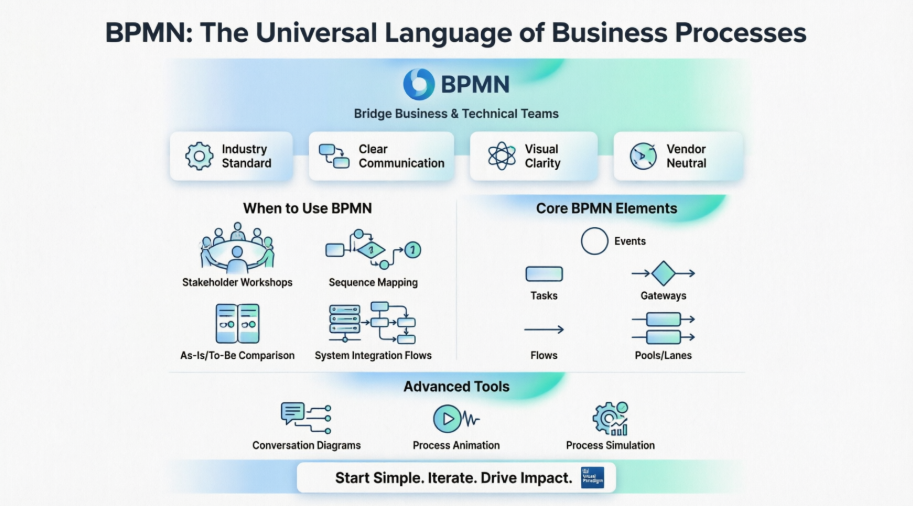
In this comprehensive review, I’ll walk you through my hands-on experience with BPMN and process mapping using Visual Paradigm, sharing practical insights, real-world applications, and honest reflections on what works, what challenges you might face, and how to get the most value from these powerful methodologies. If you’ve ever struggled to align technical teams with business stakeholders, or found yourself lost in verbose documentation that nobody reads, this guide is for you.
Understanding BPMN: The Universal Language of Business Processes
One of the most important elements of every Business Analyst’s toolkit is process modeling, which is also a significant activity for Business Process Management professionals. Business Process Modeling Notation (BPMN) is a method of illustrating business processes in the form of a diagram similar to a flowchart, as shown below:
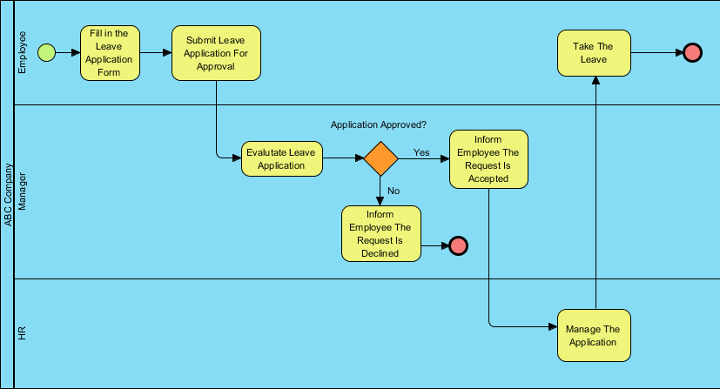
BPMN was originally conceived and developed by the Business Process Management Initiative (BPMI). It is currently maintained by the Object Management Group (OMG). What strikes me most about BPMN is its dual nature: it provides an intuitive and easy way for non-expert users in BPM to understand the notation, while simultaneously offering the precision technical teams need. With BPMN, both the business and technical sides of the organization can share a common language – something that they can both understand and that meets their respective needs for precision and flexibility. This shared language is empowering new ways of working together – and it results in the deployment of new and more flexible applications. Thus, BPMN reduces noise in communication between the process design stage and implementation, execution, and management.
When to Use BPMN: Real-World Scenarios from My Experience
There are a variety of scenarios when a business analyst should use a business process model. Based on my work across multiple industries, here are the situations where BPMN has delivered the most impact:
-
Work with business stakeholders to understand or describe how they do their job
-
They are such an easy model for business stakeholders to create and understand. I’ve facilitated workshops where non-technical users sketched their workflows in minutes using BPMN basics—something that would have taken hours with traditional documentation.
-
-
Show the sequence of when things happen
-
Many models show relationships between pieces of information, but process flows are the best way to show the order that things need to occur. This temporal clarity is invaluable for identifying dependencies and critical paths.
-
-
Show the current state (as-is) and future state (to-be) of the business process
-
This would be impossible to do well in words, so I suggest you create the as-is, then update it in a new copy for the to-be flow. Visual comparison accelerates buy-in and highlights improvement opportunities instantly.
-
-
Show the order in which systems interactions occur
-
This is a variant of a business process called a system flow, where the swimlanes are actually systems instead of people and the steps are steps within systems. Essential for integration projects and API design discussions.
-
What is BPMN? A Practitioner’s Perspective
BPMN allows us to capture and document business processes of an organization in a clear and consistent way, that ensures relevant stakeholders, such as process owners and business users, are involved in the process. Thus, the team can respond to any issues identified in the processes more effectively. BPMN provides comprehensive and yet rich notations that can easily be understood by both technical and non-technical stakeholders.
From my experience, the true power of BPMN emerges not in the notation itself, but in the conversations it enables. When a developer and a marketing manager can point to the same diagram and agree on what “Order Approved” means, you’ve achieved something remarkable.
Benefits of BPMN: What Actually Delivers Value
After implementing BPMN across multiple projects, here are the benefits I’ve observed firsthand:
-
An industry standard developed by the OMG consortium, a not-for-profit industry group – This means longevity, community support, and reduced vendor lock-in risk.
-
Provides businesses with the capability of defining and understanding their procedures through Business Process Diagrams – Clarity drives alignment; alignment drives execution.
-
To provide a standard notation that is readily understandable by all business stakeholders – No more “translation layers” between departments.
-
To bridge the communication gap that frequently occurs between business process design and implementation – This alone has saved countless hours of rework in my projects.
-
Simple to learn yet powerful enough to depict the potential complexities of a business process – The learning curve is gentle, but the ceiling is high.
-
Vendor neutral with wide tools support – Flexibility to choose tools that fit your workflow, not the other way around.
BPMN Notation: Getting Started with Visual Paradigm
We divide the BPMN notation guide into four parts which provides:
-
An introduction to the Business Process Model and Notation (BPMN). The basics of the BPMN notation will be described – that is, the types of graphical objects that comprise the notation and;
-
How they work together as part of a Business Process Diagram.
-
Also it illustrates how you can create and draw BPMN diagrams with Visual Paradigm.
Foundational Learning Path
Practical Implementation Guides
2. Conversation Diagram: Mapping Communication Flows
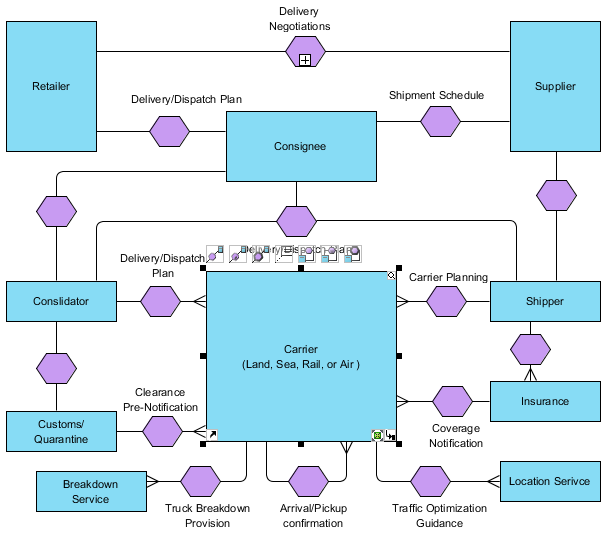
A conversation diagram focuses on the communications between participants which visualizes messages exchange between pools. You cannot create or display processes or choreographies in this diagram.
In the following example, the various conversations associated with deliveries from a supplier to a retailer are analyzed:
Conversation Diagram Notation: Key Elements Explained
Participant – A Participant in a Collaboration or a Choreography.
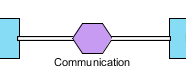
Conversation Link – Conversation Links are used to connect ConversationNodes to and from Participants (Pools).
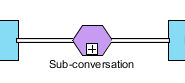
Sub-Conversation Link – A Sub-Conversation is a ConversationNode that is a hierarchical division within the parent Conversation.
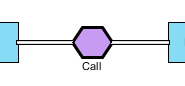
Call-Conversation Link – A Call Conversation identifies a place in the Conversation where a global Conversation or a GlobalCommunication is used.
Group – A Group is a grouping of Activities that are within the same Category.

Text Annotation – Text Annotations are a mechanism for a modeler to provide additional information for the reader of a BPMN Diagram.

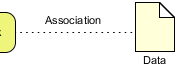
Association – A data association is used to model how data is pushed into or pulled from item-aware elements
Pro Tip from My Experience: Conversation diagrams shine during stakeholder alignment sessions. When executives ask “Who talks to whom, and about what?”, this diagram type delivers instant clarity without drowning them in process detail.
3. Process Animation: Bringing Static Diagrams to Life
What is Process Animation?
Process animation breaks down the presentation barrier encountered in studying process flow with static images. It analyzes process flows and converts process design into an animation, which can be viewed in motion by the audience. With this, process animation helps to lower the risk in business process improvement, improve the chance of getting the processes right at the first attempt and brings better decision-making in re-engineering and resource planning.
Preview this Tutorial on YouTube
The video highlights the steps and primary concepts of this tutorial. By watching the video, you should be able to complete this tutorial much easier.
My Take: I’ve presented process animations to C-suite audiences who typically zone out during workflow reviews. The motion element captures attention and makes abstract flows tangible. It’s not just a “nice-to-have”—it’s a persuasion tool.
4. Process Simulation: Testing Before You Invest
What is Process Simulation?
Simulation is a technique that helps business analysts simulate the execution of business process for studying the resource consumption (e.g. Human resources, devices, etc.) throughout a process, identifying bottlenecks and improving the current business by process refinement and resources re-allocation. It includes not only the visual simulation ability, but also charts generation functions.
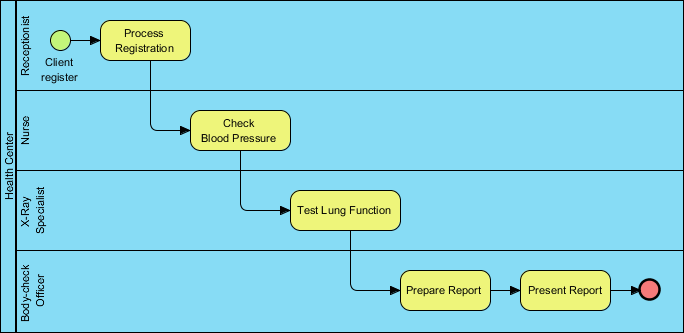
Here is a complete tutorial for illustrating a business process of performing body check, and make use of the simulation tool to find out the possible changes that can make the process more efficient.
(Read More – A cycle of body check)
Simulation Resources for Deep Dives
Real-World Insight: In one healthcare project, simulation revealed that adding a single triage nurse reduced patient wait times by 40%. We validated this virtually before hiring—saving significant budget and avoiding operational disruption. That’s the power of simulation done right.
5. Other Business Diagrams: Expanding Your Toolkit
Visual Paradigm provides other complementary diagrams for business analysts to deal with some other aspects in the business domain such as Business Concept Diagram, Event-driven process chain diagram and process map diagram. Here is some diagram examples:
EPC Diagram
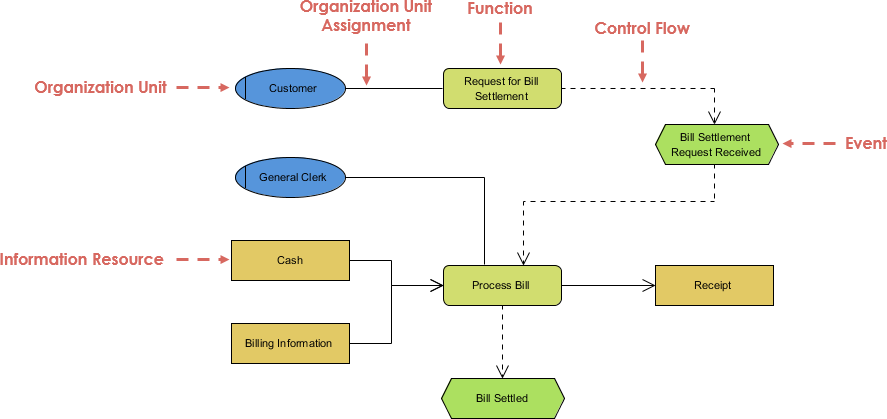
EPC diagram, abbreviation for event-driven process chain diagram, is a flowchart based diagram that can be used for resource planning and identifying possible improvements of a business process.
(Learn More about EPC and learn it from Temples and examples)
Business Concept Diagram Example
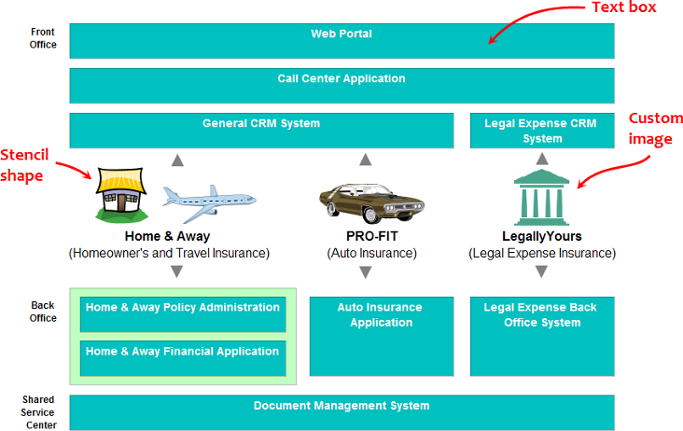
Business Concept Diagram allows for the creation of a less formal and rigorous high-level representation of business processes and organization structure. It comes with a Stencil Pane that provides you with a rich set of built-in shapes to use in representing any kind of business concepts. If you find the stencil not enough you can add any image files into the diagram.
Business Process Diagram Example
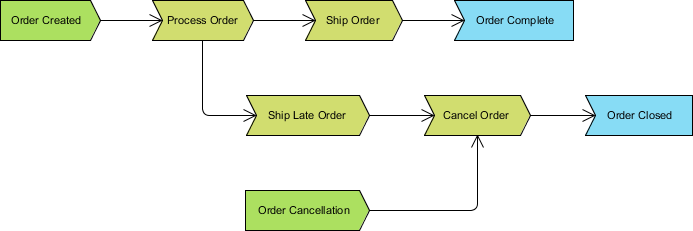
Process map diagram gives an overview that shows the processes needed to approach a business goal. It is rather in a upper level of analyzing and understanding a business process.
Expanding Your Diagram Skills
Practitioner Note: Don’t feel pressured to use every diagram type. I typically start with a high-level Process Map for executive alignment, drill into BPMN for implementation teams, and use Conversation Diagrams for integration planning. Choose the right tool for the audience and objective.
Conclusion: Your Journey to Process Excellence Starts Here
After years of applying BPMN and process mapping across diverse industries—from fintech to healthcare to retail—I can affirm that these methodologies are not just academic exercises. They are practical, powerful levers for organizational transformation. The key to success isn’t mastering every notation symbol on day one; it’s starting small, engaging stakeholders early, and iterating based on feedback.
Visual Paradigm, as showcased throughout this guide, provides a robust, intuitive platform that lowers the barrier to entry while supporting advanced use cases. Whether you’re documenting an as-is process, simulating a to-be optimization, or animating a workflow for executive review, the tools and techniques covered here will accelerate your impact.
My final advice? Don’t aim for perfection in your first diagram. Aim for clarity. Aim for collaboration. Aim for action. The rest will follow.
If you take away one thing from this guide, let it be this: Process mapping isn’t about drawing boxes and arrows—it’s about creating shared understanding that drives better decisions, faster execution, and measurable business outcomes.
Now, go map something valuable.
Reference
- BPMN Intro I: Introduction to the Business Process Model and Notation (BPMN) covering the basics of graphical objects that comprise the notation.
- BPMN Intro II – Swimlanes: Learn how to use swimlanes in BPMN to organize responsibilities and roles within business process diagrams.
- BPMN Intro III – Flow/Connectors: Understand sequence flows, message flows, and connectors that link elements together in BPMN diagrams.
- BPMN Intro IV – Data & Artifacts: Explore data objects, data stores, and artifacts that enrich BPMN diagrams with contextual information.
- How to draw a BPMN Business Process Diagram: Step-by-step tutorial for creating professional BPMN business process diagrams using Visual Paradigm.
- Using BPMN Pool and Lane: Guide to organizing participants and responsibilities using pools and lanes in BPMN.
- Using BPMN Task and Sub-Process: Learn to model atomic tasks and complex sub-processes for scalable process design.
- Using BPMN Event: Master start, intermediate, and end events to control process flow triggers and outcomes.
- Using BPMN Gateway: Implement decision points, parallel flows, and exclusive gateways for dynamic process logic.
- Using BPMN Sequence and Message Flow: Differentiate between internal sequence flows and cross-participant message flows.
- Using BPMN Choreography Task and Sub-Process: Model interactions between multiple participants using choreography notation.
- Using BPMN Data Object: Incorporate data inputs, outputs, and stores to show information flow alongside process flow.
- Adjusting caption’s position and angle in BPD: Tips for enhancing diagram readability through caption formatting and layout adjustments.
- Creating Use Cases from BPMN Tasks: Bridge process modeling and requirements engineering by deriving use cases from BPMN tasks.
- What is process simulation?: Foundational overview of business process simulation concepts and value propositions.
- Simulation Control Panel: Navigate and configure simulation parameters using Visual Paradigm’s control interface.
- How to simulate a business process: Practical walkthrough for executing and analyzing process simulations.
- Reading the various simulation charts: Interpret performance metrics, resource utilization charts, and bottleneck analysis outputs.
- How to draw a Business Concept Diagram: Create high-level conceptual models using flexible stencils and visual elements.
- How to draw an EPC Diagram: Build event-driven process chain diagrams for resource planning and improvement identification.
- How to draw a Process Overview Diagram: Design executive-level process maps that communicate strategic workflows clearly.
- A cycle of body check: Complete case study demonstrating process simulation applied to a healthcare body check workflow.
- Temples and examples: Collection of EPC diagram templates and real-world examples for inspiration and reuse.
This post is also available in Deutsch, Español, فارسی, Français, English, Bahasa Indonesia, 日本語, Polski, Portuguese, Ру́сский, Việt Nam, 简体中文 and 繁體中文.