


📖 विजुअल पैराडाइग्म के एआई-संचालित बीपीएम का क्यों महत्व है
व्यापार प्रक्रिया मैपिंग लंबे समय से संचालनात्मक उत्कृष्टता की आधारशिला रही है—लेकिन यह अक्सर धीमी, व्यक्तिगत और अलग-अलग विभागों में होती है। पारंपरिक उपकरण आपसे कहते हैं कि आपको पहले बनाना होगा, फिर सोचना होगापहले बनाएं, बाद में सोचें. इसके विपरीत, इसकेबुद्धिमान बीपीएम और विश्लेषण सूट पाठ्यक्रम को उलट देता है: सोचने से शुरुआत करें, एआई को ड्राइंग करने दें.
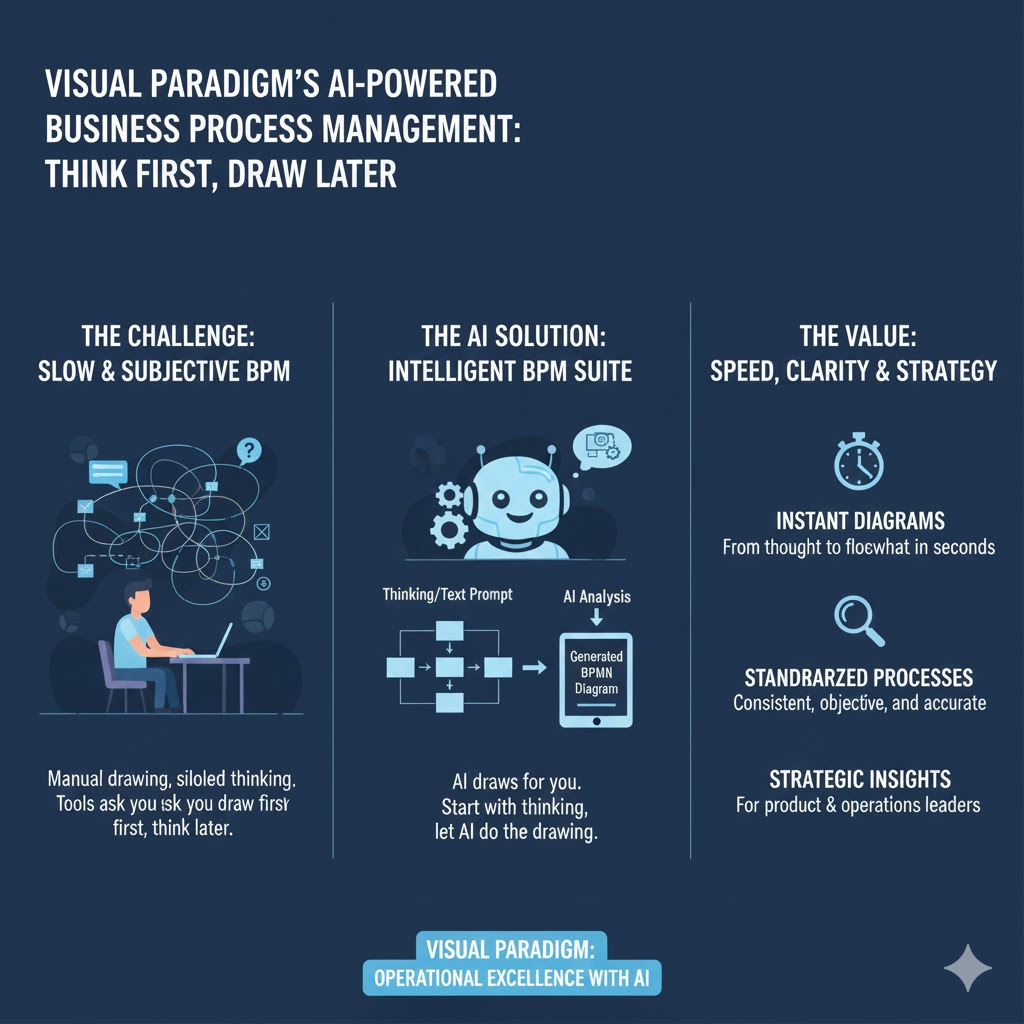
यह पाठ्यपुस्तक आपके मार्ग के माध्यम से चलती है:
- दक्यों और कौन इस उपकरण के पीछे, जो
- एक कदम-दर-कदम कार्यप्रवाह के साथवास्तविक उदाहरण,
- मूलभूत अवधारणाएं और उत्तम व्यवहार, जो
- त्वरित संदर्भ सारांश सारणी, और
- उत्पाद और संचालन नेताओं के लिए रणनीतिगत निष्कर्ष।
चाहे आप एक होंप्रमुख उत्पाद प्रबंधक एक नए आंतरिक उपकरण के लिए अनुमान लगाना, एकसंचालन निदेशक आने वाले लोगों के लिए अनुकूलन, या एकस्क्रम उत्पाद मालिक प्रक्रिया स्वास्थ्य पर टीमों को संरेखित करना—यह सूट सप्ताहों के प्रयास को मिनटों में कम कर देता है।
🎯 इसके लिए कौन है?
| भूमिका | उपयोग केस |
|---|---|
| उत्पाद प्रबंधक (खासकर HCI/CS पृष्ठभूमि के साथ) | उपयोगकर्ता यात्रा का नक्षत्र बनाएं, उत्पाद विशेषताओं के लिए पीछे के कार्यप्रवाह को परिभाषित करें, प्रक्रिया KPI पर इंजीनियरिंग + CX को एक साथ लाएं। |
| संचालन और प्रक्रिया नेतृत्व | SOP निर्माण को स्वचालित करें, अवरोधों की पहचान करें, लेखा परीक्षा के लिए तैयार दस्तावेज़ तैयार करें। |
| एजाइल/स्क्रम टीमें | स्प्रिंट पुनरावलोकन को दृश्यात्मक प्रक्रिया सुधारों में बदलें; प्रक्रिया परिवर्तनों को बैकलॉग आइटम से जोड़ें। |
| नेतृत्व और रणनीति | परिवर्तन कार्यक्रमों के दौरान “वर्तमान” बनाम “भविष्य” प्रक्रिया धाराओं का त्वरित रूप से मॉडल बनाएं। |
💡 हाइब्रिड टीमों के लिए आदर्श त्वरित गति वाले वातावरण (उदाहरण के लिए, SF बे क्षेत्र की तकनीकी संगठन) में जहां गति, स्पष्टता और अन्य क्षेत्रों के बीच समन्वय अनिवार्य है।
🔑 मुख्य अवधारणाएं
| शब्द | परिभाषा | यह क्यों महत्वपूर्ण है |
|---|---|---|
| हितधारक अंतःक्रिया आरेख (SID) | एक मानकीकृत, भूमिका-आधारित प्रवाह जो दिखाता है कौन क्या करता है और जब. केवल स्विमलेन के बारे में नहीं — हस्तांतरण और निर्णय बिंदुओं पर ध्यान केंद्रित है। | अस्पष्टता को समाप्त करता है; RACI संरेखण के लिए आदर्श है। |
| प्रक्रिया कहानी | प्रक्रिया धारा का प्राकृतिक भाषा में, कालक्रमानुसार वर्णन — आपके समस्या कथन से AI द्वारा उत्पन्न। | व्यावसायिक भाषा और तकनीकी मॉडलिंग के बीच की खाई को पार करता है। |
| KPI-आधारित मॉडलिंग | KPI को परिभाषित किया गया है संदर्भ में प्रक्रिया के संदर्भ में — अंत में विचार के रूप में नहीं। AI उद्योग के मानकों के आधार पर मापदंडों की सिफारिश कर सकता है (उदाहरण के लिए, SaaS आरंभ → पहले मूल्य तक समय, गिरावट दर)। | यह सुनिश्चित करता है कि मापन एकीकृत है—न कि बाहर से लगाया गया है। |
| AI रिपोर्ट्स सूट | एक क्लिक में उत्पन्न करेंकार्यान्वयन योजना, जोखिम मूल्यांकन, औरसंसाधन योजना—सभी आपके मॉडल से निर्मित। | स्थिर आरेखों को कार्यान्वयन योजनाओं में बदल देता है। |
🛠️ चरण-दर-चरण निर्देशिका (वास्तविक उदाहरण के साथ)
आइए एक वास्तविक दृश्य के माध्यम से गुजरें:
“हमारे SaaS उपयोगकर्ता एकीकरण में साइनअप और पहली महत्वपूर्ण क्रिया के बीच 40% लोग छोड़ देते हैं। हमें प्रवाह का निदान करने और पुनर्डिज़ाइन करने की आवश्यकता है।”
✅ चरण 1: समीक्षा — समस्या को परिभाषित करें

क्रियान्वयन:प्राकृतिक भाषा में संक्षिप्त विवरण दर्ज करें।
उदाहरण इनपुट:
“नए उपयोगकर्ता साइनअप करते हैं लेकिन सेटअप पूरा नहीं करते; वे मुख्य विशेषता के उपयोग से पहले छोड़ देते हैं।”
AI आउटपुट:
- संरचित समस्या कथन
- प्रारंभिक दायित्व (उदाहरण के लिए: “केंद्र: पहली डैशबोर्ड बनाने तक साइनअप के बाद का प्रवाह”)
- सुझाए गए हितधारक: उपयोगकर्ता, बैकएंड सेवा, ईमेल प्रणाली, समर्थन बॉट
✅ प्रो टिप:दर्द के बिंदुओं के बारे में विस्तृत बताएं (उदाहरण के लिए: “उपयोगकर्ता चरण 3 पर छोड़ देते हैं: ईमेल सत्यापन”) ताकि AI की सटीकता में सुधार हो।
✅ चरण 2: अंतःक्रियाएं — प्रक्रिया कहानी बनाएं
क्रियान्वयन:आइए AI एक ड्राफ्ट कहानी बनाएं—या इसे बारीकी से संपादित करें।
AI द्वारा उत्पन्न कहानी (ड्राफ्ट):
- उपयोगकर्ता साइनअप फॉर्म जमा करता है → प्रणाली पुष्टिकरण ईमेल भेजती है।
- उपयोगकर्ता ईमेल लिंक पर क्लिक करता है → प्रणाली τोकन की पुष्टि करती है और सेटअप विज़ार्ड पर पुनर्निर्देशित करती है।
- उपयोगकर्ता कार्यस्थल का नाम दर्ज करता है → प्रणाली ड्राफ्ट कार्यस्थल बनाती है।
- छोड़ने का बिंदु:उपयोगकर्ता से सहकर्मियों को आमंत्रित करने के लिए कहा जाता हैपहलेमूल्य देखना।
- यदि उपयोगकर्ता छोड़ देता है, तो प्रणाली खाली डैशबोर्ड दिखाती है → कम एंगेजमेंट।
आप कर सकते हैं:
- अनुपस्थित चरण जोड़ें (उदाहरण के लिए, “उपयोगकर्ता वीडियो ट्यूटोरियल के साथ स्वागत ईमेल प्राप्त करता है”)।
- बॉटलनेक चिन्हित करें (“चरण 4 में अवरोध होता है—यूएक्स अनुसंधान के साथ पुष्टि करें”)।
📝 श्रेष्ठ व्यवहार:उपयोग करें“क्रियाकलाप → क्रिया → परिणाम”सुसंगतता के लिए शब्दावली।
✅ चरण 3: दृश्यायित करें — आरेख उत्पन्न करें
क्रिया:क्लिक करें“आरेख उत्पन्न करें”
उपकरण एक साफ, स्वचालित रूप से फॉर्मेट किए गए उत्पादन करता हैहितधारक अंतःक्रिया आरेख:

मुख्य विशेषताएँ:
- रंग-आधारित भूमिकाएँ (उपयोगकर्ता = नीला, प्रणाली = ग्रे, टीम = हरा)
- निर्णय हीरे शर्तीय पथों के लिए (उदाहरण के लिए, “सहकर्मियों को आमंत्रित करें? → हाँ/नहीं”)।
- बॉटलनेक चेतावनी (उदाहरण के लिए, चरण 4 पर लाल झंडा)
आप अनुकूलित करने के लिए ड्रैग और ड्रॉप कर सकते हैं—कोई आरेखण विशेषज्ञता की आवश्यकता नहीं है।
✅ चरण 4: एमपीआई — सुई के आगे बढ़ने वाले कारक को मापें
क्रिया:क्लिक करें“KPI जोड़ें”या AI से पूछें:
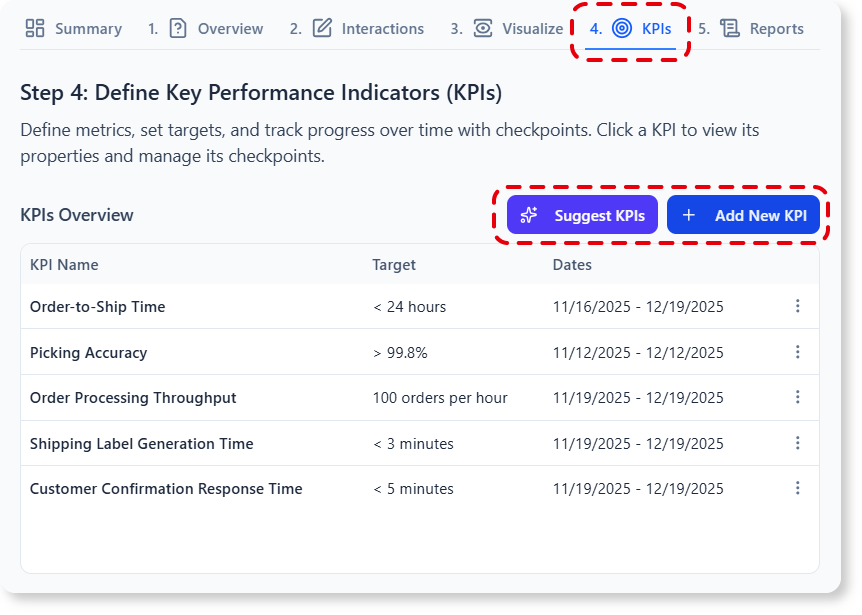
“SaaS ऑनबोर्डिंग के लिए KPI सुझाएं”
AI सुझाव:
| KPI | लक्ष्य | आंकड़ा स्रोत |
|---|---|---|
| साइनअप-से-सेटअप पूर्णता दर | ≥ 85% | प्रमाणीकरण लॉग + फ्रंटएंड घटनाएँ |
| पहले मूल्य तक समय (TTFV) | < 3 मिनट | सत्र रिकॉर्डिंग + विश्लेषण |
| सेटअप के बाद एंगेजमेंट (दिन 1) | ≥ 2 विशेषता उपयोग | उत्पाद विश्लेषण (उदाहरण के लिए, मिक्सपैनल) |
आप कर सकते हैं:
- KPI को विशिष्ट चरणों से जोड़ें (उदाहरण के लिए, TTFV ↔ चरण 3)
- चेतावनी या घटते सीमा सेट करें
- अपने BI डैशबोर्ड (API या CSV के माध्यम से) में निर्यात करें
✅ चरण 5: रिपोर्ट्स — अंतर्दृष्टि को क्रियान्वयन में बदलें
कोई भी रिपोर्ट प्रकार पर क्लिक करें:
- कार्यान्वयन योजना
- चरणबद्ध लॉन्च: MVP (अनिवार्य निमंत्रण हटाएं) → V2 (टिप्पणियाँ जोड़ें) → V3 (मार्गदर्शित चलना)
- मालिक की नियुक्ति, अनुमानित प्रयास (कहानी बिंदु), निर्भरताएँ
- जोखिम मूल्यांकन
- उच्च जोखिम: निमंत्रण चरण हटाने से वायरलता कम हो सकती है
- उपाय: वैकल्पिक “कार्यक्षेत्र साझा करें” CTA जोड़ेंके बादमूल्य प्रदर्शन
- संसाधन योजना
- इंजीनियरिंग: 2 विकासकर्मी × 1 स्प्रिंट
- डिज़ाइन: सत्यापन के लिए 1 यूएक्स अनुसंधानकर्मी
- पीएम: वृद्धि टीम के साथ द्विसप्ताहिक समन्वय
🔄 जब आप प्रक्रिया मॉडल में संपादन करते हैं, तो सभी रिपोर्ट्स गतिशील रूप से अद्यतित होती हैं।
📊 सारांश सारणी: कार्यप्रवाह एक नज़र में
| चरण | प्रथम आँकड़ा | एआई आउटपुट | हस्ताक्षरित ओवरराइड? | आउटपुट प्रारूप |
|---|---|---|---|---|
| 1. समीक्षा | समस्या कथन (प्राकृतिक भाषा में) | परिधि, हितधारक, सफलता के मापदंड | ✅ परिधि संपादित करें | पाठ + जांच सूची |
| 2. अंतःक्रियाएँ | संपाद्य कहानी ड्राफ्ट | कालक्रमिक प्रक्रिया वर्णन | ✅ चरण जोड़ें/हटाएँ | मार्कडाउन शैली की सूची |
| 3. दृश्यात्मकता | पुष्टिकृत कहानी | हितधारक अंतःक्रिया आरेख | ✅ खींचें और गिराएँ | एसवीजी/पीएनजी (निर्यातनीय) |
| 4. क्रियान्वयन मापदंड | हस्ताक्षरित प्रविष्टि या एआई प्रॉम्प्ट | लक्ष्य और स्रोत के साथ KPIs | ✅ भार को समायोजित करें | तालिका + चार्ट पूर्वावलोकन |
| 5. रिपोर्ट्स | रिपोर्ट प्रकार चुनें | संरचित विश्लेषण दस्तावेज | ✅ टिप्पणी / टैग करें | PDF, DOCX, या नॉटियन एम्बेड |
🧠 यह क्यों बदलता है (विशेष रूप से उत्पाद नेताओं के लिए)
अनुभवी के लिएउत्पाद प्रबंधक (7+ वर्ष, CS/HCI-प्रशिक्षित), यह उपकरण सीधे मूल क्षमताओं को बढ़ाता है:
| पारंपरिक दृष्टिकोण | बुद्धिमान BPM सूट के साथ |
|---|---|
| एक प्रक्रिया के नक्शा बनाने के लिए 2-3 कार्यशालाएं | 20 मिनट का AI-सहायता युक्त सत्र |
| स्थिर Visio/Lucid आरेख → तेजी से अप्रचलित | जीवंत मॉडल KPIs और रिपोर्ट्स के साथ समकालीन |
| KPIs परिभाषितके बाद लॉन्च → प्रतिक्रियात्मक | मापदंडों में डाला गयापहले निर्माण → सक्रिय |
| “प्रक्रिया ऋण” जमा होता है | तकनीकी + प्रक्रिया ऋण एक साथ ट्रैक किया जाता है |
✅ एजाइ� टीमों के लिए बोनस: कहानियों को सीधे Jira में लिंक किए गए आरेखों के साथ एपिक/कार्य के रूप में निर्यात करें।
🏁 निष्कर्ष: आरेखों से निर्णय तक
द एक बुद्धिमान बीपीएम और विश्लेषण सूटयह केवल एक अन्य आरेखण उपकरण नहीं है—यह एक है प्रक्रिया सह-चालकजो अस्पष्टता को संरेखण में, प्रयास को अंतर्दृष्टि में, और विचारों को कार्यान्वयन योजनाओं में बदलता है।
आपके लिए अगले चरण:
- 🔗 अभी आज़माएं: https://ai-toolbox.visual-paradigm.com/app/intelligent-bpm-and-analysis-suite/
- 📅 अपनी टीम के साथ 30 मिनट का “प्रक्रिया स्प्रिंट” चलाएं: चुनें एकउच्च घर्षण वाली प्रक्रिया (उदाहरण के लिए, ग्राहक उत्थान, फीचर अनुरोध विश्लेषण) और इसका अंत से अंत तक मॉडलिंग करें।
- 📊 अगली स्प्रिंट समीक्षा में अपने केएपीआई डैशबोर्ड और रिपोर्ट आउटपुट साझा करें।
“स्पष्टता गति का आधार है।”
— विशेष रूप से जब आप ऐसे उत्पाद बना रहे हों जहां हर हस्तांतरण, हर देरी, हर गिरावट महत्वपूर्ण हो।
आईएआई को मानचित्रण करने दें—ताकि आप उस पर ध्यान केंद्रित कर सकें जो सबसे अधिक महत्वपूर्ण है: बेहतर अनुभव बनाना।
उत्पाद और संचालन नेताओं के लिए तैयार जो मानते हैं कि प्रक्रिया उत्कृष्टता तेज, सहयोगात्मक और मानव-केंद्रित होनी चाहिए।
उपकरण विजुअल पैराडाइग्म ऑनलाइन (कॉम्बो+) और डेस्कटॉप (एक्टिव रखरखाव के साथ प्रो+) के साथ अनुकूलित है।
यह पोस्ट Deutsch, English, Español, فارسی, Français, Bahasa Indonesia, 日本語, Polski, Portuguese, Ру́сский, Việt Nam, 简体中文 और 繁體中文 में भी उपलब्ध है।