


Visual Paradigm Online is an all-in-one platform that makes it easy to create high-quality animated videos, even if you’re not a professional. In this tutorial, we’ll guide you through creating a breaking news report video using Visual Paradigm Online’s AniFuzion and Fliplify tools. This video will simulate a news studio set, feature realistic-looking graphics and 3D models, and include both studio and field reporters.
Step 1: Sign Up and Explore Visual Paradigm Online
- Sign Up:
- Visit the Visual Paradigm Online website and sign up for a free account.
- Explore the dashboard to familiarize yourself with the available tools and features.
Step 2: Create a New Project in AniFuzion
- Start a New Project:
- Click on “Create New Project” in AniFuzion.
- Select a template that fits the news report theme. You can choose a virtual news studio set from the template library.
Step 3: Customize Your Characters
- Add Characters:
- Use the character customization options to add two reporters: a studio reporter (Jen) and a field reporter (Mike).
- Customize their appearances, actions, and expressions to match the script.
- Set Up the Scene:
- Place the studio reporter in the virtual news studio set.
- Create a transition to the field reporter at the scene of the accident.
Step 4: Add Transitions and Effects
- Opening Scene:
- Start with a “Breaking News” graphic for the first 4 seconds.
- Use the motion path control to ensure smooth transitions between scenes.
- Studio Reporter Segment:
- Add the studio reporter (Jen) introducing the field reporter (Mike).
- Use dynamic transitions to switch from the studio to the field reporter.
Step 5: Add Backgrounds and Props
- Studio Background:
- Choose a high-quality background for the news studio set.
- Add realistic-looking graphics and 3D models of the reporters.
- Field Reporter Background:
- Select a background that simulates a city street with a multi-vehicle accident scene.
- Add 3D models of emergency vehicles and crew to enhance realism.
Step 6: Add Audio Narratives
- Text-to-Speech:
- Use the advanced text-to-speech feature with lipsync capabilities to add audio narratives for both reporters.
- Input the script for each segment and adjust the lipsync settings for realistic lip movements.
Step 7: Create the Video Segments
- Opening Scene:

- [00:00:00 to 00:00:04] Add the “Breaking News” graphic.
Studio Reporter (Jen) Segment:
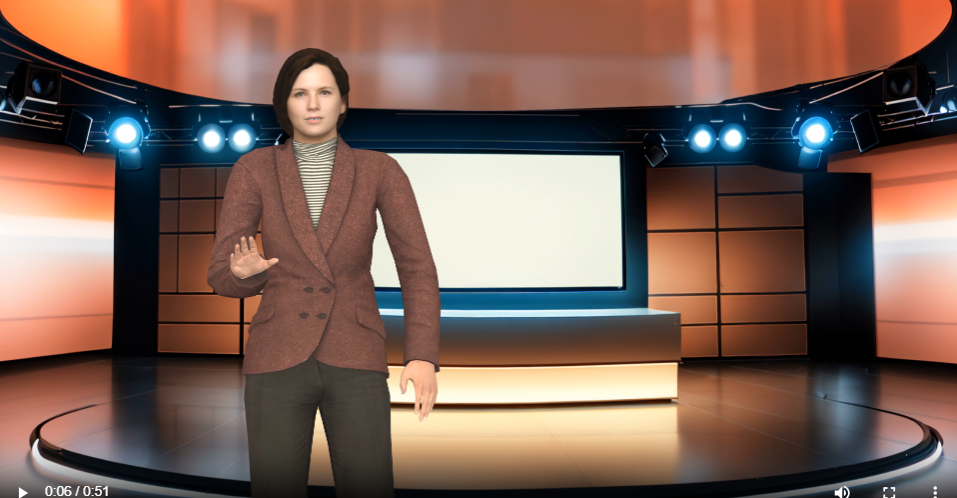
- [00:00:05 to 00:00:11] Jen: “We’re here at the scene of a major accident downtown. Mike, what can you tell us?”
- Field Reporter (Mike) Segment:
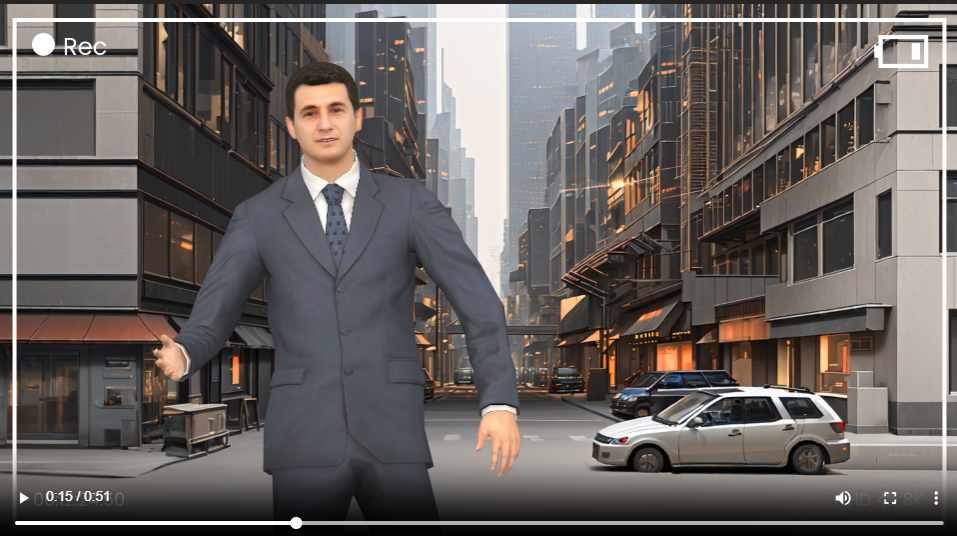
- [00:00:12 to 00:00:22] Mike: “Jen, a car ran a red light and crashed into several other vehicles at this intersection. Emergency crews are on the scene; multiple injuries have been reported.”
- Studio Reporter (Jen) Segment:
- [00:00:23 to 00:00:28] Jen: “Do we know any more details about what caused the accident?”
- Field Reporter (Mike) Segment:
- [00:00:29 to 00:00:40] Mike: “Witnesses say the driver who ran the red light was speeding. Police are investigating the circumstances. They’re advising people to avoid the area while they work to clear the scene.”
- Closing Scene:
- [00:00:41 to 00:00:51] Jen: “This is a very serious situation. We’ll continue to follow this breaking news and provide updates as we get them.”
Step 8: Preview and Export
- Preview:
- Preview your animation to ensure everything is in place.
- Make any necessary adjustments to the transitions, effects, and audio.
- Export:
- Once satisfied with the preview, export your animation in your preferred format.
Step 9: Enhance with Fliplify (Optional)
- Create a Flipbook:
- Use Fliplify to create an interactive flipbook that complements your news report video.
- Choose a template that matches the news theme and add content such as text, images, and interactive elements.
- Integrate with Animation:
- Use the integration features to combine your flipbook with your animated video seamlessly.
- Preview and Publish:
- Preview your flipbook to ensure it meets your expectations.
- Publish your flipbook and share it with your audience.
Conclusion
Creating a breaking news report video with Visual Paradigm Online‘s AniFuzion and Fliplify is straightforward and accessible, even for non-professionals. With a user-friendly interface, extensive character actions, dynamic transitions, and enhanced realism, you can create high-quality animations that engage and inform your audience.
Get started with Visual Paradigm Online today and bring your news report to life with captivating visuals and interactive content.








This post is also available in Deutsch, English, Español, فارسی, Français, Bahasa Indonesia, 日本語, Polski, Portuguese, Ру́сский, Việt Nam, 简体中文 and 繁體中文.