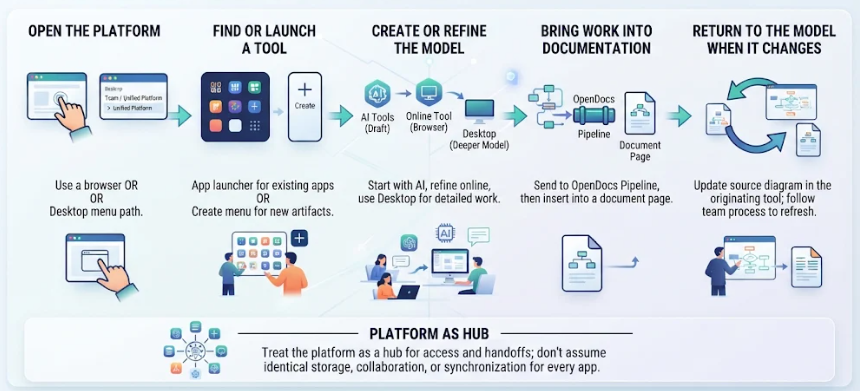
In the rapidly evolving landscape of software engineering, the boundary between modeling, development, and documentation is becoming increasingly blurred. Visual Paradigm has addressed this by creating the Unified Platform, a centralized hub that integrates a vast ecosystem of tools. This tutorial breaks down the sophisticated workflow depicted in the system architecture, guiding you from the initial platform access to the synchronization of artifacts across your team.
1. The Architecture of the Unified Platform
The core philosophy behind the Visual Paradigm Unified Platform is “Hub and Spoke.” Rather than treating every tool as a siloed application, the platform acts as the central brain. It manages access, licensing, and the “handoffs” required to move work seamlessly between different environments.
When you log in, you are not just opening a single program; you are accessing a suite of capabilities. The architecture is designed to be flexible, acknowledging that different tasks require different interfaces—whether that is a lightweight browser-based tool for quick drafts or a robust Desktop application for deep system modeling.
2. Step-by-Step Workflow Execution
The workflow follows a logical progression from discovery to creation, and finally to documentation. Let’s walk through the five critical stages.
Stage 1: Open the Platform
The journey begins with the entry point. Visual Paradigm supports a hybrid access model to accommodate different user preferences:
- Browser Access: Users can launch the platform directly through a web browser. This is ideal for quick access or running on devices without local installation.
- Desktop Access: For power users, the workflow starts within the Desktop application by navigating to the Team / Unified Platform menu. This path ensures access to the most comprehensive set of features and local resources.
Stage 2: Find or Launch a Tool
Once inside the Unified Platform, the user faces a choice: continue existing work or start something new. The platform utilizes a unified interface to manage this:
- The App Launcher: This acts as a dashboard for existing applications. If you have a specific model or project open, you can launch the associated tool directly from here.
- The Create Menu: For new initiatives, the “Create” menu allows you to instantiate new artifacts. This is where you define the scope of your next modeling task.
Stage 3: Create or Refine the Model
This is the core technical phase where the actual architecture is designed. The platform offers a strategic choice between speed and depth:
- AI-Driven Drafting: Leveraging the AI Ecosystem, users can utilize AI tools to generate a first draft of a diagram. This accelerates the initial setup phase, allowing engineers to focus on logic rather than drawing lines.
- Online Tools (Browser): For rapid prototyping, browser-based tools allow for quick creation without the overhead of local installation.
- Desktop Modeling: For complex systems, the Desktop environment is recommended. It provides “deeper project modeling” capabilities, allowing for intricate relationships and detailed system behaviors that might be constrained in a browser.
Stage 4: Bring Work into Documentation
One of the most common pain points in software engineering is keeping diagrams in sync with documentation. The Visual Paradigm Unified Platform solves this via the OpenDocs Pipeline:
- Once a diagram is created or refined, it is sent to the OpenDocs Pipeline.
- This pipeline acts as a bridge, converting the modeling artifact into a document-friendly format.
- The artifact is then inserted into a document page, ensuring that the visual representation is embedded directly into the project documentation.
Stage 5: Return to the Model When It Changes
Software is never static. When requirements change or the architecture evolves, the workflow dictates a strict update path:
- Update the Source: Modifications must always be made in the originating tool (the model source).
- Refresh the Artifact: Once the model is updated, the team must follow a specific process to refresh the documentation artifact. This ensures that the document page reflects the current state of the system.
3. The Platform as a Hub for Access and Handoffs
A critical architectural concept to understand is that the Unified Platform treats every app as a distinct entity with specific behaviors. While the platform provides the hub for access, it does not assume identical storage, collaboration, or synchronization behavior for every application.
For example, the Visual Paradigm Professional Edition and active maintenance contracts are often required for advanced online apps. This licensing distinction ensures that users have access to the specific features they need while adhering to the platform’s security and resource management standards.
4. Support and Maintenance
Given the complexity of the ecosystem, Visual Paradigm provides robust support channels. Whether you need assistance with licensing, specific tool configurations, or deep modeling concepts, the platform offers forums, help requests, and comprehensive tutorials. This support structure ensures that the “handoffs” between tools are smooth and that your team can maintain a high standard of documentation.
By mastering this workflow, you transform the Unified Platform from a simple collection of apps into a cohesive environment where modeling, development, and documentation flow seamlessly together.