Introduction
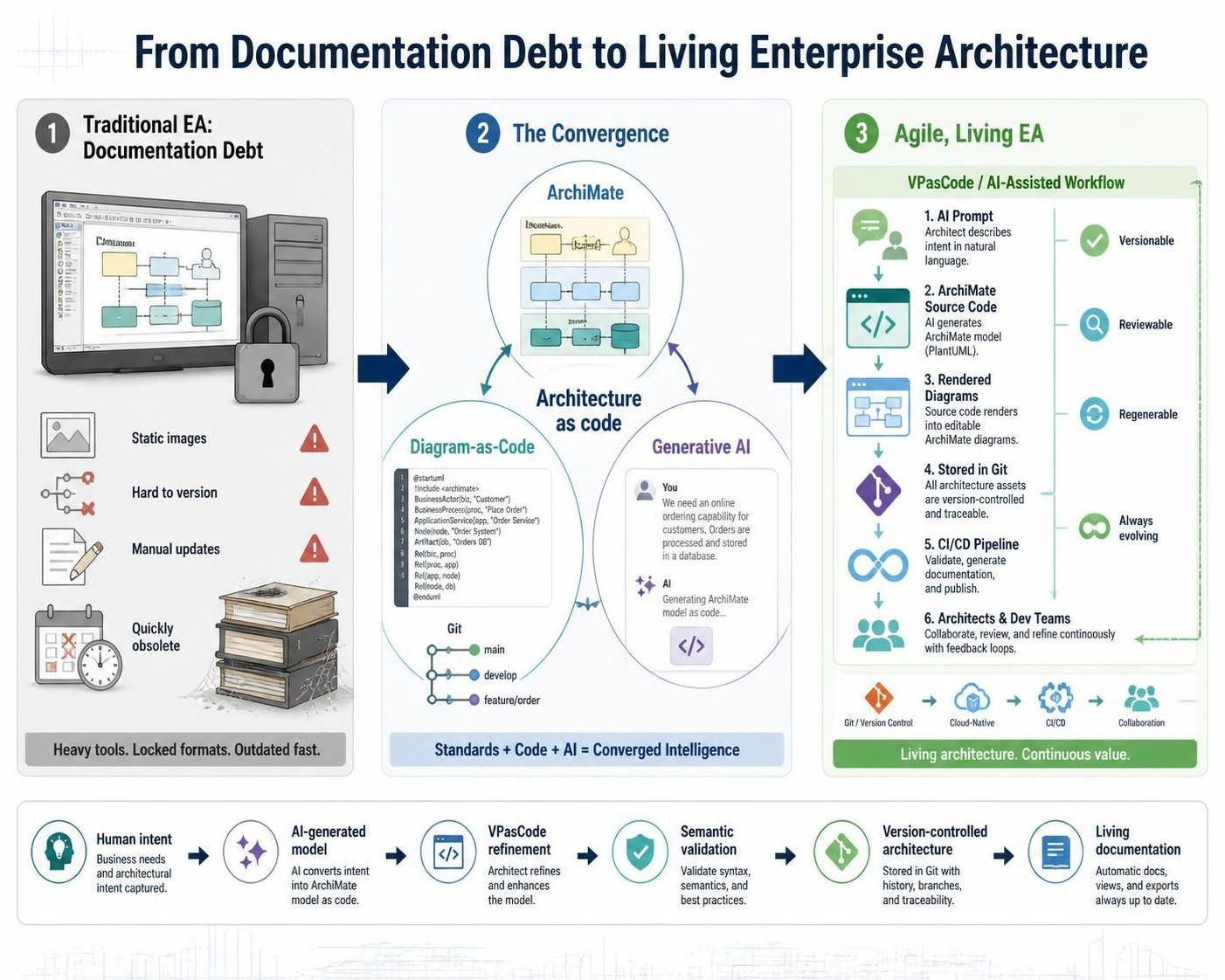
Enterprise Architecture (EA) has long suffered from a “documentation debt” problem. Traditional modeling relies on heavy, proprietary GUI tools where diagrams are static images—difficult to version control, painful to update, and prone to becoming obsolete the moment they are exported. As organizations accelerate toward agile delivery and cloud-native architectures, the bottleneck of manual diagramming has become unsustainable.
Enter the convergence of three powerful trends: ArchiMate (the standard language for EA), Diagram-as-Code (treating diagrams like software), and Generative AI (automating the creation process). This guide explores how combining these elements, particularly through tools like Visual Paradigm’s VPasCode and its embedded AI capabilities, transforms enterprise architecture from a bureaucratic hurdle into an agile, living engineering asset.
Part 1: Foundations of ArchiMate & Diagram-as-Code
What is ArchiMate?
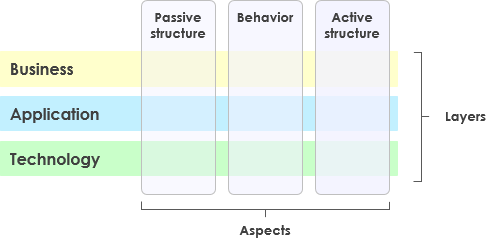
ArchiMate is an Open Group standard enterprise architecture modeling language. It provides a uniform representation for diagrams that describe, analyze, and visualize relationships across three core layers:
-
Business Layer: Processes, services, actors, and roles.
-
Application Layer: Software components, data objects, and interfaces.
-
Technology Layer: Infrastructure, nodes, devices, and system software.
By bridging high-level business strategy with low-level technical implementation, ArchiMate ensures that all stakeholders speak the same visual language.
What is Diagram-as-Code (DaC)?
Diagram-as-Code applies software engineering best practices to architecture visualization. Instead of dragging shapes in a GUI, architects write plain text specifications that compilers render into professional diagrams.
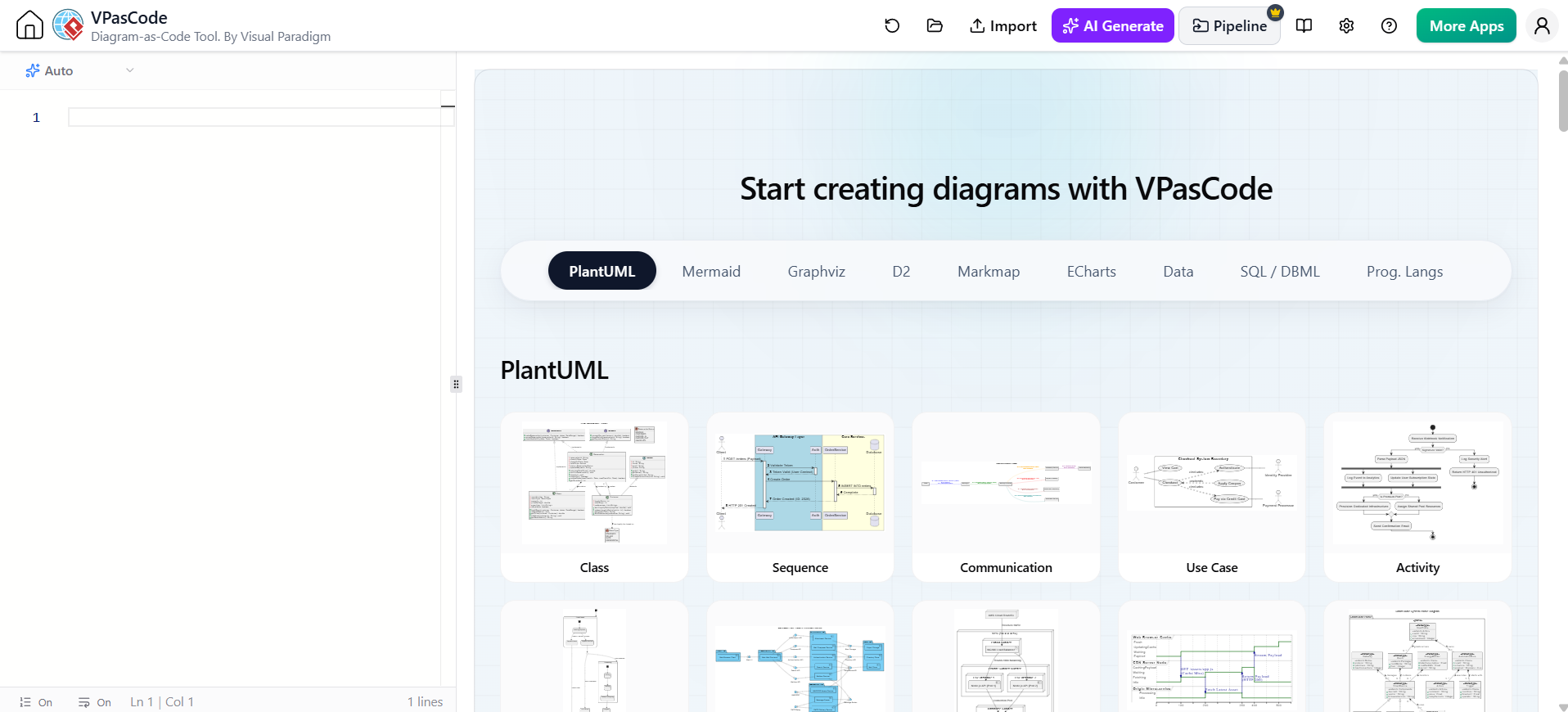
Key Benefits of DaC:
-
Version Control Friendly: Store diagrams in Git alongside source code.
-
Effortless Diffing: See exactly what changed in a model via text diffs.
-
Zero Manual Layout: The engine handles alignment and spacing automatically.
-
CI/CD Integration: Automatically generate and publish diagrams in documentation pipelines.
The Standard Library: Archimate-PlantUML
The repository [github.com/plantuml-stdlib/Archimate-PlantUML](https://github.com/plantuml-stdlib/Archimate-PlantUML) is the de facto standard for rendering ArchiMate models in PlantUML. It provides official macros for elements, colors, and relationship styles that conform strictly to the ArchiMate specification.
Part 2: Key Concepts in ArchiMate-PlantUML
To write valid ArchiMate-PlantUML code, you map standard layers and relationships into PlantUML preprocessor macros.
1. Layers & Elements
-
Strategy Layer: Capabilities, Resources, Courses of Action.
-
Business Layer: Actors, Roles, Processes, Services, Business Objects.
-
Application Layer: Application Components, Collaborations, Services, Data Objects.
-
Technology Layer: Nodes, System Software, Devices, Networks, Technology Services.
2. Relationships
-
Composition/Aggregation:
Rel_Composition,Rel_Aggregation -
Assignment:
Rel_Assignment(e.g., Role assigned to Business Process) -
Realization:
Rel_Realization(e.g., Application Service realized by Application Component) -
Serving / Use:
Rel_Serving(e.g., Application Service serves Business Process) -
Flow / Triggering:
Rel_Flow,Rel_Triggering
Part 3: Comprehensive Diagram Examples
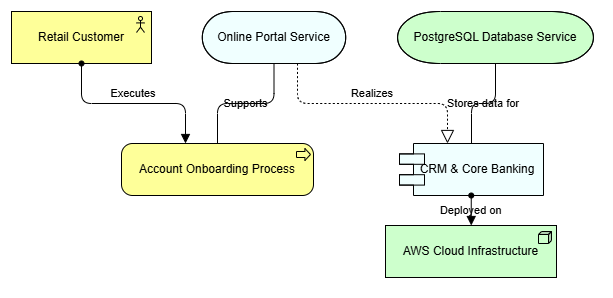
Example 1: Multi-Layer Enterprise Architecture View
This example demonstrates an end-to-end flow from a Business Actor down to the underlying Technology Infrastructure.
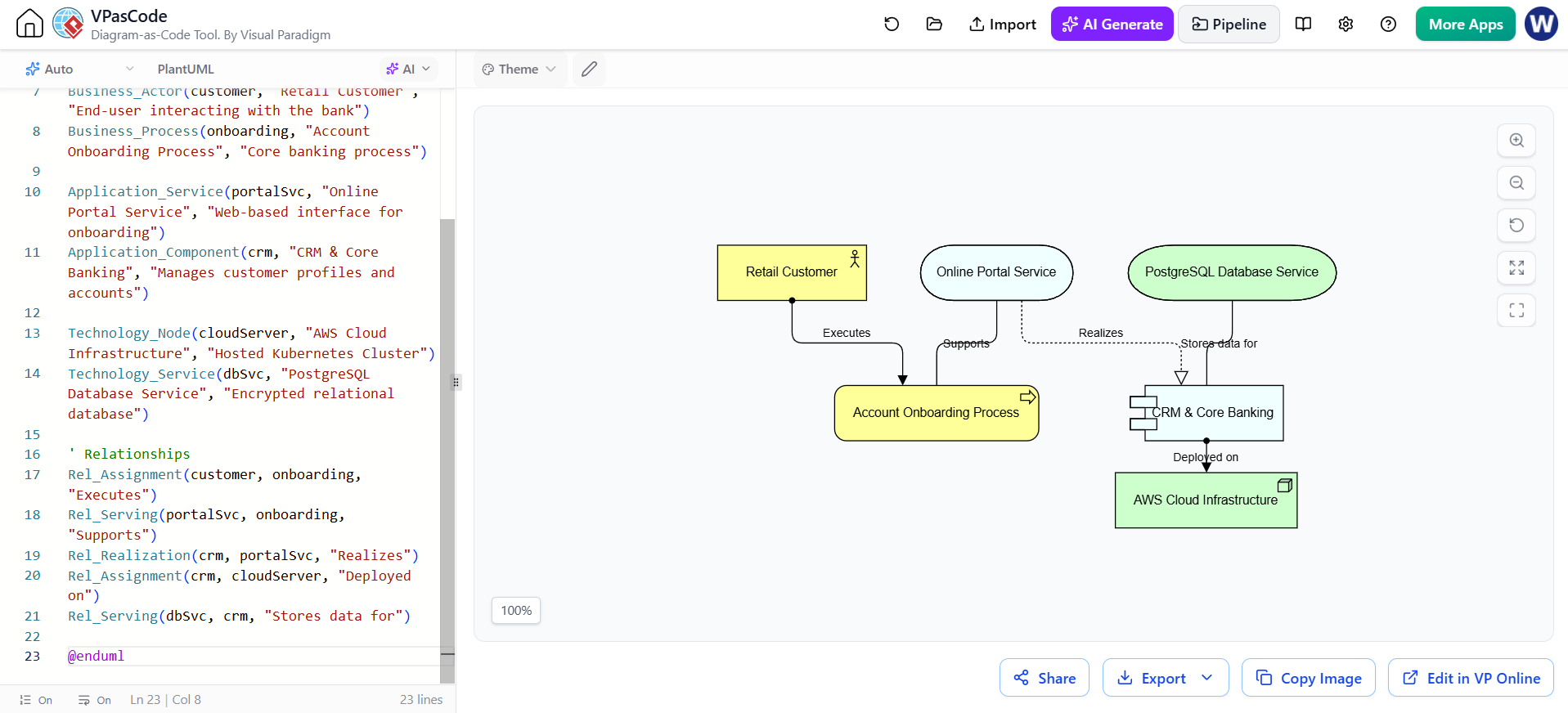
@startuml
!include <archimate/Archimate>

title Customer Onboarding - Enterprise Architecture View

' Elements definition by layer
Business_Actor(customer, "Retail Customer", "End-user interacting with the bank")
Business_Process(onboarding, "Account Onboarding Process", "Core banking process")

Application_Service(portalSvc, "Online Portal Service", "Web-based interface for onboarding")
Application_Component(crm, "CRM & Core Banking", "Manages customer profiles and accounts")

Technology_Node(cloudServer, "AWS Cloud Infrastructure", "Hosted Kubernetes Cluster")
Technology_Service(dbSvc, "PostgreSQL Database Service", "Encrypted relational database")

' Relationships
Rel_Assignment(customer, onboarding, "Executes")
Rel_Serving(portalSvc, onboarding, "Supports")
Rel_Realization(crm, portalSvc, "Realizes")
Rel_Assignment(crm, cloudServer, "Deployed on")
Rel_Serving(dbSvc, crm, "Stores data for")

@enduml
Example 2: Application Integration & Microservices View
This view focuses on application-level interactions and infrastructure hosting.
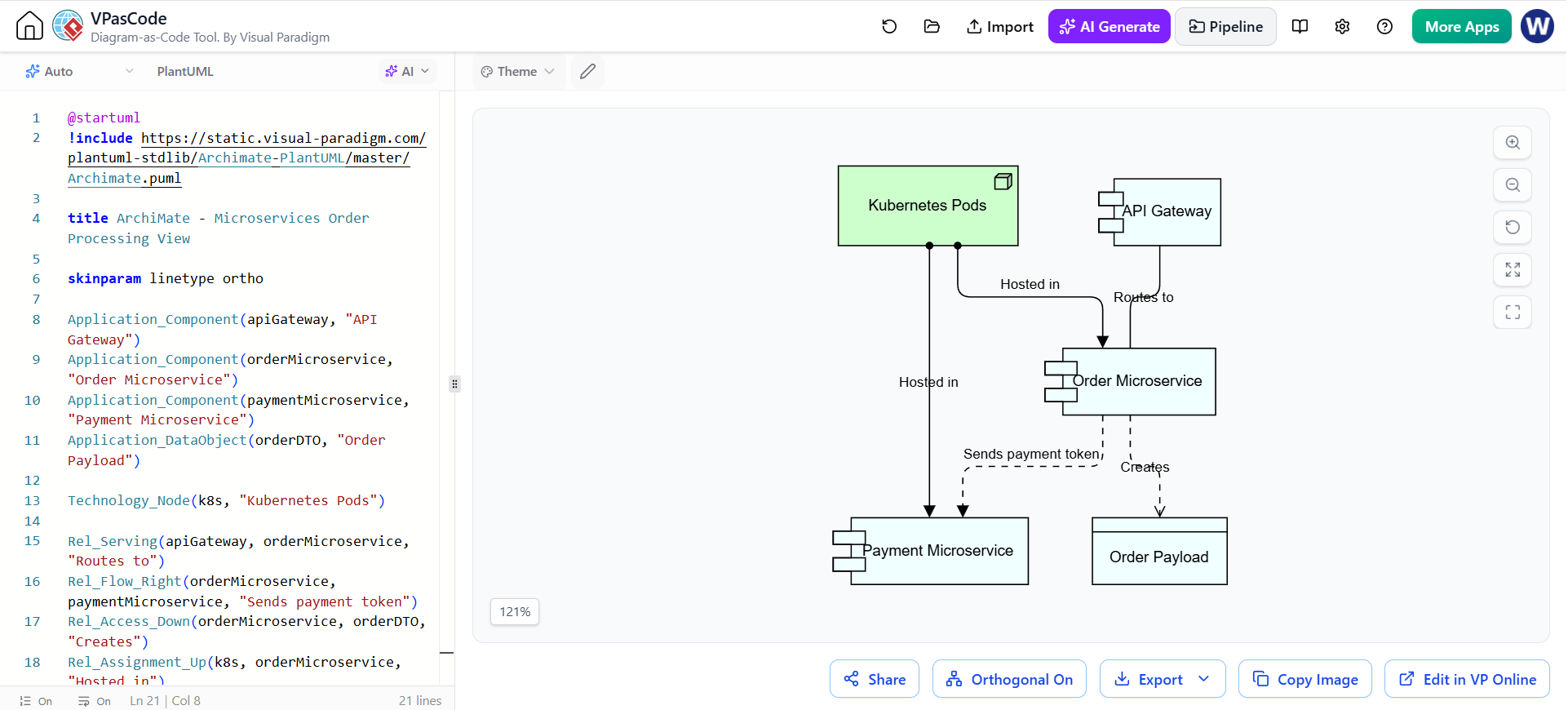
@startuml
!include <archimate/Archimate>

title Microservices Order Processing View

skinparam linetype ortho

Application_Component(apiGateway, "API Gateway", "Entry point for client requests")
Application_Component(orderMicroservice, "Order Microservice", "Handles order creation and validation")
Application_Component(paymentMicroservice, "Payment Microservice", "Processes credit card transactions")
Application_Data(orderDTO, "Order Payload", "JSON data structure")

Technology_Node(k8s, "Kubernetes Pods", "Container runtime")

Rel_Serving(apiGateway, orderMicroservice, "Routes to")
Rel_Flow(orderMicroservice, paymentMicroservice, "Sends payment token", "HTTPS/JSON")
Rel_Assignment(orderMicroservice, k8s, "Hosted in")
Rel_Assignment(paymentMicroservice, k8s, "Hosted in")

@enduml
Part 4: Tooling Ecosystem — Visual Paradigm (VPasCode) & Embedded AI
While PlantUML can be used in any text editor, modern modeling environments like Visual Paradigm have integrated these capabilities into professional enterprise architecture toolsets through VPasCode.
Visual Paradigm & VPasCode Integration
-
Seamless Switching: VPasCode allows architects to switch instantly between visual drag-and-drop representations and PlantUML/ArchiMate code views. Changes in one view reflect immediately in the other.
-
Professional Repository Management: Unlike standalone text editors, Visual Paradigm manages these code-based diagrams within a robust EA repository, enabling governance, reuse, and impact analysis.
Embedded AI Diagram Generation & AI Chatbots
Visual Paradigm’s embedded AI features radically streamline model creation by bypassing manual boilerplate coding.
-
Natural Language to Diagram:
-
Prompt: “Create an ArchiMate model showing how our mobile app connects to AWS via an API gateway to process payments.”
-
Result: The AI instantly generates valid
Archimate-PlantUMLcode, complete with correct layers and relationships.
-
-
Context-Aware Refinement:
-
Prompt: “Add a Redis cache layer between the API gateway and the database.”
-
Result: The AI updates the existing code snippet, inserting the new technology node and adjusting relationships accordingly.
-
-
Automated Documentation & Explanations:
-
The AI can inspect existing diagrams and automatically generate Architecture Decision Records (ADRs), compliance reviews, or dependency analyses, ensuring documentation stays synchronized with the model.
-
Part 5: How AI Changes the Process (Why It Is Extremely Agile & Popular)
The fusion of Diagram-as-Code, ArchiMate, and Generative AI has transformed enterprise architecture from a slow-moving documentation exercise into an agile, real-time engineering asset.
1. Massive Reduction in Cognitive & Syntax Load
-
Before: Architects spent hours looking up PlantUML macro documentation, syntax rules, or manual box-alignment coordinates.
-
Now: Natural language prompts generate syntactic structures instantly, letting architects focus purely on architectural logic and business value.
2. True Agility & Real-Time Iteration
-
Enterprise architecture workshops can now occur in real-time. As business stakeholders debate capabilities or application dependencies during a live meeting, an architect or AI assistant can update the text model on the fly, rendering an updated diagram instantly.
3. Seamless Version Control & CI/CD Pipelines
-
Because diagrams are stored as simple text files, they live happily inside Git repositories alongside source code. Pull requests can include architectural changes, making architecture review a natural part of code review pipelines.
4. Elimination of Diagram Drift
-
Traditional architecture repositories grow stale because updating proprietary binary files is tedious. With code-based diagrams and AI auto-generation from code/swagger definitions, documentation stays synchronized with actual implementation reality.
Conclusion
The traditional approach to Enterprise Architecture—characterized by static diagrams and manual updates—is no longer compatible with the speed of modern software delivery. By adopting ArchiMate for standardized modeling, Diagram-as-Code for version-controlled agility, and Generative AI for rapid creation, organizations can unlock a new level of architectural responsiveness.
Tools like Visual Paradigm’s VPasCode bridge the gap between rigorous EA governance and developer-friendly workflows. As AI continues to evolve, the role of the enterprise architect will shift from “diagram drawer” to “strategic validator,” ensuring that the rapidly generated models align with business goals and technical constraints. The future of EA is not just documented—it is coded, versioned, and intelligently automated.