


Enterprise architecture is complex. It involves aligning business strategy with technology, ensuring systems work together, and managing change effectively. Without a common language, teams struggle to communicate across departments. This is where ArchiMate comes in. It serves as a standard language for describing, analyzing, and visualizing business and IT architecture. This guide breaks down the core concepts into manageable parts, helping you understand how to model your organization without getting lost in jargon. 🚀
1. Understanding the Core Purpose 🎯
ArchiMate is an open and independent modeling language for enterprise architecture. It is not tied to a specific software vendor or tool. Instead, it focuses on the principles of structure and behavior. The primary goal is to create a unified view of the enterprise. This view bridges the gap between business managers and IT professionals. When everyone speaks the same visual language, misunderstandings decrease.
Think of ArchiMate as a blueprint for your organization. Just as an architect uses blueprints to plan a building, architects use ArchiMate to plan the digital landscape. It helps in identifying dependencies. It clarifies how a change in one area affects another. This clarity is essential for digital transformation initiatives.
Key Benefits of Using ArchiMate
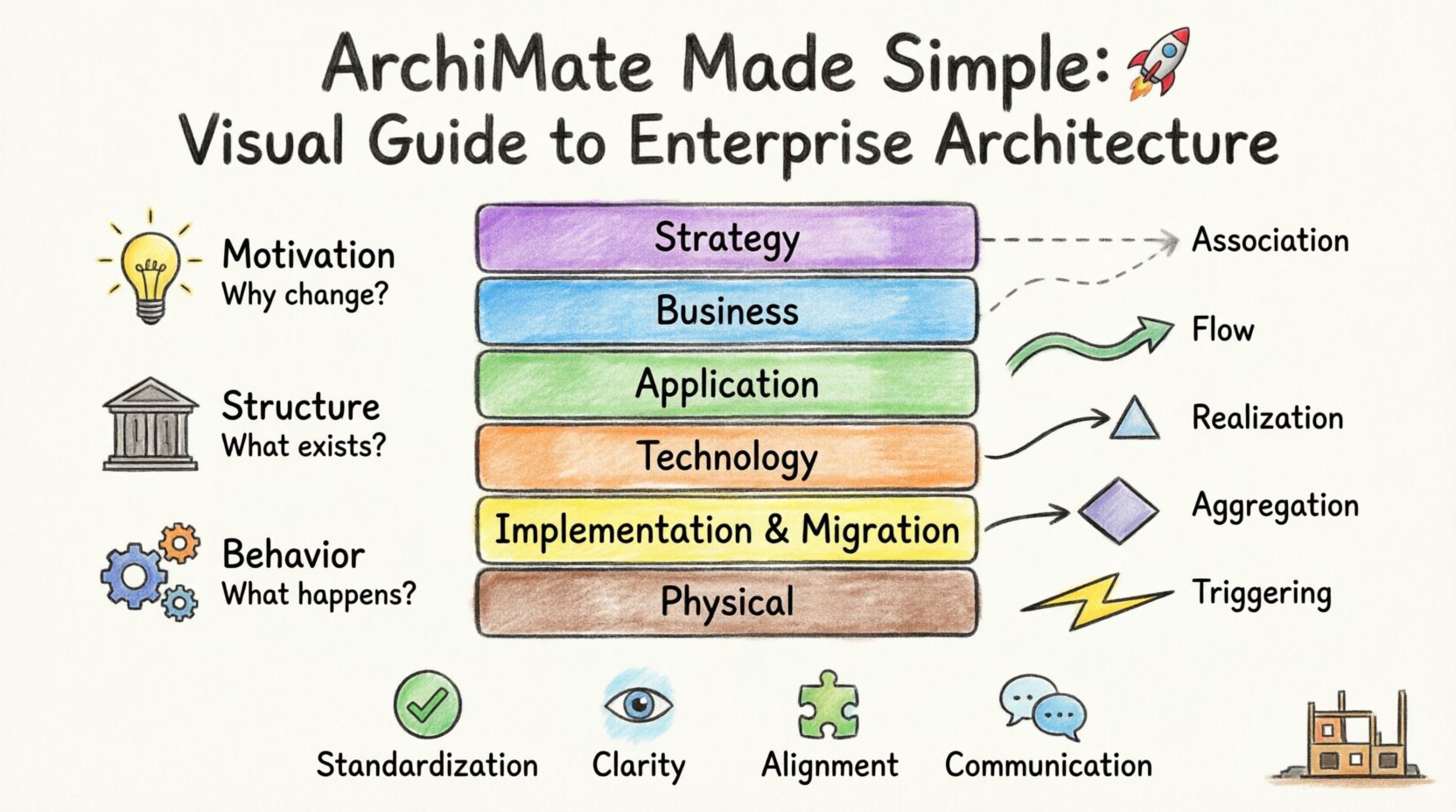
- Standardization: Provides a common vocabulary for stakeholders.
- Clarity: Visualizes complex relationships between business and technology.
- Alignment: Ensures IT investments support business goals.
- Communication: Facilitates discussions between technical and non-technical teams.
2. The Three Viewpoints of Enterprise Architecture 🧩
To make sense of a large organization, ArchiMate divides the model into three distinct viewpoints. These viewpoints ensure that different audiences can focus on what matters to them. They prevent information overload by filtering details based on the specific question being asked.
2.1 The Motivation Viewpoint 🧠
This viewpoint deals with why changes are happening. It captures the drivers, goals, and principles behind a project. It answers questions like “Why are we doing this?” and “What value does it bring?”
- Drivers: External or internal forces pushing for change (e.g., new regulations).
- Goals: Desired outcomes the organization wants to achieve.
- Principles: Rules that guide decision-making.
2.2 The Structure Viewpoint 🏛️
This viewpoint focuses on what exists in the enterprise. It describes the static elements. It maps out the organization’s structure, business processes, applications, and infrastructure. It answers questions like “What do we have?” and “How are things connected?”
- Business Objects: Entities like customers, products, or orders.
- Applications: Software systems and functions.
- Technology: Hardware and network infrastructure.
2.3 The Behavior Viewpoint ⚙️
This viewpoint describes how the enterprise operates. It focuses on processes and activities. It shows the flow of information and the execution of tasks. It answers questions like “How does work get done?” and “What triggers an action?”
- Processes: A sequence of activities.
- Functions: Capabilities of a system or role.
- Events: Triggers that start a process.
3. The Six Layers Explained in Detail 🏛️
One of the most powerful features of ArchiMate is its layered structure. This structure allows you to model different aspects of the enterprise separately. It prevents mixing concerns. Each layer has specific elements and relationships. Understanding these layers is crucial for accurate modeling.
3.1 Strategy Layer
This is the top layer. It represents the high-level drivers and goals. It is where the vision lives. Elements here include business goals, principles, and requirements. This layer guides the rest of the architecture. If the strategy changes, the layers below must adapt.
3.2 Business Layer
This layer describes how the organization operates. It includes business processes, roles, and actors. It shows how value is delivered to the customer. It is the core of the business operations, independent of the technology used to support it.
- Business Process: A structured set of activities.
- Business Role: A person or group performing a function.
- Business Service: A value delivered to a stakeholder.
3.3 Application Layer
This layer focuses on the software applications. It describes the functions provided by the software. It shows how applications support the business layer. It is where data is processed and logic is executed.
- Application Component: A part of a software system.
- Application Function: A function provided by a component.
- Application Service: A service exposed by an application.
3.4 Technology Layer
This layer represents the physical hardware and software. It includes servers, networks, and databases. It is the foundation upon which the application layer runs. It ensures the necessary computing power and storage are available.
- Node: A physical or logical computing device.
- Device: A specific hardware unit like a server.
- Network: The communication infrastructure.
3.5 Implementation & Migration Layer
This layer deals with projects and work. It describes how to move from the current state to the future state. It includes work packages, projects, and capabilities. It bridges the gap between planning and execution.
3.6 Physical Layer
This layer describes the actual physical location and environment. It includes buildings, rooms, and geographical locations. It is often used for asset management and logistics planning.
4. A Comparison of the Layers 📊
Understanding the distinction between layers helps in organizing your model. The table below summarizes the focus and key elements of each layer.
| Layer | Focus | Key Element Example |
|---|---|---|
| Strategy | Goals & Drivers | Business Goal |
| Business | Operations & Value | Business Process |
| Application | Software Logic | Application Function |
| Technology | Hardware & Network | Server Node |
| Implementation | Change Management | Work Package |
| Physical | Location & Assets | Building |
5. Connecting the Dots: Relationships 🔗
Elements do not exist in isolation. Relationships define how elements interact. Without relationships, the model is just a list of parts. Relationships provide context. They show the flow of data, the execution of tasks, and the support structures.
5.1 Association Relationships
An association represents a general link between two elements. It does not imply a specific flow. It is used for structural connections. For example, a Business Role might be associated with a Business Process. This means the role participates in the process.
5.2 Flow Relationships
Flow indicates the movement of data or objects. It connects behavior elements. A process might flow into another process. An application function might flow data to a database. This helps visualize the lifecycle of information.
5.3 Realization Relationships
Realization shows how one element implements another. It is a “how it is built” relationship. For example, a Business Process is realized by a Business Function. An Application Function is realized by an Application Component. This shows the mapping from abstract to concrete.
5.4 Aggregation Relationships
Aggregation indicates a whole-part relationship. It shows that one element is composed of others. A Business Process might be composed of sub-processes. A System might be composed of components. This helps in breaking down complexity.
5.5 Triggering Relationships
Triggering shows causality. One event triggers another. An event might trigger a process. A process might trigger another process. This is critical for understanding event-driven architectures.
6. Practical Modeling Guidelines ✅
Building a model requires discipline. It is easy to create cluttered diagrams that confuse rather than clarify. Follow these guidelines to maintain quality.
6.1 Keep It Focused
Do not try to model the entire enterprise in one diagram. Break it down into views. A view addresses a specific question. Focus on one layer or one viewpoint at a time. This keeps the diagram readable.
6.2 Use Consistent Naming
Names matter. Use clear, descriptive names for every element. Avoid acronyms unless they are universally understood. Consistency helps stakeholders understand the model quickly.
6.3 Validate with Stakeholders
Models are not created in a vacuum. Review them with the people who use the systems. Ask business managers if the business processes are accurate. Ask IT staff if the technical architecture matches reality.
6.4 Maintain Version Control
Architecture changes over time. Keep track of changes. Document why a change was made. This creates an audit trail. It helps in understanding the evolution of the organization.
6.5 Balance Detail and Abstraction
Too much detail makes the model hard to read. Too little detail makes it useless. Find the right level. For strategic planning, high-level views are best. For implementation, detailed views are necessary.
7. Common Use Cases 📈
ArchiMate is versatile. It can be applied to many scenarios within an organization. Here are some common situations where it adds value.
7.1 Digital Transformation
When moving to the cloud or adopting new technologies, ArchiMate helps map the current state to the future state. It identifies gaps and dependencies. It ensures that the new technology supports the business goals.
7.2 Mergers and Acquisitions
When companies combine, their architectures must merge. ArchiMate helps visualize the integration points. It identifies conflicting systems or redundant processes. It aids in planning the consolidation.
7.3 Regulatory Compliance
Many industries require strict reporting. ArchiMate can model the controls and processes needed for compliance. It links regulations to the specific business processes that satisfy them.
7.4 IT Infrastructure Planning
Planning hardware upgrades or network changes requires understanding dependencies. ArchiMate maps the technology layer. It shows how an upgrade affects applications and business services.
8. Tips for Effective Communication 🗣️
Even the best model fails if people cannot understand it. Communication is key to success.
- Use Color Coding: Use colors to distinguish layers or viewpoints. This helps visual scanning.
- Limit Connections: Avoid crossing lines. Use group boxes to separate concerns.
- Provide Context: Always include a legend. Explain what the symbols mean.
- Keep it Updated: An outdated model is worse than no model. Ensure it reflects the current state.
- Focus on Value: Highlight the value delivered by each component. Explain why it exists.
9. Overcoming Common Challenges ⚠️
Adopting a modeling language can face resistance. Here is how to handle common obstacles.
Challenge: Complexity
Some find ArchiMate too complex. Solution: Start small. Model a single process first. Once comfortable, expand to layers. Do not try to learn everything at once.
Challenge: Lack of Tools
People might worry about software costs. Solution: Remember ArchiMate is a standard. It can be used with many different tools or even pen and paper initially. The standard is free to use.
Challenge: Skepticism
Stakeholders may question the value. Solution: Show concrete examples. Demonstrate how it solved a specific problem. Prove the return on investment through better decision-making.
10. Summary of Key Elements 📝
To wrap up, here is a quick recap of the most important concepts to remember when working with this language.
- Layers: Strategy, Business, Application, Technology, Implementation, Physical.
- Viewpoints: Motivation, Structure, Behavior.
- Relationships: Association, Flow, Realization, Aggregation, Triggering.
- Goal: Align IT with Business Strategy.
- Outcome: Clear, shared understanding of the enterprise.
Mastering this approach takes time. It requires patience and practice. However, the clarity it brings to organizational architecture is unmatched. By using a structured method, you reduce risk and increase the speed of delivery. Your organization will be better prepared for change.
Start by mapping a small part of your organization. Identify the key business processes and the applications that support them. Connect them using the relationships defined above. As you grow, the model will grow with you. This is how you build a resilient architecture for the future. 🏗️✨
This post is also available in Deutsch, Español, فارسی, Français, English, Bahasa Indonesia, 日本語, Polski, Portuguese, Ру́сский, Việt Nam, 简体中文 and 繁體中文.