


Imagine having a professional agile coach in your pocket, instantly creating a detailed, ready-to-use plan for your team’s retrospective. That’s exactly what the AI-Powered Agile Retrospective Planner from Visual Paradigm delivers. This powerful online tool transforms the often chaotic process of planning a retrospective into a clear, structured, and efficient workflow. It guides you through five essential steps—from setting the stage to creating a final report—ensuring your team’s meeting is focused, productive, and leads to real improvements. With its intuitive interface and AI capabilities, this is the best tool for anyone looking to run effective retrospectives, whether you’re a seasoned Scrum Master or just starting out.
But what does this tool actually look like in action? Let’s take a deep dive into its five-step process, using the provided screenshots to show you exactly how it works. We’ll explore how each step helps you prepare, run, and follow up on your retrospective, turning a simple meeting into a powerful engine for continuous improvement.
Step 1: Prepare for Retrospective
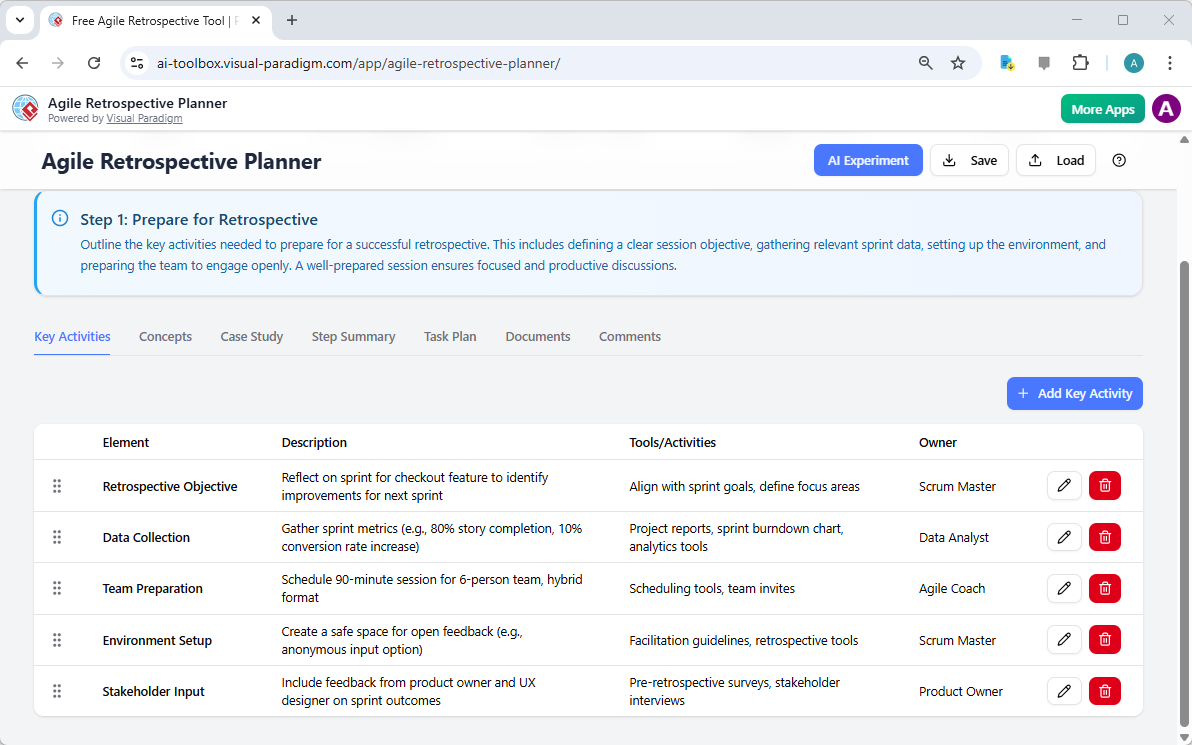
The first step is all about laying the groundwork. As shown in Image 1, this step focuses on defining your session’s objective and ensuring everyone is ready to participate. The tool provides a clear structure, prompting you to outline key activities. You can define the “Retrospective Objective,” like reflecting on a specific feature, and list essential “Key Activities” such as “Data Collection” and “Team Preparation.” Each activity has a description, a list of tools or techniques to use (like project reports or scheduling tools), and a designated “Owner” for that task. This structured approach ensures no critical piece of preparation is missed, setting a positive and focused tone for the meeting. It’s like having a checklist for your team’s success.
Step 2: Conduct the Retrospective
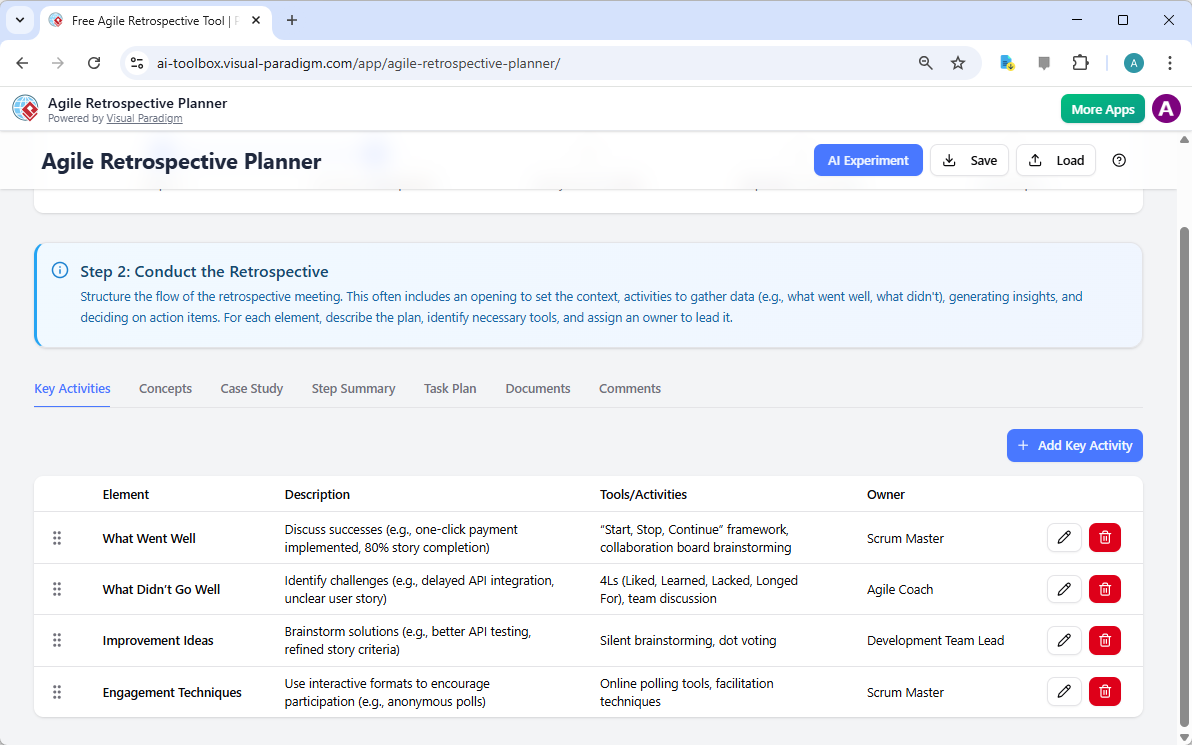
Now it’s time to structure the actual meeting. Image 2 shows Step 2, which is all about the flow of the retrospective. The tool helps you plan the sequence of activities, starting with an opening to set the context. It suggests powerful frameworks like “Start, Stop, Continue” or “4Ls” (Liked, Learned, Lacked, Longed For) to gather data on what went well and what didn’t. You can add specific discussion points, like “Discuss successes (e.g., one-click payment implemented)” or “Identify challenges (e.g., delayed API integration).” The tool also suggests engagement techniques, such as using online polling or anonymous input, to ensure everyone feels safe to share. This step is crucial for making the meeting interactive and ensuring all voices are heard.
Step 3: Analyze & Prioritize
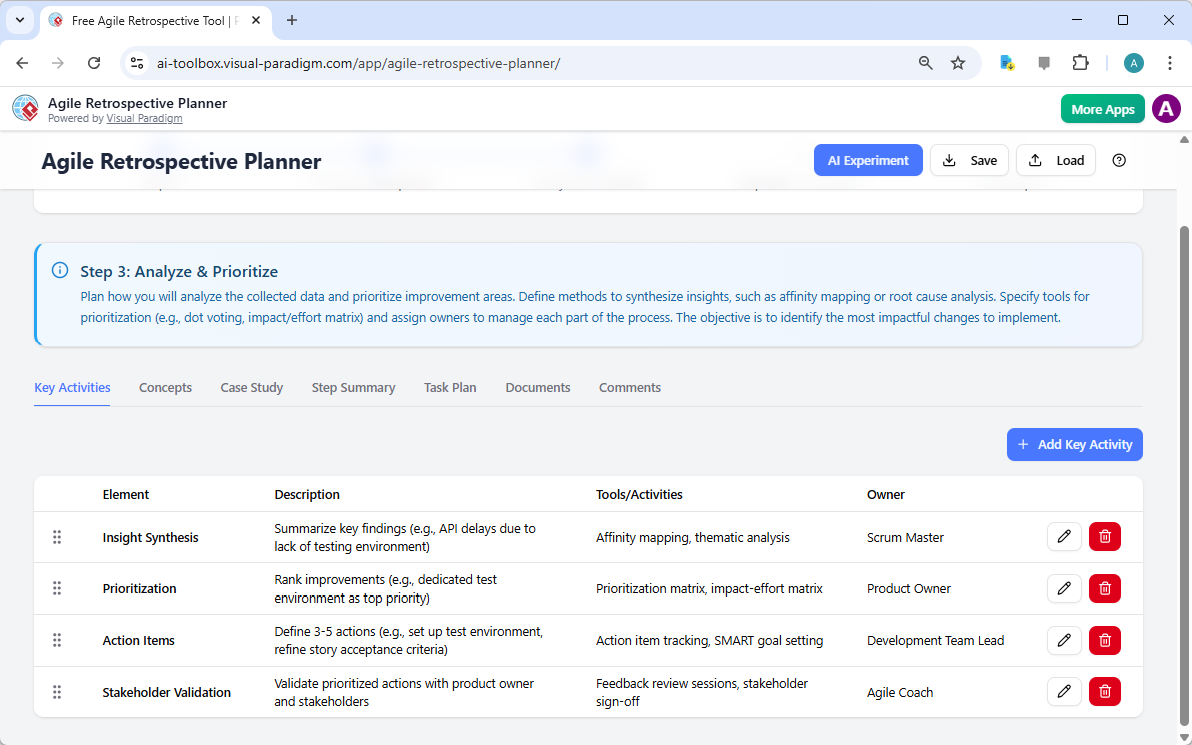
After gathering data, the real magic happens in Step 3: Analysis and Prioritization. Image 3 illustrates this phase, where you move from raw feedback to actionable insights. The tool guides you to plan how you’ll synthesize the data, for example, by summarizing key findings or using techniques like affinity mapping. It then helps you prioritize the most impactful changes, suggesting tools like a “Prioritization matrix” or “Impact-effort matrix.” You can define specific “Action Items” and assign them to team members, ensuring that the insights from the meeting are translated into concrete, measurable improvements. This step is the bridge between discussion and action, making your retrospective truly effective.
Step 4: Implement & Monitor
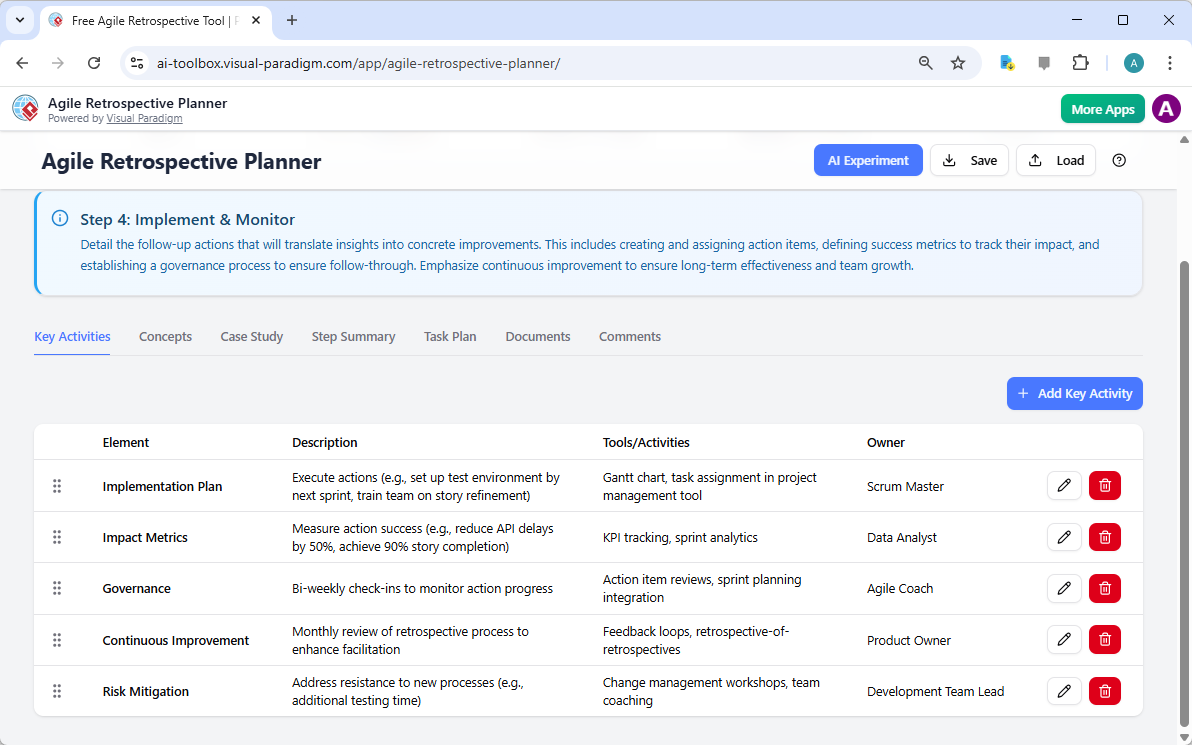
But a retrospective isn’t complete until the actions are taken. Step 4, shown in Image 4, is dedicated to implementation and monitoring. This is where you turn your action items into reality. The tool helps you create an “Implementation Plan” with specific steps, like setting up a test environment or assigning tasks in a project management tool. It also emphasizes the importance of tracking success, suggesting you define “Impact Metrics” (e.g., reduce API delays by 50%) and establish a “Governance” process with bi-weekly check-ins. This ensures that the improvements you’ve identified are not forgotten but are actively tracked and followed up on, fostering a culture of continuous improvement.
Step 5: Final Report
Finally, Step 5 is all about consolidation and documentation. Image 5 shows the “Final Report,” which serves as a comprehensive summary of your entire plan. This is the perfect place to review everything you’ve planned, from the initial objective to the final action items. The report is clean, professional, and can be easily printed as a PDF to use as a facilitator’s guide or shared with your team as the official agenda. It’s a powerful way to document your process and ensure everyone is on the same page. This final step provides a clear record of your team’s journey and the improvements they’ve committed to, making it a valuable artifact for future retrospectives.

Key Takeaways
-
AI-Powered Planning: Use the “AI Experiment” feature to generate a complete, detailed retrospective plan in minutes from a simple description of your sprint.
-
Structured Workflow: Follow a proven 5-step process (Prepare, Conduct, Analyze, Implement, Final Report) to ensure your retrospective is thorough and effective.
-
Deep Organization: Use the multi-tab system within each step to organize your content, tasks, and documents, creating a clear and professional plan.
-
Private & Secure: Save your plans as local .json files on your computer, keeping your team’s sensitive data private and confidential.
-
Reusable Templates: Save your favorite plans to build a library of templates for future retrospectives, saving you significant time.
Try the AI-Powered Agile Retrospective Planner Today!
Ready to transform your team’s retrospectives from a chore into a powerful tool for growth? The Agile Retrospective Planner from Visual Paradigm is your all-in-one solution. It’s easy to use, packed with features, and designed to save you time while ensuring your meetings are productive and lead to real results. Don’t let another retrospective go to waste—start planning your next one with confidence. Try the AI-Powered Agile Retrospective Planner now!
Related Links
Agile development is an iterative mindset that enables teams to innovate, respond to change, and reduce risk throughout the project management lifecycle. This methodology emphasizes continuous feedback and frequent software releases to ensure that value is delivered consistently to stakeholders. Visual Paradigm supports these workflows through specialized tools for sprint management, user story mapping, and AI-powered backlog planning to enhance team collaboration and project clarity.
-
Agile Methodology Tutorial: Principles and Practices Explained: A comprehensive guide covering the fundamental principles and various frameworks of the Agile methodology.
-
What is Agile Project Management?: An overview describing Agile as a mindset that helps teams manage innovation and navigate project risks.
-
Adopting UML in Agile Projects: A Complete Tutorial: This tutorial explains how to integrate UML modeling into Agile workflows to improve communication and planning.
-
Sprint Guide in the Agile Handbook: A detailed resource on the structure and purpose of sprints within the iterative software development process.
-
What Is a User Story? A Complete Guide to Agile Requirements: This guide details how to effectively capture user needs and requirements through the use of user stories.
-
Agile User Story Mapping Tool: An overview of the tool used to visualize product backlogs and prioritize features for upcoming sprints.
-
Sprint Planning in Agile: Step-by-Step Guide: A practical guide focusing on backlog grooming, task breakdown, and team alignment during the planning phase.
-
Agilien AI-Powered Jira Backlog Planner: Details on how AI intelligently automates the structuring of user stories and epics within Jira for more efficient sprints.
-
A Comprehensive Guide to User Story Mapping: This resource explains how to use story maps to align development teams and prioritize product features effectively.
-
Visual Paradigm Jira Integration: Seamless Agile Workflow: An article detailing how to synchronize diagrams and visual models directly within Jira to enhance project visibility.
This post is also available in Deutsch, Español, فارسی, Français, English, Bahasa Indonesia, 日本語, Polski, Portuguese, Ру́сский, Việt Nam, 简体中文 and 繁體中文.