Introduction
The landscape of software architecture and business process modeling is undergoing a significant transformation. For decades, creating diagrams meant manually dragging shapes, aligning connectors, and ensuring syntactic correctness—a tedious process that often distracted from the core logic and design thinking. Enter Visual Paradigm’s AI Chatbot, a conversational, text-driven ecosystem that promises to bridge the gap between natural language ideas and structured visual models.
With recent updates in Visual Paradigm 18.1 and the introduction of the AI VPP Chatbot, the tool has evolved beyond simple diagram generation into a deep conversational analysis engine for project files. This guide explores how this AI-powered ecosystem redefines visual modeling, offering instant text-to-diagram generation, conversational refactoring, and integrated quality review. We will examine key concepts, provide practical PlantUML examples, and compare specialized AI tools against general Large Language Models (LLMs) to help product managers, architects, and developers leverage this technology effectively.
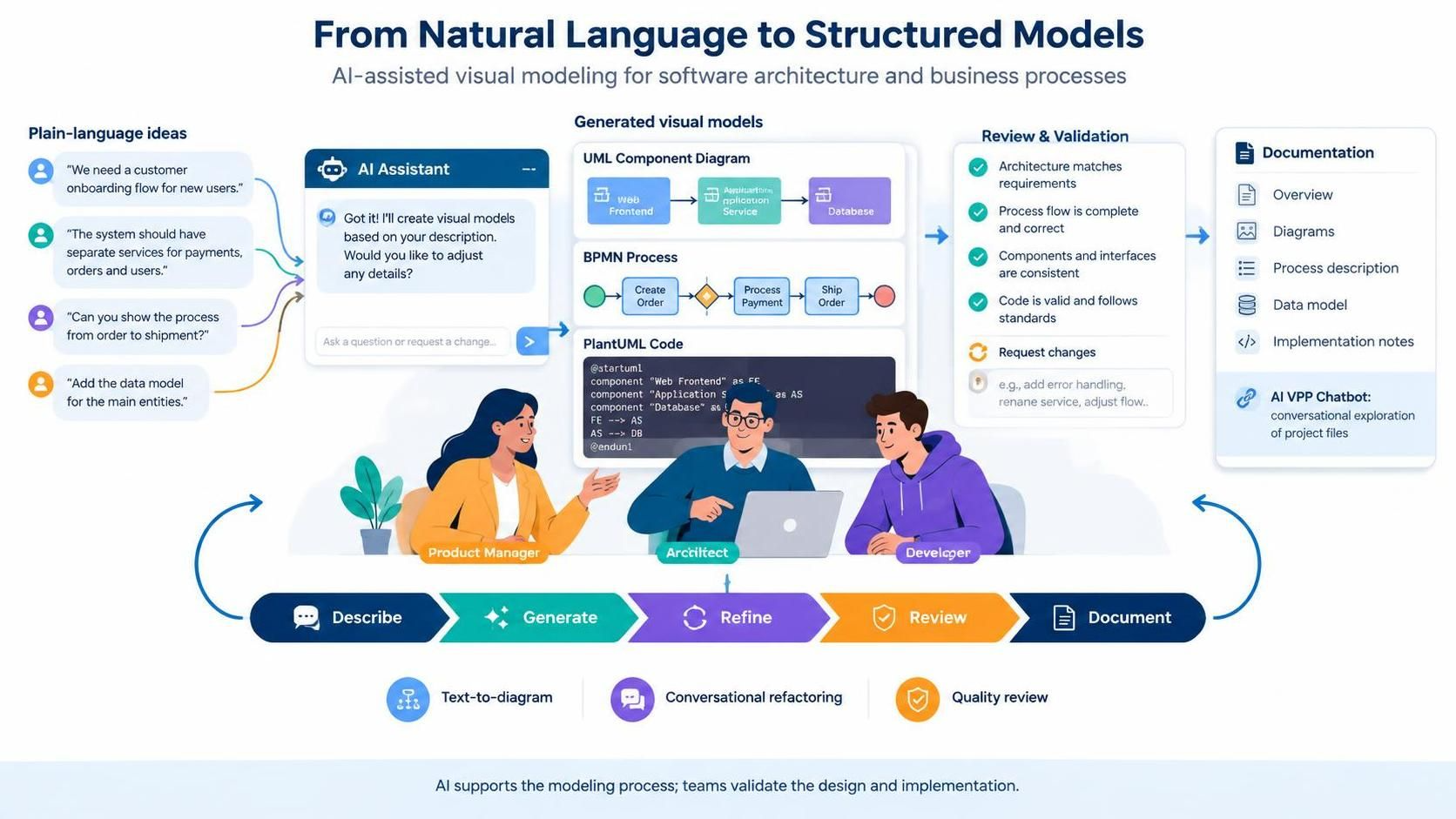
Key Concepts in AI-Driven Visual Modeling
1. Instant Text-to-Diagram Generation
The core promise of the AI Chatbot is the ability to describe systems, processes, or requirements in plain language and receive syntactically correct diagrams automatically. This eliminates the manual drag-and-drop burden, allowing users to focus on the “what” rather than the “how” of drawing. Whether it’s a UML class diagram, a BPMN process flow, or an ArchiMate enterprise architecture view, the AI interprets context and structure to generate accurate visuals.
2. Conversational Refactoring & Editing
Models are rarely static. The AI Chatbot supports iterative development through natural language commands. Users can request modifications such as “Add an alternative path for book damage,” “Rename Customer to User,” or even “Translate diagram content to Simplified Chinese.” The system’s cascading intelligence ensures that changes propagate correctly—renaming a class updates related attributes, methods, and references across the entire canvas, maintaining model integrity.
3. Deep Project Analysis with AI VPP Chatbot
Introduced in Visual Paradigm 18.1, the AI VPP Chatbot goes beyond surface-level diagramming. It provides deep conversational analysis for existing project files (.vpp). Users can extract insights, query complex architecture models, and manage business process designs directly from their project data. This turns the chatbot into a knowledgeable assistant that understands the specific context of your organization’s models.
4. Quality Review & Validation
Beyond creation, the AI acts as a quality assurance partner. It can review flowcharts and architectural models to evaluate overall quality, identify missing steps (such as security checks or edge case handling), and suggest refinements. This proactive validation helps teams avoid common pitfalls early in the design phase.
5. Documentation & Knowledge Base Generation
The ecosystem extends beyond visuals to generate structured documentation, technical explanations, and summaries from visual models. This ensures that diagrams remain living documents, synchronized with textual explanations and accessible to stakeholders who may not be familiar with modeling notations.
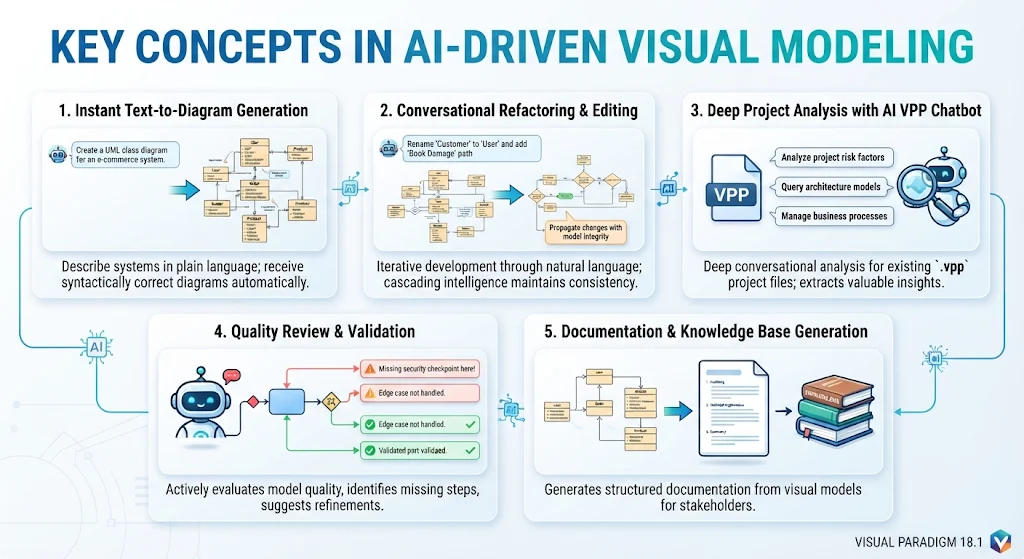
Tooling Ecosystem: Visual Paradigm BPMN + VPasCode + AI
The power of Visual Paradigm’s AI lies in its integration with a broader tooling ecosystem. It does not operate in isolation but connects seamlessly with other components to enhance productivity and control.
VPasCode Integration
VPasCode exposes PlantUML scripts, allowing for fine-grained styling and logic control. While the AI Chatbot handles the high-level structure and content, VPasCode enables developers to tweak the underlying code for precise customization. This hybrid approach combines the speed of AI with the precision of code-based modeling.
OpenDocs Pipeline
The AI Chatbot connects with the OpenDocs pipeline for living documentation. As models evolve, the associated documentation is automatically updated, ensuring that knowledge bases remain current without manual intervention.
Export and Interoperability
The ecosystem supports a wide range of export formats, including PNG, SVG, Markdown, PlantUML, Mermaid, and Graphviz. This flexibility allows teams to integrate diagrams into various workflows, from web presentations to code repositories. Diagrams can also be imported directly into Visual Paradigm Desktop and VP Online workspaces, facilitating collaboration across different environments.
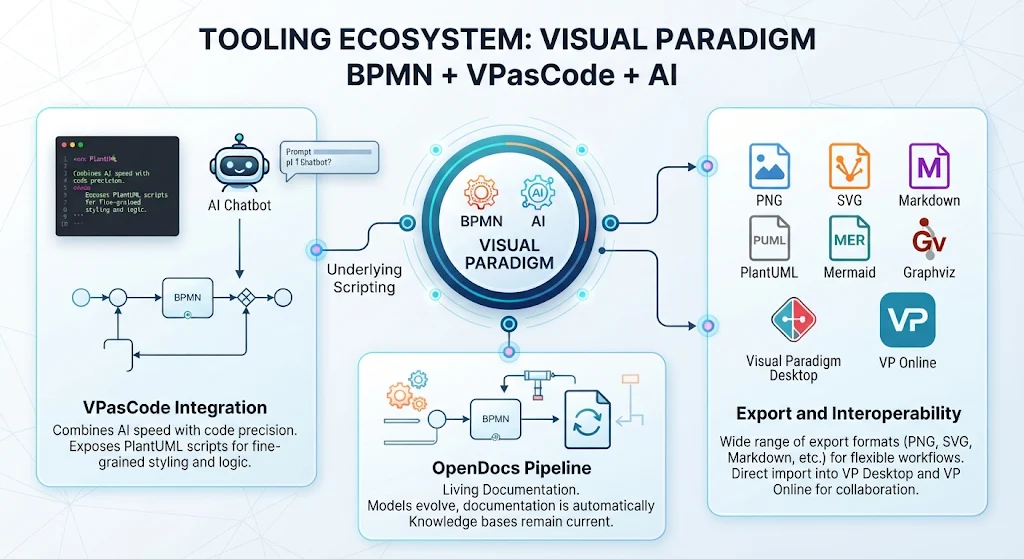
Diagram Examples Using PlantUML
To illustrate the capabilities of the AI Chatbot, here are examples of diagrams that can be generated through natural language prompts, along with their underlying PlantUML representations.
Example 1: Simple UML Class Diagram
Prompt: “Create a UML class diagram for a library system with Book, Member, and Loan classes. Book has title and ISBN. Member has name and ID. Loan connects Member and Book with date.”
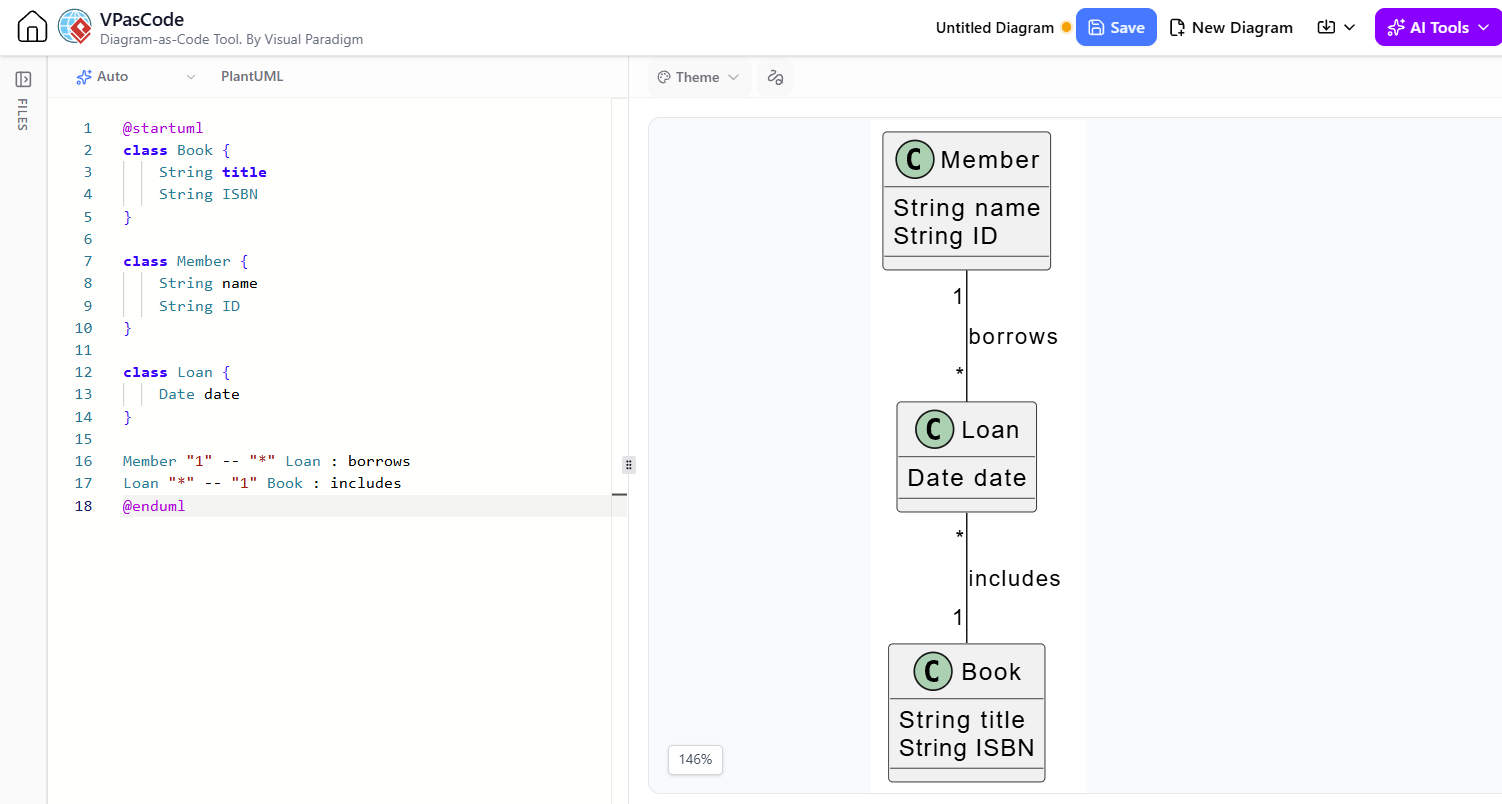
@startuml
class Book {
    String title
    String ISBN
}

class Member {
    String name
    String ID
}

class Loan {
    Date date
}

Member "1" -- "*" Loan : borrows
Loan "*" -- "1" Book : includes
@enduml
Example 2: BPMN Process Flow
Prompt: “Generate a BPMN diagram for an order processing system. Start with Order Received, then Check Inventory. If available, Proceed to Payment; if not, Notify Customer. After Payment, Ship Order and End.”
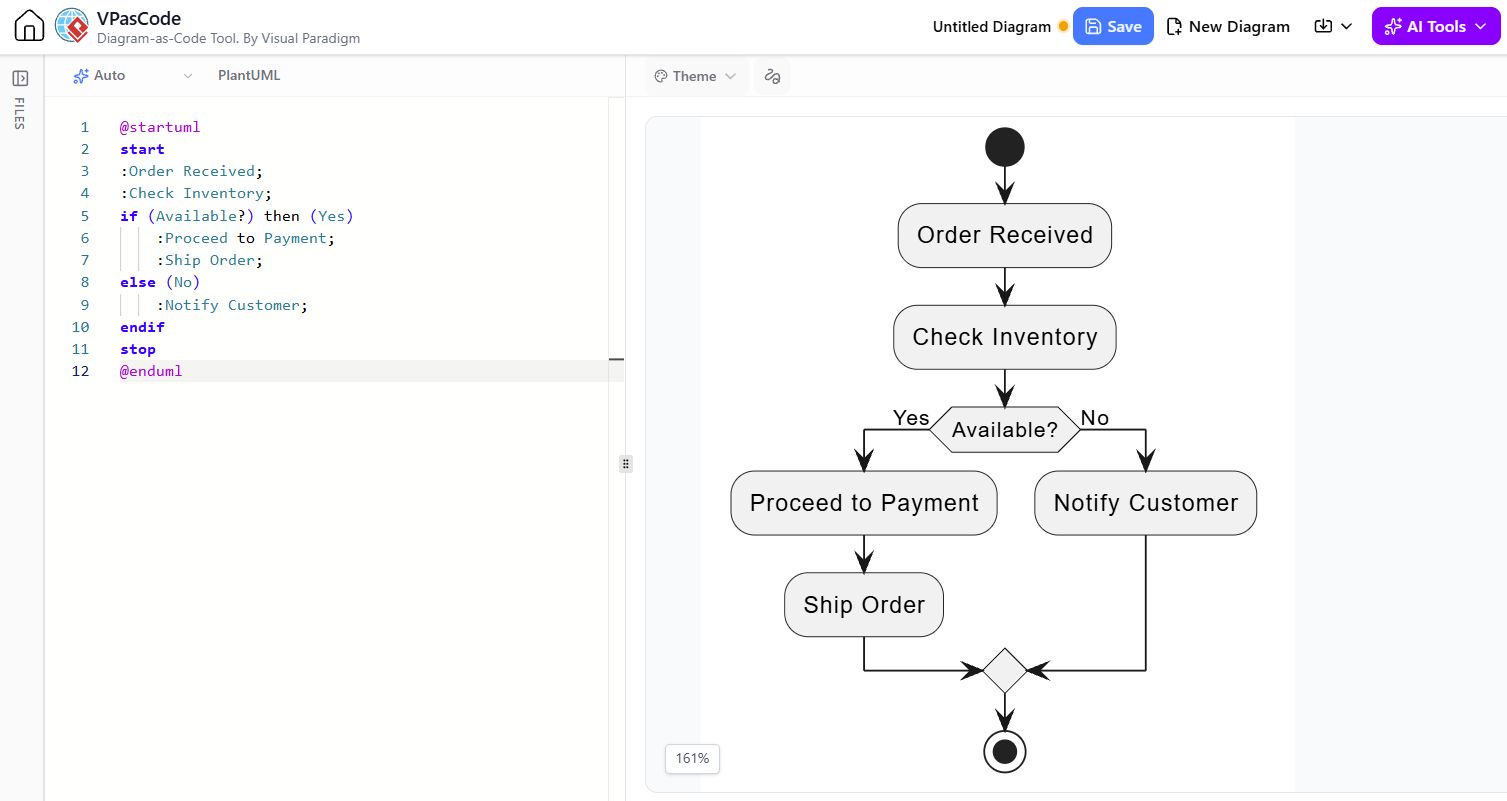
@startuml
start
:Order Received;
:Check Inventory;
if (Available?) then (Yes)
    :Proceed to Payment;
    :Ship Order;
else (No)
    :Notify Customer;
endif
stop
@enduml
Example 3: C4 Model Context Diagram
Prompt: “Create a C4 Context Diagram for a web application. Include User, Web App, Database, and External Email Service.”
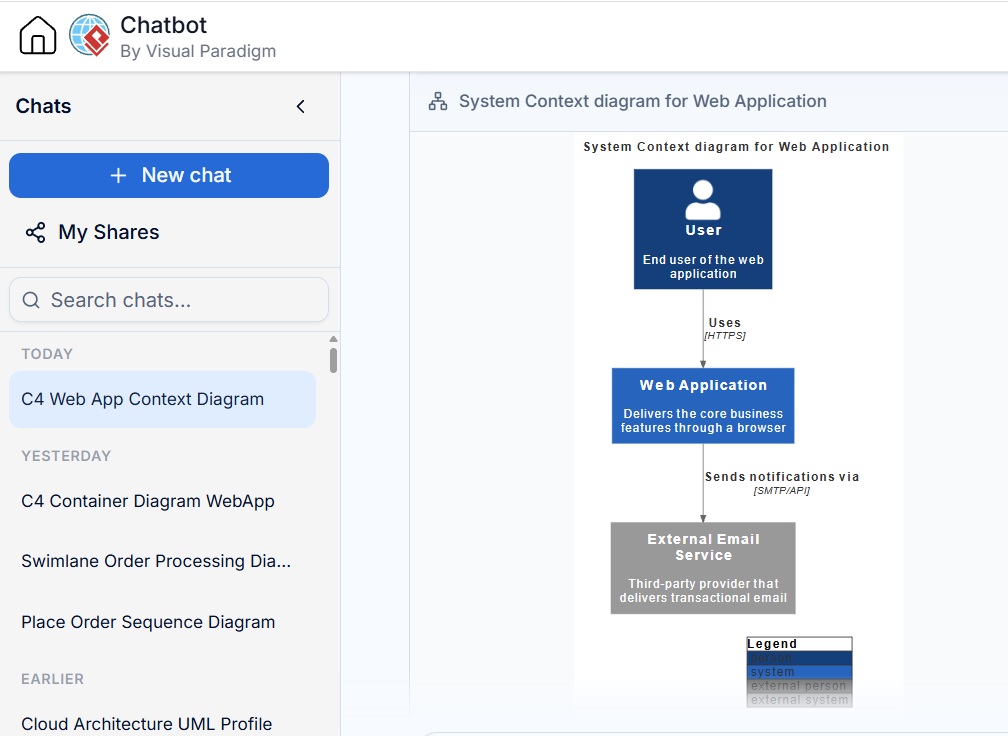
@startuml
skinparam backgroundColor white
rectangle "User" as user
rectangle "Web App" as app
rectangle "Database" as db
rectangle "External Email Service" as email

user --> app : Uses
app --> db : Reads/Writes
app --> email : Sends Notifications
@enduml
Specialized AI Chatbot vs. General LLM
When considering AI for visual modeling, it’s essential to distinguish between specialized tools like Visual Paradigm’s AI Chatbot and general-purpose LLMs.
Specialized Skills and Knowledge
Visual Paradigm’s AI is trained specifically on modeling notations (UML, BPMN, ArchiMate, etc.) and understands the semantic relationships between elements. It ensures syntactic correctness and adheres to industry standards. In contrast, general LLMs may produce visually plausible but semantically incorrect diagrams, often struggling with complex relationships or specific notation rules.
Context Awareness
The AI VPP Chatbot has deep access to project files, allowing it to understand the specific context of your architecture. It can answer questions like “What are the dependencies of this module?” or “Show me all processes involving customer authentication.” General LLMs lack this contextual awareness unless explicitly provided with extensive prompt engineering, which is often impractical for large projects.
Integrated Workflow
Visual Paradigm’s AI is embedded within a comprehensive modeling environment, enabling seamless transitions from diagram generation to editing, validation, and documentation. General LLMs require manual copying and pasting between tools, breaking the workflow and increasing the risk of errors.
Customer User Journey and Review
Onboarding and First Impressions
Users typically start by describing a simple system in natural language. The immediate generation of a correct diagram creates a “wow” moment, demonstrating the tool’s value. The intuitive chat interface lowers the barrier to entry, making modeling accessible to non-technical stakeholders.
Iterative Design
As users become comfortable, they begin using conversational refactoring to evolve their models. The ability to make changes through natural language commands significantly speeds up the design process. Users appreciate the cascading intelligence that maintains model consistency during edits.
Quality Assurance and Collaboration
Teams leverage the quality review feature to catch missing steps or potential issues early. The generated documentation facilitates communication with stakeholders who may not be familiar with modeling notations. The export options ensure that diagrams can be easily shared and integrated into other tools.
Challenges and Considerations
While powerful, users should be aware that complex diagrams may require multiple iterations to get right. Understanding the basics of the underlying notations still helps in crafting effective prompts. Additionally, while the AI is highly accurate, human review remains essential for critical architectural decisions.
Tips, Tricks, and Guidelines
-
Be Specific in Prompts: Provide clear details about entities, relationships, and constraints. Instead of “Draw a login process,” try “Create a BPMN diagram for a login process with username/password validation, two-factor authentication, and error handling for invalid credentials.”
-
Iterate Gradually: Start with a high-level overview and then refine details through conversational commands. This approach helps the AI maintain context and reduces the likelihood of errors.
-
Leverage Cascading Intelligence: When renaming or modifying elements, trust the AI to update related references. However, always review the changes to ensure they align with your intent.
-
Use Quality Review Proactively: Regularly ask the AI to review your diagrams for completeness and best practices. This can uncover missing edge cases or security considerations you might have overlooked.
-
Combine with VPasCode for Precision: For fine-grained control over styling or complex logic, use the AI to generate the initial structure and then refine it using VPasCode’s PlantUML scripts.
-
Export for Collaboration: Use the export features to share diagrams in formats suitable for your audience. Markdown and PNG are great for documentation, while PlantUML and Mermaid are ideal for developer workflows.
Conclusion
Visual Paradigm’s AI Chatbot represents a significant leap forward in visual modeling, transforming a traditionally manual and time-consuming process into a conversational and intuitive experience. By combining instant text-to-diagram generation, conversational refactoring, deep project analysis, and quality validation, it empowers teams to focus on design thinking rather than drawing mechanics.
The integration with VPasCode and OpenDocs further enhances its utility, creating a cohesive ecosystem that supports both rapid prototyping and rigorous documentation. While general LLMs offer broad capabilities, specialized tools like Visual Paradigm’s AI provide the precision, context awareness, and workflow integration necessary for professional modeling tasks.
For product managers, architects, and developers looking to streamline their design processes, improve collaboration, and ensure model quality, Visual Paradigm’s AI Chatbot is a compelling solution. As AI continues to evolve, tools that seamlessly blend natural language interaction with structured modeling will become indispensable in the modern software development lifecycle.
Recommended Reading and Resources
- Introducing AI VPP Chatbot: Conversational AI for Your Visual Paradigm Projects: Overview of the AI VPP Chatbot features and capabilities in Visual Paradigm 18.1.
- How the Visual Paradigm AI Chatbot and VPasCode Function as an Integrated Ecosystem: Detailed guide on integrating AI Chatbot with VPasCode for enhanced diagramming control.
- Visual Paradigm AI Tooling: A Step-by-Step Guide to the AI Chatbot C4 Pipeline OpenDocs Workflow: Tutorial on using AI Chatbot for C4 modeling and documentation generation.
- From Idea to Diagram in Seconds: Hands-On Review of Visual Paradigm’s AI Chatbot: Practical review and user experience insights on using the AI Chatbot for team collaboration.
- Visual Paradigm AI Chatbot Features Overview: Comprehensive list of features supported by the AI Chatbot, including supported notations and frameworks.
- Visual Paradigm AI UML Diagram Chatbot: Specific focus on UML diagram generation and editing capabilities.
- Visual Paradigm AI Chatbot Official Page: Main product page with overview, videos, and feature highlights.