
Introduction
Enterprise Architecture (EA) is often misunderstood as a purely theoretical exercise in drawing complex diagrams. In reality, effective EA is about bridging the gap between business strategy and technical execution. It answers critical questions: How do our current systems support our business goals? What changes are needed to reach our target state? And how do we get there efficiently?
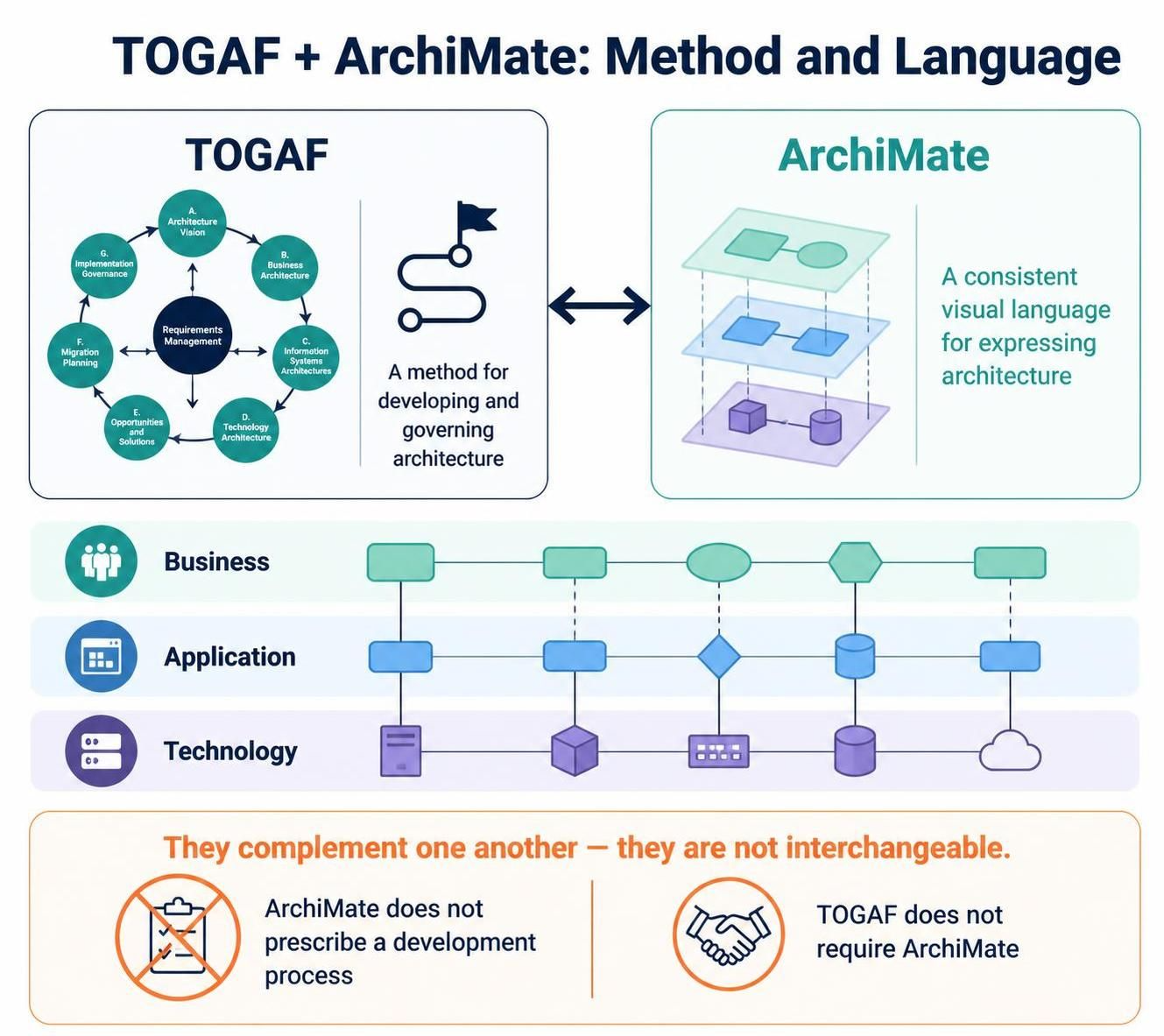
Two standards dominate this space: TOGAF (The Open Group Architecture Framework), which provides the method for developing and governing architecture, and ArchiMate, which provides the language for visually expressing it. While TOGAF tells you what to do in each phase of the Architecture Development Method (ADM), ArchiMate gives you the consistent vocabulary to describe how business, application, and technology layers interact.
This guide focuses on a practical, modern approach to EA using Visual Paradigm, a tool that integrates both TOGAF’s process guidance and ArchiMate’s modeling capabilities. Furthermore, we will explore how AI-assisted features can accelerate model creation, validate consistency, and generate documentation, turning EA from a static artifact into a dynamic decision-support system.
1. Understand the Modeling Framework: The ArchiMate Core
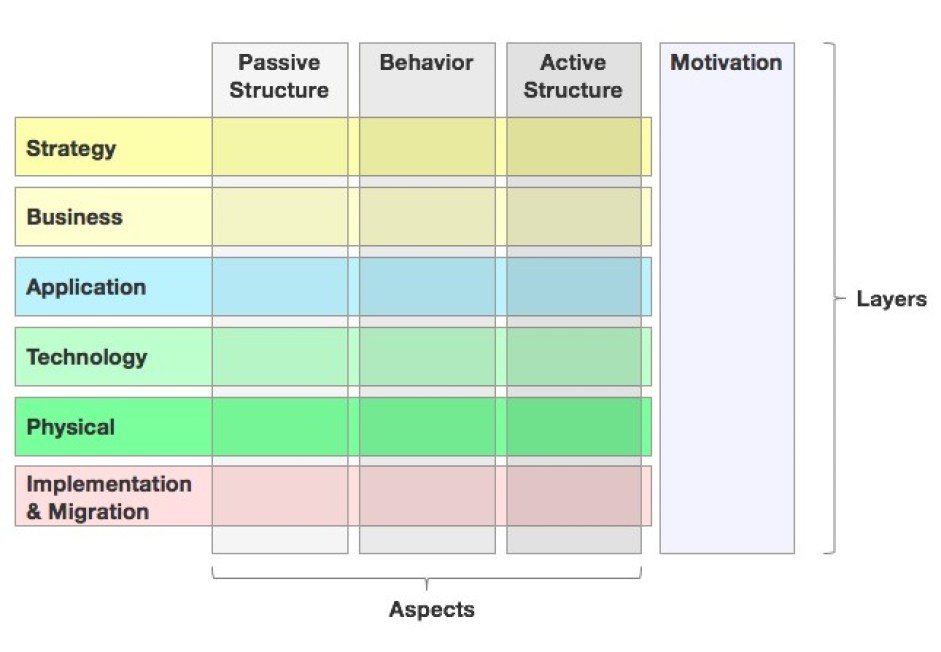
ArchiMate organizes architecture concepts into distinct domains and layers. Understanding these layers is crucial before opening any tool. The core layers are:
-
Business Layer: Describes the organization’s actors, roles, processes, functions, services, and products. This is the “why” and “what” of the business.
-
Application Layer: Describes the software components and application services that support business behavior. This is the “how” of the software logic.
-
Technology Layer: Describes the infrastructure (hardware, networks, system software) that supports applications. This is the “where” of deployment.
-
Motivation Layer: Captures stakeholders, drivers, goals, principles, and requirements. This explains why architecture decisions are made.
-
Strategy Layer: Expresses strategic direction through capabilities, resources, and courses of action.
-
Implementation & Migration Layer: Used for planning the move from current to target architecture, including work packages, deliverables, plateaus, and gaps.
Key Concept: The Connected Stack
A powerful way to visualize EA is as a connected stack:
-
Business Services are realized by Business Processes.
-
Application Services support those business processes.
-
Technology Services host and enable those application services.
Example: Consider an “Online Order Processing” capability.
-
Business: A “Customer” (Actor) initiates an “Place Order” (Process).
-
Application: The “Order Management System” (Application Component) provides an “Order Submission Service” (Application Service).
-
Technology: This service runs on a “Cloud Server Cluster” (Node) using “Linux OS” (System Software).
2. Establish Purpose Before Drawing
Never start by dragging shapes onto a canvas. Start with the decision or concern the model needs to support.
-
For Executives: Focus on Capability Maps, Strategic Goals, and High-Level Roadmaps.
-
For Solution Architects: Focus on Application Services, Interfaces, Data Flows, and Technology Dependencies.
-
For Operations: Focus on Infrastructure, Deployment Nodes, and Network Topologies.
Rule of Thumb: Avoid trying to put every architecture fact into one diagram. Create separate Views for different concerns, all based on the same underlying model elements.
3. Build a Small, Connected Model
Start with a compact set of elements for a specific initiative. A typical minimal viable model includes:
-
Motivation: A Driver (e.g., “Market Competition”), a Goal (e.g., “Reduce Order Time”), and a Requirement (e.g., “Real-time Inventory Check”).
-
Business: The Capability (e.g., “Order Fulfillment”), the Process, and the Actor.
-
Application: The Application Component (e.g., “ERP System”) and the Service it provides.
-
Technology: The Technology Service (e.g., “Database Hosting”) and the Infrastructure (e.g., “AWS RDS”).
-
Implementation: The Work Package (e.g., “Q3 ERP Upgrade”) that delivers the change.
Connect them meaningfully: Use relationships like Uses, Realizes, Serves, and Assigned To. A diagram with fewer lines but clear intent is far more valuable than a spaghetti diagram of every possible connection.
4. Leverage Visual Paradigm with AI Assistance
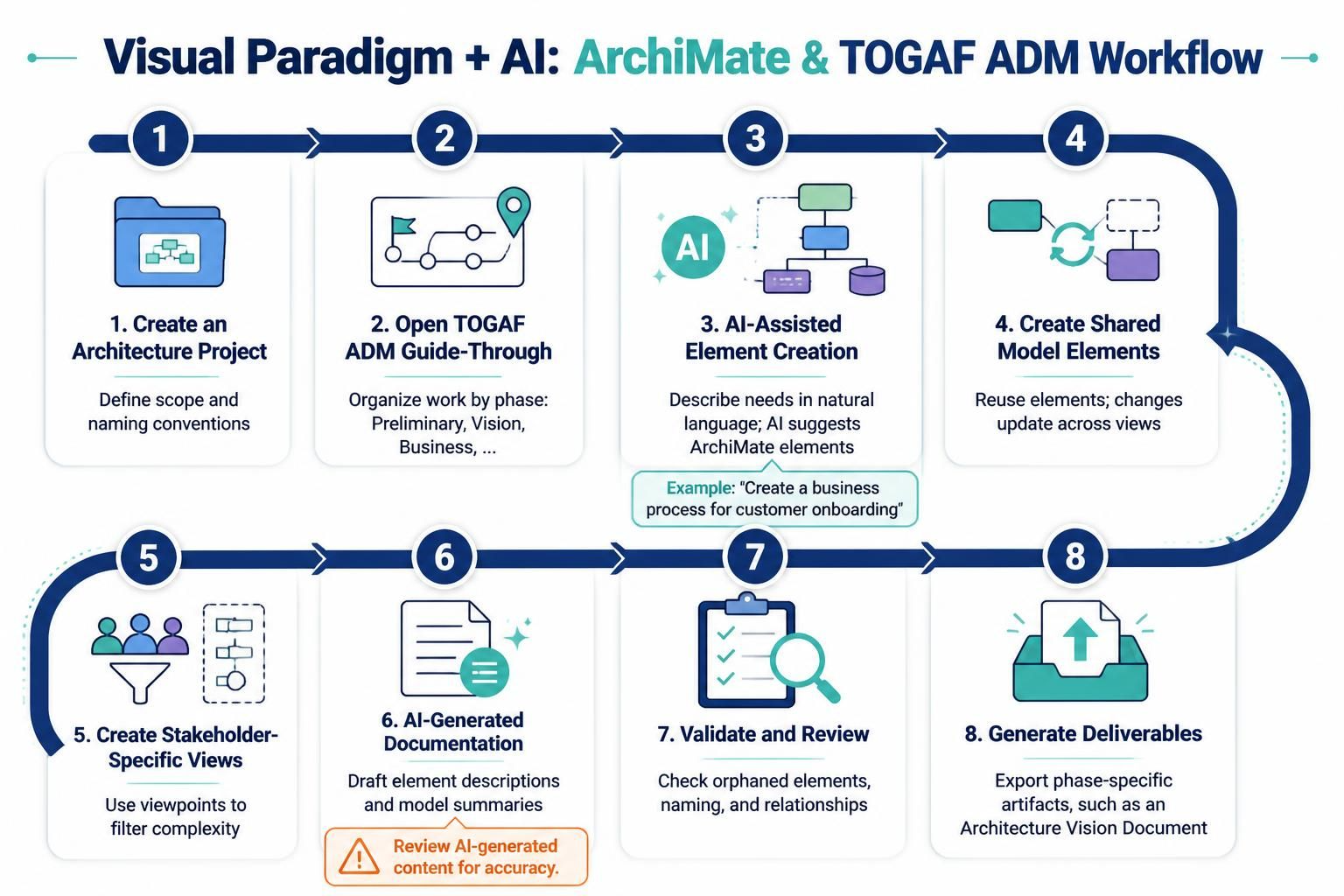
Visual Paradigm’s strength lies in its integration of ArchiMate modeling with the TOGAF ADM Guide-Through Process. Here is a practical setup sequence, enhanced with AI capabilities:
-
Create an Architecture Project: Define scope and naming conventions.
-
Open the TOGAF ADM Guide-Through: Use this to structure your work by phase (Preliminary, Vision, Business, etc.) rather than treating models as isolated drawings.
-
AI-Assisted Element Creation: Use Visual Paradigm’s AI features to suggest standard ArchiMate elements based on natural language descriptions. For example, typing “Create a business process for customer onboarding” can auto-generate the appropriate shape and properties.
-
Create Shared Model Elements: Reuse elements across diagrams. If you change the name of an Application Component in one view, it updates everywhere.
-
Create Stakeholder-Specific Views: Use ArchiMate Viewpoints to filter complexity. An executive view might hide technology details; a developer view might hide business goals.
-
AI-Generated Documentation: Use AI to draft descriptions for elements or generate summary reports from the model. Note: Always review AI-generated content for accuracy.
-
Validate and Review: Check for orphaned elements, inconsistent naming, and broken relationships.
-
Generate Deliverables: Use the Guide-Through process to export phase-specific artifacts (e.g., Architecture Vision Document).
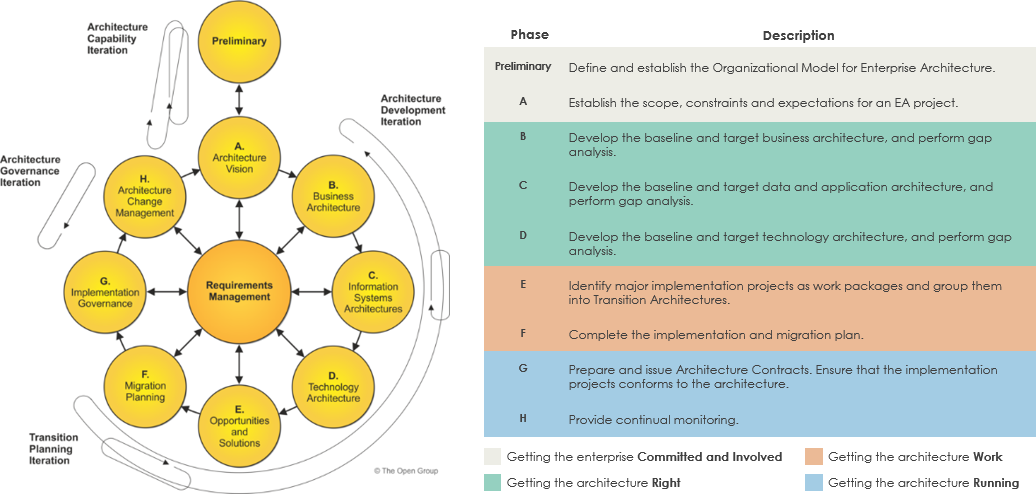
5. Map ArchiMate to the TOGAF ADM
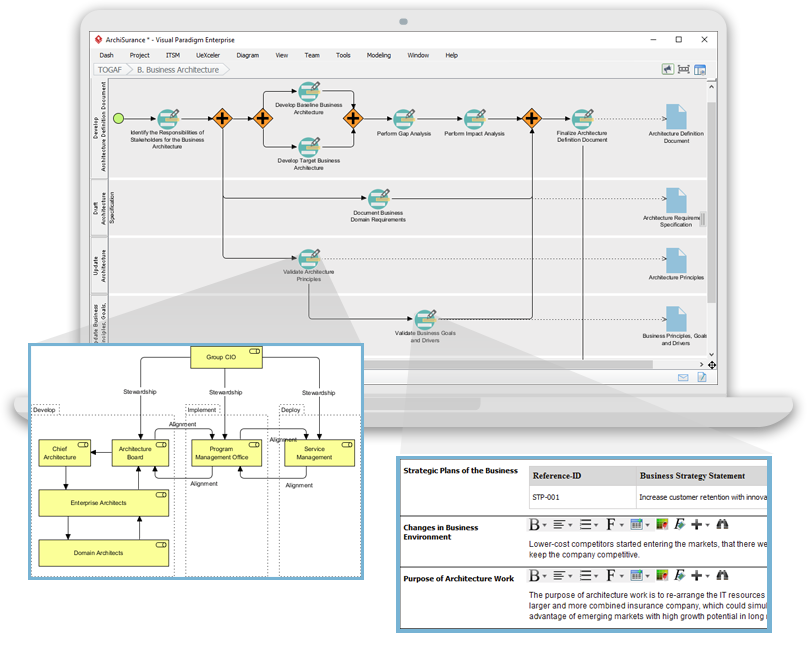
The ADM provides the lifecycle; ArchiMate provides the content. Use this mapping to guide your modeling efforts:
| TOGAF ADM Phase | Modeling Focus | Useful ArchiMate Content |
|---|---|---|
| Preliminary | Set up capability, principles, governance | Principles, Stakeholders, Organization Structure |
| A: Architecture Vision | Define change, outcomes, high-level scope | Drivers, Goals, Requirements, High-Level Business/Solution Views |
| B: Business Architecture | Baseline and Target Business Architecture | Capabilities, Actors, Roles, Processes, Services |
| C: Info Systems Architectures | Data and Application Architecture | Application Components, Services, Data Objects, Interfaces |
| D: Technology Architecture | Infrastructure supporting the solution | Technology Services, Nodes, Devices, System Software, Networks |
| E: Opportunities & Solutions | Group changes into solutions/work packages | Work Packages, Deliverables, Gaps, Dependencies |
| F: Migration Planning | Sequence transitions | Plateaus, Gaps, Implementation Events |
| G: Implementation Governance | Check delivery against architecture | Requirements, Constraints, Compliance Decisions |
| H: Change Management | Manage ongoing changes | Changed Elements, New Requirements, Impact Analysis |
6. Create Effective Views
A Viewpoint defines what a view is intended to show. Before drawing, ask: Who is this for? What question does it answer?
-
Capability View: Shows organizational capabilities and gaps. Ideal for strategic planning.
-
Application Cooperation View: Shows how application components exchange data. Ideal for integration teams.
-
Technology Deployment View: Shows physical infrastructure. Ideal for operations and security.
-
Migration View: Shows the path from Baseline to Target via intermediate Plateaus. Ideal for project managers.
Tip: If a diagram is too dense to read at 100% zoom, split it. Create a high-level overview and link to detailed sub-diagrams.
7. Trace Requirements Through the Architecture
A robust EA model explains why a change exists. Maintain traceability:
Driver → Goal → Requirement → Business Service → Application Service → Technology Service → Work Package
Example:
-
Driver: Regulatory Compliance (GDPR).
-
Goal: Protect Customer Data.
-
Requirement: Encrypt all PII at rest.
-
Impact: Updates to the “Customer Database” (Application Component) and “Storage Infrastructure” (Technology Node).
-
Work Package: “Security Hardening Project Q4.”
This traceability allows for impact analysis. If a requirement changes, you can instantly see which systems and projects are affected.
8. Model Current State, Target State, and Transition
Transformation is rarely a big-bang switch. Distinguish three states:
-
Baseline (As-Is): What exists today.
-
Target (To-Be): The desired future state.
-
Transition: The intermediate steps (Plateaus) and work (Work Packages) needed to get there.
Gap Analysis: Explicitly model the gaps between Baseline and Target. Connect each gap to a Work Package. Use Visual Paradigm’s migration planning features to visualize dependencies between work packages.
9. Apply Quality Checks
Before sharing your model, perform a self-audit:
-
Purpose: Does each diagram answer a specific question?
-
Consistency: Are shared elements reused? Is naming consistent (e.g., always “Order Service,” not sometimes “Ordering Svc”)?
-
Semantics: Are you using the right relationship types? (e.g., Realizes vs. Uses).
-
Traceability: Can you follow a goal down to a technical component?
-
Audience Fit: Is the level of detail appropriate for the viewer?
10. Common Pitfalls to Avoid
-
Treating ArchiMate as a Method: ArchiMate is a language, not a process. Use TOGAF or another framework for the process.
-
The “Big Ball of Mud” Diagram: Do not try to model the entire enterprise in one view. Use multiple, focused views.
-
Over-Modeling Infrastructure: Only model technology details if they impact business decisions or operational risk.
-
Vague Relationships: Every line should mean something specific. Avoid generic “associated with” links if a more precise relationship exists.
-
Ignoring Maintenance: EA is not a one-time project. Assign owners to key elements and update the model as the real world changes.
Reference
-
Unlock the Power of TOGAF ADM with Visual Paradigm’s Guide-Through Process: Introduces the core advantages of the guided process, including step-by-step guidance, process navigator, and automated deliverable composition .
-
Comprehensive Guide for Using TOGAF ADM with Visual Paradigm: Explains in detail the application of TOGAF ADM in Visual Paradigm, covering iterative development, architecture partitioning, and key tool features .
-
How to use the TOGAF ADM Guide-through?: A practical operation guide explaining how to create a TOGAF ADM project and navigate through phases and activities .
-
Comprehensive Guide to Phase C: Information Systems Architectures in TOGAF ADM: Focuses on Phase C, detailing the objectives, inputs, outputs, and steps for data architecture and application architecture .
-
Comprehensive Guide to Phase E: Opportunities and Solutions in TOGAF ADM: Parses Phase E, explaining how to generate the architecture roadmap, identify work packages, and develop migration plans .
-
ArchiMate Download (Certified Tool Description): Lists Visual Paradigm’s ArchiMate modeling capabilities, including syntax validation, viewpoint support, and collaboration features .
-
Part II: Hands-on Modeling with Visual Paradigm: An ArchiMate hands-on tutorial covering the complete process from project creation and core modeling techniques to import/export .
-
From ArchiMate 3.2 to Next: Key Highlights from the First Snapshot: Analyzes the major changes in the ArchiMate 4 snapshot, including removal of the common domain, composition relationships, and introduction of the Hexagonion framework .
-
ArchiMate 4: A New Era in Enterprise Architecture Modeling: Another overview of ArchiMate 4, emphasizing the design philosophy of simplification, unification, and modernization .
Conclusion
Enterprise Architecture is most valuable when it is actionable, clear, and aligned with business goals. By combining TOGAF’s structured process, ArchiMate’s precise visual language, and Visual Paradigm’s integrated tooling, you can create models that do more than just document—they drive decision-making.
Adding AI assistance to this workflow accelerates the mundane tasks of element creation and documentation, allowing architects to focus on high-value activities like strategic alignment and stakeholder communication. Remember, the goal is not a perfect model, but a useful one. Keep your views focused, your traceability clear, and your architecture alive.