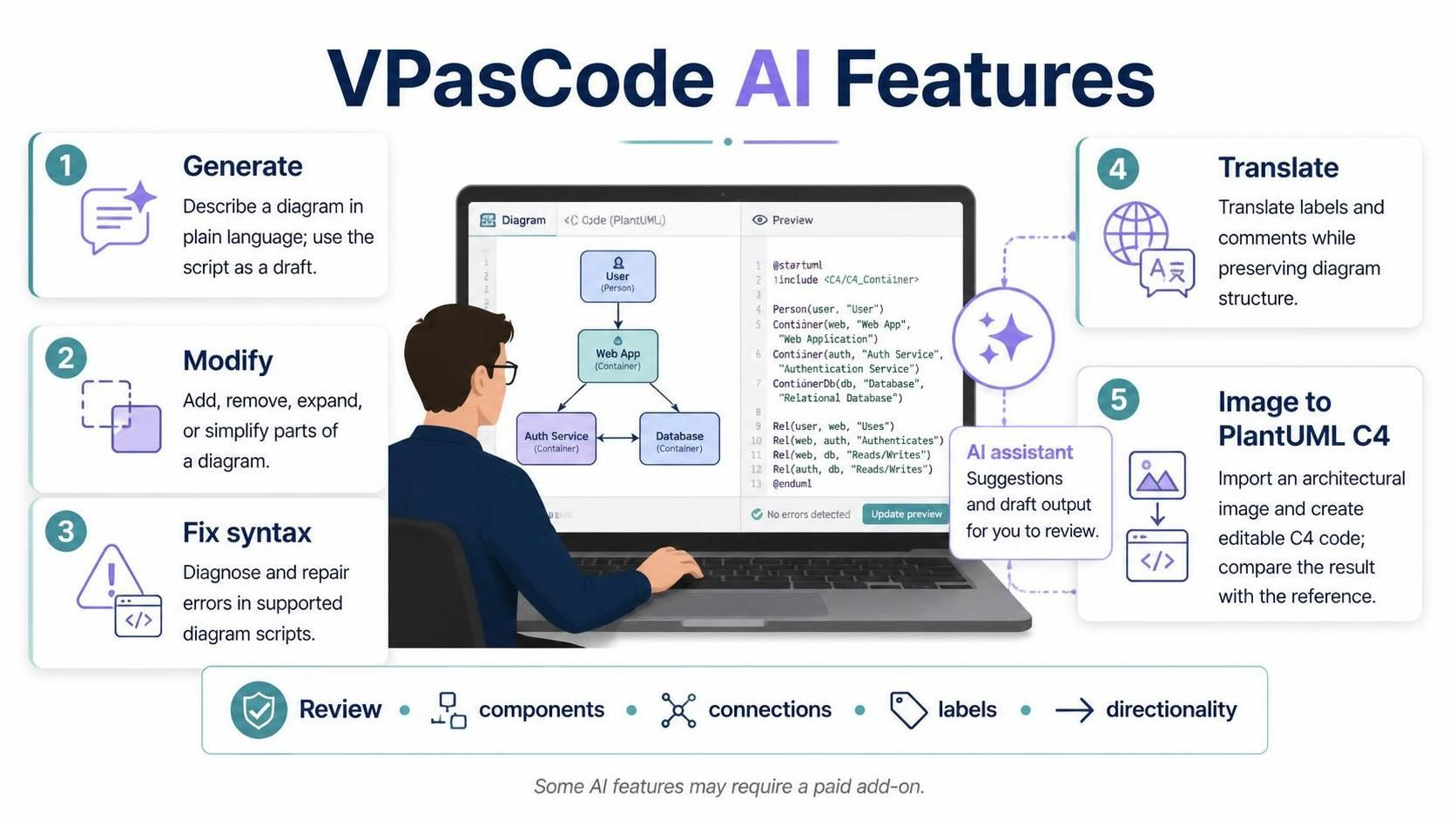
In the rapidly evolving landscape of software architecture, the gap between conceptual design and implementation documentation is often bridged by code. VPasCode, powered by advanced Artificial Intelligence within the Visual Paradigm ecosystem, represents a paradigm shift. It moves diagramming from a manual, tedious drawing exercise to an intelligent, text-driven engineering workflow. By leveraging the C4 model’s abstraction levels and the power of generative AI, architects can accelerate the creation, maintenance, and internationalization of their technical diagrams.
The C4 Model: A Foundation for Abstraction
Before diving into the AI capabilities, it is essential to understand the structural backbone of the diagrams shown in the interface: the C4 Model. Unlike traditional UML diagrams that focus heavily on static class structures or detailed sequence flows, C4 is designed to tell the story of a system at different levels of abstraction.
The AI assistant in VPasCode defaults to this structure, utilizing PlantUML syntax to define:
- Person: The human actors interacting with the system (e.g., “User”, “Administrator”).
- Container: Large, deployable units of software (e.g., “Web Application”, “Mobile App”, “Microservice”).
- Component: Distinct parts within a container that share a common function.
- Database: Specific storage units where data is persisted.
By structuring your AI prompts around these specific entities, you ensure that the generated output aligns with industry-standard architectural modeling practices.
Five Pillars of AI-Assisted Diagramming
The VPasCode interface integrates five distinct AI workflows that transform how an architect interacts with their documentation. Here is a step-by-step breakdown of these capabilities.
1. Generate: From Natural Language to Script
The most powerful feature of VPasCode is its ability to translate plain language requirements into executable PlantUML code. Instead of manually dragging and dropping boxes, you can describe your system’s intent.
Workflow Example:
- Identify your actors and containers. (e.g., “A User needs to access a Web App to process payments.”)
- Input this description into the AI prompt.
- The AI generates the initial
.pumlscript, creating the nodes and the relationships between them.
2. Modify: Iterative Refinement
Architecture is rarely static. As requirements change, your diagrams must evolve. The Modify function allows you to iterate on the AI-generated script without rewriting it from scratch.
- Add: Request the addition of new components, such as “Add a Redis Cache layer.”
- Remove: Clean up redundant elements like “Remove the legacy login service.”
- Expand/Simplify: You can ask the AI to expand a high-level container into its internal components or conversely, simplify a complex web of connections.
3. Fix Syntax: Intelligent Diagnostics
PlantUML is a text-based language, which means it is prone to syntax errors that can prevent rendering. VPasCode’s AI acts as a smart debugger. When a diagram fails to render, the AI can analyze the error logs, diagnose the root cause (e.g., missing quotes, unclosed braces, or invalid relationship keywords), and provide a corrected script.
4. Translate: Global Collaboration
In distributed teams, language barriers can impede understanding. The Translate feature ensures that your architectural documentation remains accessible globally. It intelligently translates labels and comments while strictly preserving the underlying diagram structure and connection logic.
5. Image to Code: Reverse Engineering Legacy Art
Often, architects need to modernize hand-drawn whiteboard sketches or screenshots of legacy systems. The Image to Code feature utilizes computer vision to convert these visual artifacts into editable PlantUML C4 code.
Caution: AI image recognition is probabilistic. While it can reconstruct the general topology, you must manually verify the labels and relationship directions to ensure technical accuracy.
Technical Implementation: The PlantUML C4 Syntax
When VPasCode generates a diagram, it outputs standard PlantUML code. Understanding this syntax empowers you to use the “Modify” feature more effectively. The code snippet below demonstrates the structure generated by the AI for the architecture shown in the interface.
@startuml
!include C4_C4_Container

' Define the People and Containers
Person(user, "User")
Container(web, "Web App", "Web Application")
Container(auth, "Auth Service", "Authentication Service")
ContainerDb(db, "Database", "Relational Database")

' Define the Relationships
Rel(user, web, "Uses")
Rel(web, auth, "Authenticates")
Rel(web, db, "Reads/Writes")
Rel(auth, db, "Reads/Writes")

@enduml
Notice how the AI uses !include to load the C4 library, ensuring that the rendering engine understands the specific shapes for “Person,” “Container,” and “Database.”
Best Practices for AI-Assisted Modeling
While AI significantly speeds up the process, it is not a replacement for architectural judgment. To maintain high-quality documentation, adhere to these guidelines:
- Human-in-the-Loop Review: Always verify that component names, connection directions, and technical meanings are accurate before using the diagram in formal technical documentation.
- Iterative Prompting: If the first generation is imperfect, refine your prompt. Instead of saying “Make it better,” say “Add a firewall between the Web App and the Database.”
- Subscription Awareness: Be aware that some advanced AI capabilities may require a paid subscription tier within the Visual Paradigm ecosystem.
By combining the structural rigor of the C4 model with the generative speed of VPasCode, you can keep your architectural documentation living, breathing, and always up-to-date.