


UML—the Unified Modeling Language—is a standardized way to describe a system’s structure and behavior. It helps teams discuss requirements, design software, and document decisions. UML is a modeling language, not a programming language: diagrams communicate a model, but they do not automatically guarantee that the implementation matches it.
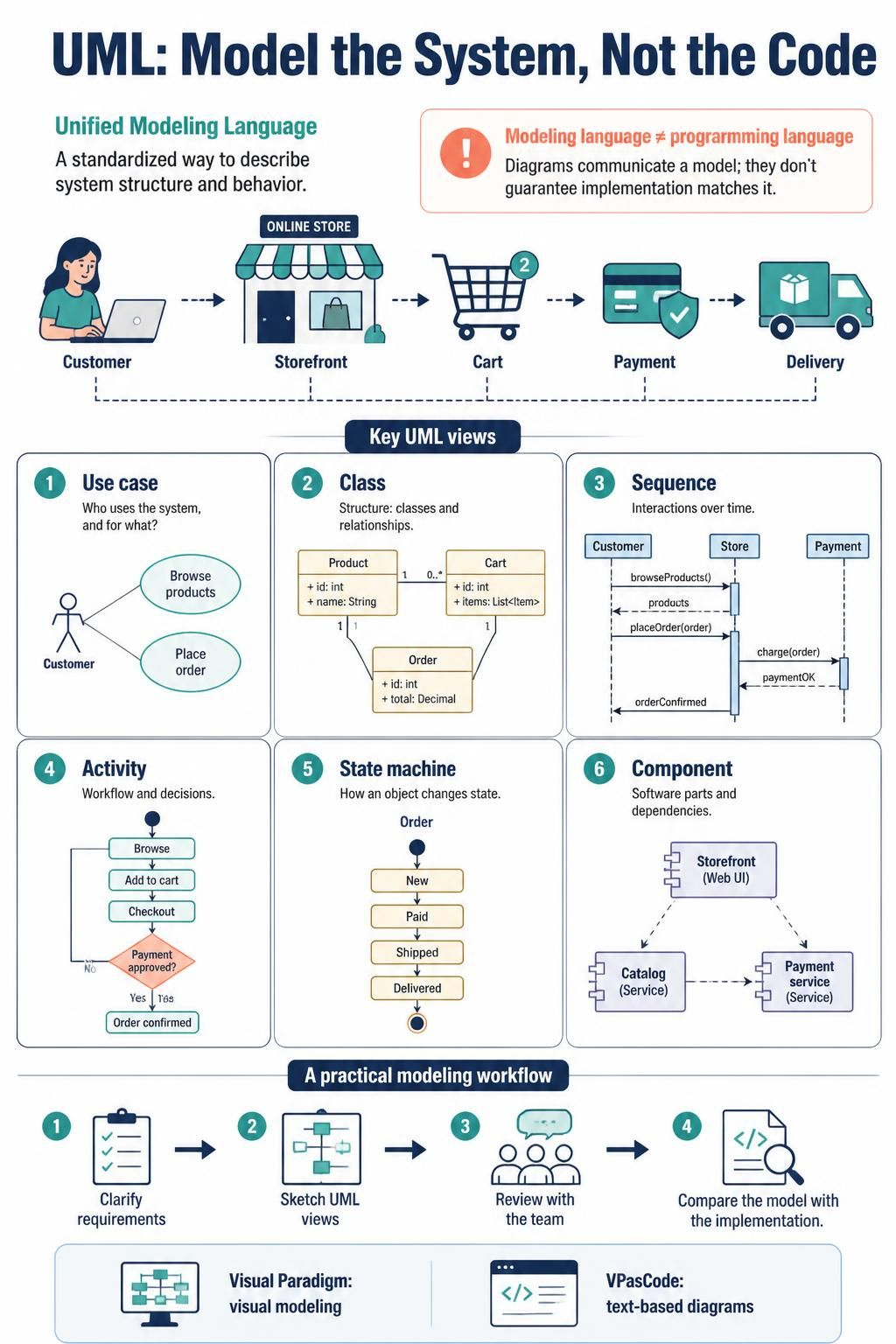
This guide uses an online shopping system as a running example. It covers the main UML diagram types and a workflow using Visual Paradigm for visual modeling and VPasCode for text-based diagrams.
1. Start with the question your diagram should answer
Before drawing, decide what the reader needs to understand:
-
What can users do? Use a use case diagram.
-
What happens during a scenario? Use a sequence or activity diagram.
-
What concepts and relationships make up the domain? Use a class diagram.
-
How is software divided into deployable or replaceable parts? Use component and deployment diagrams.
-
How does one object change over time? Use a state machine diagram.
A diagram that tries to answer every question at once usually becomes hard to read. Prefer several focused diagrams over one crowded overview.
2. UML diagram families
UML 2.x includes 14 standard diagram types, commonly grouped into structural and behavioral diagrams. Interaction diagrams are a subset of behavioral diagrams.
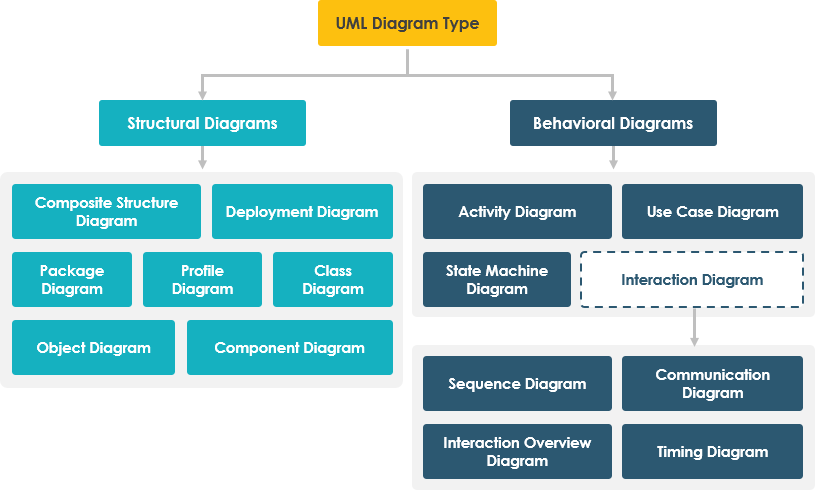
| Family | Diagram | Best used to show |
|---|---|---|
| Structural | Class | Classes, attributes, operations, and relationships |
| Structural | Object | A snapshot of specific instances and links |
| Structural | Component | Software components and their dependencies or interfaces |
| Structural | Composite structure | Internal parts, ports, and connectors inside a classifier |
| Structural | Package | How model elements are grouped and depend on one another |
| Structural | Deployment | Software artifacts mapped to hardware or execution environments |
| Structural | Profile | UML extensions, stereotypes, and tagged values |
| Behavioral | Use case | Actors, goals, and system scope |
| Behavioral | Activity | Workflow, decisions, parallel work, and responsibility lanes |
| Behavioral | State machine | States and event-triggered transitions of an object |
| Interaction | Sequence | Messages exchanged over time between participants |
| Interaction | Communication | Participants and their message links, emphasizing network structure |
| Interaction | Timing | State or value changes along a time scale |
| Interaction | Interaction overview | A high-level flow that connects interaction scenarios |
You rarely need all 14 for a project. For many application designs, a use case, class, sequence, activity, component, and deployment diagram are a strong starting set.
3. The most useful diagrams, with an e-commerce example
Use case diagram: goals and system boundary
A use case diagram describes user goals, not screen layouts or internal code. For an online store, actors might include Customer, Payment Provider, and Warehouse Service. Use cases might include Browse Products, Place Order, Pay for Order, and Track Shipment.
Use <<include>> when a use case always invokes another required behavior. Use <<extend>> for optional or conditional behavior that adds to a base use case. Keep the system boundary clear so readers can distinguish the system from external actors.
Activity diagram: workflow and decisions
Activity diagrams are useful for processes with branches or parallel work. A checkout flow might be:
-
Validate the cart and address.
-
Calculate shipping and tax.
-
Create a pending order.
-
Request payment authorization.
-
If payment succeeds, confirm the order and notify fulfillment.
-
If payment fails, show the failure and leave the order unconfirmed.
Use decision and merge nodes for branching, fork and join nodes for parallel work, and swimlanes when responsibility changes between a customer, the store, and an external provider.
Sequence diagram: one scenario over time
Sequence diagrams show participants and the messages they exchange. They are especially useful for clarifying service boundaries, call order, and error cases. Add alternate paths for outcomes such as payment rejection or inventory becoming unavailable.
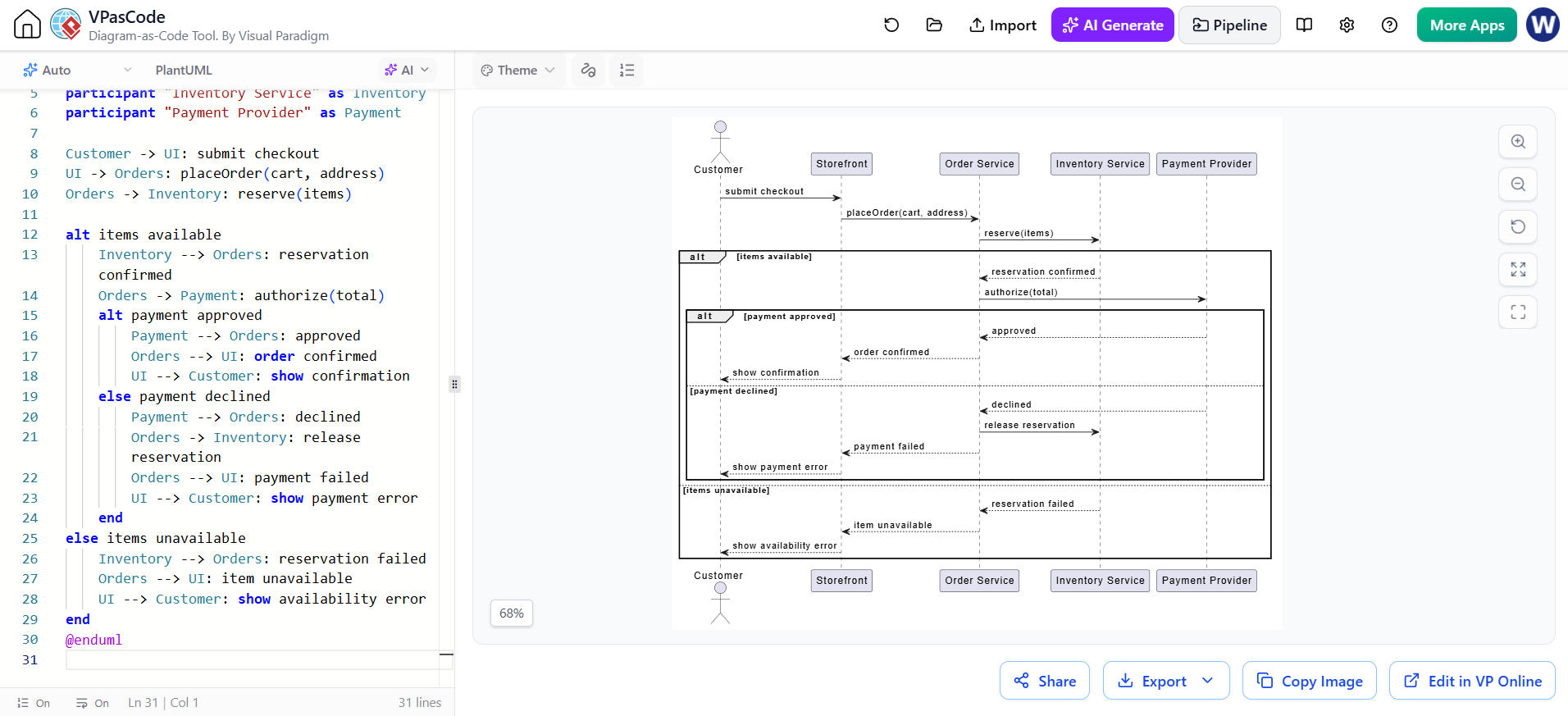
@startuml
actor Customer
participant "Storefront" as UI
participant "Order Service" as Orders
participant "Inventory Service" as Inventory
participant "Payment Provider" as Payment

Customer -> UI: submit checkout
UI -> Orders: placeOrder(cart, address)
Orders -> Inventory: reserve(items)

alt items available
    Inventory --> Orders: reservation confirmed
    Orders -> Payment: authorize(total)
    alt payment approved
        Payment --> Orders: approved
        Orders --> UI: order confirmed
        UI --> Customer: show confirmation
    else payment declined
        Payment --> Orders: declined
        Orders -> Inventory: release reservation
        Orders --> UI: payment failed
        UI --> Customer: show payment error
    end
else items unavailable
    Inventory --> Orders: reservation failed
    Orders --> UI: item unavailable
    UI --> Customer: show availability error
end
@enduml
This example uses PlantUML syntax. It is a behavioral sketch, not a specification of every timeout, retry, or security rule. Add those details when they matter to the design.
Class diagram: domain structure
Class diagrams describe types and their relationships. A small order model might contain:
-
Customer -
Order -
OrderLine -
Product -
Payment
Show attributes and operations when they help explain responsibilities. Use multiplicities to make quantity rules explicit: for example, one Order contains one or more OrderLine objects, while each OrderLine refers to one Product.
Common relationship types:
-
Association: a general structural link.
-
Inheritance/generalization: one class is a specialized kind of another.
-
Aggregation: a whole–part relationship where parts can exist independently; use sparingly.
-
Composition: a strong whole–part relationship where a part’s lifecycle is tied to the whole.
-
Dependency: one element uses or depends on another.
For a commerce model, an OrderLine is often modeled as belonging to one Order, while a Product exists independently of any particular order. Choose the relationship that reflects the domain’s actual lifecycle and rules.
State machine diagram: lifecycle rules
Use a state machine when an object’s allowed transitions matter. An order might move through:
Pending → AwaitingPayment → Confirmed → Fulfilled
It might also transition to Cancelled or PaymentFailed. Label transitions with triggering events or guards, such as paymentApproved or [stockAvailable]. This diagram can expose invalid transitions—for example, whether a fulfilled order can be cancelled.
Component and deployment diagrams: software and runtime
A component diagram shows software responsibilities and dependencies, such as a storefront, order service, inventory service, and payment adapter. It is useful for discussing modularity and integration boundaries.
A deployment diagram shows where software runs: for example, browser, application runtime, database, and external payment provider. Use it to discuss runtime topology, not detailed network configuration.
4. Model well: practical conventions
-
Give each diagram a clear title and a single purpose.
-
Use domain language consistently; avoid inventing different names for the same concept.
-
Keep diagrams small enough to read at their intended size.
-
Include only details that answer the diagram’s question.
-
Label important associations and message flows.
-
Add multiplicities to associations when quantity rules matter.
-
Use notes for assumptions, constraints, and unresolved decisions.
-
Keep names and responsibilities consistent across diagrams.
-
Distinguish what is confirmed from what is proposed or still unknown.
-
Update diagrams when important design decisions or behavior changes.
Treat UML as a communication aid. A diagram can be syntactically valid and still be misleading if its labels, assumptions, or scope are unclear.
5. Using Visual Paradigm
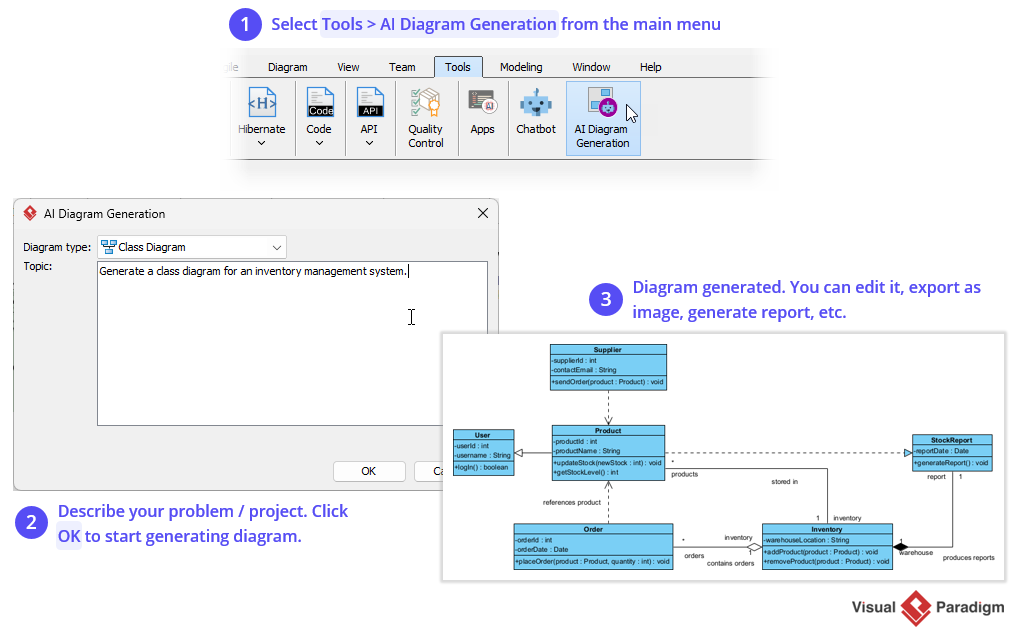
Visual Paradigm is suited to graphical modeling: create and arrange UML elements on a canvas, organize related diagrams, and refine a model through visual editing. Its product materials describe UML modeling among its visual-modeling capabilities.
A practical workflow:
-
Create a project for the system or bounded area you are modeling.
-
Start with requirements and scope. Identify users, external systems, and key goals.
-
Create a use case diagram to establish the boundary and major interactions.
-
Add behavior diagrams for the scenarios that carry the most risk or ambiguity.
-
Build the class model around domain concepts and their rules.
-
Add component and deployment views if architecture or runtime placement needs discussion.
-
Review with stakeholders. Check names, scope, alternate flows, and cardinalities.
-
Export or share diagrams in formats appropriate for reviews and documentation.
-
Keep the model maintained. Assign an owner and update diagrams when decisions change.
Exact menu names and available features can vary by Visual Paradigm edition and release, so use the product’s current interface documentation for edition-specific steps.
6. Using VPasCode
VPasCode is a browser-based diagram-as-code editor from Visual Paradigm. Its product information describes support for text-based diagram formats including PlantUML and Mermaid, with live rendering; it also describes exports such as SVG and PNG.
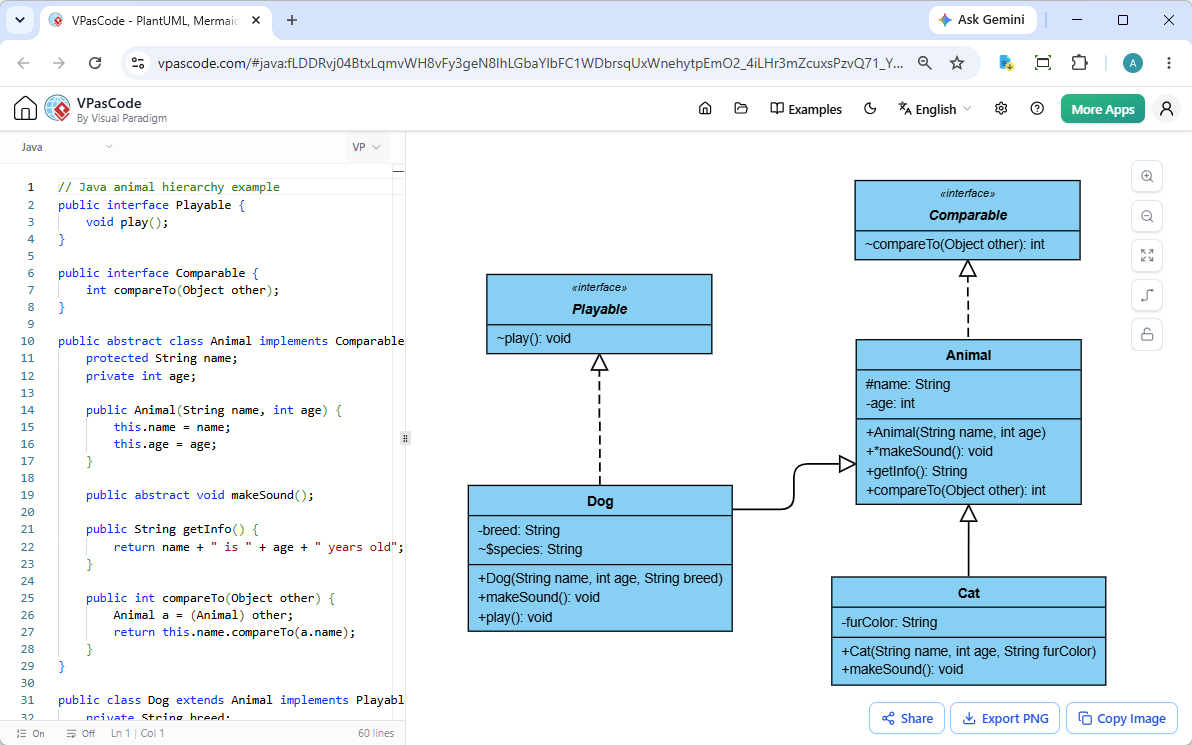
A simple workflow:
-
Open VPasCode and choose the diagram language, such as PlantUML.
-
Write or paste a diagram script.
-
Check the rendered preview as you edit.
-
Refine names, relationships, layout, and error paths.
-
Export an image for a document or review.
-
Keep the source script with the project if you want a text-based record that can be reviewed and versioned.
VPasCode is a good fit for quick drafts, documentation diagrams, and teams that prefer text-based editing. Visual Paradigm’s graphical model is useful when you want to manipulate model elements visually and organize diagrams as part of a larger modeling project. The two approaches can complement one another, but do not assume that every diagram or model transfers between them with perfect round-trip fidelity; validate any conversion in your workflow.
7. A useful end-to-end workflow
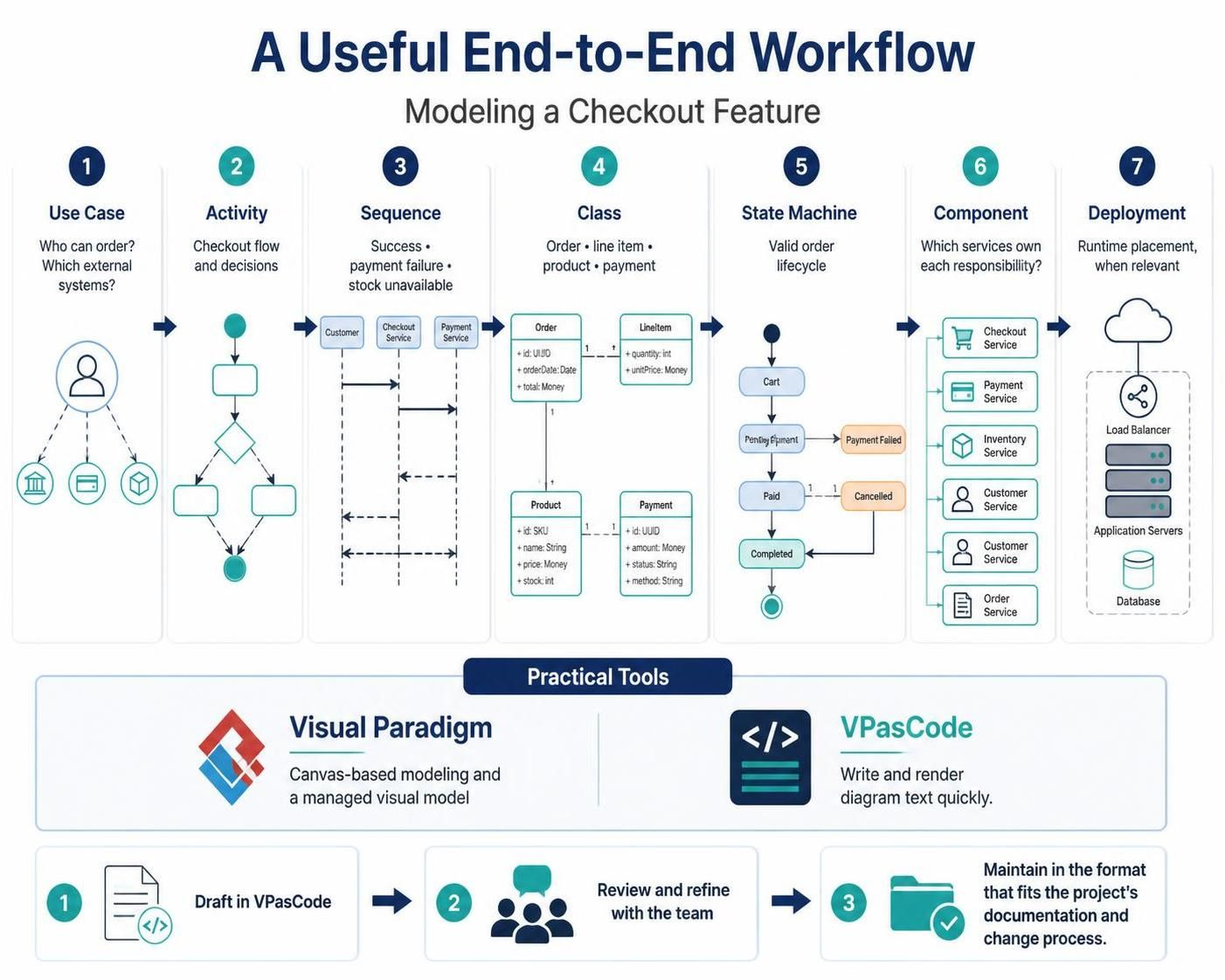
For a checkout feature, a lightweight modeling sequence could be:
-
Use case: define who can place an order and which external systems participate.
-
Activity: map the checkout flow and its decisions.
-
Sequence: detail interactions for the success, payment-failure, and stock-unavailable paths.
-
Class: define the order, line item, product, and payment concepts and their rules.
-
State machine: specify the valid order lifecycle.
-
Component: show which services own those responsibilities.
-
Deployment: document runtime placement if infrastructure decisions are relevant.
Use Visual Paradigm when the team benefits from canvas-based modeling and a managed visual model. Use VPasCode when the team wants to write and render diagram text quickly. A common approach is to draft a scenario in VPasCode, review and refine it with the team, then maintain the diagrams in the format that best fits the project’s documentation and change process.
8. Common pitfalls
-
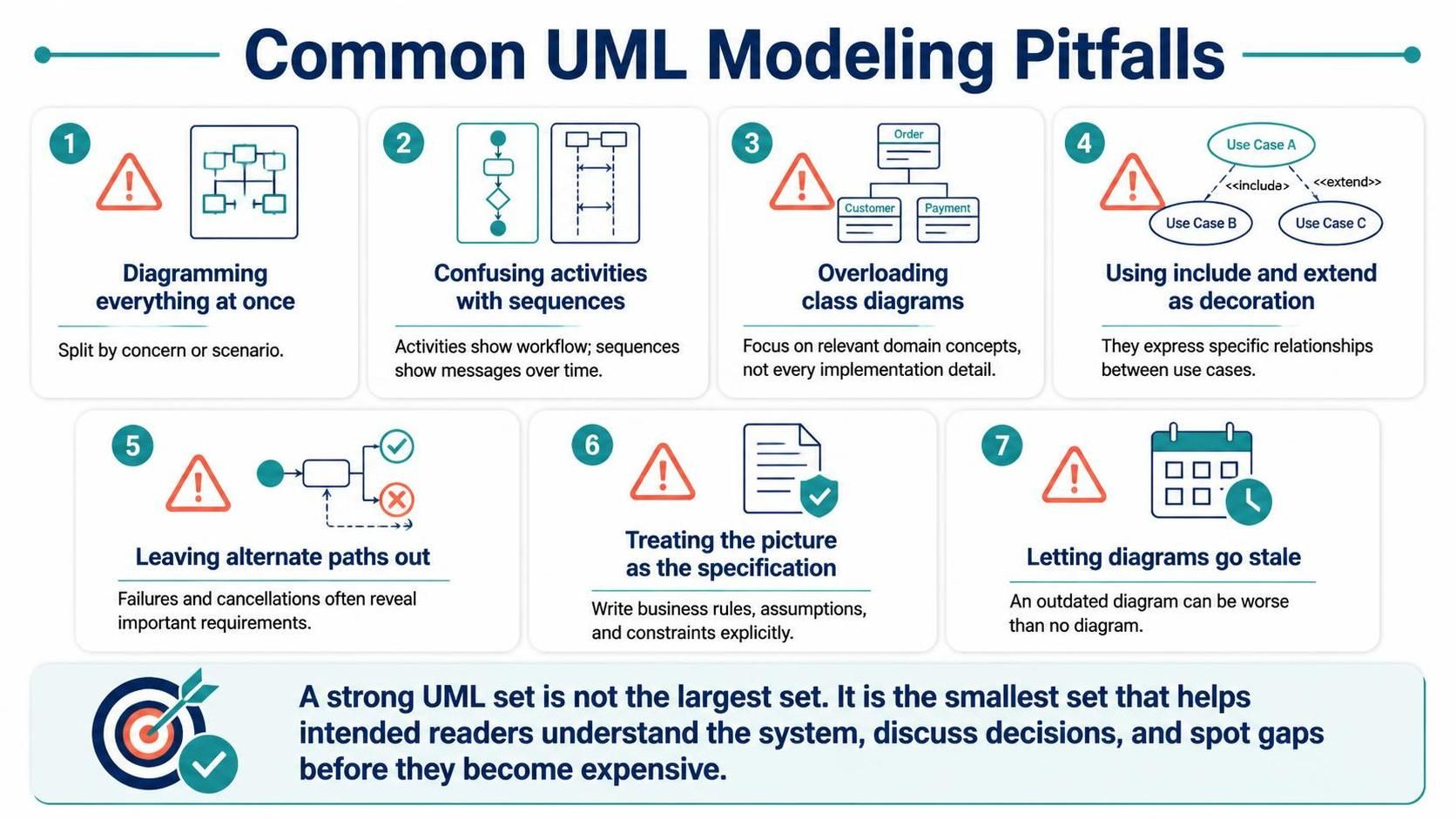
Trying to diagram the entire system at once: split by concern or scenario.
-
Confusing activities with sequences: activities emphasize workflow; sequences emphasize messages over time.
-
Overloading class diagrams: focus on relevant domain concepts, not every implementation detail.
-
Using
includeandextendas decoration: they express specific relationships between use cases. -
Leaving alternate paths out: failures and cancellations often reveal important requirements.
-
Treating the picture as the specification: document important business rules, assumptions, and constraints explicitly.
-
Letting diagrams go stale: an outdated diagram can be worse than no diagram because readers may trust it.
A strong UML set is not the largest set. It is the smallest set of diagrams that lets the intended readers understand the system, discuss decisions, and spot gaps before they become expensive.
This post is also available in Deutsch, Español, فارسی, Français, Bahasa Indonesia, 日本語, Polski, Portuguese, Ру́сский, Việt Nam, 简体中文 and 繁體中文.