


UML diagrams are commonly grouped into structural diagrams, which describe what a system is made of, and behavioral diagrams, which describe what it does. The examples below use a single online-store scenario so they can be compared and adapted. UML 2.5.1 is the formal specification referenced here.
PlantUML renders many UML notations directly. A few specialized diagram types—especially profile, composite structure, communication, and interaction overview—may be expressed using a practical PlantUML approximation rather than a dedicated diagram renderer. The comments identify those cases.
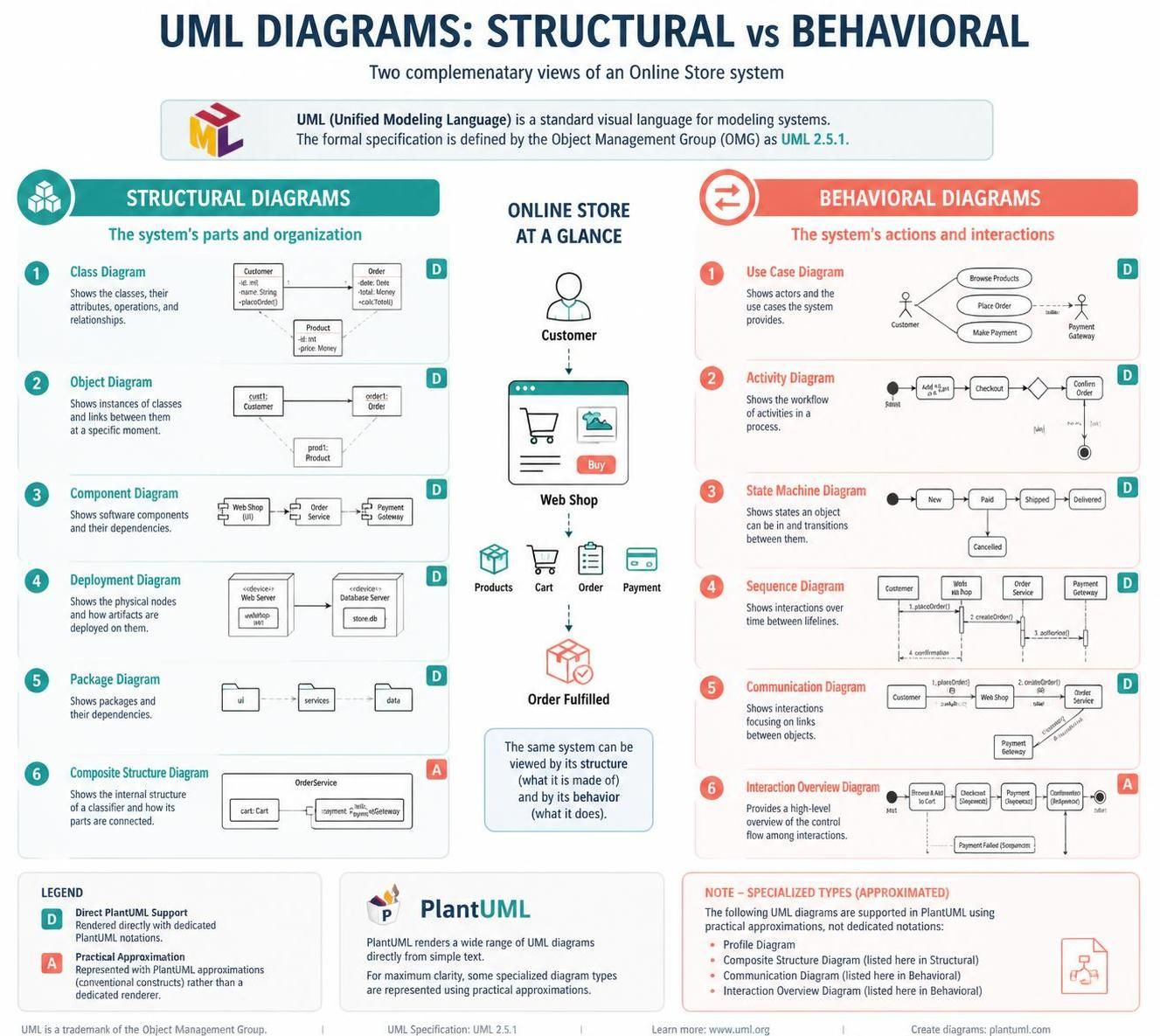
Structural diagrams
1. Class diagram
Shows the system’s classes, their data and operations, and relationships such as association, inheritance, and composition. Use it to discuss domain models or object-oriented design.
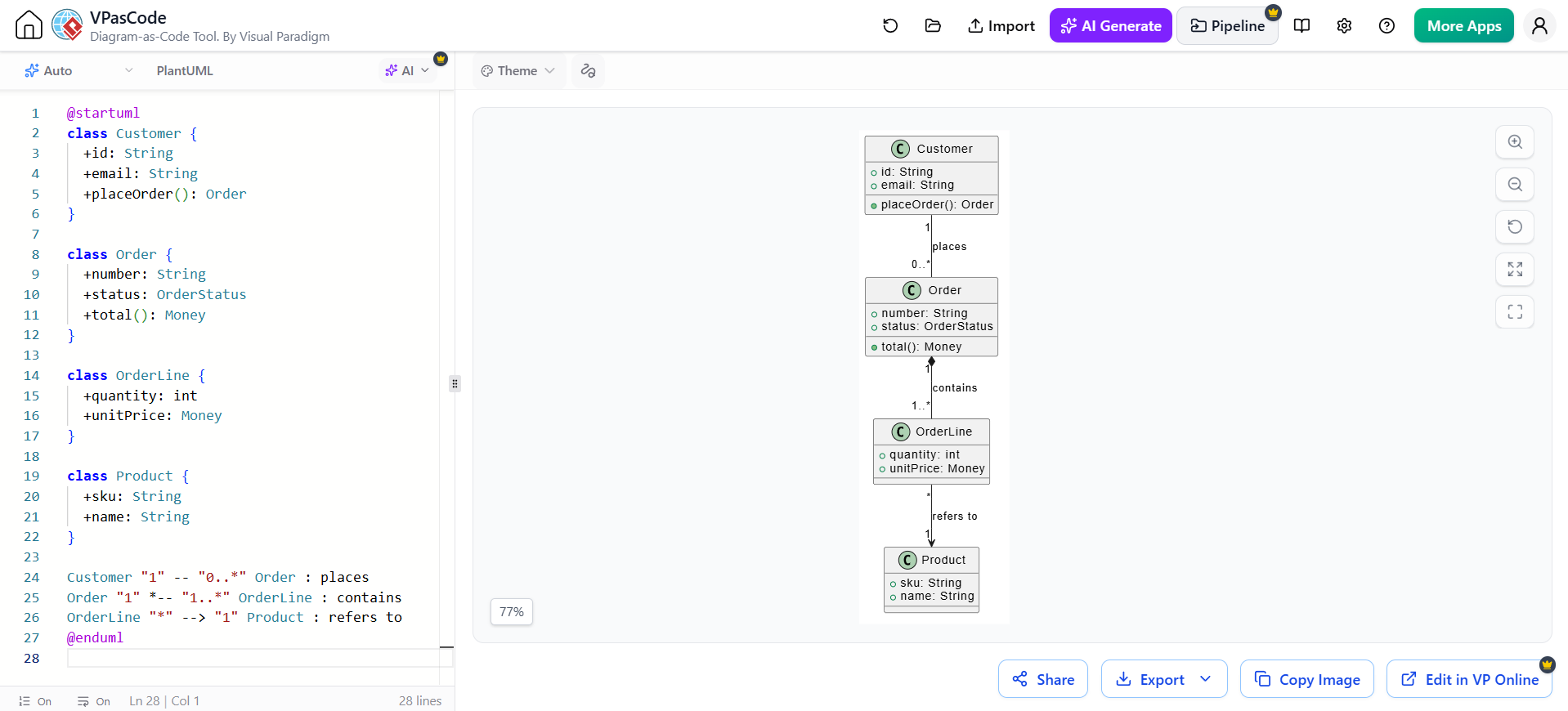
@startuml
class Customer {
  +id: String
  +email: String
  +placeOrder(): Order
}

class Order {
  +number: String
  +status: OrderStatus
  +total(): Money
}

class OrderLine {
  +quantity: int
  +unitPrice: Money
}

class Product {
  +sku: String
  +name: String
}

Customer "1" -- "0..*" Order : places
Order "1" *-- "1..*" OrderLine : contains
OrderLine "*" --> "1" Product : refers to
@enduml
Read it: one customer can place many orders; an order contains one or more lines; each line refers to a product. The filled diamond indicates composition: the order owns its lines.
2. Object diagram
Shows concrete instances and links at one moment in time. It is useful for illustrating example data or explaining a class model with a specific scenario. In PlantUML, use object notation.
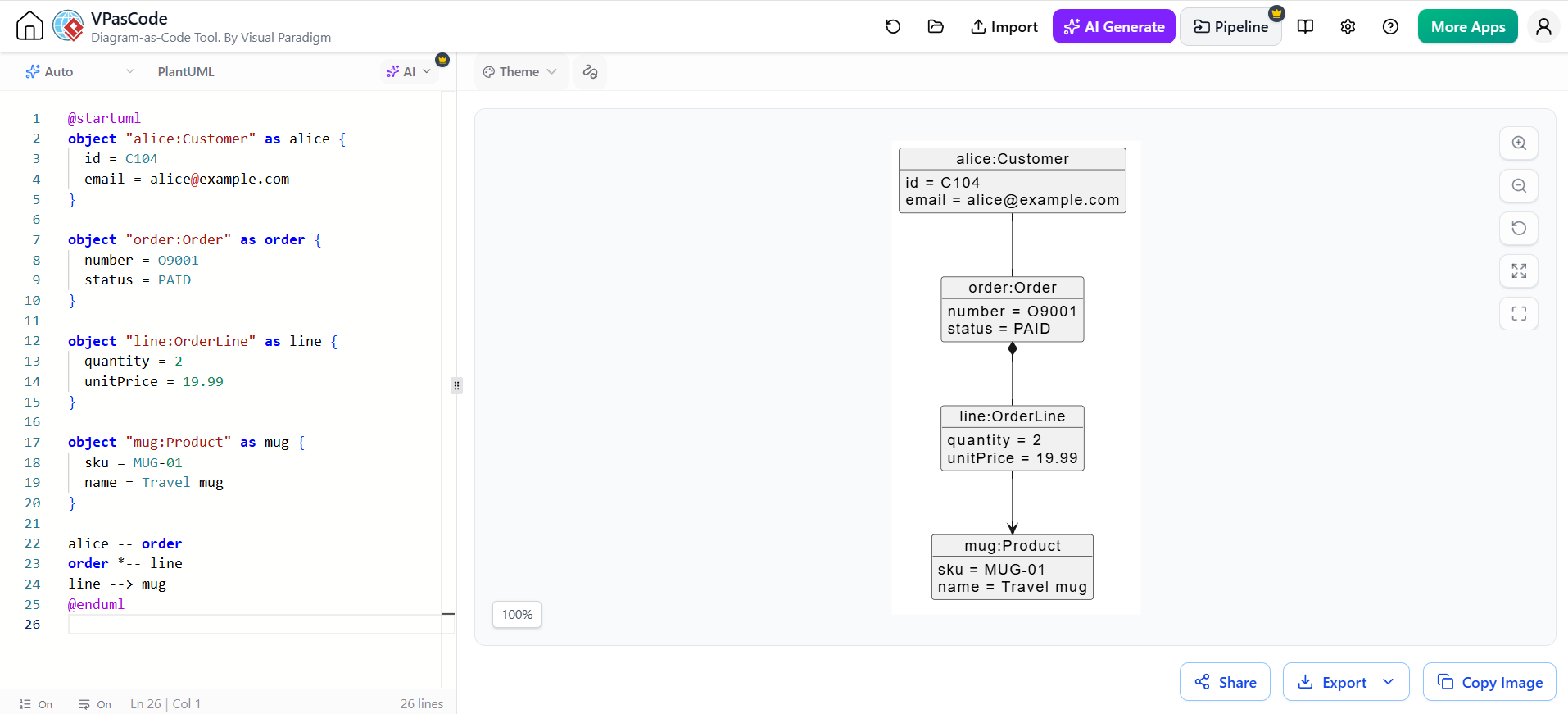
@startuml
object "alice:Customer" as alice {
  id = C104
  email = [email protected]
}

object "order:Order" as order {
  number = O9001
  status = PAID
}

object "line:OrderLine" as line {
  quantity = 2
  unitPrice = 19.99
}

object "mug:Product" as mug {
  sku = MUG-01
  name = Travel mug
}

alice -- order
order *-- line
line --> mug
@enduml
3. Component diagram
Shows deployable or replaceable software parts and their dependencies. Use it to communicate application architecture and integration boundaries.
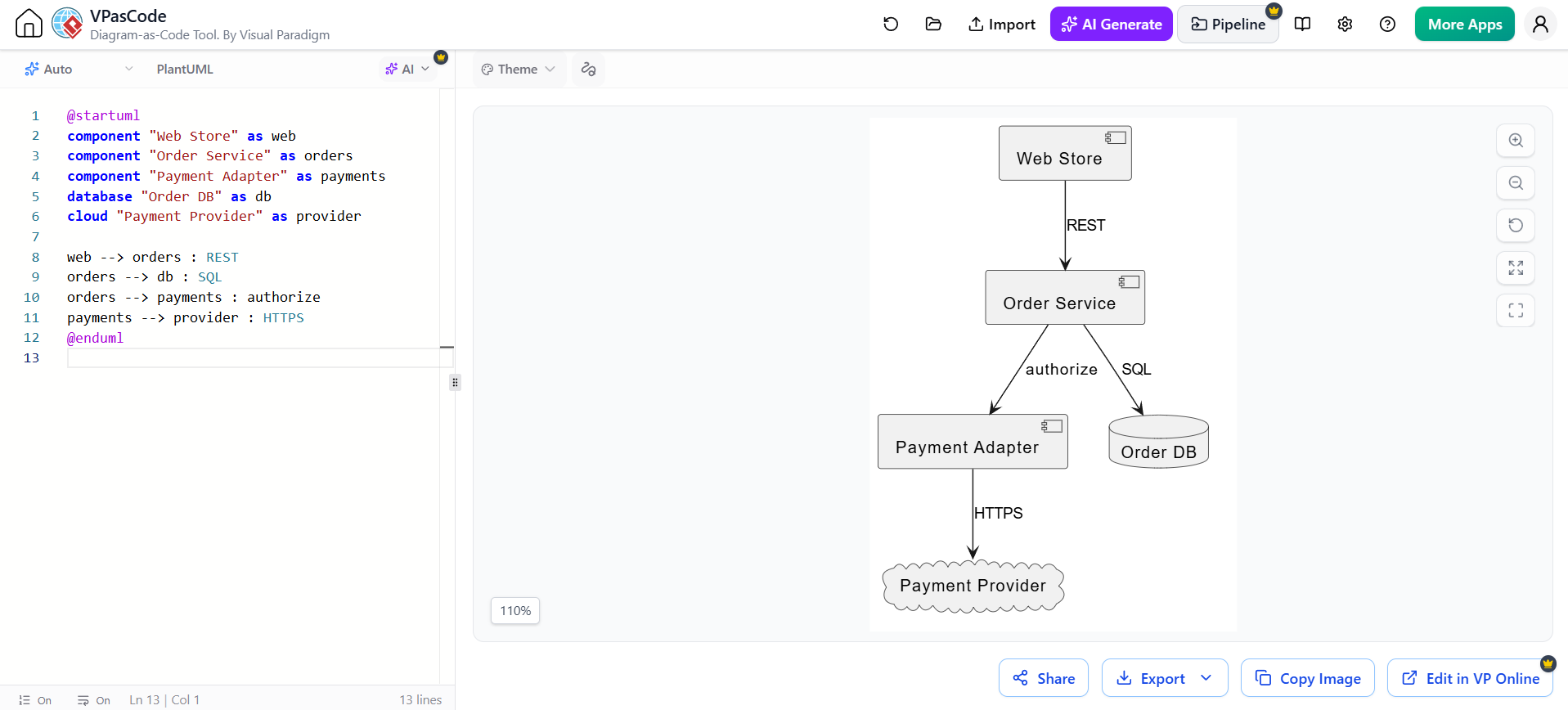
@startuml
component "Web Store" as web
component "Order Service" as orders
component "Payment Adapter" as payments
database "Order DB" as db
cloud "Payment Provider" as provider

web --> orders : REST
orders --> db : SQL
orders --> payments : authorize
payments --> provider : HTTPS
@enduml
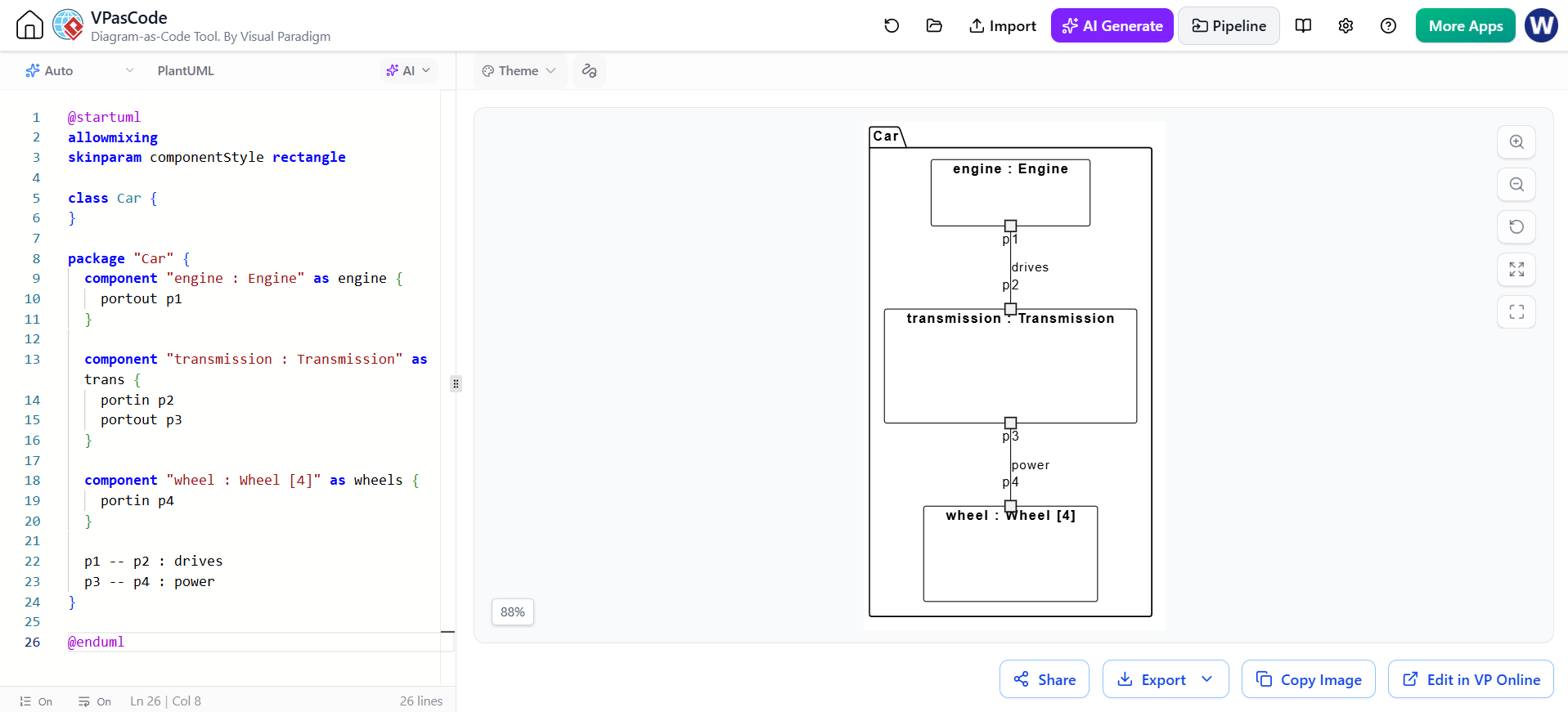
4. Composite structure diagram
Shows the internal parts of a classifier—such as a component or class—and how those parts connect through ports. It is useful when the internal collaboration matters more than the surrounding system architecture.
PlantUML does not provide a universally supported, dedicated composite-structure syntax. This class-diagram-style sketch conveys the parts and connections:
@startuml
allowmixing
skinparam componentStyle rectangle

class Car {
}

package "Car" {
  component "engine : Engine" as engine {
    portout p1
  }

  component "transmission : Transmission" as trans {
    portin p2
    portout p3
  }

  component "wheel : Wheel [4]" as wheels {
    portin p4
  }

  p1 -- p2 : drives
  p3 -- p4 : power
}

@endumlTreat this as a structural sketch; it does not show formal UML ports or connector semantics.
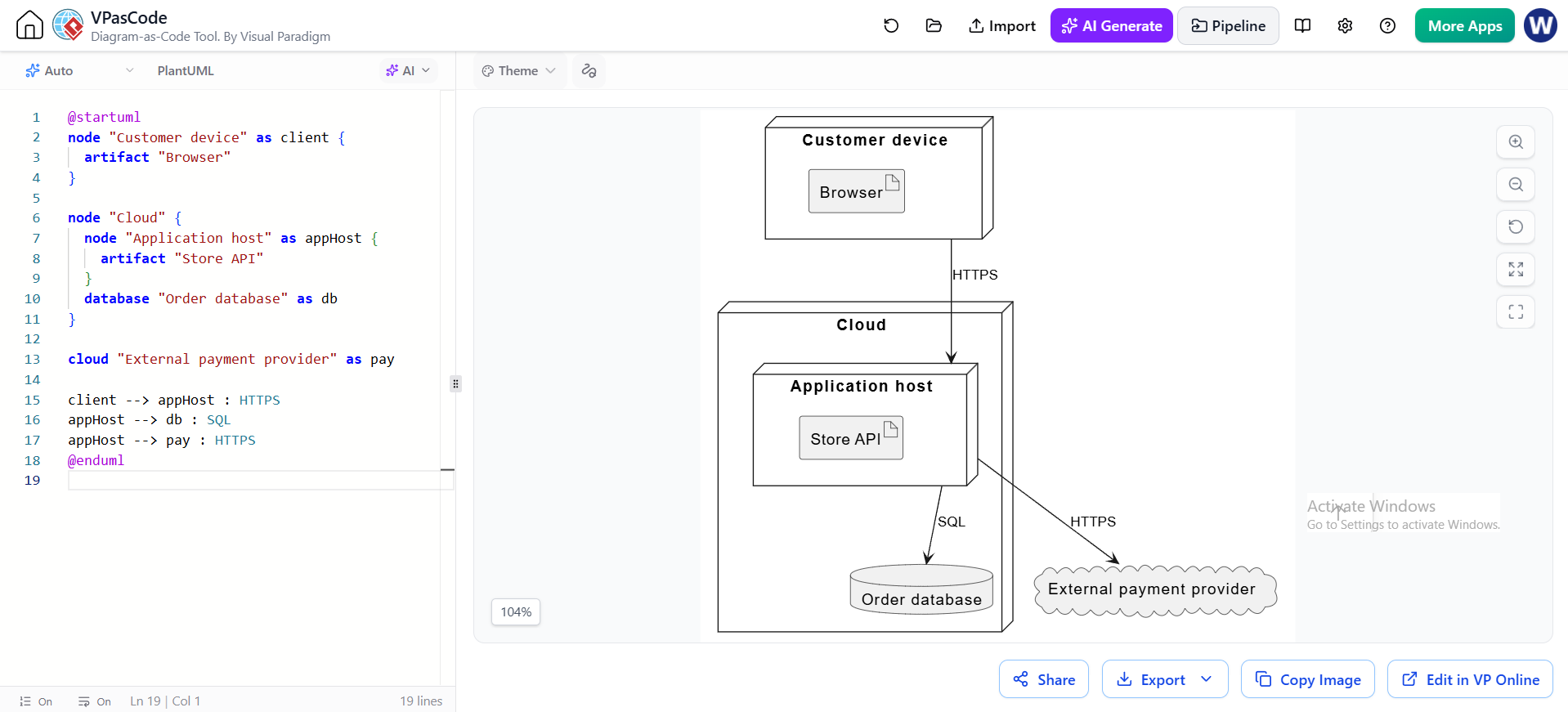
5. Deployment diagram
Maps software artifacts or services onto hardware nodes and execution environments. Use it to explain where software runs and how runtime nodes communicate.
@startuml
node "Customer device" as client {
  artifact "Browser"
}

node "Cloud" {
  node "Application host" as appHost {
    artifact "Store API"
  }
  database "Order database" as db
}

cloud "External payment provider" as pay

client --> appHost : HTTPS
appHost --> db : SQL
appHost --> pay : HTTPS
@enduml
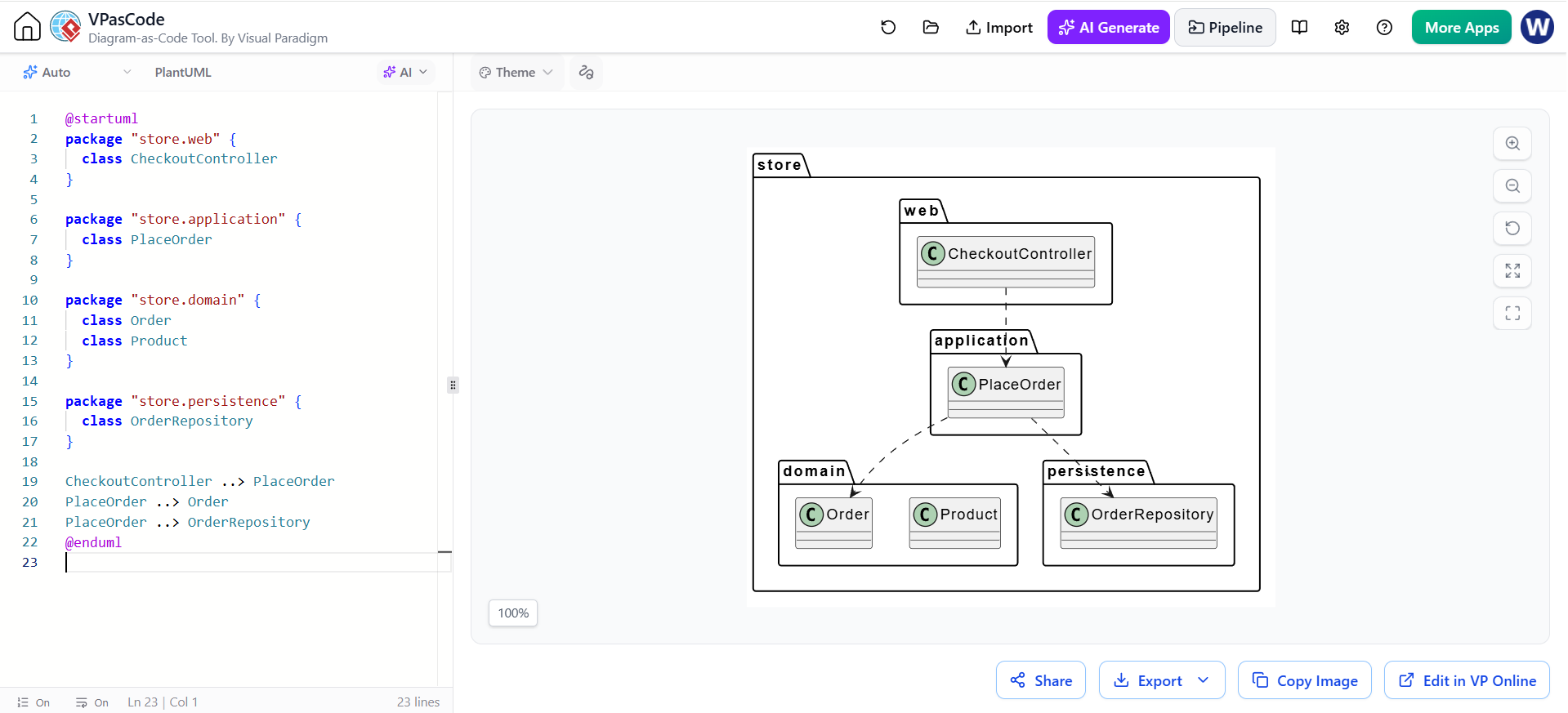
6. Package diagram
Groups model elements into namespaces or layers and shows dependencies between those groups. Use it to explain code organization and architectural direction.
@startuml
package "store.web" {
  class CheckoutController
}

package "store.application" {
  class PlaceOrder
}

package "store.domain" {
  class Order
  class Product
}

package "store.persistence" {
  class OrderRepository
}

CheckoutController ..> PlaceOrder
PlaceOrder ..> Order
PlaceOrder ..> OrderRepository
@enduml
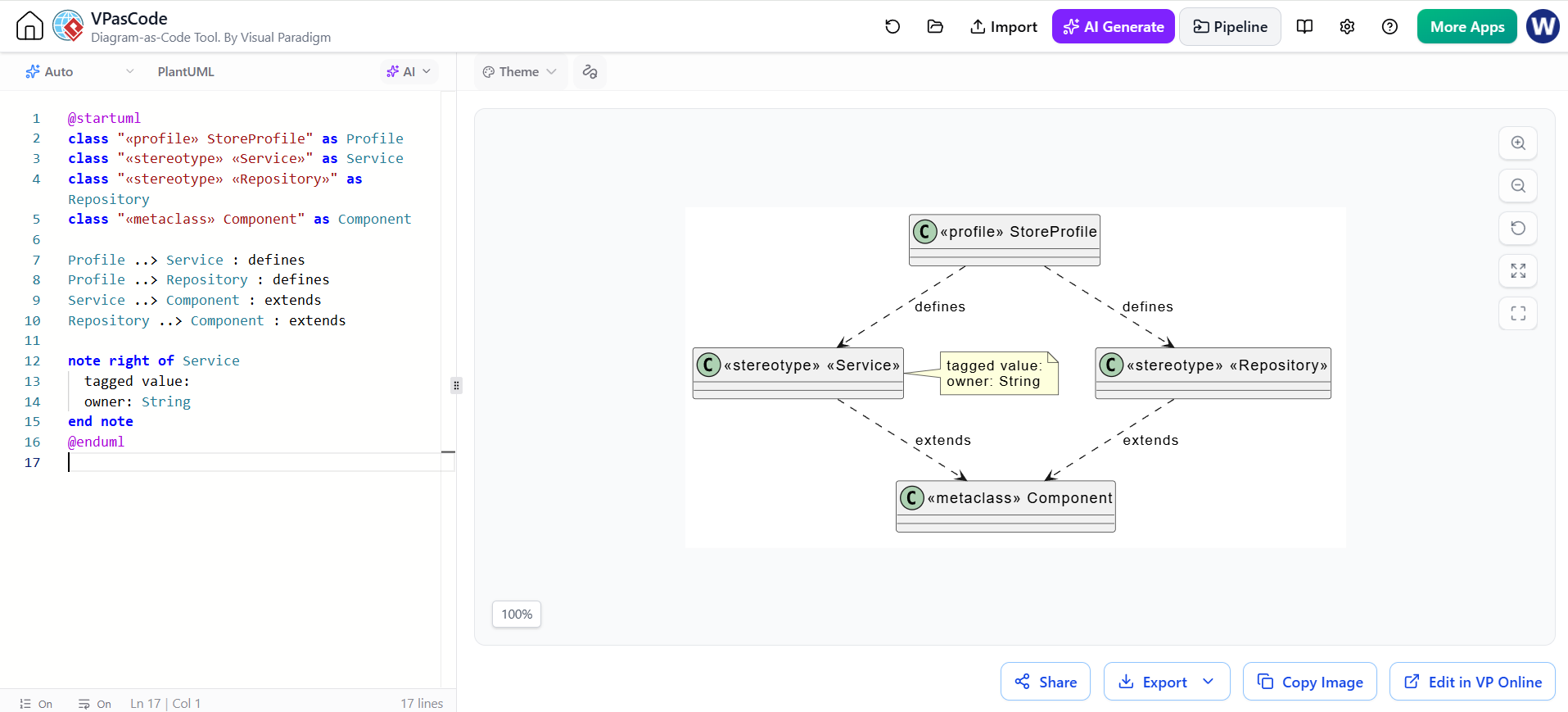
7. Profile diagram
Defines a domain-specific extension to UML using stereotypes, tagged values, and constraints. Use it when a project needs a consistent modeling vocabulary beyond standard UML.
PlantUML can show the profile concepts as a UML-style sketch, but this is not a dedicated profile-diagram renderer.
@startuml
class "«profile» StoreProfile" as Profile
class "«stereotype» «Service»" as Service
class "«stereotype» «Repository»" as Repository
class "«metaclass» Component" as Component

Profile ..> Service : defines
Profile ..> Repository : defines
Service ..> Component : extends
Repository ..> Component : extends

note right of Service
  tagged value:
  owner: String
end note
@enduml
Behavioral diagrams
8. Use case diagram
Shows external actors and the system goals they interact with. Use it to establish scope and capture functional requirements at a high level.
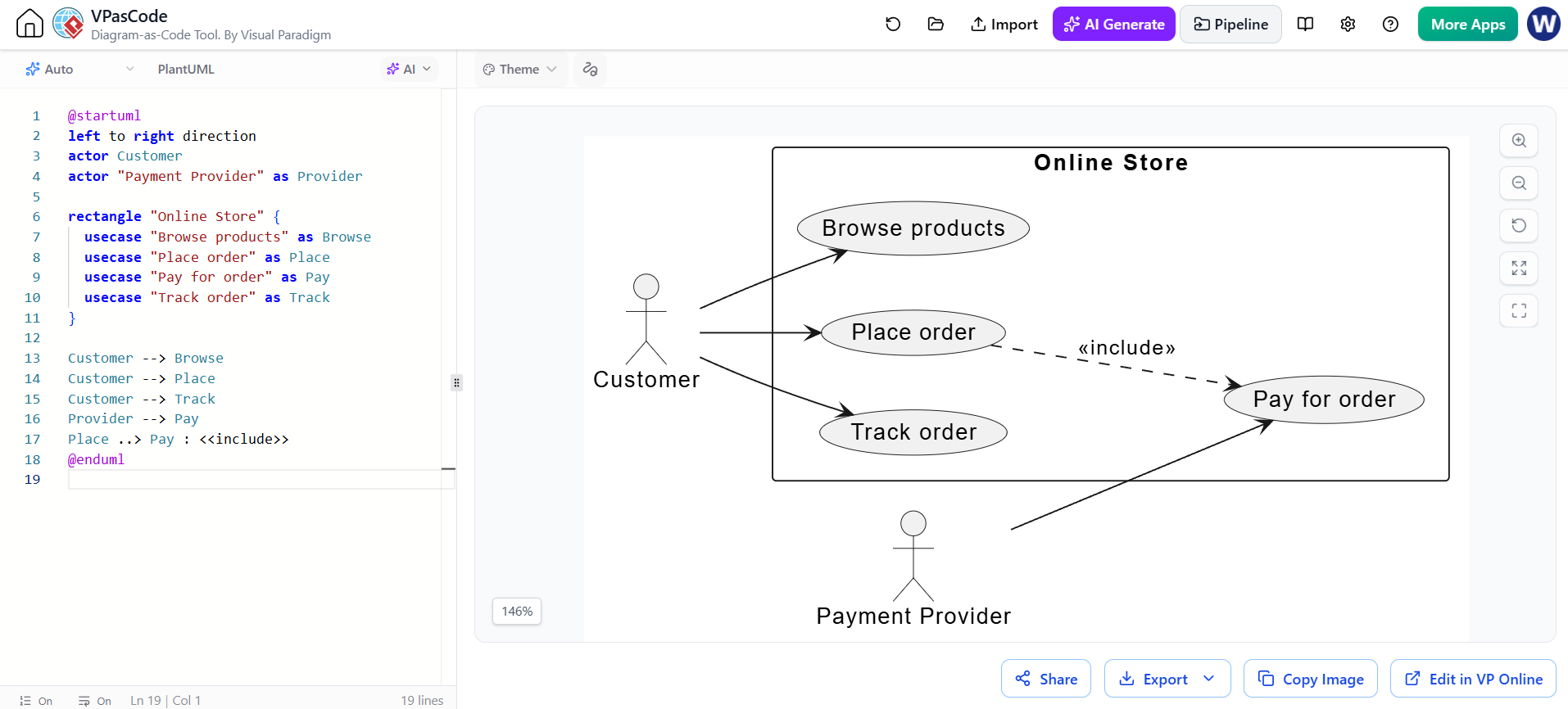
@startuml
left to right direction
actor Customer
actor "Payment Provider" as Provider

rectangle "Online Store" {
  usecase "Browse products" as Browse
  usecase "Place order" as Place
  usecase "Pay for order" as Pay
  usecase "Track order" as Track
}

Customer --> Browse
Customer --> Place
Customer --> Track
Provider --> Pay
Place ..> Pay : <<include>>
@enduml
9. Activity diagram
Models a workflow: actions, decisions, parallel paths, and handoffs. Use it for business processes, operational procedures, or an algorithm’s control flow.
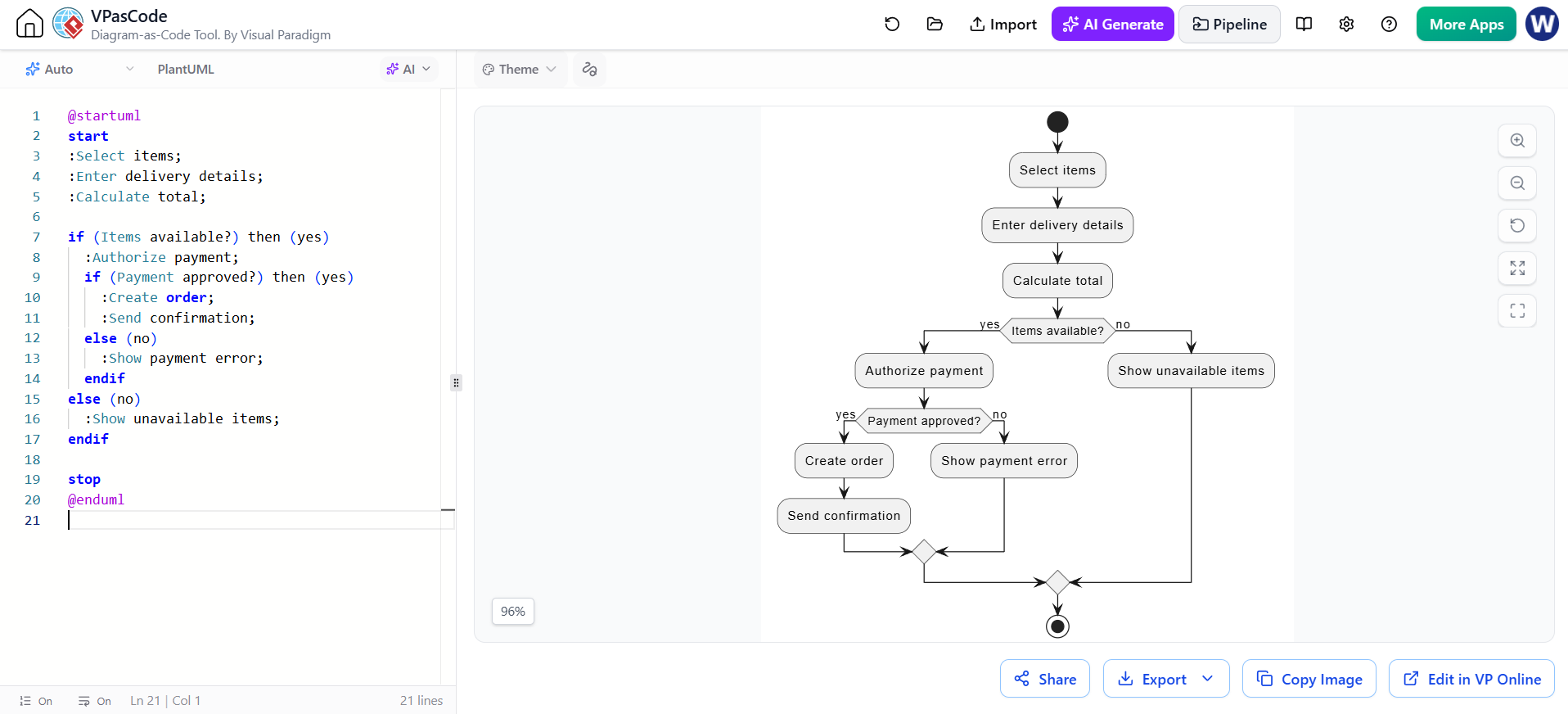
@startuml
start
:Select items;
:Enter delivery details;
:Calculate total;

if (Items available?) then (yes)
  :Authorize payment;
  if (Payment approved?) then (yes)
    :Create order;
    :Send confirmation;
  else (no)
    :Show payment error;
  endif
else (no)
  :Show unavailable items;
endif

stop
@enduml
10. State machine diagram
Describes the states an entity can occupy and the events or conditions that cause transitions. Use it when an object’s behavior depends on its current state.
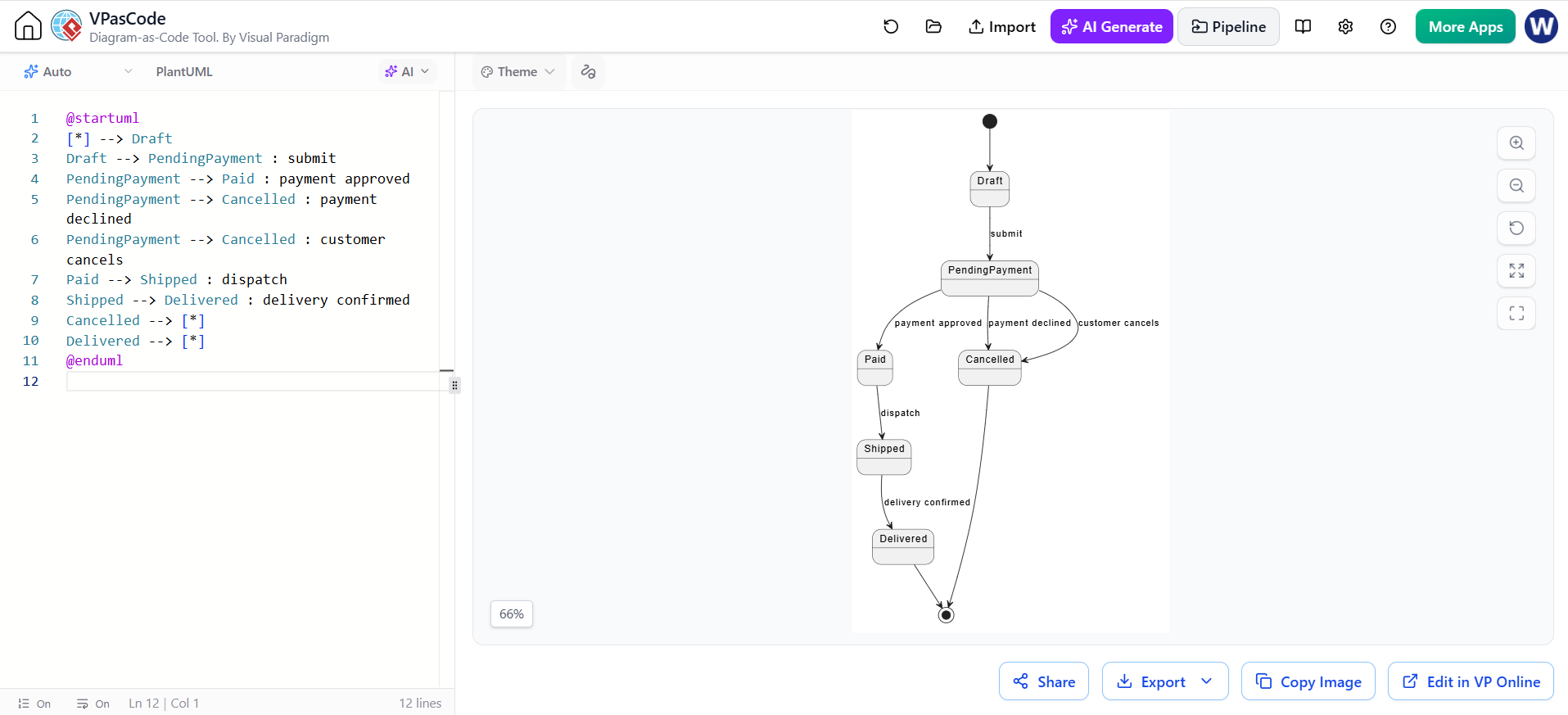
@startuml
[*] --> Draft
Draft --> PendingPayment : submit
PendingPayment --> Paid : payment approved
PendingPayment --> Cancelled : payment declined
PendingPayment --> Cancelled : customer cancels
Paid --> Shipped : dispatch
Shipped --> Delivered : delivery confirmed
Cancelled --> [*]
Delivered --> [*]
@enduml
11. Sequence diagram
Shows messages exchanged between participants in time order. Use it to describe a scenario, API call flow, or interaction between services.
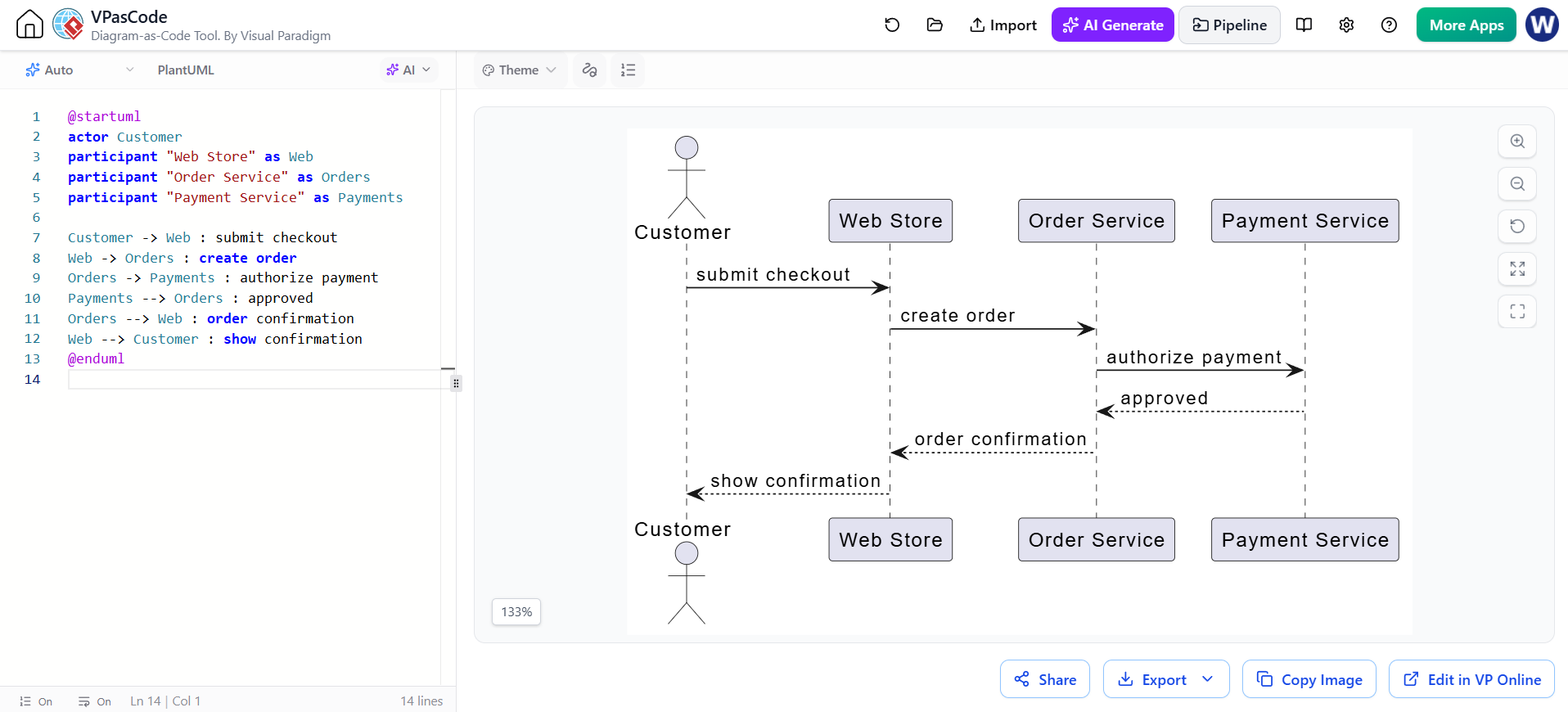
@startuml
actor Customer
participant "Web Store" as Web
participant "Order Service" as Orders
participant "Payment Service" as Payments

Customer -> Web : submit checkout
Web -> Orders : create order
Orders -> Payments : authorize payment
Payments --> Orders : approved
Orders --> Web : order confirmation
Web --> Customer : show confirmation
@enduml
12. Communication diagram
Emphasizes which objects collaborate and the links between them; message numbering shows the order of interactions. Use it when the network of collaborating participants is more important than a timeline.
PlantUML does not have a dedicated communication-diagram renderer in its standard UML set. This object-link sketch labels messages with sequence numbers:
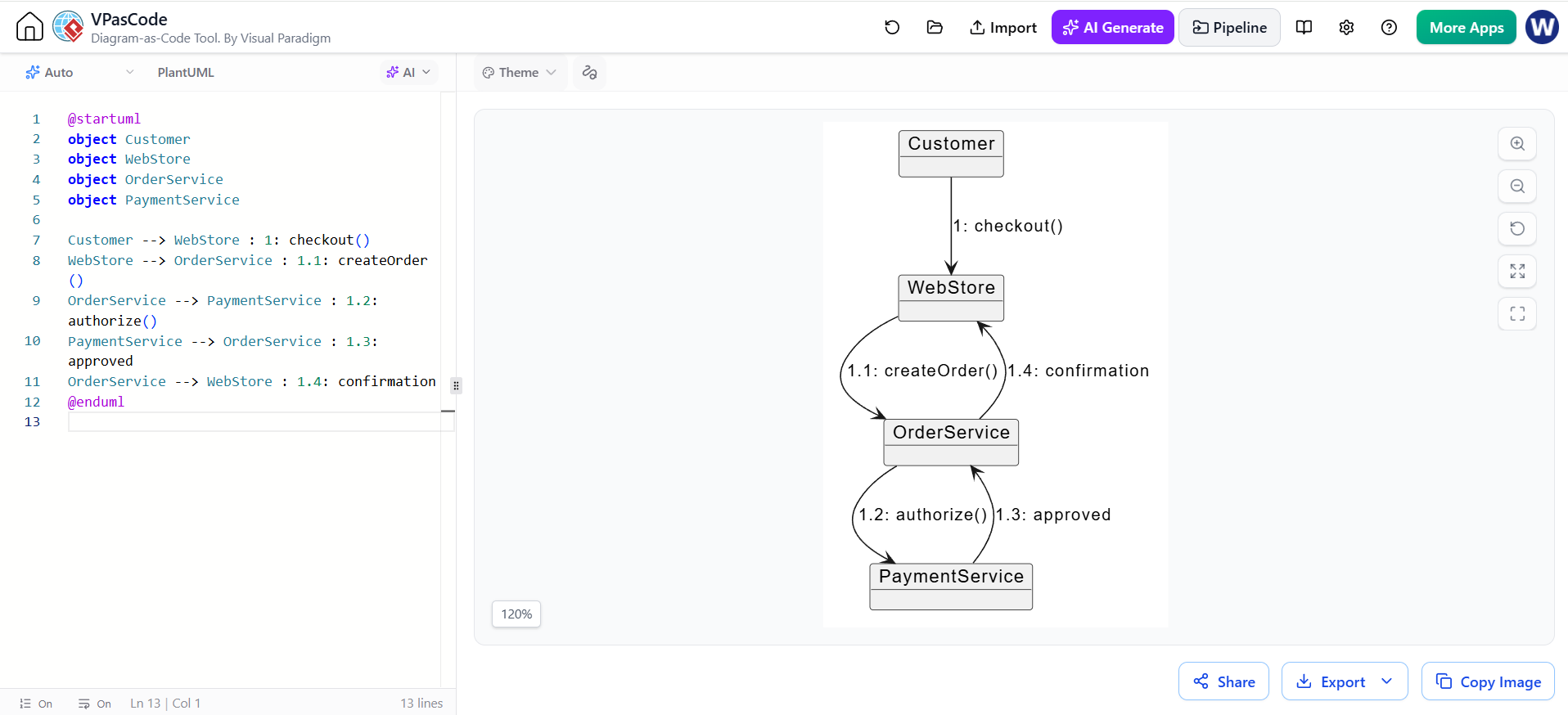
@startuml
object Customer
object WebStore
object OrderService
object PaymentService

Customer --> WebStore : 1: checkout()
WebStore --> OrderService : 1.1: createOrder()
OrderService --> PaymentService : 1.2: authorize()
PaymentService --> OrderService : 1.3: approved
OrderService --> WebStore : 1.4: confirmation
@enduml
13. Interaction overview diagram
Provides a high-level control-flow view of interactions, combining activity-style flow with references to interaction scenarios. Use it to show how several sequence-level scenarios fit into a larger process.
This PlantUML example uses an activity diagram as an overview, with scenario names standing in for referenced interactions:
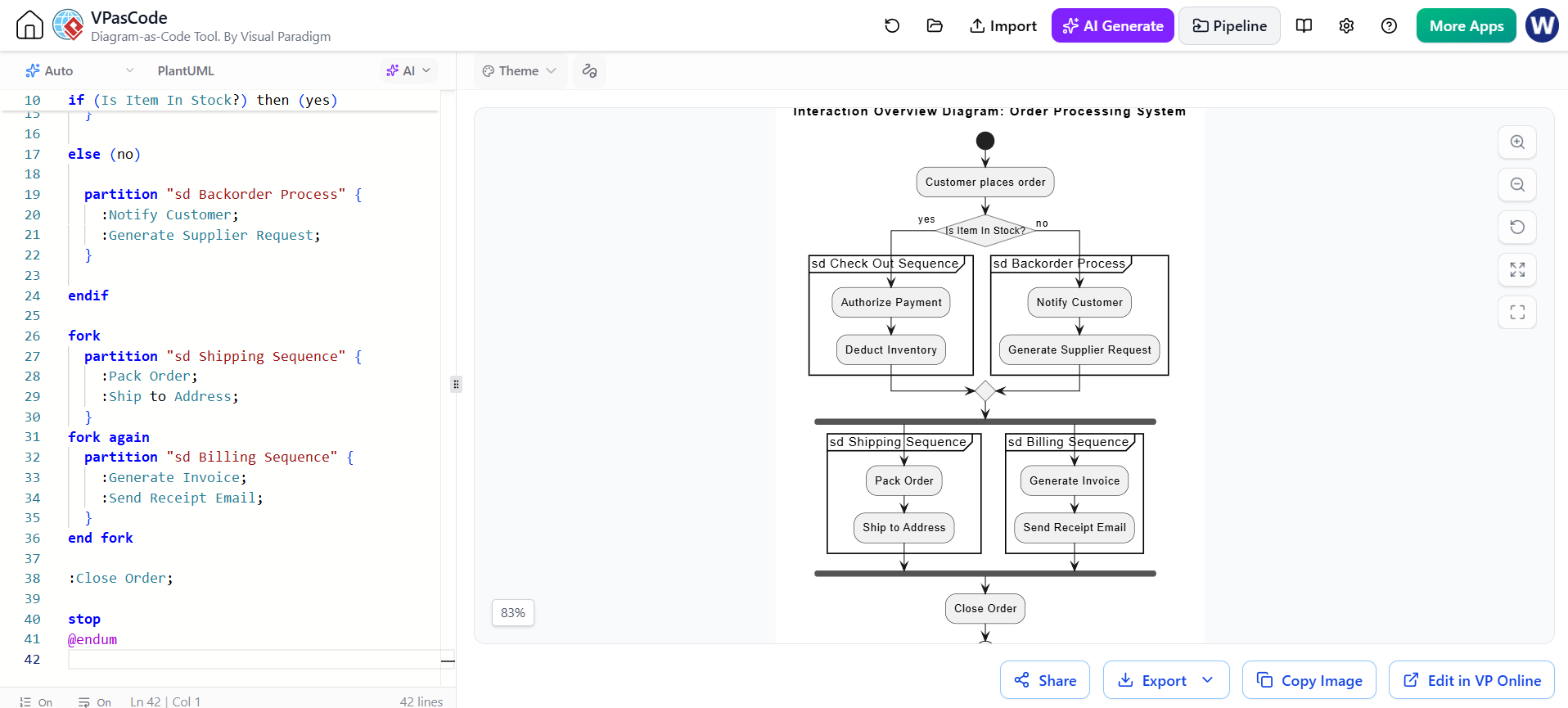
@startuml
skinparam conditionStyle InsideDiamond

title Interaction Overview Diagram: Order Processing System

start

:Customer places order;

if (Is Item In Stock?) then (yes)

  partition "sd Check Out Sequence" {
    :Authorize Payment;
    :Deduct Inventory;
  }

else (no)

  partition "sd Backorder Process" {
    :Notify Customer;
    :Generate Supplier Request;
  }

endif

fork
  partition "sd Shipping Sequence" {
    :Pack Order;
    :Ship to Address;
  }
fork again
  partition "sd Billing Sequence" {
    :Generate Invoice;
    :Send Receipt Email;
  }
end fork

:Close Order;

stop
@endumFor detailed message exchanges inside each scenario, create a separate sequence diagram.
14. Timing diagram
Shows state or value changes against a time axis. Use it for time-sensitive behavior, protocols, hardware interactions, or requirements involving durations and deadlines.
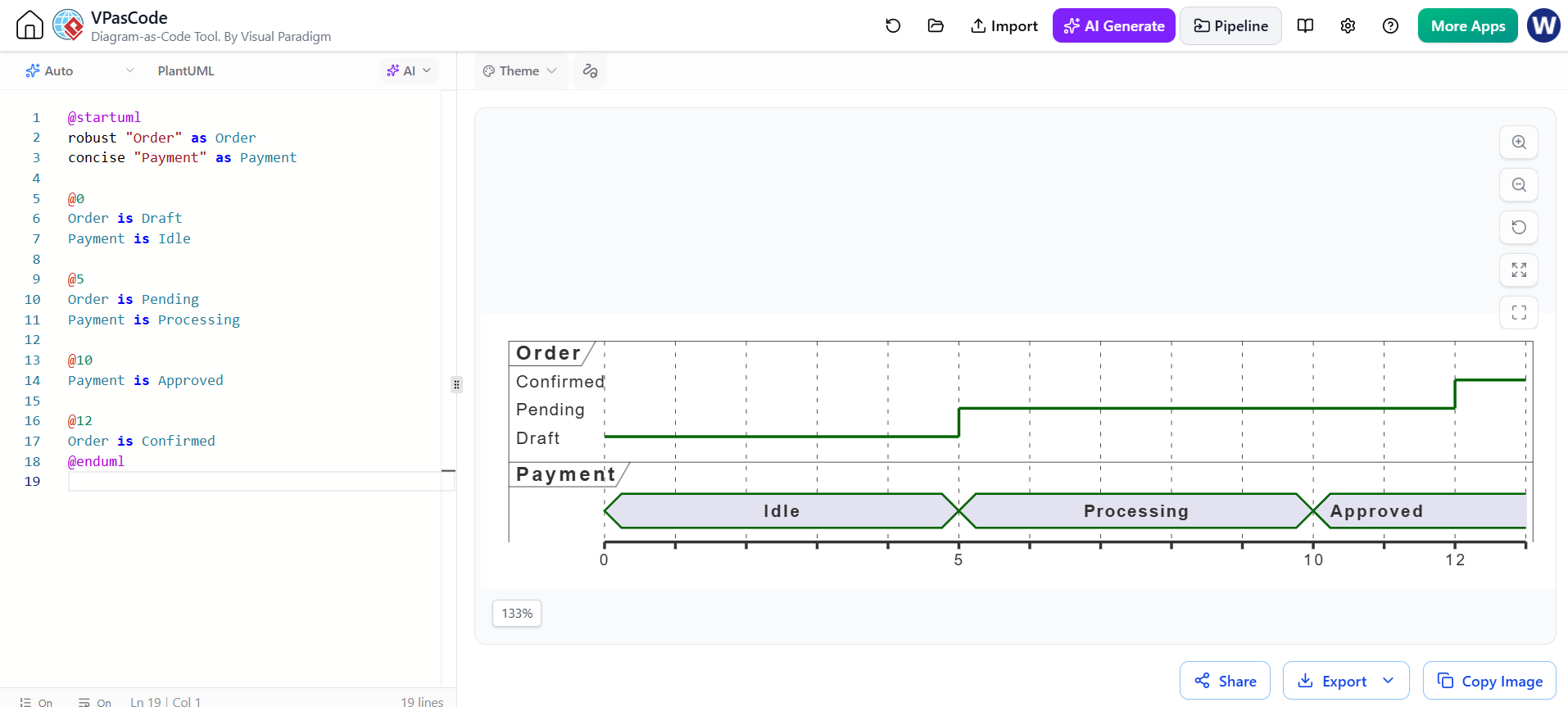
@startuml
robust "Order" as Order
concise "Payment" as Payment

@0
Order is Draft
Payment is Idle

@5
Order is Pending
Payment is Processing

@10
Payment is Approved

@12
Order is Confirmed
@enduml
Choosing a diagram
Start with the question you need the diagram to answer:
-
What is in the system? Class, object, component, composite structure, package, profile, or deployment.
-
What does the system do? Use case, activity, or state machine.
-
How do participants collaborate? Sequence, communication, interaction overview, or timing.
Keep each diagram focused on one purpose, use consistent names across diagrams, and include only enough detail for the audience and decision at hand. PlantUML snippets are starting points: check your renderer’s supported syntax, particularly for the specialized diagram types.
This post is also available in Deutsch, Español, فارسی, Français, Bahasa Indonesia, 日本語, Polski, Portuguese, Ру́сский, Việt Nam, 简体中文 and 繁體中文.