
Introduction
Enterprise Architecture (EA) has become the backbone of digital transformation, enabling organizations to align business strategy with IT execution. Among the various modeling languages available, ArchiMate stands out as the open standard for describing, analyzing, and visualizing complex enterprise architectures. However, the true power of ArchiMate is unlocked only when paired with a robust, certified tooling environment.
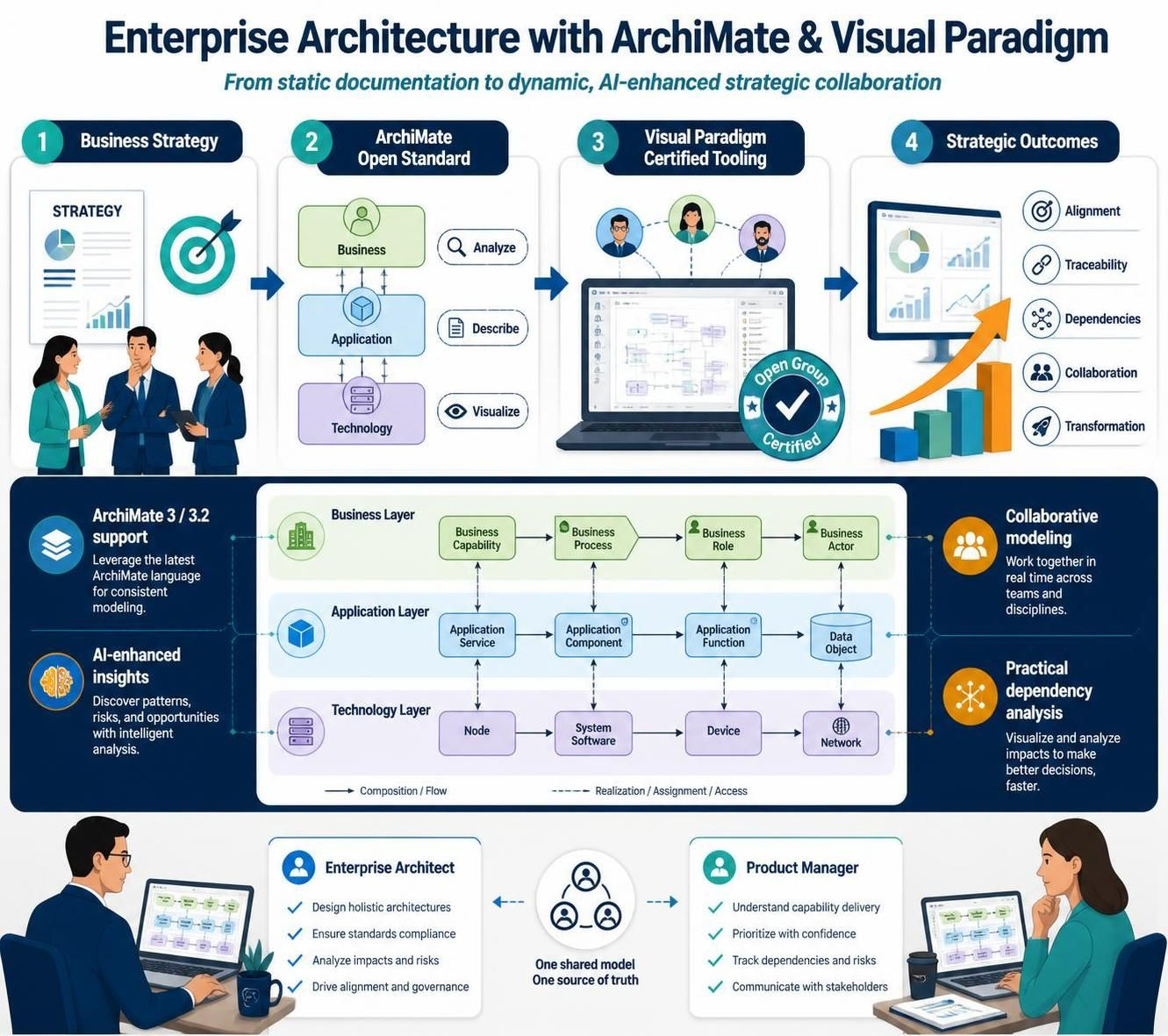
Visual Paradigm emerges as a premier solution in this space, offering an Open Group-certified platform that supports the full spectrum of ArchiMate 3 and 3.2 specifications. This guide explores how Visual Paradigm transforms EA modeling from a static documentation exercise into a dynamic, AI-enhanced, and collaborative strategic process. Whether you are a seasoned enterprise architect or a product manager looking to understand structural dependencies, this guide provides the key concepts, practical examples, and tooling insights needed to leverage Visual Paradigm effectively.
Key Concepts in ArchiMate Modeling
Before diving into the tooling, it is essential to understand the core pillars of ArchiMate that Visual Paradigm supports.
1. The Layered Metamodel
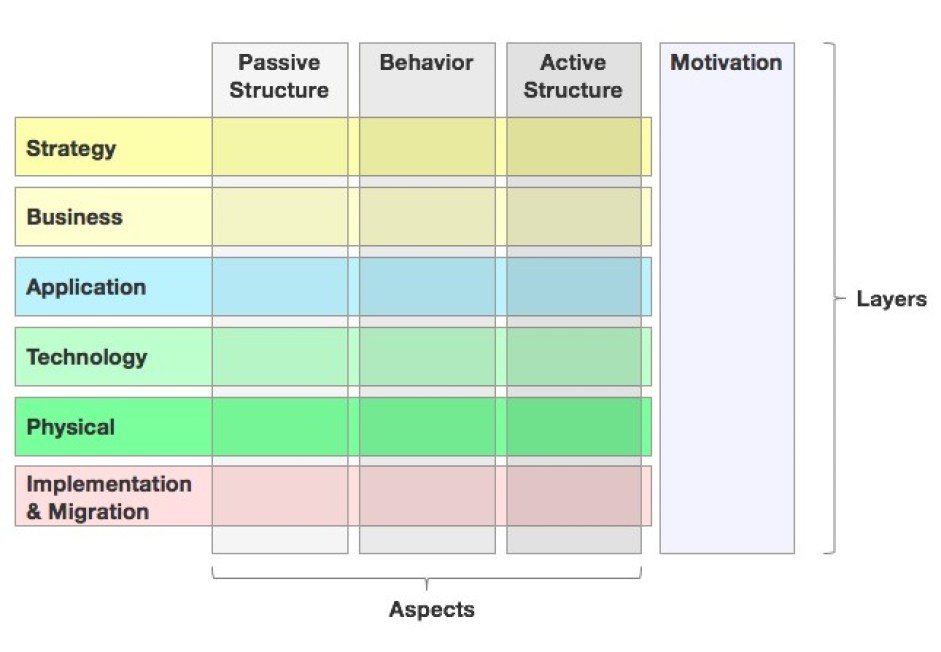
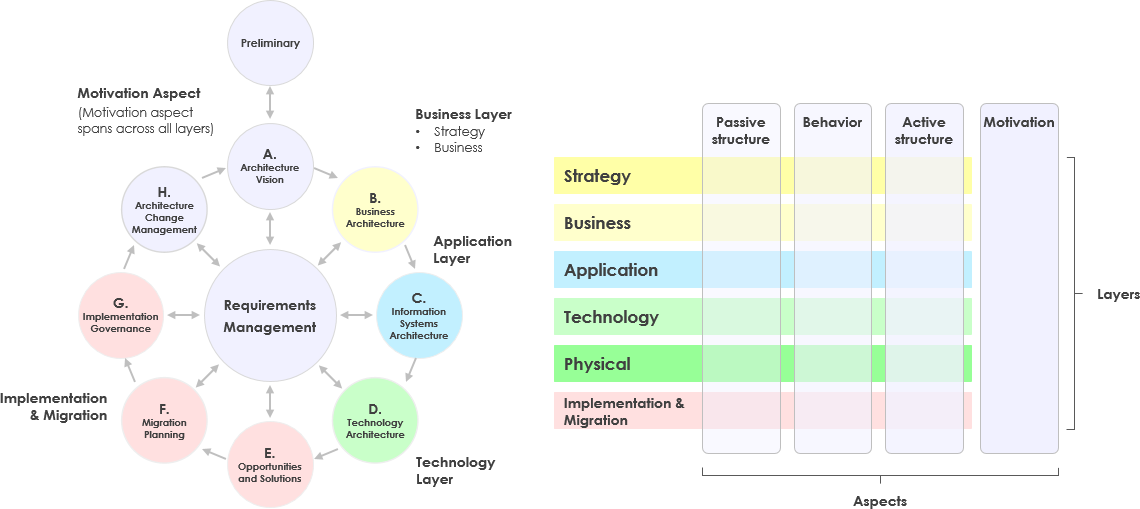
ArchiMate organizes enterprise elements into distinct layers, each serving a specific purpose. Visual Paradigm ensures strict adherence to these layers:
-
Strategy Layer: Focuses on high-level goals, capabilities, and courses of action.
-
Business Layer: Describes business services, processes, functions, and actors.
-
Application Layer: Models software applications, components, and their interactions.
-
Technology Layer: Represents hardware, system software, and communication networks.
-
Physical Layer: Covers physical equipment, materials, and distribution networks.
-
Motivation Layer: Captures stakeholders, drivers, assessments, goals, and requirements.
-
Implementation & Migration Layer: Handles projects, deliverables, and plateaus during transition.
2. Viewpoints and Stakeholder Concerns
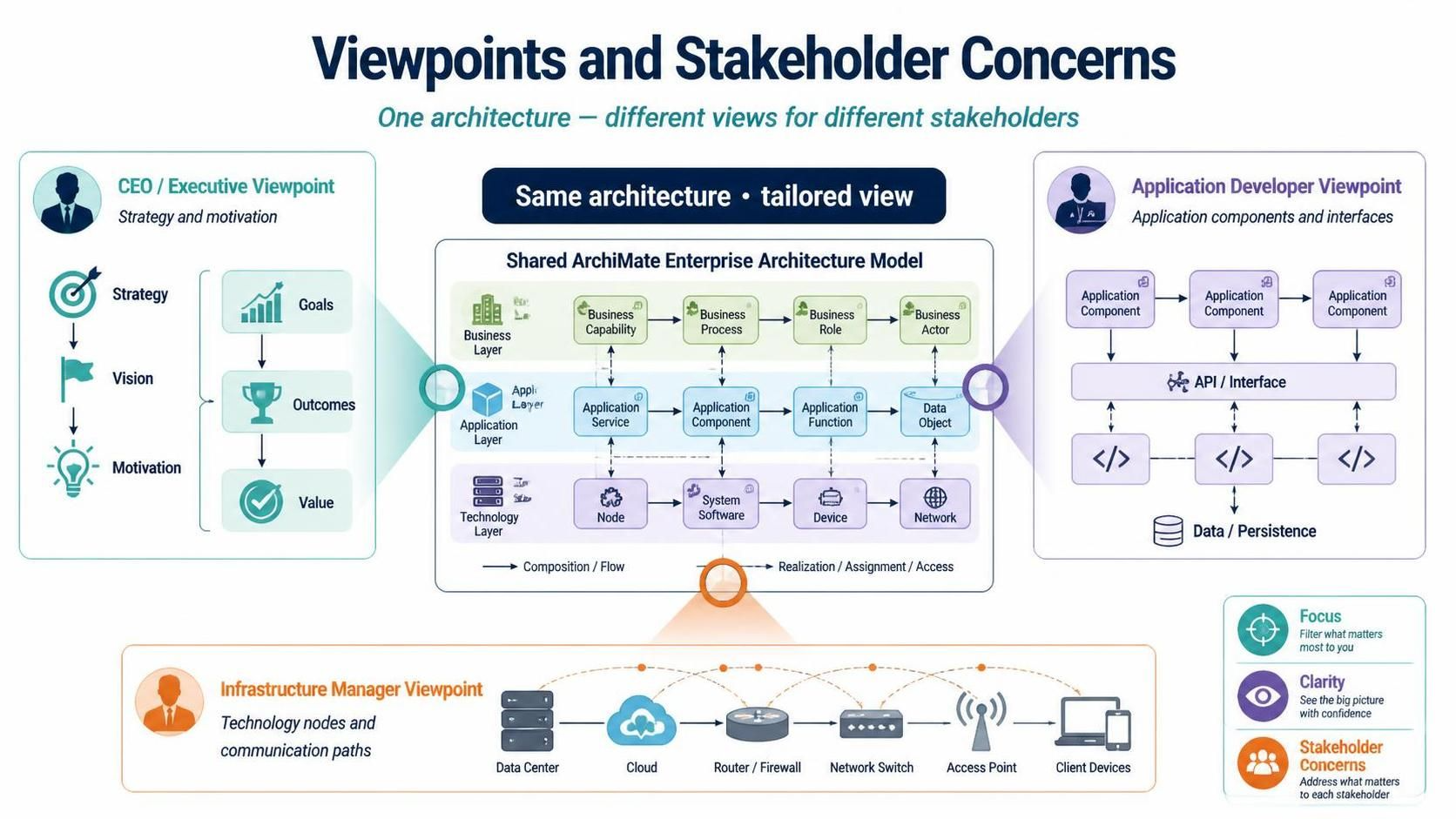
One of ArchiMate’s strengths is its ability to present different views of the same architecture to different stakeholders. Visual Paradigm’s official viewpoint library allows architects to filter complexity:
-
CEO/Executive Viewpoint: High-level strategy and motivation elements.
-
Application Developer Viewpoint: Detailed application components and interfaces.
-
Infrastructure Manager Viewpoint: Technology nodes and communication paths.
3. Relationships and Dynamics
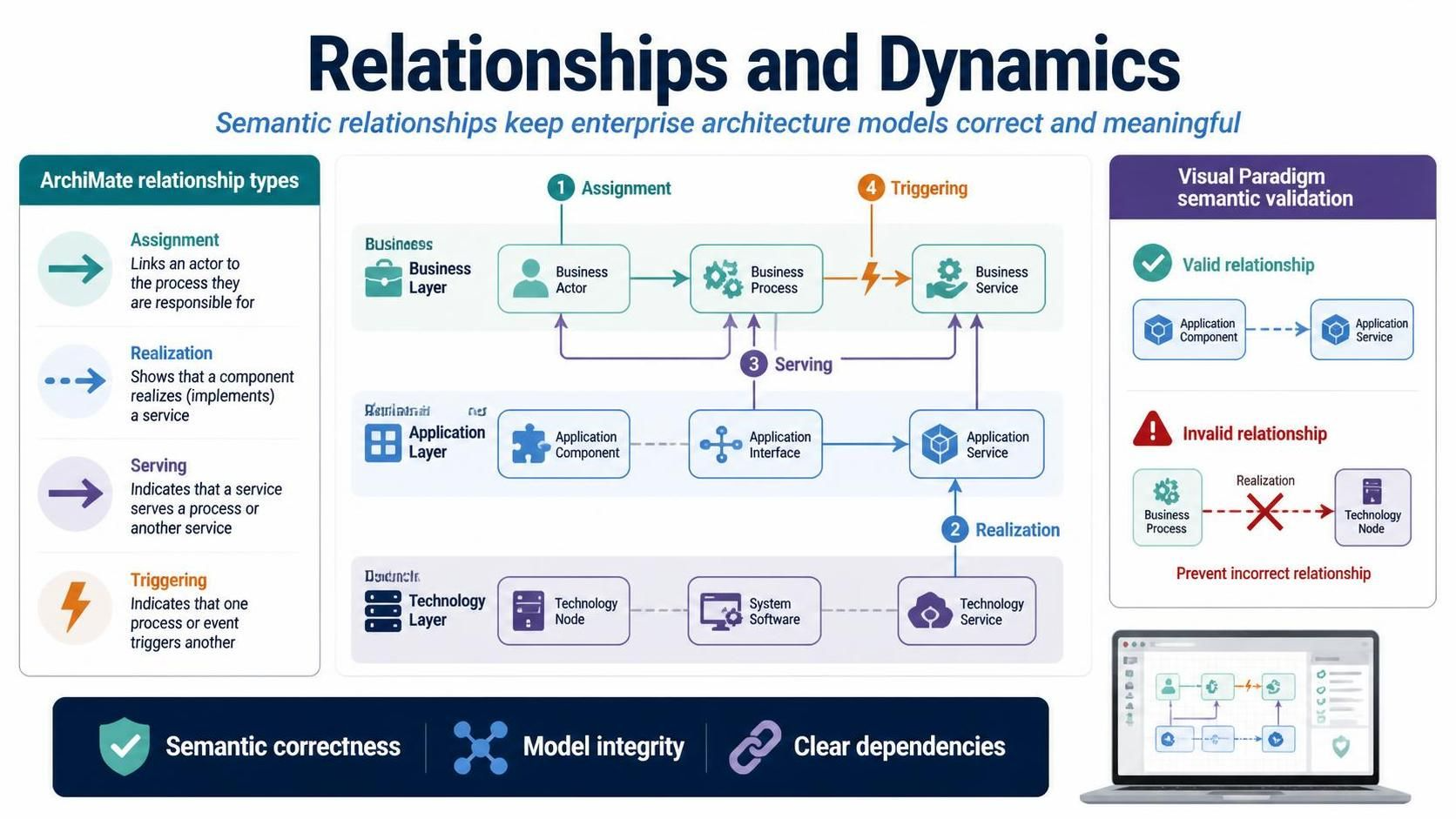
ArchiMate defines specific relationship types (e.g., Assignment, Realization, Serving, Triggering) that dictate how elements interact. Visual Paradigm enforces semantic correctness, ensuring that a “Business Process” cannot incorrectly “realize” a “Technology Node,” thereby maintaining model integrity.
Visual Paradigm: Tooling Capabilities and Examples
Visual Paradigm goes beyond basic diagramming by integrating advanced features that streamline the EA lifecycle.
AI-Powered ArchiMate Generation
Traditional modeling can be time-consuming. Visual Paradigm introduces an AI-driven generator that allows users to build compliant diagrams through natural language conversation.
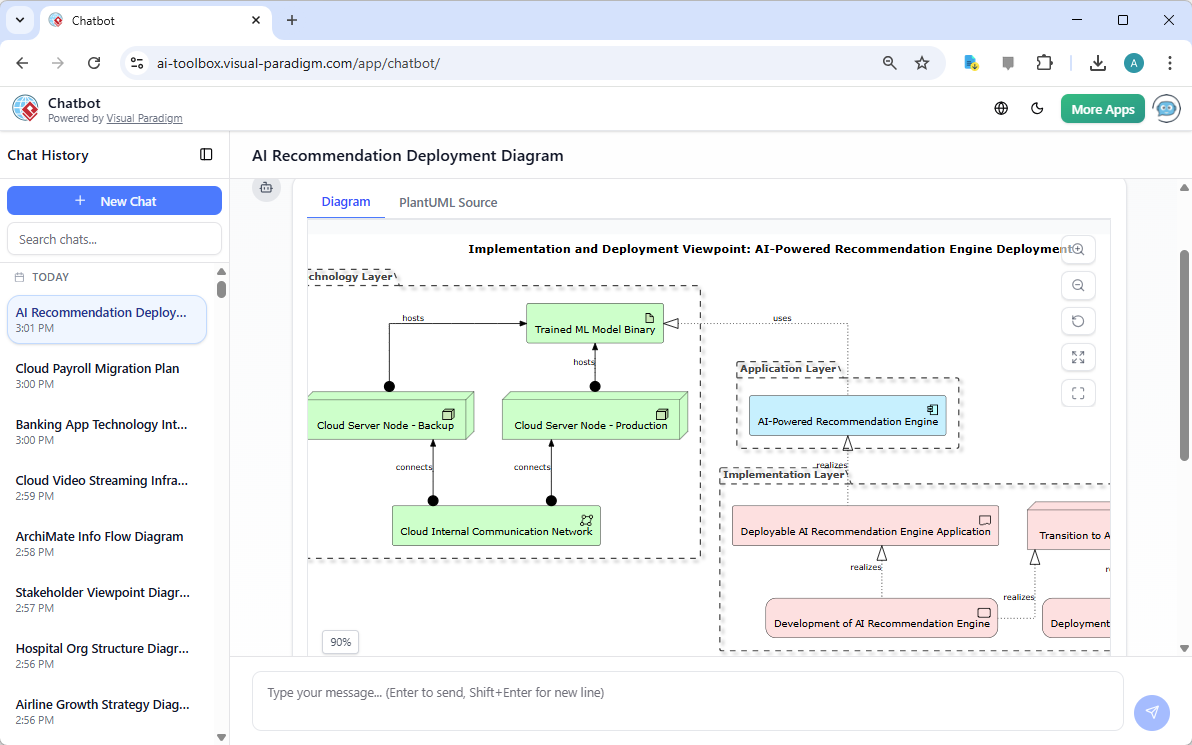
Example Scenario:
An architect needs to model a new customer onboarding flow. Instead of manually dragging shapes, they can prompt the AI: “Create an ArchiMate diagram showing a Business Actor ‘Customer’ triggering a Business Process ‘Onboarding,’ which is supported by an Application Service ‘CRM System’ running on a Technology Node ‘Cloud Server.'” The tool generates the initial structure, which the architect can then refine, saving hours of manual setup.
Seamless TOGAF ADM Integration
For organizations using The Open Group Architecture Framework (TOGAF), Visual Paradigm provides end-to-end traceability between ArchiMate models and the Architecture Development Method (ADM) cycle.
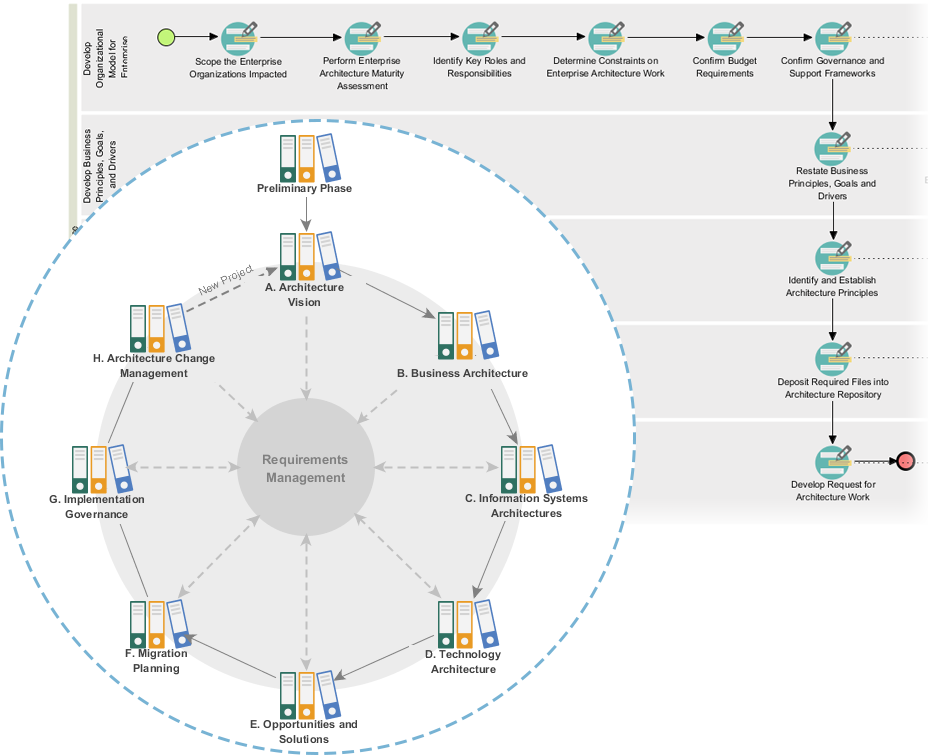
Example Scenario:
During the “Preliminary Phase” of TOGAF, architects define principles and requirements. In Visual Paradigm, these can be modeled as Motivation elements. As the project moves to “Architecture Vision” and “Business Architecture,” the same elements are linked to Business Layer components. This ensures that every technical decision can be traced back to a business driver or requirement, facilitating impact analysis and compliance reporting.
Multi-Framework Support and Interoperability
Enterprise architecture does not exist in a vacuum. Visual Paradigm allows ArchiMate models to coexist with other standards:
-
BPMN 2.0: For detailed business process orchestration.
-
UML: For granular software design and class structures.
-
Strategic Tools: SWOT, Value Chain, and PEST analysis diagrams can be linked to ArchiMate Strategy elements, providing context for architectural decisions.
Example Scenario:
A product team uses BPMN to detail the steps of a “Loan Approval Process.” The EA team links this BPMN diagram to an ArchiMate “Business Process” element. Developers then use UML sequence diagrams to show how the “Loan Approval Service” interacts with backend databases. All three models are synchronized within Visual Paradigm, ensuring consistency across business, architecture, and development teams.
Cloud Collaboration and Stakeholder Feedback
Modern EA requires input from diverse stakeholders. Visual Paradigm’s cloud workspace enables distributed teams to share interactive online diagrams.
Example Scenario:
An architect publishes a “System Landscape Viewpoint” to the cloud. Stakeholders from security, compliance, and operations can access the diagram via a web browser, leave comments, and request changes without needing to install desktop software. This feedback loop accelerates review cycles and ensures broader buy-in.
Custom and Constrained Viewpoints
While official viewpoints provide a starting point, every organization has unique needs. Visual Paradigm allows users to create custom viewpoints with specific element filtering and syntax checking.
Example Scenario:
A healthcare organization needs a viewpoint that only shows “Patient Data” flows and related “Security Controls.” They can configure a custom viewpoint that hides all other elements, ensuring that auditors see only relevant information, reducing cognitive load and enhancing clarity.
Practical Steps to Get Started with Visual Paradigm
-
Define Your Scope: Identify the key stakeholders and their concerns. Are you focusing on strategy, business processes, or technology infrastructure?
-
Select Appropriate Viewpoints: Use Visual Paradigm’s library to choose pre-defined viewpoints that match your stakeholder needs.
-
Leverage AI for Initial Drafts: Use the AI generator to create baseline models based on natural language descriptions.
-
Enforce Semantic Correctness: Utilize the tool’s built-in validation to ensure relationships and layer assignments comply with ArchiMate standards.
-
Integrate with Other Frameworks: Link ArchiMate elements to BPMN, UML, or strategic analysis diagrams as needed.
-
Collaborate in the Cloud: Share diagrams with stakeholders for feedback and iterate based on their input.
-
Maintain Traceability: Ensure that all architectural decisions are linked back to business drivers and requirements using TOGAF ADM integration.
Conclusion
Visual Paradigm represents a significant evolution in Enterprise Architecture tooling. By combining Open Group-certified ArchiMate support with AI-powered generation, TOGAF integration, and cloud-based collaboration, it addresses the common pain points of traditional EA modeling: complexity, siloed information, and slow iteration cycles.
For enterprise architects, product managers, and IT leaders, adopting Visual Paradigm means moving from static documentation to dynamic, living architecture models that drive strategic decision-making. Whether you are mapping out a digital transformation initiative or optimizing existing processes, Visual Paradigm provides the structure, flexibility, and intelligence needed to succeed in today’s complex enterprise landscape.
Recommended Reading and Resources
- Visual Paradigm ArchiMate Tools Overview: Official feature breakdown of ArchiMate support, AI generation, and framework integration.
- ArchiMate 3.2 Specification Guide: Detailed reference for ArchiMate 3 and 3.2 syntax and semantics within Visual Paradigm.
- What is ArchiMate?: Beginner-friendly introduction to ArchiMate concepts and layers.
- AI ArchiMate Enterprise Architecture Generator: Deep dive into using AI for natural language-to-diagram modeling.
- Enterprise Modeling Tool Features: Overview of multi-framework support including BPMN, UML, and strategic tools.
- Visual Paradigm: The Premier Tool for ArchiMate EA Modeling: Third-party review highlighting collaboration and cloud features.
- Full ArchiMate Viewpoints Guide: Comprehensive list of official and custom viewpoint configurations.
Related posts:
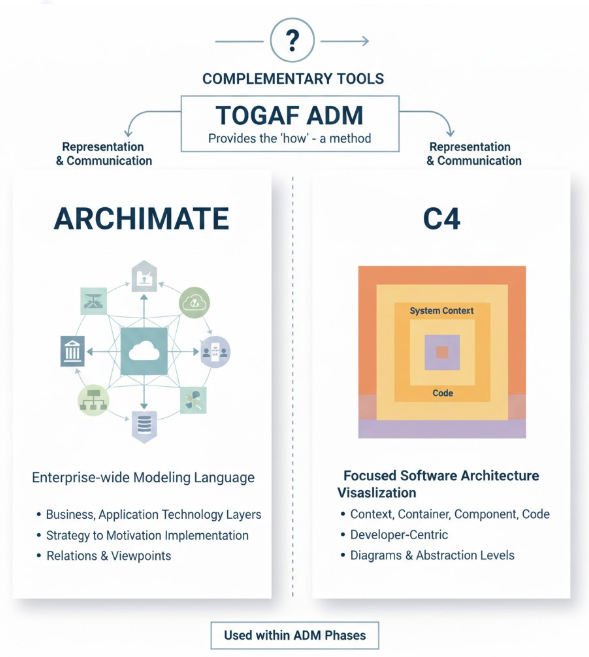 Unifying Enterprise Architecture: How Visual Paradigm Empowers TOGAF ADM, ArchiMate, and C4 with AI-Powered Intelligence
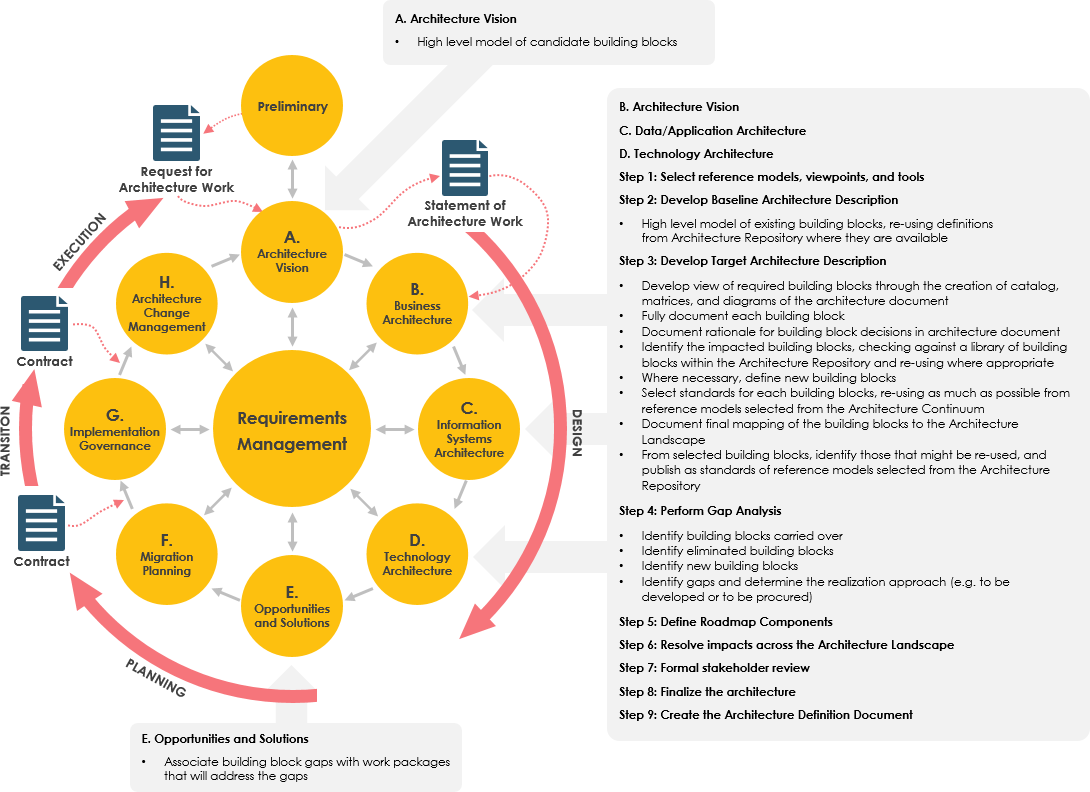 Streamline Enterprise Architecture with Visual Paradigm’s Intelligent AI TOGAF and ArchiMate Support
 ArchiMate® 3: A Comprehensive Overview
 Review Tutorial: Integrating ArchiMate and TOGAF for Effective Enterprise Architecture