
Introduction
In today’s fast-paced business environment, organizations constantly seek ways to optimize operations, reduce costs, and enhance customer satisfaction. One of the most effective approaches to achieving these goals is through Business Process Model and Notation (BPMN)—a standardized graphical representation for specifying business processes.
Better processes produce lower costs, higher revenues, motivated employees, and happier customers. However, creating effective process models requires more than just understanding the notation; it demands the right tools. Visual Paradigm provides complete BPMN support with sophisticated tools that go beyond simple diagramming, offering features for report generation, glossary management, team collaboration, and seamless integration with other complementary open standards such as UML, Mindmap, Decision tables, CMMN, and the Zachman framework.
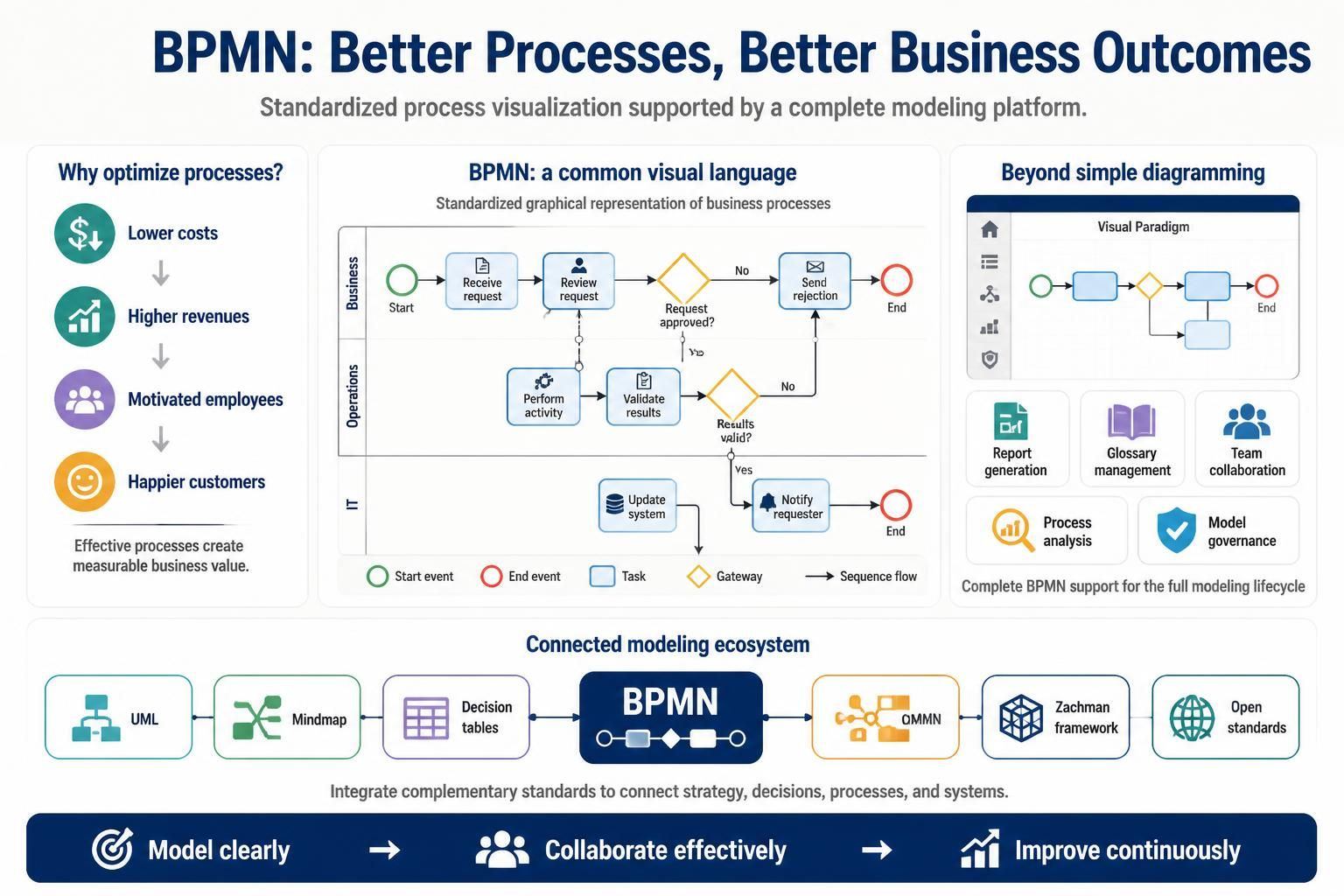
This comprehensive guide will walk you through everything you need to know about BPMN modeling using Visual Paradigm, from basic concepts to advanced analysis techniques that can transform your business processes.
Key Concepts in BPMN
What is BPMN?
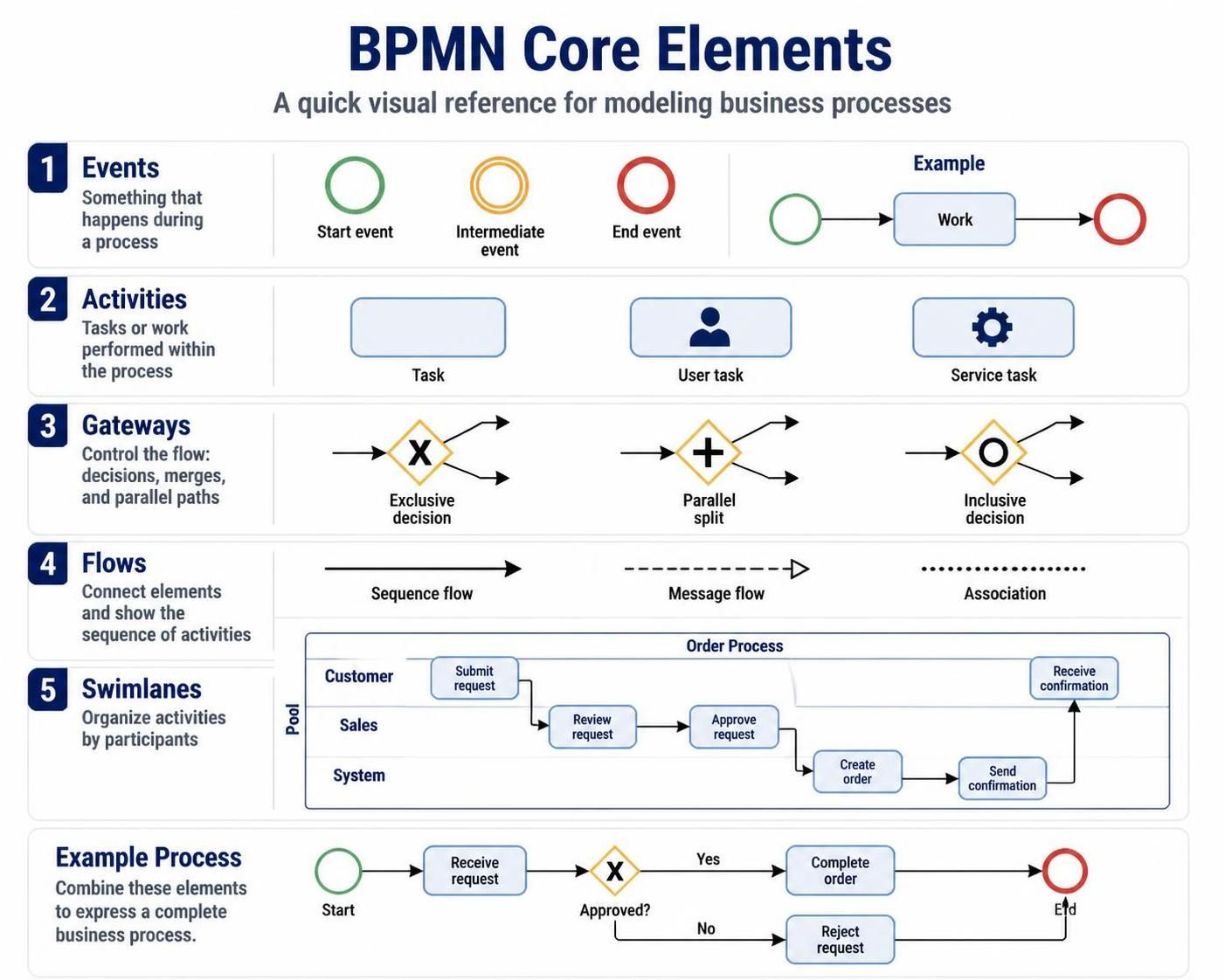
BPMN 2.0 is an ISO standard that provides a graphical notation for specifying business processes in a Business Process Diagram (BPD). It enables all stakeholders—from business analysts to technical developers—to understand process flows consistently.
Core BPMN Elements
-
Events: Represent something that happens during a process (start, intermediate, end)
-
Activities: Tasks or work performed within the process
-
Gateways: Control the flow of the process (decisions, merges, parallel paths)
-
Flows: Connect elements and show the sequence of activities
-
Swimlanes: Organize activities by participants (pools and lanes)
Why Visual Paradigm for BPMN?
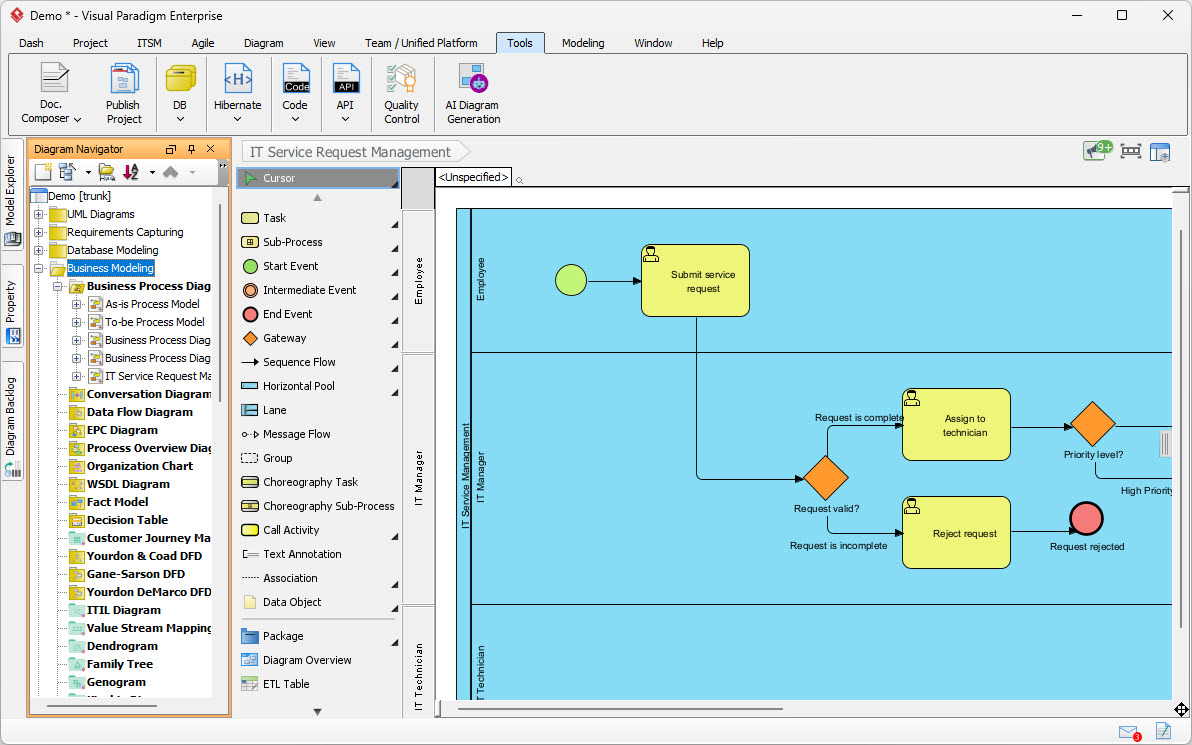
Visual Paradigm stands out as a comprehensive BPMN solution because it:
-
Fully supports the latest BPMN 2.0 notations
-
Integrates seamlessly with other modeling standards
-
Provides advanced analysis and simulation capabilities
-
Offers cross-platform support (Windows, Linux, Mac OS)
-
Is trusted by millions of users worldwide, including Fortune 500 companies
Getting Started with Visual Paradigm BPMN Tools
Creating Your First Business Process Diagram
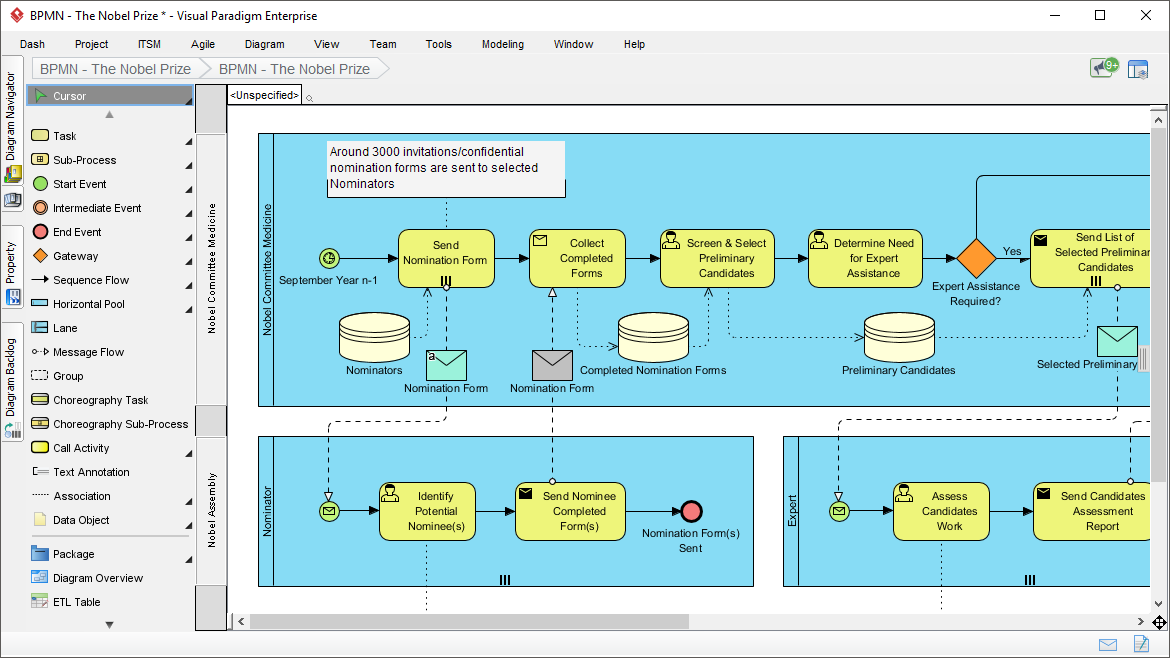
The foundation of BPMN modeling is the Business Process Diagram. Visual Paradigm makes it easy to create professional-looking diagrams with its intuitive drag-and-drop interface. Here’s how to get started:
-
Launch Visual Paradigm and select “New Project”
-
Choose BPMN from the diagram types
-
Define your process scope by identifying start and end events
-
Add activities that represent the work being performed
-
Connect elements using sequence flows
-
Organize with swimlanes to show who performs each activity
Process Drill-Down with Sub-Processes
Complex processes can be overwhelming when displayed in a single diagram. Visual Paradigm allows you to use sub-processes to break down complex workflows into manageable chunks:
-
Collapsed sub-processes: Show a high-level view with a “+” indicator
-
Expanded sub-processes: Display detailed steps within the parent process
-
Reusable sub-processes: Create modular components that can be referenced across multiple diagrams
This hierarchical approach helps maintain clarity while preserving detail where needed.
Advanced BPMN Modeling Techniques
Mapping Processes with Other Standards
One of Visual Paradigm’s standout features is its ability to map BPMN processes with any standards, creating a holistic view of your business architecture:
-
Use Cases: Link process activities to specific user requirements
-
User Stories: Connect agile development items to process steps
-
Wireframes: Associate UI designs with corresponding process activities
-
UML Diagrams: Integrate with class diagrams, sequence diagrams, and more
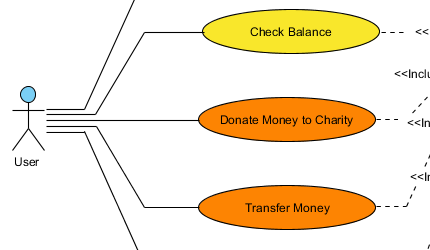
This integration ensures traceability from business requirements through to technical implementation, reducing gaps and miscommunications between business and IT teams.
Centralized Glossary Management
Consistency in terminology is crucial for effective communication. Visual Paradigm’s centralized glossary repository allows you to:
-
Define standard terms and their meanings
-
Link important keywords directly from your diagrams
-
Ensure all stakeholders use consistent language
-
Maintain a single source of truth for business vocabulary
This feature is particularly valuable in large organizations where different departments may use varying terminology for the same concepts.
Performing Useful Modeling and Analysis
Documenting Working Procedures
Every workflow element in your BPMN diagram can be documented with detailed working procedures. This creates living documentation that:
-
Explains how each task should be performed
-
Identifies required inputs and expected outputs
-
Specifies roles and responsibilities
-
Links to relevant policies and guidelines
As-Is and To-Be Process Analysis
Process improvement starts with understanding your current state and envisioning your desired future state:
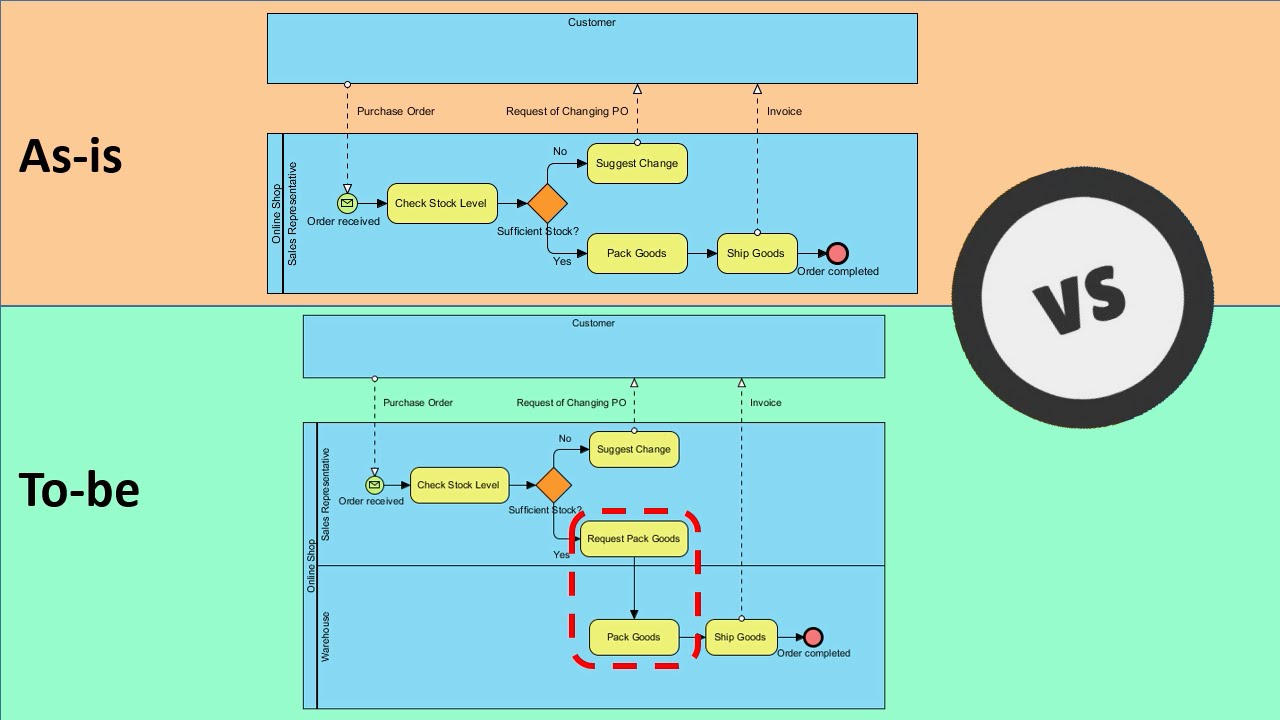
As-Is Analysis:
-
Document your current processes exactly as they exist
-
Identify bottlenecks, redundancies, and inefficiencies
-
Gather metrics on cycle times, costs, and error rates
To-Be Design:
-
Design optimized processes that address identified issues
-
Model different scenarios and alternatives
-
Validate improvements through simulation
Visual Paradigm makes it easy to maintain both versions side-by-side, facilitating comparison and change management.
Automatic Chart Generation
Save time and ensure accuracy by leveraging Visual Paradigm’s automatic chart generation capabilities:
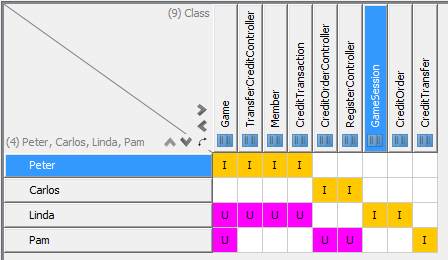
RACI Charts:
-
Automatically generate Responsibility Assignment Matrix charts from your BPD
-
Clearly identify who is Responsible, Accountable, Consulted, and Informed for each activity
-
Eliminate role ambiguity and improve accountability
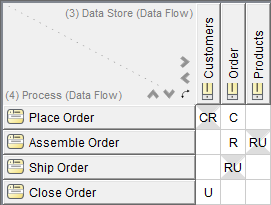
CRUD Charts:
-
Generate Create, Read, Update, Delete matrices automatically
-
Map data interactions across your processes
-
Identify data ownership and access patterns
These automated reports provide immediate insights into your process structure and help identify areas for improvement.
Business Process Improvements with Related Standards
Enhance your BPMN models by integrating with complementary methodologies:
-
Mind Maps: Brainstorm process improvements and organize ideas visually
-
Customer Journey Mapping: Align internal processes with customer experiences
-
Decision Tables: Model complex business rules that drive process decisions
-
CMMN (Case Management Model and Notation): Handle unstructured, knowledge-intensive processes
This multi-standard approach ensures you have the right tool for every aspect of process improvement.
Advanced, Practical BPMN Tools
Process Animation
Bring your static diagrams to life with Visual Paradigm’s process animation tool. This unique feature allows you to:
-
Visualize the flow of tokens through your process
-
Identify deadlocks and unreachable activities
-
Demonstrate process behavior to stakeholders
-
Validate logic before implementation
Animation transforms abstract diagrams into dynamic demonstrations, making it easier to communicate process behavior to non-technical stakeholders.
Process Simulation
Take analysis further with the process simulator, which enables you to:
-
Model resource constraints and availability
-
Simulate different workload scenarios
-
Calculate throughput, cycle times, and resource utilization
-
Perform what-if analysis to evaluate improvement options
-
Identify bottlenecks before they occur in production
Simulation provides quantitative insights that help justify process changes and predict their impact on performance metrics.
Report Generation
Effective communication of process models requires professional documentation. Visual Paradigm offers two approaches:
Automatic Report Generation:
-
Quickly generate standard reports with predefined templates
-
Include diagrams, element details, and metadata
-
Export to PDF, Word, or HTML formats
Advanced Custom Reports with Report Designer (Doc. Composer):
-
Create corporate-branded reports with custom layouts
-
Combine multiple diagrams and analyses in a single document
-
Add executive summaries, appendices, and supporting materials
-
Automate report updates when diagrams change
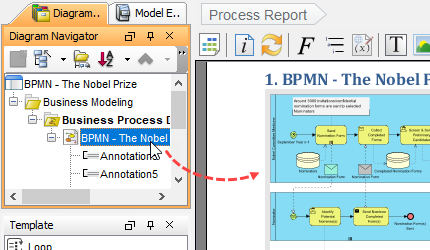
This flexibility ensures you can produce documentation that meets your organization’s specific needs and standards.
Real-World Applications and Examples
Example 1: Order Fulfillment Process
Let’s examine a practical example of an order fulfillment process modeled in Visual Paradigm:
Process Overview:
-
Customer places order (Start Event)
-
Order validation activity
-
Payment processing gateway (decision point)
-
Inventory check sub-process
-
Shipping coordination
-
Order completion (End Event)
Key Features Applied:
-
Swimlanes separate Customer Service, Warehouse, and Finance departments
-
Sub-process expands inventory checking into detailed steps
-
RACI chart automatically generated showing departmental responsibilities
-
Glossary links define terms like “backorder” and “drop-ship”
Improvements Identified Through Simulation:
-
Bottleneck in payment verification reduced by 40% through automation
-
Inventory check time decreased by implementing parallel processing
-
Overall order-to-delivery cycle time improved by 25%
Example 2: Employee Onboarding Process
Another common application is employee onboarding:
Process Structure:
-
Multiple parallel tracks for HR, IT, Facilities, and Department Manager
-
Conditional gateways based on employee type (full-time, contractor, intern)
-
Integration with use cases for system access requests
-
Customer journey mapping to ensure positive new hire experience
Benefits Realized:
-
Reduced time-to-productivity by 30%
-
Improved new hire satisfaction scores
-
Standardized onboarding across multiple locations
-
Clear accountability through RACI assignments
Best Practices for BPMN Modeling with Visual Paradigm
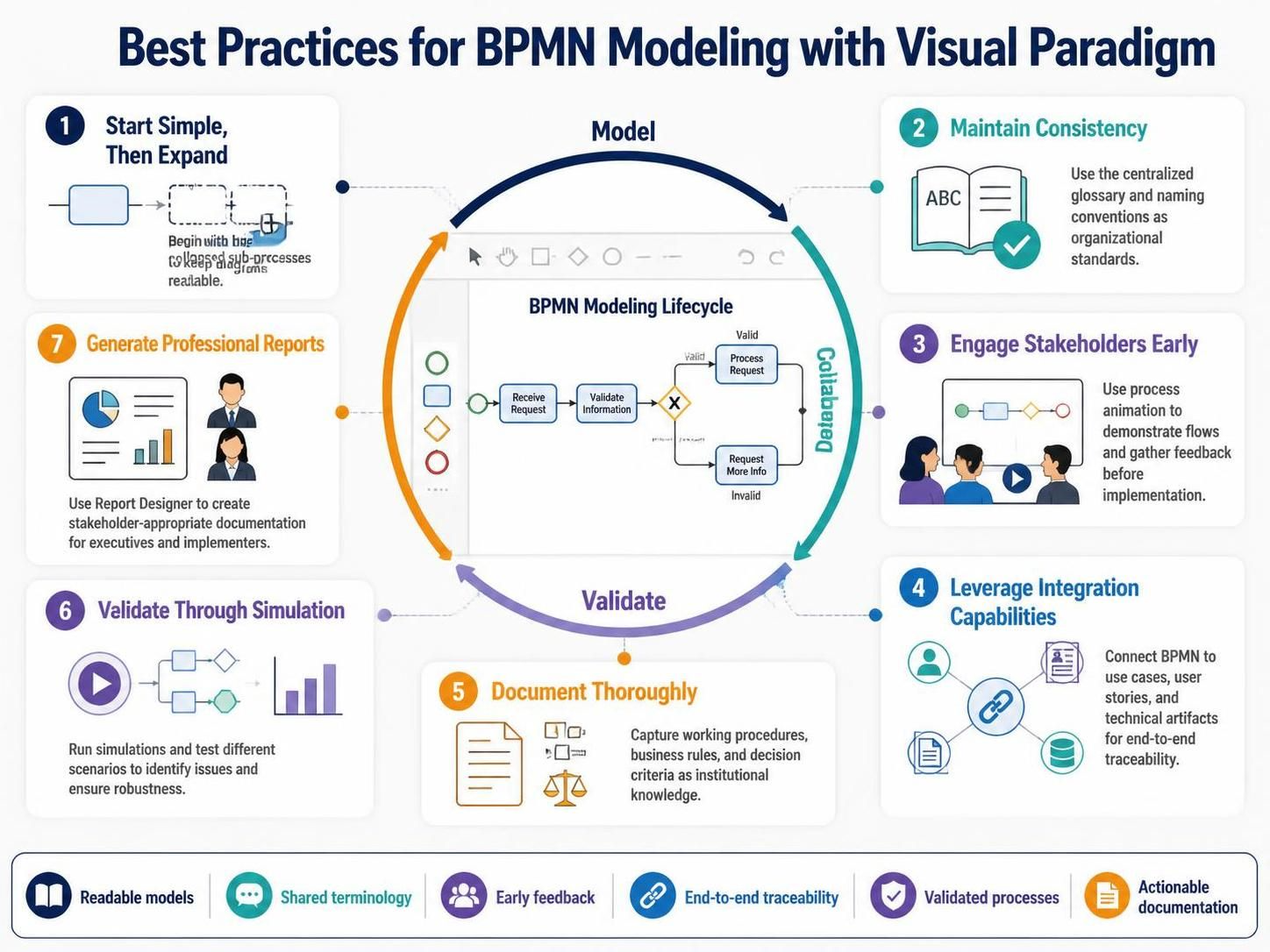
1. Start Simple, Then Expand
Begin with high-level processes and drill down into details only where necessary. Use collapsed sub-processes to maintain readability.
2. Maintain Consistency
Use the centralized glossary to ensure consistent terminology. Establish naming conventions for activities and establish them as organizational standards.
3. Engage Stakeholders Early
Use process animation to demonstrate flows to business users. Their feedback during the modeling phase is far less costly than changes after implementation.
4. Leverage Integration Capabilities
Don’t model BPMN in isolation. Connect your processes to use cases, user stories, and technical artifacts to maintain end-to-end traceability.
5. Document Thoroughly
Use the documentation features to capture working procedures, business rules, and decision criteria. This creates valuable institutional knowledge.
6. Validate Through Simulation
Before finalizing your models, run simulations to identify potential issues. Test different scenarios to ensure robustness.
7. Generate Professional Reports
Use the Report Designer to create stakeholder-appropriate documentation. Executives need different information than implementers.
Why Organizations Choose Visual Paradigm
Visual Paradigm has earned recognition as an International IT Award winner and is trusted by over a million users, including:
-
Government units requiring rigorous process documentation
-
Blue-chip corporations managing complex enterprise architectures
-
Business and IT consultants delivering process improvement projects
-
Universities teaching business process management
-
Small businesses seeking affordable yet powerful tools
Cross-Platform Support
Whether your team uses Windows, Linux, or Mac OS, Visual Paradigm provides a consistent experience across all platforms, ensuring everyone can contribute regardless of their preferred operating system.
One-Stop-Shop Solution
Visual Paradigm serves as a comprehensive platform for:
-
Enterprise architecture modeling
-
Business process improvement initiatives
-
Full software lifecycle development
-
Requirements management
-
Project planning and tracking
This integrated approach eliminates the need for multiple disconnected tools and ensures consistency across all modeling activities.
Community and Support
Access rich online resources through:
-
VP Community Circle: Connect with other users and share best practices
-
Active User Forum: Get answers to specific questions from experts
-
Know-How Blog: Stay updated on new features and modeling techniques
-
Free Online Drawing Tools: Available for users under valid maintenance plans
Conclusion
Business Process Model and Notation represents a powerful approach to understanding, analyzing, and improving organizational processes. However, the value of BPMN is fully realized only when supported by comprehensive tools that go beyond simple diagramming.
Visual Paradigm delivers exactly this comprehensive capability, offering:
✓ Full BPMN 2.0 support with intuitive diagramming
✓ Seamless integration with UML, mind maps, decision tables, and other standards
✓ Advanced analysis through process animation and simulation
✓ Automated report generation with customizable templates
✓ Centralized glossary management for consistent terminology
✓ Cross-platform accessibility for distributed teams
✓ Proven track record with millions of users worldwide
By leveraging Visual Paradigm’s sophisticated BPMN tools, organizations can transform their processes from static documentation into dynamic assets that drive continuous improvement. The combination of powerful modeling capabilities, analytical tools, and collaborative features enables teams to design better processes, communicate more effectively, and deliver measurable business results.
Whether you’re a business analyst documenting current workflows, a process architect designing future-state operations, or a project manager coordinating cross-functional improvements, Visual Paradigm provides the tools you need to succeed. Start modeling smarter today and experience how better processes lead to lower costs, higher revenues, motivated employees, and happier customers.
Ready to transform your business processes? Explore Visual Paradigm’s BPMN tools and join the millions of professionals who have already discovered the power of visual process modeling.
Core Tutorials for As-Is / To-Be Modeling
-
How to Develop As-Is and To-Be Business Process?: Official step-by-step guide on capturing current state and generating future-state diagrams from an As-Is model.
-
BPR Process Steps: A Step-by-Step Guide to Re-Engineering: Full BPR journey covering As-Is mapping, To-Be design, gap analysis, and implementation planning.
-
To-Be Process Design: Building Future-State Workflows: Deep dive into radical To-Be design, value analysis, and innovation techniques for future-state workflows.
-
Modeling BPMN Diagrams with Visual Paradigm Desktop: Practical setup and modeling workflow for BPMN diagrams in Visual Paradigm Desktop.
Feature Deep-Dives (Animation & Simulation)
-
How to Animate a BPMN Business Process?: Tutorial on using Visual Paradigm’s animation tool to present dynamic process flows to stakeholders.
-
How to Create BPMN Business Process Diagrams in Visual Paradigm: Covers swimlanes, flow mapping, and process simulation for bottleneck identification.
-
Creating Your First BPMN Diagram in Visual Paradigm: Beginner-friendly guide to tasks, gateways, and sequence flows with validation tips.
Tool Overview & Business Context
-
Visual Paradigm: The Ultimate All-in-One Software: Overview of BPMN capabilities including As-Is/To-Be traceability, RACI charts, and process simulation.
-
Business Process Modeling Tool Solution Page: Feature summary covering auto As-Is/To-Be gap analysis, process drill-down, and RACI/CRUD chart generation.
Related posts:
 How Visual Paradigm’s AI Diagram Generation Turns Your Ideas into Professional UML & BPMN Diagrams in Seconds
 Mastering Business Process Modeling: A Hands-On Review of BPMN and Visual Paradigm’s AI-Powered Tools
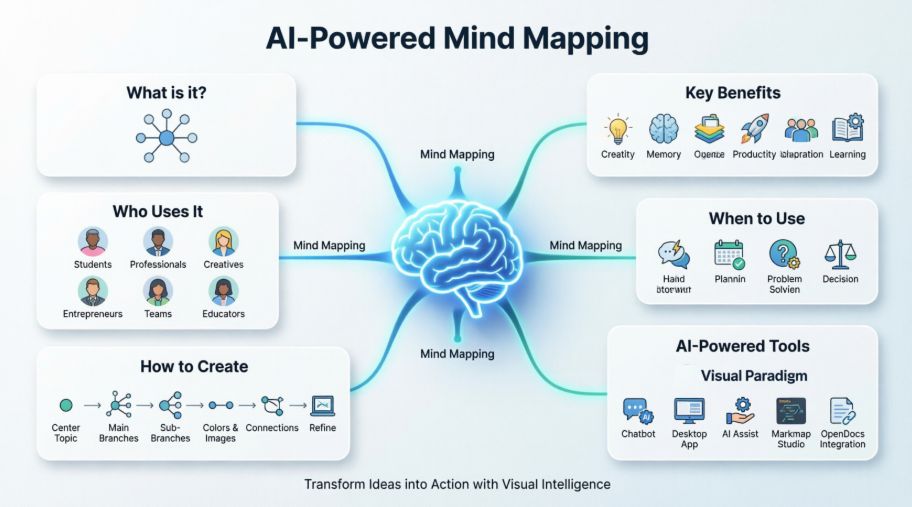 Mastering AI-Powered Mind Mapping with Visual Paradigm
 A Software Engineer’s Field Guide to UML, BPMN, and SysML