


For enterprise architects, product managers, and software engineers evaluating Visual Paradigm’s multi-modal diagramming ecosystem.
The landscape of enterprise architecture and software modeling has evolved beyond manual drag-and-drop mechanics. Visual Paradigm supports five distinct modal workflows for creating, editing, and managing technical visuals—ranging from isolated canvas scripts to structurally validated desktop models. Below is an examination of these five generation methodologies, breaking down their operational mechanics, underlying limitations, and ideal use cases.
1. AI Chatbot: Diagramming as Code
Interface: chat.visual-paradigm.com | Platform: Cloud-native (VP Online feature, accessible from Desktop with qualifying license)
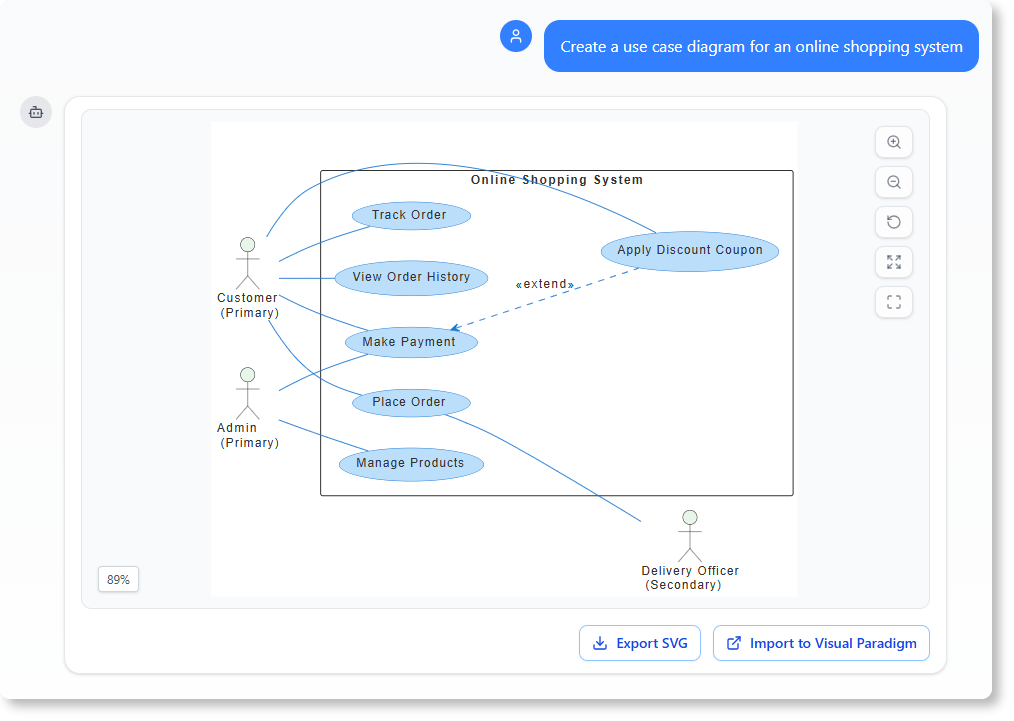
Operational Mechanics
- Natural Language Input: Users type structural declarations or real-world descriptions (e.g., “Create a UML use case diagram for an online shopping system”). The AI parses intent, maps to modeling standards, and compiles visual output .
- Supported Standards: UML (all 14 diagram types), SysML, C4 Model (Context/Container/Component/Code), ArchiMate (20+ viewpoints), and business frameworks (SWOT, PESTLE, Ansoff, BCG Matrix) .
- Conversational Refinement: Commands like “Rename Customer to Buyer” or “Add async payment callback” trigger iterative regeneration without manual repositioning.
Key Limitations
| Constraint | Impact |
|---|---|
| No persistent model repository | Generated diagrams exist as isolated outputs; changes don’t propagate to other diagrams unless explicitly importe |
| License-gated import | Importing AI-generated diagrams into VP Desktop requires Professional Edition (Enterprise for ArchiMate |
| Context window limits | Extremely complex multi-system prompts may require staged refinement rather than single-shot generation |
Best Used For
✅ Rapid structural prototyping and stakeholder alignment sessions
✅ Initial brainstorming before committing to formal modeling
✅ Generating first-draft documentation visuals for non-technical audiences
✅ Exploring architectural alternatives via conversational iteration
💡 Pro Tip: Use the AI Chatbot to generate a C4 System Context diagram, then import it into VP Desktop (Professional+) to establish model-level consistency for downstream Container/Component refinemen.
2. VP Online: Isolated Canvas Editing
Interface: online.visual-paradigm.com | Platform: Browser-based, zero-install
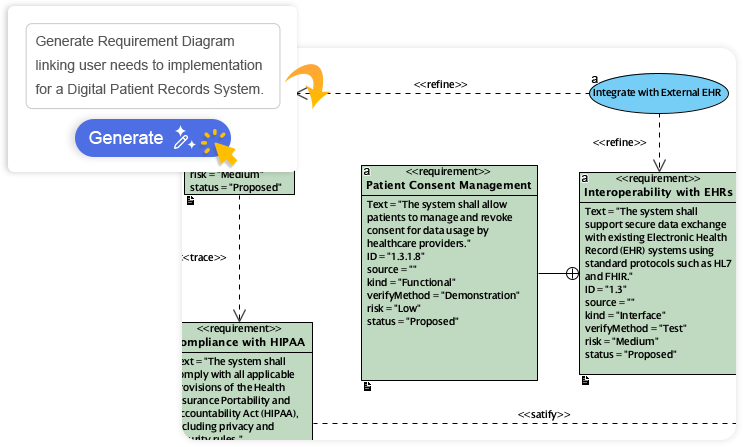
Operational Mechanics
- Vector Canvas Editor: Intuitive drag-and-drop interface with shape libraries for flowcharts, UML, ERD, BPMN, and infographic.
- Real-Time Collaboration: Multi-user editing with commenting, task assignment, and version history—ideal for distributed team.
- Export Flexibility: PNG, SVG, PDF, and direct embedding into Confluence, Notion, or Microsoft 365.
Key Limitations
| Constraint | Impact |
|---|---|
| No centralized model dictionary | Elements are geometric shapes, not reusable model instances; renaming “Order” on Diagram A doesn’t update Diagram B |
| Limited engineering features | No code generation, reverse engineering, or database DDL synchronization |
| Validation-light | Syntactic modeling rules (e.g., UML cardinality constraints) are not enforced |
Best Used For
✅ Standalone presentation visuals and executive summaries
✅ Ad-hoc process mapping for business workshops
✅ Educational diagrams and student assignments
✅ Quick wireframes before formal specification
⚠️ Critical Distinction: VP Online excels at visual communication but is not designed for model-driven engineering. Use it for outputs, not as your system-of-record architecture repository.
3. OpenDocs: In-Document Embedded Modeling
Interface: ai.visual-paradigm.com/tool/opendocs/ | Platform: Cloud knowledge base with integrated text editing + diagramming
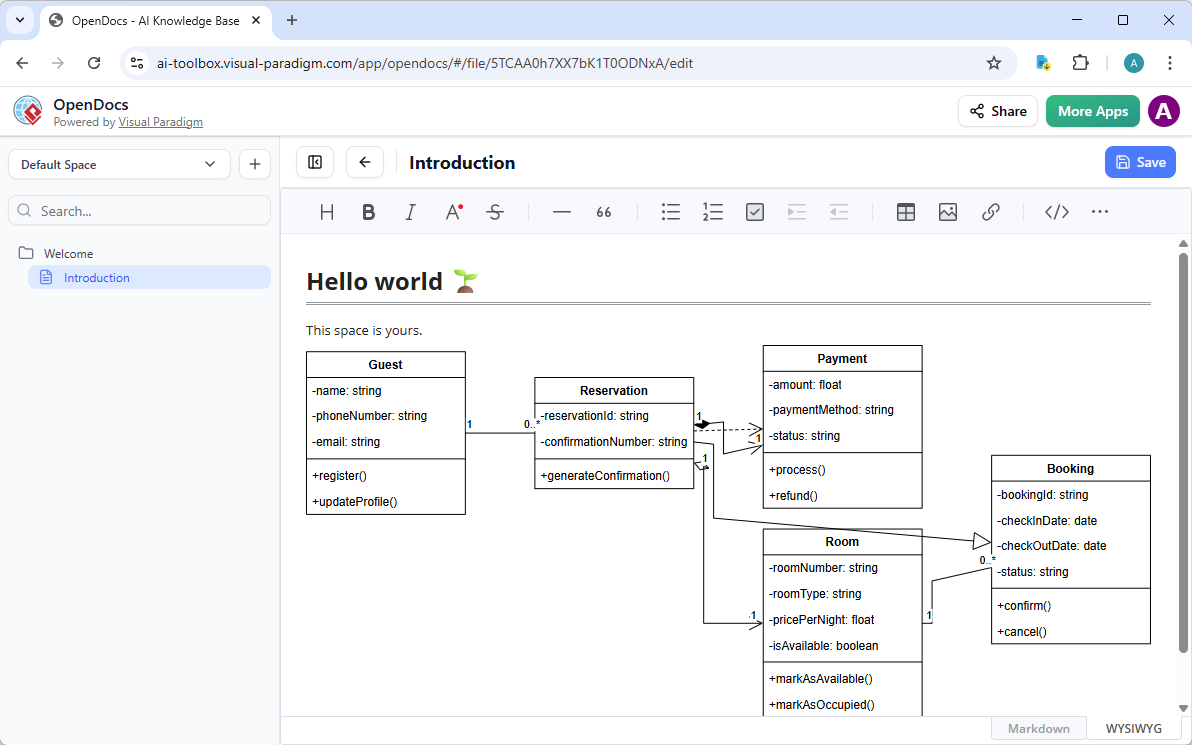
Operational Mechanics
- Inline Diagram Generation: Trigger “Create with AI” directly from the OpenDocs toolbar to embed diagrams at cursor position.
- Pipeline Integration: Export diagrams from VP Desktop or VP Online into OpenDocs via the Pipeline feature for synchronized documentation.
Key Limitations
| Constraint | Impact |
|---|---|
| Document-local scope | Diagrams are tied to their host page; no cross-document model synchronization |
| No validation engine | Embedded diagrams lack syntactic checking or consistency rules across the knowledge base |
| Limited export formats | Optimized for web viewing; PDF/Word export is secondary to digital sharing |
Best Used For
✅ Technical wikis, SOPs, and product requirement documents
✅ Living architecture decision records (ADRs) with embedded visuals
✅ Onboarding guides combining narrative explanation with system diagrams
✅ Agile team spaces linking user stories to visual specifications
💡 Workflow Enhancement: Generate a C4 Component diagram via AI Chatbot → embed in OpenDocs for stakeholder review → export validated version to VP Desktop for engineering implementation.
4. VP Desktop: Advanced Modeling, Validation, and Consistency
Interface: Installed application (Windows/macOS/Linux) | Platform: Unified model repository with enterprise-grade tooling
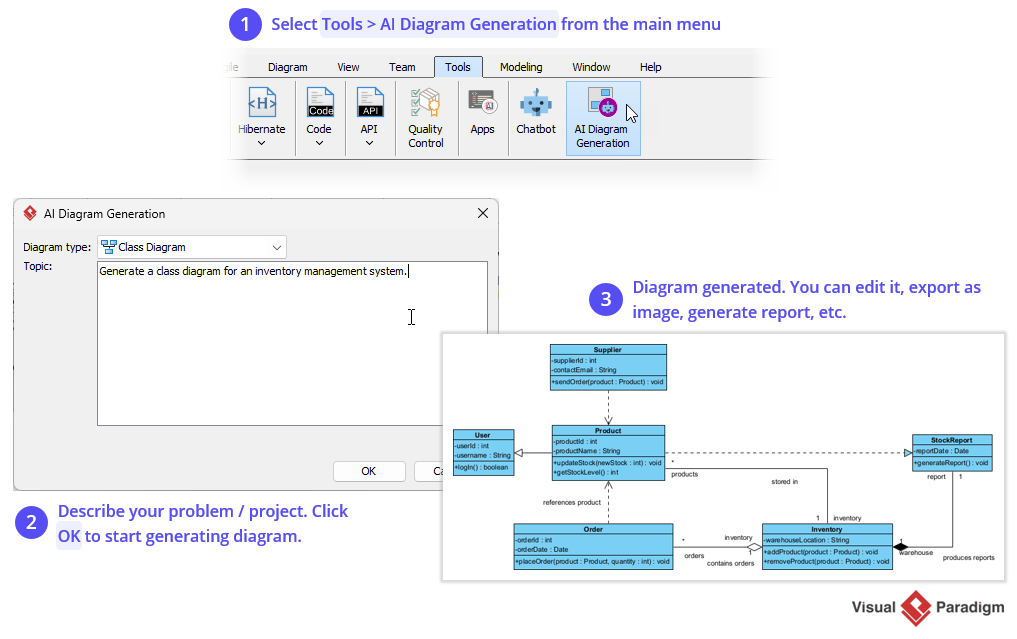
Operational Mechanics
- True Model-Centric Architecture: Elements exist as master definitions in a centralized project database. Updating an
Employeeclass propagates changes across all UML, sequence, and deployment diagrams instantly. - Standards Compliance Engine: Enforces UML 2.5, SysML 1.6, BPMN 2.0, and ArchiMate 3.2 syntax rules; flags invalid relationships, missing multiplicities, or broken dependencies.
- Full Engineering Lifecycle:
- Round-trip code engineering (Java, C#, Python, SQL, etc.)
- Database schema generation (DDL) and ORM mapping (Hibernate)
- REST API design with OpenAPI/Swagger export
- Enterprise framework support: TOGAF ADM, DoDAF, NAF, Zachman
Key Limitations
| Constraint | Impact |
|---|---|
| Installation required | Not browser-accessible; requires local setup and license management |
| Steeper learning curve | Advanced features demand familiarity with modeling standards and repository concepts |
| Collaboration requires cloud sync | Real-time co-editing needs VP Online integration (enabled via Cloud sync settings) |
Best Used For
✅ Mission-critical system architectures requiring auditability and traceability
✅ Long-term enterprise projects with multi-team model ownership
✅ Regulatory-compliant documentation (e.g., medical, finance, aerospace)
✅ Code-first development workflows needing model-code synchronization
🔁 Sync Strategy: Enable Cloud integration in Desktop (Tools > Options > Cloud) to sync projects with VP Online for hybrid desktop/web collaboration.
5. Web Wizards: Structural and Contextual Relationship Refinement
Interface: Guided step-by-step interfaces within VP Online/Desktop | Platform: Context-aware architectural scaffolding
Operational Mechanics
- Tiered Scoping Framework: Wizards prompt users through explicit boundary definition, dependency mapping, and layer refinement—reducing cognitive load for complex architectures .
- C4 Model Native Support: Dedicated wizards for all six C4 diagram types:
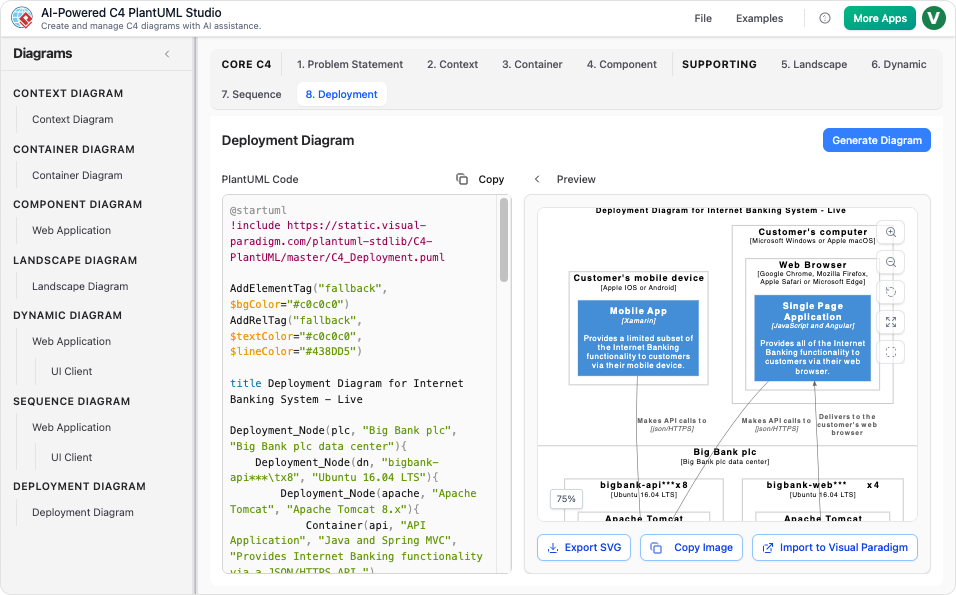
- System Context: Define system boundaries and external actors
- Container: Map high-level technical components (web apps, databases, microservices)
- Component: Decompose containers into internal modular units
- Code: Generate class diagrams from component specifications
- Dynamic: Illustrate runtime interactions and sequences
- Deployment: Model infrastructure topology and node relationships
- AI-Assisted Refinement: Wizards integrate with the AI Chatbot to suggest relationship refinements or missing dependencies based on architectural patterns .
Key Limitations
| Constraint | Impact |
|---|---|
| Template-driven flexibility | Highly structured workflows may feel restrictive for unconventional architectures |
| C4 focus | Optimized for software architecture; less applicable to pure business process modeling |
| Requires foundational understanding | Users benefit from basic C4 literacy to maximize wizard effectiveness |
Best Used For
✅ Decomposing monolithic systems into layered, maintainable architectures
✅ Onboarding new team members to complex system landscapes
✅ Creating executive-ready architecture portfolios with consistent visual language
✅ Aligning technical implementation with business capability maps
🎯 C4 Best Practice: Start with the System Context wizard to establish stakeholder alignment, then progressively drill down—using AI Chatbot for rapid iteration at each layer before formalizing in Desktop .
Workflow Comparison Matrix
| Workflow Mode | Generation Interface | Model Sync / Reusability | Validation & Compliance | Primary Use Case | Licensing Notes |
|---|---|---|---|---|---|
| 1. AI Chatbot | Conversational text prompts | ❌ Isolated outputs (importable with Pro+) | ⚠️ Basic pattern matching | Rapid prototyping, stakeholder alignment | VP Online feature; Desktop access requires qualifying license |
| 2. VP Online | Drag-and-drop canvas | ❌ Shape-level only (no model instances) | ❌ None | Presentation visuals, ad-hoc diagrams | Free tier available; team features require subscription |
| 3. OpenDocs | Embedded AI + page editor | ⚠️ Document-local only | ❌ None | Technical documentation, wikis, ADRs | Included with VP Online; Pipeline sync requires Desktop integration |
| 4. VP Desktop | Repository canvas + import pipelines | ✅ Full workspace-wide synchronization | ✅ Strict syntactic & rule engine | Enterprise engineering, regulatory projects | Perpetual/subscription; Professional+ for AI import |
| 5. Web Wizards | Guided step-by-step structural flow | ⚠️ Context-mapped parent/child scaling | ⚠️ Structured boundary constraints | Hierarchical architectures (C4, TOGAF) | Available in VP Online; advanced wizards require Desktop |
Licensing & Access Quick Reference
| Feature | Free Tier | VP Online Subscription | VP Desktop Professional | VP Desktop Enterprise |
|---|---|---|---|---|
| AI Chatbot access | ✅ Limited prompts | ✅ Full access | ✅ Via cloud sync | ✅ Via cloud sync |
| Diagram import to Desktop | ❌ | ❌ | ✅ UML/C4/etc. | ✅ + ArchiMate |
| Model validation engine | ❌ | ❌ | ✅ Full UML/SysML/BPMN | ✅ + ArchiMate/DoDAF |
| C4 Model wizards | ✅ Basic | ✅ Full suite | ✅ Full suite + export | ✅ Full suite + enterprise templates |
| Real-time collaboration | ❌ | ✅ Multi-user editing | ✅ Via VP Online sync | ✅ + advanced permissions |
| Code engineering | ❌ | ❌ | ✅ 10+ languages | ✅ + advanced ORM/API |
ℹ️ Note: Desktop license holders with active maintenance receive complimentary access to VP Online features, enabling seamless desktop/web workflow integration.
Next Steps: Deep Dives
Would you like to explore either of these implementation pathways?
🔹 Import AI Chatbot layouts into Desktop for model verification: I can provide a step-by-step guide covering license prerequisites, import workflows, and validation rule configuration.
🔹 Configure a 4-level C4 model via Web Wizards: I can walk through scoping boundaries, refining container relationships, and generating implementation-ready component specifications.
Let me know your priority, and I’ll tailor the guidance to your role (architect, PM, engineer) and current tooling environment.
Reference
- Enhanced AI Composite Structure Diagram Generation in Visual Paradigm AI Chatbot: Announces significant improvements to the AI Composite Structure Diagram generator within Visual Paradigm AI Chatbot, making UML diagram generation faster, more reliable, and more insightful with more stable generation and richer, more logical representations. The article includes an image showing a vending machine example of a newly generated UML Composite Structure Diagram created with the updated AI engine.
- Enhanced AI Activity Diagram Support in Visual Paradigm AI Chatbot: Announces enhancements to AI activity diagram generation including removal of orphan decision shapes, updated visual style for readability with lighter vibrant colors, and seamless import to Visual Paradigm Desktop for advanced editing. The article includes example images of newly generated activity diagrams demonstrating the cleaner structure and professional color palette.
- Designing a Ride Booking Workflow with AI-Powered Precision: Demonstrates how Visual Paradigm AI Chatbot generates UML sequence diagrams for ride-sharing applications through natural language prompts, with conversational refinement capabilities for dynamic pricing logic and system interactions. The article includes AI-generated sequence diagram images showing the ride booking process and online payment processing examples.
- Visual Paradigm AI Chatbot: Turn Your Ideas into Diagrams Instantly: Introduces Visual Paradigm’s AI Chatbot that transforms natural language prompts into professional diagrams in seconds, supporting UML, flowcharts, BPMN, ERD, and more with instant results, conversational editing, and seamless export options.
- AI CRC Card Diagram Generator by Visual Paradigm: Explains how Visual Paradigm’s AI-powered tools generate CRC (Class-Responsibility-Collaborator) card diagrams from natural language prompts, with support for refinement in VP Desktop and integration across the Visual Paradigm ecosystem including advanced editing, export to code, and offline collaboration capabilities.
- AI Activity Diagram Generator: How Visual Paradigm Makes It Effortless: Details how Visual Paradigm’s AI ecosystem generates professional activity diagrams from plain English descriptions across VP Desktop, OpenDocs, AI Chatbot, and Web Apps for business workflows and system behaviors. The article includes embedded YouTube tutorial videos demonstrating AI-powered activity diagram generation workflows.
- AI State Diagram Generator: How Visual Paradigm Powers State Machine Diagramming Across Four Platforms: Describes Visual Paradigm’s AI-powered state diagram generation across VP Desktop, OpenDocs, AI Chatbot, and Web Apps, enabling quick creation and refinement of UML state machine diagrams with traceability and code generation. The article includes embedded YouTube tutorial videos showing step-by-step state machine diagram creation with AI.
- Revolutionize Enterprise Architecture: The Best AI ArchiMate Viewpoint Generator in 2026: Showcases Visual Paradigm as the leading AI ArchiMate tool for generating all 26 official ArchiMate viewpoints through natural language prompts in both VP Desktop and the AI Chatbot, with certified ArchiMate 3.2 support. The article includes multiple example ArchiMate diagram images for viewpoints such as Business Process, Strategy, Technology, and Implementation & Migration.
- AI Diagram to OpenDocs Pipeline: Streamline Documentation with Visual Paradigm: Introduces the new integration allowing users to send AI-generated diagrams from the Visual Paradigm AI Chatbot directly to OpenDocs documentation via the Pipeline feature, enabling seamless workflow from diagram creation to living documentation. The article includes images showing the Insert button in OpenDocs editor with Pipeline option and an AI-generated UML diagram successfully inserted into an OpenDocs page.
This post is also available in Deutsch, Español, فارسی, Français, English, Bahasa Indonesia, 日本語, Polski, Portuguese, Ру́сский, Việt Nam, 简体中文 and 繁體中文.